Here is the awkward truth about browser-using agents in 2026: the moment you hand one a real browser, you face a bad choice. Give it a fresh sandbox profile and it hits login walls, captchas, and two-factor prompts on every site that matters. Give it your actual browser and it clicks around your signed-in accounts while you watch, hoping it behaves. BrowserSkill from Tencent rejects both options. It is an open-source bridge (MIT licensed, already past 4,400 stars) that lets coding agents work in your real browser through a separate visible Agent Window, touching your existing tabs only when they explicitly borrow one, and returning it when done.
Understanding the Architecture
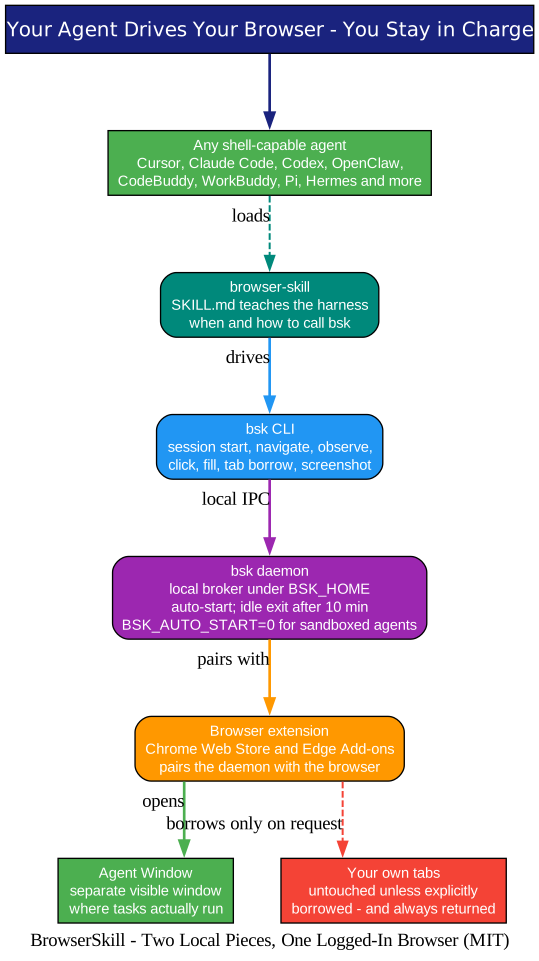
The architecture diagram above shows the whole system, and it is deliberately simple: two local pieces, no cloud relay. Let’s break down what each piece does and why the design works.
The skill. BrowserSkill ships as a skill: a SKILL.md file installed into your agent harness that teaches it when and how to call the bsk CLI. One command handles the popular harnesses:
bsk install-skill
Select your harness with the space bar and press enter. Cursor, Claude Code, Codex, OpenClaw, CodeBuddy, WorkBuddy, Pi, and Hermes Agent are supported directly, and DeepSeek Harness gets a dedicated plugin. Any other shell-capable agent works too: copy the skill file into its skills directory and the same commands become available. We have covered this pattern before in the Cloudflare security-audit skill: plain instructions, no runtime lock-in, and your agent stays swappable.
The CLI and daemon. The bsk binary is the agent’s steering wheel. It talks to a local daemon that brokers every request. The daemon auto-starts on first use, keeps state under one home directory, and politely exits after 10 minutes of idleness. Nothing routes through Tencent’s servers; the IPC is local.
The extension. A browser extension from the Chrome Web Store or Edge Add-ons pairs the daemon with your actual browser. This is the piece that gives BrowserSkill its edge: your logins, cookies, and sessions are already there. The agent does not need test accounts or credential vaults, because it is using the browser as you left it.
Two windows, one rule. Browser tasks run in a separate, visible Agent Window. Your own tabs are off limits unless the agent asks, which brings us to the part that makes this trustworthy.
Borrowing: The Politeness Protocol
Understanding Tab Borrowing
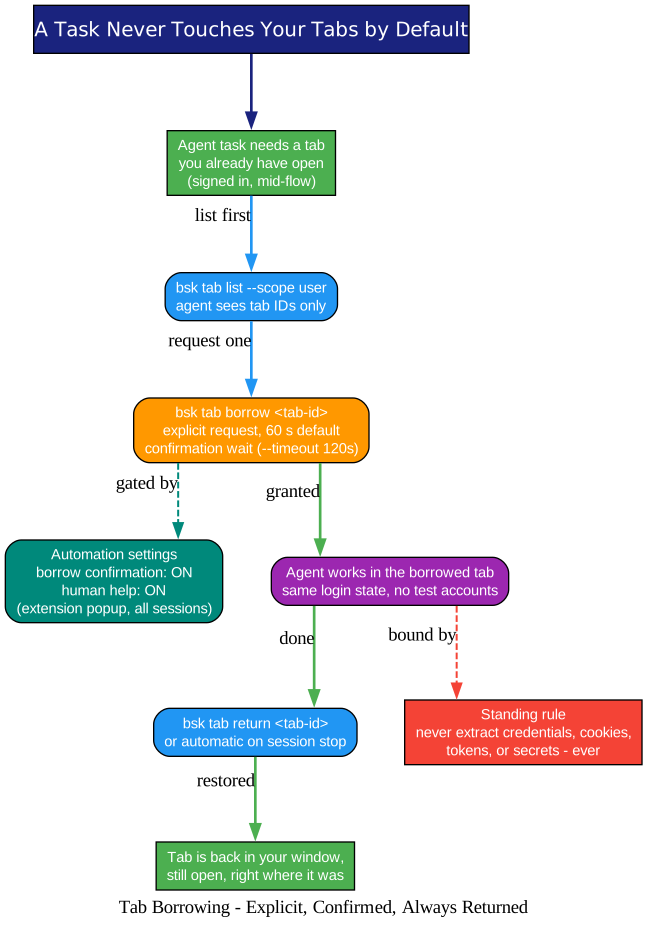
The borrowing diagram above captures the interaction model, and it reads less like an API and more like etiquette. The reason is simple: most valuable browser work happens in tabs you already have open and signed into. Rather than giving the agent a blanket grant, BrowserSkill makes access per-tab, explicit, and reversible.
The flow works like this:
bsk tab list --scope user --session <id>
bsk tab borrow <tab-id> --session <id>
# ... agent works in the tab ...
bsk tab return <tab-id> --session <id>
List first. The agent sees tab IDs, not open season on your session. Borrow explicitly. The default confirmation wait is 60 seconds (tune it with --timeout 120s), and the extension’s Automation settings gate the request: borrow confirmation and human help are both on by default, and they apply to existing sessions too. When a task hits a captcha, a login prompt, or a confirmation dialog, the agent asks you to take over, then continues once you have. Return on time. tab return hands the tab back, and session stop returns every borrowed tab automatically. The tab lands back in your window, still open, exactly where it was.
There is also a standing rule baked into the skill itself: never extract credentials, cookies, tokens, or other secrets. The automation settings cannot be silently overridden by CLI flags; deprecated --unattended and --no-confirm options do not bypass them. That combination, explicit borrowing plus unbypassable confirmation, is what separates this from agents that simply get pointed at your browser and trusted.
The Session Loop: Observe, Act, Re-Observe
Understanding the Session Workflow
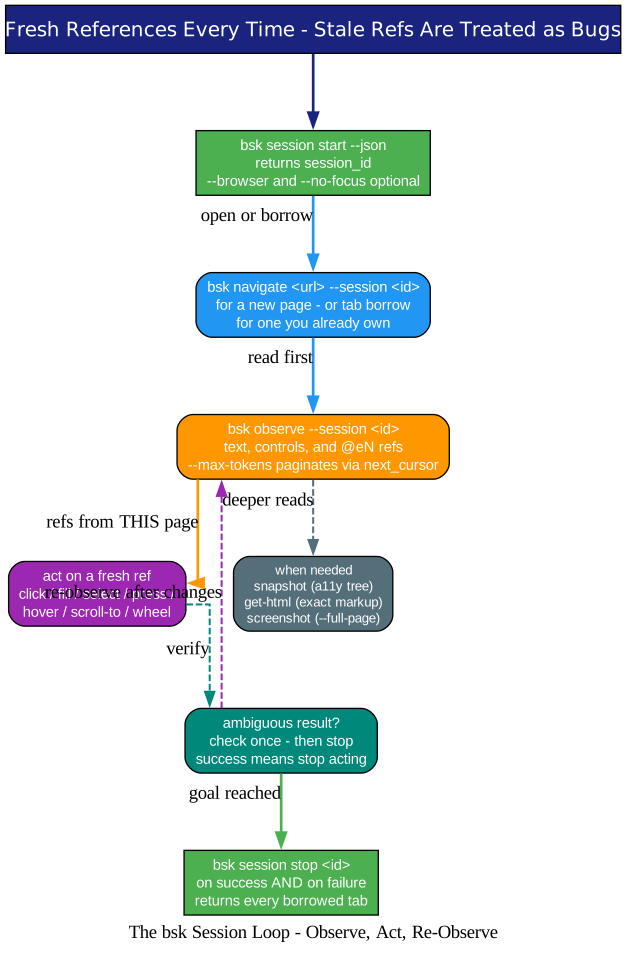
The session diagram above shows how an agent actually drives pages, and the loop will look familiar to anyone who has watched an agent code: read, act, verify, repeat.
bsk session start --json        # returns a session_id
bsk navigate https://example.com --session <id>
bsk observe --session <id>      # text, controls, and @eN references
bsk click @e3 --session <id>
bsk fill @e5 --value "text" --session <id>
bsk session stop <id>           # every time, success or failure
Fresh references. Every observation yields @eN references for the elements on the current page. Navigation invalidates them, and the skill treats stale refs as bugs rather than retry fodder. The skill’s instructions are refreshingly blunt about verification too: check an ambiguous result once, and once success is visible, stop acting.
Deeper looks when needed. snapshot returns a static accessibility tree, get-html the exact markup, and screenshot --full-page a full-page capture saved to disk. Large pages paginate: observe --max-tokens 4000 returns a continuation cursor so a big page never blows the agent’s context window, which is a thoughtful touch given how often long pages derail automation runs.
Sessions are scoped. With multiple browsers connected, --browser <id> picks the target, and --no-focus runs the task in the background without stealing your screen. Stop is mandatory in both success and failure paths, which is what keeps borrowed tabs from leaking across tasks.
The Sandboxed-Agent Story Is Where It Gets Clever
Understanding the Sandboxed Setup
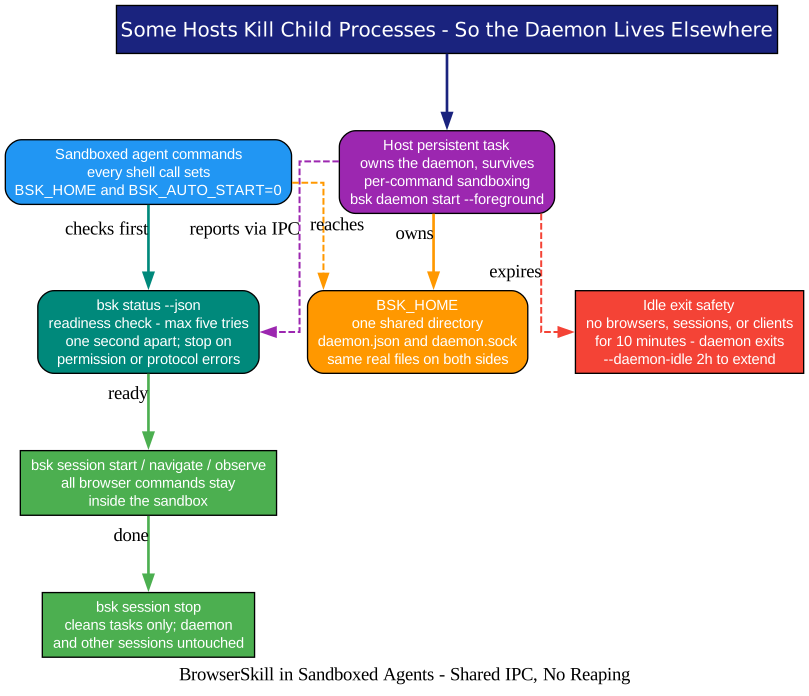
The sandbox diagram above covers the edge case that shows how much production thought went into this project. Many agent environments reap child processes after every shell call; a background daemon started inside such a sandbox simply dies. Tencent documented the failure mode (their issue #214 tracks it for WorkBuddy’s bubblewrap sandbox on Linux) and shipped a supported setup instead of a workaround:
- Pick one shared
BSK_HOMEdirectory that both the host and the sandbox see as the same real files. - Run
bsk daemon start --foregroundin a persistent host task that outlives individual sandboxed commands. - In every sandboxed shell call, set
BSK_HOMEplusBSK_AUTO_START=0, and verify withbsk status --jsonbefore doing browser work: at most five readiness checks, one second apart, stopping on permission or protocol errors.
The discipline in those numbers is deliberate. The docs warn against the classic agent failure loops: repeatedly launching daemons, deleting runtime files, or restarting a shared daemon to “fix” a transient discovery race. Same BSK_HOME and BSK_AUTO_START=0 on every call, because environment variables may not survive between shell tool calls. It reads like hard-won operational knowledge, which it is.
bsk doctor ties it together, checking the daemon, the extension connection, and the installed skill, and reporting warnings with recovery hints instead of a bare pass/fail.
Platform Support and Honest Limits
BrowserSkill runs on macOS (Apple Silicon and Intel), Linux (x64 and ARM64), and Windows x64. Chrome and Microsoft Edge are first-class; other Chromium browsers are expected to work with unpacked extensions, and Firefox is planned. Updates are bsk update --yes, with sensible handling for staged Windows installs and host-managed daemons.
The honest limits deserve as much attention as the features. The agent works over a daemon-and-extension bridge, not raw CDP tunneling, so exotic automation needs still belong to a dedicated framework. Observed refs go stale after navigation, by design, which pushes agents toward re-observing rather than guessing. And the human-in-the-loop means someone is around for captchas; full unattended runs over guarded sites are not the goal.
Why This Design Matters
The bigger idea here is a permission model for agent browsing. Instead of “the agent has the browser” or “the agent has nothing”, BrowserSkill makes access a sequence of small, confirmed, reversible grants: borrow one tab, work inside the window you can see, return the tab, extract no secrets. That is the same instinct behind the write isolation rules in Cloudflare’s security-audit skill and the no-permissions-by-default stance we covered in Pi. Agents are getting capable fast; the interesting engineering is no longer what they can do, but what they ask before doing it. BrowserSkill is one of the best answers to that question we have seen shipped, and it is one installer away from your own stack.
Links
Related Posts
- Cloudflare’s Security Audit Skill: Turn Your Coding Agent Into a Security Auditor
- Pi: The Agent Harness Where the Coding Agent Extends Itself
- OpenResearch: Turn Your Coding Agents Into Research Agents

Enjoyed this post? Never miss out on future posts by following us


