The AI coding agent space has a packaging problem. Every serious agent ships as an opaque product: one CLI, one model routing layer, one permission model, take it or leave it. Try to answer “what exactly happens between my prompt and the tool call?” and you are reading a changelog, not source code.
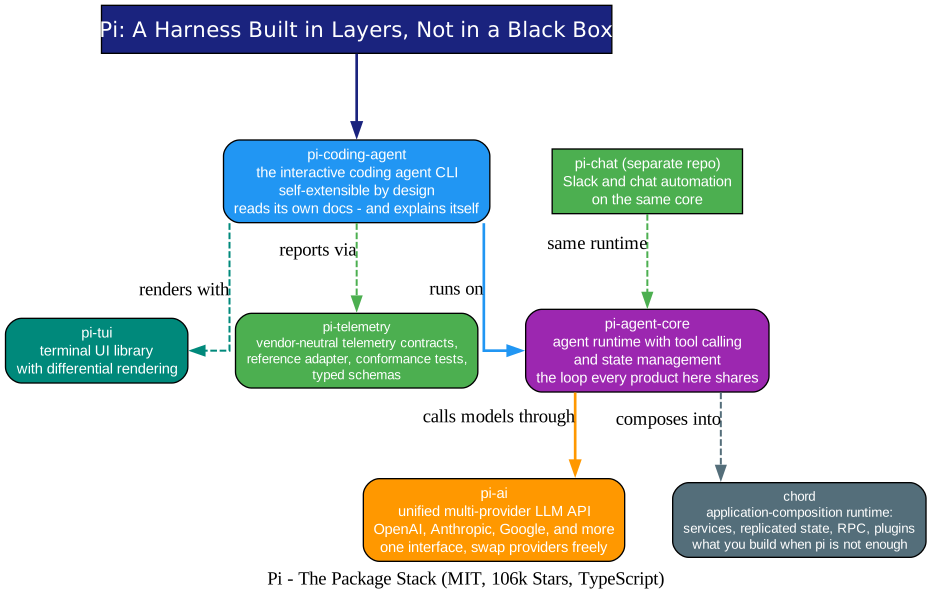
Pi from earendil-works (MIT, a striking 106k GitHub stars) is the opposite approach. It is a layered agent harness in TypeScript where each layer is a separate, documented package: pi-ai gives you one unified API over OpenAI, Anthropic, Google, and more; pi-agent-core is the tool-calling runtime with state management; and pi-coding-agent is the interactive CLI built on top - a coding agent that is explicitly self-extensible: its documentation is written so the agent itself can read it, extend it, and explain itself. The contributor list reads like modern open source royalty - Flask creator Armin Ronacher is among its committers - and the numbers (6,352 commits, 259 releases, 289 contributors, currently v0.85.1) say this is a project under continuous, heavy development.
Two things make Pi worth your evening: the architecture discipline, and the two areas where it is more honest than anything we have covered - what it refuses to do for you, and how hard it works to keep npm from betraying you.
Understanding the Architecture
The diagram above shows the stack, and the layering is the point: nothing here is a monolith you must accept whole.
1. pi-ai - the provider seam. A unified multi-provider LLM API. Every model call in the system goes through this one interface, which means swapping providers - or running a fleet of them side by side - is a configuration change, not a rewrite. If you have read our coverage of Oh My Hermes or OpenResearch, you will recognize the pattern: harnesses that survive model churn are the ones that isolate it.
2. pi-agent-core - the loop. The agent runtime: tool calling and state management, nothing more. This is the package you embed when you are building your own agent product - and earendil-works dogfoods it: their separate pi-chat repo builds Slack and chat automation on the same runtime.
3. pi-coding-agent - the product. The interactive coding agent CLI that ties the layers together, rendered through pi-tui (a terminal UI library with differential rendering, fast enough that the interface never fights the model).
4. The escape hatches. When you outgrow the CLI, chord provides an application-composition runtime - services, replicated state, RPC, and plugins - for building Pi-shaped systems of your own, and pi-telemetry defines vendor-neutral telemetry contracts with conformance tests, so observability does not quietly become a vendor lock.
The Self-Extensible Agent
Understanding the Loop
“Self-extensible” is the phrase on the repo banner, and it is more than marketing:
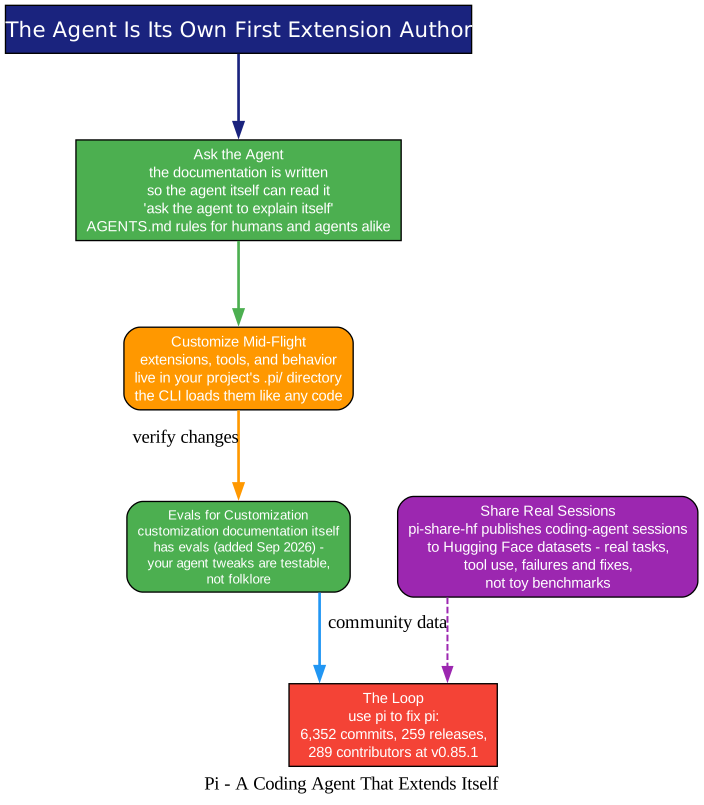
- The docs are agent-first. The README points at pi.dev/docs and adds, “but you can also ask the agent to explain itself.” The documentation is authored with the explicit intent that Pi’s own CLI can consume it - the agent is its own first power user.
- Customization lives in files, not forks. Extensions and tools load from your project’s
.pi/directory like any other code, so tailoring the agent to your stack is a normal code change with normal review. - Customization has evals. In a touch that tells you who maintains this, the project recently added evals for the customization documentation itself - your agent tweaks are testable claims, not folklore that rots.
- Real sessions, shared. The community publishes actual coding-agent sessions to Hugging Face datasets via pi-share-hf - real tasks, real tool use, real failures and fixes, as a corrective to toy benchmarks. The maintainers publish their own pi-mono sessions openly.
The compounding result is visible in the commit graph: the team uses Pi to build Pi, across 6,352 commits and 259 releases.
Supply-Chain Hardening: The Best We Have Covered
Understanding the Hardening
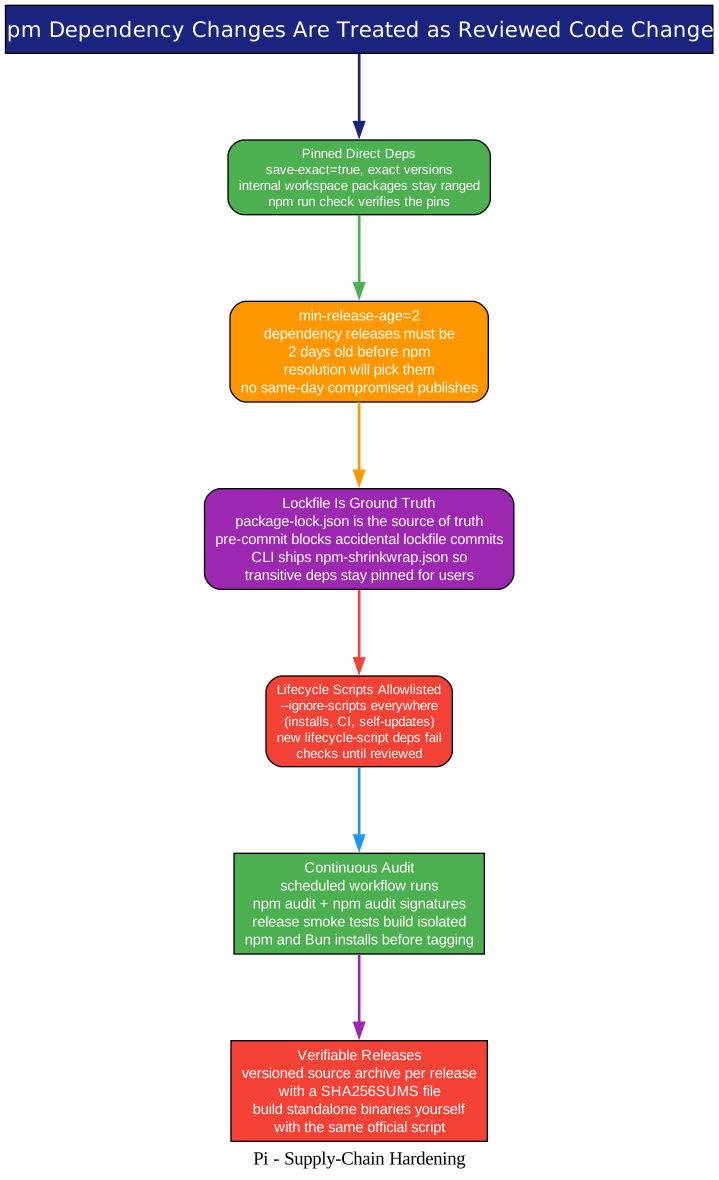
The npm ecosystem is the soft underbelly of every TypeScript project, and Pi’s README says the quiet part loudly: “We treat npm dependency changes as reviewed code changes.” Then it backs that up with a list that reads like a threat model:
- Exact pins on all direct external dependencies (
save-exact=true), with internal workspace packages version-ranged - andnpm run checkverifies the pins hold. min-release-age=2- dependency releases must be two days old before npm resolution will even consider them. A freshly published compromised package never gets picked up in the window that matters.- The lockfile is ground truth, protected by a pre-commit hook; the published CLI ships an
npm-shrinkwrap.jsonso transitive dependencies stay pinned for npm users, not just for the repo. - Lifecycle scripts are allowlisted. Everything installs with
--ignore-scripts- local installs, CI, documented npm installs, evenpi update --self- and a new dependency that wants a lifecycle script fails checks until a human reviews it. - Continuous verification: a scheduled workflow runs
npm auditandnpm audit signatures, and release smoke tests build isolated npm and Bun installs outside the repo before any tag. - Verifiable releases: every release ships a versioned source archive with a
SHA256SUMSfile, and the samebuild-binaries.shscript used for official binaries works offline from that archive - reproduce the binary yourself.
If you maintain anything npm-installable, this section of the repo is a copy-paste-able curriculum.
Permissions: Honest About Power
Understanding the Containment Patterns
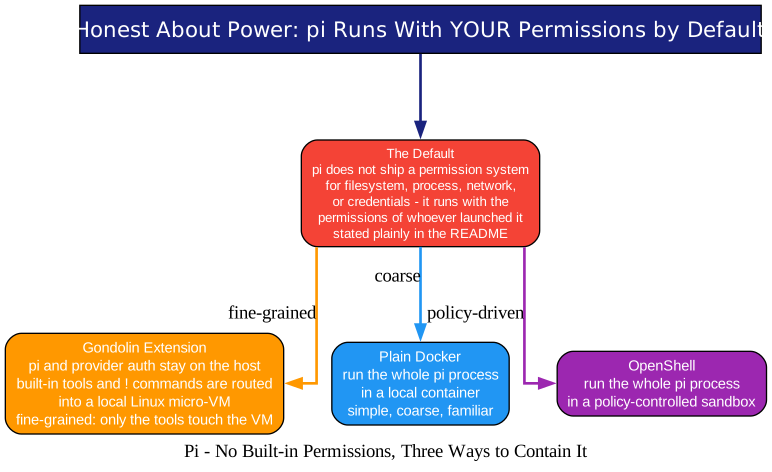
Here is the honesty part. Most agent CLIs market a permission system as a feature. Pi’s README does the reverse: it states plainly that Pi has no built-in permission system for filesystem, process, network, or credential access - by default it runs with the permissions of whoever launched it. No security theater; the boundary is yours to draw, and the containerization doc gives you three patterns for drawing it:
- Gondolin extension - the surgical option: Pi and provider auth stay on the host while built-in tools and
!commands are routed into a local Linux micro-VM. - Plain Docker - run the whole
piprocess in a local container; coarse but familiar. - OpenShell - the whole process in a policy-controlled sandbox.
For a tool that can execute arbitrary code, “we do not pretend to sandbox you, here is exactly how to sandbox us” is a more trustworthy posture than a checkbox prompt.
Getting Started
npm install -g @earendil-works/pi-coding-agent
pi
Or build from source:
git clone https://github.com/earendil-works/pi
cd pi
npm install --ignore-scripts
npm run build
./pi-test.sh   # run pi from sources, from any directory
Tests run without API keys by default (./test.sh skips LLM-dependent tests), standalone binaries can be built from the release source archive, and the project’s longer-term plans live in public RFCs. One policy worth knowing before you contribute: new contributors’ issues and PRs are auto-closed by default and reviewed daily - the contribution guide explains the flow, and AGENTS.md carries the project rules for humans and agents alike.
Why This Matters
The agent harness market is consolidating around opaque products, and Pi is the strongest counterargument we have covered: a harness as a layered library stack, where the model seam, the agent loop, and the product are each independently understandable, embeddable, and replaceable. Its two “gaps” - no permission system, no dependency trust - are filled not with features but with documented positions: three containment patterns, and a supply-chain policy most security teams would envy. After Atlas gave agents a memory of why code changed, Pi asks the next question: what is the agent harness itself made of? With Pi, the answer is - layers you can read.
If you are building your own agent product, start with pi-agent-core and pi-ai. If you just want a better coding CLI, install pi-coding-agent, then ask it to explain itself. That feature is the README.
Related Posts
- Atlas: Source Control for Coding Agents - Every Commit Explained
- OpenResearch: Turn Your Coding Agent Into a Research Agent
- Oh My Hermes: The Operating Layer for Hermes Agent

Enjoyed this post? Never miss out on future posts by following us


