Codebase-Memory-MCP is a high-performance code intelligence engine for AI coding agents that indexes 158 programming languages into a persistent knowledge graph and answers structural queries in under 1 millisecond. Built in pure C with zero runtime dependencies, it delivers a 99.2% token reduction compared to file-by-file exploration – five structural queries consume approximately 3,400 tokens versus 412,000 tokens through traditional grep-based search.
The Code Understanding Problem for AI Agents
AI coding agents face a fundamental limitation: they understand code by reading files one at a time. When an agent needs to trace a function call across dozens of files, it burns hundreds of thousands of tokens on grep and read operations. When it needs to understand the architecture of a large project, it has no structural overview – just a wall of individual files.
This problem scales linearly with codebase size. A small project might be manageable, but for real-world repositories with millions of lines of code, the token cost becomes prohibitive. The Linux kernel alone contains 28 million lines across 75,000 files. Traditional agent exploration would consume over 400,000 tokens just to understand the basic call relationships.
Codebase-Memory-MCP solves this by building a persistent knowledge graph that captures functions, classes, call chains, import relationships, HTTP routes, and cross-service links – then exposing 14 MCP tools that let agents query this graph in milliseconds.
Key Insight: Codebase-Memory-MCP reduces token consumption by 99.2% – from 412,000 tokens via file-by-file exploration to just 3,400 tokens through five structural graph queries. For agents paying per token, this is the difference between a $4 search and a $0.03 search.
Architecture Overview
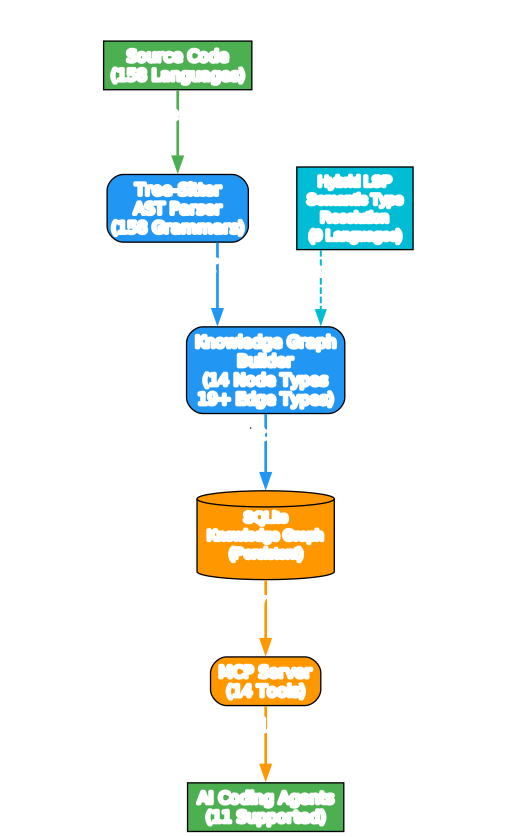
Understanding the Architecture
The architecture diagram illustrates the complete data flow from source code to AI agent responses. Here is how each component works:
Source Code Input (green) represents the starting point – any codebase in any of the 158 supported languages. The system accepts git repositories, local directories, and even single files as input. Tree-sitter grammars vendored into the binary handle parsing without any external dependencies.
Tree-Sitter AST Parser (blue) is the first processing stage. Tree-sitter provides incremental, error-tolerant parsing across all 158 languages. Each language grammar is compiled directly into the binary, so there is nothing to install, nothing that breaks, and no runtime dependencies. The parser produces an abstract syntax tree for every source file, extracting functions, classes, methods, imports, exports, and type annotations.
Knowledge Graph Builder (blue) takes the AST output and constructs a property graph. Nodes represent code entities (projects, packages, folders, files, modules, classes, functions, methods, interfaces, enums, types, routes, and resources). Edges represent relationships: CONTAINS_PACKAGE, CONTAINS_FOLDER, DEFINES, CALLS, IMPORTS, IMPLEMENTS, HTTP_CALLS, ASYNC_CALLS, HANDLES, and 11 more edge types. The builder also runs community detection (Louvain algorithm) to discover functional modules.
Hybrid LSP (cyan) provides semantic type resolution for 9 languages: Python, TypeScript/JavaScript/JSX/TSX, PHP, C#, Go, C, C++, Java, Kotlin, and Rust. This is not a full language server – it is a lightweight C implementation of type-resolution algorithms compatible with tsserver, pyright, gopls, and others. It resolves parameter binding, return types, generic substitution, JSX component dispatch, namespace resolution, and trait method dispatch. The Hybrid LSP output feeds into the graph builder to create accurate CALLS edges across files and packages.
SQLite Knowledge Graph (orange, cylinder) is the persistent storage layer. The graph is stored in a SQLite database at ~/.cache/codebase-memory-mcp/, which means indexes survive across sessions. The RAM-first pipeline uses LZ4 compression for reading, in-memory SQLite for building, and a single dump at the end. Memory is released back to the OS after indexing completes.
MCP Server (orange) exposes 14 tools through the Model Context Protocol. Your coding agent calls these tools to search the graph, trace call paths, detect changes, query architecture, and run Cypher queries – all in under 1 millisecond for typical queries.
AI Coding Agents (green) are the consumers. The system supports 11 agents out of the box, including Claude Code, Codex CLI, Gemini CLI, Zed, OpenCode, Antigravity, Aider, KiloCode, VS Code, OpenClaw, and Kiro. The install command auto-detects all installed agents and configures MCP entries, instruction files, skills, and pre-tool hooks for each.
Takeaway: The architecture eliminates the need for an embedded LLM. Other code graph tools bundle an LLM for natural language to graph query translation, requiring extra API keys and cost. With MCP, the agent you are already talking to IS the query translator – no extra model, no extra keys, no extra cost.
Indexing Pipeline
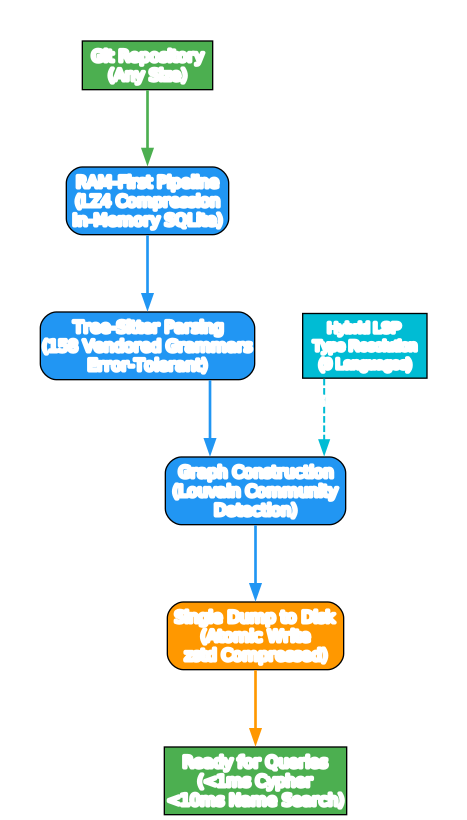
Understanding the Indexing Pipeline
The pipeline diagram traces the complete journey from a raw git repository to a query-ready knowledge graph. Here is how each stage works:
Git Repository (green) is the input. Any size repository works – from a small Python project to the Linux kernel (28M LOC, 75K files). The system indexes the repository once and then keeps it fresh through an automatic background watcher that detects file changes and re-indexes incrementally.
RAM-First Pipeline (blue) is the core innovation. Instead of writing to disk during indexing, the entire pipeline runs in memory. LZ4 HC compression is used for reading source files, SQLite operates in in-memory mode, and only a single dump writes to disk at the very end. This approach achieves remarkable speed: the Linux kernel indexes in 3 minutes, Django in approximately 6 seconds. Memory is released back to the OS as soon as indexing completes, so there is no persistent memory footprint.
Tree-Sitter Parsing (blue) processes every file through 158 vendored grammars. Tree-sitter is an incremental parsing system that handles syntax errors gracefully – a malformed file still produces a useful partial AST rather than a parse failure. The parser extracts functions, classes, imports, exports, type annotations, decorators, and HTTP route definitions.
Hybrid LSP Type Resolution (cyan) adds semantic intelligence on top of the syntactic AST. For 9 languages, it resolves types across files: which class a method belongs to, what interface it implements, what type a variable holds, and which function a call site invokes. This is what makes CALLS edges accurate – without it, you would only have IMPORTS relationships, not actual function-to-function call graphs.
Graph Construction (blue) takes all the extracted data and builds the knowledge graph. 14 node types and 19+ edge types create a rich representation of the codebase. The Louvain community detection algorithm runs automatically to discover functional modules and clusters. Architecture Decision Records can be managed through the manage_adr tool.
Single Dump to Disk (orange) writes the complete graph to the SQLite database. Because all indexing happened in memory, this is a single atomic write operation. The database persists at ~/.cache/codebase-memory-mcp/ and is reused across sessions. A zstd-compressed artifact (.codebase-memory/graph.db.zst) can be committed to the repo so teammates skip the full reindex.
Ready for Queries (green) means sub-millisecond response times. Cypher queries, name searches, and call traces all return in under 10ms. Dead code detection across the full graph takes approximately 150ms. This is orders of magnitude faster than any approach that requires reading files at query time.
Amazing: The Linux kernel – 28 million lines of code across 75,000 files – indexes in just 3 minutes, producing a graph with 4.81 million nodes and 7.72 million edges. And once indexed, any structural query returns in under 1 millisecond.
14 MCP Tools
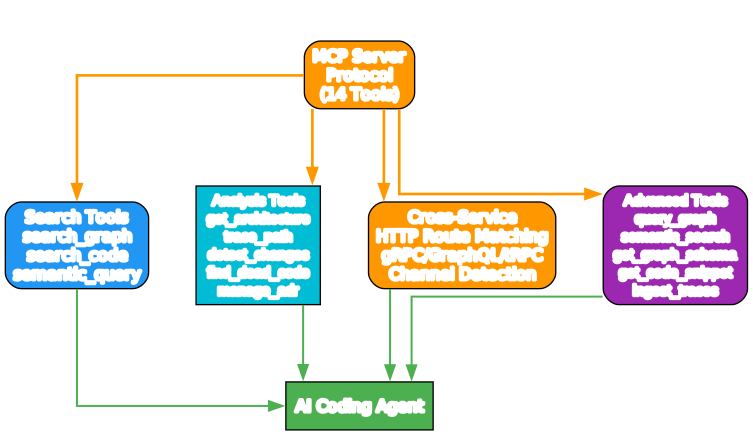
Understanding the MCP Tools
The tools diagram organizes the 14 MCP tools into four categories, all flowing through the MCP Server Protocol to the AI agent. Here is what each category provides:
Search Tools (blue) offer three complementary search strategies. search_graph performs structured search by label, name pattern (regex), file pattern, and degree filters with pagination. search_code provides grep-like text search limited to indexed project files – so it only searches relevant code, not logs or build artifacts. semantic_query delivers vector search across the entire graph using bundled Nomic nomic-embed-code embeddings (40K tokens, 768d int8) compiled into the binary – no API key, no Ollama, no Docker required. An 11-signal combined scoring system blends TF-IDF, RRI, API/type/decorator signatures, AST profiles, data flow, Halstead-lite complexity, MinHash, module proximity, and graph diffusion for results that combine structural and semantic relevance.
Analysis Tools (cyan) provide deep architectural insight. get_architecture returns a single-call overview with languages, packages, entry points, routes, hotspots, boundaries, layers, and clusters. trace_path performs BFS traversal to show who calls a function and what it calls (depth 1-5). detect_changes maps git diff output to affected symbols with risk classification. find_dead_code identifies functions with zero callers, excluding entry points. manage_adr persists architectural decisions across sessions so important context is never lost.
Cross-Service (orange) tools connect the dots between services. HTTP route matching with confidence scoring links frontend calls to backend handlers. gRPC, GraphQL, and tRPC service detection with protobuf Route extraction maps inter-service communication. Channel detection (EMITS / LISTENS_ON) for Socket.IO, EventEmitter, and generic pub-sub patterns traces asynchronous data flow across 8 languages with constant resolution.
Advanced Tools (purple) unlock the full power of the graph. query_graph executes Cypher-like queries (openCypher read subset) for complex traversals. semantic_search provides the same vector-powered search. get_graph_schema reveals node/edge counts, relationship patterns, and property definitions per label. get_code_snippet reads source code for a function by qualified name. ingest_traces ingests runtime traces to validate HTTP_CALLS edges.
Token Efficiency: 99.2% Reduction

Understanding the Token Savings
The performance diagram makes the token efficiency advantage starkly visible. Traditional file-by-file exploration requires approximately 412,000 tokens to understand a codebase – each grep, read, and search call consumes context window space and costs money. Codebase-Memory-MCP achieves the same understanding with just 3,400 tokens across five structural queries.
Here is why this matters for AI coding agents:
Cost savings scale with usage. At typical LLM pricing, 412,000 input tokens might cost $2-4 per exploration session. With codebase-memory-mcp, the same understanding costs under $0.05. For teams running agents continuously, this compounds to significant savings.
Speed compounds quality. When agents can understand architecture in milliseconds instead of minutes, they make better decisions. They can explore more hypotheses, check more call paths, and validate more assumptions within the same context window.
Context window preservation. Each file read consumes precious context window space. By the time an agent has read 20-30 files to trace a call chain, it has lost most of its working memory. Graph queries return structured results that take a tiny fraction of the window.
The benchmark data from the research paper (arXiv:2603.27277) confirms this across 31 real-world repositories: 83% answer quality, 10x fewer tokens, and 2.1x fewer tool calls compared to file-by-file exploration.
Important: The 99.2% token reduction is not theoretical – it was measured across 31 real-world repositories in the research paper. The evaluation showed 83% answer quality with 10x fewer tokens and 2.1x fewer tool calls versus file-by-file exploration.
11 Supported Agents

Understanding Agent Support
The agents diagram shows all 11 supported coding agents, connected through the single binary MCP server. The install command auto-detects which agents are installed on your system and configures the appropriate MCP entries, instruction files, skills, and pre-tool hooks for each one. No manual configuration needed.
The supported agents include:
- Claude Code – Full MCP integration with skills and a PreToolUse hook that intercepts Grep/Glob calls (never Read) and injects graph context as
additionalContext - Codex CLI – MCP config with
.codex/config.tomland.codex/AGENTS.mdinstructions, plus a SessionStart reminder - Gemini CLI – MCP config with
.gemini/settings.jsonand.gemini/GEMINI.md, BeforeTool grep reminder and SessionStart reminder - Zed – MCP config in
settings.json(JSONC) - OpenCode – MCP config in
opencode.jsonwithAGENTS.md - Antigravity – Shared MCP config with
antigravity-cli/AGENTS.mdand SessionStart reminder - Aider – Instructions via
CONVENTIONS.md - KiloCode – MCP config in
mcp_settings.jsonwith~/.kilocode/rules/ - VS Code – MCP config in
Code/User/mcp.json - OpenClaw – MCP config in
openclaw.json - Kiro – MCP config in
.kiro/settings/mcp.json
The Claude Code hook is particularly clever: it is structurally non-blocking (exit code 0, every failure path). When a search token matches indexed symbols, the hook injects structured context from search_graph alongside the agent’s normal search results. When there is no match, the hook silently returns and the agent proceeds with its normal grep workflow. This means the graph augmentation is additive – it never blocks or interferes with the agent’s default behavior.
Installation and Quick Start
One-Line Install (macOS / Linux)
curl -fsSL https://raw.githubusercontent.com/DeusData/codebase-memory-mcp/main/install.sh | bash
Windows (PowerShell)
irm https://raw.githubusercontent.com/DeusData/codebase-memory-mcp/main/scripts/setup-windows.ps1 | iex
With Graph Visualization UI
curl -fsSL https://raw.githubusercontent.com/DeusData/codebase-memory-mcp/main/install.sh | bash -s -- --ui
The UI variant opens a 3D interactive graph visualization at localhost:9749 – explore your knowledge graph directly in the browser.
Via Package Managers
Available on npm, PyPI, Homebrew, Scoop, Winget, Chocolatey, AUR, and go install.
Build from Source
git clone https://github.com/DeusData/codebase-memory-mcp.git
cd codebase-memory-mcp
scripts/build.sh            # standard binary
scripts/build.sh --with-ui  # with graph visualization
Requirements: C compiler (gcc or clang), C++ compiler, zlib, and Git.
Usage Examples
Index Your Project
After installation, simply tell your agent:
Index this project
Or use the CLI directly:
codebase-memory-mcp cli index_repository '{"repo_path": "/path/to/repo"}'
The Linux kernel (28M LOC) indexes in 3 minutes. Typical projects index in seconds.
Search the Graph
# Find all Handler functions
codebase-memory-mcp cli search_graph '{"name_pattern": ".*Handler.*", "label": "Function"}'

# Trace who calls ProcessOrder
codebase-memory-mcp cli trace_path '{"function_name": "ProcessOrder", "direction": "inbound"}'

# Run a Cypher query
codebase-memory-mcp cli query_graph '{"query": "MATCH (f:Function)-[:CALLS]->(g) WHERE f.name = '\''main'\'' RETURN g.name"}'
Auto-Index on Session Start
codebase-memory-mcp config set auto_index true
New projects are indexed automatically on first connection. Previously indexed projects register with the background watcher for ongoing git-based change detection.
Team-Shared Graph Artifact
Commit .codebase-memory/graph.db.zst to your repository. Teammates clone the repo and run codebase-memory-mcp – they get the pre-built graph instantly, with incremental indexing filling in their local diff. The artifact uses zstd compression with 8-13:1 ratio, so it stays small.
Key Technical Details
| Feature | Detail |
|---|---|
| Languages parsed | 158 (vendored tree-sitter grammars) |
| Hybrid LSP languages | 9 (Python, TS/JS/JSX/TSX, PHP, C#, Go, C, C++, Java, Kotlin, Rust) |
| MCP tools | 14 |
| Supported agents | 11 |
| Indexing speed (Linux kernel) | 3 minutes (28M LOC, 75K files) |
| Indexing speed (Django) | ~6 seconds |
| Query latency | <1ms (Cypher), <10ms (name search) |
| Token reduction | 99.2% (3,400 vs 412,000 tokens) |
| Binary size | Single static binary, zero dependencies |
| Platforms | macOS (arm64/amd64), Linux (arm64/amd64), Windows (amd64) |
| License | MIT |
| Research paper | arXiv:2603.27277 |
Conclusion
Codebase-Memory-MCP represents a fundamental shift in how AI coding agents understand code. Instead of burning hundreds of thousands of tokens reading files one by one, agents can query a persistent knowledge graph and get structured answers in milliseconds. The 99.2% token reduction, 83% answer quality, and sub-millisecond query times make it a practical necessity for any agent working on real-world codebases.
The engineering choices are notable: pure C for performance, vendored tree-sitter grammars for reliability, in-memory SQLite for speed, zstd for team sharing, and MCP for agent compatibility. No Docker, no API keys, no runtime dependencies. Download the binary, run install, restart your agent, and say “Index this project” – done.
With 7,456+ GitHub stars and 2,322+ new stars today, the community has spoken clearly: structural code intelligence for AI agents is not a nice-to-have, it is a must-have. The research paper (arXiv:2603.27277) provides rigorous benchmarks across 31 repositories, and the SLSA Level 3 build provenance and VirusTotal scanning of every release demonstrate a serious commitment to security.
Links
- GitHub Repository: https://github.com/DeusData/codebase-memory-mcp
- Research Paper: arXiv:2603.27277

Enjoyed this post? Never miss out on future posts by following us


