HuggingFace OpenEnv: RL Post-Training Environment Interface
HuggingFace OpenEnv is a standardized framework for creating, deploying, and using isolated execution environments for agentic RL post-training. Built with Gymnasium-style APIs, OpenEnv makes it trivially easy for RL researchers to train LLMs using environments like coding challenges, chess games, and financial trading simulations - all running in isolated Docker containers with one-command deployment to Hugging Face Spaces.
Reinforcement learning post-training - techniques like RLHF, GRPO, and PPO - has become the critical step for aligning and improving large language models. But while the training algorithms themselves have matured rapidly thanks to libraries like TRL, the environments that LLMs interact with during training remain ad-hoc, fragile, and non-standardized. Each research team builds custom environment setups from scratch, with no shared interface, no isolation guarantees, and no deployment story. Hugging Face’s OpenEnv asks a simple but powerful question: what if agentic RL environments were as easy as pip install openenv?
What is OpenEnv?
OpenEnv is Hugging Face’s open-source framework for creating, deploying, and using isolated execution environments for agentic RL post-training. It provides a Gymnasium-style API - step(), reset(), state() - that makes it easy for RL researchers and framework writers to interact with environments during training loops. The project is currently at version 0.3.2.dev0, licensed under BSD-3-Clause, and requires Python 3.10 or higher.
The core thesis is straightforward: agentic RL training needs standardized, isolated, deployable environments, and OpenEnv provides the interface, tooling, and deployment infrastructure to make this as simple as installing a Python package. With 2,213 stars and 394 forks on GitHub, and growing at 276 stars per week, the project has clearly struck a chord with the RL research community.
OpenEnv extends the Gymnasium concept to agentic environments - environments where LLMs take actions (tool calls, code execution, game moves) and receive observations, rewards, and state. While Gymnasium focuses on traditional RL environments with continuous or discrete action spaces, OpenEnv focuses on agentic RL post-training where the “actions” are natural language tool calls, code snippets, or game moves, and the “observations” are structured responses from the environment.
Key Insight: OpenEnv is the first standardized framework that brings Gymnasium-style simplicity to agentic RL environments. Instead of each team building custom environment infrastructure, OpenEnv provides a unified protocol (HTTP/WebSocket), containerized isolation (Docker), and one-command deployment to Hugging Face Spaces.
Architecture Overview
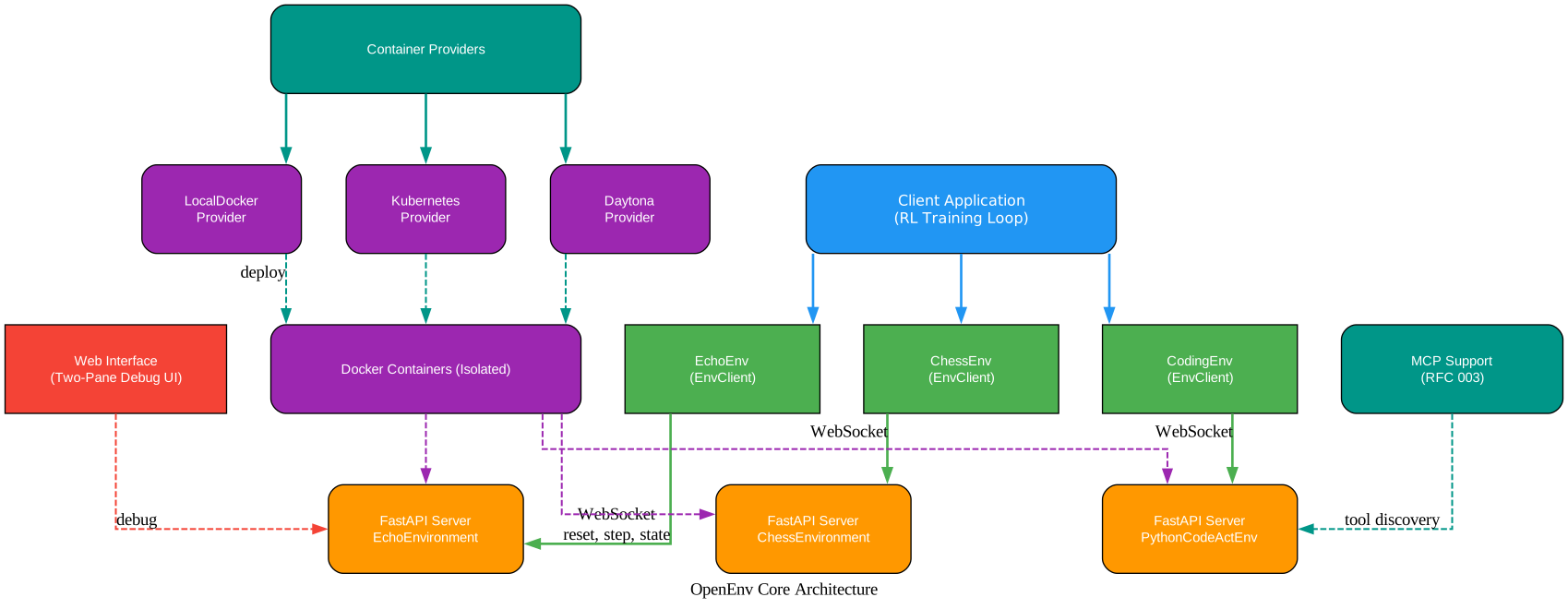
Understanding the Architecture
The architecture diagram above illustrates the client-server design that sits at the heart of OpenEnv. Let’s break down each layer and component:
Client Application Layer (Top)
The top layer represents the client application - typically an RL training loop running in a framework like TRL, torchforge, or SkyRL. The client application contains multiple EnvClient instances, each connecting to a specific environment. For example, an EchoEnv client connects to the Echo environment, a CodingEnv client connects to the coding environment, and a ChessEnv client connects to the chess environment. Each client communicates with its corresponding server over WebSocket, sending reset(), step(), and state() calls.
Docker Container Layer (Middle)
The middle layer contains the isolated Docker containers where environments actually run. Each container hosts a FastAPI server with an environment implementation that extends the Environment base class. The FastAPI server handles WebSocket connections from clients, processes incoming actions, and returns observations and rewards. This isolation is critical for agentic RL - environments that execute code (like the coding environment) or interact with external systems need to be sandboxed to prevent security issues.
Container Providers Layer (Bottom)
The bottom layer shows the container providers that manage deployment. LocalDockerProvider runs containers on a local Docker daemon, KubernetesProvider deploys to Kubernetes clusters, and DaytonaProvider uses Daytona cloud sandboxes. This provider-neutral abstraction means any hosted runtime can implement the provider contract: start an isolated server and return a base_url.
Side Components: Web Interface and MCP
The web interface provides a two-pane debugging UI with a HumanAgent interaction panel on the left and state observation on the right. It is conditionally enabled via ENABLE_WEB_INTERFACE=true. The MCP (Model Context Protocol) support, introduced in RFC 003, enables integration with the growing MCP ecosystem for tool discovery and agent interaction.
Takeaway: The client-server architecture over WebSocket means RL training loops can connect to environments running anywhere - locally in Docker, on Hugging Face Spaces, or in Kubernetes clusters - without changing a single line of training code.
The Gymnasium-Style API
One of OpenEnv’s most powerful design decisions is adopting the familiar Gymnasium API pattern. Anyone who has used OpenAI Gym or Gymnasium will immediately recognize the three core methods:
reset()- Initialize a new episode, returns the initialObservationstep(action)- Execute anAction, returns aStepResultcontaining the observation, reward, and done flagstate()- Access episode metadata includingepisode_id,step_count, and other tracking information
This familiarity is a key adoption driver. RL researchers don’t need to learn a new paradigm - they just need to understand that actions and observations are now Pydantic models instead of numpy arrays.
Type-Safe Models
OpenEnv uses Pydantic-based data structures for full type safety:
Action- Base class for environment actions, with validation and serializationObservation- Base class for environment observationsState- Episode state tracking withepisode_idandstep_countStepResult- Combines observation, reward, and done flag into a single return type
This type safety catches errors at the boundary between client and server, preventing the silent failures that plague ad-hoc environment implementations.
Async-First with Sync Wrapper
OpenEnv is async by default, using async with and await for all operations. This is the right choice for production RL training loops that need to handle multiple environments concurrently. For scripts, notebooks, and debugging, a .sync() wrapper provides synchronous access:
from echo_env import CallToolAction, EchoEnv

# Async usage (recommended for training loops)
async with EchoEnv(base_url="https://openenv-echo-env.hf.space") as client:
    result = await client.reset()
    result = await client.step(
        CallToolAction(
            tool_name="echo_message",
            arguments={"message": "Hello, World!"},
        )
    )
    print(result.observation.result)
    print(result.reward)
from echo_env import CallToolAction, EchoEnv

# Sync usage (for scripts and notebooks)
with EchoEnv(base_url="https://openenv-echo-env.hf.space").sync() as client:
    result = client.reset()
    result = client.step(
        CallToolAction(
            tool_name="echo_message",
            arguments={"message": "Hello, World!"},
        )
    )
    print(result.observation.result)
Environment Creation
Creating a new environment with OpenEnv is straightforward thanks to the CLI scaffolding tool. The openenv init command generates a complete project structure:
# Create a new environment
openenv init my_env
This creates the following project structure:
my_env/
├── .dockerignore        # Docker build exclusions
├── __init__.py           # Export YourAction, YourObservation, YourEnv
├── models.py             # Define Action, Observation, State dataclasses
├── client.py             # Implement YourEnv(EnvClient)
├── README.md             # Document your environment
├── openenv.yaml          # Environment manifest
├── pyproject.toml        # Dependencies and package configuration
├── outputs/              # Runtime outputs (logs, evals) - gitignored
│   ├── logs/
│   └── evals/
└── server/
    ├── your_environment.py  # Implement YourEnvironment(Environment)
    ├── app.py               # Create FastAPI app
    ├── requirements.txt     # Dependencies for Docker
    └── Dockerfile           # Define container image
The developer’s job is to implement three methods in server/your_environment.py:
reset()- Initialize a new episode and return the initial observationstep(action)- Process the action and return the observation, reward, and done flagstate()- Return the current episode state
And define the Action and Observation models in models.py using Pydantic. The CLI handles all the boilerplate: Dockerfile, FastAPI app setup, WebSocket transport, and package configuration.
Dependency Management
OpenEnv uses pyproject.toml as the primary dependency specification. Each environment defines its own dependencies in its own pyproject.toml, while the root-level package contains shared core dependencies like fastapi, pydantic, uvicorn, and websockets. This modular approach means environments only install what they need.
# Install environment in editable mode
cd my_env
pip install -e .

# Or using uv (faster)
uv pip install -e .

# Run server locally without Docker
uv run server --host 0.0.0.0 --port 8000
Usage Examples
Quick Start
# Install the OpenEnv package
pip install openenv

# Install an environment client (e.g., Echo)
pip install git+https://huggingface.co/spaces/openenv/echo_env
AutoEnv Auto-Discovery
OpenEnv includes an AutoEnv auto-discovery mechanism that automatically finds matching client and action classes for installed or discoverable environments:
from openenv.core.auto_env import AutoEnv, AutoAction

# Auto-discover the Echo environment client
EchoEnv = AutoEnv.from_env("echo")
CallToolAction = AutoAction.from_env("echo")

# Use it
async with EchoEnv(base_url="https://openenv-echo-env.hf.space") as client:
    result = await client.reset()
    result = await client.step(CallToolAction(
        tool_name="echo_message",
        arguments={"message": "Hello!"},
    ))
The AutoEnv.from_env() method accepts common name forms: “echo”, “echo-env”, “echo_env” all resolve to the same environment.
Docker Image Usage
For environments deployed as Docker images, OpenEnv provides a convenient factory method:
from echo_env import EchoEnv

# Connect from a Docker image directly
client = EchoEnv.from_docker_image("registry.hf.space/openenv/echo_env:latest")
Container Providers
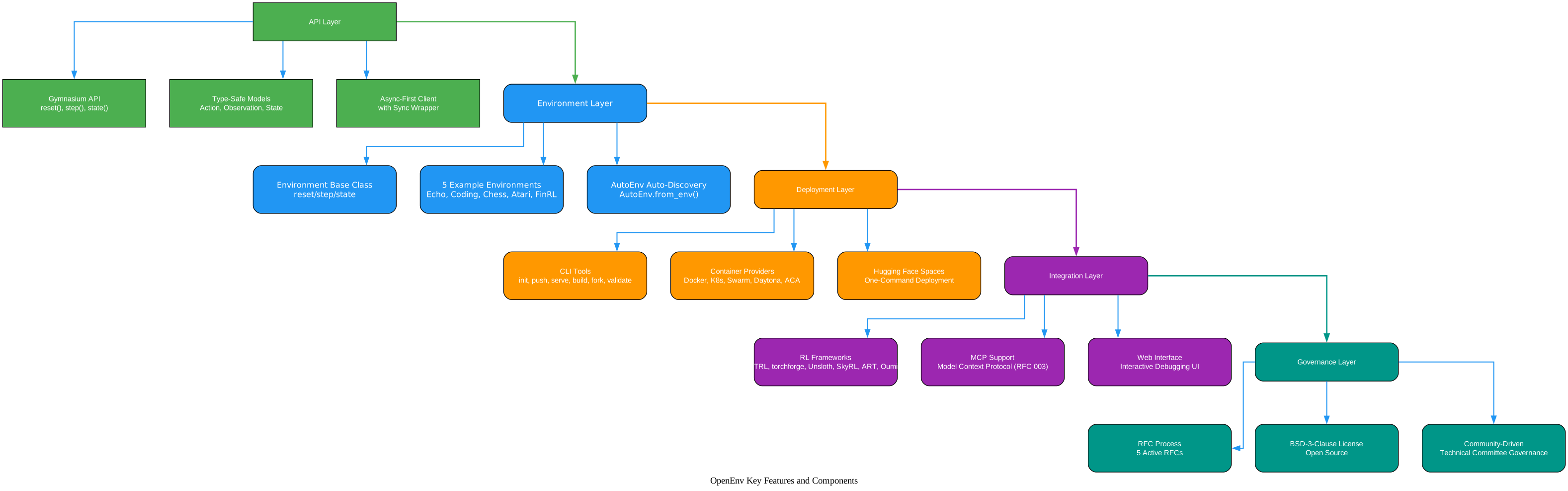
Understanding the Feature Categories
The features diagram above organizes OpenEnv’s capabilities into five distinct layers, each serving a specific purpose in the agentic RL ecosystem:
API Layer (Green)
The API layer is the foundation - the Gymnasium-style interface that makes OpenEnv accessible to anyone familiar with RL. The reset(), step(), and state() methods provide the standard interaction loop, while the type-safe Pydantic models (Action, Observation, State, StepResult) ensure that data flowing between client and server is always valid. The async-first client with sync wrapper means the same API works in both high-performance training loops and quick debugging scripts.
Environment Layer (Blue)
The environment layer provides the building blocks for creating new environments. The Environment base class defines the contract that all environments must implement. Five example environments (Echo, Coding, Chess, Atari, FinRL) demonstrate different use cases from simple infrastructure testing to complex game playing. The AutoEnv auto-discovery mechanism makes it trivially easy to find and use installed environments.
Deployment Layer (Orange)
The deployment layer handles the lifecycle of environments from creation to production. The CLI tools (init, push, serve, build, fork, validate) provide a complete workflow for environment management. Container providers (Docker, Kubernetes, Swarm, Daytona, ACA) abstract away the infrastructure details, and Hugging Face Spaces integration enables one-command deployment.
Integration Layer (Purple)
The integration layer connects OpenEnv to the broader RL ecosystem. Seven RL frameworks (TRL, torchforge, Unsloth, SkyRL, ART, Oumi, Lightning AI) already have documented integrations. MCP support (RFC 003) enables tool discovery through the Model Context Protocol, and the web interface provides interactive debugging capabilities.
Governance Layer (Teal)
The governance layer ensures the project remains healthy and community-driven. Five active RFCs guide major technical decisions, the BSD-3-Clause license ensures open access, and a technical committee with members from Meta-PyTorch, Reflection, Unsloth, Modal, Prime Intellect, Nvidia, Mercor, Fleet AI, Microsoft, and Hugging Face coordinates project direction.
Amazing: OpenEnv already supports 5 example environments (Echo, Coding, Chess, Atari, FinRL) and 7+ RL framework integrations (TRL, torchforge, Unsloth, SkyRL, ART, Oumi, Lightning AI) - all in an experimental v0.3.2.dev0 release. The ecosystem is growing rapidly with support from major AI organizations.
Example Environments
OpenEnv ships with five example environments that demonstrate different use cases:
| Environment | Description |
|---|---|
| Echo Environment | Echoes back messages with metadata. Ideal for testing HTTP server infrastructure, learning framework basics, and verifying container deployment. |
| Coding Environment | Sandboxed Python code execution via smolagents. Captures stdout/stderr/exit codes, supports persistent episode context, and provides detailed error handling. |
| Chess Environment | Chess RL environment with configurable opponents and full rules support. Perfect for training LLMs to play strategic games. |
| Atari Environment | Classic Arcade Learning Environment tasks for RL benchmarking. Brings traditional RL benchmarks into the agentic RL framework. |
| FinRL Environment | Financial market simulations for algorithmic trading experiments. Enables training LLMs to make trading decisions. |
The Echo environment is particularly useful as a starting point - it is the simplest possible environment that exercises the full client-server stack, making it ideal for testing infrastructure and learning the basics.
RL Framework Integration
OpenEnv is designed to work with any RL framework. The Gymnasium-style API means that any framework that can call reset(), step(), and state() can integrate with OpenEnv environments. The following frameworks already have documented integrations:
TRL (Hugging Face)
TRL is Hugging Face’s own RL training library. The integration enables GRPO (Group Relative Policy Optimization) training using OpenEnv environments. See the TRL OpenEnv documentation for details.
torchforge (Meta PyTorch)
torchforge is PyTorch’s agentic RL framework. The featured example in the OpenEnv repository trains LLMs to play BlackJack using GRPO. See the examples/grpo_blackjack/ directory for the complete training script.
Unsloth
Unsloth provides a 2048 game RL training example using gpt-oss. The Colab notebook demonstrates the full training pipeline.
SkyRL, ART, Oumi, Lightning AI
Additional integrations include SkyRL (UC-Berkeley’s training framework), ART (OpenPipe’s Agentic Reinforcement Training), Oumi (with GRPO+TRL), and Lightning AI templates. Each has documentation showing how to connect OpenEnv environments to their training loops.
CLI Commands
The openenv CLI provides a complete environment lifecycle management tool:
# Initialize a new environment from template
openenv init my_game_env

# Build the Docker image for an environment
openenv build

# Deploy to Hugging Face Spaces (will prompt for login if needed)
cd my_game_env
openenv push

# Serve an environment locally with auto-reload
openenv serve

# Fork a Space from HF Hub to your account
openenv fork <space-id>

# Validate an environment configuration
openenv validate
The openenv init command scaffolds the full project structure with all necessary files. The openenv push command deploys the environment to Hugging Face Spaces, making it accessible to anyone via a URL. The openenv serve command is useful for local development and debugging.
User Workflow
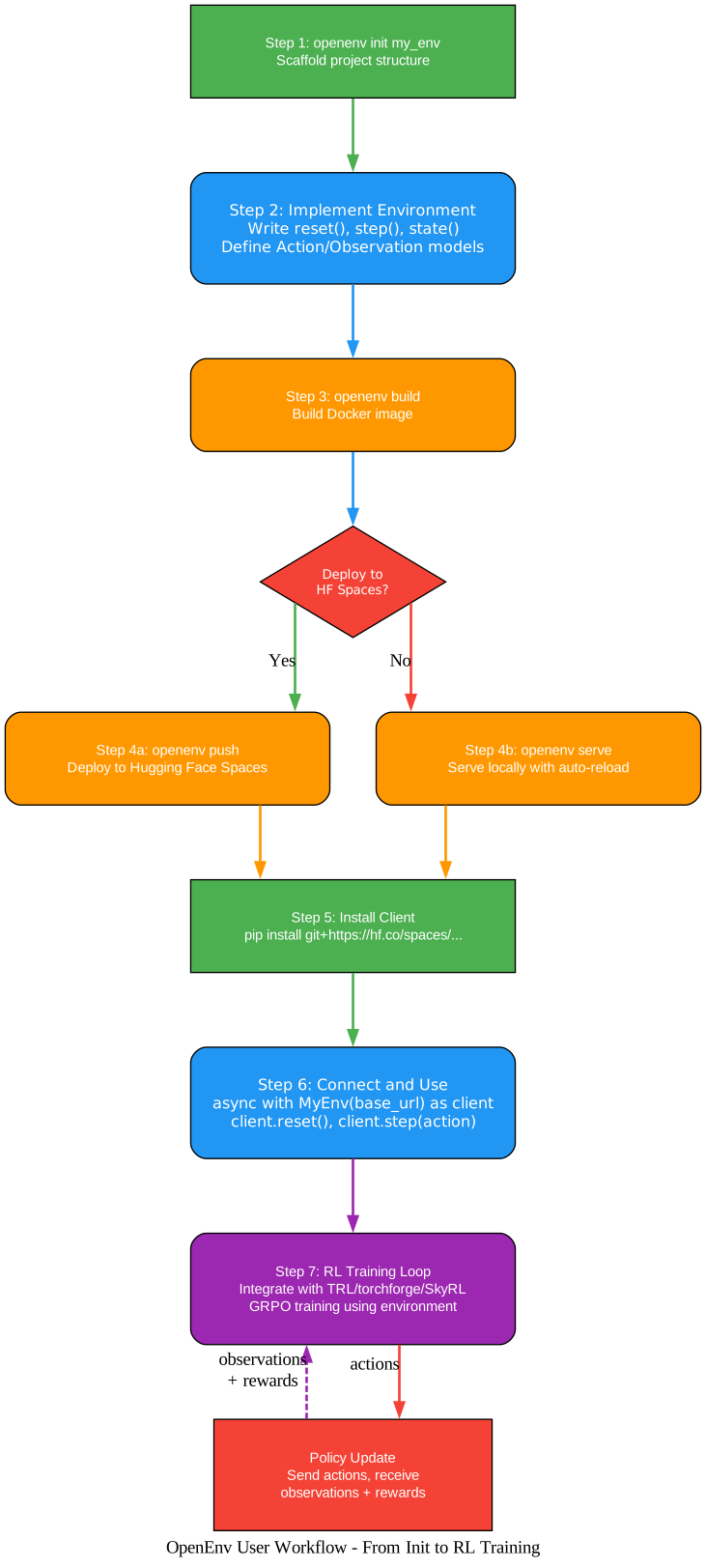
Understanding the Workflow
The workflow diagram above shows the complete journey from environment creation to RL training. Let’s walk through each step:
Step 1: Scaffold the Project
The journey begins with openenv init my_env, which creates the full project structure including models.py for defining Action and Observation types, client.py for the client implementation, and server/ for the environment logic.
Step 2: Implement the Environment
The developer writes the three core methods - reset(), step(), and state() - in server/your_environment.py, and defines the Action and Observation Pydantic models in models.py. This is where the domain logic lives.
Step 3: Build the Docker Image
The openenv build command creates the Docker image for the environment, packaging the FastAPI server, environment implementation, and all dependencies into an isolated container.
Step 4: Deploy (Decision Point)
The workflow branches based on the deployment target. For production use, openenv push deploys to Hugging Face Spaces, making the environment accessible via a public URL. For local development and testing, openenv serve runs the environment locally with auto-reload for fast iteration.
Step 5: Install the Client
Users install the environment client package, which provides the typed EnvClient subclass for connecting to the deployed environment.
Step 6: Connect and Use
The user connects to the environment using the async context manager pattern, calls reset() to start an episode, and then repeatedly calls step(action) to interact with the environment.
Step 7: RL Training Loop
The final step integrates the environment into an RL training loop. The training framework (TRL, torchforge, SkyRL, etc.) sends actions to the environment, receives observations and rewards, updates the policy, and repeats. This feedback loop - actions out, observations and rewards back, policy update - is the core of agentic RL post-training.
Important: OpenEnv is currently in an experimental stage (v0.3.2.dev0). You should expect bugs, incomplete features, and APIs that may change in future versions. The project welcomes bugfixes, but significant changes should be discussed with the technical committee before implementation.
RFC-Driven Development
OpenEnv uses a formal RFC (Request for Comments) process for major changes and features. This community-driven governance model ensures that significant decisions are discussed and coordinated before implementation. The current active RFCs are:
- RFC 001: Baseline API and Interface Specifications - defines the core
reset(),step(),state()API - RFC 002: Discoverability of environment tools by agents - how agents discover available tools
- RFC 003: Add MCP (Model Context Protocol) support - integration with the MCP ecosystem
- RFC 004: Add delayed rewards support for trajectory-based scoring - enables scoring entire trajectories rather than individual steps
- RFC 005: Agentic Harness Integration - how RL training harnesses integrate with OpenEnv
The technical committee includes members from Meta-PyTorch, Reflection, Unsloth, Modal, Prime Intellect, Nvidia, Mercor, Fleet AI, Microsoft, and Hugging Face. This broad industry representation ensures that OpenEnv serves the needs of the entire agentic RL community, not just a single organization.
Conclusion
HuggingFace OpenEnv represents a significant step forward for the agentic RL post-training ecosystem. By providing a standardized Gymnasium-style API, isolated Docker container environments, and one-command deployment to Hugging Face Spaces, it removes the infrastructure burden that has plagued RL research teams.
The project’s strengths are clear: a familiar API that any RL practitioner can use immediately, type-safe Pydantic models that catch errors at boundaries, async-first design for production training loops, and a growing ecosystem of 5 example environments and 7+ RL framework integrations. The RFC-driven governance model and broad technical committee representation suggest the project is well-positioned for long-term community-driven development.
For RL researchers, LLM fine-tuning engineers, and AI agent developers, OpenEnv offers a path to standardized, reproducible, and deployable agentic RL environments. The experimental status means you should expect some rough edges, but the core architecture is sound and the momentum is undeniable.
Getting started is as simple as:
pip install openenv
openenv init my_env
The project is open source under the BSD-3-Clause license, and contributions are welcome through the RFC process and issue tracker. With 2,213 stars and growing at 276 per week, OpenEnv is rapidly becoming the standard interface for agentic RL post-training environments. Enjoyed this post? Never miss out on future posts by following us 


