Guizang Social Card Skill is a Claude Code / Codex skill that generates magazine-quality social card image sets for Xiaohongshu (Rednote) and WeChat Official Account from articles, scripts, screenshots, or photos. With 28 layout skeletons, 10 curated theme presets, dual Editorial x Swiss visual systems, and a Playwright-based validation pipeline, it turns any AI agent into a disciplined social media designer - no Figma, no Canva, no manual layout work.
The Social Media Design Problem
Creating polished social media cards is time-consuming. You open a design tool, pick fonts, arrange text boxes, source images, adjust spacing, export, re-export, and repeat for every platform. The process demands design literacy that most content creators do not have. AI image generation tools like Midjourney or DALL-E can produce striking visuals, but they lack typographic discipline - the text on AI-generated images often looks distorted, misaligned, or simply wrong.
Guizang Social Card Skill asks a different question: what if an AI agent could produce magazine-quality social cards automatically, following strict typographic rules and validated against real DOM measurements? The result is a structured skill with 3,566 GitHub stars, AGPL-3.0 licensed, that runs natively in Claude Code and Codex. It does not generate images from pixels - it composes HTML/CSS layouts from seed templates, renders them to PNG via Playwright, and validates the output against six rules that catch overflow, font violations, and layout collisions.
What is Guizang Social Card Skill?
Guizang Social Card Skill is a Claude Code / Codex skill for generating Xiaohongshu/Rednote carousels and WeChat cover pairs from articles, scripts, screenshots, product notes, subtitles, or photos. It produces static information-flow image sets - not horizontal slide decks (that is the sister guizang-ppt-skill domain).
The skill ships with two complete visual systems sharing one workflow:
- Editorial Magazine x E-ink: Serif/Songti display with quiet sans body, paper and ink palette, atmosphere layers (paper grain, ink wash, WebGL canvas). Inspired by Monocle, Kinfolk, and Cereal magazines. Best for narrative, lifestyle, travel, reading, film, and personal observation.
- Swiss International: Inter/Helvetica feel with very light display at large sizes, mono labels at small, strict left-aligned grid, hairline rules, and one high-saturation accent. Inspired by Massimo Vignelli and the Swiss International Typographic Style. Best for product reviews, data, methodology, tutorials, and AI tools.
The render pipeline is deliberately simple: single-file HTML with no build chain. The agent copies a seed template, replaces placeholder posters with layout recipe HTML blocks, runs node render.mjs, and Playwright screenshots each .poster element to PNG. HTML and CSS are text - agents can write, read, modify, and validate them directly.
System Architecture
The skill’s architecture follows a clear top-to-bottom flow: the AI agent at the top invokes the skill, SKILL.md orchestrates a 7-step workflow, seed templates and reference docs provide the building blocks, a per-project task folder holds the work, and a render and validation pipeline produces the final PNGs.

The architecture diagram shows five layers. At the top, the agent environment (Claude Code, Codex, or Cursor) initiates the skill. SKILL.md sits below as the orchestrator, defining the 7-step workflow that guides the agent from intake to delivery. The third layer splits into two branches: on the left, seed templates in assets/ provide the HTML scaffolding - template-editorial-card.html with 6 themes across 3 canvas sizes, template-swiss-card.html with 4 accent palettes across 3 canvas sizes, a WebGL ink-flow background script, and 9 WebP screenshot stage backgrounds. On the right, 14 reference documents in references/ cover everything from platform specs and style rules to layout recipes, image overlay rules, and QA checklists.
The fourth layer is the task folder - a per-project workspace containing index.html (copied from a seed template), assets/ (source images), output/ (rendered PNGs), and SOURCES.md (image attribution). The bottom layer is the render and validation pipeline: node render.mjs drives Playwright to screenshot each poster to PNG, while node validate-social-deck.mjs runs 6 rules (R1-R6) against the real DOM. A side branch shows the three output canvas sizes: .poster.xhs at 1080x1440 for Xiaohongshu 3:4, .poster.wide at 2100x900 for WeChat 21:9, and .poster.square at 1080x1080 for WeChat 1:1.
The skill’s core thesis: social media content deserves the same typographic discipline as print magazines - and AI agents can now produce it automatically through a structured, validated skill workflow.
Key Features and Capabilities
The feature set spans five categories: visual systems, layouts and canvases, image and asset workflow, validation and quality, and platform integration.

Dual Visual Systems
Two complete visual systems share one workflow. Editorial Magazine x E-ink brings serif display type, paper-and-ink palettes, and atmosphere layers - it feels slow, considered, and hand-set. Swiss International brings Inter/Helvetica, strict grids, hairline rules, and a single high-saturation accent - it feels engineered, quantified, and decisive. The two systems are not bound to specific content types: a workplace essay can be Editorial, a travel ledger can be Swiss. You pick by the feeling you want, not by category lookup.
28 Layout Skeletons
The skill provides 28 layout skeletons: 16 Editorial layouts (M01-M16) including Image-Led Cover, Pipeline, Before/After, Ledger, Marginalia, and Pull Quote; and 12 Swiss layouts (S01-S12) including KPI Tower, H-Bar Chart, Matrix + Hero, Numbered Statements, and Card-Fill Matrix. The agent selects layouts based on content structure, never inventing pages that do not exist in the recipe library.
10 Theme Presets with No Custom Hex
Editorial offers 6 palettes: Ink Classic (general default), Indigo Porcelain (tech/AI), Forest Ink (nature/sustainability), Kraft Paper (nostalgia/humanities), Dune (art/design), and Midnight Ink (game key art/night scenes). Swiss offers 4 accent palettes: IKB Klein Blue (general/business), Lemon Yellow (youth/sports), Lemon Green (eco/health), and Safety Orange (alerts/industrial).
Custom hex values are not allowed. This is a feature, not a limitation.
Protecting aesthetics is more important than giving freedom. Ten curated presets ensure every output looks like it came from a professional magazine designer - not a color picker experiment.
Image Source Workflow
When the user has no images, the skill follows a priority chain: user-supplied photos first (recommended, least “AI-feeling”), then Unsplash, Pexels, Flickr CC, Wallhaven, and direct search. All sourced images are downloaded locally and tracked in SOURCES.md with one line per file preserving provenance.
WebGL Ink-Flow Backgrounds
Editorial hero pages can mount a dynamic WebGL ink-flow canvas for atmospheric depth. Low-performance or screenshot scenarios can disable it. The background system supports paper grain, ink wash, and WebGL canvas layers over a warm paper base.
Image Overlay and Face Avoidance
Full-bleed images must have overlays. Text placement must avoid subjects - faces, products, text-dense areas. The references/image-overlay.md document provides hard rules: selection first, tint only if needed, subject mapping is mandatory, and crop discipline requires explicit object-position on every photo.
Screenshot Beautification
9 WebP real-material backgrounds (Editorial 5, Swiss 4) pair with .frame-shot, .device-browser, and .device-phone utility classes for screenshot framing. The skill preserves screenshot content unless the user asks for redesign, and never stretches screenshots.
Map Component
MapLibre + OSM real tiles support multi-pin and route lines, suitable for travel guides. Pins are HTML overlays, and the skill never uses live JS maps.
Validation Script
validate-social-deck.mjs runs 6 rules based on Playwright real DOM measurement - not static scanning:
| Rule | Check |
|---|---|
| R1 | Overflow - any section exceeding .poster bounds |
| R2 | Type Caps - .h-xl / .h-display font size + weight combos exceeding seed definitions |
| R3 | Footer Collision - content pressing into footer / page-number |
| R4 | 4-Band Density - 1440px canvas split into 4 horizontal bands, each should have content or intentional whitespace |
| R5 | Frame Overflow - .frame-img / .frame-shot child elements overflowing |
| R6 | Swiss Identity - Swiss templates with inline font-weight >= 700 warning (violates “bigger = thinner” principle) |
11 Xiaohongshu Category Adaptations
Three tiers of capability: strong end-to-end (Travel, Workplace, Recommendations), strong text and structure with image needs (Games, Film/TV, Food recipes, Makeup tutorials, Fitness, Home, Outfit capsule), and outside scope where the skill pushes back honestly (OOTD body shots, dreamcore/aesthetic styling, Y2K/goth-loli/kawaii decorated aesthetics, pure photography showcase).
How It Works: The 7-Step Workflow
The skill enforces a structured 7-step workflow from user request to delivered PNGs, with a validation decision point and an iteration loop.
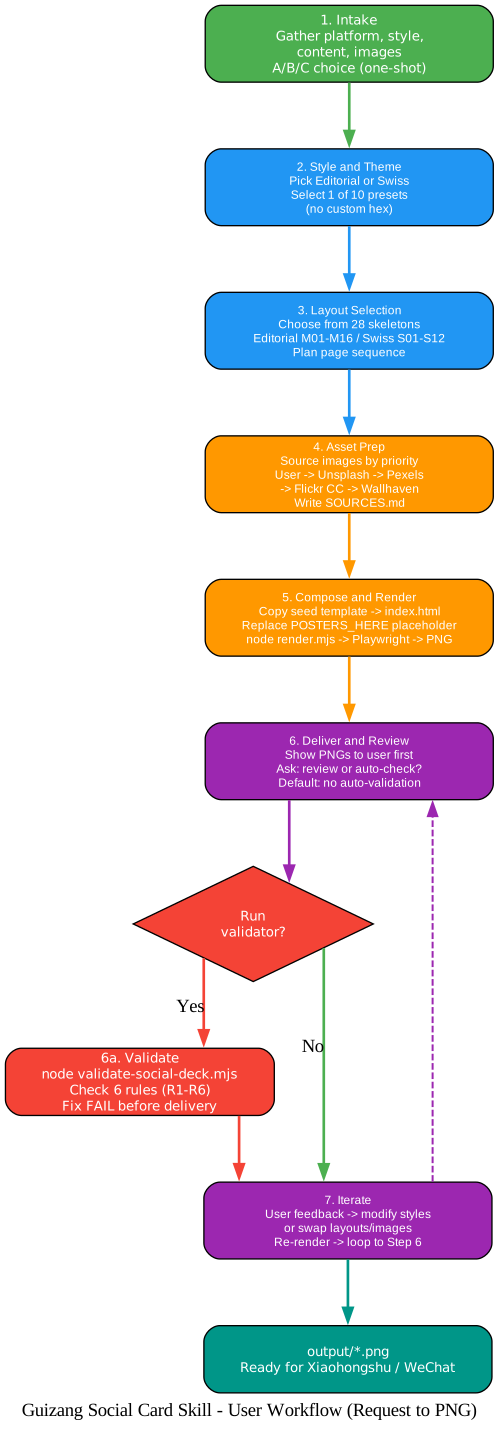
The workflow diagram traces the complete path from request to output. Step 1 (Intake) gathers the four essentials: target platform, style preference, content source, and images. If the user supplies only text, the agent asks once with an A/B/C choice - user photos, web sourcing, or AI generation - and never re-prompts. Step 2 (Style and Theme) picks Editorial or Swiss, then one of 10 presets. No custom hex. Step 3 (Layout Selection) chooses from 28 layout skeletons based on content structure and plans the page sequence. Step 4 (Asset Prep) sources images by priority, downloads them locally, and writes SOURCES.md. Step 5 (Compose and Render) copies the seed template to index.html, replaces the POSTERS_HERE placeholder with layout recipe HTML blocks, and runs node render.mjs to produce PNGs via Playwright.
Step 6 (Deliver and Review) shows the rendered PNGs to the user first, then asks: review yourself or run the validator? The default is no auto-validation - this saves dozens of seconds per iteration. A decision diamond branches: “Yes” runs node validate-social-deck.mjs with its 6 rules, fixing any FAIL before delivery; “No” proceeds directly to Step 7. Step 7 (Iterate) accepts user feedback, modifies inline styles or swaps layouts and images, re-renders, and loops back to Step 6. The final output is output/*.png - ready to post on Xiaohongshu or WeChat.
The skill explicitly defaults to no auto-validation. Auto-running the validator after every render takes too long and delays the user from seeing results. The workflow puts “look first, validate on request” into the process - a design decision that respects the user’s time.
Use Cases
The skill handles a wide range of social media content scenarios:
- Long article to Xiaohongshu carousel: Extract core viewpoints, use Editorial for narrative rhythm and Swiss for data breakdown
- Product review / tool review: Swiss + IKB Blue, prefer S09 KPI Tower or S10 H-Bar Chart layouts
- Travel / lifestyle: Editorial + Midnight Ink or Dune, M16 Image-Led Cover with full-bleed hero image
- WeChat cover pairs: Render two canvases from one content source -
.poster.wide21:9 header +.poster.square1:1 share card, visual consistency guaranteed - Screenshot tutorials:
.frame-shot+.device-browserframing, Swiss grid base - Game guides / film reviews: Editorial + Midnight Ink, source key art from Wallhaven for full-bleed covers
- Data review / year-end summary: Swiss + Lemon or Safety Orange, matrix + ledger combinations
Integration with Claude Code
Installation is a one-line command:
npx skills add https://github.com/op7418/guizang-social-card-skill --skill guizang-social-card-skill
You can also paste this instruction to any shell-capable AI agent:
Install guizang-social-card-skill. Clone https://github.com/op7418/guizang-social-card-skill to ~/.claude/skills/guizang-social-card-skill, then verify SKILL.md, assets/, and references/ exist.
For manual installation:
git clone https://github.com/op7418/guizang-social-card-skill.git ~/.claude/skills/guizang-social-card-skill
After installation, Claude Code auto-discovers the skill. Trigger keywords include “Xiaohongshu cards”, “Rednote cards”, “WeChat cover”, “social cards”, and “Swiss style”. Example usage:
Make a set of Swiss-style Xiaohongshu cards from this article, 5 pages, IKB Blue.
The skill supports Claude Code natively, Codex for long-flow generation, and Cursor or other local agents that have file system and shell access. Plain chatbots without file systems or render pipelines are not recommended.
Performance and Design Quality
The single-file HTML approach is a deliberate architectural choice with five advantages:
- Agent-friendly: HTML and CSS are text - agents can write, read, modify, and validate directly
- Precise layout: CSS Grid with strict font sizes, spacing, and grid far exceeds Markdown layout capabilities
- Open image sources: Connects to Unsplash, Pexels, Wallhaven, Mapbox, OSM, and any web resource
- Validatable:
validate-social-deck.mjsuses Playwright for real DOM measurement, not guessing - Simple delivery:
output/*.pngfiles ship directly - no deployment, no export tools
The design principles are equally deliberate: restraint over shouting (restrained palettes stand out in information feeds), structure over decoration (font size, type contrast, and grid whitespace carry information hierarchy - not shadows and cards), layout over freedom (28 skeletons first, then modify - never invent non-existent pages), user images first, overlay and avoidance rules, “bigger = thinner” for Swiss display type, no auto-validation by default, and the skill is a product not a prompt - it has a PRODUCT.md, version numbers, a CHANGELOG, and defined capability boundaries.
Single-file HTML is agent-friendly. HTML and CSS are text - agents can write, read, modify, and validate them directly. No build chain, no framework lock-in, no opaque rendering pipeline. The agent sees exactly what the browser will render.
Getting Started
Install via npx skills add or git clone. Trigger with natural language. The skill handles both Chinese and English content: Editorial uses Playfair Display + Noto Serif, Swiss uses Inter + Helvetica - both font stacks cover Chinese and English simultaneously. Layout skeletons are not language-bound.
To update to the latest version, re-run the install command or execute git pull in the skill directory.
Comparison with Alternatives
| Approach | Guizang Social Card Skill Advantage |
|---|---|
| Figma / Canva | AI agent automation vs manual design, no subscription, structured templates |
| AI image generation (Midjourney/DALL-E) | Structured HTML/CSS vs pixel generation, typographic discipline, editable, validatable |
| guizang-ppt-skill | Static social cards vs horizontal slide decks, different canvas sizes and layouts |
| Markdown-to-image tools | CSS Grid precision vs limited Markdown layout |
| Plain chatbot prompting | File system + render pipeline + validation vs unreliable text-only output |
Tech Stack
- HTML + CSS: Single-file, no build chain
- Playwright: Rendering and validation
- WebGL: Ink-flow backgrounds
- MapLibre + OSM: Map component
- Node.js:
render.mjsandvalidate-social-deck.mjs - Font stacks: Playfair Display + Noto Serif (Editorial), Inter + Helvetica (Swiss)
- Lucide icons: Icon system
- AGPL-3.0 license: Open source, network services must also be open
Conclusion
Guizang Social Card Skill brings magazine-quality social card generation to any AI agent. With 28 layout skeletons, 10 curated theme presets, 3 canvas sizes, and dual Editorial x Swiss visual systems, it produces pixel-perfect 1080x1440, 2100x900, and 1080x1080 outputs from any content source. The structured 7-step workflow with Playwright-based validation ensures every output meets strict typographic standards.
The skill runs natively in Claude Code and Codex, works with Cursor and other shell-capable agents, and carries 3,566 GitHub stars under an AGPL-3.0 license. It is part of the guizang ecosystem - a sister project to guizang-ppt-skill, sharing aesthetic language but independently maintained for static social media image sets.
Getting started takes one line: Enjoyed this post? Never miss out on future posts by following us npx skills add https://github.com/op7418/guizang-social-card-skill --skill guizang-social-card-skill. From there, any AI agent with file system and shell access can produce professional social cards from articles, scripts, screenshots, or photos - no design tools, no manual layout, no subscription. 


