Introduction
AI coding tools have moved from novelty to necessity in 2026. Whether you are a solo developer shipping side projects or an enterprise team managing monorepos with millions of lines, the questions are remarkably consistent: what is an agent, how is it different from autocomplete, should I run models locally, and what on earth is MCP. This post answers the twenty most-searched questions about AI coding, LLMs, MCP, and RAG, with practical answers grounded in the tooling landscape of 2026.
The goal is clarity without hype. Each section gives you a direct answer, the trade-offs you need to know, and concrete next steps. We start with a map of the entire AI coding stack so the rest of the answers have a shared frame of reference, then move question by question through the topics developers search for most.
The AI Coding Landscape in 2026
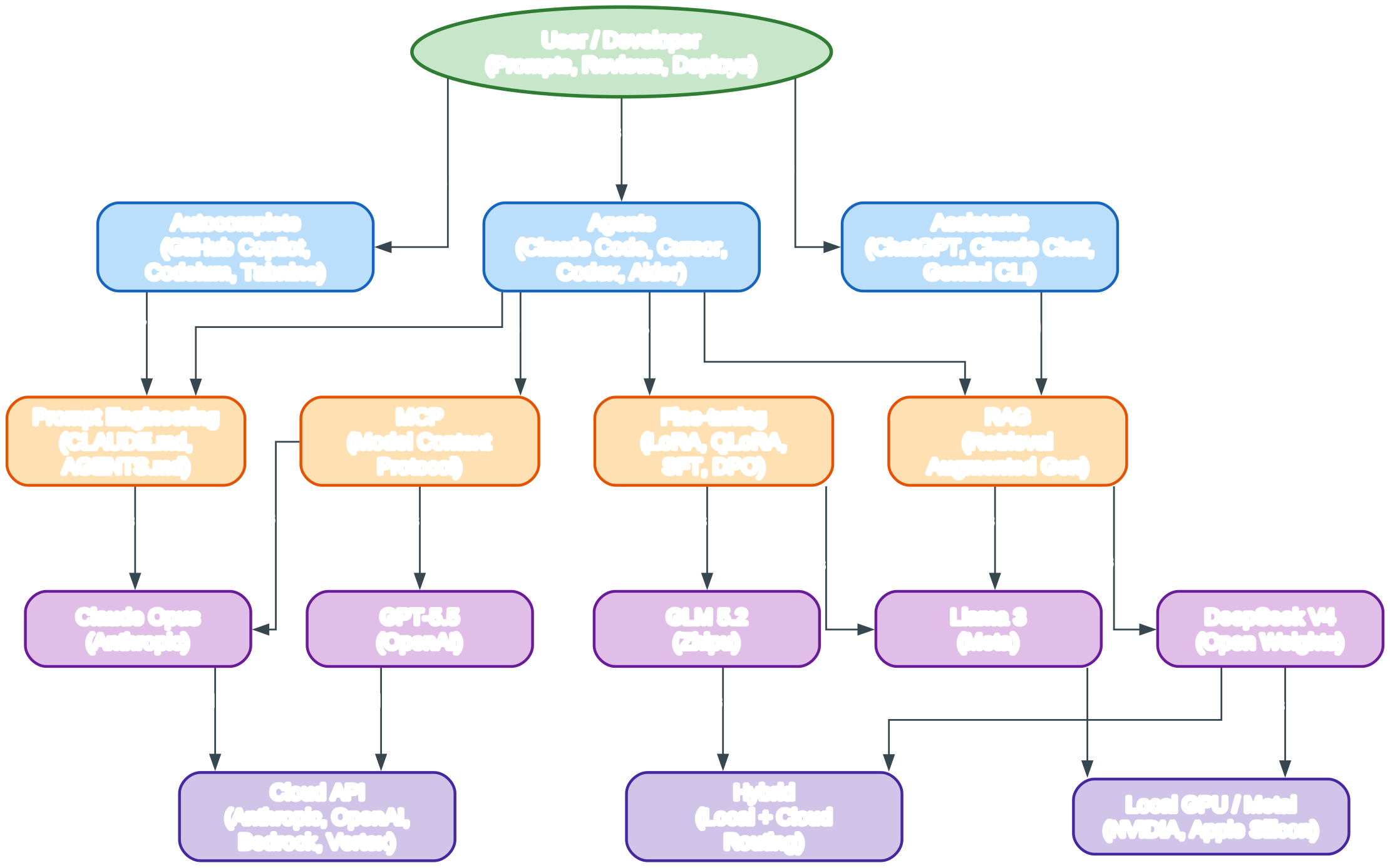
The diagram above maps the full AI coding stack as it stands in 2026, flowing top-down from the developer to the physical hardware that makes inference possible.
At the very top sits the user, the developer who writes prompts, reviews generated code, and ships the result. Everything below that top node exists to serve the loop of intent, generation, verification, and deployment.
The first layer splits the tooling market into three distinct columns, and the distinction matters because each column implies a different level of autonomy and a different review burden.
Autocomplete tools such as GitHub Copilot, Codeium, and Tabnine operate inline inside the editor, predicting the next few lines as you type. You stay in control keystroke by keystroke, accepting or rejecting each suggestion.
Assistants like ChatGPT, the Claude web chat, and Gemini CLI are conversational surfaces where you describe a problem in natural language and receive explanations or code snippets you then paste and adapt. The human remains the executor who integrates the output.
Agents, the newest and most autonomous category, include Claude Code, Cursor in agent mode, OpenAI Codex, and Aider. These tools can read files, run commands, edit multiple files, and iterate until a task is done, returning a finished diff for your review.
The second layer is the infrastructure that makes those tools effective rather than generic. Each component here closes a specific gap between a raw model and a useful coding companion.
MCP, the Model Context Protocol, standardizes how an agent connects to external data sources, APIs, and tools. With MCP, a model can reach your database, your ticket tracker, or a custom CLI without bespoke, per-tool glue code.
RAG, Retrieval Augmented Generation, lets a tool pull relevant snippets from your codebase or docs into the prompt at query time. This grounds answers in your actual project instead of relying on generic training data that may be stale or irrelevant.
Fine-tuning, through techniques like LoRA, QLoRA, supervised fine-tuning, and preference methods such as DPO, adapts a base model to your domain or coding style. It is the heaviest investment in this layer and is reserved for cases where prompt engineering and RAG are insufficient.
Prompt engineering, codified in files like CLAUDE.md and AGENTS.md, gives the agent persistent instructions about conventions, build commands, and boundaries. It is the cheapest and highest-leverage component of the infrastructure layer.
The third layer is the model layer, where the reasoning actually happens. Claude Opus from Anthropic, GPT-5.5 from OpenAI, DeepSeek V4 as a leading open-weights option, GLM 5.2 from Zhipu, and Meta’s Llama 3 represent the spectrum developers choose between in 2026.
The fourth and final layer is hardware. Local GPU or Apple Silicon gives you privacy and zero per-token cost; cloud APIs from Anthropic, OpenAI, AWS Bedrock, and Google Vertex give you maximum capability with no ops; and hybrid routing sends easy requests locally and hard requests to the cloud.
Read the diagram as a dependency chain rather than a flat list. A developer delegates work to an agent, the agent uses MCP to reach external systems and RAG to ground itself in your repo, the underlying model does the reasoning, and the model ultimately runs on either local or cloud hardware.
Each color encodes a role in this chain. Green marks the human at the top, blue marks the tooling surface the developer touches directly, orange marks the connective infrastructure that wires tools to data and models, and purple marks the models and hardware where computation physically happens.
The arrows show the direction of delegation and dependency, flowing downward from intent to silicon. Edge labels such as “delegates”, “grounds with”, “serves”, and “runs” describe the verb that connects one layer to the next, so you can read the whole stack as a sentence.
Notice that a single tool can span multiple layers. Cursor, for example, is a blue tool that can call orange MCP servers and orange RAG indexes, target a purple model like Claude Opus or GPT-5.5, and run on either a purple cloud API or local hardware depending on your routing.
Understanding this stack is the prerequisite for every question that follows, because most tool comparisons are really comparisons of one layer versus another. When someone asks whether to use Claude Code or Cursor, they are often really asking which blue surface pairs best with their preferred purple model and orange infrastructure.
The same framing explains why a weakness in one layer cannot be fixed by another. A frontier model run by a weak agent harness still produces poor multi-file edits, and a great agent harness pointed at a stale RAG index still hallucinates, because the chain is only as strong as its weakest link.
Keep this diagram in mind as you read the questions below. Whenever a term like MCP, RAG, context window, or SWE-bench appears, locate it in the stack, and the surrounding answer will make more sense because you will know which layer is being discussed and what it depends on.
Question 1
What is an AI coding agent?
An AI coding agent is a system that uses a large language model to perform software engineering tasks with a degree of autonomy, going beyond text generation to actually take actions in your environment. Unlike a chatbot that only returns text, an agent can read files, run shell commands, edit code, execute tests, and observe the results before deciding on the next step. The defining trait is the action-observation loop: the agent proposes a change, applies it, inspects the output, and iterates until the task is complete or it hits a blocker it cannot resolve. Tools like Claude Code, Cursor in agent mode, and OpenAI Codex are the canonical 2026 examples. Under the hood they combine a frontier model, a tool-calling interface, a file system sandbox, and a memory mechanism so context survives across many turns.
Question 2
What is the difference between AI autocomplete, AI assistant, and AI agent?
The three differ in scope, autonomy, and where they sit in your workflow. Autocomplete is the narrowest layer: it predicts the next tokens inline as you type, operating inside the editor with no awareness of intent beyond the surrounding lines, and you accept or reject suggestions keystroke by keystroke. An assistant is conversational: you describe a problem in a chat panel, it returns code or explanations, and you manually copy, adapt, and integrate the result, so the human remains the executor. An agent is the most autonomous tier: you give it a goal in natural language and it plans, edits multiple files, runs commands, and verifies outcomes on its own, returning a finished diff or pull request for your review. A useful mental model is that autocomplete finishes your sentence, the assistant answers your question, and the agent completes your task.
Question 3
How do I run LLMs locally on my machine?
Running a model locally means downloading weights and using a runtime that serves them through an OpenAI-compatible API or a chat UI. The two most popular entry points in 2026 are Ollama, which packages models into a one-command install with a CLI and REST API, and llama.cpp, the lower-level C++ inference engine that Ollama builds on, ideal when you want maximum control. For Apple Silicon, the MLX framework and LM Studio GUI offer native Metal acceleration and a polished desktop experience. After installing Ollama, you pull a model and serve it, then point your coding tool at http://localhost:11434.
# Install Ollama, then pull and run a coding-focused model
ollama pull qwen2.5-coder:7b
ollama run qwen2.5-coder:7b

# Serve it as an OpenAI-compatible API (Ollama does this by default on 11434)
curl http://localhost:11434/v1/models
Local inference gives you privacy, zero per-token cost, and offline work, at the trade-off of smaller effective model size and the need for adequate hardware.
Question 4
What is MCP (Model Context Protocol)?
MCP is an open standard introduced by Anthropic that defines a uniform way for AI applications to connect to external data sources, tools, and services. Before MCP, every agent needed bespoke integrations to read your database, query your ticket tracker, or call a custom CLI, which meant fragile, duplicated glue code. MCP defines a client-server architecture where an MCP server exposes resources, prompts, and tools through a shared protocol, and any MCP-compatible client, whether Claude Code, Cursor, or a custom agent, can consume them identically. Practically, you install or write an MCP server for your systems once, and every supporting agent gains access without further integration work. It plays the same unifying role for tool access that LSP played for language intelligence in editors.
Question 5
What is RAG (Retrieval Augmented Generation)?
RAG is a technique that grounds a language model’s answers in retrieved context at query time, instead of relying solely on what the model learned during training. The pipeline has three stages: you index your documents or code into a vector store, at query time you embed the user’s question and retrieve the most similar chunks, and you insert those chunks into the prompt so the model conditions its answer on them. For coding, RAG lets an agent reference your actual codebase, design docs, or runbooks without fine-tuning, and it makes answers cite-able and updatable by simply refreshing the index. The main trade-offs are retrieval quality, if the wrong chunks are fetched the answer suffers, and latency, since each query pays a search cost.
Question 6
How do I choose between Claude, GPT, and open-source models?
The choice depends on capability needs, cost, privacy, and control. Claude Opus and GPT-5.5 are the frontier proprietary options, leading on hard reasoning, long-context agentic tasks, and tool use, billed per token through their respective APIs. Open-weights models like DeepSeek V4, GLM 5.2, and Llama 3 can be self-hosted, customized, and run without per-token fees, but typically trail frontier models on the most complex agentic benchmarks and require you to operate infrastructure. A common 2026 pattern is hybrid: use a frontier model for planning and difficult refactors, and route simpler completion or review tasks to a local open-weights model. If privacy, cost predictability, or deep customization matter most, lean open-weights; if you want maximum capability with zero ops, lean proprietary.
Question 7
What is the best AI coding tool for beginners?
For someone starting out, the lowest-friction entry is a chat assistant combined with autocomplete, because they introduce AI help without changing how you run code. GitHub Copilot in VS Code gives inline suggestions and a chat panel in one extension, which makes it the most common beginner pick. Cursor goes a step further by bundling an agent mode and good model routing into a familiar editor shell, so beginners can graduate from autocomplete to agentic edits without learning a CLI. Claude Code is powerful but assumes more comfort with the terminal, so it suits developers who already live in a shell. The practical advice is to start with autocomplete to build intuition for what models do well, then layer in an assistant, and only move to a full agent once you can review its diffs confidently.
Question 8
How do AI coding agents handle multi-file changes?
Agents handle multi-file changes by maintaining a working model of the repository and applying a sequence of targeted edits rather than rewriting everything at once. When given a task, the agent first explores the relevant files, often using grep or semantic search to locate symbols and call sites, then plans a set of edits across the files that need to change. It applies edits through a file-editing tool that does exact string replacement or full rewrites per file, then runs the build or tests to verify the change compiles and behaves correctly. If verification fails, it reads the error output and iterates. The key mechanisms are a scratchpad for the plan, a tool interface for file reads and writes, and a verification step, usually tests or a type checker, that closes the loop.
Question 9
What are common AI coding agent failure modes?
The most frequent failure is hallucinating APIs or symbols that look plausible but do not exist, which happens when the model leans on training data instead of the actual codebase. Close behind is context loss on large repos, where the agent drops or misremembers earlier decisions once the context window fills, producing inconsistent edits. Agents also over-edit, changing unrelated code or applying stylistic rewrites you did not ask for, and they can get stuck in loops, repeatedly applying a fix that fails verification without changing approach. A subtler failure is confidently asserting a task is done when tests were never run or were skipped. Mitigations include forcing the agent to run tests, keeping changes scoped with explicit file lists, requiring it to cite the file and line it relied on, and breaking large tasks into smaller, verifiable steps.
Question 10
How do I write a good CLAUDE.md or AGENTS.md file?
A good memory file gives the agent the same onboarding a new teammate would need: project layout, build and test commands, conventions, and boundaries. Keep it concise and imperative, because the agent reads it on every session, so bloat wastes context and dilutes the signal. State the exact commands to build, lint, and test, the coding conventions that matter, where source and tests live, and what the agent must never do, such as committing secrets or editing generated files. Both CLAUDE.md (used by Claude Code) and AGENTS.md (a more tool-agnostic convention) follow the same principle: persistent, scoped instructions.
# AGENTS.md

## Commands
- Build: `npm run build`
- Test single file: `npm test -- path/to/file.test.ts`
- Lint: `npm run lint`

## Conventions
- Use named exports; avoid default exports.
- Never edit files under `src/generated/` (they are auto-generated).
- Keep functions under 60 lines; extract helpers when longer.

## Layout
- `src/services/` - business logic
- `src/adapters/` - external API clients
- `tests/` - mirrors src/ structure
Put the highest-priority rules at the top, since models weight early instructions more heavily.
Question 11
What is prompt engineering and why does it matter?
Prompt engineering is the practice of structuring the input to a language model so it produces more useful, accurate, and reliable output. It matters because the same model can produce dramatically different results depending on how a request is framed, and for coding agents the prompt includes not just your question but the system instructions, retrieved context, tool results, and conversation history. Core techniques include giving the model a clear role, specifying the output format, providing examples, breaking complex requests into steps, and asking the model to reason before answering. In an agentic context, prompt engineering is largely codified into memory files, tool descriptions, and system prompts, so the work is durable across sessions rather than retyped each time. Good prompt engineering is the cheapest lever for improving agent quality before you reach for fine-tuning or a bigger model.
Question 12
How do I fine-tune an LLM for my codebase?
Fine-tuning adapts a base model to your domain by training it further on examples drawn from your code, style, or task patterns. The practical 2026 recipe is parameter-efficient fine-tuning with LoRA or QLoRA, which trains a small set of adapter weights on top of a frozen base model, making it feasible on a single consumer GPU. You assemble a dataset of input-output pairs, for example instruction to code, or function signature to body, formatted consistently, then run supervised fine-tuning, optionally followed by a preference stage like DPO to shape style. Use a framework such as Hugging Face TRL, Axolotl, or Unsloth to manage the training loop. Fine-tuning is worth it when you have hundreds to thousands of examples and a consistent gap that prompt engineering and RAG cannot close; otherwise those cheaper techniques usually win.
# Conceptual LoRA fine-tune with Hugging Face TRL (SFTTrainer)
from datasets import load_dataset
from trl import SFTTrainer, SFTConfig
from transformers import AutoModelForCausalLM, AutoTokenizer
from peft import LoraConfig

model = AutoModelForCausalLM.from_pretrained("Qwen/Qwen2.5-Coder-7B")
tokenizer = AutoTokenizer.from_pretrained("Qwen/Qwen2.5-Coder-7B")
dataset = load_dataset("json", data_files="my_code_pairs.jsonl", split="train")

lora_cfg = LoraConfig(r=16, lora_alpha=32, target_modules=["q_proj","v_proj"])
cfg = SFTConfig(output_dir="./out", num_train_epochs=3, per_device_train_batch_size=4)

trainer = SFTTrainer(model=model, args=cfg, train_dataset=dataset,
                     processing_class=tokenizer, peft_config=lora_cfg)
trainer.train()
Question 13
What is the difference between RAG and MCP?
RAG and MCP solve different problems and are complementary, not competing. RAG is a retrieval technique: it fetches relevant text chunks from an index and injects them into the prompt so the model’s answer is grounded in your data. MCP is a connectivity protocol: it standardizes how an agent calls external tools and data sources, defining the interface for listing and invoking tools, reading resources, and surfacing prompts. In practice an agent might use MCP to reach a database server, and that server could internally use RAG over its documents. A useful framing is that RAG is about what goes into the context, while MCP is about how the agent reaches the systems that hold or produce that context.
Question 14
How do I build an AI agent from scratch?
Building a minimal agent from scratch means wiring four pieces: a model client, a set of tools, a control loop, and memory. You define each tool as a function with a typed schema, register them so the model can call them, then run a loop that sends the conversation to the model, executes any tool calls the model returns, appends the results, and repeats until the model produces a final answer with no tool calls. Memory is just the message history, optionally summarized to fit the context window. A minimal skeleton in Python illustrates the shape.
import json
from anthropic import Anthropic

client = Anthropic()

def read_file(path: str) -> str:
    return open(path).read()

tools = [{
    "name": "read_file",
    "description": "Read a file from disk and return its contents.",
    "input_schema": {"type": "object", "properties": {"path": {"type": "string"}}, "required": ["path"]}
}]

def run_agent(user_msg: str, system: str = "You are a coding agent."):
    messages = [{"role": "user", "content": user_msg}]
    while True:
        resp = client.messages.create(model="claude-opus-4", max_tokens=4096,
                                      system=system, tools=tools, messages=messages)
        if resp.stop_reason == "tool_use":
            tool_use = next(b for b in resp.content if b.type == "tool_use")
            result = read_file(**tool_use.input)
            messages.append({"role": "assistant", "content": resp.content})
            messages.append({"role": "user", "content": [{"type": "tool_result",
                            "tool_use_id": tool_use.id, "content": result}]})
        else:
            return resp.content[0].text
Production agents add error handling, permission prompts, sandboxing, and better memory, but the core is this loop.
Question 15
What hardware do I need to run LLMs locally?
Hardware needs scale with model size and required latency. For 7B to 14B parameter quantized models, which are the sweet spot for local coding help, an NVIDIA GPU with 8 to 12 GB of VRAM, such as an RTX 3060 or 4070, is a comfortable starting point, and Apple Silicon Macs with 16 GB or more of unified memory perform well via MLX and Metal. For 30B to 70B models you generally want 24 GB of VRAM or more, meaning an RTX 4090, dual GPUs, or a Mac with 32 GB or more of unified memory, and you will run them quantized to 4-bit. CPU-only inference works for small models but is too slow for interactive coding. A practical rule: budget for VRAM first, since quantization lets you fit larger models but cannot compensate for too little memory.
Question 16
Are AI coding agents safe for production code?
They can be safe, but only with guardrails that match the risk of an autonomous editor touching production. The core safety practices are sandboxing the agent so it cannot run destructive commands or reach secrets, requiring human review of every diff before merge, and running the full test suite plus type checking and linting as automated gates. Treat the agent as an enthusiastic junior engineer: capable of useful work, but never allowed to push to main or deploy without review. Keep secrets out of context by using environment variables and MCP servers that proxy authenticated access rather than pasting tokens into prompts. With code review, branch protections, and CI enforcement, agents are widely used against production codebases in 2026; without those controls, they are a liability.
Question 17
What is context window and why does it matter?
The context window is the maximum number of tokens a model can consider in a single request, combining the system prompt, conversation history, retrieved context, tool results, and the model’s own output. It matters because everything the model reasons over must fit inside it; once exceeded, older content is truncated or summarized, which can drop critical details and cause inconsistent behavior. Larger windows, 200K tokens and beyond on frontier 2026 models, let an agent hold more of a codebase and longer conversations, reducing the need for aggressive summarization. But a bigger window is not free: latency and cost rise with input length, and models can still lose focus on details buried in a long context. The practical implication is to be intentional about what enters the window: retrieve only relevant files, summarize history when it grows, and keep instructions concise.
Question 18
How do I compare LLM benchmarks (SWE-bench, etc.)?
LLM benchmarks are standardized tasks that let you compare models on a common axis, but they require interpretation, not blind ranking. SWE-bench and its variants give a model real GitHub issues with the repo and tests, and measure whether the model’s patch passes the hidden tests, making it the most relevant benchmark for coding agents. HumanEval and MBPP are simpler, single-function generation tasks that are saturated on frontier models and less informative for agentic work. When reading results, check the eval setup: SWE-bench Verified uses human-validated tests and is harder to game than the original, and agent-based results depend heavily on the harness, not just the model. Always cross-check benchmarks against your own evals on your codebase, because a model’s ranking on a public benchmark can diverge from how it performs on your languages, frameworks, and code style.
Question 19
What is the AI coding stack in 2026?
The 2026 AI coding stack is a layered set of components that together take a developer’s intent to running code. At the surface is the tool: autocomplete, an assistant, or an agent such as Claude Code, Cursor, or Codex. Beneath the tool sits infrastructure that makes it effective: MCP for connecting to external systems, RAG for grounding in your codebase, fine-tuning for domain adaptation, and prompt engineering codified in CLAUDE.md or AGENTS.md. The infrastructure targets a model, Claude Opus, GPT-5.5, DeepSeek V4, GLM 5.2, or Llama 3, which provides the reasoning. The model runs on hardware, local GPU or Apple Silicon for privacy and control, cloud APIs for capability, or a hybrid routing layer that picks the right backend per request. This is exactly the stack visualized in the landscape diagram earlier, and most teams assemble it piece by piece rather than adopting it wholesale.
Question 20
Will AI coding agents replace developers?
No, but they are reshaping what developers do and how many are needed for a given scope of work. Agents are very good at well-specified, bounded tasks: writing a function from a clear spec, refactoring with a mechanical pattern, adding tests, and fixing bugs with a reproducible failure. They are weak at the parts of the job that require judgment: understanding ambiguous business requirements, making architectural trade-offs, negotiating scope with stakeholders, and owning the reliability and security of a system in production. The realistic 2026 outcome is that developers who use agents effectively produce more, and the role shifts toward specification, review, and system design, while the volume of routine implementation work done by humans falls. The risk to a career is not the agent itself but another developer using one, so the practical move is to become fluent with the stack described here and focus on the judgment-heavy skills agents handle poorly.
Conclusion
The AI coding landscape in 2026 is layered but learnable. Autocomplete, assistants, and agents form a spectrum of autonomy; MCP and RAG are the connective tissue that makes agents useful in your actual environment; and the choice of model and hardware is a trade-off between capability, cost, privacy, and control. The twenty questions above cover the concepts developers search for most, and the unifying thread is that none of these tools are magic. They are components in a stack, each with clear strengths and failure modes, and the developers who get the most value are the ones who understand the stack well enough to choose the right layer for each job.
If you take away one thing, make it this: start with autocomplete, add an assistant, and adopt an agent only when you can confidently review its work. Write a CLAUDE.md or AGENTS.md early, because persistent instructions compound. Run models locally when privacy or cost matters, use the frontier cloud models for hard reasoning, and always keep a human in the loop for production. The tools will keep evolving, but the principles of scoping tasks, verifying outputs, and understanding what is inside the context window will stay relevant well beyond 2026. Enjoyed this post? Never miss out on future posts by following us 


