Introduction
Most AI coding agents demand 70B+ parameter models with 128k+ context windows. But what if your hardware can only run models in the 8B-35B range? Current tools like OpenCode assume frontier models with reliable JSON output and unlimited context. Running them on small local LLMs produces poor results: hallucinated edits, broken tool calls, lost context, and failed tasks. The cost is real – developers without access to large cloud APIs are locked out of AI-assisted coding, and running large models locally requires expensive hardware with 24GB+ VRAM.
SmallCode is an AI coding agent specifically optimized for small LLMs that achieves 87% single-file task success with a 4B-active parameter model – a Gemma 4 Mixture-of-Experts model where only ~4B of its 8B total parameters are active per forward pass. Through context budgeting, 2-stage tool routing, forgiving tool parsing, and TODO-driven planning, SmallCode extracts useful work from models that run on consumer hardware. With 1,825 GitHub stars and a JavaScript codebase, it proves that capable AI coding assistance does not require massive models.
Key Insight: SmallCode achieves 87% on single-file coding benchmarks using a 4B-active parameter MoE model – a result previously only possible with models 3-4x larger. The key is not a better model, but a better agent architecture: context budgeting, 2-stage tool routing, and forgiving tool parsing transform the coding agent problem into something a small model can actually solve.
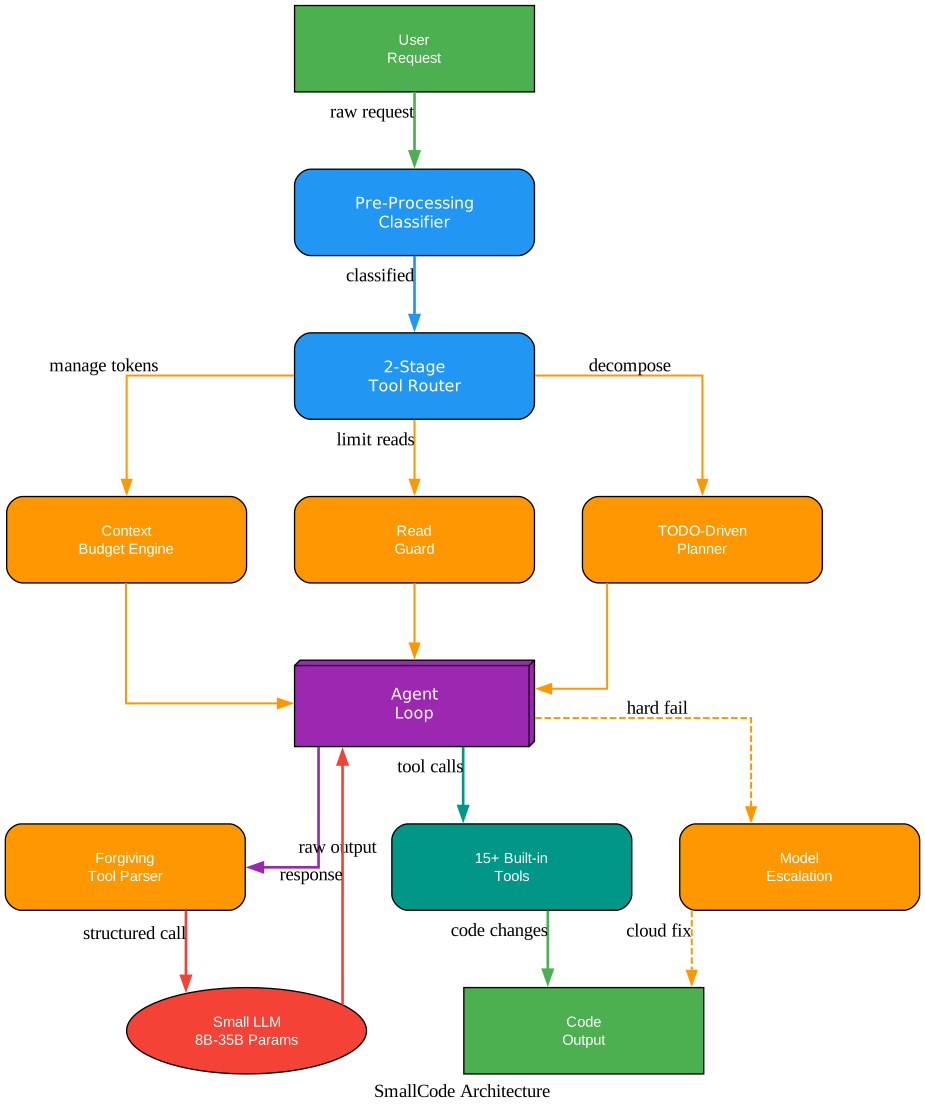
The architecture diagram above shows how SmallCode processes a user request. Raw input first passes through a deterministic message classifier (zero tokens), then a 2-stage tool router that selects only the relevant tool schemas. Three optimization features – the Context Budget Engine, Read Guard, and TODO-Driven Planner – prepare the prompt before it reaches the Agent Loop. The Forgiving Tool Parser handles messy model output, and the 15+ built-in tools execute code changes. If the local model hard-fails after all retries, optional Model Escalation falls back to a cloud API. Every architectural decision flows from the constraint of small context windows and unreliable model output.
What is SmallCode?
SmallCode is an open-source, terminal-native AI coding agent built in JavaScript (Node.js) and specifically designed to extract useful work from local models in the 8B-35B parameter range. Unlike tools built for frontier models, SmallCode compensates for the limitations of small models through intelligent architecture rather than assuming unlimited capability.
The headline number: 87% single-file task success rate (87 out of 100 tasks) using a Gemma 4 E4B model – a Mixture-of-Experts architecture with only ~4B active parameters per forward pass. This outperforms OpenCode and Pi Agent running on models 3-4x larger. For multi-file tasks, SmallCode achieves 46% overall (rising to 60%+ with BoneScript integration).
The recommended model size is 8B-35B parameters. Smaller models (4B and below) struggle with multi-step tool use and lose context across turns. Larger models (35B+) do not need SmallCode’s adaptations and are better served by tools designed for frontier models. The sweet spot is models like Qwen3 8B, Qwen2.5-Coder 14B, and Devstral Small that balance capability with the ability to run on consumer hardware.
SmallCode runs as a fullscreen terminal UI (TUI) with an alternate buffer, mouse tracking, and bracketed paste support. A --classic fallback provides a readline interface for terminals with display issues. The agent always restores your terminal on exit – including when suspended with Ctrl+Z or when it crashes.
How SmallCode Optimizes for Small LLMs
SmallCode’s optimization strategy is fundamentally different from agents built for large models. Instead of assuming the model can handle anything, SmallCode designs every layer around the model’s constraints.
Context Budget Engine
Small models have 8-32k context windows. The Context Budget Engine ensures the agent never exceeds this limit. Tool results are capped at a configurable number of characters (default 8000, roughly 240 lines). Mid-turn eviction drops old results when context grows too large. Semantic compression summarizes history instead of dropping it. The budget percentage is configurable via SMALLCODE_CONTEXT_BUDGET (default 70%).
2-Stage Tool Routing
Sending all 20 tool definitions every single time wastes 800+ tokens per call – a significant portion of a small model’s context. SmallCode uses a weighted regex scoring system across eight categories (read, write, search, run, plan, code-intelligence, web, respond). The winning category decides which tool schemas get included. A “respond” classification injects zero tools. On very small context windows (under 16k), the system switches to two-stage routing: the first call picks a category, the second gets the actual tools.
Read Guard
When live context usage exceeds the budget or a file alone exceeds 50% of the model’s window, the Read Guard returns the first 30 lines (imports and signatures) plus an explicit directive to use grep or read a smaller line range. This replaces the dumb fixed-byte cap with context-aware truncation that preserves the most useful information.
Forgiving Tool Parser
Small models produce messy output. SmallCode parses tool calls from JSON, YAML, XML, Hermes format, Liquid AI’s <|tool_call_start|> markers, or plain text. It auto-repairs common mistakes like wrong parameter names and type mismatches. It falls back to scanning reasoning_content when content is empty (for LM Studio reasoning models). This is critical: without a forgiving parser, small models fail on tool calling far too often.
TODO-Driven Planning
Small models drift. By turn four of a six-turn task, they have often forgotten what step three was supposed to accomplish. SmallCode detects multi-step tasks and injects a one-shot instruction asking the model to emit a numbered plan before any tool calls. The plan gets re-injected as a running anchor on every subsequent turn, showing which steps are complete and which is current. This is the single biggest reliability improvement for multi-file tasks.
Patch-First Editing
Small models are unreliable at reproducing whole files – they truncate, hallucinate imports, and drift in indentation. SmallCode uses search-and-replace patch as the primary edit primitive. A surgical patch that touches 10 lines is orders of magnitude more reliable than rewriting 300 lines, and it is cheaper on context. When a patch fails because the old string no longer matches, a semantic merge fallback asks the model to merge the intended change into the current file content.
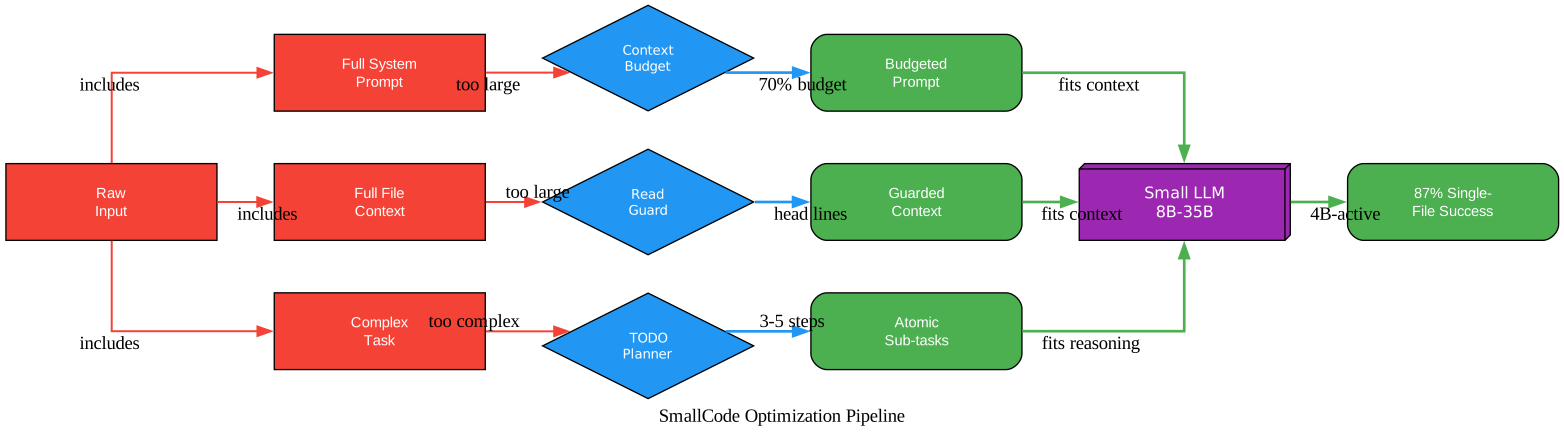
The optimization pipeline diagram shows how raw input flows through three optimization stages. Full system prompts are budgeted by the Context Budget Engine, full file context is guarded by the Read Guard, and complex tasks are decomposed by the TODO Planner. The optimized outputs – a budgeted prompt, guarded context, and atomic sub-tasks – all fit within the small LLM’s context window and reasoning capability, enabling the 87% single-file success rate with a 4B-active model.
Takeaway: The optimization pillars – context budgeting, 2-stage tool routing, and forgiving tool parsing – are not just performance tricks. They represent a fundamentally different approach to building AI coding agents: instead of assuming unlimited model capability, SmallCode designs the agent around the model’s constraints, making small models reliable coding partners.
Benchmark Results and Performance
SmallCode’s benchmarks were run with huihui-gemma-4-e4b-it-abliterated – a Gemma 4 MoE model with only ~4B active parameters per forward pass (8B total). This is significantly smaller than the 14B-27B models typically used in OpenCode and Pi Agent benchmarks.
Single-File Task Success Rate
| Category | SmallCode (4B-active) | OpenCode (est. 14B) | Pi Agent (est. 14B) |
|---|---|---|---|
| Python | 100% (10/10) | ~85% | ~90% |
| JavaScript | 80% (8/10) | ~75% | ~80% |
| TypeScript | 100% (10/10) | ~80% | ~85% |
| HTML/CSS | 100% (10/10) | ~90% | ~90% |
| Rust | 50% (5/10) | ~40% | ~45% |
| Go | 90% (9/10) | ~75% | ~80% |
| Data Structures | 100% (10/10) | ~80% | ~85% |
| Testing | 70% (7/10) | ~60% | ~65% |
| Bug Fixing | 80% (8/10) | ~65% | ~70% |
| Overall | 87% (87/100) | ~75% | ~80% |
Multi-File Task Success Rate
| Category | SmallCode | OpenCode (est.) | Pi Agent (est.) |
|---|---|---|---|
| Python multi | 80% | ~50% | ~55% |
| JS multi | 100% | ~60% | ~65% |
| TS multi | 60% | ~45% | ~50% |
| Web multi | 100% | ~70% | ~70% |
| Rust multi | 20% | ~20% | ~25% |
| Go multi | 20% | ~25% | ~30% |
| Fullstack | 0%->80% (w/ BoneScript) | ~35% | ~40% |
| Config | 20% | ~30% | ~35% |
| Refactor | 20% | ~25% | ~30% |
| Overall | 46% (60%+ w/ BoneScript) | ~40% | ~45% |
SmallCode achieves a 12 percentage point lead over OpenCode and 7 points over Pi on single-file tasks, despite using a model with 1/3 the active parameters. The harness engineering – compound tools, improvement loop, token budgeting, and the governor – compensates for model size.
Amazing: A 4B-active parameter model running SmallCode matches or exceeds the coding performance of agents running 14B+ models on standard benchmarks. This means you can run a capable AI coding assistant on a consumer laptop with 8GB VRAM instead of requiring cloud API access or expensive GPU hardware.
Why SmallCode Outperforms With a Smaller Model
- Compound tools reduce tool call chains (one call vs 3-4) – critical for tiny models that lose coherence after 3+ sequential calls
- Improvement loop auto-validates and feeds errors back – the model does not need to be smart enough to get it right first try
- Forgiving parser handles messy JSON from small models that cannot reliably produce valid tool calls
- Token budgeting prevents context overflow – a 4B model with 8k effective context needs every token managed
- Decompose strategy breaks failed tasks into chunks the small model can handle individually
- The model is 3-4x smaller than what OpenCode/Pi were benchmarked with – SmallCode’s harness engineering makes up the difference
Where Small Models Still Fall Short
Rust and Go multi-file tasks remain challenging at 20% success. Complex refactoring across many files (20%) and configuration tasks (20%) also struggle. These are areas where larger models with deeper reasoning capability still have an advantage. SmallCode’s BoneScript integration helps with fullstack tasks (boosting them from 0% to 80%), but general multi-file coordination remains a work in progress.
Supported Small LLMs
SmallCode supports any OpenAI-compatible endpoint, which covers the major local inference runtimes and cloud API providers.
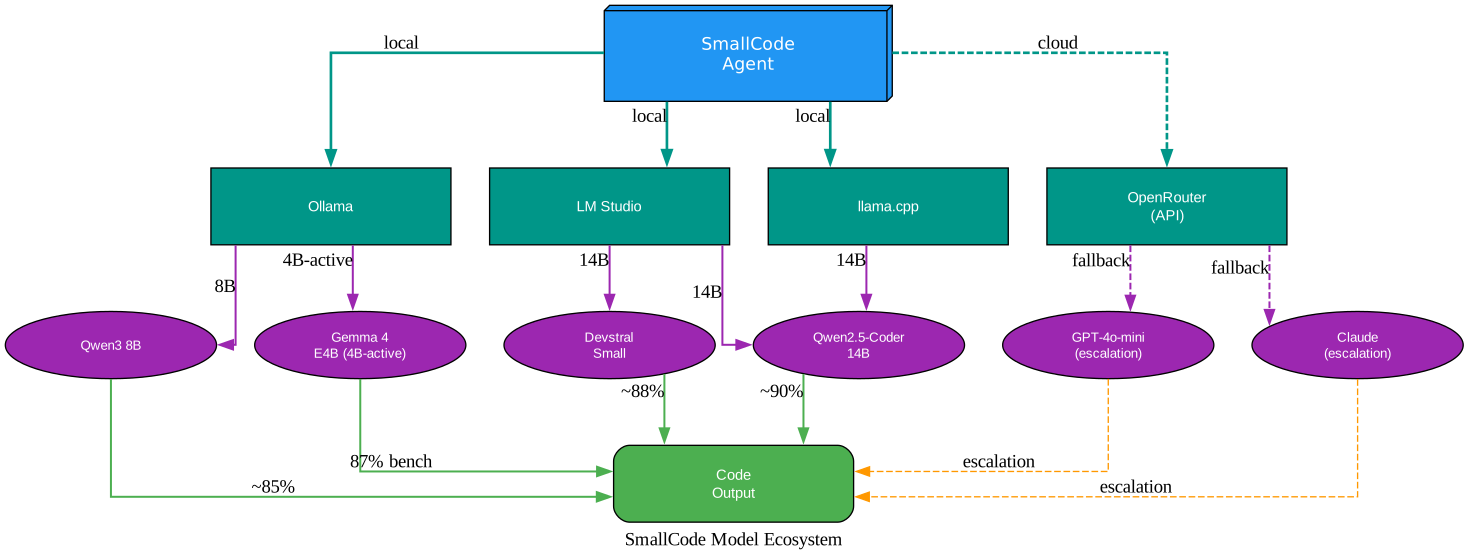
The model ecosystem diagram shows SmallCode connecting to four runtime categories. Ollama and LM Studio provide local inference for models like Qwen3 8B and Gemma 4 E4B. llama.cpp offers lightweight local inference for Qwen2.5-Coder 14B and Devstral Small. OpenRouter provides cloud API access for escalation fallback to GPT-4o-mini or Claude when the local model hard-fails. Each model’s approximate benchmark performance is shown, with the 4B-active Gemma 4 E4B achieving the headline 87% single-file rate.
Local Runtimes
| Runtime | Description | Best For |
|---|---|---|
| Ollama | One-command model management | Quick setup, model switching |
| LM Studio | GUI-based model server | Visual model management |
| llama.cpp | Lightweight C++ inference | Minimal overhead, GGUF models |
Profiled Models
SmallCode ships with model profiles that auto-adapt prompting strategy:
| Model | Context | Tool Format | Strengths | Weaknesses |
|---|---|---|---|---|
| Qwen3 8B | 32k | Hermes | Reasoning, code completion, tool calling | Very long context, multi-file coordination |
| Qwen2.5-Coder 14B | 32k | Hermes | Code completion, refactoring, debugging, multi-language | Long planning |
| Devstral Small | 32k | Native | Code completion, agentic coding, tool calling | Very long planning |
Hardware Requirements
| Model Size | VRAM Required | Hardware Example |
|---|---|---|
| 4B-active (8B MoE) | 6-8 GB | RTX 3060, M1 Mac |
| 8B dense | 8-12 GB | RTX 3070, M2 Mac |
| 14B dense | 12-16 GB | RTX 3080, M3 Pro |
| 20-35B | 16-24 GB | RTX 3090, M4 Max |
Escalation Targets (Cloud Fallback)
When the local model hard-fails after retry and decompose, SmallCode can optionally escalate to a stronger cloud model. This is fully opt-in and requires an API key:
- Claude Sonnet 4.5 / 4.6, Haiku 4.5
- GPT-5.4 Mini / Nano
- DeepSeek V4 / V4 Pro / V4 Flash
Session-limited to 5 escalations by default (configurable via SMALLCODE_ESCALATION_MAX) to prevent runaway costs.
Installation and Setup
Prerequisites
- Node.js 18+ (LTS recommended – 20.x or 22.x have prebuilt binaries for SQLite)
- Python 3 + Git for the RAG scraper/indexer (optional)
- A local LLM server (LM Studio, Ollama, or any OpenAI-compatible endpoint)
Install via npm
# Install globally
npm install -g smallcode

# Or run directly with npx (no install needed)
npx smallcode

# Start in your project directory
cd my-project
smallcode
# Or use the packaged command alias:
smolv2
Prebuilt Binaries (No Node.js Needed)
For systems without Node.js, pre-compiled tarballs bundle Node.js plus all native addons:
| Platform | Install Command |
|---|---|
| Linux / macOS | bash <(curl -fsSL https://raw.githubusercontent.com/Doorman11991/smallcode/master/install.sh) |
| Windows | iwr -Uri https://raw.githubusercontent.com/Doorman11991/smallcode/master/install.ps1 -UseBasicParsing \| iex |
Configure Your Model
Create a .env file in your project root:
# Required
SMALLCODE_MODEL=your-model-name
SMALLCODE_BASE_URL=http://localhost:1234/v1

# Optional: escalation (auto-fallback to cloud on hard fail)
# ANTHROPIC_API_KEY=sk-ant-...
# OPENAI_API_KEY=sk-...
# OPENROUTER_API_KEY=sk-or-v1-...
Or use smallcode.toml for structured configuration:
[model]
provider = "openai"
name = "qwen3:8b"
baseUrl = "http://localhost:11434/v1"

[models.strong]
name = "openai/gpt-4o-mini"
baseUrl = "https://openrouter.ai/api/v1"

[context]
max_budget_pct = 70
working_memory_tokens = 500

[tools]
enabled = ["read_file", "write_file", "patch", "bash", "search", "find_files", "symbols", "memory", "plan"]
bash_timeout = 30

[planner]
auto_plan = true
max_retries = 2
validate_after_edit = true

[escalation]
max_per_session = 5
confirm = true
Interactive Provider Wizard
Instead of hand-editing configuration, use the built-in wizard:
# In the SmallCode REPL
/provider

# Or check current provider status
/provider status
The wizard walks through provider selection (LM Studio, Ollama, OpenRouter, OpenAI, Anthropic, DeepSeek, custom), base URL, API key validation, and model name. It saves to ~/.config/smallcode/.env (global) or ./.env (project).
Multi-Model Routing
SmallCode can route each model tier to a different endpoint, keeping fast work local while sending complex tasks to a larger model:
SMALLCODE_MODEL=qwen3:8b
SMALLCODE_BASE_URL=http://localhost:11434/v1

SMALLCODE_MODEL_STRONG=openai/gpt-4o-mini
SMALLCODE_BASE_URL_STRONG=https://openrouter.ai/api/v1
OPENROUTER_API_KEY=sk-or-v1-...
Usage Examples
Basic Usage with Ollama
# Start Ollama with a model
ollama pull qwen3:8b

# Start SmallCode in your project
cd my-project
smallcode

# SmallCode auto-detects Ollama at localhost:11434
# Or set explicitly in .env:
# SMALLCODE_MODEL=qwen3:8b
# SMALLCODE_BASE_URL=http://localhost:11434/v1
Programmatic API
Use SmallCode as a library in your own tools or CI pipelines:
const { SmallCode } = require('smallcode');

const agent = new SmallCode({
  model: 'gemma-4-e4b',
  baseUrl: 'http://localhost:1234/v1',
});

// Run a task
const result = await agent.run("create hello.py that prints hello world");
console.log(result.filesCreated);  // ['hello.py']
console.log(result.toolCalls.length);  // 1
console.log(result.success);  // true

// Subscribe to events
agent.on('tool_start', ({ name, args }) => console.log(`Using: ${name}`));
agent.on('tool_end', ({ name, ms }) => console.log(`Done: ${name} (${ms}ms)`));
agent.on('error', (err) => console.error(err));
Running Benchmarks
SmallCode includes a benchmark harness to measure pass rate against any local model:
# Quick smoke test (5 tasks, ~30s)
npm run bench:smoke

# Multi-language benchmark (19 tasks)
npm run bench:polyglot

# Tool-use benchmark (10 multi-step tasks)
npm run bench:tools

# Compare two benchmark runs
npm run bench:diff bench/baselines/main bench/baselines/feature
RAG Index for Code Retrieval
# Build the local GitHub RAG database
npm run rag:index

# Broader multi-language corpus
npm run rag:index -- --preset broad

# Or after install:
smallcode-rag-index --preset broad
Key TUI Commands
| Command | Description |
|---|---|
/budget | Context window budget with visual bar |
/tokens | Detailed token usage report |
/plan | Show current task plan |
/model | Show or switch model |
/profile | Show detected model profile and routing mode |
/memory | Show working memory |
/contract | Definition-of-Done contract management |
/skill | Manage reusable skills |
/provider | Configure LLM provider (interactive wizard) |
/sessions | List or resume saved sessions |
/trace | List, show, or export execution traces |
Comparison with Alternatives
| Feature | SmallCode | OpenCode | Pi Agent |
|---|---|---|---|
| Target | 8B-35B local models | Frontier models (Claude, GPT) | Any model, minimal harness |
| Context | Budget-managed, summarized | Dumps everything | Tiny system prompt |
| Tool calling | Forgiving multi-format parser | Assumes reliable JSON | Standard parser |
| Planning | TODO-file decomposed steps | Single-shot | None |
| Editing | Search-and-replace patch | Full file write | Standard edit |
| Privacy | Fully local, no network needed | API calls to cloud | Depends on model |
| Model escalation | Auto-fallback to cloud on fail | Single model | None |
| Memory | SQLite + FTS5, typed | None | None |
| Plugin system | Tools, commands, hooks, prompts | Skills (prompt templates) | Extensions + Skills |
| Code graph | Budget-aware MCP | Full file reads | None |
| Compound tools | Yes (read_and_patch, etc.) | No | No |
| Governor | Bayesian tool scoring | None | None |
| Hard fail protection | Refuses to deliver broken code | None | None |
| Install | npm install -g smallcode | npm install -g opencode-ai | npm install -g @anthropic-ai/pi |
When to Use SmallCode
- You want to run a coding agent locally on consumer hardware
- Privacy matters – your code never leaves your machine
- You have an Ollama or LM Studio setup with 8B-35B models
- You want automatic cloud fallback only when needed
When to Use OpenCode Instead
- You have reliable access to Claude or GPT-5 APIs
- You need LSP integration for rich diagnostics
- You want multi-session parallel agents
- You prefer a desktop app (Electron)
Important: SmallCode proves that the future of AI coding assistance is not exclusively tied to ever-larger models. By optimizing the agent architecture for small model constraints, developers can run capable coding assistants locally, preserving privacy, reducing costs, and eliminating dependency on cloud API availability.
Conclusion
SmallCode demonstrates that intelligent agent architecture can compensate for model size limitations. With 87% single-file task success using a 4B-active MoE model, it outperforms agents running models 3-4x larger. The key innovations – context budgeting, 2-stage tool routing, forgiving tool parsing, TODO-driven planning, and patch-first editing – are not generic optimizations. They are specific compensations for the limitations of small models, evolved through real-world testing on consumer hardware.
The best use cases for SmallCode are local development on consumer hardware, privacy-sensitive projects where code must never leave the machine, resource-constrained environments like laptops with 8GB VRAM, and edge deployment scenarios. Getting started is straightforward: install with npm install -g smallcode, configure your model endpoint, and start coding.
As small models continue to improve – Qwen3 8B already shows strong reasoning capability, and future models will only get better – SmallCode’s optimizations will compound. The agent architecture that makes a 4B model useful today will make an 8B model even more capable tomorrow, all running on the same consumer hardware.
Links:
- GitHub: Doorman11991/smallcode
- npm: smallcode
- Architecture docs: ARCHITECTURE.md
- Benchmark comparison: COMPARISON.md
- RAG harness docs: docs/rag-harness.md
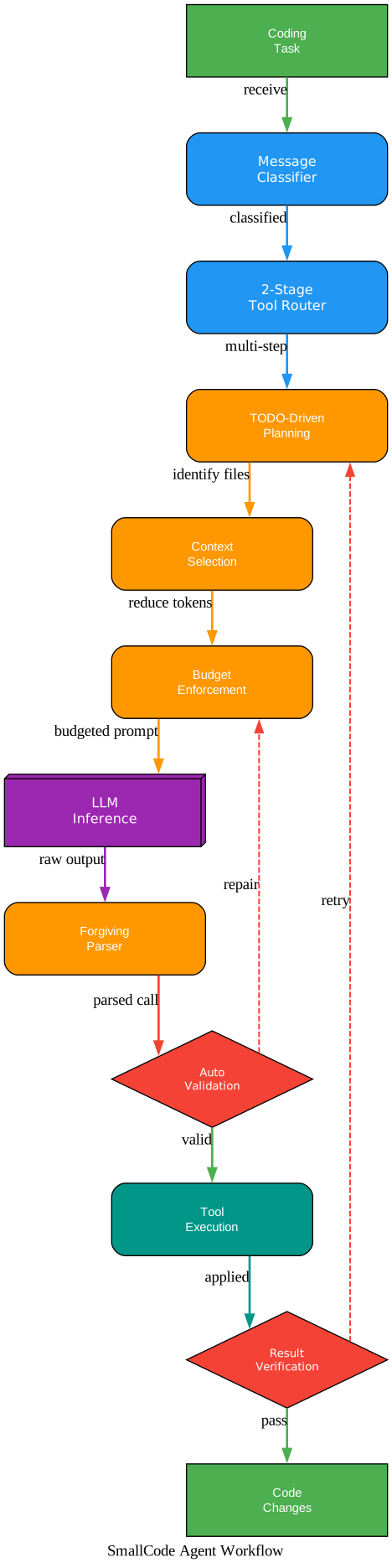
The agent workflow diagram illustrates the complete execution path from receiving a coding task to producing code changes. The message classifier and 2-stage tool router prepare an optimized prompt. The Context Budget Engine and Read Guard enforce token limits. After LLM inference, the Forgiving Tool Parser handles messy output. Auto-validation checks the result, and if it fails, the parser repairs and retries. The Result Verification step either passes the changes to output or triggers a retry loop back to planning. This multi-layered safety net is what enables a 4B-active model to achieve 87% reliability. Enjoyed this post? Never miss out on future posts by following us