OpenSEO: An Open-Source Pay-As-You-Go Alternative to Semrush and Ahrefs
If you have ever tried to run serious SEO work without an enterprise budget, you already know the pain. Ahrefs’ cheapest plan starts around $129 per month, and Semrush is in the same bracket. For an indie hacker, a solo content site, or a small agency, that is real money spent every month whether you use the tools or not. OpenSEO takes a different position: it is an open-source, pay-as-you-go SEO platform that you can self-host, fork, and connect to the AI agent of your choice. Instead of renting access to a closed SaaS dashboard, you run the tool and you own the workflow.
Introduction
OpenSEO is described by its maintainers as an “open source alternative to Semrush and Ahrefs.” It is built by the team at Every App and lives at github.com/every-app/open-seo. The project bundles the core SEO workflows you actually reach for every day – keyword research, rank tracking, competitor insights, backlinks, site audits, and AI visibility – and exposes them through a modern web UI and a Model Context Protocol (MCP) server that AI agents such as Claude Code, OpenClaw, and Hermes can call directly.
The key idea is that SEO data is not free, but it should not require a subscription either. OpenSEO uses DataForSEO as its data backend, and you pay only for the API calls you actually make. You can try the hosted version at openseo.so for $10 a month (which includes $10 of usage), or you can self-host and pay DataForSEO directly at cost. Either way, there are no seats, no locked-in tiers, and no bloat you are forced to pay for.
This post walks through what OpenSEO is, why it exists, how its architecture fits together, how the MCP and Agent Skills layer works, how to self-host it with Docker or Cloudflare, what it costs, and how to install and use it day to day.
Why OpenSEO
The dominant SEO tools were designed for a world before AI agents. They assume a human clicks through a dashboard, exports a CSV, and pastes it somewhere else. They also assume that the same human is happy to pay a flat subscription every month regardless of whether they ran ten queries or ten thousand. OpenSEO challenges both assumptions.
No subscriptions, pay only for what you use. OpenSEO’s cost model is tied to real API usage. When you self-host, you bring your own DataForSEO API key and pay DataForSEO directly. The hosted version adds a 28% markup on top of DataForSEO’s rates and bundles $10 of usage into the $10 monthly plan, so for light users the effective price is close to zero.
Built for AI agents first. OpenSEO ships an MCP server as a first-class citizen, not an afterthought. The same data you see in the UI – keyword metrics, SERP results, domain overviews, backlink profiles, rank tracker positions, and Google Search Console signals – is available as typed tools an agent can call mid-conversation. This means an agent can research keywords, cluster them, save the promising ones back to your project, and hand you a content plan to review.
Modern, focused UI. Instead of a sprawling enterprise suite, OpenSEO focuses on the workflows people actually use: keyword research, rank tracking, competitor insights, backlinks, site audits, and AI visibility. The interface is built with TanStack and TypeScript, validated end to end with Zod, and runs on SQLite for local development or Postgres for production.
Fork and extend. Because it is fully open source, you can fork the repo, wire in your own data sources, add custom MCP tools, and ship a tailored SEO tool that fits your team. The project even ships a set of Agent Skills (reusable markdown workflows) for common SEO tasks like keyword clustering, competitor analysis, and link prospecting.
Bring your own data backend. You are not locked into a single provider for SEO data. DataForSEO is the default, but the architecture is built so the data layer is pluggable, and Google Search Console data is free and does not consume your paid credits.
How It Works
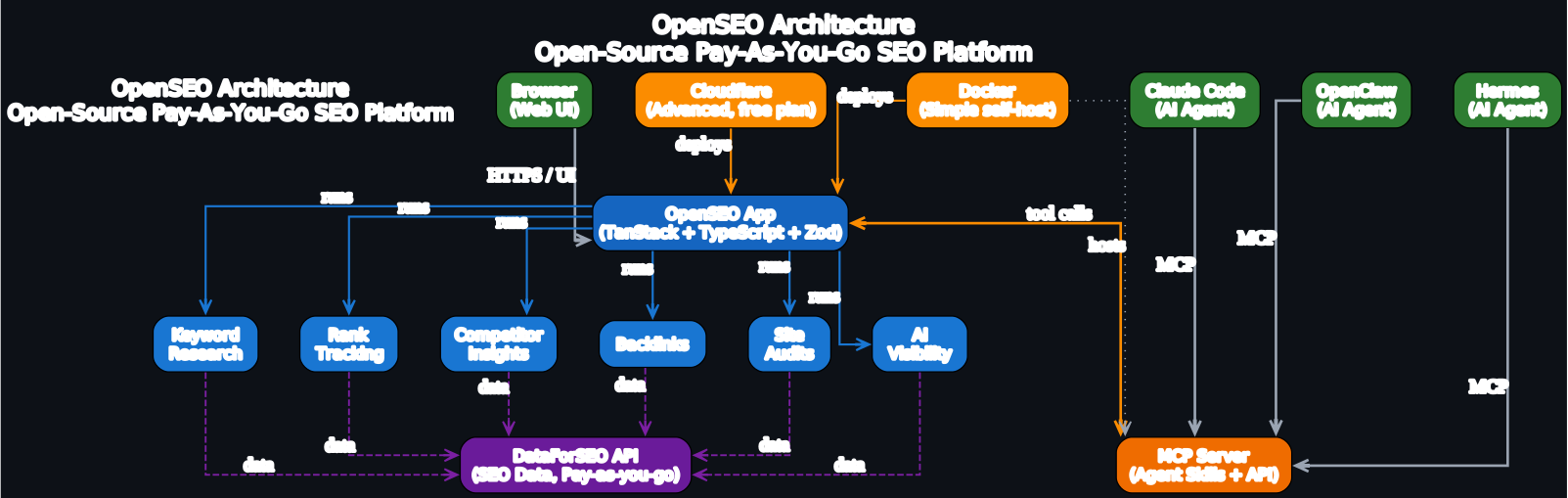
OpenSEO is a layered application. At the top are the entry points: a browser-based UI for humans and MCP clients for AI agents. In the middle is the OpenSEO application itself, which runs the six core SEO workflows. Below that sit the MCP server (which exposes those workflows as agent-callable tools) and the DataForSEO API (which provides the underlying SEO data). On the side are the two self-hosting paths: Docker for a simple local install and Cloudflare for an internet-facing deployment.
Understanding the Architecture
The architecture diagram above maps out how every piece of OpenSEO fits together, from the person or agent making a request down to the SEO data provider that ultimately answers it. Let us walk through each layer and the connections between them, because the design choices here are what make OpenSEO different from a closed SaaS tool. The diagram uses a consistent color scheme to communicate role rather than decoration, and every edge is labeled to make the data flow explicit.
The top layer: users and entry points. OpenSEO has two categories of clients at the top of the diagram, both rendered in green to signal that they are input sources. The first is a regular Browser, which a human uses to open the OpenSEO web UI over HTTPS and interact with the dashboards directly. The second category is AI agents – Claude Code, OpenClaw, and Hermes – which do not use the UI at all. Instead, they speak the Model Context Protocol and talk to OpenSEO programmatically. This split is deliberate: the same data and the same workflows are available to both a human clicking around and an agent writing a content brief, so you never end up with a tool that only works one way.
The middle layer: the OpenSEO application. The blue OpenSEO App node in the center is the heart of the system. It is a TypeScript application built on the TanStack stack, with Zod schemas validating every request and response, and it runs on either SQLite (for local and small deployments) or Postgres (for production and team use). The app node is colored blue because it is a process layer: it receives requests, runs business logic, and orchestrates the SEO workflows. From this central node, six arrows fan out to the feature nodes – Keyword Research, Rank Tracking, Competitor Insights, Backlinks, Site Audits, and AI Visibility. Each of these is a self-contained workflow that the app exposes both in the UI and as MCP tools. The arrow label “runs” captures the relationship: the app owns and executes these workflows rather than delegating them to an external service.
The bottom-left: the MCP server and Agent Skills. The orange MCP Server node sits at the bottom left and is the integration point for AI agents. It is colored orange because it is a tool layer – a bridge between external agents and the internal application. The three AI agent nodes at the top connect down to this MCP server with edges labeled “MCP”, representing the protocol they share. From the MCP server, a bidirectional edge labeled “tool calls” runs to the OpenSEO App, indicating that the server forwards tool invocations to the app and returns results back. Agent Skills are reusable markdown workflows that live alongside the MCP server and guide an agent through multi-step SEO tasks such as keyword clustering or competitor teardowns. The bidirectional arrow matters because it shows that the MCP server is not a one-way pipe: an agent both calls tools and receives typed results it can act on.
The bottom-right: the DataForSEO backend. The purple DataForSEO API node at the bottom right is the data backend, colored purple to mark it as an external backend service. Every feature node has a dashed purple arrow running down to it with the label “data”. The dashed style signals that this is an outbound data fetch rather than an internal call, and the purple color signals that the data lives outside OpenSEO. This is the layer you pay for on a per-request basis, and it is also the layer you can swap or extend if you want to bring in additional data sources. Because the data fetch happens at the feature level rather than the app level, each workflow can independently decide which endpoints it needs and how to cache results.
The side: self-hosting options. Finally, the orange Docker and Cloudflare nodes on the side represent the two self-hosting paths, colored orange because they are deployment tools rather than runtime components. Docker is the simple path for a single machine or a personal install, while Cloudflare is the advanced path for an internet-facing deployment that works even on the free plan. Both deploy edges point up to the OpenSEO App, with a “deploys” label, and Docker also has a dotted “hosts” edge to the MCP server, indicating that the deployment also brings the MCP server online alongside the app. This is what lets an agent reach OpenSEO the moment your deployment is up.
The data flow end to end. Reading the diagram top to bottom gives you the full request path. A browser hits the app directly over HTTPS, while an agent first hits the MCP server, which then calls into the app. The app runs the requested workflow among the six feature nodes, and that workflow in turn issues a dashed data request down to DataForSEO. Results flow back up the same chain, and any saved artifacts (keywords, audits, tracked positions) land in your OpenSEO project so you can review them in the UI later. The deployment tools on the side sit outside this request path, which is why they are drawn as a side input rather than a stage in the pipeline.
The overall shape – agents and browsers at the top, an app process in the middle, an MCP tool layer and a data backend at the bottom, and deployment tools on the side – is what gives OpenSEO its flexibility. You can run it locally with Docker, point an agent at the MCP server, plug in your own DataForSEO key, and have a fully private SEO pipeline without ever touching a proprietary SaaS account.
MCP and AI Agent Integration
The MCP server is the feature that most clearly separates OpenSEO from traditional SEO tools. Instead of forcing you to copy data out of a dashboard, OpenSEO exposes its workflows as typed tools that an MCP-compatible agent can call directly.
The MCP server supports the major tool groups you need for real SEO work:
- Keywords: research keywords with volume, difficulty, and CPC; pull live SERP results for a keyword; save promising ideas back to your project; and read rank-tracker positions.
- Competitive research: get a domain overview, find keywords a domain already ranks for, and inspect backlink and referring-domain stats.
- Search Console: read clicks, impressions, CTR, and position from a connected Google Search Console property, and inspect URLs for index coverage and rich-result signals. GSC data is free and does not consume your paid credits.
The server works with Claude Code, Cursor, Codex, OpenClaw, Hermes, and any other client that speaks MCP. Setup instructions for each client are maintained in the OpenSEO MCP docs. Because the tools return typed output (validated with Zod), an agent can chain calls together: it can research a seed keyword, cluster the results, save the best candidates, pull the live SERP for each, and then summarize where you can realistically compete.
OpenSEO also ships a set of Agent Skills – reusable markdown workflows that guide an agent through common SEO tasks. These include keyword-research, keyword-clustering, competitive-landscape, competitor-analysis, link-prospecting, seo-audit, seo-coach, and seo-project-setup. Skills are how you turn a generic agent into one that knows how to do SEO the way an experienced practitioner would. You can use the bundled skills, fork them, or write your own. Setup details are in the skills docs.
A representative agent session looks like this:
> find and cluster keywords for openseo.so

openseo.keyword_research(seed: "open source seo")
  keyword                      volume     kd
  open source seo              1,300      12
  open source seo tools        720        9
  self-hosted seo platform     210        4

Saved 3 keywords to your workspace.
View data in app: app.openseo.so/keywords
The agent calls the MCP tool, OpenSEO fetches real data from DataForSEO, and the saved keywords show up in your project so you can review them in the UI. That round trip – agent to MCP to app to data backend and back – is the loop the architecture diagram describes.
Self-Hosting
OpenSEO supports two self-hosting paths, and you can choose based on whether you need a personal tool or an internet-facing deployment.
Simple: Docker. Docker is the recommended path for getting started and for personal use. The default compose.yaml uses the published GHCR image ghcr.io/every-app/open-seo:latest, runs with AUTH_MODE=local_noauth (a local admin user admin@localhost), and is meant to be exposed only behind your own auth-protected reverse proxy, tunnel, or private network. Full instructions are in the Docker self-hosting guide.
Advanced: Cloudflare. Cloudflare is the path for internet-facing self-hosting across multiple devices or with a team. A single deploy command provisions the D1 database, KV namespaces, R2 bucket, applies migrations, deploys the Worker, and creates the Cloudflare Access login gate. Importantly, it works on Cloudflare’s free plan, although you do need R2 enabled (which requires a payment method on file even within the free tier). Full instructions are in the Cloudflare self-hosting guide.
Either way, you need a DataForSEO API key to get SEO data. The key setup is documented in the DataForSEO API key guide, and the value is the base64 encoding of email:password from your DataForSEO account.
Pricing
OpenSEO’s pricing is usage-based, which is the core of its value proposition next to flat-rate incumbents.
Hosted version. The hosted plan at openseo.so/pricing is $10 per month and includes $10 of usage every month. That single plan includes keyword research, backlinks, rank tracking, and site audits, and it works inside Claude, Cursor, and ChatGPT via the MCP server. Google Search Console data is free and does not touch your $10. If you need more, you can buy top-up credits at any time, and those top-up credits never expire. A free trial with $0.50 of credits is available so you can test the product before subscribing. For comparison, Ahrefs’ cheapest plan is $129 per month, so for a light-to-moderate user the savings are substantial.
Self-hosting. When you self-host, you pay DataForSEO directly at their per-request rates, with no markup. The OpenSEO team notes that self-hosting costs are slightly lower than the estimates on the pricing page, because the hosted service funds itself by charging roughly 28% extra on every DataForSEO request. In other words, self-hosting is the cheapest path if you are comfortable running the deployment yourself.
Credits are consumed only by features that actually query DataForSEO – backlinks, keyword volume, competitor data, and site audits. Your projects, settings, and any data you have already fetched do not cost credits, and Google Search Console reads are free.
Installation
The fastest way to run OpenSEO is with Docker. You need Docker Desktop (or Docker Engine plus Docker Compose) and a DataForSEO API key.
# Clone the repository
git clone https://github.com/every-app/open-seo.git
cd open-seo

# Copy the example environment file
cp .env.example .env
Open .env and set your DataForSEO API key. The value should be the base64 encoding of email:password from your DataForSEO account, in the format described in the DataForSEO API key guide:
DATAFORSEO_API_KEY=<base64 of email:password>
Then start OpenSEO:
docker compose up -d
Open http://localhost:3001 (the default port) in your browser. The first start builds the app and may take one to two minutes; you can follow progress with docker compose logs -f. A health check is available at /api/health, and docker compose ps reports container health.
If you put Docker behind a reverse proxy or a temporary tunnel, remember that Docker self-hosting runs with app auth disabled, so you should only expose it behind your own auth-protected reverse proxy, tunnel, or private network, and set the public hostname before restarting:
ALLOWED_HOST=yourdomain.com docker compose up -d
For the Cloudflare path, the fastest route is the “Deploy to Cloudflare” button in the Cloudflare self-hosting guide. Click the button, connect your Git provider, leave the resource naming fields at their defaults, and click “Create and Deploy”. The deploy provisions the D1 database, KV namespaces, and R2 bucket, applies the migrations, and stands up the Worker for you:
# After the deploy button finishes, open the Worker in the Cloudflare dashboard
# Compute -> Workers & Pages -> your OpenSEO Worker -> Settings
Then configure authentication and secrets in the Cloudflare dashboard. Enable Cloudflare Access on the workers.dev route so only your allowed emails can reach the app, and add the following variables under Settings -> Variables & Secrets:
POLICY_AUD=<from Cloudflare Access setup>
TEAM_DOMAIN=<your-team>.cloudflareaccess.com
DATAFORSEO_API_KEY=<base64 of email:password>
Optionally, add an R2 lifecycle rule so cached DataForSEO responses under the dataforseo-cache/ prefix are cleaned up automatically instead of accumulating:
npx wrangler r2 bucket lifecycle add open-seo dataforseo-cache-expiry dataforseo-cache/ --expire-days 7
The whole stack runs on Cloudflare’s free plan. The only requirement that touches billing is R2, which needs a payment method on file to activate even within its free tier.
Usage
Once OpenSEO is running, the day-to-day workflow is the same whether you self-host or use the hosted version. You create a project for the site you are working on, connect Google Search Console if you have it (free data, no credit cost), and then use the six core workflows.
Keyword research takes a seed keyword and returns ideas with volume, difficulty, and CPC, which you can save back to your project for clustering and tagging:
openseo.keyword_research(seed: "open source seo")
Rank tracking lets you monitor keyword positions over time, with weekly or daily frequency options. Competitor insights pull a domain overview and the keywords a competitor already ranks for. Backlinks inspect referring domains and link quality. Site audits crawl your pages and surface technical issues categorized by severity. AI visibility reviews how your brand is mentioned across AI search platforms.
To connect an AI agent, point your MCP client at the OpenSEO MCP server URL (documented in the MCP setup guide). From that point on, the agent can call the same tools you use in the UI. A typical agent-driven first pass is to research a topic, cluster the saved keywords by intent, check the live SERP for each cluster, and hand back a content plan you can act on directly in OpenSEO.
Common maintenance commands for a Docker deployment:
# Restart after env changes
docker compose up -d open-seo

# Pull the latest image and restart
docker compose pull && docker compose up -d

# Stop
docker compose down
If you want to disable the anonymized telemetry that OpenSEO collects (heartbeats with aggregate counts, no URLs, keywords, prompts, emails, or IP-derived location), set OPENSEO_TELEMETRY_DISABLED=1 in .env and recreate the container:
docker compose up -d --force-recreate open-seo
Conclusion
OpenSEO is a genuinely different take on SEO tooling. Instead of asking you to pay $129 a month for a closed dashboard, it gives you an open-source application you can run yourself, a pay-as-you-go cost model tied to real API usage, and a first-class MCP server that lets AI agents do the repetitive parts of SEO work for you. The architecture – users and agents at the top, an app process in the middle, an MCP tool layer and a DataForSEO backend at the bottom, and Docker or Cloudflare on the side – is simple enough to understand in one diagram and flexible enough to fork into something custom.
For indie hackers, solo content creators, small agencies, and anyone who wants their SEO data plugged directly into an AI agent workflow, OpenSEO is worth a serious look. The hosted version at $10 a month is the lowest-friction way to start, and self-hosting with Docker is the path to take if you want to pay DataForSEO at cost and keep everything on infrastructure you control. Either way, you are no longer renting access to someone else’s closed platform.
Key Links:
- GitHub: https://github.com/every-app/open-seo
- Website: https://openseo.so
- Pricing: https://openseo.so/pricing
- MCP docs: https://openseo.so/docs/mcp
- Agent Skills docs: https://openseo.so/docs/skills
- Docker self-hosting: docs/SELF_HOSTING_DOCKER.md
- Cloudflare self-hosting: docs/SELF_HOSTING_CLOUDFLARE.md
- DataForSEO: https://dataforseo.com
- Discord community: https://discord.gg/c9uGs3cFXr

Enjoyed this post? Never miss out on future posts by following us


