The Mac mini has quietly become the default answer to a question that used to require a data center: where do I run an open-weight LLM on hardware I own? In August 2026 Apple refreshed the line with the Mac mini M6 and the Mac mini M5 Pro — the first Mac mini with Neural Accelerators in every GPU core — while the previous M4 and M4 Pro generation remains on sale, refurbished, and in clusters all over the internet. This post is a deep research pass over what the community has actually measured: which mini to buy, what models each configuration can hold, how fast they decode, what time-to-first-token feels like, and how to stitch several minis into a cluster that runs models no single machine can.
Two numbers decide everything on Apple Silicon. The first is unified memory capacity, because the model weights and the KV cache both live in it. The second is memory bandwidth, because autoregressive decode reads every weight of the active model once per token — bandwidth is the ceiling on tokens per second. Price, watts, and cores matter far less than these two.
We went through Apple’s newsroom and configurator, community benchmark sites (InsiderLLM, SpecPicks, RunAIHome, compute-market), published arXiv runtime studies, and the EXO cluster ecosystem. Every speed figure below comes from those sources and every claim links to its source so you can double-check it; none is invented. Where sources disagree we quote the consistent range and say so.
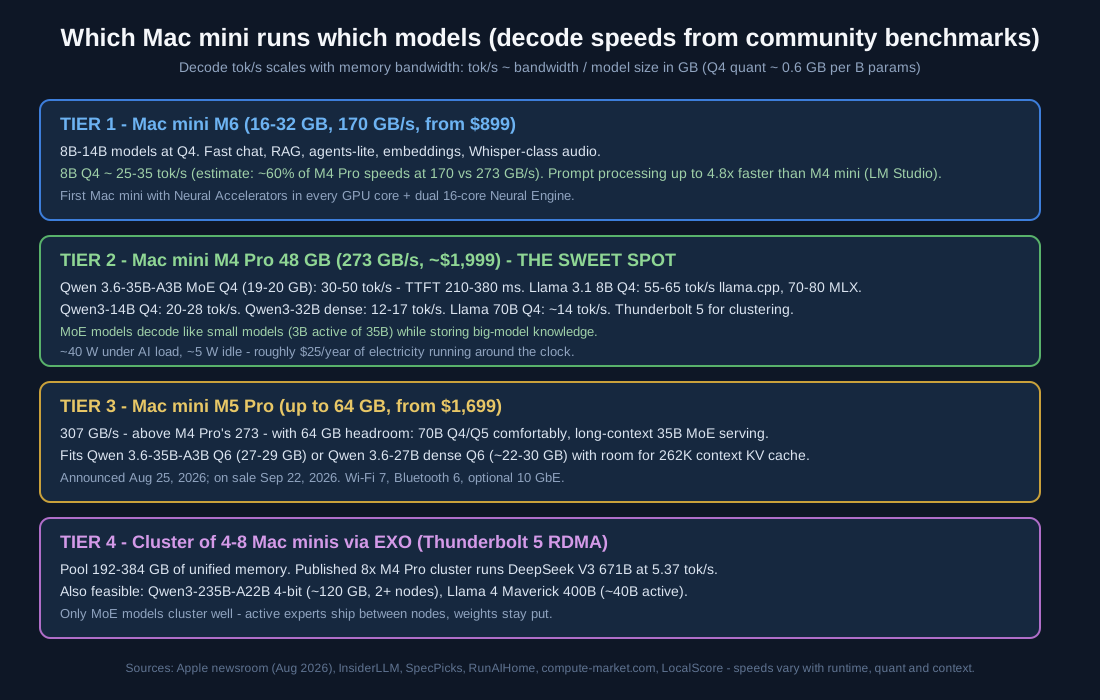
The four buying tiers: M6 base for 8B-14B models, M4 Pro 48 GB as the sweet spot, M5 Pro for 70B-class and long context, and a cluster for 671B-parameter MoE models.
Reading the overview from top to bottom: each tier adds memory and bandwidth, and the runnable model class jumps accordingly — from 8B chat models on the $899 M6, to the Qwen 3.6-35B-A3B MoE sweet spot on a 48 GB M4 Pro, to 70B quantized dense models on the 64 GB M5 Pro, and finally to frontier 671B MoE models pooled across a Thunderbolt 5 cluster.
Why a Mac mini for Local AI
Unified memory is the trick. On a PC you buy VRAM separately from RAM, and consumer GPUs cap out at 16-32 GB. Apple’s unified memory is one pool addressable by CPU and GPU, so a $1,999 mini with 48 GB loads a 40 GB quantized model where a similarly priced PC would swap to system RAM and crawl. There is no VRAM ceiling to design around — the memory slider in the configurator is your model-size budget.
The mini sips power. Community measurements put the M4 Pro mini around 5 W idle and roughly 40-45 W under sustained AI load — about $25 of electricity per year even running around the clock. Compare that with a multi-hundred-watt GPU workstation, and the mini’s total cost of ownership beats almost anything per delivered token.
The software stack is mature in 2026. MLX (Apple’s own array framework) and llama.cpp both run natively on Metal; LM Studio and Ollama sit on top of them with one-click model downloads and OpenAI-compatible servers. A published arXiv study (arXiv:2511.05502) ranking five Apple Silicon runtimes found MLX fastest for steady-state throughput, MLC-LLM lowest time-to-first-token, and llama.cpp the compatibility king — and in most side-by-side tests MLX lands 30-50% ahead of llama.cpp at 14B and above, which is why every number below notes the runtime.
Decode Throughput: the Bandwidth Rule
Decode speed on Apple Silicon obeys a simple rule of thumb: tokens per second ≈ memory bandwidth ÷ model size in gigabytes. A Q4 quantization runs about 0.6 GB per billion parameters, so an 8B model in Q4 is roughly a 5 GB read per token. Real-world decode lands at 50-80% of that theoretical ceiling depending on runtime, context length, and quant format — but the rule predicts which machine runs what, fast.
Here is the bandwidth ladder, and what it means in practice:
| Chip | Bandwidth | Theoretical 8B Q4 decode | Measured reality (source) |
|---|---|---|---|
| Mac mini M6 | 170 GB/s | ~34 tok/s | Prompt processing up to 4.8x faster than M4 mini in LM Studio (Apple newsroom); decode expected at ~60% of M4 Pro speeds |
| Mac mini M4 | 120 GB/s | ~24 tok/s | 17.7 tok/s at 8B, 9.6 tok/s at 14B (LocalScore community runs) |
| Mac mini M4 Pro | 273 GB/s | ~55 tok/s | Llama 3.1 8B Q4: 55-65 tok/s llama.cpp, 70-80 tok/s MLX (SpecPicks) |
| Mac mini M5 Pro (307 GB/s) | 307 GB/s | ~61 tok/s | Same decode class as M4 Pro with 64 GB memory headroom (InsiderLLM M5 guide) |
| Mac Studio M4 Max | 546 GB/s | ~110 tok/s | 70B Q4 ~28 tok/s (RunAIHome) |
| Mac Studio M5 Max | 614 GB/s | ~120 tok/s | 8B 100-120 tok/s; 70B Q5 15-20 tok/s (RunAIHome) |
The M-series pecking order for decode is therefore: M6 base mini → M4/M5 Pro mini → Max/Ultra studios. What makes the M4 Pro 48 GB mini the community’s sweet spot is not raw speed — it is the combination of 273 GB/s, 48 GB of memory, Thunderbolt 5, and a ~$1,999 price. On it, per InsiderLLM’s benchmarks: Qwen 3.6-35B-A3B (MoE, 3B active) runs 30-50 tok/s, Qwen3-14B Q4 runs 20-28 tok/s, a 32B dense model runs 12-22 tok/s depending on the model and quant (SpecPicks measured Qwen3-32B at 12-17), and a 70B model at Q3 still manages 5-7 tok/s.
Mixture-of-Experts models are the decode cheat code: only the active parameters are read per token, so a 35B-total MoE with 3B active decodes like a 3B model while storing 35B parameters of knowledge. That is why MoE dominates the 2026 local-model leaderboards on Mac.
TTFT: Time to First Token and Prompt Processing
Decode speed is only half the experience. Time-to-first-token (TTFT) is dominated by prompt processing (prefill) — the model must read your entire prompt before the first token can emerge. Prefill is compute-bound rather than bandwidth-bound, which is exactly where the new M6’s Neural Accelerators and the Pro chips’ extra GPU cores pay off.
Apple’s own headline metric for the M6 mini, measured with LM Studio: LLM prompt processing up to 13.5x faster than the M1 mini and 4.8x faster than the M4 mini (Apple newsroom). On the M4 Pro side, community measurements fill in the picture (LM Studio, Q4_K_M quants, 8,192-token context, M4 Pro 48 GB):
| Model | TTFT, short prompt (~ping) | TTFT, news-article prompt | Decode tok/s |
|---|---|---|---|
| Qwen 3.6-35B-A3B (MoE) | ~210 ms | ~380 ms | 50-59 |
| Gemma 4 26B-A4B (MoE) | ~240 ms | ~410 ms | 50-59 |
| Gemma 4 31B (dense) | ~520 ms | ~890 ms | 15-18 |
The MoE models win on both axes — faster prefill and double the decode. That is the 2026 local-AI pitch in one table. (The TTFT rows are community LM Studio measurements on an M4 Pro 48 GB with Q4_K_M quants at 8,192-token context; MetriLLM’s published run of Qwen 3.6-35B-A3B on the same machine cross-checks a 147 ms first chunk, 72.7 tok/s decode, and 19.6 GB of RAM.)
For long prompts, a 48 GB M4 Pro measured with a community prefill benchmark sustained roughly 673 tokens/second of prompt processing: a 512-token prompt adds under a second of wait (about 0.76 s), a 4,096-token prompt about 6.1 s, and a 32,768-token prompt about 48.7 s. You can reproduce these numbers yourself with LocalScore or MetriLLM, both of which publish full per-run hardware and runtime details.
One caution from the LocalScore numbers on the base M4 mini: small-model TTFT figures in some public benchmarks (1.2-13 s) include model cold-load time, not just prefill. Keep models warm in memory and TTFT collapses to the hundreds-of-milliseconds range shown above.
What Each Configuration Can Run
Matching model files to memory budgets (Q4 quants, leaving headroom for KV cache and macOS):
| Memory | Fits (Q4) | Best 2026 picks | Expected speed (M4/M5 Pro class) |
|---|---|---|---|
| 16 GB (M6 base) | 8B-9B, 14B tight | Qwen 3.5 9B, Llama 3.1 8B, Gemma 4 small | ~25-35 tok/s (est.), fast chat + RAG |
| 24 GB (M6/M4 Pro base Pro) | 35B MoE at Q4 (~19-21 GB) | Qwen 3.6-35B-A3B — SWE-bench Verified 73.4, Apache 2.0, 262K context (measured: 72.7 tok/s, 19.6 GB RAM) | 30-50 tok/s, TTFT 210-380 ms |
| 48 GB (M4 Pro max) | 32B dense, 70B at Q3-Q4 (~40 GB) | Qwen 3.6-27B dense (SWE-bench 77.2), Gemma 4 31B, Llama 3.3 70B | 12-22 tok/s dense; ~14 tok/s 70B Q4 |
| 64 GB (M5 Pro) | 70B Q4/Q5 + big KV, 35B MoE at Q6 | Same 70B class with 262K contexts, or Qwen 3.6-35B-A3B Q6 (27-29 GB, weights on Ollama) for max quality | 70B Q4 ~14 tok/s |
| Cluster (192-384 GB pooled) | 235B-671B MoE | DeepSeek V3 671B (5.37 tok/s on 8 nodes), Qwen3-235B-A22B 4-bit (~120 GB, 2+ nodes), Llama 4 Maverick 400B | Cluster-dependent, latency-tolerant workloads |
The 2026 model to install first is unambiguous from the benchmarks: Qwen 3.6-35B-A3B (April 2026, Apache 2.0) — 35B total/3B active parameters, 262K context extendable to 1M via YaRN, 73.4% on SWE-bench Verified, ~44 tok/s even on an M4 Max. Its dense sibling Qwen 3.6-27B scores higher still (77.2) but decodes like the 32B dense models. For vision-plus-text, Qwen 3.8-27B ships image input with a hybrid linear-attention design, and DeepSeek V4-Flash (284B/13B active, MIT license, 1M context) is the cluster-tier alternative.
Clustering Mac Minis with EXO
In April 2026, macOS 26.2 added kernel-level RDMA over Thunderbolt 5, and EXO 1.0 shipped day-0 support for it. EXO (open source, from EXO Labs) partitions one model across machines, routes activations over the fastest link available — TB5 RDMA, then 10 GbE, then Wi-Fi — and exposes an OpenAI-compatible endpoint. EXO Labs reports about a 99% reduction in inter-node latency versus the previous transport, with RDMA round-trips in the 1-3 microsecond range (source).
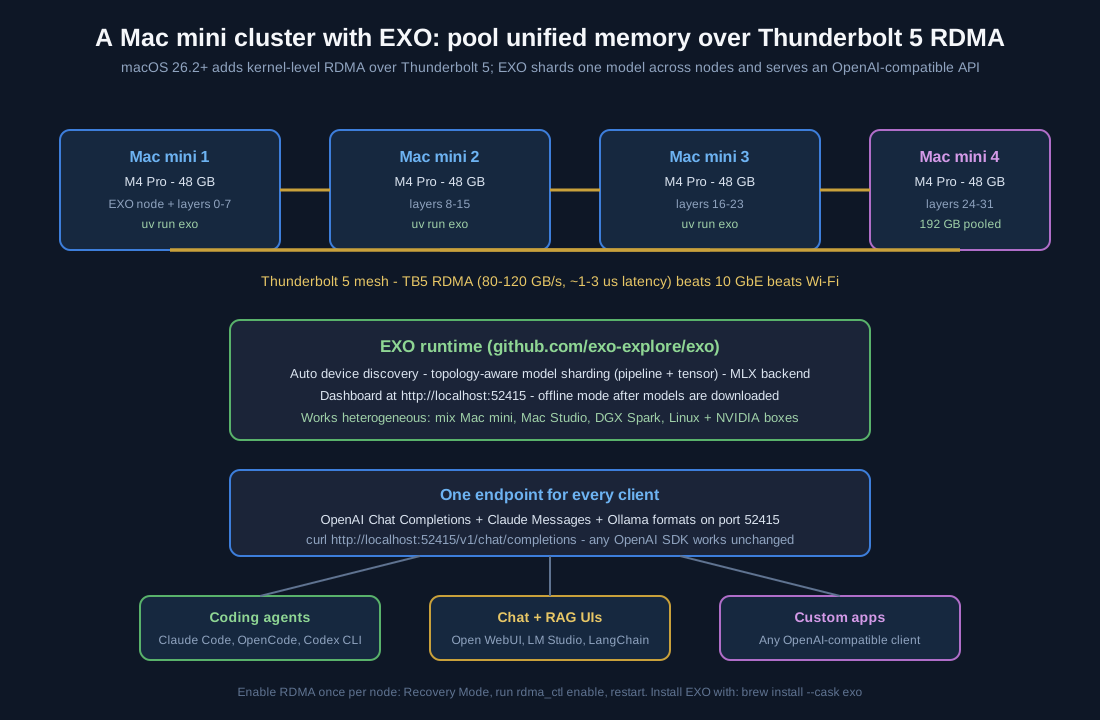
A four-node M4 Pro mini cluster pools 192 GB of unified memory; EXO shards model layers across nodes and serves OpenAI, Claude, and Ollama-compatible APIs on port 52415.
The published result that made clusters mainstream: 8x M4 Pro Mac minis running DeepSeek V3 671B at 5.37 tokens per second. Slow by chat standards, but it is a frontier 671B model served from eight $1,400-class desktops — a category that previously required an H100 cluster. Only MoE models cluster well: DeepSeek V3 computes just 37B of its 671B parameters per token, so the network only ships small expert activations while the weights sit still on each node.
Setup is deliberately boring. On every node (macOS 26.2 or later):
# Simplest: the macOS app
brew install --cask exo

# Or from source
git clone https://github.com/exo-explore/exo
cd exo/dashboard && npm install && npm run build && cd ..
uv run exo
Enable RDMA once per Thunderbolt 5 node (Recovery Mode, run rdma_ctl enable, restart), connect 2-4 nodes with direct TB5 cables, launch EXO on each — nodes discover each other automatically — and open the dashboard at http://localhost:52415. Any OpenAI-compatible client then just works:
curl http://localhost:52415/v1/chat/completions \
  -H "Content-Type: application/json" \
  -d '{"model": "mlx-community/Qwen3-235B-A22B-4bit", "messages": [{"role": "user", "content": "Explain model sharding simply."}]}'
Community measurements put EXO scaling at up to 1.8x single-model speedup with 2 nodes and up to 3.2x with 4. The cluster also works heterogeneously — mixing Mac minis, Mac Studios, NVIDIA DGX Spark units, and Linux GPU boxes — and after downloading models it runs fully offline.
Where to Buy and What to Pay
From Apple’s newsroom and live configurator (announced August 25, 2026; available September 22, 2026):
| Configuration | Price (USD) | Notes |
|---|---|---|
| Mac mini M6, 16 GB/256 GB | from $899 | Entry tier; 8B-14B models |
| Mac mini M6, 24 GB/512 GB | $1,299 | Fits 35B-A3B Q4 at Q3-class quality; 32 GB is +$200 |
| Mac mini M5 Pro, from | from $1,699 | Up to 18-core CPU, 20-core GPU, 64 GB memory, 8 TB storage |
| Mac mini M4 Pro (previous gen) | $1,399-$1,999 | 24-48 GB; the current cluster workhorse via refurb/retail |
| 10 Gb Ethernet option | +$100 | Worth it for 3+ node clusters without TB5 |
| China pricing (source) | RMB 6,999 / 12,999 | Education: RMB 6,199 / 12,199; orders opened Aug 27, 2026 |
Buy from apple.com/shop/buy-mac/mac-mini (configurator with education pricing), the Apple Certified Refurbished store — the practical source of M4 Pro 48 GB units for clusters — or retail channels like Amazon and B&H for the previous generation. In China, apple.com.cn opened orders August 27, 2026 with September 22 availability.
Our concrete buying advice, per tier: tinkerer — M6 24 GB ($1,299) runs the 8B-9B class all day. Developer who codes with local agents — M4 Pro 48 GB (~$1,999), the sweet spot that runs Qwen 3.6-35B-A3B at 30-50 tok/s. Pro/prosumer — M5 Pro with 64 GB if you need 70B-class models or long-context serving headroom. Frontier-model hobbyist — four M4 Pro 48 GB minis (~$6,000-8,000) with EXO and TB5, or eight if you want 671B.
Conclusion
The best Mac mini for local AI in 2026 is not one machine — it is a memory-and-bandwidth ladder, and you pick your rung. The bandwidth rule (tok/s ≈ bandwidth ÷ model GB) predicts decode speed within a factor of two across the whole line; MoE models like Qwen 3.6-35B-A3B multiply what 24-48 GB can do; MLX buys 30-50% over llama.cpp at the top end; and EXO plus Thunderbolt 5 RDMA turns the humble mini into a scalable cluster for frontier-scale MoE models. Buy the most unified memory your budget allows, prefer MoE checkpoints at Q4, keep models warm, and scale sideways with Thunderbolt 5 when the model outgrows the box.
Links
- Apple newsroom: Mac mini with M6 and M5 Pro
- Apple: Buy Mac mini and Apple Certified Refurbished Mac minis
- EXO — github.com/exo-explore/exo and exolabs.net
- MLX / mlx-lm, llama.cpp, LM Studio, Ollama
- Benchmark sources: InsiderLLM (M5 Pro/Max guide, local models for OpenClaw guide), SpecPicks, RunAIHome, MetriLLM published runs, LocalScore, compute-market.com Mac mini cluster guide, compute-market MLX vs llama.cpp, local-llm.net MLX vs llama.cpp, LLMCheck on Qwen 3.6-35B-A3B, Qwen 3.6-35B weights on Ollama (BatiAI quants), MLX OptiQ Qwen family guide, Devoxx Genie EXO guide, arXiv:2511.05502, BaseRT (arXiv:2607.00501)

Enjoyed this post? Never miss out on future posts by following us


