If the Mac mini is the entry point to local AI, the Mac Studio is where the ceiling disappears. In August 2026 Apple refreshed the Studio with the Mac Studio M5 Max and the Mac Studio M5 Ultra — the first Mac built on a quad-die UltraFusion chip, with up to 512 GB of unified memory and 1.2 TB/s of memory bandwidth (Apple newsroom). This is the machine class that runs frontier-scale open-weight models — Llama 3.1 405B, Llama 4 Maverick 400B, DeepSeek V3 671B — entirely on a desk, with no cloud and no token meter. This post is a deep research pass over what reviewers and the community have actually measured: which Studio to buy, how big a model each memory tier holds, what tokens-per-second to expect at every size, what time-to-first-token feels like, and how clustering works when one Studio is not enough. Every number below links to its source so you can double-check it.
Two numbers decide everything here, same as on the mini. Memory capacity sets how big a model you can load at all; memory bandwidth sets how fast it decodes, because autoregressive generation streams every active weight through memory once per token. The Studio’s whole reason to exist is that it pushes both numbers to the limit of what a silent desktop can dissipate.
We went through Apple’s newsroom and official tech specs, hands-on reviews (MacStories, Tom’s Hardware, 9to5Mac), and the community benchmark aggregators tracking real runs (Presenc AI, ModelFit, LLMCheck, llamaperf, SpecPicks, PromptQuorum, Contra Collective, RunAIHome). Where sources disagree we quote the consistent range and say so; where a figure is an estimate rather than a measurement, the source marks it as one.
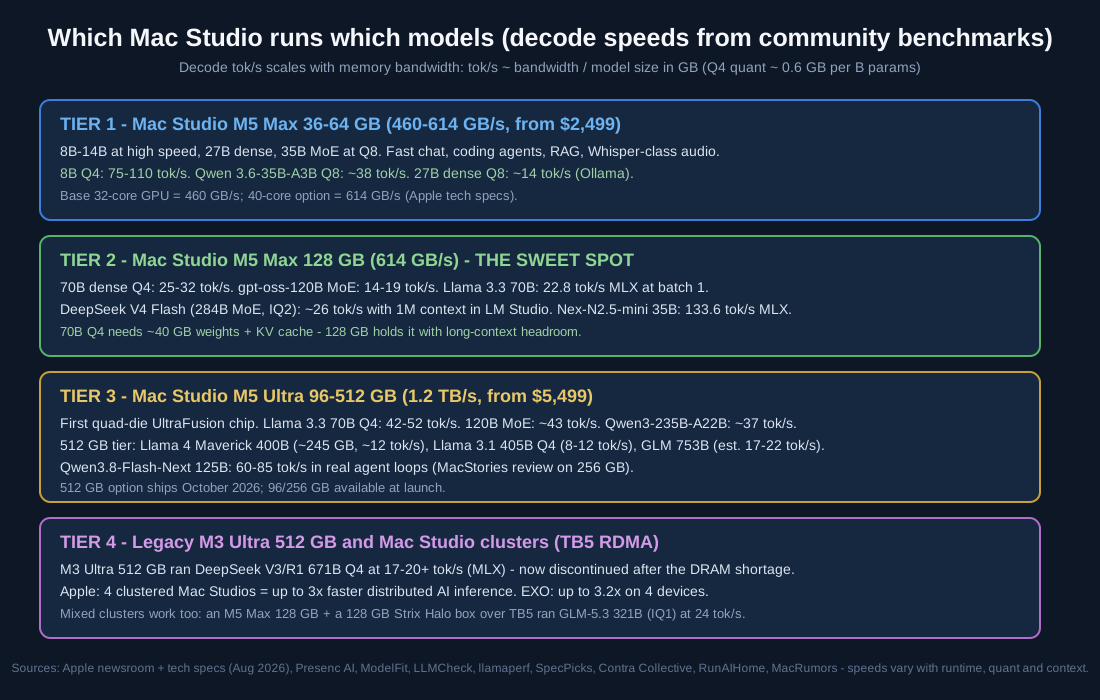
The four buying tiers: M5 Max 36-64 GB for the 8B-35B class, M5 Max 128 GB as the 70B sweet spot, M5 Ultra up to 512 GB for frontier-scale models, and the legacy M3 Ultra plus clusters.
Reading the overview from top to bottom: each tier multiplies both the memory and the biggest runnable model — from the 27B-35B class on a 36-64 GB M5 Max, to 70B-class and 120B MoE models on 128 GB, to 235B-753B models on the 96-512 GB M5 Ultra tiers, and finally to the retired-but-legendary M3 Ultra 512 GB and multi-Studio clusters that pool memory over Thunderbolt 5.
Why a Mac Studio for Local AI
It is the memory, and then it is the bandwidth. A consumer GPU tops out at 32 GB of VRAM (the RTX 5090), which holds an 8B-14B model comfortably and a 70B model not at all without CPU offload — and offload over PCIe collapses effective bandwidth to a fraction of the GPU’s own. The M5 Ultra’s 512 GB pool holds models no consumer GPU can even address, at 1.2 TB/s — bandwidth that Apple notes is 50 percent higher than the M3 Ultra. As one Presenc AI benchmark roundup puts it, NVIDIA wins raw tokens-per-second at small model sizes, while Apple wins gigabytes-per-dollar at 70B and above (Presenc AI).
The decode rule still applies. Tokens per second ≈ memory bandwidth ÷ model size in GB, with Q4 quants at roughly 0.6 GB per billion parameters. A 70B model at Q4 (~40 GB) on the M5 Max’s 614 GB/s decodes at a theoretical ~15 tok/s ceiling; MLX’s overlapping of loads and compute pushes real throughput above that, which is exactly what the measurements below show (SpecPicks). MoE models break the rule in your favor: only the active experts stream per token, which is why a 671B-total DeepSeek can outrun a 70B dense model on the same machine (RunAIHome).
It is still a silent desktop. The M3 Ultra famously ran the full DeepSeek R1 671B while drawing under 200 W — roughly a tenth of a comparable multi-GPU rig (MacRumors). The new generation adds Wi-Fi 7, Bluetooth 6, and standard 10 Gb Ethernet, with up to six Thunderbolt 5 ports (Apple tech specs).
The 2026 Lineup: M5 Max and M5 Ultra
| Configuration | Chips and bandwidth | Memory options | Price | Source |
|---|---|---|---|---|
| Mac Studio M5 Max (base) | 18-core CPU, 32-core GPU, 460 GB/s | 36 GB, up to 128 GB | from $2,499 | Apple tech specs |
| Mac Studio M5 Max (40-core GPU) | 18-core CPU, 40-core GPU, 614 GB/s | 48/64/128 GB | configurable | Apple tech specs |
| Mac Studio M5 Ultra (base) | 30-core CPU, 64-core GPU, 1.2 TB/s | 96 GB, up to 512 GB | from $5,499 | Apple tech specs |
| Mac Studio M5 Ultra (max) | 36-core CPU, 80-core GPU, 1.2 TB/s | 256/512 GB, 16 TB SSD | configurable | Apple tech specs |
Announced August 25, 2026, on sale September 22, 2026 (Apple newsroom). The M5 Ultra is Apple’s first quad-die chip — effectively two dual-die M5 Max fused by next-generation UltraFusion — with up to 4.3x the peak AI compute of the M3 Ultra and 9.8x that of the M1 Ultra (Apple). The M5 Max claims up to 3.9x faster AI performance than its predecessor, aimed squarely at prompt processing (Apple newsroom). Note the launch caveat: at launch the top M5 Ultra memory option is 256 GB, with the 512 GB tier shipping in October 2026 (MacRumors).
The generational jump is real but not uniform: review roundups put the M5 Ultra 20-30 percent over the M3 Ultra in CPU, GPU, and Neural Engine scores (9to5Mac), and Tom’s Hardware’s review found it outpacing NVIDIA’s DGX Spark on prompt processing with roughly 2x the throughput of the M4 Max (Tom’s Hardware).
Decode Throughput: What the Community Measured
The single best cross-hardware table published in 2026 comes from Presenc AI’s benchmark roundup, which aggregates public runs from the llama.cpp discussions, the MLX repository, and Hugging Face’s blog. Single-stream decode at Q4 quantization:
| Hardware | 7B | 13B | 30B | 70B | 120B (gpt-oss) |
|---|---|---|---|---|---|
| RTX 5090 (32 GB) | 130-150 | 85-105 | 40-55 (offload) | 14-22 (offload) | does not fit |
| Mac Studio M4 Max (128 GB) | 75-90 | 50-65 | 30-40 | 18-24 | 10-14 |
| Mac Studio M5 Max (128 GB) | 95-110 | 65-85 | 40-52 | 25-32 | 14-19 |
| Mac Studio M5 Ultra | 120-140 | 85-105 | 55-70 | 32-42 | 20-26 |
| NVIDIA DGX Spark (128 GB) | 105-125 | 75-95 | 50-65 | 35-45 | 20-28 |
All figures are community-aggregated tok/s at Q4, single stream (Presenc AI). The pattern: the M5 Max wins outright over the M4 Max by 15-25 percent on 70B-class decode (SpecPicks), and the M5 Ultra’s 1.2 TB/s lifts every class by roughly a further 25-40 percent.
Per-model measured runs worth reading in full:
- Llama 3.3 70B on M5 Max: 22.8 tok/s decode with mlx-lm at batch 1, rising to 52.1 tok/s aggregate at batch 8; llama.cpp is close at batch 1 (21.4) and wins prefill on long inputs (Contra Collective).
- Llama 3 8B / 70B on M5 Max 128 GB: about 75 tok/s and 18 tok/s respectively at Q4_K_M under MLX (PromptQuorum).
- Qwen3.8-27B on M5 Max 128 GB: 87.8 tok/s decode at 64k context on the Splash engine, and a community-measured 133.6 tok/s for the Nex-N2.5-mini 35B MoE at 4-bit MLX (llamaperf).
- DeepSeek V4 Flash (284B MoE) on M5 Max 128 GB: about 26 tok/s generation and 190 tok/s prompt processing at IQ2 quantization with the full 1M-token context in LM Studio (llamaperf).
- M5 Ultra (512 GB), the frontier tier: Llama 3.3 70B Q4 at 42-52 tok/s, a 120B MoE at about 43 tok/s, Llama 4 Maverick 400B at about 12 tok/s, and Llama 3.1 405B Q4 at 8-12 tok/s, compiled by ModelFit and Contra Collective (ComputeLeap/dev.to); LLMCheck’s index for the same machine estimates Qwen3.8-Flash-Next (125B) at 85 tok/s, DeepSeek V4 Flash (284B) at 47 tok/s, Qwen3-235B-A22B at 37 tok/s, and the 753B GLM 5.2 at 17-22 tok/s — figures LLMCheck explicitly marks as bandwidth-model estimates (LLMCheck).
- Real agent workloads on M5 Ultra: MacStories’ review measured 60-85 tok/s sustained on multi-turn agent loops with Qwen3.8-Flash-Next on the 256 GB M5 Ultra — fast enough that the author made a fully local model the default brain of his personal agents (MacStories).
- Previous-gen M4 Max, for the refurb market: Llama 3.1 70B Q4 at 16-22 tok/s under MLX and 12-18 under llama.cpp (SpecPicks); Mistral Large 2 (123B) Q4 at 8.1 tok/s under llama.cpp with a 4.8 s cold start (markaicode); and the vllm-mlx research stack reports up to 525 tok/s on a 0.6B model with 4.3x aggregate throughput at 16 concurrent requests on M4 Max (arXiv:2601.19139).
TTFT and Prompt Processing
Prefill is where the Neural Accelerators in every GPU core earn their keep, and it is where the M5 generation made its biggest relative leap — Apple claims up to 3.9x faster AI performance than the prior generation on the M5 Max specifically for speeding up prompt processing (Apple newsroom). The measured anchors:
- The M5 Max processes a 4,000-token prompt at roughly 350-450 tok/s (Presenc AI); the M5 Ultra outpaces the DGX Spark on the same workload per Tom’s Hardware’s review (Tom’s Hardware).
- On the previous flagship, an M3 Ultra 512 GB measured 1,313 tok/s of prompt processing on an 8B model with a 780 ms time-to-first-token at 1k context, rising to 1,434 tok/s PP at 4k context (oMLX published run).
- On long inputs the runtime matters: in Contra Collective’s 70B testing, llama.cpp finished 16k-token prefills about 24 percent faster than mlx-lm, while mlx-lm won decode (Contra Collective). If your workload is RAG over long documents, test both runtimes.
- Cold starts stay practical even for huge models: the 74 GB Mistral Large quant loaded and produced its first token in 4.8 s on an M4 Max (markaicode).
Practical takeaway: at chat-sized prompts every Studio here feels instant; long-document agents are where the M5 Ultra’s compute and the runtime choice show.
How Big an LLM Each Memory Tier Can Run
macOS reserves part of unified memory, and by default the GPU can address about 75 percent of it — on a 128 GB machine that is roughly 96 GB usable for models, raisable via the iogpu.wired_limit_mb sysctl (QuelLLM). Budget KV cache on top of weights: roughly 5-20 GB depending on context length (RunAIHome).
| Memory tier | Weights that fit | The biggest models, measured or sourced estimates |
|---|---|---|
| 36-48 GB (M5 Max) | 27B dense Q8, 35B MoE Q4 | Qwen 3.6-35B-A3B at Q8, Qwen3.8-27B, Gemma 4 26B-A4B |
| 64 GB (M5 Max) | 35B MoE Q8 (~39 GB), 70B Q4 tight | 35B MoE at ~38 tok/s (ModelFit); 70B Q4 needs 128 GB for comfort (SpecPicks) |
| 128 GB (M5 Max max) | 70B Q4-Q8, 120B MoE, 284B MoE at IQ2 | gpt-oss-120B at 14-19 tok/s (Presenc AI); DeepSeek V4 Flash at ~26 tok/s with 1M context |
| 256 GB (M5 Ultra) | 235B MoE Q4, 405B Q3 | Qwen3-235B-A22B ~37 tok/s (est.); Qwen3.8-Flash-Next at 60-85 tok/s in agent loops |
| 512 GB (M5 Ultra max) | 405B Q4 (~242 GB), Maverick 400B (~245 GB), 671B Q4 (370-405 GB) | Maverick ~12 tok/s, 405B 8-12 tok/s; DeepSeek V3/R1 671B Q4 17-20+ tok/s, proven on M3 Ultra |
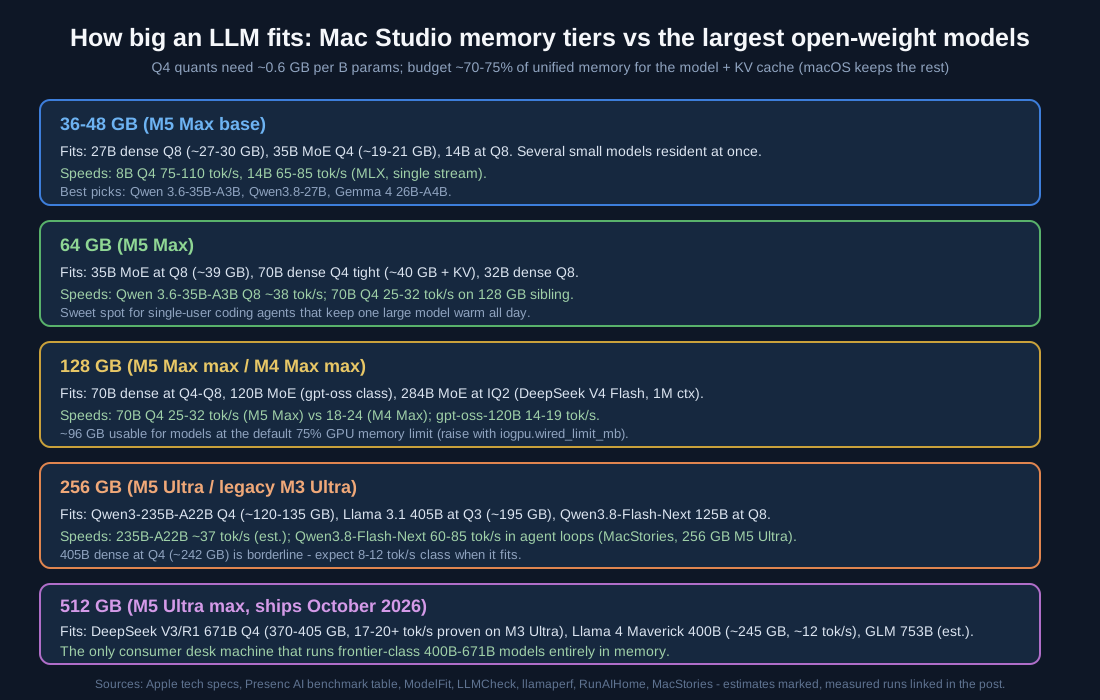
From a 36 GB M5 Max to the 512 GB M5 Ultra: the memory tier, not the chip generation, decides which model class is on the table.
The dense-versus-MoE split is the single most important practical distinction: Llama 3.1 405B (dense) streams all ~242 GB of Q4 weights per token, so it lands at 3-5 tok/s even on the old M3 Ultra; DeepSeek V3/R1 671B activates just 37B of parameters per token and ran at 17-20+ tok/s under MLX on the same machine, verified by Apple researcher Awni Hannun (RunAIHome). Choose MoE checkpoints whenever your workload allows it.
The M3 Ultra Legacy: What the 512 GB Era Proved
The M3 Ultra Mac Studio (2025, 819 GB/s, up to 512 GB) is the proof-of-concept machine the new M5 Ultra inherits from. Its headline results, all independently measured:
- DeepSeek R1 671B at 4-bit, 17-18 tok/s, consuming 404 GB of storage and under 200 W of power, in Dave2D’s hands-on (MacRumors); community runs measured 9-21 tok/s at 8-bit and 15.78-19.17 tok/s across GGUF and MLX runtimes (Quantum Bit via Juejin).
- Two M3 Ultras over Thunderbolt 5 with EXO ran the full 8-bit R1 at 11 tok/s (theoretical ~20), from EXO founder Alex Cheema’s early-unit testing (Quantum Bit via Juejin).
- Llama 3.1 405B at 3-5 tok/s — usable for batch, painful for chat (RunAIHome).
- 8B-class speed: 85 tok/s (llama.cpp, 4-bit) in cross-platform comparisons (Habr) and 102.5 tok/s with 1,313 tok/s prefill under oMLX (oMLX).
Then the DRAM shortage intervened: Apple removed the 512 GB option in March 2026 and the 192/256 GB options by May 2026, leaving a 96 GB M3 Ultra at $3,999 as the only configuration before the whole line was superseded (MacRumors, VideoCardz). The M5 Ultra restores — and raises — the big-memory Mac, with 512 GB returning in October 2026 (MacRumors). Used 192-512 GB M3 Ultras remain the second-hand bargain for 671B-class inference if you find one.
Clustering Mac Studios: Apple’s RDMA Play
The 2026 Studio ships with first-party cluster support: Thunderbolt 5 plus RDMA creates a shared memory pool across systems, and Apple says four clustered Mac Studios deliver up to 3x faster AI inference than a single system (Apple newsroom, MacRumors). RDMA over Thunderbolt 5 arrived in macOS Tahoe 26.2 and works on any Thunderbolt 5 Apple Silicon Mac, with clusters of up to five machines reported (MacRumors).
The software layer is open:
- Apple’s own MLX now ships distributed inference and fine-tuning across Macs over RDMA, demonstrated at WWDC 2026 with CLI, Python, and Swift APIs (Apple WWDC26 session).
- EXO partitions one model across machines with automatic discovery and an OpenAI-compatible API on port 52415, reporting up to 3.2x speedup with pipeline or tensor parallelism on 4 devices (EXO on GitHub, Devoxx Genie’s EXO guide). Setup is
brew install --cask exo, enable RDMA once per node withrdma_ctl enablein Recovery Mode, and connect machines with direct TB5 cables. - The community has already run mixed clusters: a 128 GB M5 Max plus a 128 GB AMD Strix Halo machine over Thunderbolt served GLM-5.3 321B at 24 tok/s generation and 333 tok/s prompt processing with a Mac-heavy tensor split (llamaperf).
Two Studios at 256 GB each pool 512 GB — the same class of memory the single-machine 512 GB tier offers, with more total bandwidth and more money spent. The honest math: for models above ~400 GB of weights, clustering is the only path; for everything below, one M5 Ultra is simpler and usually faster.
Where to Buy and What to Pay
| Configuration | Price | Notes | Source |
|---|---|---|---|
| Mac Studio M5 Max, 36 GB | from $2,499 | 8B-14B fast, 35B MoE Q4 | MacRumors roundup |
| Mac Studio M5 Max, 64-128 GB | +$200-1,000 | The 70B sweet spot; 40-core GPU = 614 GB/s | Apple tech specs |
| Mac Studio M5 Ultra, 96 GB | from $5,499 | 120B MoE class | MacRumors roundup |
| Mac Studio M5 Ultra, 256/512 GB | configurable | 512 GB ships October 2026 | MacRumors roundup |
| Mac Studio M4 Max (2025) | refurb, from ~$1,999 | Best $/tok on 70B; 15-25% slower than M5 Max | SpecPicks |
| Used M3 Ultra 192-512 GB | secondary market | The 671B-class bargain, if you find one | RunAIHome |
Buy from apple.com/shop/buy-mac/mac-studio (orders opened August 27, 2026; availability September 22, 2026 — Apple newsroom), or the Apple Certified Refurbished store for previous-generation M4 Max units — which SpecPicks’ price tracking makes the rational buy for single-user 70B workloads, since a refurb M4 Max often costs 40-50 percent less for 15-25 percent less speed (SpecPicks).
Our concrete advice per tier: prosumer — M5 Max 64 GB ($2,699-class): the 35B-70B class all day, quiet, low power. Developer running 70B-120B daily — M5 Max 128 GB with the 40-core GPU for the full 614 GB/s. Local-AI professional or small team — M5 Ultra 256 GB: frontier-class MoE models at interactive speeds, as MacStories’ review concluded after days of real agent workloads (MacStories). Frontier hobbyist — wait for the 512 GB M5 Ultra in October, or hunt a used M3 Ultra 512 GB.
Conclusion
The Mac Studio is the only consumer desktop where the question “how big a model can I run” is answered with “which frontier model do you want.” The 2026 generation widens the ladder at both ends: the M5 Max makes 70B-class decoding a comfortable 25-32 tok/s, and the quad-die M5 Ultra at 1.2 TB/s and up to 512 GB brings Llama 405B, Maverick 400B, and the DeepSeek 671B class onto a desk that draws less power than a space heater. The bandwidth rule predicts decode within a factor of two; MoE checkpoints multiply what each tier holds; Apple’s RDMA-over-Thunderbolt clustering and MLX’s distributed runtime scale you past a terabyte of pooled memory when one machine is not enough. Buy the most unified memory your budget allows, prefer MoE quants, keep models warm — and bookmark the sources above, because every number on this ladder is moving.
Links
- Apple newsroom: Mac Studio with M5 Max and M5 Ultra
- Apple newsroom: M6 and M5 Ultra chips
- Apple: Mac Studio tech specs and Buy Mac Studio and Refurbished Mac Studio
- Apple WWDC26: Distributed inference and training with MLX
- MacStories M5 Ultra review, Tom’s Hardware M5 Ultra review, 9to5Mac review roundup
- Benchmarks: Presenc AI tps roundup, ModelFit Mac Studio guide, LLMCheck M5 Ultra 512 GB, llamaperf M5 Max 128 GB, SpecPicks Llama 70B on M4, SpecPicks M4 Max vs M5 Max, Contra Collective M5 Max 70B, PromptQuorum MLX vs CUDA, RunAIHome 100B+ models, oMLX M3 Ultra run, markaicode Mistral Large cold start, vllm-mlx (arXiv:2601.19139)
- M3 Ultra era: MacRumors DeepSeek R1 hands-on, Apple M3 Ultra announcement, MacRumors memory-option cuts, VideoCardz 96 GB-only, Quantum Bit 2x M3 Ultra cluster test
- Clustering and runtimes: MacRumors Studio clustering, EXO, Devoxx Genie EXO guide, MLX, llama.cpp, LM Studio, Ollama, compute-market MLX vs llama.cpp

Enjoyed this post? Never miss out on future posts by following us


