Here is a story every small business owner knows too well. A customer messages your business on WhatsApp at 11 PM. Nobody answers. By morning they have bought from a competitor. Multiply that by a hundred conversations a week, add a sales pipeline that nobody has time to update, and you understand why teams burn money on per-seat SaaS CRMs that still require a human to type every reply.
DeskcommCRM asks a simple question: what if the AI agent that answers your WhatsApp messages is the same system that moves leads through your pipeline, opens support cases, schedules follow-ups, and knows your pricing policy well enough to refuse a discount it is not authorized to give — all running on your own server, with your own database, for free?
It is one of the most practically useful applications of agentic AI I have seen this year, and it is open source under MIT. Let me walk you through how it works.
The One-Paragraph Pitch
DeskcommCRM is a self-hosted AI sales operating system built for WhatsApp. You install it on a VPS with a single command, connect your WhatsApp number via QR code (or Meta’s official channel), pick an AI provider, and three specialized AI agents start answering customers, qualifying leads, and moving deals through your pipeline. It is built on Next.js 16 + React 19 + Supabase + Tailwind/shadcn, ships with multi-tenant Postgres row-level security tested as a CI gate, exposes the entire CRM to agents via an internal MCP server, and is positioned as the open alternative to Kommo, Octadesk, and Intercom for any business that sells by chat.
The Stack: Modern, Pragmatic, No Surprises
Before we get to the AI, the foundation matters. A CRM that crashes or leaks data across tenants is not a CRM, it is a liability. DeskcommCRM’s stack is chosen for a reason:
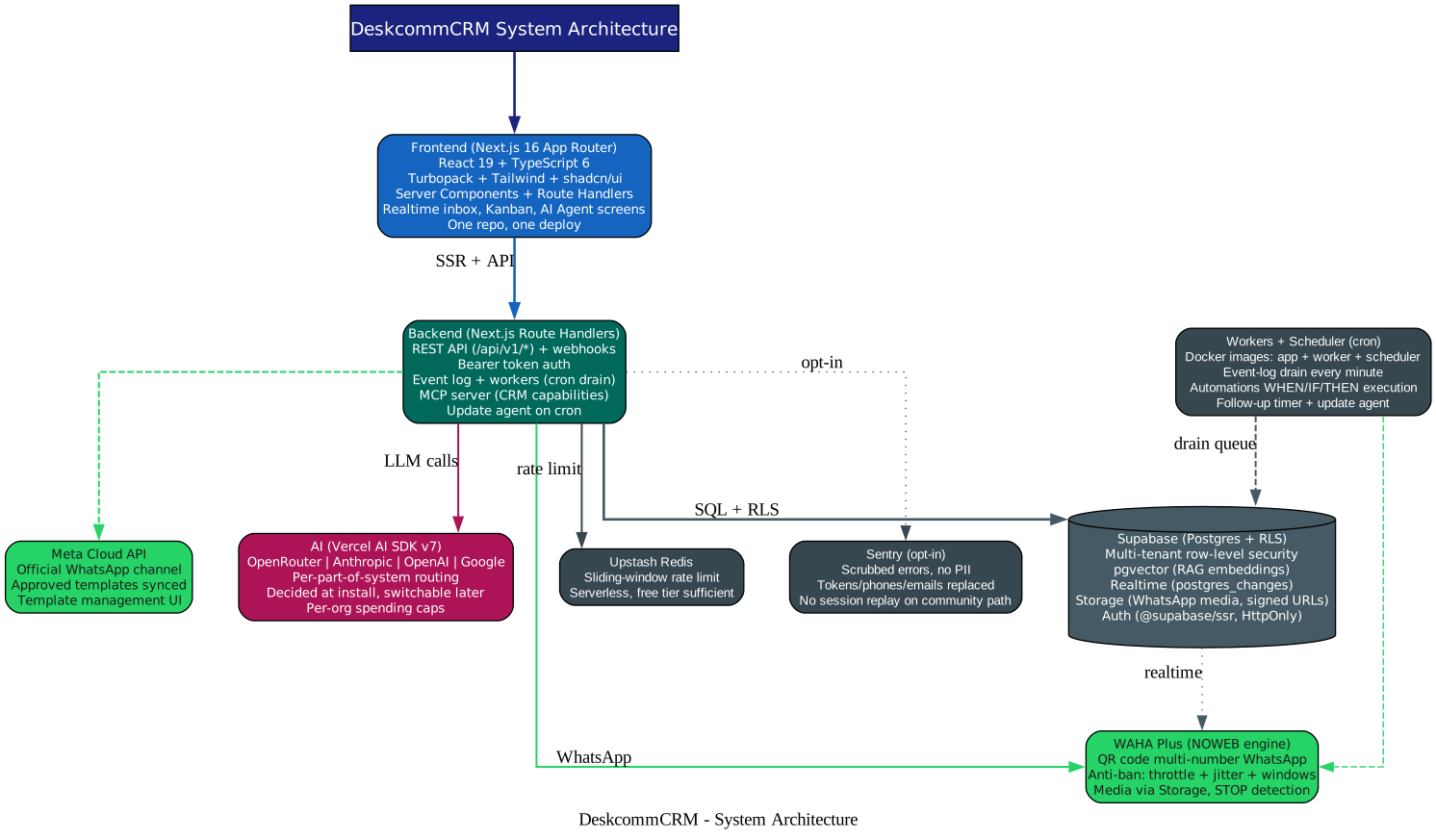
| Layer | Choice | Why |
|---|---|---|
| Frontend | Next.js 16 App Router (Turbopack), React 19, TypeScript 6 | Server Components + Route Handlers in one repo |
| Styling | Tailwind + shadcn/ui (new-york, neutral) | Customizable without lock-in |
| Database | Supabase (Postgres + RLS + pgvector) | Native multi-tenancy, embeddings for RAG |
| Auth | Supabase Auth via @supabase/ssr | SameSite=Strict, HttpOnly cookies |
| Realtime | Supabase Realtime | postgres_changes + broadcast |
| WAHA Plus (NOWEB) + Meta Cloud API | QR to start fast, official channel to scale | |
| Queues | event_log table + workers (cron) | A database trigger never makes HTTP calls |
| Rate limit | Upstash Redis (sliding window) | Serverless, free tier is enough |
| AI | Vercel AI SDK v7 — OpenRouter, Anthropic, OpenAI, Google | Decided at install, switchable later |
| Observability | Sentry (scrubbed, opt-in) | No PII, no session replay on community path |
The architecture is intentionally simple: one Next.js app serves the frontend and the API, Supabase handles database/auth/storage/realtime, WAHA or Meta Cloud API handles WhatsApp, and Docker images run the app, worker, and scheduler. No Kafka, no microservices sprawl — just the right amount of infrastructure for a small team to operate.
The Three AI Roles: Not One Brain, a Team
This is the part that separates DeskcommCRM from a “wrap an LLM in a chatbot” project. The AI is not one agent doing everything. It is three roles with distinct jobs, and the design is borrowed from how a real sales team works.
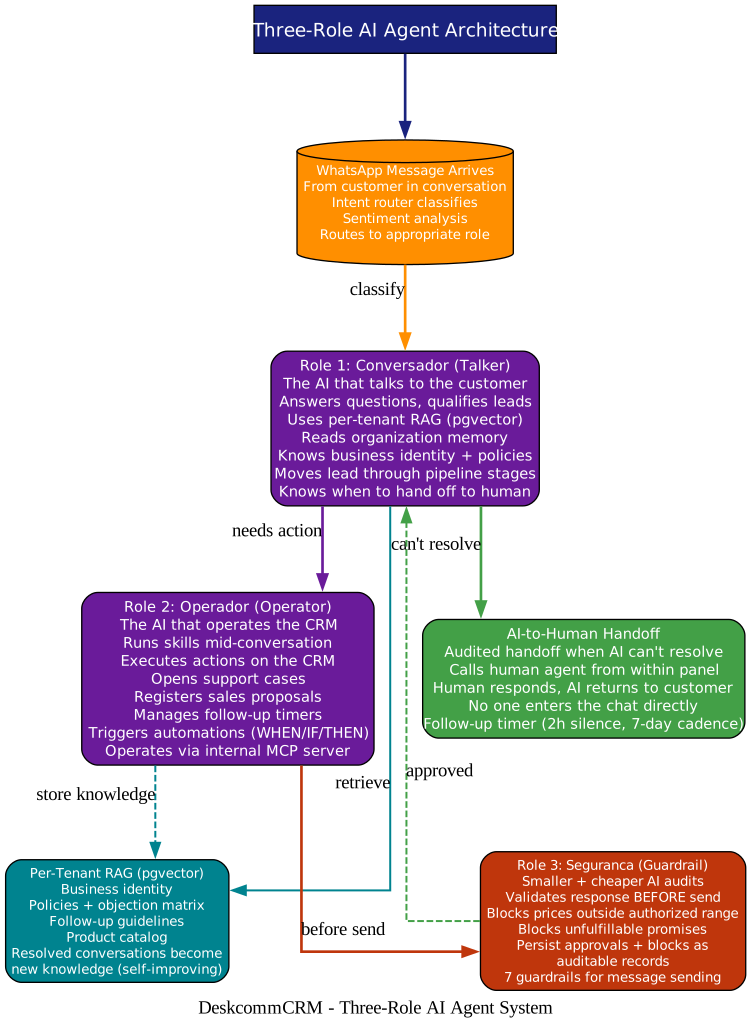
Role 1: Conversador (The Talker)
This is the AI your customer actually talks to. It answers questions, qualifies leads, and moves them through the pipeline. It does not improvise — it reads from a per-tenant RAG knowledge base (pgvector embeddings of your business identity, policies, objection matrix, follow-up guidelines, and product catalog) so every answer is grounded in your actual business. It has organization memory (operational context per org), does sentiment analysis on incoming messages, and knows its own spending cap per organization.
The Conversador also knows when to stop talking. If it cannot resolve an issue, it performs an audited handoff to a human agent — it calls the human from within the panel, the human responds, and the AI returns to the customer. Nobody enters the chat directly. The handoff is logged, and a follow-up timer ensures the AI comes back on its own if it promised to return (2 hours of silence, appointment confirmation, cadence up to 7 days).
Role 2: Operador (The Operator)
This is the AI that operates the CRM itself. While the Conversador is talking, the Operador runs skills mid-conversation — actions on the CRM that the agent executes autonomously. It opens support cases, registers sales proposals, manages follow-up timers, and triggers WHEN/IF/THEN automations (lead changed stage, got a tag, WhatsApp message arrived -> add tags, move leads, assign agents, send WhatsApp, notify external systems). The entire CRM is exposed to the agent via an internal MCP server, so the AI is a first-class operator, not a decorative chatbot that “promises to talk to the team and never gets back to them.”
Role 3: Seguranca (The Guardrail)
This is the part that prevents the Chevrolet-bot-sells-a-car-for-one-dollar problem. Before any message goes out, a second, smaller, and cheaper AI audits the response. It blocks prices outside the authorized range, blocks promises that cannot be fulfilled, and persists every approval and block as an auditable record. There are 7 guardrails for message sending. The guardrail AI is deliberately cheaper than the conversational AI — you do not use a frontier model to check a discount.
This three-role split is the real innovation. Most AI customer service fails not because the model is bad, but because there is nothing around the model. DeskcommCRM puts a tool harness (Operador), a guardrail (Seguranca), and a handoff/follow-up system around the Conversador — and that is what makes it work in production.
Self-Improving Agents: The Flywheel
A particularly clever feature is the AI Evolution screen. Resolved conversations become new knowledge — the agent learns from every successful interaction. The system shows you whether the agent is improving, where it fails, and what is left to teach it. There is even a Proposals mechanism where the AI suggests improvements to itself, applicable as a new version — always human-gated, so the agent cannot rewrite its own brain without your approval.
WhatsApp: Two Ways In, Zero Ban Risk
WhatsApp integration is the core of the product, and it supports two paths:
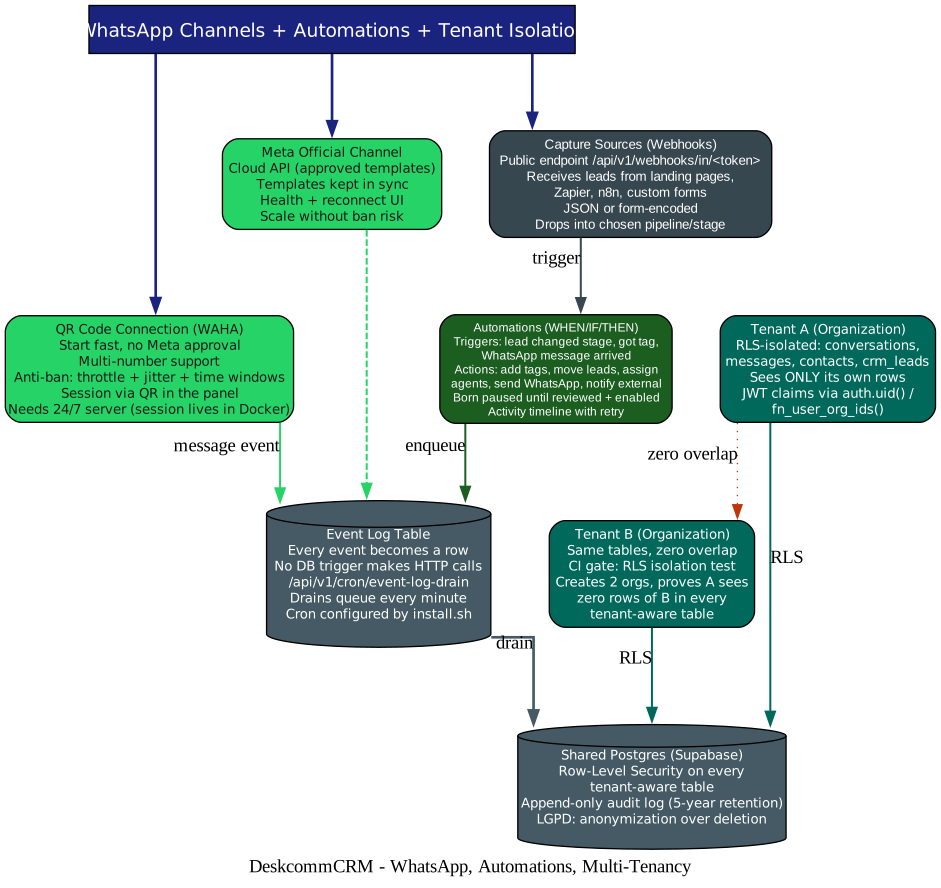
- QR code via WAHA Plus (NOWEB engine) — start fast, no Meta approval needed, multi-number support. Anti-ban protection includes throttle, jitter, and time windows. The catch: the session lives in Docker, so you need a 24/7 server. If the server goes down, the session goes down.
- Meta’s official Cloud API — approved templates kept in sync, scale without ban risk, health and reconnect UI. Use this when you outgrow the QR path.
Both paths feed into the same event_log table — and critically, no database trigger ever makes an HTTP call. Events are drained by /api/v1/cron/event-log-drain every minute (cron configured automatically by the installer). This is the kind of design decision that separates a production system from a demo.
The automations engine sits on top: WHEN/IF/THEN rules that are always born paused until reviewed and enabled, with an activity timeline showing each run, per-action results, and manual retry when an external webhook fails. Webhook capture sources (/api/v1/webhooks/in/<token>) accept leads from landing pages, Zapier, n8n, or custom forms — JSON or form-encoded — and drop them straight into the chosen pipeline stage.
Multi-Tenancy: Proven Isolation, Not Promised
If you are going to host multiple organizations on one instance, isolation is not a feature you claim — it is a feature you test. DeskcommCRM puts Row-Level Security on every tenant-aware table and runs an RLS isolation test as a CI gate. The test creates two organizations, simulates JWT claims through the same auth.uid() / fn_user_org_ids() path that production policies use, and proves a user of org A sees zero rows of org B in conversations, messages, contacts, and crm_leads. A control case first proves org B’s rows actually exist — without it, the test would pass against an empty table. This is exactly how you should test RLS, and most projects do not.
On the privacy side, it is LGPD-aligned by design: anonymization preferred over deletion, cascading anonymization via workers, audited consent, and an append-only audit log with 5-year retention.
Self-Host in One Command, Update From the Screen
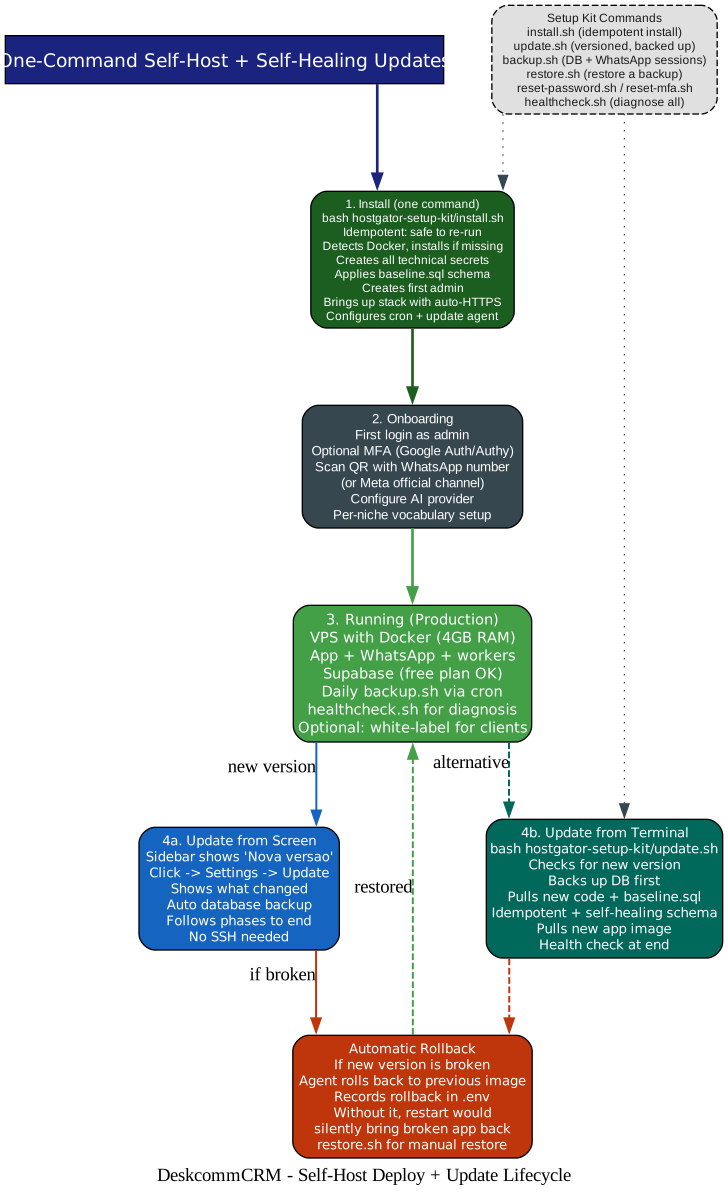
The deploy story is where DeskcommCRM earns its “self-hosted” badge. It is genuinely one command.
git clone https://github.com/melgarafael/DeskcommCRM.git
cd DeskcommCRM
bash hostgator-setup-kit/install.sh
The installer is idempotent (safe to re-run), detects and installs Docker if missing, generates every technical secret itself, applies the baseline.sql schema (self-healing — it repairs data left inconsistent by older versions), creates the first admin, brings up the stack with automatic HTTPS, and configures the automations cron and update agent. If you have a SUPABASE_ACCESS_TOKEN exported, it even creates the Supabase project for you, waits for the database to become healthy, fetches all credentials, and discovers the pooler host by testing a real connection — no copy-paste.
Updating is even better. When a new version exists, the sidebar lights up “Nova versao” (only for the server owner — alerting someone who cannot update is noise). Click it, see what changed, and the system takes a database backup by itself, follows every phase (backup -> code -> database -> live), and if the new version comes up broken, it rolls back to the previous image on its own and records that rollback in .env — without it, the next restart would silently bring the broken app back. No SSH required. The terminal path (update.sh) exists too, and always lands on a tagged release, never an untested commit.
The setup kit also includes backup.sh, restore.sh, reset-password.sh, reset-mfa.sh, and healthcheck.sh — the full operational toolkit.
CI: Tests That Actually Prove Something
The CI gates are serious. Branch protection requires five checks: verify (typecheck + lint + unit + shell), invariants (boots a clean Postgres, applies baseline.sql in install mode AND update mode proving idempotency, then runs 618 invariants across 98 files covering RBAC, assignment, scoping, routing, follow-up, webhooks, and automations), build-and-size, e2e (boots a local Supabase and runs 44 of 45 Playwright specs), and imagens-ok (builds the three Docker images). The one spec outside e2e is vps-fresh-onboarding — it needs a real WAHA + Redis + Resend + Nuvemshop, and it is the P0 of their visual-QA doctrine. A green e2e does not prove the fresh-install journey; that one is proven on a VPS.
Multi-Niche by Design
The same core serves e-commerce (its birthplace, with native Nuvemshop integration), clinics, real estate, and info-products. The trick is configurable vocabulary per pipeline: a lead becomes a Customer, Patient, or Buyer; “won” becomes Paid, Booked, or Closed. The pipeline stages and loss reasons are all configurable from the screen. You do not fork the codebase to serve a different niche — you configure it.
Quick Start
You need: a VPS with Docker (4 GB RAM), a domain with an A record, a free Supabase account, an AI key (OpenRouter, Anthropic, or OpenAI), and your WhatsApp number.
ssh root@YOUR_VPS
git clone https://github.com/melgarafael/DeskcommCRM.git
cd DeskcommCRM
bash hostgator-setup-kit/install.sh
The installer validates every answer before moving on — a wrong key is rejected right there, not three steps later. Non-interactive mode exists too: copy .env.hostgator.example to .env, fill it in, and run install.sh --yes. You can even drop the hostgator-setup-kit/ folder into Claude Code running on the VPS and say “install DeskcommCRM for me” — it reads the kit’s CLAUDE.md and walks you through it.
Why This Matters
The market for WhatsApp-based sales CRM is enormous — particularly in Latin America, the Middle East, and South Asia, where WhatsApp is the primary business communication channel. The existing options are either expensive per-seat SaaS that lock your data behind a subscription, or generic CRM tools that treat WhatsApp as an afterthought. DeskcommCRM is neither: it is open source, self-hosted, multi-tenant, and built around the premise that the AI agent should operate the CRM, not just chat.
The three-role architecture (Conversador + Operador + Seguranca) is the kind of design pattern that will be copied. It addresses the real failure mode of AI customer service — not bad models, but missing guardrails, missing tools, and missing handoff logic. The fact that it is MIT-licensed, runs on a $6/month VPS, and can be installed by someone who has never touched Docker before makes it genuinely accessible to the small businesses that need it most.
Where to Go Next
- Repository and full documentation: github.com/melgarafael/DeskcommCRM
- English README: README.en.md
- Architecture overview: ARCHITECTURE.md
- Vision and positioning: VISION.md
If agentic AI applied to real business workflows interests you, these related posts are worth a read:
- PentAGI: The Open Source AI Agent That Hacks So You Don’t Have To
- CowAgent: Open Source Super AI Assistant
- CloddsBot: Open Source AI Trading Agent Across 1000+ Markets
- MathModelAgent: The AI That Turns a 3-Day Math Competition Into 1 Hour
DeskcommCRM is MIT licensed, trending on GitHub, and actively maintained with 3,800+ commits. Clone it, install it on a VPS, connect your WhatsApp number, and watch three AI agents run your sales pipeline while you sleep. The future of sales operations is autonomous, multi-tenant, and open source. Enjoyed this post? Never miss out on future posts by following us 


