CowAgent: Open-Source Super AI Assistant and Agent Harness
CowAgent is an open-source super AI assistant that proactively plans tasks, controls your computer and external services, creates and runs Skills, builds a personal knowledge base and long-term memory, and grows alongside you through self-evolution. It is a reference implementation of Agent Harness engineering — a clean, decoupled architecture where messages flow in through Channels, an Agent Core plans and reasons over memory, knowledge, and tools, and Models generate the response that is sent back through the originating channel.
Formerly known as chatgpt-on-wechat, the project was officially renamed to CowAgent and has accumulated tens of thousands of GitHub stars and over 2,600 commits. It is lightweight, easy to deploy, and built to extend: plug in any major LLM provider and run it 24/7 on a personal computer or server, across the web and all major IM platforms. It ships under the permissive MIT license.
What Is CowAgent?
CowAgent is not a thin chatbot wrapper. It is a complete agent runtime that decomposes complex tasks into steps, loops over tools until a goal is reached, and persists what it learns across sessions. The project is written in Python (app.py, config.py, pyproject.toml) and organized into clean top-level directories: agent (the core loop, planning, memory, knowledge), bridge (channel adapters), channel (platform integrations), cli (the cow command system), common (shared utilities), desktop (the desktop application), docker (containerized deployment), models (model provider adapters), plugins (extension points), skills (built-in skills), translate (internationalization), and voice (ASR/TTS).
Key Capabilities
- Planning — Decomposes complex tasks and executes them step by step, looping over tools until the goal is reached
- Memory — Three-tier architecture (context, daily, core) with automatic Deep Dream distillation and hybrid keyword plus vector retrieval
- Knowledge — Auto-curates structured knowledge into a Markdown wiki and builds an evolving knowledge graph with visual browsing
- Self-Evolution — Reviews conversations automatically to improve skills, follow up on unfinished tasks, and consolidate memory and knowledge
- Skills — One-click install from Skill Hub, GitHub, or ClawHub, or create custom skills via natural-language conversation
- Tools — Built-in file I/O, terminal, browser, scheduler, memory retrieval, web search, and many more tools with native MCP integration
- Channels — Integrates with Web, WeChat, Feishu, DingTalk, WeCom, QQ, Official Accounts, Telegram, and Slack
- Multimodal — First-class support for text, images, voice, and files — recognition, generation, and delivery
- Models — Claude, GPT, Gemini, DeepSeek, Qwen, GLM, Kimi, MiniMax, Doubao, and more, swappable from the Web console with one click
Agent Harness Architecture
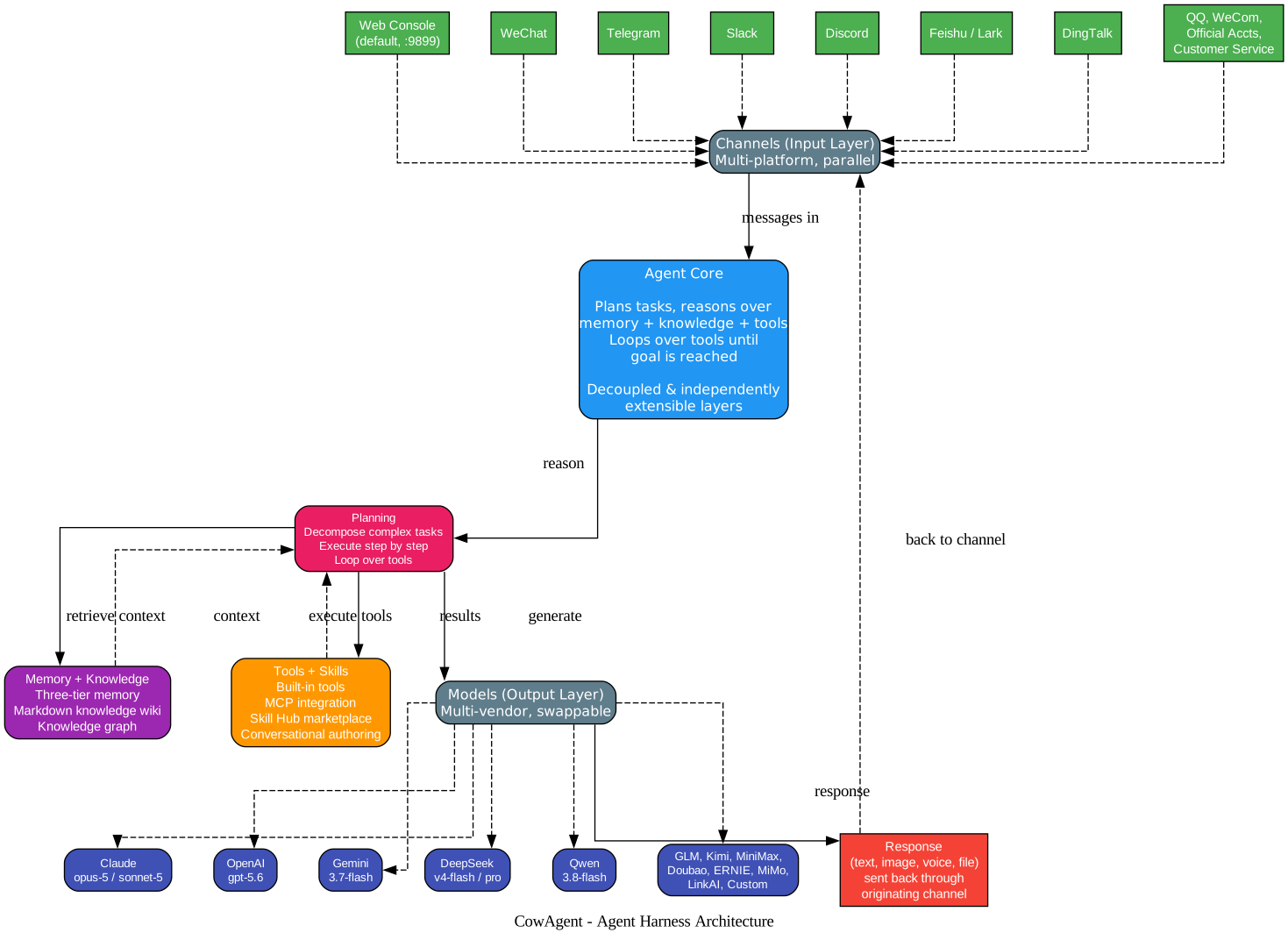
The architecture diagram above illustrates CowAgent’s core design as a complete Agent Harness. The system is built around three decoupled, independently extensible layers, which is the central insight of the harness pattern: no single layer is privileged, and each can be replaced or extended without touching the others.
The Channels Layer (Input)
The top of the diagram shows the input layer. CowAgent does not assume a single front-end. Instead it accepts messages from many channels in parallel — the Web Console (the default interface served on port 9899), WeChat, Telegram, Slack, Discord, Feishu and Lark, DingTalk, plus QQ, WeCom, Official Accounts, and WeChat Customer Service. Every channel is an adapter that normalizes incoming messages into a common internal format. This means a single CowAgent instance can simultaneously serve a web user, a WeChat contact, and a Slack team, all sharing the same agent, memory, and skills.
The Agent Core (Reasoning)
At the center sits the Agent Core. This is where the harness earns its name. Rather than forwarding a message straight to a model, the core plans: it decomposes the task, retrieves relevant context from memory and the knowledge base, selects and executes the right tools, observes their results, and loops until the goal is satisfied. The core is itself composed of three subsystems shown inside the diagram — Planning (which decomposes and executes), Memory plus Knowledge (which provides context and long-term recall), and Tools plus Skills (which perform actions). Each subsystem is independently extensible, which is why the project calls itself a reference implementation of Agent Harness engineering rather than a chatbot.
The Models Layer (Output)
Once the core has gathered context and executed tools, it routes to the Models layer. CowAgent supports a wide roster of providers — Claude (opus and sonnet families), OpenAI GPT, Gemini, DeepSeek, Qwen, GLM, Kimi, MiniMax, Doubao, ERNIE, and more — and every capability (chat, vision, image generation, ASR, TTS, embedding) can be routed to a different provider. The generated response — which may be text, an image, a voice clip, or a file — is then sent back through the originating channel, closing the loop.
The practical payoff of this design is composability. You can swap the model without touching channels, add a new channel without touching the agent loop, or register a new tool without touching memory. This is what makes CowAgent suitable as a foundation that others build on top of, rather than a sealed product.
Three-Tier Memory, Deep Dream, and Knowledge Base
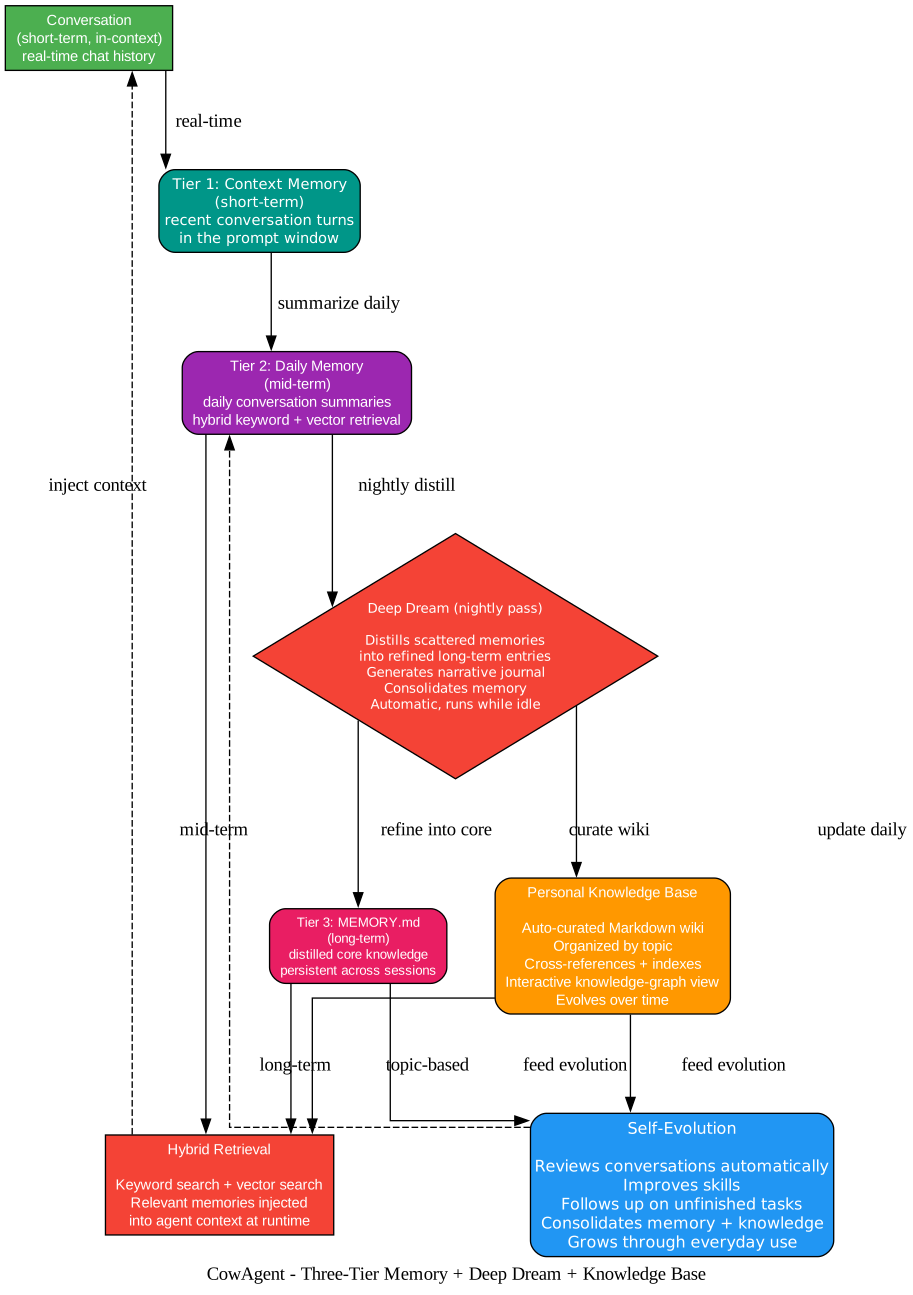
Memory is what separates an agent from a stateless chatbot, and CowAgent treats it as a first-class subsystem. The diagram above shows how conversation history flows through three tiers, gets distilled by a nightly Deep Dream pass, feeds a personal knowledge base, and powers a self-evolution loop.
Tier 1: Context Memory (Short-Term)
The shortest tier holds the recent conversation turns that fit inside the model’s prompt window. This is the working memory the agent reasons over in real time. It is ephemeral by design — once the window fills, older turns are summarized and pushed downstream rather than dropped outright.
Tier 2: Daily Memory (Mid-Term)
Daily Memory stores per-day conversation summaries and supports hybrid retrieval: a combination of keyword search and vector search. This tier answers questions like “what did the user discuss yesterday” without forcing the agent to replay raw transcripts. The hybrid approach matters because pure keyword search misses semantically related memories, while pure vector search can miss exact-match facts — combining them yields higher recall.
Tier 3: MEMORY.md (Long-Term)
The deepest tier is a distilled, persistent knowledge file that survives across sessions. It holds the core facts, preferences, and decisions the agent has consolidated over time. This is what gives CowAgent continuity: after a restart, the agent does not start blank — it loads the long-term core and remembers who you are and what it has learned.
Deep Dream (Nightly Distillation)
Left to accumulate, mid-tier memory grows noisy. CowAgent runs a nightly Deep Dream pass that distills scattered daily memories into refined long-term entries, generates a narrative journal, and consolidates the knowledge base. It runs automatically while the agent is idle, so memory improves without manual curation. This is conceptually similar to how some coding agents run a background “dream” pass to consolidate session notes, but CowAgent generalizes it across the whole personal-assistant surface.
Personal Knowledge Base
Alongside memory, CowAgent auto-curates a structured Markdown wiki organized by topic, with cross-references and indexes and an interactive knowledge-graph view. Where memory records what happened, the knowledge base records what was learned — and it evolves over time as the agent encounters new information.
Self-Evolution
Finally, the Self-Evolution loop ties it together: the agent reviews past conversations automatically to improve its skills, follow up on unfinished tasks, and consolidate memory and knowledge. The result is an assistant that grows through everyday use rather than sitting static between updates.
Hybrid Retrieval at Runtime
When a new message arrives, CowAgent performs hybrid retrieval — keyword plus vector search across mid-term and long-term memory and the knowledge base — and injects the relevant fragments into the agent context. This is how long-term recall becomes actionable instead of merely archived.
Tools and Skills Ecosystem
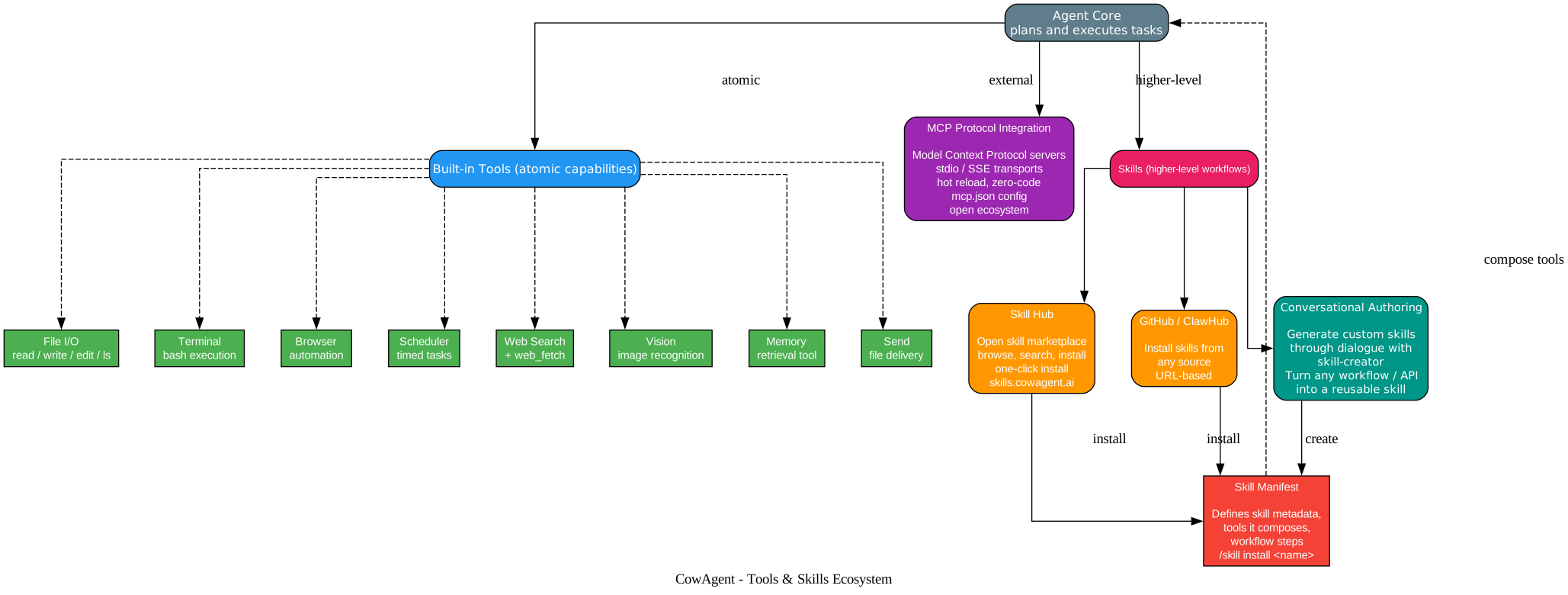
An agent is only as capable as the actions it can take, and CowAgent provides two complementary layers for this: atomic built-in tools and higher-level Skills.
Built-in Tools (Atomic Capabilities)
The built-in toolkit covers the fundamentals an agent needs to operate a computer: file I/O (read, write, edit, list), a terminal for shell execution, a browser for web automation (navigate, click, fill, select, scroll, press, take snapshots, run JavaScript, and capture screenshots), a scheduler for timed tasks, web search and web fetch, vision for image recognition, a memory retrieval tool, and a send tool for file delivery. These are the primitives from which complex behaviors are composed.
MCP Protocol Integration
Beyond the built-ins, CowAgent integrates the Model Context Protocol natively. MCP servers can be attached via stdio, SSE, or Streamable HTTP transports, configured through an mcp.json file, and hot-reloaded with zero code. This means the entire and growing ecosystem of MCP-compatible tools — from databases to design software to internal APIs — becomes available to the agent without writing a custom adapter.
Skills (Higher-Level Workflows)
Skills sit above tools. A Skill is a named, manifest-defined workflow that composes multiple tools into a reusable capability — for example, “summarize this PDF and email the digest” or “scrape the pricing page and update the spreadsheet.” CowAgent provides three ways to obtain skills:
- Skill Hub — an open skill marketplace at
skills.cowagent.aiwhere you browse, search, and install skills in one click, with mirror acceleration for faster downloads in regions that need it. - GitHub and ClawHub — install skills from any source by URL, including batch installs and subdirectory targeting.
- Conversational Authoring — generate a custom skill through dialogue with a skill-creator; turn any workflow or API into a reusable skill without writing code.
Once installed or authored, every skill is described by a manifest that defines its metadata, the tools it composes, and its workflow steps. Skills are installed with a simple /skill install <name> in chat or cow skill install <name> in the terminal, and they immediately become available to the agent core, which composes their underlying tools as needed.
This two-tier design — atomic tools underneath, composable skills on top — is what lets CowAgent scale from “read this file” to “run my weekly report pipeline” without the user writing glue code.
Multi-Model and Multi-Channel Matrix
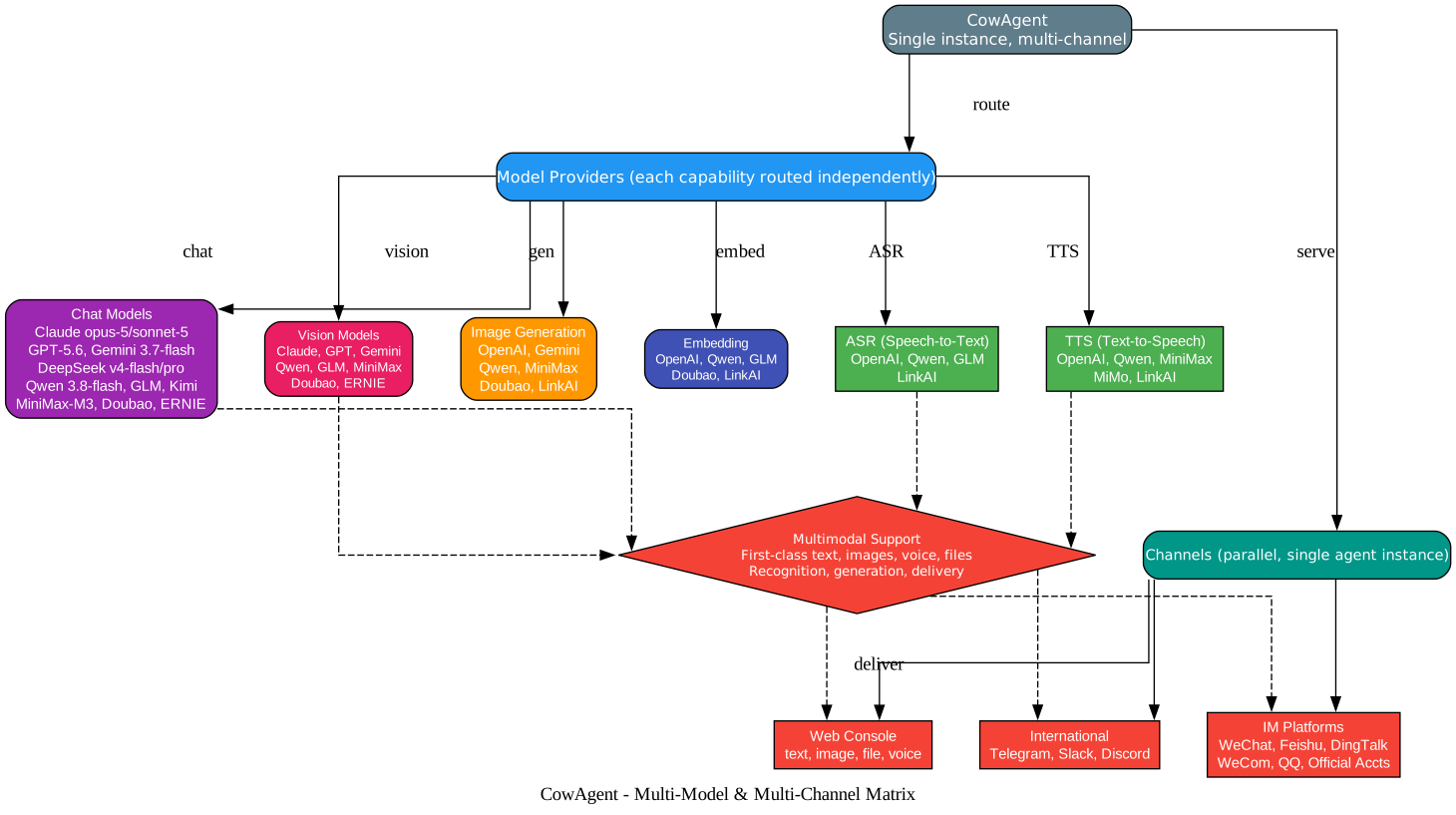
A distinctive feature of CowAgent is that it routes each model capability independently and serves many channels from a single agent instance. The diagram above maps that matrix.
Independent Capability Routing
Rather than binding the whole agent to one provider, CowAgent lets you choose a different model for each capability. Chat models span Claude (opus and sonnet families), GPT, Gemini, DeepSeek, Qwen, GLM, Kimi, MiniMax, Doubao, and ERNIE. Vision models, image generation, ASR (speech-to-text), TTS (text-to-speech), and embedding models are each a separately configurable lane. This matters because providers specialize differently — one may lead on chat reasoning, another on vision, a third on voice — and routing each capability to the best-fit provider yields a stronger overall assistant than committing to a single vendor.
Parallel Multi-Channel Serving
The same agent instance serves every channel in parallel: the Web Console (text, image, file, voice), the IM platforms (WeChat, Feishu, DingTalk, WeCom, QQ, Official Accounts, WeChat Customer Service), and international platforms (Telegram, Slack, Discord). This is enabled by the channel-adapter design: each platform normalizes its messages into the common internal format, so the agent core does not care whether a request arrived from Slack or WeChat. One deployment, many audiences.
First-Class Multimodal Support
Tying the two dimensions together is first-class multimodal support. Text, images, voice, and files are recognized, generated, and delivered across whichever channel originated the request. A user can send a photo through WeChat, have the vision model describe it, generate a related image, and receive the result back in the same chat — all through one agent instance.
Installation and Quick Start
CowAgent is designed to be running in minutes. A one-line installer handles dependencies, configuration, and startup:
bash <(curl -sS https://cdn.link-ai.tech/code/cow/run.sh)
For source deployments, clone the repository and run the included script:
git clone https://github.com/zhayujie/CowAgent.git
cd CowAgent
chmod +x run.sh
./run.sh
The run.sh script (or scripts/run.ps1 on Windows PowerShell) guides you through choosing a model provider and a channel, then starts the service. Once running, open http://localhost:9899 to access the Web Console — the one-stop hub to chat with the agent, configure models, connect channels, and install skills.
The cow CLI
CowAgent ships a unified command system usable both in the terminal and inside a conversation:
cow start | stop | restart     # service control
cow update                     # pull latest code and restart
cow status                     # check service status
cow logs                       # tail logs
cow skill install <name>       # install a skill
cow install-browser            # install the browser tool and dependencies
Inside a chat, slash commands like /help, /status, /config, /skill, /context, /logs, and /version are available, and the Web Console surfaces a slash-command menu with input-history navigation.
Deployment Modes
CowAgent supports local, Docker, and server deployment. The Docker image comes with the browser tool preinstalled, and docker-compose.yml is provided for one-command containerized deployment. A desktop application is also available for download from the project website.
Supported Model Providers
| Provider | Notes |
|---|---|
| Claude | opus and sonnet families |
| OpenAI GPT | GPT family models |
| Gemini | Google AI Studio models |
| DeepSeek | dedicated DeepSeek module |
| Qwen | Alibaba Bailian DashScope |
| GLM (Zhipu) | glm-5-turbo and more |
| Kimi | Moonshot models |
| MiniMax | M2.7 and variants |
| Doubao | ByteDance models |
| ERNIE | Baidu models |
| LinkAI | one API for many providers, plus knowledge base and workflows |
| Custom | any OpenAI-compatible endpoint |
Supported Channels
| Channel | Highlights |
|---|---|
| Web Console | default, port 9899, text/image/file/voice |
| WeChat (personal) | scan-to-login, credential persistence, auto-reconnect |
| WeCom / WeChat Customer Service | smart-bot scan-to-create, multimedia merging |
| Feishu / Lark | app ID and secret |
| DingTalk | client ID and secret |
| QQ / Official Accounts | domestic IM reach |
| Telegram | text and multimedia |
| Discord | channels and direct messages |
| Slack | team workflow integration |
Internationalization
Starting with v2.1.0, CowAgent ships an end-to-end internationalization framework. The install flow, CLI, logs, error messages, and agent system prompts are all localized. The default auto mode infers the language from the system locale, or cow_lang can be set explicitly in config.json. English and Chinese ship first, with more languages to follow, and the Web Console supports switching the system language online in real time.
Notable Releases
- v2.1.0 — Internationalization, Telegram, Discord, Slack, and WeChat Customer Service channels, Streamable HTTP MCP transport,
cowCLI streaming output, fuzzy command matching, and task cancellation. - v2.0.5 — Cow CLI command system, open-source Skill Hub, Browser tool with DOM snapshots and JavaScript execution, WeCom smart-bot scan-to-create, standalone DeepSeek module.
- v2.0.4 — Personal WeChat (
weixin) channel with scan-to-login and credential persistence, MiniMax-M2.7 and GLM-5-Turbo models,run.shrefactor.
Troubleshooting
- Web Console not reachable — Confirm the service is running with
cow statusand that port 9899 is open; checkcow logsfor errors. - Model not responding — Verify the API key in
config.jsonor the Web Console, and confirm the API base URL matches the provider. - Channel not connecting — Each channel has its own setup parameters (app ID, secret, token); refer to the channel-specific docs and use the Web Console’s channel page.
- Context seems to reset — Ensure the long-term memory file is being loaded on startup; check that the daily memory tier is being written.
- Browser tool missing — Run
cow install-browserto install the browser and its dependencies, or use the Docker image which ships it preinstalled.
Conclusion
CowAgent stands out as a mature, MIT-licensed reference implementation of Agent Harness engineering. Its decoupled Channels / Agent Core / Models architecture, three-tier memory with nightly Deep Dream distillation, auto-curated knowledge base, self-evolution loop, two-tier tools-and-skills ecosystem with native MCP support, and independent per-capability model routing combine into an assistant that is genuinely extensible rather than merely configurable. Whether you want a 24/7 personal assistant across WeChat and Slack, a foundation to build custom agent skills on top of, or a studied example of how to structure a production agent harness, CowAgent is a strong open-source choice.
Links
- CowAgent GitHub Repository
- CowAgent Website
- CowAgent Documentation
- Quick Start Guide
- Skill Hub
- Architecture Overview
- Memory Documentation
- Skills Documentation
- Tools Documentation
- Channels Documentation
- Models Documentation
- CLI Guide
- Try Online
Related Posts
- Grok Build: SpaceXAI’s Terminal-Based AI Coding Agent in Rust
- DeepSeek Harness: Everything-Is-a-Plugin Agent Harness

Enjoyed this post? Never miss out on future posts by following us