AI music generation has been dominated by closed, subscription-based services that keep their models behind an API and meter every song you create. The open source landscape has caught up — the YuE2 model from the Multimodal Art Projection (m-a-p) team now outperforms Suno v5 on the WildSongBench evaluation — but running it has required comfort with command-line inference scripts, manual model loading, and parsing stderr to know what is happening.
PSY Music Studio fixes that. It is a single-file FastAPI web UI that wraps the entire YuE2 pipeline behind a browser interface, so you can generate full songs with vocals and accompaniment from a style prompt and lyrics — and watch every pipeline stage stream live, then play the result right in the page.
The One-Paragraph Pitch
PSY Music Studio is a browser-based studio for AI song generation, built on top of the YuE2 pipeline. You pick a model, VAE, backend, quantization, and device from dropdowns, enter a music style and lyrics with [Verse] / [Chorus] markers, click Generate, and watch the resolve → verify → load → plan → generate → synthesize → decode pipeline stream progress in real time via Server-Sent Events. When it finishes, an inline audio player appears with Download .flac and Open-containing-folder buttons. It is a single webui.py file with vanilla HTML/CSS/JS — no build step, no framework, no npm install. The full YuE2 source is included verbatim under src/yue2/, unmodified. Apache 2.0 licensed.
The Architecture: One File, Zero Build Step
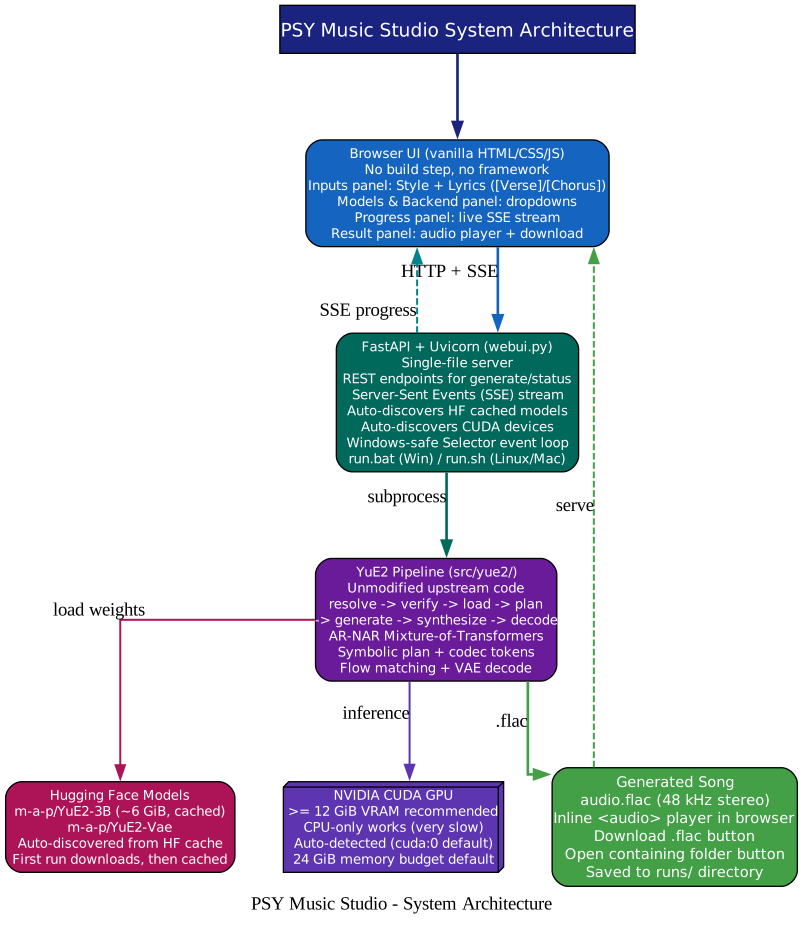
The design philosophy is refreshing in its simplicity. There is no React, no webpack, no TypeScript compilation, no frontend framework. The entire UI is vanilla HTML, CSS, and JavaScript served directly by a single FastAPI file.
Here is PSY Music Studio in action — a quick demo of the full generate-to-playback flow:
The stack is intentionally thin:
- Browser UI — vanilla HTML/CSS/JS. An Inputs panel for style and lyrics, a Models & Backend panel with dropdowns, a Progress panel that renders the live SSE stream, and a Result panel with an inline
<audio>player and download buttons. - FastAPI + Uvicorn (
webui.py) — a single-file server. REST endpoints handle generate and status requests. Server-Sent Events stream every[YuE2]stderr line to the browser as it happens. The server auto-discovers cached Hugging Face models and CUDA devices, so the dropdowns are populated from what you actually have installed. - YuE2 pipeline (
src/yue2/) — the unmodified upstream code. PSY does not fork or patch YuE2; it launches it as a subprocess and parses its stderr output for progress. - Hugging Face models —
m-a-p/YuE2-3B(~6 GiB) andm-a-p/YuE2-Vaeare auto-discovered from the HF cache. The first run downloads them; subsequent runs skip the download. - NVIDIA CUDA GPU — 12 GiB VRAM minimum recommended, 24 GiB default memory budget. CPU-only works but is extremely slow.
The Windows-safe detail is worth noting: the server uses the Selector event loop to avoid cosmetic WinError 10054 connection-reset noise from SSE clients disconnecting. Generation still succeeds; the error is just suppressed. This is the kind of practical polish that separates a tool you actually use from one that floods your console.
The Pipeline: Seven Stages, Live in Your Browser
The most engaging part of PSY Music Studio is the live progress. When you click Generate, you do not stare at a spinner. Every pipeline stage streams to the browser via SSE, with a status pill and a progress bar updating in real time.
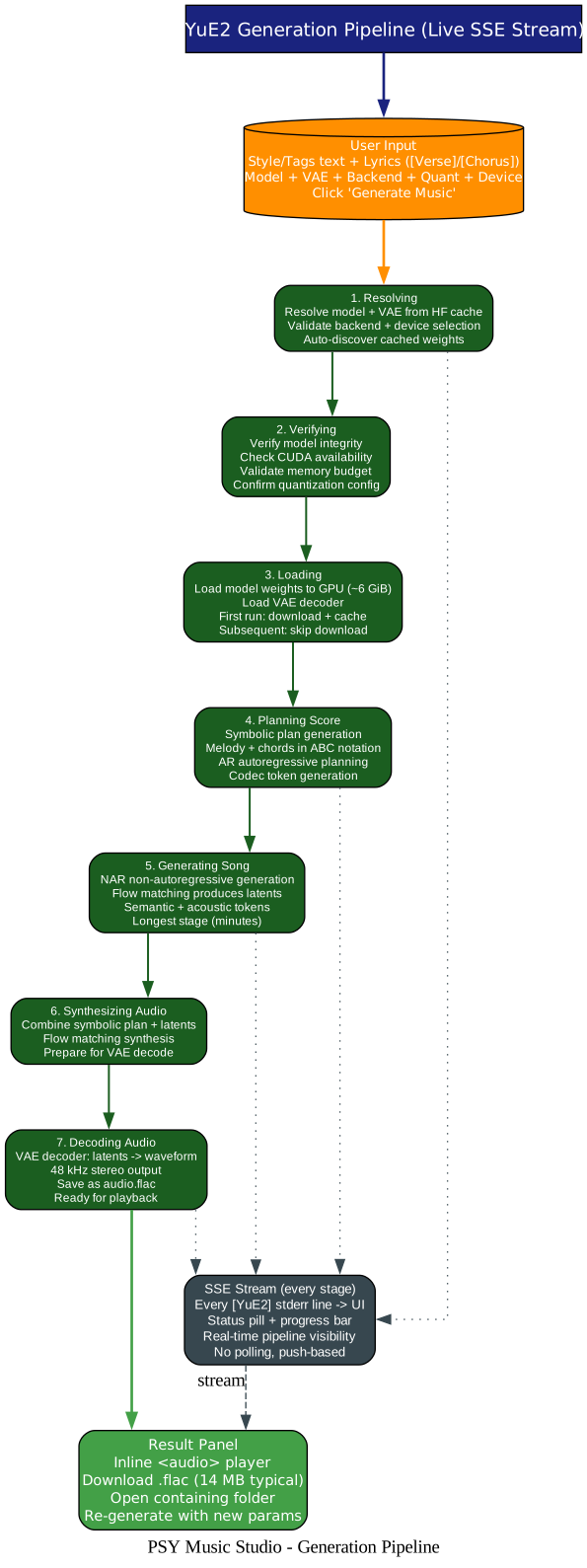
The seven stages mirror the YuE2 pipeline exactly:
- Resolving — resolve the model and VAE from the Hugging Face cache, validate the backend and device selection, auto-discover cached weights.
- Verifying — verify model integrity, check CUDA availability, validate the memory budget, confirm quantization config.
- Loading — load model weights to GPU (~6 GiB), load the VAE decoder. First run downloads and caches; subsequent runs skip the download.
- Planning Score — the AR (autoregressive) stage generates a symbolic plan: melody and chords in ABC notation, plus codec tokens. This is the “composition” step.
- Generating Song — the NAR (non-autoregressive) stage uses flow matching to produce acoustic latents, conditioned on the plan. This is the longest stage, typically taking minutes.
- Synthesizing Audio — combine the symbolic plan and latents, prepare for VAE decoding.
- Decoding Audio — the VAE decoder converts latents to a 48 kHz stereo waveform, saved as
audio.flac.
When stage 7 finishes, the Result panel appears with an inline audio player, a Download .flac button (typically 13–14 MB), and an Open-containing-folder button that highlights the generated file in Explorer, Finder, or your file manager. You can immediately re-generate with different parameters — no need to restart anything.
Backend Selector: Three Ways to Run Inference
One of the most practical design decisions in PSY is the backend selector. Different torch builds have different capabilities, and PSY does not force you into one path.
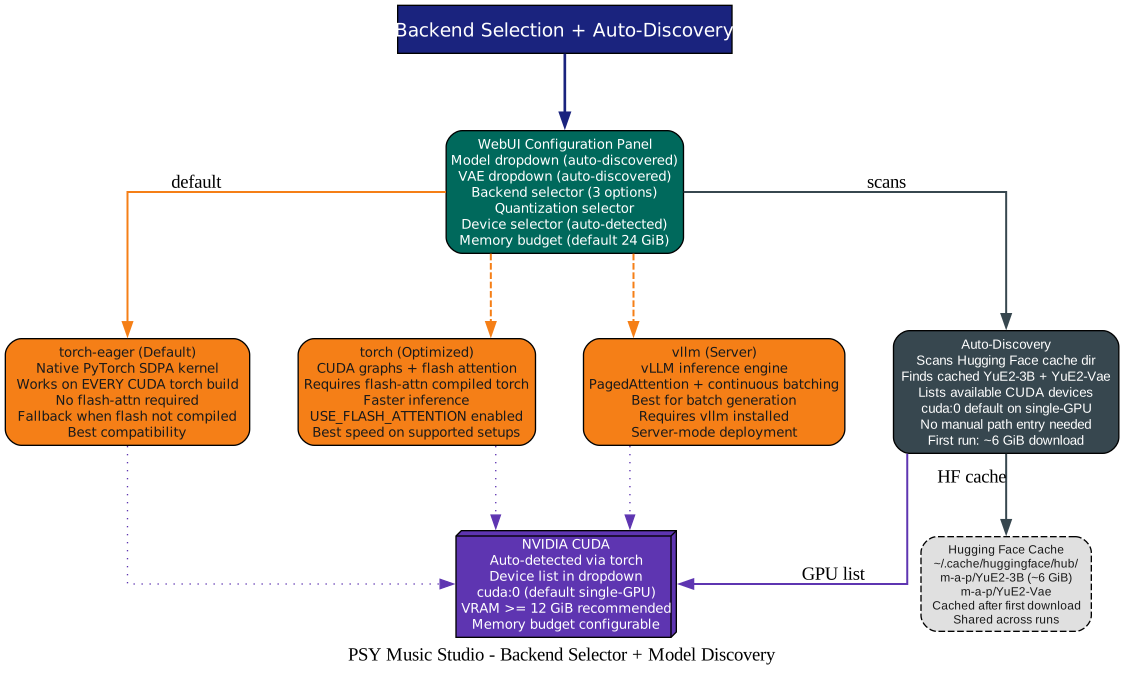
torch-eager(default) — uses PyTorch’s native SDPA (Scaled Dot-Product Attention) kernel. Works on every CUDA torch build, no flash-attn required. This is the fallback when you seeUSE_FLASH_ATTENTION was not enabled for build— just switch totorch-eagerand everything works.torch(optimized) — enables CUDA graphs and flash attention. Requires a torch wheel compiled with flash-attn. Faster inference, but only on supported setups.vllm(server) — uses the vLLM inference engine with PagedAttention and continuous batching. Best for batch generation or server-mode deployment. Requires vLLM installed separately.
The auto-discovery is what makes this usable without a manual. The server scans your Hugging Face cache directory, finds cached YuE2-3B and YuE2-Vae models, lists available CUDA devices (defaulting to cuda:0 on single-GPU machines), and populates the dropdowns. You never type a model path. On a single-GPU Windows machine, the defaults (m-a-p/YuE2-3B, torch-eager, cuda:0, 24 GiB) are usually correct — just click Generate.
The Model: YuE2 AR-NAR Mixture-of-Transformers
The intelligence underneath PSY is the YuE2 model, and it is worth understanding because it is architecturally different from most music generation systems.
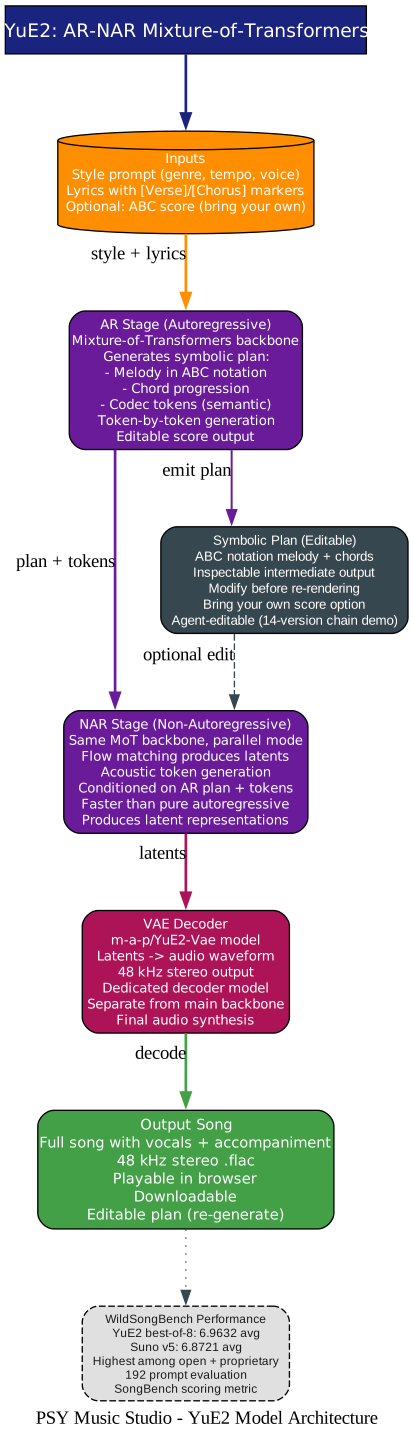
YuE2 uses a single AR-NAR Mixture-of-Transformers backbone that operates in two modes:
- AR (autoregressive) stage — generates a symbolic plan containing the melody (in ABC notation), chord progression, and codec tokens (semantic representations). This is token-by-token generation, and the plan is an explicit, inspectable intermediate output. You can modify it before re-rendering.
- NAR (non-autoregressive) stage — uses flow matching to produce acoustic latents in parallel, conditioned on the AR plan and tokens. This is faster than pure autoregressive generation and produces the latent representations that the VAE will decode.
A dedicated VAE decoder (m-a-p/YuE2-Vae) converts the latents into a 48 kHz stereo audio waveform. The planning and synthesis APIs are exposed separately, so developers can inspect or replace the symbolic plan — a feature that enables the “bring your own score” workflow and the agent-editing chain (where an AI agent iteratively revises the plan, style, and lyrics across 14 versions to transform a song from Mandarin pop to English jazz).
On the WildSongBench evaluation (192 prompts), YuE2 with best-of-8 sampling achieves a SongBench average of 6.9632, compared to 6.8721 for Suno v5 — the highest score among all open and proprietary models evaluated. This is why PSY is worth your attention: it wraps a model that genuinely rivals the best closed systems, behind an interface that anyone can use.
Installation: Five Steps to Your First Song
You need Python 3.10+ and (optionally, but strongly recommended) an NVIDIA CUDA GPU with 12+ GiB VRAM.
# 1. Clone
git clone https://github.com/pyshine-labs/psy.git
cd psy

# 2. Create venv
python -m venv .venv
# Windows: .\.venv\Scripts\Activate.ps1
# Linux/macOS: source .venv/bin/activate

# 3. Install YuE2 + WebUI
pip install -e .

# 4. Install CUDA PyTorch (GPU users)
pip install --force-reinstall --no-deps \
    torch==2.10.0+cu126 \
    torchvision==0.25.0+cu126 \
    torchaudio==2.10.0+cu126 \
    --index-url https://download.pytorch.org/whl/cu126

# 5. Install FastAPI + Uvicorn
pip install fastapi uvicorn
Then launch:
# Windows
.\run.bat

# Linux / macOS
./run.sh
The launcher auto-detects your venv, starts the server, and opens your browser at http://127.0.0.1:7860. That is it. Enter a style, enter lyrics with [Verse] and [Chorus] markers, pick your backend (use torch-eager if you see the flash-attn warning), click Generate Music, and watch the pipeline stream live.
Example: Twinkle Twinkle, Little Star
The README includes a complete example using the classic nursery rhyme, generated in two vocal styles from the same lyrics:
Style (male): English, male voice, pop, acoustic piano, light drums, warm, heartfelt, 88 BPM
Style (female): English, female voice, pop, acoustic piano, light drums, warm, lyrical melody, 88 BPM
Both versions are downloadable as .flac files from the repo. The difference between them — same lyrics, same structure, different vocal character — demonstrates the style-conditioning control YuE2 gives you.
Troubleshooting: The Four Things You Will Actually Hit
| Symptom | Fix |
|---|---|
| Torch not compiled with CUDA | Install a +cuXXX torch wheel matching your driver’s CUDA version |
USE_FLASH_ATTENTION was not enabled | Switch backend to torch-eager in the WebUI — it uses native SDPA and works everywhere |
WinError 10054 in console | Cosmetic only — already handled by the Selector event loop. Generation succeeds. |
| First Generate is very slow | Model weights (~6 GiB) download on first run, then cached. Subsequent runs skip the download. |
Repository Layout
psy/
├── webui.py              # PSY Music Studio WebUI (FastAPI + SSE)
├── run.bat               # Windows launcher
├── run.sh                # Linux/macOS launcher
├── examples/             # Original YuE2 example lyrics + generate.py
├── src/yue2/             # Unmodified YuE2 package (cli, pipeline, models)
├── tests/                # YuE2 test suite
├── docs/                 # YuE2 documentation
├── skills/               # YuE2 skill / agent definitions
├── assets/               # Logo + architecture images
├── assests/              # Demo audio (male.flac, female.flac)
├── licenses/             # Third-party license texts
├── pyproject.toml        # Installs the bundled yue2 package
├── LICENSE               # Apache 2.0 (inherited from YuE2)
└── THIRD_PARTY_NOTICES.md
Credits and License
PSY Music Studio is a thin web wrapper authored by Pyshine Labs. All of the actual song-generation intelligence — the model, the symbolic-plan + codec-token pipeline, the VAE, and the sampling code under src/yue2/ — is the work of the YuE2 / Multimodal Art Projection (m-a-p) team:
- YuE2 upstream: github.com/multimodal-art-projection/YuE
- YuE2 models on Hugging Face: m-a-p/YuE2-3B and m-a-p/YuE2-Vae
The project is Apache 2.0 licensed (inherited from YuE2). If you use PSY Music Studio in research or product work, cite the YuE2 model and the m-a-p team as the source of the generation pipeline.
Why This Matters
The open source AI music space has been waiting for two things: a model that rivals the best closed systems, and an interface that makes it usable by people who are not ML engineers. YuE2 delivered the first. PSY Music Studio delivers the second. Together, they mean you can generate full songs with vocals and accompaniment — at quality that beats Suno v5 on the standard benchmark — on your own GPU, for free, with no subscription, no API limits, and no content filters. You own the output, you control the model, and you can edit the symbolic plan before re-rendering if the first pass is not quite right.
The single-file, no-build-step design is a deliberate choice that makes the project accessible: you do not need a Node.js toolchain, you do not need to understand a frontend framework, and you can read the entire server in one file. The SSE progress stream turns what used to be a black-box “wait and hope” into a transparent, watchable process. And the three backend modes (torch-eager, torch, vllm) mean it works on whatever torch build you happen to have, without forcing you to recompile anything.
For musicians, developers, and tinkerers who want to explore AI song generation without handing their creativity to a metered API, PSY Music Studio is the most accessible entry point to frontier-quality open source music AI available today.
Where to Go Next
- Repository and full documentation: github.com/pyshine-labs/psy
- YuE2 model (the engine underneath): github.com/multimodal-art-projection/YuE
- YuE2-3B model on Hugging Face: huggingface.co/m-a-p/YuE2-3B
- YuE2-Vae decoder on Hugging Face: huggingface.co/m-a-p/YuE2-Vae
If AI music generation and open source creative tools interest you, these related posts are worth a read:
- YuE2: Open Source Music AI That Rivals Suno
- ACE-Step UI: Open Source AI Music Generation Interface
- HyperFrames: Write HTML, Render Video, Built for Agents
- PentAGI: The Open Source AI Agent That Hacks So You Don’t Have To
PSY Music Studio is Apache 2.0, single-file, and runs on your own GPU. Clone it, install it, enter your lyrics, and watch a frontier-quality AI song generation pipeline stream live in your browser. The future of music creation is open, local, and watchable. Enjoyed this post? Never miss out on future posts by following us 


