DiffusionStudio Lottie: Generate Production-Ready Lottie Animations with AI Coding Agents
Creating Lottie animations traditionally requires After Effects expertise and the Bodymovin plugin – but what if your AI coding agent could generate them from a description? DiffusionStudio Lottie is an open-source skill-based harness that enables AI coding agents like Claude Code and Codex to generate production-ready Lottie animations from natural language descriptions, complete with a live Skottie-powered preview player and real-time slot editing.
Lottie animations are the industry standard for lightweight, scalable UI animations across web, iOS, and Android. But creating them requires specialized design skills in After Effects, knowledge of the Bodymovin export plugin, and understanding of Lottie JSON limitations. This creates a bottleneck for developers who need animations but lack motion design expertise. Hiring a motion designer or learning After Effects takes significant time and money. Manual Lottie creation is error-prone – invalid keyframes, unsupported effects, and cross-platform rendering issues are common.
DiffusionStudio Lottie eliminates this bottleneck by providing AI coding agents with structured skill instructions and a live preview harness, enabling developers to generate production-ready animations from natural language descriptions. With 2,021 GitHub stars in just 9 days and backing from Y Combinator (F24 batch), it signals massive unmet demand in the developer community.
Key Insight: DiffusionStudio Lottie eliminates the After Effects bottleneck from the Lottie animation pipeline. By providing AI coding agents with structured skill instructions and a live Skottie preview player, it enables developers to generate production-ready animations from natural language descriptions – no motion design expertise required.
Understanding the Architecture
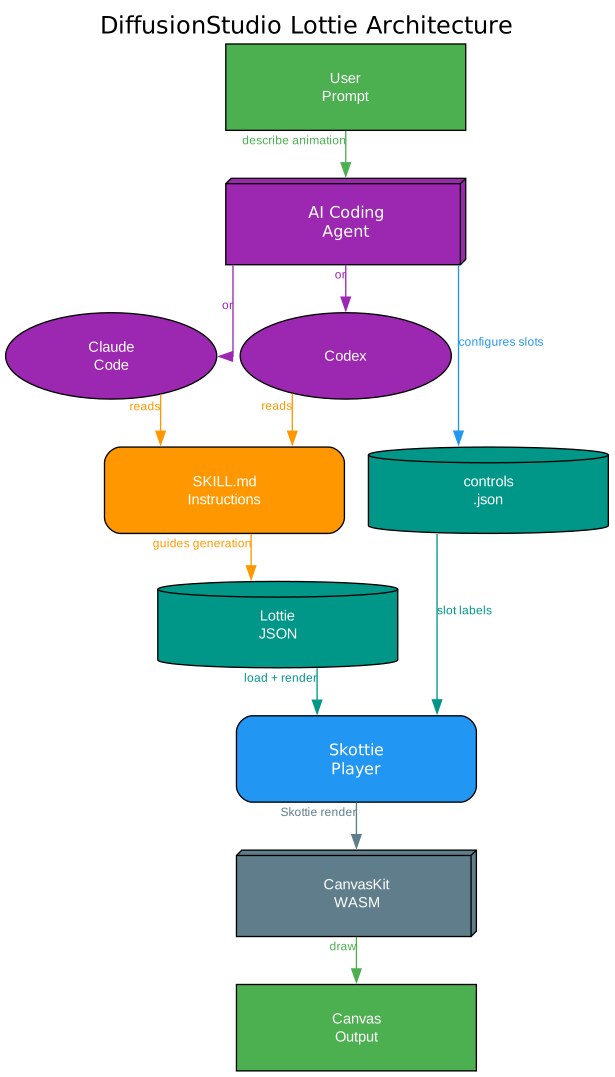
The architecture diagram above illustrates how DiffusionStudio Lottie connects natural language prompts to rendered Lottie animations. Let’s break down each component:
User Prompt The workflow begins with a natural language description of the desired animation. The user describes what they want in plain English – for example, “Create a Lottie animation from the SVG path that reveals the path with an animation following the natural path direction, with an ease-in-out timing and a transparent background.”
AI Coding Agent Claude Code or Codex receives the prompt and processes it. These agents are general-purpose coding assistants, not specialized animation tools. The magic happens in the next layer.
SKILL.md Instructions This is the critical differentiator. The skills/text-to-lottie/SKILL.md file contains detailed instructions that teach the AI agent how to author valid Lottie JSON. It covers the Lottie JSON schema, Skottie-specific requirements (like mandatory group wrappers), keyframe animation syntax, slot declarations, and a verification checklist. The agent reads these instructions and follows them precisely.
Lottie JSON and controls.json The agent writes two files: public/lottie.json (the animation itself) and public/controls.json (optional metadata for slot labels and slider ranges). These files are watched by a Vite plugin that triggers hot-reload on save.
Skottie Player with CanvasKit WASM The preview player uses Skia’s Skottie module via CanvasKit WASM – not the JavaScript lottie-web runtime. This provides GPU-accelerated rendering on a WebGL canvas surface, with Figma-style pan/zoom controls and a properties panel for live slot editing.
Canvas Output The final rendered animation appears on an HTML canvas element with data-testid="lottie-canvas", enabling automated browser agents to screenshot and verify specific frames via URL query parameters like ?frame=60&paused=1.
What is DiffusionStudio Lottie?
DiffusionStudio Lottie (package name text-to-lottie) is an open-source TypeScript project that provides a skill-based harness for generating production-ready Lottie animations with AI coding agents. Unlike traditional Lottie workflows that require After Effects and the Bodymovin plugin, DiffusionStudio Lottie enables developers to create animations by describing them in natural language to Claude Code, Codex, or any other coding agent that supports skills.
The project was created by Diffusion Studio Inc., a Y Combinator F24 company, and has rapidly gained 2,021 GitHub stars and 101 forks in just 9 days since its creation on June 4, 2026. This explosive growth signals strong developer demand for AI-assisted animation creation tools.
The core innovation is the SKILL.md instruction layer. Rather than fine-tuning a model or building custom tools, DiffusionStudio Lottie encodes Lottie JSON schema constraints, Skottie rendering requirements, and animation best practices into a structured skill file. When an AI coding agent loads this skill, it gains the knowledge needed to produce valid, renderable Lottie JSON without any model modifications.
The included Vite + React player provides immediate visual feedback through Skia’s Skottie module (via CanvasKit WASM), with hot-reload on every save, a properties panel for live slot editing, and URL-based frame pinning for deterministic verification by browser agents.
Amazing: The repository gained 2,021 stars in just 9 days, making it one of the fastest-growing AI design tools on GitHub. This signals massive unmet demand: developers want Lottie animations but have been blocked by the After Effects requirement for years.
How It Works – Architecture Deep Dive
The Skill Instruction Layer
The heart of DiffusionStudio Lottie is the skills/text-to-lottie/SKILL.md file. This is not a library you import or a CLI you run – it is a structured instruction document that AI coding agents read and follow. The skill covers:
- Project setup: How to scaffold the player project using
npx degit diffusionstudio/lottie - Lottie JSON structure: Required top-level fields (
v,fr,ip,op,w,h,assets,layers) - Layer types: Shape layers (
ty: 4), image layers (ty: 2), solid layers (ty: 1), precomp layers (ty: 0), text layers (ty: 5) - Transform blocks: The
ksobject with animated or static properties for opacity, rotation, position, anchor, and scale - The Skottie group requirement: Every shape must be wrapped in a
ty: "gr"group with a closingty: "tr"transform – flat shapes render blank - Keyframe animation: How to set
"a": 1and provide keyframe arrays witht,s,i, andoeasing handles - Slot declarations: How to expose editable properties via the
slotstop-level object andsidreferences - Background color control: Every animation must include a background layer with a slotted color
- Verification checklist: Nine-point checklist including JSON validation, group wrapping, color format, and player verification
The Skottie Rendering Engine
The preview player uses Skia’s Skottie module via canvaskit-wasm, not the JavaScript lottie-web runtime. This is a deliberate choice – Skottie provides GPU-accelerated rendering through a WebGL surface and supports the Lottie slot system natively. The LottiePlayer class in src/lib/lottie-player.ts manages:
- CanvasKit WASM initialization and caching
- WebGL surface creation and resize handling
- Frame-accurate playback driven by wall-clock time scaled by the animation’s FPS
- Slot discovery via
animation.getSlotInfo()and live slot overrides (scalar, color, vec2, text) - Figma-style camera with pan, zoom (0.1x to 32x), and double-click reset
- URL query parameter control:
?frame=N&paused=1for deterministic frame inspection
The Hot-Reload Development Loop
A custom Vite plugin (watchLottie() in vite.config.ts) watches public/lottie.json and public/controls.json for changes. When either file is saved, the plugin sends a full-reload signal to the browser. This means the AI agent can write the Lottie JSON, save it, and immediately see the result in the running dev server – no manual refresh needed.

Understanding the Generation Pipeline
The generation pipeline diagram above shows the step-by-step workflow from natural language prompt to visually verified animation. Here is how each stage works:
1. Natural Language Prompt The developer describes the desired animation in plain language. The README provides a prompt guide with five key principles: ground the model with SVGs or real data, use motion design terminology (ease-in, ease-out, ease-in-out), think like a camera operator (pushes, pans, zooms), request the controls you need, and specify FPS and duration.
2. Skill Installation The skill is installed with npx skills add diffusionstudio/lottie. This makes the SKILL.md instructions available to the AI coding agent, giving it the knowledge to produce valid Lottie JSON.
3. Project Scaffold The agent scaffolds a fresh copy of the player project using npx degit diffusionstudio/lottie my-animation, then runs npm install (which copies the CanvasKit WASM binary into /public) and npm run dev to start the dev server.
4. Write lottie.json and controls.json The agent writes the animation JSON to public/lottie.json following the SKILL.md rules. If the animation exposes editable properties, it also writes public/controls.json with labels and slider ranges for each slot.
5. Vite Hot-Reload The custom Vite plugin detects the file changes and triggers a full page reload. The animation appears in the browser immediately.
6. Skottie Parse CanvasKit attempts to parse the Lottie JSON. If the JSON is valid and follows Skottie’s requirements (groups wrapping shapes, correct color format, valid keyframes), the animation renders. If parsing fails, the app displays an error message on screen.
7. Visual Verify The agent (or developer) inspects the rendered animation. Browser agents can pin specific frames via URL parameters (?frame=60&paused=1) and screenshot the canvas for verification. If the result is incorrect, the agent edits the JSON and the cycle repeats.
Lottie JSON and the Bodymovin Format
Lottie was created by Airbnb, based on the Bodymovin After Effects plugin by Hernan Torrisi. The Lottie JSON format defines animations as a structured object with composition properties, layers, keyframes, shapes, and effects. Every Lottie document requires these top-level fields:
{
  "v": "5.7.0",
  "fr": 60,
  "ip": 0,
  "op": 120,
  "w": 512,
  "h": 512,
  "assets": [],
  "layers": []
}
The v field specifies the Bodymovin version string. fr is the frame rate (FPS). ip and op define the in-point and out-point in frames – the animation duration is (op - ip) / fr seconds. w and h set the composition dimensions in pixels. assets holds images and precomps. layers contains the animation layers in After Effects order: the first entry renders on top.
Why Generating Valid Lottie JSON is Hard
The Lottie JSON format is extremely complex with hundreds of properties and edge cases. Common mistakes that AI agents make include:
- Missing group wrappers: Skottie requires shape elements inside a
ty: "gr"group’sitarray. A flat list of shapes renders blank. - Wrong color format: Lottie uses normalized 0-1 RGBA values, not 0-255.
[1, 0, 0, 1]is opaque red, not[255, 0, 0, 1]. - Invalid keyframe format: Keyframe
svalues must always be arrays, even for scalars like rotation:"s": [360], not"s": 360. - Missing group transforms: Each group must end with a
ty: "tr"transform element, even if it is an identity transform. - Incorrect layer out-points: Each layer’s
opmust cover the frames where it should be visible.
The SKILL.md file addresses each of these pitfalls with explicit rules and examples, significantly reducing the error rate for AI-generated Lottie JSON.
The Slot System
One of the most powerful features of DiffusionStudio Lottie is the slot system. Slots allow animation properties to be marked as editable, enabling real-time customization without re-generating the entire animation. Slots are declared in the top-level slots object:
{
  "slots": {
    "ballColor": { "p": { "a": 0, "k": [0.231, 0.6, 1, 1] } },
    "ballSize":  { "p": { "a": 0, "k": 120 } }
  }
}
Properties reference slots via "sid" instead of inline values:
{ "ty": "fl", "c": { "sid": "ballColor" }, "o": { "a": 0, "k": 100 } }
The player discovers slots automatically via Skottie’s getSlotInfo() API and renders appropriate controls: color pickers for RGBA values, sliders for scalars, number inputs for vec2, and text inputs for strings. The optional controls.json sidecar adds human-readable labels and slider ranges:
{
  "controls": [
    { "sid": "ballColor", "label": "Ball color" },
    { "sid": "ballSize", "label": "Ball size", "min": 40, "max": 240, "step": 1 }
  ]
}
Getting Started with Claude Code
Prerequisites
- Node.js (v18 or later recommended)
- Claude Code installed and configured
Installation
Install the text-to-lottie skill to make it available to Claude Code:
npx skills add diffusionstudio/lottie
Quick Start
Ask your coding agent to generate a Lottie animation using the text-to-lottie skill. Here is an example prompt from the official README:
Create a Lottie animation from the SVG path in https://github.com/JaceThings/SF-Hello/blob/main/SVG/hello-en.svg. Reveal the path with an animation that follows the natural path direction. Apply a premium apple themed gradient to the path. Use ease-in-out timing, a transparent background, and preserve the original SVG geometry.
The agent will scaffold the player project, write the Lottie JSON, and start the dev server. You can then inspect the animation in the browser at the local URL printed by Vite.
Prompt Guide
The README provides five principles for getting the best results:
-
Ground the model: Provide SVGs, real-world data, or screenshots whenever possible. Results are significantly better when the animation is based on concrete assets rather than abstract descriptions.
-
Use motion design terminology: Describe timing and movement using language like ease-in, ease-out, and ease-in-out. These terms map directly to Lottie keyframe easing handles.
-
Think like a camera operator: Professional motion graphics often rely on camera movement. Include camera pushes, pans, zooms, and rig-like motion in your prompt. The agent can simulate these through group transforms.
-
Request the controls you need: By default, outputs usually only expose a background color control. If you want to customize other properties, explicitly ask the agent to create controls for them.
-
Specify FPS and duration: If your animation requires a specific frame rate or length, include the desired FPS and total frame count in the prompt.
Takeaway: The key innovation is not the Lottie generation itself, but the skill instruction layer. By encoding Lottie JSON schema constraints, Skottie rendering requirements, and animation best practices into SKILL.md, DiffusionStudio Lottie turns general-purpose AI coding agents into specialized Lottie animation generators without any model fine-tuning.
Getting Started with Codex
Using Codex follows the same workflow as Claude Code. Install the skill, then ask Codex to generate a Lottie animation:
npx skills add diffusionstudio/lottie
Then prompt Codex:
Generate a Lottie JSON animation for a checkmark icon that draws itself with a stroke-draw effect. Use 60 FPS, 90 frames total, ease-in-out timing, and expose the stroke color and draw progress as editable controls.
The main difference between Claude Code and Codex integration is the agent’s interpretation of the SKILL.md instructions. Both agents read the same skill file, but their output quality may vary depending on the model’s capability and context window. The SKILL.md checklist (9 verification steps) helps both agents catch and fix common errors before finalizing.
Animation Types and Examples
Understanding Animation Types
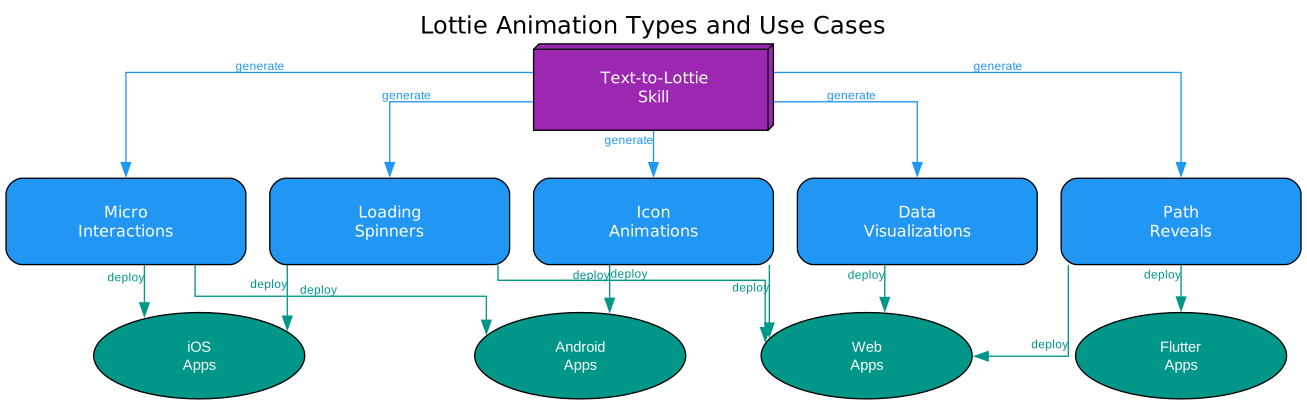
The animation types diagram above shows the different categories of Lottie animations that can be generated with the text-to-lottie skill and the platforms where they can be deployed. Here is a detailed breakdown:
Loading Spinners Loading spinners are the most common Lottie animation type. They include rotating circles, pulsing dots, and progress indicators. These are typically simple shape-layer animations with looping keyframes. The SKILL.md makes these straightforward to generate because they use basic shapes (ellipses, rectangles) with rotation and opacity animations. Spinners deploy across all platforms – web apps, iOS, and Android.
Icon Animations Icon animations transform static icons into dynamic elements: check marks that draw themselves, arrows that bounce, hamburger-to-X menu transitions. These often use path trim animations (ty: "tm") to create stroke-draw effects. The prompt guide recommends providing SVG paths as grounding assets for best results. Icon animations are commonly deployed on web and Android platforms.
Micro-Interactions Micro-interactions provide visual feedback for user actions: button press effects, toggle switch animations, notification badge appearances. These are typically short (30-60 frames at 60 FPS) and use scale, opacity, and position keyframes. The slot system is particularly useful here – you can expose colors and sizes as editable properties for design system integration. Micro-interactions are heavily used on iOS and Android.
Path Reveals Path reveals animate SVG paths with stroke-draw or mask effects, following the natural path direction. The README example demonstrates this type: “Reveal the path with an animation that follows the natural path direction.” These require custom path shapes (ty: "sh") with bezier curve data. Path reveals are popular on web and Flutter platforms.
Data Visualizations Animated charts, graphs, and data-driven visualizations. These use shape layers with animated dimensions (bar heights, pie slices) driven by data values. The slot system can expose data values as editable properties, enabling real-time data updates without regenerating the animation. Data visualizations are primarily deployed on web platforms.
Example: Bouncing Ball Animation
The repository includes a sample public/lottie.json that demonstrates a bouncing ball with slotted properties. Here is the structure:
{
  "v": "5.7.0",
  "fr": 60,
  "ip": 0,
  "op": 90,
  "w": 512,
  "h": 512,
  "assets": [],
  "slots": {
    "ballColor": { "p": { "a": 0, "k": [0.231, 0.6, 1, 1] } },
    "ballOpacity": { "p": { "a": 0, "k": 100 } },
    "ballSize": { "p": { "a": 0, "k": [120, 120] } }
  },
  "layers": [
    {
      "ty": 4,
      "nm": "ball",
      "ip": 0,
      "op": 90,
      "st": 0,
      "ks": {
        "o": { "sid": "ballOpacity" },
        "r": { "a": 0, "k": 0 },
        "p": {
          "a": 1,
          "k": [
            { "t": 0, "s": [256, 140, 0], "i": { "x": [0.5], "y": [1] }, "o": { "x": [0.7], "y": [0] } },
            { "t": 45, "s": [256, 380, 0], "i": { "x": [0.3], "y": [1] }, "o": { "x": [0.5], "y": [0] } },
            { "t": 90, "s": [256, 140, 0] }
          ]
        }
      },
      "shapes": [
        {
          "ty": "gr",
          "nm": "ball-group",
          "it": [
            { "ty": "el", "p": { "a": 0, "k": [0, 0] }, "s": { "sid": "ballSize" } },
            { "ty": "fl", "c": { "sid": "ballColor" }, "o": { "a": 0, "k": 100 } },
            { "ty": "tr", "p": { "a": 0, "k": [0, 0] }, "a": { "a": 0, "k": [0, 0] }, "s": { "a": 0, "k": [100, 100] }, "r": { "a": 0, "k": 0 }, "o": { "a": 0, "k": 100 } }
          ]
        }
      ]
    }
  ]
}
Notice how the ball color, opacity, and size are exposed as slots via "sid" references, and the position is animated with three keyframes creating a bounce effect with custom easing handles.
Production Readiness and Cross-Platform Rendering
What “Production-Ready” Means
The generated Lottie JSON files are production-ready in three ways:
-
Valid JSON: The SKILL.md includes a JSON validation step:
node -e "JSON.parse(require('fs').readFileSync('public/lottie.json','utf8'))". This catches syntax errors before deployment. -
Skottie-validated: The preview player uses Skottie to parse and render the animation. If Skottie can render it, the JSON is structurally valid for the Lottie specification.
-
Cross-platform compatible: The Lottie JSON format is supported by renderers across all major platforms. The same JSON file works with lottie-web, lottie-ios, lottie-android, and lottie-flutter.
Understanding Cross-Platform Rendering
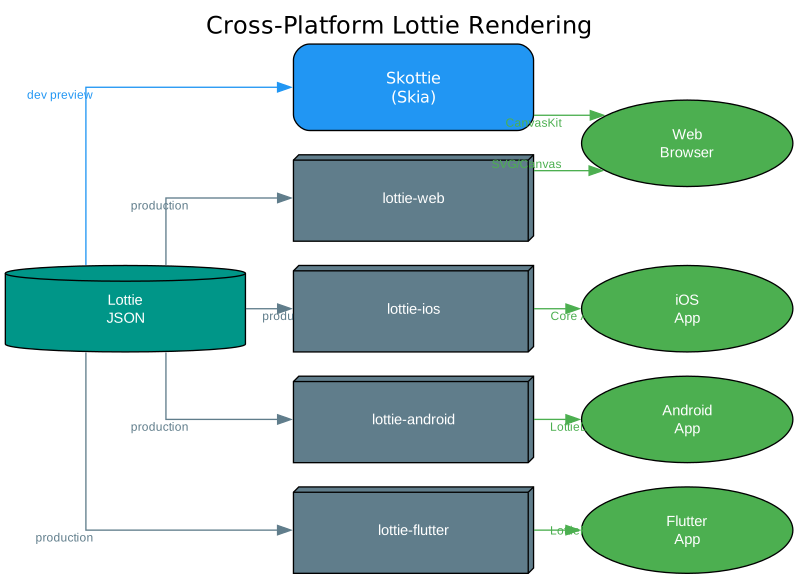
The cross-platform rendering diagram above shows how a single Lottie JSON file renders across different platforms. Here is how each rendering path works:
Development Preview: Skottie (Skia) During development, the animation is previewed using Skia’s Skottie module via CanvasKit WASM. This provides GPU-accelerated rendering on a WebGL canvas surface. The Skottie renderer is the most strict – if an animation renders correctly in Skottie, it will almost certainly render correctly on other platforms. The player also supports Figma-style pan/zoom (0.1x to 32x) and URL-based frame pinning for verification.
Production: lottie-web For web deployment, lottie-web provides SVG or Canvas rendering. The README includes a vanilla HTML example using the unpkg CDN:
<script src="https://unpkg.com/lottie-web/build/player/lottie.min.js"></script>
<div id="anim"></div>
<script>
  lottie.loadAnimation({
    container: document.getElementById("anim"),
    renderer: "svg",
    loop: true,
    autoplay: true,
    path: "/animations/my-animation.json"
  });
</script>
Production: lottie-ios For iOS apps, the Lottie Swift library renders animations using Core Animation:
import Lottie

let animationView = LottieAnimationView(name: "animation")
animationView.frame = view.bounds
animationView.contentMode = .scaleAspectFit
animationView.loopMode = .loop
view.addSubview(animationView)
animationView.play()
Production: lottie-android For Android apps, the Lottie Kotlin library renders animations using LottieDrawable:
val view = findViewById<LottieAnimationView>(R.id.animationView)
view.setAnimation(R.raw.animation)
view.loop(true)
view.playAnimation()
Production: lottie-flutter For Flutter apps, the lottie-flutter package renders animations using LottiePainter:
import 'package:lottie/lottie.dart';

Lottie.asset('assets/animation.json')
Production: React Native Skia (Skottie) The README also highlights an advanced option: React Native Skia’s Skottie module, which renders Lottie animations as regular Skia drawings that can be composed into larger Skia scenes alongside shaders, effects, and masks. This enables runtime customization of animation properties, assets, and typographies.
Important: The Skottie renderer used in the preview player is stricter than lottie-web. If an animation renders correctly in Skottie, it will almost certainly work on other platforms. However, the reverse is not always true – some lottie-web features (like expressions and certain effects) are not supported by Skottie. The SKILL.md explicitly recommends using shape layers (ty: 4) for LLM-authored animations since they require no external assets and have the broadest cross-platform support.
Comparison with Alternatives
DiffusionStudio Lottie vs. After Effects + Bodymovin
| Aspect | DiffusionStudio Lottie | After Effects + Bodymovin |
|---|---|---|
| Required skills | Natural language description | After Effects expertise |
| Setup time | Minutes (npx skills add) | Hours (install, learn, configure) |
| Cost | Free (open source, MIT) | $22.99/month (Adobe subscription) |
| Iteration speed | Seconds (edit JSON, hot-reload) | Minutes (edit, export, test) |
| Creative control | Constrained by Lottie spec | Full After Effects capabilities |
| Best for | Programmatic, template-based animations | Creative motion design |
DiffusionStudio Lottie vs. LottieFiles
LottieFiles is a marketplace for Lottie animations, not a generation tool. You browse and download pre-made animations. DiffusionStudio Lottie generates custom animations from your descriptions. They serve different needs: LottieFiles for ready-made assets, DiffusionStudio Lottie for custom animations.
DiffusionStudio Lottie vs. Manual Lottie JSON Authoring
Writing Lottie JSON by hand is possible but extremely tedious and error-prone. The format has hundreds of properties, strict ordering requirements, and subtle edge cases (like the mandatory group wrapper in Skottie). DiffusionStudio Lottie automates this process while the SKILL.md checklist catches common mistakes.
When to Use DiffusionStudio Lottie
DiffusionStudio Lottie is best for:
- Rapid prototyping of UI animations
- Developer-generated animations for design systems
- Template-based animations with customizable properties (via slots)
- Animations grounded in concrete SVG assets or data
It is less suitable for:
- Complex creative motion design requiring visual feedback during authoring
- Animations that use After Effects features not supported by Lottie (3D layers, expressions, some effects)
- Projects where a professional motion designer is available
Conclusion
DiffusionStudio Lottie bridges the gap between AI coding agents and professional-quality Lottie animations. By encoding Lottie JSON schema constraints, Skottie rendering requirements, and animation best practices into a structured SKILL.md file, it transforms general-purpose AI coding agents into specialized Lottie animation generators – no model fine-tuning required.
The included Skottie-powered preview player with hot-reload, live slot editing, and URL-based frame pinning creates a tight feedback loop that enables rapid iteration. The slot system allows animations to be customized at runtime without regeneration, making them ideal for design systems and component libraries.
As AI coding agents continue to improve in capability and context understanding, the quality and complexity of animations generated through this approach will increase. The skill-based architecture means the instructions can be updated independently of the AI model, keeping pace with new Lottie features and best practices.
Links:
- GitHub Repository: https://github.com/diffusionstudio/lottie
- LottieFiles Motion Design Skill: https://github.com/lottiefiles/motion-design-skill
- React Native Skia Skottie: https://shopify.github.io/react-native-skia/docs/skottie/

Enjoyed this post? Never miss out on future posts by following us


