Introduction
Project management software is one of the most crowded categories in modern tooling, yet most teams still end up fighting their tools instead of doing their work. Kaneo is a free, open-source project management platform that takes the opposite stance. It is self-hosted, MIT licensed, and built around a single principle: the best tools are invisible. Instead of adding every possible feature, Kaneo amplifies a team’s natural workflow so the tool fades into the background and the work stays in focus.
The project lives on GitHub at usekaneo/kaneo and ships a marketing site at kaneo.app alongside a managed Kaneo Cloud offering. It is written primarily in TypeScript, organized as a pnpm and Turborepo monorepo, and deployed either through a purpose-built CLI called drim, through Docker Compose, or through a packaged Helm chart for Kubernetes. The community gathers on Discord, and contributions are welcomed under the MIT license.
This post walks through what Kaneo is, why it exists, how its architecture fits together, how to install it, how to use it day to day, and which features matter most. Whether you are evaluating a Jira alternative, a Linear alternative, or a Trello alternative, Kaneo is worth understanding because it deliberately rejects the feature-bloat race in favor of focus and ownership.
Why Kaneo
The creator of Kaneo, Andrej, built it after years of using bloated, overcomplicated project management platforms that distracted from actual work. The core observation is that the problem with most tools is not that they lack features, it is that they have too many. Every unnecessary notification, every unused workflow state, and every configuration surface pulls a team away from what matters: building great products.
Kaneo is built on the principle that less is more. Every feature exists because it solves a real problem, not because it looks impressive in a demo. This philosophy shows up across the product. The interface is clean and centered on the work rather than on the tool. The platform is self-hosted by default, so your data stays yours and you are not locked into a vendor’s pricing or roadmap. Performance is treated as a first-class concern, so the board and list views respond instantly even on large workspaces. And the whole project is open source under the permissive MIT license, so you can audit, customize, and extend it without asking permission.
For teams that care about control, privacy, and a focused execution experience, Kaneo occupies a clear niche. It gives you clean planning, focused execution, and full ownership of your workflow from backlog to release. It is not trying to be everything to everyone; it is trying to be the invisible layer that helps a team move faster.
How It Works
Kaneo follows a modern, layered architecture that separates the presentation tier, the API tier, the backend services, and the data tier, while keeping deployment simple through containerization. The diagram below shows how users, the Kaneo application, backend services, storage, and deployment tooling connect to form a complete request and data flow.
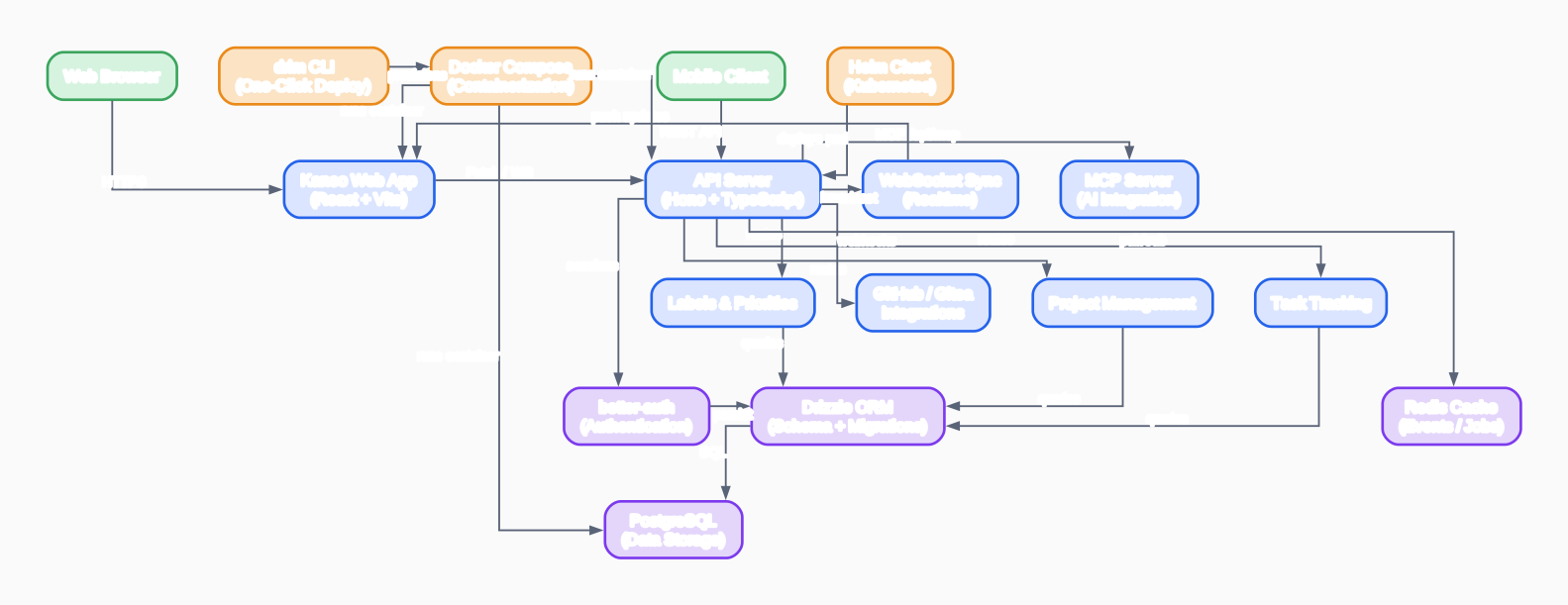
The diagram is organized into horizontal bands that map directly to Kaneo’s runtime responsibilities. Reading it top to bottom traces a single user action from click to persisted row, while the side band captures how the whole stack is delivered. Each color carries semantic meaning: green marks input from users, blue marks the application layers and processes, purple marks backend services and storage, and orange marks the deployment tooling. This consistent coloring makes it easy to scan where a request enters, where it is processed, and where it lands.
At the top, in green, sit the human entry points: the Web Browser and the Mobile Client. Browsers load the Kaneo Web App, which is a React 19 single-page application built with Vite, TanStack Router, TanStack Query, and Tailwind CSS. The routing is file-based through TanStack Router, server state is cached and synchronized through TanStack Query, and the rich text editor for task descriptions is powered by TipTap. Mobile and other programmatic clients, including scripts and CI pipelines, talk to the API Server directly over its REST API. These two surfaces are the only things end users ever touch, which keeps the perceived surface area of the product small even though the underlying system is capable.
The blue band in the middle represents the Kaneo application layer. The Web App communicates with the API Server, which is a Hono application running on Node.js. Hono was chosen because it is fast, lightweight, and built around web standards, which keeps cold starts and per-request overhead low. The API Server is the central orchestrator for the entire backend. It validates every incoming request with Zod and Valibot, enforces sessions and API keys through better-auth, and then dispatches work to the domain modules: Project Management, Task Tracking, Labels and Priorities, and the GitHub and Gitea integrations. Each module owns its own controllers and schema, which keeps the codebase navigable as features grow.
Alongside the domain modules, the API Server fans two kinds of work outward. The first is the WebSocket Sync layer, which broadcasts task and project changes to every connected client so that moving a card on one screen instantly reflects on every other open board. The second is the MCP Server, which exposes a Model Context Protocol endpoint at /api/mcp. This lets AI tools like Claude Desktop and Cursor manage tasks, projects, and labels directly, giving agentic coding workflows a unified project context instead of forcing humans to copy information back and forth. The same API that powers the web UI therefore also powers automation and AI agents, with no separate integration tier to maintain.
The purple band represents the backend services and the data tier. better-auth handles authentication, sessions, social sign-in through GitHub, Google, and Discord, magic links, OTP, and API keys. Drizzle ORM provides a typed schema, versioned migrations, and query building on top of PostgreSQL, so every domain module persists its data through the same safe, typed boundary and the schema is reviewable in version control. Redis is used as a cache and a pub/sub bus for events, scheduled jobs, and due-date reminders, which is what enables the realtime broadcast and the background scheduler to run without overloading the database. All of these services ultimately funnel through Drizzle into PostgreSQL, the single source of truth for projects, tasks, labels, comments, activity, and workspaces.
The orange band on the side captures the deployment and tooling story, which is central to Kaneo’s promise of invisible ownership. drim is a Go CLI that generates the docker-compose.yml, Caddyfile, and .env, installs Docker if it is missing, and brings the whole stack up with one command, including automatic HTTPS through Caddy. Docker Compose runs the API, the Web App, and PostgreSQL as containers and is the fastest way to try Kaneo locally or on a single server, which is why it is the default path in the documentation. The Helm chart targets teams running Kubernetes in production and includes deployment, service, ingress, HPA, and PVC templates.
Together these bands describe a complete request lifecycle. A browser loads the Web App, which calls the API Server over HTTPS. The API Server authenticates the request with better-auth, routes it to the right domain module, reads or writes through Drizzle ORM into PostgreSQL, publishes any resulting events to Redis, and broadcasts changes back over WebSocket to every open client. When a team wants to deploy, drim or Docker Compose stands the whole thing up in minutes. This separation of concerns, combined with simple delivery tooling, is exactly what lets Kaneo stay fast and focused while remaining trivially self-hostable.
Concretely, a single task update flows through the system in the following steps:
- The user drags a card in the Web App, which issues a
PATCH /api/tasks/:idrequest to the API Server. - The API Server validates the payload with Zod and confirms the session and permissions through better-auth and the permissions package.
- The Task Tracking domain module updates the row through Drizzle ORM, which executes the SQL against PostgreSQL.
- The API Server publishes the change as an event to Redis, which fans it out to the WebSocket Sync layer.
- The WebSocket layer pushes the update to every connected client, so all open boards reflect the new status instantly.
- If a due date changed, the scheduler picks it up from the database and queues a reminder through the configured notification channels.
This layered flow is what makes Kaneo feel instantaneous while keeping every concern in its own place. The frontend never talks to PostgreSQL directly, the API never reaches into another module’s schema, and realtime delivery is decoupled from request handling through Redis. The same disciplined boundary also applies to integrations: GitHub and Gitea webhooks arrive at dedicated endpoints, are translated into activity, and flow back out through the WebSocket layer, so external systems and the web UI stay consistent without ad hoc glue code.
The deployment side mirrors the same predictability. A fresh server goes from empty to a secured Kaneo instance through a short, repeatable lifecycle:
- drim is installed from the official install script and verifies that the Docker daemon is reachable.
- drim generates the
docker-compose.yml,Caddyfile, and.envfrom your answers or flags. - Docker Compose pulls the bundled Kaneo image and the PostgreSQL image and starts both services.
- The API waits for PostgreSQL to pass its health check, then runs any pending Drizzle migrations.
- Caddy terminates TLS for the configured domain and reverse-proxies traffic to the Web App and API.
- The instance is live and reachable over HTTPS, with the database persisted to a named volume.
Because every layer has a clear job and every deployment step is generated rather than hand-written, the same diagram that describes a task update also describes how the system is stood up and operated. That symmetry, more than any single feature, is the practical payoff of Kaneo’s architecture: it is simple enough to reason about end to end, yet complete enough to run a real team’s workflow from backlog to release.
Installation
Kaneo offers three primary installation paths, each tuned for a different level of operational comfort. The fastest is drim, the one-click deployment CLI, which is ideal if you want things to just work on a fresh Linux server.
One-Click Deployment with drim
Install drim and run its setup wizard. The CLI generates the required configuration files, installs Docker if it is missing, provisions automatic HTTPS through Caddy, and brings the stack up.
curl -fsSL https://assets.kaneo.app/install.sh | sh
drim setup
To install and deploy in a single step with a domain and automatic HTTPS, pass the flags directly to the install script:
curl -fsSL https://assets.kaneo.app/install.sh | sh -s -- --setup --domain=kaneo.example.com
Once the command finishes, your Kaneo instance is running with the database, API, and web frontend all configured and reachable over HTTPS.
Quick Start with Docker Compose
The fastest way to try Kaneo locally is with Docker Compose. Save the following as compose.yml, copy .env.sample to .env, set POSTGRES_PASSWORD and AUTH_SECRET, and run docker compose up -d.
services:
  postgres:
    image: postgres:16-alpine
    env_file:
      - .env
    ports:
      - "5432:5432"
    volumes:
      - postgres_data:/var/lib/postgresql/data
    restart: unless-stopped
    healthcheck:
      test: ["CMD-SHELL", "pg_isready -U kaneo -d kaneo"]
      interval: 10s
      timeout: 5s
      retries: 5

  kaneo:
    image: ghcr.io/usekaneo/kaneo:latest
    ports:
      - "5173:5173"
    env_file:
      - .env
    depends_on:
      postgres:
        condition: service_healthy
    restart: unless-stopped

volumes:
  postgres_data:
Generate a strong AUTH_SECRET with OpenSSL, then open http://localhost:5173 in your browser.
openssl rand -hex 32
Development Setup
To hack on Kaneo itself, clone the repository and use pnpm with Turborepo. The project requires Node 20.19 or newer.
git clone https://github.com/usekaneo/kaneo.git
cd kaneo
pnpm install
pnpm dev
Refer to the ENVIRONMENT_SETUP.md file in the repository root for the full list of required environment variables and for troubleshooting common issues such as CORS configuration.
Kubernetes Deployment
For production Kubernetes clusters, Kaneo ships a comprehensive Helm chart under charts/kaneo. It includes deployment, service, ingress, HPA, PVC, and validation templates, with documented values for TLS, storage, and scaling. See the chart’s README for installation and production configuration examples.
Usage
Day to day, Kaneo centers on a small set of focused workflows. The workspace is the top-level container, and inside it you create projects. Each project has a board and a list view that share the same source of truth, so planning in the list view and executing in the board view keeps statuses, priorities, and labels perfectly in sync.
A typical session looks like this. You sign in, open a workspace, and land on a project board with columns such as Backlog, To Do, In Progress, In Review, and Done. You create a task, assign an owner, set a priority, attach labels, and pick a due date. Dragging a card between columns updates its status immediately and broadcasts the change to every other connected client through the WebSocket layer.
Tasks support a rich text editor built on TipTap, file attachments, subtasks, comments, activity history, and relations to other tasks. Labels act as the primary cross-cutting organizational axis, representing streams like onboarding, backend, or customer-feedback, and they combine with priority and due dates for sharper planning. Because label naming is consistent across a workspace, filtering stays useful as the project grows.
For teams that connect planning to code, the native GitHub and Gitea integrations sync issues and keep product planning aligned with development execution. Outgoing webhooks can fan events out to Slack, Discord, Telegram, or any custom HTTP endpoint. The scheduler runs due-date reminders so nothing slips through the cracks, and the REST API plus the MCP server let you automate Kaneo from scripts, CI pipelines, or AI coding agents.
# Create a task through the REST API
curl -X POST https://kaneo.example.com/api/tasks \
  -H "Authorization: Bearer $KANEO_API_KEY" \
  -H "Content-Type: application/json" \
  -d '{
    "projectId": "proj_abc123",
    "title": "Ship release notes",
    "priority": "high",
    "status": "in-progress",
    "labels": ["docs", "release"]
  }'
# Run the MCP server for an AI coding agent
npx -y @kaneo/mcp
Features
Board and List Views
Kaneo keeps planning operational with less dashboard theater and more visible ownership. The board view is a drag-and-drop kanban where cards move between status columns in real time. The list view presents the same work as a compact table for planning and triage. Because both views read and write the same data, switching between them never causes drift.
Labels and Priorities
Labels are central to Kaneo’s flow. Use them to group initiatives, surface cross-cutting work, and keep prioritization clear across board and list views. Combine labels with priority levels and due dates to build a focused, filterable backlog without introducing heavy process.
Native GitHub and Gitea Integrations
Kaneo connects project management to the code repository. Native integrations for GitHub and self-hosted Gitea sync issues and map labels, so development execution and product planning stay aligned. Webhook handlers translate repository events into activity that appears on the relevant tasks.
MCP Server for AI Tools
Every Kaneo instance ships a built-in HTTP MCP endpoint at /api/mcp, and a stdio client is available through the @kaneo/mcp package on npm. This lets AI tools like Claude Desktop and Cursor manage tasks, projects, and labels directly, giving agentic coding workflows a unified project context.
Authentication and Security
Authentication is handled by better-auth, which supports email and password, magic links, OTP, API keys, and social sign-in through GitHub, Google, and Discord. Permissions are enforced through a dedicated package, and the platform is designed with a privacy-first stance and minimal analytics so teams that care about control can run it confidently.
Realtime Collaboration
A WebSocket layer broadcasts task and project changes to every connected client. Moving a card, updating a description, or posting a comment is reflected instantly across the team, which keeps distributed teams in sync without manual refreshes.
Self-Hosted by Default
Deploy with Docker, drim, or Helm and keep full ownership of your infrastructure and data. There are no mandatory phone-home calls and no forced telemetry. For teams that prefer not to self-host, Kaneo Cloud offers a managed option with the same product.
Internationalization
Kaneo ships with translations for many languages, including English, Spanish, French, German, Portuguese, Russian, Chinese, Japanese, Korean, and more, with a schema-validated i18n workflow that keeps translations consistent across releases.
Conclusion
Kaneo is a refreshing entry in the project management space precisely because it refuses to compete on feature count. It is free, open source, MIT licensed, and self-hosted by default, which gives teams genuine ownership of their workflow and their data. The architecture is clean: a React and Vite web app talking to a Hono API, persisted through Drizzle ORM into PostgreSQL, with Redis for events, better-auth for identity, and a WebSocket layer for realtime updates. Deployment is deliberately painless thanks to the drim CLI, Docker Compose, and a Helm chart for Kubernetes.
For teams that have grown tired of bloated platforms and want a tool that amplifies their natural workflow instead of forcing adaptation, Kaneo is well worth a try. Clone the repository, run drim setup, or spin up the Docker Compose stack and see how an invisible project management tool feels. If it saves your team time, consider sponsoring the project on GitHub or joining the community on Discord to help shape its future.
- Repository: https://github.com/usekaneo/kaneo
- Website: https://kaneo.app
- Cloud: https://cloud.kaneo.app
- Discord: https://discord.gg/rU4tSyhXXU
- Documentation: https://kaneo.app/docs/core

Enjoyed this post? Never miss out on future posts by following us


