Real investigations are never a list. Ask any fraud analyst or threat researcher how a case actually unfolds and you will hear the same shape: a suspicious domain leads to an IP, the IP leads to an ASN, one breached email address leads to three other domains, and somewhere in the middle there is a person. Investigators have always drawn this on whiteboards and in spreadsheets - and then lost the thread, because a list cannot hold a relationship.
Flowsint is an open-source answer to that problem: a graph-based investigation platform for OSINT (open source intelligence) and reconnaissance, Apache-2.0 licensed, with around 8,200 GitHub stars and a spot on the trending charts right now. You drop a seed entity - a domain, an email, a phone number, a crypto wallet - onto a visual canvas, pick an enricher, and the graph literally grows in front of you: new nodes appear, edges connect them, and every new node is itself enrichable. One click on a domain cascades into subdomains, IPs, autonomous systems, and WHOIS records. One click on an email reveals breach records and linked domains. Everything runs in Docker on your own machine, and nothing about your investigation ever leaves it.
The project is explicit about ethics - it ships with an ETHICS.md and is built for security researchers, journalists, fraud teams, and threat-intelligence work - which is exactly the right posture for a tool this powerful. Let’s look at how it works.
Understanding the Architecture
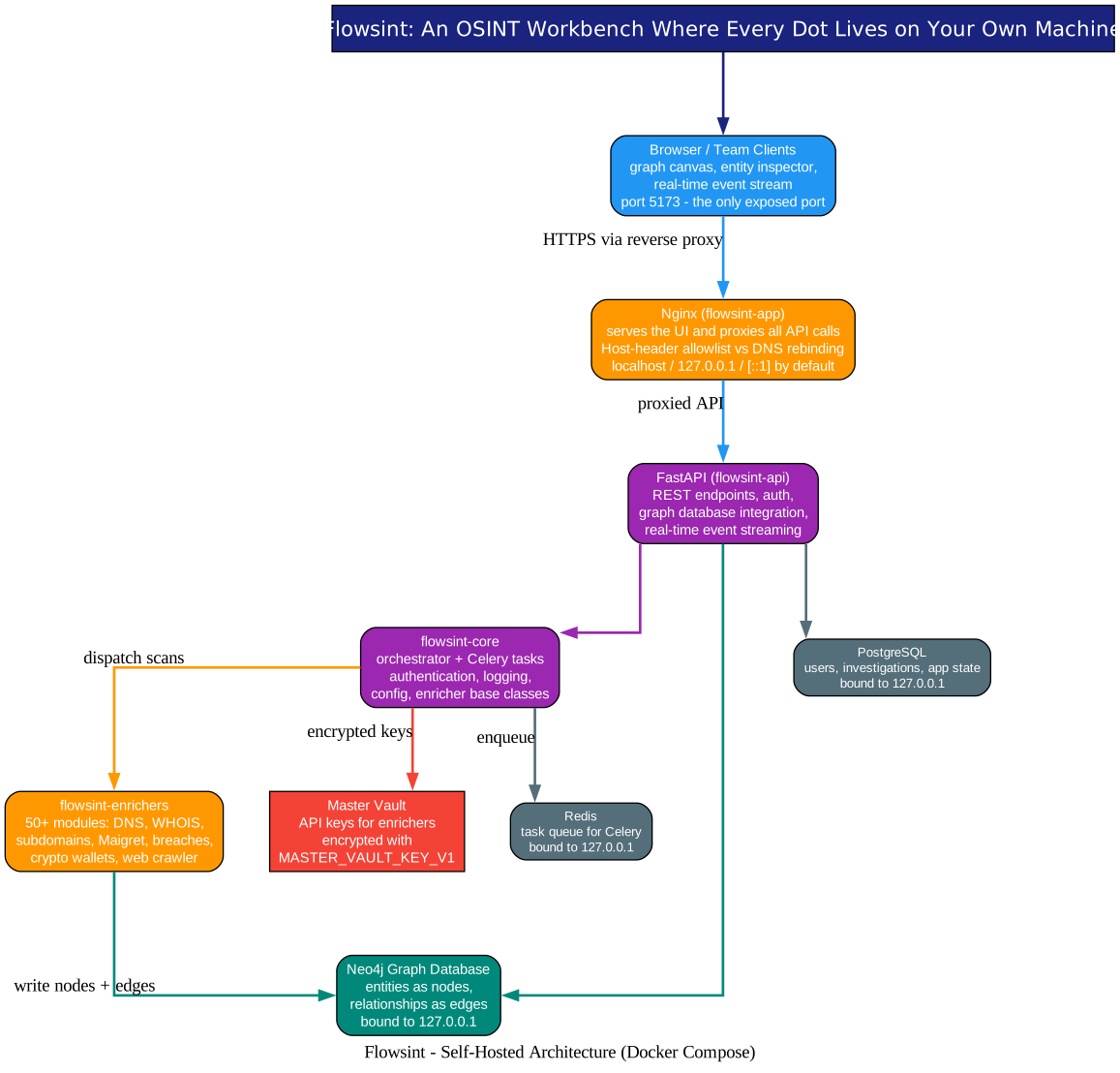
Flowsint deploys as a single Docker Compose stack with five autonomous modules, and the diagram above shows how a request flows through them.
1. One exposed port. Your browser talks to flowsint-app - the frontend, served by nginx on port 5173. That is the only port the outside world sees. The frontend serves the UI and proxies every API call internally, which means team deployments need zero extra configuration: point colleagues at http://<server-ip>:5173 and they are in. Put Caddy or any reverse proxy in front of it for HTTPS beyond a trusted LAN.
2. FastAPI + Celery: the engine room. Behind the proxy sits flowsint-api, a FastAPI server handling REST endpoints, authentication, and - crucially - real-time event streaming, so enricher progress lands on your canvas live. Long-running scans are dispatched through flowsint-core, the orchestrator that manages Celery tasks over Redis. This is why the UI stays responsive: the graph canvas keeps rendering while dozens of scans run in the background.
3. Three databases, each with one job. Neo4j holds the investigation itself - entities as nodes, relationships as edges, which is exactly what a graph database is for. PostgreSQL holds users, investigations, and app state. Redis serves as the Celery task queue. All three are bound to 127.0.0.1 inside the deployment, reachable only through the app - a deliberate hardening choice we will come back to.
4. The vault. Most enrichers need API keys (breach databases, domain history services, and so on). Flowsint stores those keys in an encrypted master vault sealed by MASTER_VAULT_KEY_V1, so secrets are not sitting in plaintext config files. Enrichers pull their credentials from the vault at runtime.
The whole stack pulls pre-built images from GitHub Container Registry - docker compose up -d and you are running, no local build required.
The Workflow: How One Seed Becomes a Case File
Understanding the Workflow
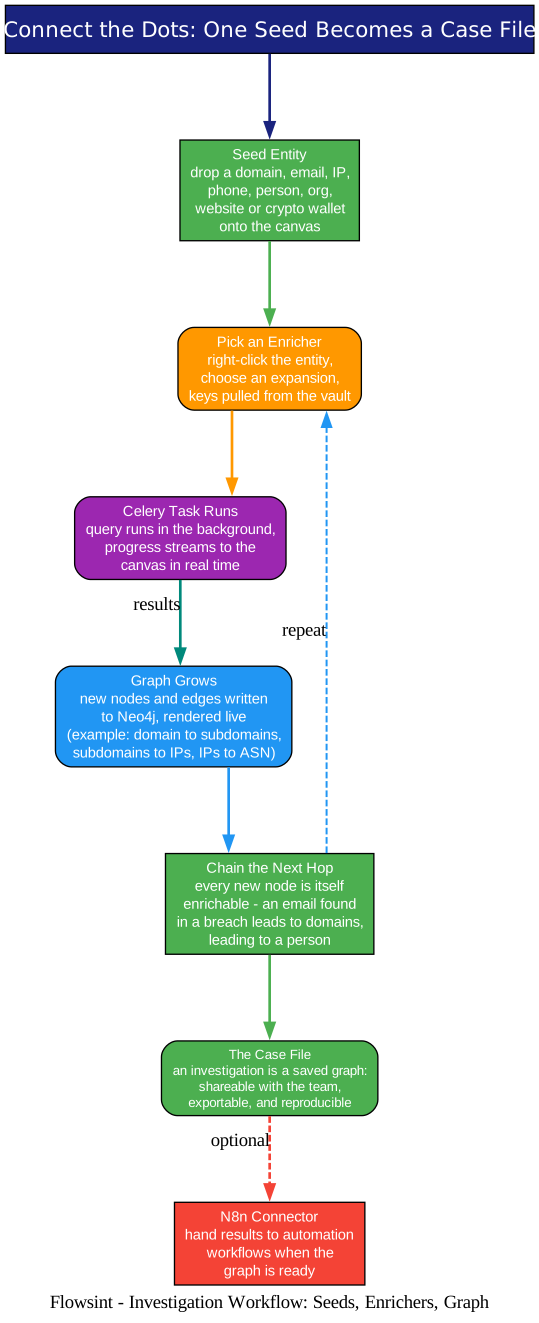
Start with anything. A seed entity can be a domain, IP, ASN, CIDR, email, phone, website, person, organization, social profile, or crypto wallet - each one is a typed entity with a Pydantic model behind it (flowsint-types), not just a labeled blob.
Expand with an enricher. Right-click the entity, choose an expansion. A domain might get DNS resolution, reverse DNS, subdomain discovery, WHOIS, or historical records. An IP might be resolved to its ASN; the ASN to its CIDR ranges; a CIDR enumerated into individual IPs. Each enricher is a small, focused module in flowsint-enrichers - and adding your own is a documented workflow, not a patch job.
Chain the next hop. This is where the tool earns its name. Every node the enrichers produce is itself a first-class entity. An email address found in a breach dataset can be run through “email to domains”; a domain found that way becomes a new investigation seed; a person entity can be linked to organizations. Investigations compound - the graph grows outward the way real cases do, and because it is a saved graph in Neo4j rather than a browser tab full of notes, the whole chain of reasoning is reproducible and shareable with your team.
Hand off when done. An N8n connector enricher lets you push results into automation workflows when the graph is ready - a nice escape hatch for teams whose investigation pipeline ends in ticketing or alerting systems.
The Enricher Catalog: 50+ Ways to Expand
Understanding the Catalog
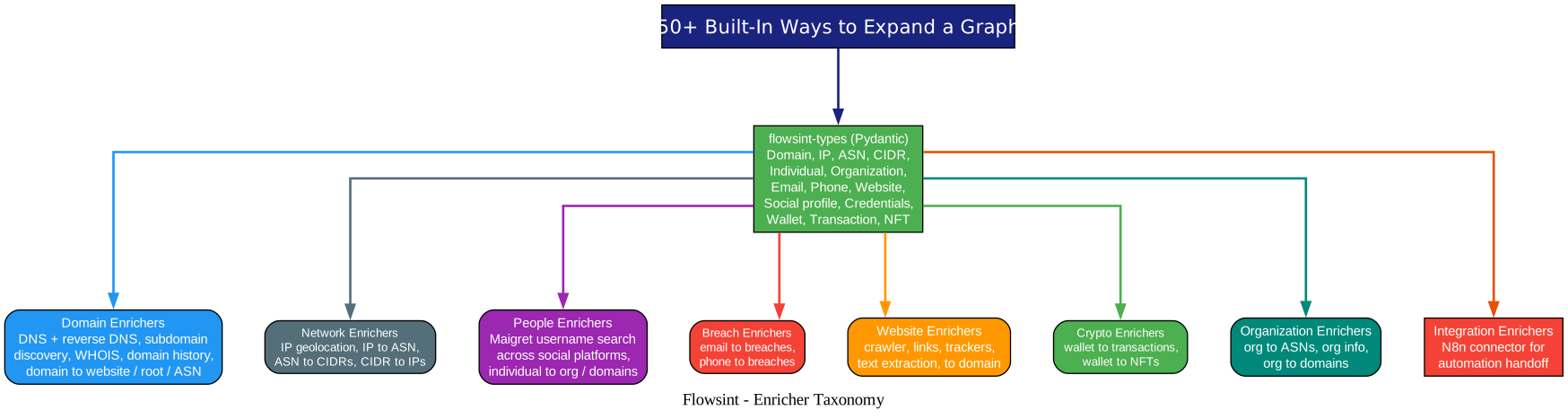
The enrichers are organized by the entity type they consume, and the breadth is the point - each one converts a generic node into specific, structured intelligence:
- Domain - DNS and reverse DNS resolution, subdomain discovery, WHOIS lookups, domain history, and conversions to website, root domain, or ASN
- Network - IP geolocation and network details, IP-to-ASN, ASN-to-CIDRs, and CIDR-to-IPs enumeration
- People and social - username search across social platforms via Maigret, plus individual-to-organization and individual-to-domains lookups
- Breaches - email-to-breaches and phone-to-breaches checks against data breach databases
- Website - a full crawler that maps site structure, extracts every link, identifies tracking scripts, pulls text content, and resolves back to a domain
- Crypto - wallet-to-transactions and wallet-to-NFTs, tracing what a wallet actually touched
- Organization - company details, owned ASNs, and owned domains
- Integration - the N8n connector for automation handoff
A practical note for tinkerers: the codebase is deliberately modular - types live in flowsint-types, enrichers in flowsint-enrichers, endpoints in flowsint-api, utilities in flowsint-core - and each module has its own pytest suite run with uv. Writing a new enricher means implementing one base class in one module, which keeps the contribution surface small.
Security: A Spy Tool That Locks Its Own Doors
Understanding the Security Model
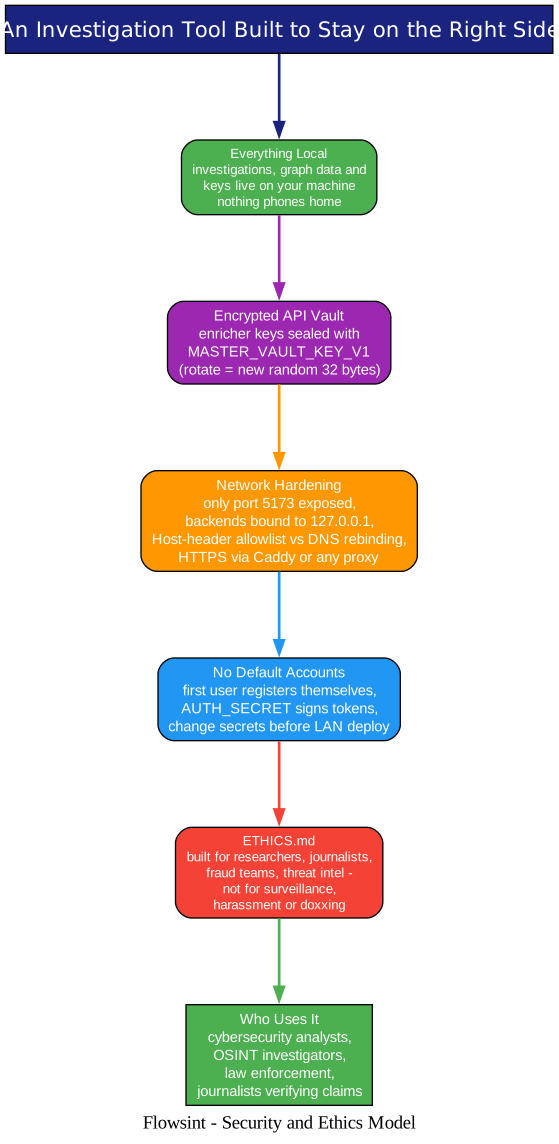
For a tool whose entire purpose is pulling external data into a private workspace, Flowsint is refreshingly serious about its own attack surface.
No default accounts. There are no seeded credentials anywhere - the first user registers themselves at /register, and authentication tokens are signed with AUTH_SECRET.
Hardened network posture. Only port 5173 is exposed. PostgreSQL, Redis, Neo4j, and the API are all bound to 127.0.0.1 and reachable only through the frontend proxy. The nginx layer enforces a Host-header allowlist - by default accepting only localhost, 127.0.0.1, and [::1] - which defends single-user installs against DNS rebinding attacks; LAN and public deployments must explicitly opt in their own hostname. It is a rare bit of threat-model thinking for a self-hosted tool.
Encrypted secrets. Enricher API keys live in the master vault, encrypted with a key you generate yourself. The README tells you exactly how to rotate all three secrets (AUTH_SECRET, MASTER_VAULT_KEY_V1, NEO4J_PASSWORD) before exposing anything to a network.
Privacy as a feature. Investigations need confidentiality, and the project states it plainly: everything is stored on your machine. Your case files, your graph, your sources - all local.
And the ethics, explicitly. The project positions itself strictly for lawful investigation - researchers, journalists verifying claims, fraud teams, law enforcement - and prohibits using it for unauthorized intrusion, surveillance, harassment, or doxxing. That framing matters: OSINT tooling is powerful, and a project that bakes its values into the README from the first screen is one worth trusting more, not less.
Getting Started
Prerequisites are just Docker and Git.
Linux / macOS:
git clone https://github.com/reconurge/flowsint.git
cd flowsint
make prod
Windows (PowerShell or cmd, no Make needed):
git clone https://github.com/reconurge/flowsint.git
cd flowsint
copy .env.example .env
copy .env.example flowsint-api\.env
copy .env.example flowsint-core\.env
copy .env.example flowsint-app\.env
docker compose -f docker-compose.prod.yml up -d
Then open http://localhost:5173/register, create your account, and drop your first seed onto the canvas. For team or server deployments, the same compose file works out of the box - just change the three default secrets first, add your hostname to the nginx allowlist, and pin a version with FLOWSINT_VERSION if you want stability over latest.
Why This Matters
Graph thinking is the difference between collecting information and understanding it. Commercial link-analysis platforms in this category are expensive and closed; notebooks and spreadsheets do not scale to relationship-heavy work. Flowsint brings the workflow - visual canvas, typed entities, automated enrichment, saved and shareable cases - to a self-hosted Docker stack that anyone can audit, extend, and run for free.
It also slots neatly into the growing open-source OSINT stack we have covered before: God’s Eye View for satellite imagery intelligence, Agent-Reach for reading the platforms themselves, and PentAGI for autonomous offensive testing. Where those tools gather raw signal, Flowsint is where the signal becomes a story - one node, one edge, one enricher at a time.
If your work ever involves answering “how is this connected to that?”, clone the repo, run make prod, and give it a seed. The dots will connect themselves.
Related Posts
- God’s Eye View: A Spy Satellite Simulator in Your Browser with Real OSINT Data
- Agent-Reach: Give Your AI Agent Eyes on the Entire Internet
- PentAGI: The Open Source AI Agent That Hacks So You Don’t Have To

Enjoyed this post? Never miss out on future posts by following us


