Agent-Reach: Give Your AI Agent Eyes to Search the Entire Internet
AI agent internet search has long been a frustrating gap in the developer workflow. You ask your AI coding agent to look up a Twitter discussion, search Reddit for bug reports, or pull YouTube transcripts – and it hits a wall. Twitter’s API costs money. Reddit blocks anonymous access. YouTube subtitles require special tools. Each platform has its own authentication maze, rate limits, and anti-scraping measures. Agent-Reach solves this problem by giving any AI agent that can run shell commands the ability to read and search 13 internet platforms with zero API fees.
Agent-Reach is not just another scraping library. It is a capability layer – an installer, health checker, and backend router that selects the most reliable upstream tool for each platform, installs it, verifies it works, and keeps it working even when platforms change their APIs or block access. When yt-dlp was blocked by Bilibili’s anti-scraping measures in June 2026, Agent-Reach automatically switched to bili-cli with zero user intervention. That is the core value proposition: you install once, and Agent-Reach handles the ongoing maintenance of your agent’s internet access.
Key Insight: Agent-Reach supports 13 platforms with multi-backend routing. Each channel maintains an ordered list of preferred and fallback backends, so when one tool breaks, the next one takes over automatically – no code changes required.
How It Works
Agent-Reach operates as a thin capability layer between your AI agent and the internet. It does not wrap or proxy the upstream tools – instead, it selects, installs, and health-checks them, then lets your agent call them directly. This design means there is zero overhead at runtime: your agent talks to twitter-cli, yt-dlp, or gh CLI exactly as if you had installed them manually.
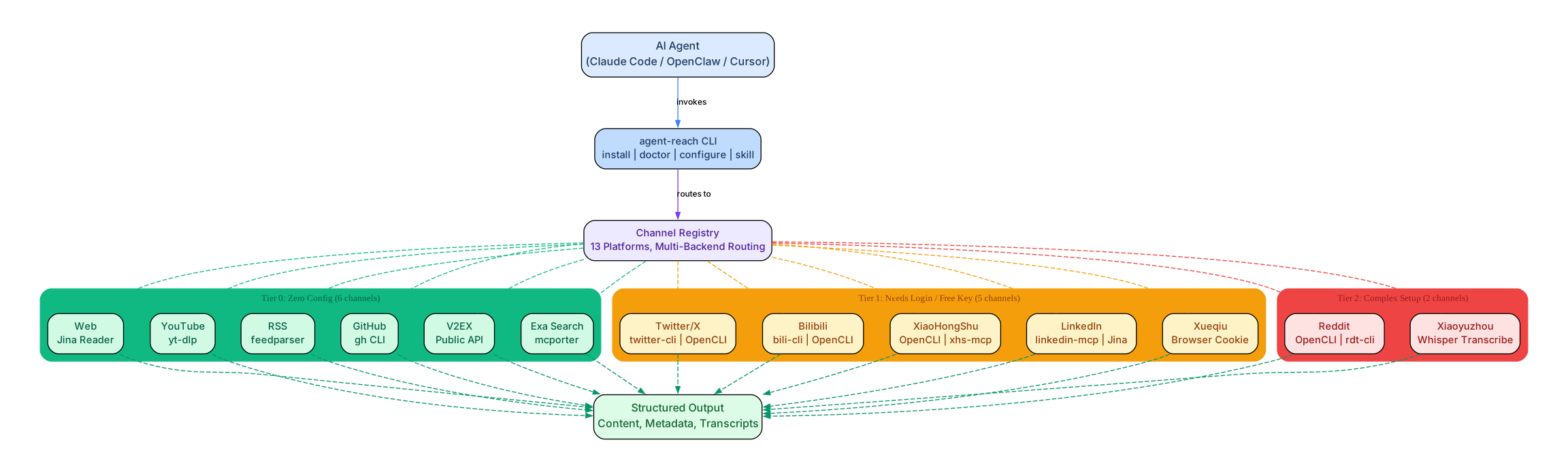
The architecture follows a tiered model based on configuration complexity:
- Tier 0 (Zero Config): Web (Jina Reader), YouTube (yt-dlp), RSS (feedparser), GitHub (gh CLI), V2EX (Public API), Exa Search (mcporter) – these work immediately after installation with no additional setup.
- Tier 1 (Needs Login/Free Key): Twitter/X (twitter-cli or OpenCLI), Bilibili (bili-cli or OpenCLI), XiaoHongShu (OpenCLI or xiaohongshu-mcp), LinkedIn (linkedin-mcp or Jina Reader), Xueqiu (browser cookie) – these require a one-time cookie or login configuration.
- Tier 2 (Complex Setup): Reddit (OpenCLI or rdt-cli – no zero-config path exists since Reddit blocked anonymous access), Xiaoyuzhou podcast (Whisper transcription via Groq or OpenAI) – these need more involved setup.
Understanding the Architecture
The architecture diagram above illustrates the three-tier channel system and how data flows from an AI agent through the Agent-Reach CLI to 13 platform channels and finally to structured output.
AI Agent Layer: Any agent that can execute shell commands works with Agent-Reach – Claude Code, OpenClaw, Cursor, Windsurf, Codex, and more. The agent invokes the agent-reach CLI to install, configure, and diagnose channels, then calls upstream tools directly for actual data retrieval.
CLI Layer: The agent-reach command provides four primary operations: install (one-shot setup with environment auto-detection), doctor (health check that probes each channel’s active backend), configure (set cookies, tokens, and proxy settings), and skill (register the SKILL.md usage guide with your agent so it knows which commands to use).
Channel Registry: Each of the 13 platforms is implemented as a single Python file in agent_reach/channels/. The registry uses an ordered backend list per channel – for example, Twitter routes through twitter-cli first, falling back to OpenCLI if twitter-cli is unavailable. Switching backends means reordering the list, not rewriting code.
Tier 0 Channels (Green): Six platforms that work with zero configuration. Jina Reader fetches clean text from any URL. yt-dlp extracts YouTube subtitles and metadata. feedparser handles RSS/Atom feeds. gh CLI provides full GitHub API access. V2EX offers a public JSON API. Exa delivers AI-powered semantic search via mcporter with no API key.
Tier 1 Channels (Amber): Five platforms requiring a one-time login or free key. Twitter uses cookie-based authentication via twitter-cli. Bilibili uses bili-cli for search without login, or OpenCLI for subtitles. XiaoHongShu prefers OpenCLI on desktop (reuses browser login) or xiaohongshu-mcp on servers. LinkedIn uses linkedin-mcp or falls back to Jina Reader. Xueqiu requires browser cookies for its anti-DDoS token.
Tier 2 Channels (Red): Two platforms with more complex setup. Reddit has no zero-config path since anonymous access was blocked – it requires either OpenCLI (desktop) or rdt-cli (server) with login credentials. Xiaoyuzhou podcast requires Whisper transcription via Groq or OpenAI API keys.
Structured Output: All channels deliver content in formats that AI agents can process directly – clean text, JSON metadata, subtitle files, or structured search results. There is no HTML parsing or data cleaning needed on the agent side.
Platform Ecosystem
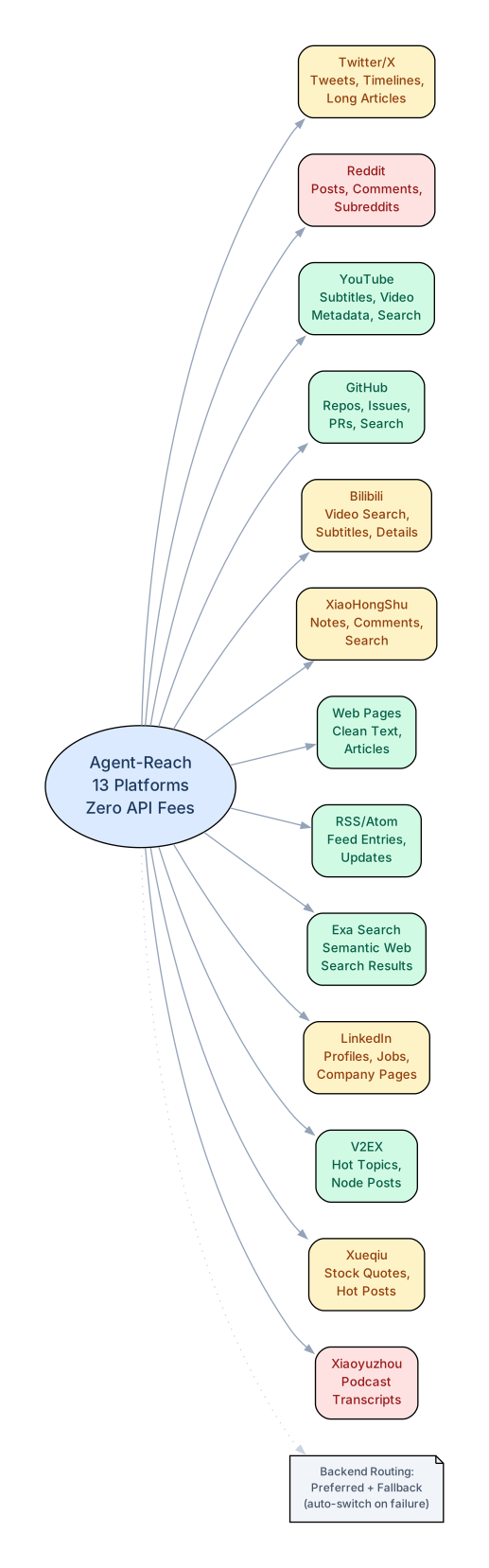
Agent-Reach connects your AI agent to 13 platforms spanning social media, developer tools, video platforms, financial data, and general web search. Each platform provides specific data types that agents can consume:
Understanding the Platform Ecosystem
The platform ecosystem diagram shows the 13 platforms Agent-Reach supports and the specific data types available from each. The central hub represents Agent-Reach’s routing capability, which connects each platform through its preferred and fallback backends.
Social Media Platforms:
-
Twitter/X delivers tweets, timelines, and long-form articles. The primary backend is twitter-cli (cookie-based, free), with OpenCLI as a fallback using browser session authentication. This means your agent can search Twitter discussions without paying for the official API.
-
Reddit provides posts, comments, and subreddit data. Since Reddit blocked anonymous
.jsonaccess and requires API approval, Agent-Reach routes through OpenCLI on desktop (reusing your browser’s reddit.com login) or rdt-cli on servers. There is no zero-config path – login is mandatory. -
XiaoHongShu (Little Red Book) offers notes, comments, and search results. On desktop, OpenCLI provides zero-friction access if you have browsed XiaoHongShu in Chrome. On servers, xiaohongshu-mcp runs a headless browser with QR code login.
Video Platforms:
-
YouTube provides subtitle extraction and video metadata via yt-dlp (154K GitHub stars, the gold standard for YouTube). No API key needed – your agent can extract transcripts from any public video.
-
Bilibili supports video search, details, and subtitles. After yt-dlp was blocked by Bilibili’s 412 anti-scraping response in June 2026, Agent-Reach switched to bili-cli for search (no login required) and OpenCLI for subtitle extraction.
Developer and Professional Platforms:
-
GitHub provides repository access, issue tracking, pull requests, and code search via the official gh CLI. After authentication, your agent gets full API capability with 5,000 requests per hour.
-
LinkedIn delivers profile data, job listings, and company pages through linkedin-scraper-mcp, with Jina Reader as a fallback for public pages.
-
V2EX offers hot topics, node posts, and user profiles through its public JSON API – zero configuration required.
Financial and Content Platforms:
-
Xueqiu (Snow Ball) provides stock quotes, search, and trending posts. Requires browser cookies due to its anti-DDoS token system.
-
Xiaoyuzhou (podcast platform) transcribes audio to text using Whisper via Groq or OpenAI, enabling agents to “read” podcast content.
-
RSS/Atom feeds are parsed by feedparser, the Python ecosystem standard.
-
Exa Search delivers AI-powered semantic web search via mcporter with no API key required.
-
Web Pages are cleaned and extracted as readable text by Jina Reader.
Takeaway: With just
pip install agent-reachandagent-reach install, your AI agent gains access to 6 zero-config channels immediately. The remaining 7 channels unlock with simple one-time configuration – usually just telling your agent “help me set up [platform name].”
Installation
Agent-Reach requires Python 3.10 or later. The installation process is designed to be fully automated – you can even delegate it to your AI agent.
One-Line Agent Installation
The recommended way to install Agent-Reach is to paste this instruction to your AI agent:
Help me install Agent Reach: https://raw.githubusercontent.com/Panniantong/agent-reach/main/docs/install.md
Your agent will read the install guide and handle everything: installing the CLI, setting up system dependencies (Node.js, gh CLI), configuring Exa search, and registering the SKILL.md with your agent’s skill directory.
Manual Installation
If you prefer to install manually:
# Install the agent-reach CLI
pip install agent-reach

# Run the one-shot installer (auto-detects local vs server environment)
agent-reach install --env=auto

# Check which channels are working
agent-reach doctor
The installer will:
- Install the
agent-reachCLI tool (includes yt-dlp and feedparser as dependencies) - Detect and install system dependencies (Node.js for mcporter, gh CLI for GitHub)
- Configure Exa semantic search via mcporter (free, no API key)
- Auto-detect whether you are on a local computer or server
- Register the SKILL.md usage guide with your agent’s skill directory
- Run
agent-reach doctorto verify all channels
Installing Optional Channels
By default, only the 6 zero-config channels are activated. To add platforms that require login:
# Install specific channels
agent-reach install --channels=twitter,xiaohongshu,reddit

# Install all channels
agent-reach install --channels=all
Safe Mode
For production servers or shared environments, use safe mode to preview changes:
# Preview what would be installed (no changes)
agent-reach install --env=auto --dry-run

# Safe mode: skip automatic system changes, show what's needed
agent-reach install --env=auto --safe
Development Installation
To contribute or modify Agent-Reach:
git clone https://github.com/Panniantong/Agent-Reach.git
cd Agent-Reach
pip install -e ".[dev]"

# Run tests
pytest

# Lint
ruff check agent_reach tests
Usage
After installation, your AI agent automatically knows how to use Agent-Reach because the SKILL.md is registered in its skill directory. You do not need to memorize commands – just tell your agent what you want.
Zero-Config Commands
These work immediately after installation with no additional setup:
# Read any web page (clean text, no HTML tags)
curl -s "https://r.jina.ai/https://example.com/article"

# Search GitHub repositories
gh search repos "machine learning framework" --sort stars --limit 10

# Extract YouTube subtitles
yt-dlp --write-sub --skip-download -o "/tmp/%(id)s" "https://youtube.com/watch?v=VIDEO_ID"

# Search Bilibili videos (no login needed)
bili search "AI tutorial" --type video -n 5

# Semantic web search via Exa
mcporter call 'exa.web_search_exa(query: "LLM framework comparison 2026", numResults: 5)'

# Read RSS feeds
python -c "import feedparser; d=feedparser.parse('https://example.com/feed.xml'); print(d.entries[0].title)"

# Browse V2EX hot topics
curl -s "https://www.v2ex.com/api/topics/hot.json" -H "User-Agent: agent-reach/1.0"
Login-Backed Commands
After configuring cookies or login credentials:
# Search Twitter (requires twitter-cli + cookies)
twitter search "AI agents" -n 10

# Read a specific tweet
twitter tweet "https://x.com/user/status/123456"

# Search Reddit via OpenCLI (desktop, uses browser login)
opencli reddit search "python async" -f yaml

# Search Reddit via rdt-cli (server/legacy)
rdt search "python async" --limit 10

# Search XiaoHongShu via OpenCLI (desktop)
opencli xiaohongshu search "AI tools" -f yaml
Health Check
The agent-reach doctor command is your diagnostic tool. It probes each channel’s backends and reports which one is currently active:
# Text report
agent-reach doctor

# Machine-readable JSON (useful for agents)
agent-reach doctor --json
The doctor output shows each channel’s status, the active backend, and what to do if a channel is not working. It also checks config file permissions and warns if they are too permissive.
Configuration
# Auto-extract cookies from Chrome browser
agent-reach configure --from-browser chrome

# Set Twitter cookies manually
agent-reach configure twitter-cookies "auth_token=xxx; ct0=yyy"

# Set GitHub token (increases API limit from 60 to 5000/hour)
agent-reach configure github-token ghp_xxxxx

# Set network proxy (for restricted networks)
agent-reach configure proxy http://user:pass@ip:port

# Set Groq API key (for podcast transcription)
agent-reach configure groq-key gsk_xxxxx
Features
| Feature | Description |
|---|---|
| 13 Platforms | Twitter/X, Reddit, YouTube, GitHub, Bilibili, XiaoHongShu, LinkedIn, V2EX, Xueqiu, Xiaoyuzhou, RSS, Exa Search, Web |
| Multi-Backend Routing | Each channel has ordered preferred + fallback backends; automatic failover when a backend breaks |
| Zero API Fees | All backends are open-source tools that do not require paid API keys |
| One-Shot Installer | agent-reach install --env=auto handles everything: dependencies, configuration, skill registration |
| Built-in Diagnostics | agent-reach doctor probes each channel and reports which backend is active |
| Agent Skill Registration | Installs SKILL.md to Claude Code, OpenClaw, Cursor, and generic .agents skill directories |
| Environment Auto-Detection | Detects local vs server environment and adjusts installation accordingly |
| Cookie Auto-Import | Extracts cookies from Chrome/Firefox/Edge browsers automatically |
| Safe Mode | --safe flag prevents automatic system changes; --dry-run previews all operations |
| Config File Security | Credentials stored at ~/.agent-reach/config.yaml with 600 permissions (owner read/write only) |
| MCP Integration | Exa search via mcporter, xiaohongshu-mcp, linkedin-mcp – all free |
| Podcast Transcription | Whisper-based audio-to-text via Groq (free tier) or OpenAI |
| Uninstaller | agent-reach uninstall cleanly removes all config, tokens, and skill files |
Amazing: Agent-Reach’s backend routing system means that when Bilibili blocked yt-dlp with a 412 anti-scraping response in June 2026, users experienced zero downtime – the system automatically fell back to bili-cli for search and OpenCLI for subtitles. The
agent-reach doctorcommand always tells you which backend is currently serving each platform.
Workflow
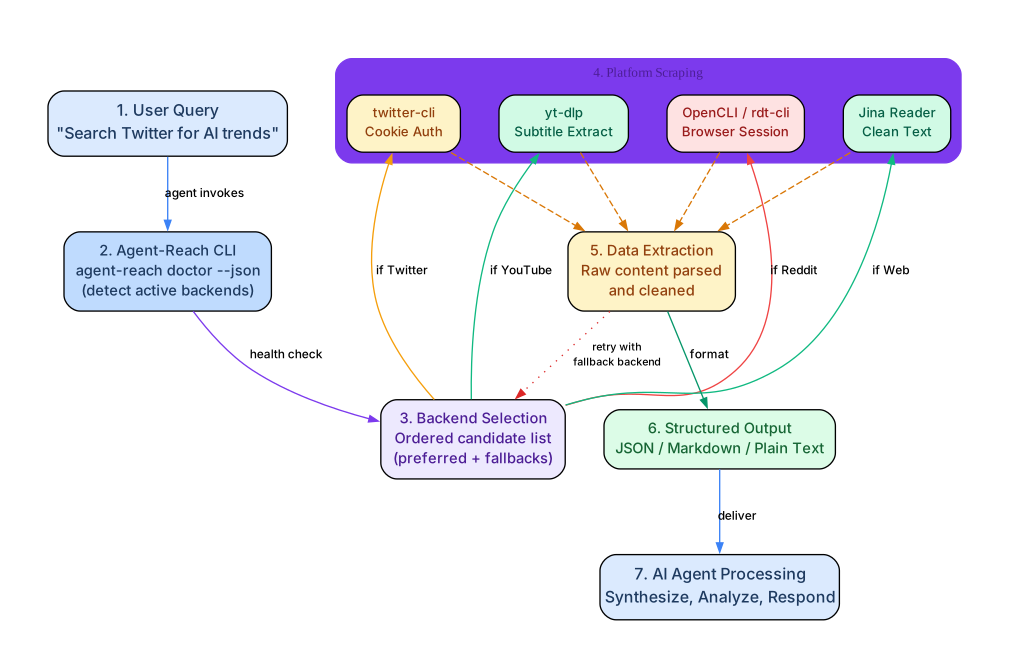
The typical Agent-Reach workflow follows a clear 7-step process from user query to AI agent response:
Understanding the Workflow
The workflow diagram illustrates the complete data flow from a user’s natural language query to the final AI agent response. Let’s walk through each step:
Step 1 – User Query: The process begins when a user asks their AI agent a question that requires internet data, such as “Search Twitter for AI trends” or “What does Reddit say about this bug?” The agent recognizes this as an internet research task because the SKILL.md is registered in its skill directory.
Step 2 – Agent-Reach CLI (Health Check): Before making any platform calls, the agent runs agent-reach doctor --json to determine which backends are currently active for each platform. This is critical for multi-backend channels like Twitter, Reddit, and Bilibili, where the available backend depends on what is installed and configured on the user’s machine.
Step 3 – Backend Selection: Based on the doctor results, the agent selects the appropriate backend for the target platform. Each channel maintains an ordered candidate list. For Twitter, the order is: twitter-cli (preferred, cookie-based) then OpenCLI (fallback, browser session). The agent picks the first available backend from the list.
Step 4 – Platform Scraping: The agent invokes the selected upstream tool directly. For Twitter, it calls twitter search "query". For Reddit, it calls opencli reddit search "query" or rdt search "query". For YouTube, it calls yt-dlp for subtitles. For web pages, it calls curl with Jina Reader. There is no wrapper layer – the agent talks to the upstream tool directly.
Step 5 – Data Extraction: The upstream tool returns raw content – tweets, Reddit posts, YouTube subtitles, or clean web text. Agent-Reach does not process this data; it passes through directly to the agent.
Step 6 – Structured Output: The agent receives the content in a structured format it can process: JSON metadata, plain text, or subtitle files. No HTML parsing or data cleaning is needed.
Step 7 – AI Agent Processing: The agent synthesizes the retrieved data, combines it with information from other platforms if needed, and generates a response for the user.
Fallback Mechanism: If a backend fails during Step 5 (for example, a cookie expires or a rate limit is hit), the agent can retry with the next backend in the channel’s ordered list. This fallback loop ensures resilience against platform changes and temporary outages.
Important: Agent-Reach stores all credentials (cookies, tokens, API keys) locally at
~/.agent-reach/config.yamlwith file permissions set to 600 (owner read/write only). Credentials are never uploaded or transmitted externally. The code is fully open source and auditable.
Troubleshooting
Common Issues and Solutions
| Issue | Cause | Solution |
|---|---|---|
agent-reach: command not found | Package not installed or not in PATH | Run pip install agent-reach and ensure your Python bin directory is in PATH |
| Twitter search returns empty results | Cookies expired or not configured | Run agent-reach configure --from-browser chrome or set cookies manually with agent-reach configure twitter-cookies "auth_token=xxx; ct0=yyy" |
| Reddit returns 403 | Anonymous access blocked by Reddit | Reddit requires login. On desktop, install OpenCLI and log into reddit.com in your browser. On servers, use rdt-cli with rdt login |
| YouTube subtitles not extracted | Missing Node.js runtime for yt-dlp | Install Node.js, then run agent-reach install to configure yt-dlp’s JS runtime |
| Bilibili search fails | yt-dlp blocked by Bilibili anti-scraping | Agent-Reach v1.5.0+ automatically uses bili-cli instead. Run agent-reach install --channels=bilibili to install bili-cli |
| XiaoHongShu returns empty results | Not logged in or OpenCLI extension missing | Install the OpenCLI Chrome extension from the Chrome Web Store, then browse xiaohongshu.com once |
| Exa search not working | mcporter not installed or Exa not configured | Run agent-reach install to install mcporter and configure Exa, or manually: mcporter config add exa https://mcp.exa.ai/mcp |
| Config file permission warning | config.yaml readable by other users | Run chmod 600 ~/.agent-reach/config.yaml (Unix only) |
| OpenClaw cannot execute commands | Default messaging tool profile blocks shell commands | Run openclaw config set tools.profile "coding" and restart the gateway |
Running Diagnostics
When something is not working, always start with the doctor:
# Full text report
agent-reach doctor

# JSON output for programmatic parsing
agent-reach doctor --json

# Check for updates (may fix backend issues)
agent-reach check-update
The doctor will tell you exactly which channels are working, which backend is active for each, and what steps to take to fix any that are not working.
Cookie Security Best Practices
For platforms that require cookies (Twitter, XiaoHongShu, Xueqiu):
- Use a dedicated secondary account – never your primary account. Platforms may detect non-browser API calls and suspend accounts.
- Use the Cookie-Editor Chrome extension for the simplest cookie export workflow: log into the platform in Chrome, open Cookie-Editor, export cookies, and paste them to your agent.
- Cookies are stored locally only at
~/.agent-reach/config.yamlwith 600 permissions. They are never uploaded or shared.
Conclusion
Agent-Reach fills a critical gap in the AI agent ecosystem: giving agents reliable, free, and maintained access to internet content across 13 platforms. Its multi-backend routing architecture ensures that when a platform changes its API or blocks a tool, your agent keeps working without any manual intervention. The one-line installation, built-in diagnostics, and automatic skill registration make it the fastest way to give any AI agent internet capabilities.
With 30,000+ GitHub stars and active maintenance that tracks platform changes in real-time, Agent-Reach is becoming the standard way for AI agents to access the internet. The project is fully open source under the MIT license, and contributions are welcome – adding a new channel is as simple as creating a single Python file in the agent_reach/channels/ directory.
Links:
- GitHub Repository: https://github.com/Panniantong/Agent-Reach
- Install Guide: https://raw.githubusercontent.com/Panniantong/agent-reach/main/docs/install.md

Enjoyed this post? Never miss out on future posts by following us


