Google Cloud Knowledge Catalog is an AI-powered data catalog and metadata management platform that transforms your entire data estate into agent-ready context through dynamic knowledge graphs, automated governance, and the open-source Open Knowledge Format. With 2,700+ GitHub stars and tools like Metadata as Code, enrichment agents, and discovery agents, Knowledge Catalog provides the semantic layer that AI agents need to reason accurately about enterprise data – from BigQuery tables and Spanner databases to unstructured documents and third-party catalogs.
AI agents need accurate, governed context about enterprise data to execute tasks reliably. The problem is that data is fragmented across systems, metadata is incomplete, and business semantics are undocumented. Without a unified context layer, agents hallucinate table names, misinterpret column semantics, and produce unreliable outputs. Knowledge Catalog solves this by providing a universal context engine that aggregates, enriches, and serves metadata to agents – making your data estate not just discoverable, but agent-ready.
Key Insight: Knowledge Catalog is not just a metadata repository – it is a universal context engine that transforms your entire data estate into agent-ready knowledge graphs, combining automated metadata harvesting, AI-driven enrichment, and governed semantic search to give AI agents the accurate context they need to reason about enterprise data.
What is Knowledge Catalog?
Knowledge Catalog (formerly Dataplex) is Google Cloud’s AI-powered data catalog and metadata management platform. It provides a dynamic knowledge graph of all your data – structured and unstructured – to provide semantics and business context to AI agents. The platform aggregates native context across Google data platforms including BigQuery, AlloyDB, Spanner, Cloud SQL, Firestore, and Looker, while also integrating with third-party catalogs from partners like Ab Initio, Anomalo, Atlan, Collibra, and Datahub.
The open-source repository at GoogleCloudPlatform/knowledge-catalog features tools, agents, and samples that demonstrate Knowledge Catalog features and building context management, enrichment, and retrieval solutions. Licensed under Apache 2.0 with 2,700+ stars, the repository is not an official Google product but serves as a reference implementation for the ecosystem.
Key capabilities include automated metadata harvesting across all connected data sources, AI-driven enrichment using Gemini, sub-second semantic search with IAM-respecting access permissions, automated governance with policy-based quality checks and lineage tracking, and defined business semantics through unified glossaries and verified queries.
Architecture Deep Dive
The Knowledge Catalog architecture is designed around five distinct layers, each optimized to produce agent-ready context rather than just human-readable documentation. Understanding this architecture is essential for building effective data governance and agent integration solutions.
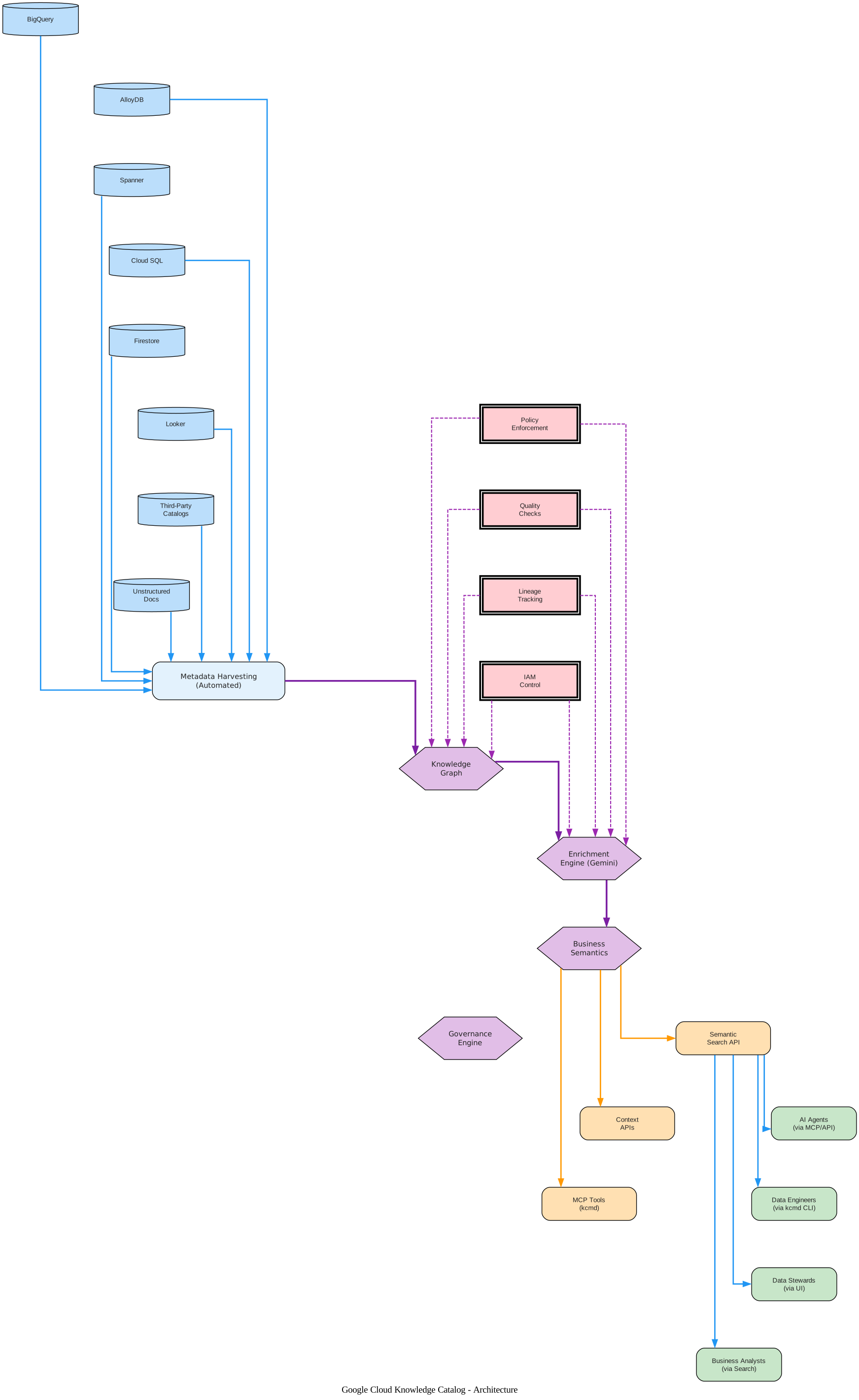
The architecture diagram above illustrates the five-layer structure of Google Cloud Knowledge Catalog, showing how data flows from diverse sources through harvesting, core processing, agent access, and finally to consumers. At the top, the Data Source Layer encompasses both Google Cloud native sources (BigQuery, AlloyDB, Spanner, Cloud SQL, Firestore, Looker) and external sources (third-party catalogs from Collibra, Atlan, and others, plus unstructured documents). All data sources feed into the Metadata Harvesting Layer through blue data-flow arrows, representing the automated extraction of technical metadata including schema information, column types, table relationships, resource hierarchies, labels, and timestamps.
The Knowledge Catalog Core sits at the center of the architecture as a hexagonal orchestrator, containing four sub-components: the Knowledge Graph that organizes metadata into a dynamic graph of data assets with relationships and business context; the Enrichment Engine powered by Gemini that performs auto-tagging, entity extraction, and business glossary generation; Business Semantics that provides unified glossaries and verified queries as semantic guardrails; and the Governance Engine that enforces policy-based quality checks, anomaly detection, and lineage tracking. Purple transform arrows show how harvested metadata flows through the core components, progressively enriching the knowledge graph.
Below the core, the Agent Access Layer provides three distinct access methods: the Semantic Search API for sub-second queries with IAM-respecting permissions, Context APIs for pre-generated enriched metadata, and MCP Tools via the kcmd server that exposes pull, push, list-entries, lookup-entry, and modify-entry operations. Orange control/trigger arrows connect the core to the access layer, indicating that these are programmatic interfaces designed for automated consumption.
The Consumer Layer at the bottom shows four types of users: AI Agents accessing via MCP/API, Data Engineers using the kcmd CLI, Data Stewards reviewing through the UI, and Business Analysts querying via search. Blue data-flow arrows connect the access layer to consumers, representing the final delivery of agent-ready context.
On the side, the Governance Overlay (shown with double-border rectangles) enforces policy, quality checks, lineage tracking, and IAM control, with purple dashed feedback arrows flowing back into the core components to ensure continuous governance compliance.
Takeaway: Knowledge Catalog’s architecture is fundamentally agent-centric. Every layer – from metadata harvesting to enrichment to governance – is designed to produce agent-ready context, not just human-readable documentation. The MCP server integration means any agent framework can consume catalog metadata as tools.
The Open Knowledge Format (OKF)
The Open Knowledge Format (OKF) is the most innovative contribution in the Knowledge Catalog repository. OKF v0.1 defines a universal, vendor-neutral format for representing knowledge as plain markdown files with YAML frontmatter. It is not tied to any particular agent, framework, model provider, or serving system.
OKF represents catalog knowledge as a directory of markdown files with YAML frontmatter, organized in a hierarchy. This design choice unlocks several properties that are hard to achieve with a service-owned metadata store:
- Human- and agent-readable. No SDK or query language stands between a reader and the content. An engineer can
cata concept; an LLM can ingest it verbatim into context. - Version-controllable out of the box. Bundles live in git. Pull requests, line-by-line diffs, blame, and review workflows just work – knowledge curation becomes a normal software-engineering activity.
- Portable and lock-in free. A bundle is a directory. Ship it as a tarball, host it in any repo, mount it from any filesystem, or sync it to any system that speaks files.
- Mixes structured and unstructured data deliberately. Use frontmatter for the few fields you want to query, filter, or index on; use the markdown body for the prose, schemas, and example queries that LLMs and humans actually read.
- Minimally opinionated, freely extensible. A small set of required keys ensures interoperability, but bundles can carry arbitrary extra frontmatter keys and arbitrary body sections without breaking consumers.
- Composes with existing tooling. Many knowledge tools – Notion, Obsidian, MkDocs, Hugo, Jekyll – already speak markdown plus YAML frontmatter, so bundles can be browsed, edited, or rendered without custom UI.
- Progressive disclosure built in. Auto-generated
index.mdfiles let an agent or human navigate the hierarchy one level at a time instead of loading the entire bundle into context. - Graph-shaped, not just tree-shaped. Concepts link to each other via normal markdown links, expressing relationships richer than the parent/child implied by the directory layout.
OKF Bundle Structure
A bundle is a directory tree of markdown files. The directory structure is independent of the domain – producers organize concepts however makes sense for the knowledge being captured:
path/to/bundle/
  index.md                      # Optional. Directory listing.
  log.md                        # Optional. Chronological history.
  <concept>.md                  # A concept at the bundle root.
  <subdirectory>/
      index.md
      <concept>.md
OKF Concept Documents
Every concept is a UTF-8 markdown file with two parts: a YAML frontmatter block and a markdown body. The only required field is type, which identifies the kind of concept. Here is an example of a concept bound to a BigQuery table resource:
---
type: BigQuery Table
title: Customer Orders
description: One row per completed customer order across all channels.
resource: https://console.cloud.google.com/bigquery?p=acme&d=sales&t=orders
tags: [sales, orders, revenue]
timestamp: 2026-05-28T14:30:00Z
---

# Schema

| Column        | Type      | Description                              |
|---------------|-----------|------------------------------------------|
| order_id      | STRING    | Globally unique order identifier.        |
| customer_id   | STRING    | Foreign key into customers.              |
| total_usd     | NUMERIC   | Order total in US dollars.               |
| placed_at     | TIMESTAMP | When the customer submitted the order.   |
OKF Cross-Linking and Conformance
Concepts link to each other using standard markdown links, either absolute (bundle-relative, starting with /) or relative. A link from concept A to concept B asserts a relationship, and the specific kind is conveyed by surrounding prose. Consumers that build a graph view treat all links as directed edges.
A bundle is conformant with OKF v0.1 if every non-reserved .md file contains a parseable YAML frontmatter block with a non-empty type field. Consumers must tolerate missing optional fields, unknown type values, unknown frontmatter keys, broken cross-links, and missing index.md files. This permissive consumption model is intentional: OKF is meant to remain useful as bundles grow, get refactored, and are partially generated by agents.
Key Features
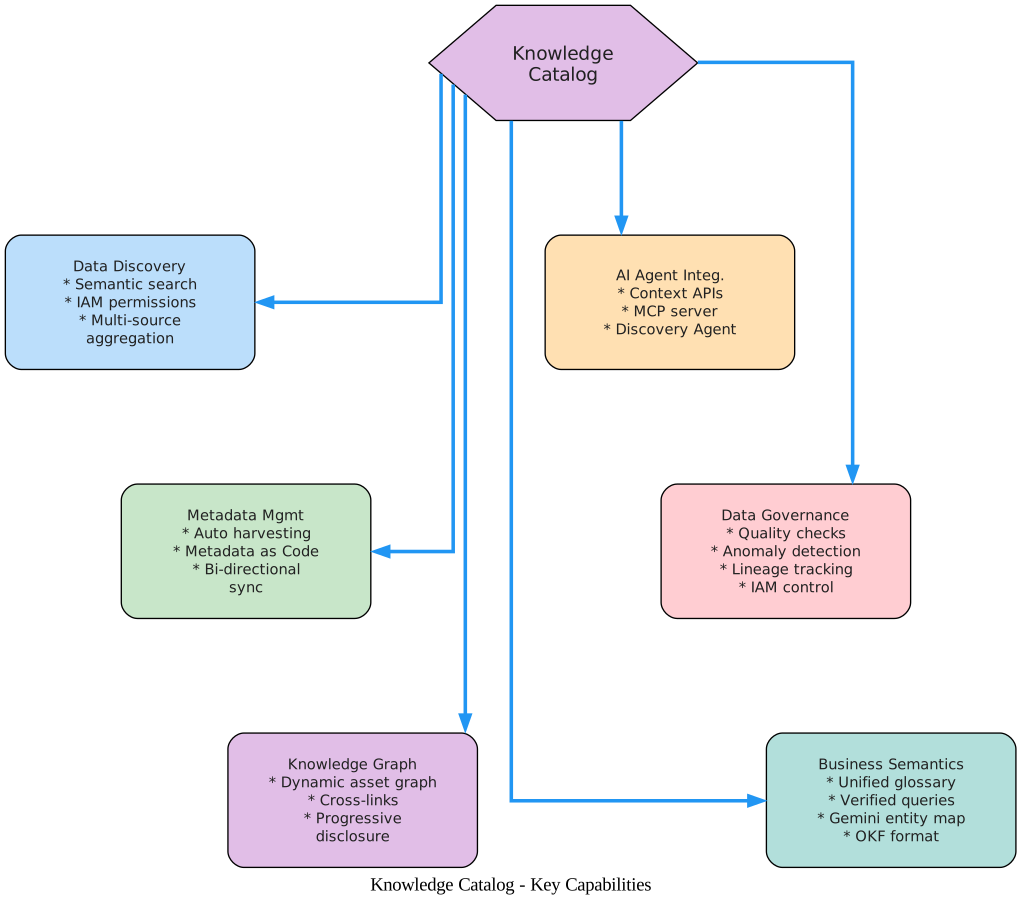
The features diagram above presents the six key capabilities of Knowledge Catalog in a radial layout, with the Knowledge Catalog hub at the center connecting to each capability node. Each capability is color-coded for quick visual identification: blue for Data Discovery, green for Metadata Management, purple for Knowledge Graph, orange for AI Agent Integration, red for Data Governance, and teal for Business Semantics.
Data Discovery provides semantic search with sub-second latency across all indexed data assets. The search respects IAM access permissions, ensuring users and agents only see data they are authorized to access. Multi-source aggregation means search results span Google Cloud native sources and partner platforms simultaneously, eliminating the need to query each system independently.
Metadata Management automates the harvesting of technical metadata across all connected data platforms. The Metadata as Code tool (kcmd) brings DevOps practices to metadata management with bi-directional sync between local workspaces and the Knowledge Catalog service. This means metadata changes can be version-controlled, reviewed via pull requests, and deployed through CI/CD pipelines.
Knowledge Graph builds a dynamic graph of all data assets with cross-links and relationships that go beyond simple parent/child hierarchies. Progressive disclosure through index.md files allows agents to navigate the graph one level at a time, loading only the context they need rather than ingesting the entire catalog.
AI Agent Integration provides three access methods: Context APIs for programmatic retrieval of enriched metadata, an MCP server that exposes catalog operations as tools for any agent framework, and a Discovery Agent that performs semantic decomposition of complex questions to find relevant data assets.
Data Governance enforces policy-based quality checks, detects anomalies in data patterns, captures lineage automatically as data flows through pipelines, and maintains IAM access control across all catalog operations.
Business Semantics provides a unified glossary of business terms, verified queries that serve as semantic guardrails for agent-generated SQL, Gemini-powered entity mapping that connects raw data to business concepts, and the Open Knowledge Format for vendor-neutral knowledge representation.
Amazing: The Open Knowledge Format turns metadata into a first-class software artifact. OKF bundles live in git, support pull requests and line-by-line diffs, and can be consumed by anything that reads markdown – from Obsidian and Notion to LLMs loading files directly into context. Knowledge curation becomes a normal software-engineering activity.
Metadata as Code (kcmd)
Metadata as Code is a Knowledge Catalog capability that provides data stewards, data producers, and AI agents with a source code artifact-based UX for metadata management and context engineering. Users and agents can author, manage, and enrich metadata artifacts using developer-friendly workflows with version control and CI/CD.
kcmd CLI
The kcmd CLI tool provides a git-like workflow for managing catalog metadata locally. It supports bi-directional sync between a local workspace and the Knowledge Catalog service:
# Initialize a new catalog snapshot for a BigQuery dataset
kcmd init --bigquery-dataset <projectId>.<datasetId>

# Pull the latest catalog snapshot from the Knowledge Catalog service
kcmd pull

# Check for local modifications
kcmd status

# Push local changes to the Knowledge Catalog service
kcmd push
The CLI uses gcloud to obtain authentication tokens, so you must be authenticated via gcloud auth application-default login before using it. The pull command reports conflicts if there are pending changes that have not been pushed, and the push command only pushes changes made since the last pull, supporting dry-run mode with the --dry-run flag.
MCP Server
The kcmd MCP server exposes catalog operations as MCP tools, enabling any agent framework that supports the Model Context Protocol to interact with Knowledge Catalog directly. Configure it in your MCP settings file:
{
  "mcpServers": {
    "kc-mac": {
      "command": "kcmd",
      "args": ["mcp", "--path", "/path/to/root"]
    }
  }
}
The server offers five tools:
| Tool | Description |
|---|---|
| pull | Pull the latest metadata from the Catalog service |
| push | Push the modified metadata to the Catalog service |
| list-entries | List entries in the catalog snapshot |
| lookup-entry | Lookup an entry and its metadata from the snapshot |
| modify-entry | Modify an entry and its metadata in the snapshot |
TypeScript and Python Libraries
For programmatic access, kcmd is distributed as both TypeScript and Python libraries. The TypeScript library can be installed via npm install kcmd and provides classes like CatalogManifest and CatalogSnapshot for creating, loading, pulling, and pushing catalog metadata programmatically.
Metadata Artifact Format
Metadata is organized within a directory representing a resource such as a BigQuery Dataset or Dataplex EntryGroup. The directory layout includes a catalog.yaml manifest file and a catalog/ directory containing the metadata snapshot with YAML entry files and sidecar markdown files:
path/to/root/
  catalog.yaml                       # Manifest and config directives
  catalog/                           # Contains the metadata snapshot
      <dir1>/
          <entry-id1>.yaml           # Entry
          <dir2>/
              <entry-id2>.yaml       # Entry with sidecar markdown
              <entry-id2>.aspect.md   # Sidecar markdown files
Enrichment Agents
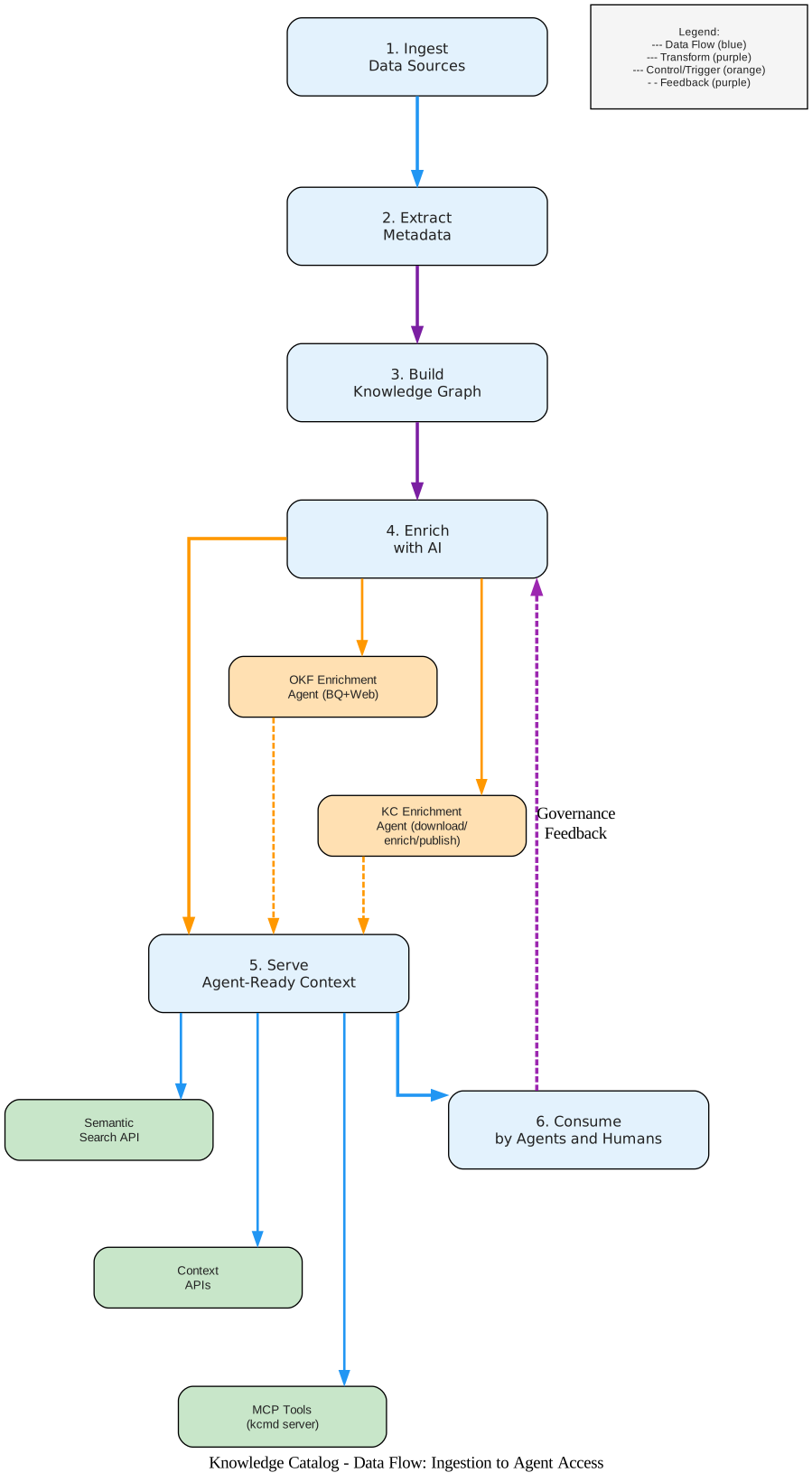
The workflow diagram above illustrates the six-step data flow through Knowledge Catalog, from initial data ingestion to consumption by agents and humans. Each step is numbered and connected with color-coded arrows: blue for data flow, purple for transform operations, orange for control/trigger actions, and purple dashed lines for governance feedback loops.
Step 1: Ingest connects data sources to Knowledge Catalog. BigQuery datasets, Spanner instances, Cloud SQL databases, and Looker models are registered, and automated metadata harvesting runs on schedule to capture technical metadata.
Step 2: Extract Metadata pulls technical metadata from all connected sources, including schema information, column types, table relationships, resource hierarchies, labels, and timestamps. Purple transform arrows indicate that the raw metadata is being structured and normalized.
Step 3: Build Knowledge Graph organizes the extracted metadata into a dynamic graph. Concepts and relationships are mapped, cross-links between data assets are established, and business context is attached through glossaries and verified queries. The knowledge graph is the foundation for all downstream agent access.
Step 4: Enrich with AI adds business context through two distinct enrichment paths. The OKF Enrichment Agent performs a two-pass enrichment: first a BigQuery pass that writes one OKF document per concept using metadata alone, then a web pass where the LLM crawls seed URLs, fetches pages, and decides whether to enrich existing concepts, mint standalone reference documents, or skip. Safety controls include a hard --web-max-pages cap and a same-domain allowed-hosts filter. The Knowledge Catalog Enrichment Agent follows a download/enrich/publish workflow using the kcenrich CLI, downloading a metadata snapshot, enriching it using external sources (filesets, MCP tools), and publishing updated metadata back to the catalog.
Step 5: Serve Agent-Ready Context delivers enriched metadata through three channels: the Semantic Search API with sub-second latency, Context APIs for pre-generated enriched metadata, and MCP Tools via the kcmd server exposing pull, push, list-entries, lookup-entry, and modify-entry operations.
Step 6: Consume is where AI agents and humans access the context. Agents retrieve context for task execution, data engineers manage metadata via the kcmd CLI, and data stewards review and approve changes. The purple dashed feedback loop from Consume back to Enrich represents the governance feedback mechanism – quality checks and usage patterns inform future enrichment cycles.
The repository contains two distinct enrichment agent implementations:
OKF Enrichment Agent
Built on the Google Agent Development Kit (ADK) with Gemini as the model backend, the OKF Enrichment Agent ingests metadata from a pluggable source and emits an OKF bundle. BigQuery is the first source implementation, and the Source interface is designed to grow.
# OKF Enrichment Agent - point at a BigQuery dataset and output directory
.venv/bin/python -m enrichment_agent enrich \
    --source bq \
    --dataset <project>.<dataset> \
    --web-seed-file <seeds.txt> \
    --out ./bundles/<name>

# Iterate on a single concept
.venv/bin/python -m enrichment_agent enrich \
    --source bq \
    --dataset <project>.<dataset> \
    --concept tables/events_ \
    --out ./bundles/<name>
The agent includes three sample bundles: GA4 e-commerce, Stack Overflow, and Bitcoin (crypto), each with an interactive Cytoscape.js force-directed graph visualizer.
Knowledge Catalog Enrichment Agent
The KC Enrichment Agent provides a customizable agentic workflow for extracting information from various sources to build metadata about data assets. It uses the kcenrich CLI and depends on the Metadata as Code (kcmd) capability:
# Initialize and pull metadata
kcmd init --bigquery-dataset <projectId>.<datasetId>
kcmd pull

# Run the enrichment tool
kcagent enrich --catalog-path . --tools-path tools --prompt-path prompt.md
The enrichment agent supports custom instructions, tools to access sources of information within your organization, and skills to describe the use of these tools. This makes it possible to tailor the enrichment workflow to your specific organizational context.
Important: The enrichment workflow is designed for iterative improvement. You can run enrichment on a single concept with
--concept, review changes via git diff, and publish only when satisfied. This makes metadata curation a continuous, reviewable process – not a one-time batch job.
Discovery Agent
The Knowledge Catalog Discovery Agent is an AI-powered search assistant for discovering data assets in Google Cloud. While standard semantic search only matches semantically similar text, this agent goes further by performing semantic decomposition of complex questions, generating multiple relevant search queries, and reranking the final results to provide a comprehensive answer.
Built on Google ADK with Gemini, the Discovery Agent can run in two modes: as a root agent for standalone search, or as a sub-agent via ADK AgentTool for integration into larger agent workflows.
# Clone and set up
git clone https://github.com/GoogleCloudPlatform/knowledge-catalog.git
cd samples/discovery
python3 -m venv /tmp/kcsearch
source /tmp/kcsearch/bin/activate
pip3 install -r requirements.txt

# Configure
export GOOGLE_CLOUD_PROJECT=<your-project>
export GOOGLE_GENAI_USE_VERTEXAI=True

# Run
adk run path/to/agent/parent/folder
Required APIs include Knowledge Catalog (dataplex.googleapis.com), Vertex AI (aiplatform.googleapis.com), and Service Usage API (serviceusage.googleapis.com). Required IAM roles are roles/dataplex.viewer, roles/aiplatform.user, and roles/serviceusage.serviceUsageConsumer.
Getting Started
Getting started with Knowledge Catalog requires a Google Cloud project with the Knowledge Catalog API enabled and the gcloud CLI authenticated. The repository provides a one-click setup via the Open in Cloud Shell button.
Clone the repository and set up individual components:
# Clone the repository
git clone https://github.com/GoogleCloudPlatform/knowledge-catalog.git

# Metadata as Code setup
cd toolbox/mdcode
npm install
npm run build

# Enrichment Agent setup
cd toolbox/enrichment
npm install
npm run build

# Discovery Agent setup
cd samples/discovery
pip3 install -r requirements.txt

# OKF Enrichment Agent setup
cd okf
python3.13 -m venv .venv
.venv/bin/pip install -e .[dev]
Each component has its own dependencies and build process. The TypeScript-based tools (kcmd, kcagent) use npm, while the Python-based agents (OKF enrichment, discovery) use pip with virtual environments.
Use Cases
Data-to-AI governance. Build a governance foundation that enables your organization to discover data and AI assets across the entire enterprise. Knowledge Catalog provides the unified metadata layer that ensures AI agents operate on accurate, governed data.
Multimodal data discovery. Turn unstructured sources – PDFs, wikis, design docs – into structured knowledge graphs that agents can query and reason about. The OKF Enrichment Agent demonstrates how to harvest knowledge from web sources and organize it into agent-readable bundles.
Automated data product creation. Package data assets into self-contained data products with intent, SLAs, and governance metadata. Metadata as Code enables version-controlled, reviewable data product definitions that evolve with your organization.
Shared semantics for humans and agents. Define business semantics across your organization using unified glossaries and verified queries. The Open Knowledge Format ensures that both humans and agents consume the same semantic definitions, reducing misinterpretation and improving consistency.
Agent context management. Provide AI agents with accurate, governed context about enterprise data through Context APIs, MCP tools, and semantic search. The MCP server integration means any agent framework – from Gemini CLI to custom LangChain agents – can consume catalog metadata as tools.
Conclusion
Google Cloud Knowledge Catalog is the first cloud-native data catalog designed from the ground up for AI agent context. The Open Knowledge Format is a significant contribution: vendor-neutral, git-native, and agent-readable, it turns metadata into a first-class software artifact that lives in version control and composes with existing tooling. Metadata as Code brings DevOps practices to metadata management, enabling bi-directional sync, pull requests, and CI/CD workflows for catalog metadata. The enrichment and discovery agents demonstrate the full lifecycle of metadata curation – from automated harvesting through AI-driven enrichment to agent-ready context delivery.
Getting started is straightforward: clone the repository at GoogleCloudPlatform/knowledge-catalog, set up the components you need, and begin building the context layer your AI agents require. The repository is licensed under Apache 2.0 and welcomes contributions via pull requests after signing the Contributor License Agreement. Enjoyed this post? Never miss out on future posts by following us 


