1. Introduction
Every time you press “record” in a cloud meeting assistant, you are making a quiet trade. You hand the raw audio of your most sensitive conversations - boardroom strategy calls, legal consultations, medical case reviews, journalist interviews - to a third-party server you do not control, processed by a vendor whose data retention policy you have probably never read. In return, you get a transcript and a summary. The convenience is real. So is the risk.
Meetily is the answer to a question that more teams are starting to ask out loud: why does my meeting assistant need the cloud at all?
Meetily is a privacy-first AI meeting assistant that captures, transcribes, and summarizes meetings entirely on your local machine. There is no account to create, no cloud sync, no telemetry, and no vendor lock-in. The application is a single self-contained desktop binary built with Tauri - a Rust backend paired with a Next.js frontend - and it runs on macOS, Windows, and Linux.
At the time of writing, Meetily has earned roughly 15.8k GitHub stars and 1.7k forks under the permissive MIT license, signalling strong community demand for a meeting tool that respects data sovereignty. The project is maintained by Zackriya-Solutions and acknowledges the open-source foundations it builds on: Whisper.cpp, Screenpipe, transcribe-rs, and NVIDIA’s Parakeet models.
In one line: Meetily captures your meeting audio, transcribes it on-device with Whisper or Parakeet, summarizes it with a local or user-chosen AI provider, and stores everything locally - all without your conversation data ever leaving your machine unless you explicitly opt in.
2. Why Privacy Matters in Meeting Assistants
The case for a local-first meeting assistant is not theoretical. The numbers tell the story.
- $4.4 million - the average cost of a single data breach in 2024, according to the IBM Cost of a Data Breach Report. That figure has been climbing year over year, and the most expensive breaches consistently involve sensitive internal communications and intellectual property.
- EUR 5.88 billion - cumulative GDPR fines issued across the EU by 2025. Regulators have made it clear that mishandling personal data - including recorded conversations - carries a material financial penalty.
- 400+ unlawful recording cases - filed in California alone over recent years under the state’s two-party consent statute. Recording a conversation without proper consent is not just a privacy faux pas; it is a legal liability.
Now consider what a typical cloud meeting assistant does. It captures audio from your microphone and system, streams or uploads that audio to a vendor’s servers, runs speech-to-text and summarization on infrastructure you cannot inspect, stores the resulting transcripts and summaries in a vendor-controlled account, and - in many cases - retains that data to train or fine-tune downstream models. Every step is a potential breach surface and a potential compliance exposure.
For executive boardrooms, legal teams, healthcare providers, financial services firms, and government contractors, this model is increasingly untenable. The conversation itself is the asset. When the conversation flows through a third party, the asset is exposed.
Data sovereignty regulations - GDPR in Europe, CCPA in California, HIPAA in healthcare, sector-specific rules in finance and defense - are tightening the screws. The question is no longer “can we use a cloud meeting assistant?” but “can we afford to?” Meetily reframes the question entirely: what if the meeting assistant never needed the cloud in the first place?
3. What is Meetily
Meetily is the product of Zackriya-Solutions, a team whose stated mission is to give users a meeting assistant that is local-first, zero-vendor-lock-in, and fully transparent. The core philosophy is simple: your audio, your transcripts, your summaries, your machine.
The application is delivered as a single self-contained Tauri application. There is no separate server to run, no Docker compose file to wrangle, no cloud account to provision. You download a binary, you launch it, and you have a meeting assistant. The Rust backend handles audio capture, transcription inference orchestration, and summarization; the Next.js frontend renders the React-based UI inside the Tauri webview. The result is a native-feeling desktop app with a modern web UI, packaged into a small binary.
Meetily runs on all three major desktop platforms:
- macOS - Apple Silicon and Intel, with Metal/CoreML acceleration
- Windows - with CUDA acceleration for NVIDIA GPUs and Vulkan fallback for AMD/Intel
- Linux - with CUDA and Vulkan support depending on your hardware
The project is open source under the MIT license, which means you can audit every line, build it yourself, and extend it. There is also a Meetily PRO edition (covered in Section 14) that adds enhanced features for professional and enterprise users, but the community edition is fully functional and free to use.
4. Key Features Overview
Meetily’s feature set is built around a single premise: everything that matters happens on your machine. The diagram below maps the eight core capability clusters.

- Real-time transcription - Meetily uses Whisper.cpp and NVIDIA Parakeet models to transcribe audio as it is captured, with broad model compatibility and configurable speed/accuracy trade-offs.
- AI-powered summaries - After transcription, Meetily generates structured summaries. The summarization provider is configurable: local-first with Ollama by default, or any of several cloud providers the user explicitly opts into.
- GPU acceleration - Transcription is GPU-accelerated across Apple Silicon (Metal/CoreML), NVIDIA (CUDA), and AMD/Intel (Vulkan). Hardware is detected automatically and the appropriate backend is selected.
- Audio mixing intelligence - Meetily blends system audio and microphone input, applies intelligent ducking to lower background audio during speech, and prevents clipping so the transcription engine receives clean input.
- Import and enhance (Beta) - You can import existing audio files and run them through the same transcription and summarization pipeline, enhancing recordings made elsewhere.
- Custom OpenAI endpoint support - For enterprises running their own LLMs, Meetily can route summarization requests to any OpenAI-compatible endpoint.
- Cross-platform desktop deployment - One codebase, three platforms, native performance everywhere.
- Zero data leakage by default - No telemetry, no cloud sync, no account required. The default configuration keeps every byte on your machine.
5. Architecture - The Tauri Stack
Meetily’s architecture is the reason it can deliver a privacy-first experience without sacrificing usability. The diagram below shows the full stack.
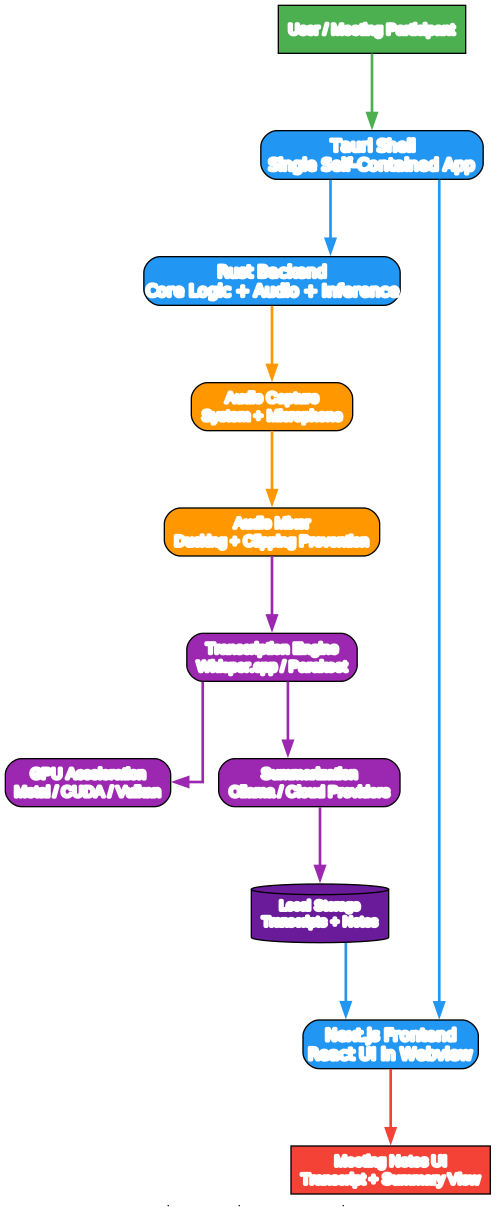
The foundation is Tauri, a framework for building desktop applications with a native backend and a web frontend. Tauri was chosen for three reasons:
- Small binary size - Tauri apps use the platform’s native webview rather than bundling a full Chromium instance, producing binaries that are a fraction of the size of equivalent Electron apps.
- Native performance - The backend is Rust, which means audio capture, model inference orchestration, and file I/O all run at native speed with no garbage-collection pauses.
- Web UI flexibility - The frontend is Next.js and React, so the UI layer gets the full ecosystem of modern web tooling while still rendering inside a native window.
The Rust backend is the workhorse. It handles audio capture from both the system audio loopback and the microphone, runs the audio through the mixer (ducking and clipping prevention), orchestrates transcription inference via Whisper.cpp or Parakeet, coordinates GPU acceleration, invokes the summarization provider, and persists transcripts and summaries to local storage.
The Next.js frontend is the face of the application. It renders the transcript view, the summary view, the settings panels, and the provider configuration UI inside the Tauri webview. Because the frontend talks to the Rust backend through Tauri’s IPC bridge, there is no HTTP server to expose and no network surface to attack.
The critical architectural property is that this is a single self-contained application. There is no separate transcription server to run, no database to configure, no cloud service to authenticate against. You launch the binary, and the entire pipeline - capture, mix, transcribe, accelerate, summarize, store, render - runs inside one process on your machine.
6. The Privacy Data Flow
The privacy story is best understood as a data flow. The diagram below shows where each byte of your meeting goes.

The flow is strictly local by default:
- Audio capture - Audio is captured locally from your microphone and system audio loopback. Nothing is streamed anywhere.
- On-device transcription - The captured audio is transcribed on your machine using Whisper.cpp or Parakeet models, accelerated by your GPU.
- Local summarization - The transcript is summarized by a local LLM via Ollama, running on the same machine.
- Local storage - Transcripts and summaries are persisted to local storage on your disk.
- Offline viewing - Meeting notes are viewable offline, anytime, with no network connection required.
The dashed orange path in the diagram represents the optional cloud provider route. If you choose to, you can configure Meetily to send the transcript to a cloud AI provider for summarization. This is strictly opt-in, strictly user-configured, and never the default. The third-party cloud node in the diagram is explicitly marked as “never used by default” - it has no incoming edges in the default flow because Meetily does not talk to it unless you tell it to.
The emphasis is unambiguous: no data leaves your machine unless you explicitly configure a cloud provider and consent to that path. There is no telemetry, no usage analytics, no crash reporting that sends conversation data, and no account required to use the application.
7. Real-Time Transcription Engine
Transcription is the heart of any meeting assistant, and Meetily’s engine is built on two pillars: Whisper.cpp and NVIDIA Parakeet.
Whisper.cpp is the C/C++ port of OpenAI’s Whisper model, and it is the project Meetily explicitly acknowledges as a foundational dependency. Whisper.cpp provides broad model compatibility - you can use everything from the tiny English-only models up to the large multilingual models - and it runs efficiently on CPU as well as GPU. For users who need maximum language coverage or who want to fine-tune the accuracy/speed trade-off by swapping models, Whisper.cpp is the workhorse.
Parakeet is NVIDIA’s family of streaming ASR models, and Meetily uses them for fast, accurate streaming transcription. Parakeet models are optimized for the kind of real-time, low-latency transcription that a meeting assistant demands: you want the transcript to appear as people speak, not minutes after the fact.
The model selection trade-off is real and Meetily exposes it to the user:
- Speed - Smaller models (Whisper tiny/base, Parakeet streaming variants) transcribe faster and use less VRAM, at the cost of some accuracy on accents, technical jargon, or overlapping speech.
- Accuracy - Larger models (Whisper medium/large) deliver higher accuracy, especially on challenging audio, but require more VRAM and more compute time.
- VRAM budget - Your GPU’s memory is the hard constraint. Meetily lets you pick a model that fits your hardware.
GPU acceleration is applied to whichever model you choose. On Apple Silicon, that means Metal and CoreML. On NVIDIA, that means CUDA. On AMD and Intel, that means Vulkan compute. The backend is selected automatically based on detected hardware, so you do not need to configure it manually.
8. AI Summarization and Flexible Provider Support
Once you have a transcript, the next step is a summary. Meetily’s summarization layer is designed around a principle the project calls local-first, cloud-optional. The diagram below shows the provider routing matrix.
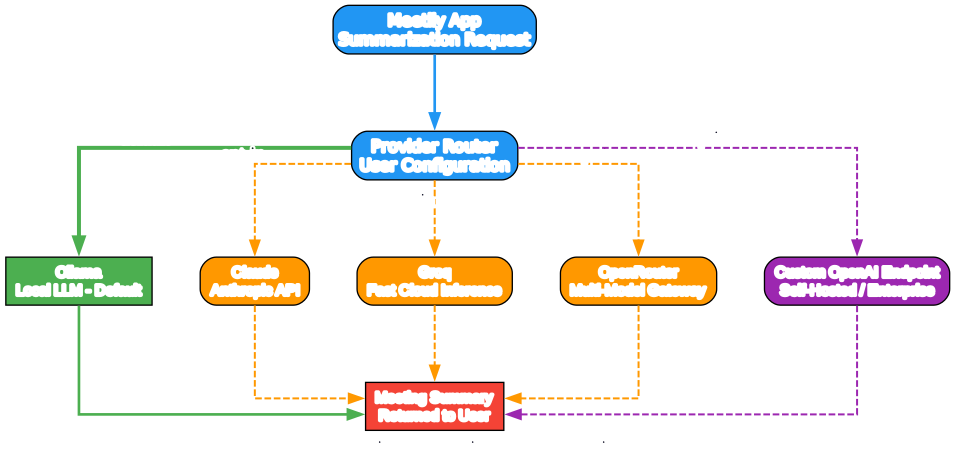
The default path is Ollama, the popular local LLM runtime. When you install Meetily and run it for the first time, summarization happens on your machine via an Ollama-hosted model. No transcript text leaves your computer. This is the solid green path in the diagram, and it is the path most users will use.
For users who want to opt into cloud providers, Meetily supports several:
- Claude (Anthropic API) - for users who want Claude’s summarization quality and are comfortable sending transcript text to Anthropic.
- Groq - for fast cloud inference, useful when you want near-instant summaries and have a Groq account.
- OpenRouter - a multi-model gateway that lets you route to many different LLMs through a single API, useful for experimentation.
- Custom OpenAI endpoint - for enterprises running their own OpenAI-compatible LLM servers (for example, a self-hosted vLLM or text-generation-inference deployment). This is the purple “enterprise” path in the diagram.
The routing is user-configured. You pick your provider in settings, you supply your own API key if you choose a cloud provider, and Meetily routes accordingly. The cloud paths are drawn as dashed orange edges in the diagram to emphasize that they are optional and opt-in - they are not the default, and Meetily never sends data to them without your explicit configuration.
This design gives users a spectrum: full local privacy with Ollama, hybrid convenience with a cloud provider of your choice, or enterprise self-hosting with a custom endpoint. The choice is yours, and the default is the most private option.
9. Audio Processing Intelligence
Transcription quality is downstream of audio quality. Meetily invests in audio processing before the audio ever reaches the transcription engine, and this is one of the less glamorous but more impactful parts of the stack.
Intelligent ducking is the practice of automatically lowering the level of background audio when speech is detected. In a meeting context, this means that when someone speaks, system audio (a shared video, a notification sound, background music) is momentarily attenuated so the speaker’s voice is clear in the captured mix. The result is a cleaner input to the transcription engine, which directly improves accuracy.
Clipping prevention ensures that the captured audio does not peak into distortion. Clipped audio produces garbled transcription because the model cannot recover information that was destroyed by clipping. Meetily applies gain management to keep the signal in a healthy range.
Multi-source mixing is the blending of system audio and microphone input into a single coherent stream. In a meeting, you often want both: the other participants’ audio coming through your speakers (system audio) and your own voice (microphone). Meetily mixes these intelligently so the transcript captures both sides of the conversation.
The reason this matters is simple: audio quality drives transcription accuracy, and transcription accuracy drives summary quality. A meeting assistant that captures clean audio produces transcripts you can trust and summaries that are actually useful. Meetily treats audio processing as a first-class concern, not an afterthought.
10. GPU Acceleration Across Platforms
On-device transcription of a multi-hour meeting is computationally heavy. Without GPU acceleration, it would be impractical on most hardware. Meetily supports three GPU acceleration backends, one per major hardware ecosystem:
- Apple Silicon (macOS) - Metal and CoreML acceleration. On M-series chips, this delivers excellent transcription throughput and is the path most macOS users will use. CoreML integration lets Meetily leverage Apple’s optimized inference stack.
- NVIDIA (macOS, Windows, Linux) - CUDA acceleration. For machines with NVIDIA GPUs, CUDA is the highest-throughput path and is the recommended backend when available. CUDA gives Whisper.cpp and Parakeet models the fastest inference times.
- AMD / Intel (Windows, Linux) - Vulkan compute fallback. For machines without NVIDIA GPUs, Vulkan provides a cross-vendor compute backend that still delivers GPU acceleration, broadening the hardware Meetily can use effectively.
Meetily detects your hardware at runtime and selects the appropriate backend automatically. You do not need to edit configuration files or pass flags to choose between Metal, CUDA, and Vulkan - the application picks the best available option. If you want to override the automatic selection, the settings UI exposes the backend choice.
Performance expectations vary by hardware tier. On an Apple M2 Pro, you can expect real-time or near-real-time transcription of a meeting with a medium Whisper model. On an NVIDIA RTX 4070, large-model transcription is comfortably real-time. On an AMD or Intel machine with Vulkan, throughput is good but you may want to choose a smaller model for the smoothest experience. The general guidance: more VRAM lets you run larger models, and larger models give you better accuracy on difficult audio.
11. Installation and Getting Started
Meetily offers two installation paths: prebuilt binaries for immediate use, and building from source for users who want to customize or audit the code.
Option A: Prebuilt Binaries
The fastest way to get started is to download a prebuilt binary from the GitHub Releases page.
macOS:
# Download the .dmg from the Releases page, then:
# Open the .dmg and drag Meetily to Applications
# On first launch, right-click and select Open to bypass Gatekeeper
open /Applications/Meetily.app
Windows:
# Download the .msi or .exe installer from the Releases page
# Run the installer and follow the wizard
# Launch Meetily from the Start Menu
Linux:
# Download the AppImage from the Releases page, then:
chmod +x Meetily-*.AppImage
./Meetily-*.AppImage

# Or install the .deb / .rpm package depending on your distribution
sudo dpkg -i Meetily-*.deb   # Debian / Ubuntu
sudo rpm -i Meetily-*.rpm    # Fedora / RHEL
Option B: Build from Source
Building from source requires the Rust toolchain, Node.js, and the Tauri CLI.
# Prerequisites
# - Rust (install via https://rustup.rs)
# - Node.js 18+ (install via https://nodejs.org or nvm)
# - Tauri CLI (installed via cargo or npm)

# Clone the repository
git clone https://github.com/Zackriya-Solutions/meetily.git
cd meetily

# Install frontend dependencies
npm install

# Build and run in development mode
npm run tauri dev

# Build a production binary
npm run tauri build
First-Run Configuration
On first launch, Meetily will guide you through:
- Model download - You will be prompted to download a transcription model (Whisper or Parakeet). Choose based on your VRAM budget and accuracy needs.
- Summarization provider - The default is Ollama (local). If you want to use a cloud provider, configure it in settings with your API key.
- Audio sources - Select which system audio source and microphone to capture.
After configuration, you are ready to record a meeting. Press record, hold your meeting, press stop, and Meetily will transcribe and summarize locally.
12. Use Cases
Meetily’s privacy-first design makes it a strong fit for any context where the conversation itself is sensitive or regulated.
- Executive boardrooms - Strategy discussions, M&A deliberations, and executive offsites involve information that is materially price-sensitive. A local assistant ensures these conversations never touch a third-party cloud.
- Legal and compliance teams - Attorney-client privilege depends on confidentiality. Sending privileged conversations through a cloud meeting assistant can waive privilege or create discoverable records. Meetily keeps the recording and transcript on the lawyer’s machine.
- Healthcare consultations - Under HIPAA and similar regimes, recorded patient consultations are protected health information. A local assistant avoids the business-associate-agreement complexity of cloud recording.
- Remote teams in regulated industries - Finance, government, and defense contractors operate under data residency and sovereignty rules that make cloud meeting assistants a compliance headache. Meetily sidesteps the issue entirely.
- Journalists and researchers - Protecting sources is a core ethical obligation. A local assistant ensures that interview recordings and transcripts stay on the journalist’s device.
- Personal productivity - Not everyone wants their personal conversations - therapy sessions, family calls, financial discussions with advisors - flowing through a vendor’s servers. Meetily gives individuals the same privacy guarantees as enterprises.
13. Meetily vs Cloud Alternatives
How does Meetily compare to the dominant cloud meeting assistants? The table below summarizes the key dimensions.
| Dimension | Meetily | Otter.ai | Fireflies.ai | tl;dv |
|---|---|---|---|---|
| Data residency | Fully local by default | Cloud (vendor servers) | Cloud (vendor servers) | Cloud (vendor servers) |
| Offline capability | Full offline use | Requires internet | Requires internet | Requires internet |
| Cost | Free (community edition) | Subscription required | Subscription required | Freemium with limits |
| Customization | Open source, fully auditable | Closed source | Closed source | Closed source |
| Vendor lock-in | None - MIT licensed | High - proprietary format | High - proprietary format | High - proprietary format |
| AI provider choice | Ollama, Claude, Groq, OpenRouter, custom | Vendor-only | Vendor-only | Vendor-only |
| Transcription model choice | Whisper / Parakeet, configurable | Vendor-only | Vendor-only | Vendor-only |
| Account required | No | Yes | Yes | Yes |
| Telemetry | None | Present | Present | Present |
Where cloud tools still win: Cloud assistants excel at multi-participant collaboration features, mobile capture on the go, and integrations with SaaS productivity suites. If your priority is real-time collaborative note-editing across a distributed team, a cloud tool may still be the better fit.
Where Meetily wins: Privacy, control, no subscription, no data leakage, full model and provider choice, and the ability to audit and extend the code. For any context where the conversation is the asset and the asset must not leave your machine, Meetily is the clear choice.
14. Meetily PRO
Meetily is available in two editions: the open-source Community Edition (MIT licensed, the version on GitHub) and Meetily PRO, a separate enhanced codebase aimed at professional and enterprise users.
The Community Edition is fully functional: local transcription, local summarization, GPU acceleration, audio mixing, import and enhance, and flexible provider support are all included. For most individual users and small teams, the Community Edition is more than enough.
Meetily PRO adds enhanced features beyond the community edition. The PRO edition is maintained as a separate codebase and is available via https://meetily.ai/pro/. PRO is designed for users who need additional capabilities - advanced workflow integrations, enhanced summarization features, and professional support - on top of the privacy-first foundation.
When to choose PRO over the Community Edition:
- You need advanced workflow features beyond core transcription and summarization.
- You want professional support and maintenance guarantees.
- Your organization requires the enhanced feature set for team deployment.
When the Community Edition is sufficient:
- You are an individual or small team that needs local transcription and summarization.
- You want to audit and potentially extend the code yourself.
- You are comfortable with community support via GitHub issues.
Both editions share the same privacy-first philosophy: your data stays on your machine by default.
15. Conclusion and Links
Meetily answers a question the market has been slow to ask: what if your meeting assistant did not need the cloud? By building on Tauri, Rust, Whisper.cpp, Parakeet, and Ollama, the project delivers a complete capture-transcribe-summarize pipeline that runs entirely on your machine, with GPU acceleration across Apple Silicon, NVIDIA, and AMD/Intel hardware, and with a flexible provider model that lets you opt into cloud summarization only if and when you want to.
For executive boardrooms, legal teams, healthcare providers, regulated industries, journalists, and privacy-conscious individuals, Meetily removes the central risk of cloud meeting assistants: the exposure of sensitive conversation data to third-party servers. The 15.8k stars and MIT license signal that the community recognizes the value of a meeting assistant you can actually trust.
Who should adopt Meetily today:
- Anyone whose meeting conversations are sensitive, regulated, or privileged.
- Anyone who wants to audit the code that processes their conversations.
- Anyone who wants to choose their own transcription model and summarization provider.
- Anyone who is tired of subscription-based meeting assistants that hold their data hostage.
Call to action: Star the GitHub repository, download a prebuilt binary from the Releases page, try it on your next meeting, and - if you are so inclined - contribute. The project acknowledges the open-source foundations it builds on (Whisper.cpp, Screenpipe, transcribe-rs, NVIDIA Parakeet), and contributions that improve transcription accuracy, GPU backend support, and provider integrations are welcome.
Verified links:
- GitHub repository: https://github.com/Zackriya-Solutions/meetily
- Project website: https://meetily.ai
- Meetily PRO: https://meetily.ai/pro/
- Releases: https://github.com/Zackriya-Solutions/meetily/releases
Meetily proves that a privacy-first AI meeting assistant is not a compromise. It is an upgrade. Enjoyed this post? Never miss out on future posts by following us