Codex Plugin for Claude Code: Integrate OpenAI Codex into Your Workflow
The Codex plugin for Claude Code brings OpenAI’s powerful Codex AI assistant directly into your Claude Code workflow. This plugin enables seamless integration between Claude Code and Codex, allowing you to run code reviews, delegate complex tasks, and manage background jobs without leaving your editor.
What is Codex?
Codex is OpenAI’s AI-powered code generation and analysis tool that helps developers write better code, review changes, and solve technical problems. The plugin bridges the gap between Claude Code and Codex, providing a unified interface for leveraging both AI assistants.
What You Get
The plugin provides several powerful slash commands:
/codex:review- Run a normal read-only Codex review on your current work/codex:adversarial-review- Run a steerable challenge review that questions your implementation choices/codex:rescue- Delegate tasks to Codex for investigation, fixes, or continuation/codex:transfer- Create a persistent Codex thread from your current Claude Code session/codex:status- Check progress on running and recent Codex jobs/codex:result- View the final stored Codex output for completed jobs/codex:cancel- Cancel active background Codex jobs/codex:setup- Check Codex installation and authentication status
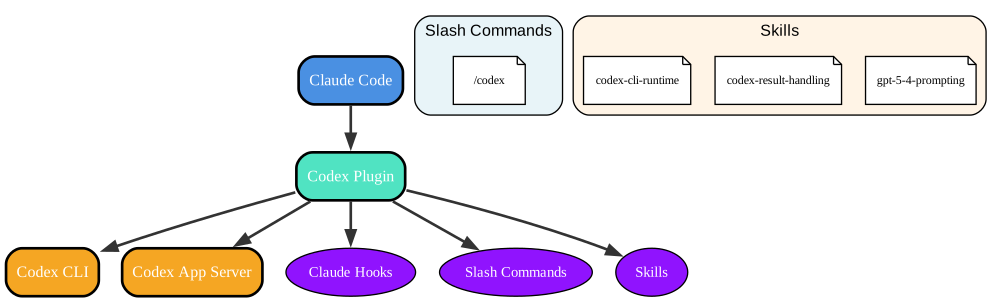
Understanding the Architecture
The architecture diagram above illustrates how the Codex plugin integrates with Claude Code and Codex. Let’s break down each component:
Claude Code
- The primary interface where developers interact with AI assistants
- Provides the context and workspace for code review and task delegation
- Serves as the orchestrator for plugin commands
Codex Plugin
- The bridge between Claude Code and Codex
- Implements slash commands and hooks for seamless integration
- Manages background jobs and session lifecycle
Codex CLI and App Server
- The local Codex installation and runtime
- Handles code analysis, generation, and execution
- Provides the actual AI-powered code review and task completion
Claude Hooks
- Integration points that trigger plugin functionality
- SessionStart and SessionEnd hooks manage session lifecycle
- Stop hook enables the review gate feature
Slash Commands
- User-facing commands that invoke plugin functionality
- Each command maps to specific Codex operations
- Provides a unified interface for Codex integration
Skills
- Internal helper modules for Codex operations
codex-cli-runtimehandles Codex CLI invocationscodex-result-handlingmanages job resultsgpt-5-4-promptingoptimizes prompts for Codex
Installation
Prerequisites
- ChatGPT subscription (incl. Free) or OpenAI API key
- Usage will contribute to your Codex usage limits
- Learn more at OpenAI Codex Pricing
- Node.js 18.18 or later
Setup Steps
- Add the marketplace in Claude Code:
/plugin marketplace add openai/codex-plugin-cc - Install the plugin:
/plugin install codex@openai-codex - Reload plugins:
/reload-plugins - Run setup:
/codex:setupThis command checks whether Codex is ready and can offer to install it if missing.
- Install Codex manually (if needed):
npm install -g @openai/codex - Log in to Codex:
!codex login
After installation, you should see:
- All slash commands listed above
- The
codex:codex-rescuesubagent in/agents
Usage
/codex:review
Runs a normal Codex review on your current work. It provides the same quality of code review as running /review inside Codex directly.
Use it when you want:
- A review of your current uncommitted changes
- A review of your branch compared to a base branch like
main
Examples:
/codex:review
/codex:review --base main
/codex:review --background
This command is read-only and will not perform any changes. When run in the background you can use /codex:status to check on the progress and /codex:cancel to cancel the ongoing task.
/codex:adversarial-review
Runs a steerable review that questions the chosen implementation and design. This is particularly useful for pressure-testing assumptions, tradeoffs, failure modes, and whether a different approach would have been safer or simpler.
Use it when you want:
- A review before shipping that challenges the direction, not just the code details
- Review focused on design choices, tradeoffs, hidden assumptions, and alternative approaches
- Pressure-testing around specific risk areas like auth, data loss, rollback, race conditions, or reliability
Examples:
/codex:adversarial-review
/codex:adversarial-review --base main challenge whether this was the right caching and retry design
/codex:adversarial-review --background look for race conditions and question the chosen approach
This command is read-only and does not fix code.
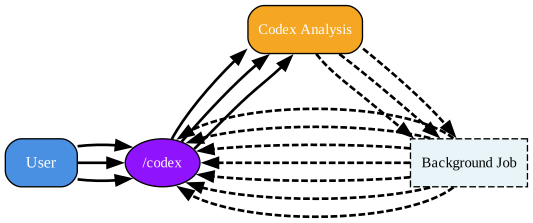
Understanding the Workflow
The workflow diagram demonstrates how different Codex commands interact with the plugin and Codex CLI. Let’s analyze the key flows:
Review Flow
- User invokes
/codex:reviewor/codex:adversarial-review - Plugin forwards the request to Codex CLI
- Codex performs code analysis and generates review
- Results are stored in background job
- User can check status with
/codex:statusand view results with/codex:result
Rescue Flow
- User invokes
/codex:rescuewith a task description - Plugin forwards the task to Codex CLI
- Codex investigates and attempts fixes
- Results are returned to the user
- Follow-up requests can continue the same Codex session
Background Job Management
- Jobs can be run in background with
--backgroundflag - Status can be checked with
/codex:status - Results can be retrieved with
/codex:result - Active jobs can be cancelled with
/codex:cancel
/codex:rescue
Hands a task to Codex through the codex:codex-rescue subagent. This is the primary command for delegating work to Codex.
Use it when you want Codex to:
- Investigate a bug
- Try a fix
- Continue a previous Codex task
- Take a faster or cheaper pass with a smaller model
Examples:
/codex:rescue investigate why the tests started failing
/codex:rescue fix the failing test with the smallest safe patch
/codex:rescue --resume apply the top fix from the last run
/codex:rescue --model gpt-5.4-mini --effort medium investigate the flaky integration test
/codex:rescue --model spark fix the issue quickly
/codex:rescue --background investigate the regression
You can also just ask for a task to be delegated to Codex:
Ask Codex to redesign the database connection to be more resilient.
Notes:
- If you do not pass
--modelor--effort, Codex chooses its own defaults - If you say
spark, the plugin maps that to--model gpt-5.3-codex-spark - Follow-up rescue requests can continue the latest Codex task in the repo
/codex:transfer
Creates a persistent Codex thread from the current Claude Code session and prints a codex resume <session-id> command.
**Use it when you started a debugging or implementation conversation in Claude Code and want to continue that same context directly in Codex.
Examples:
/codex:transfer
/codex:transfer --source ~/.claude/projects/-Users-me-repo/<session-id>.jsonl
The plugin’s existing SessionStart hook supplies the current transcript path automatically; --source is available as a manual override. The transfer uses Codex’s external-agent session importer, so it follows the same conversion rules as importing Claude history in the Codex App and creates visible turns that can be continued in the App or TUI.
/codex:status
Shows running and recent Codex jobs for the current repository.
Examples:
/codex:status
/codex:status task-abc123
Use it to:
- Check progress on background work
- See the latest completed job
- Confirm whether a task is still running
/codex:result
Shows the final stored Codex output for a finished job. When available, it also includes the Codex session ID so you can reopen that run directly in Codex with codex resume <session-id>.
Examples:
/codex:result
/codex:result task-abc123
/codex:cancel
Cancels an active background Codex job.
Examples:
/codex:cancel
/codex:cancel task-abc123
/codex:setup
Checks whether Codex is installed and authenticated. If Codex is missing and npm is available, it can offer to install Codex for you.
You can also use /codex:setup to manage the optional review gate.
Enabling review gate
/codex:setup --enable-review-gate
/codex:setup --disable-review-gate
When the review gate is enabled, the plugin uses a Stop hook to run a targeted Codex review based on Claude’s response. If that review finds issues, the stop is blocked so Claude can address them first.
Warning: The review gate can create a long-running Claude/Codex loop and may drain usage limits quickly. Only enable it when you plan to actively monitor the session.
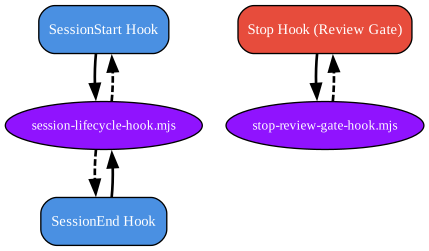
Understanding Claude Hooks Integration
The hooks diagram illustrates how the plugin integrates with Claude Code’s hook system. This integration enables automatic functionality at key points in the session lifecycle:
SessionStart Hook
- Runs when a Claude Code session begins
- Initializes the plugin and prepares for Codex integration
- Sets up session tracking and context
SessionEnd Hook
- Runs when a Claude Code session ends
- Cleans up resources and finalizes any pending Codex operations
- Ensures proper session termination
Stop Hook (Review Gate)
- Runs when Claude is about to stop or complete a response
- Can trigger a Codex review before the stop
- Blocks the stop if issues are found, allowing Claude to address them first
Hook Scripts
session-lifecycle-hook.mjshandles session start and end eventsstop-review-gate-hook.mjsmanages the review gate functionality- Both scripts are executed with appropriate timeouts and error handling
Typical Flows
Review Before Shipping
/codex:review
Hand A Problem To Codex
/codex:rescue investigate why the build is failing in CI
Start Something Long-Running
/codex:adversarial-review --background
/codex:rescue --background investigate the flaky test
Then check in with:
/codex:status
/codex:result
Codex Integration
The Codex plugin wraps the Codex app server. It uses the global codex binary installed in your environment and applies the same configuration.
Common Configurations
If you want to change the default reasoning effort or the default model that gets used by the plugin, you can define that inside your user-level or project-level config.toml. For example to always use gpt-5.4-mini on high for a specific project you can add the following to a .codex/config.toml file at the root of the directory you started Claude in:
model = "gpt-5.4-mini"
model_reasoning_effort = "high"
Your configuration will be picked up based on:
- User-level config in
~/.codex/config.toml - Project-level overrides in
.codex/config.toml - Project-level overrides only load when the project is trusted
Check out the Codex docs for more configuration options.
Moving The Work Over To Codex
Delegated tasks and any stop gate run can also be directly resumed inside Codex by running codex resume either with the specific session ID you received from running /codex:result or /codex:status or by selecting it from the list.
This way you can review the Codex work or continue the work there.
FAQ
Do I need a separate Codex account for this plugin?
If you are already signed into Codex on this machine, that account should work immediately here too. This plugin uses your local Codex CLI authentication.
If you only use Claude Code today and have not used Codex yet, you will also need to sign in to Codex with either a ChatGPT account or an API key. Codex is available with your ChatGPT subscription, and codex login supports both ChatGPT and API key sign-in. Run /codex:setup to check whether Codex is ready, and use !codex login if it is not.
Does the plugin use a separate Codex runtime?
No. This plugin delegates through your local Codex CLI and Codex app server on the same machine.
That means:
- It uses the same Codex install you would use directly
- It uses the same local authentication state
- It uses the same repository checkout and machine-local environment
Will it use the same Codex config I already have?
Yes. If you already use Codex, the plugin picks up the same configuration.
Can I keep using my current API key or base URL setup?
Yes. Because the plugin uses your local Codex CLI, your existing sign-in method and config still apply.
If you need to point the built-in OpenAI provider at a different endpoint, set openai_base_url in your Codex config.
Conclusion
The Codex plugin for Claude Code provides a powerful integration between two of the most capable AI coding assistants. By combining Claude’s contextual understanding with Codex’s code-specific capabilities, you get the best of both worlds:
- Comprehensive code reviews with both standard and adversarial modes
- Task delegation for investigation, fixes, and continuation
- Background job management for long-running operations
- Session transfer to continue work in Codex
- Review gate for automated quality checks
Whether you’re doing code reviews, debugging complex issues, or delegating tasks to AI, this plugin streamlines your workflow and keeps you in your editor.
Related Resources
- OpenAI Codex Documentation
- Claude Code Documentation
- GitHub Repository
- Codex CLI Reference
- Codex Pricing
- Codex Configuration

Enjoyed this post? Never miss out on future posts by following us


