Claude Video: Give Claude Code the Ability to Watch and Understand Any Video
1. Introduction
Claude Code can read a webpage, run a script, browse a repository, and reason over a codebase. What it cannot do, out of the box, is watch a video. You paste a YouTube link and the best the model can do is guess from the title or pull a transcript that is missing 90% of what is actually on screen. For a tool that is supposed to be a general-purpose coding and reasoning agent, that is a glaring gap — video is now one of the dominant formats for tutorials, product demos, conference talks, bug reports, and internal walkthroughs.
Claude Video (the /watch skill from bradautomates/claude-video) closes that gap. It is a self-contained Python skill that downloads a video, extracts scene-aware frames, pulls a timestamped transcript, and hands all of it to Claude so the model can answer questions grounded in what it actually saw and heard. With over 6,000 GitHub stars and growing at nearly a thousand a day, it has quickly become the de facto way to give any agent host — Claude Code, Codex, Cursor, Copilot, Gemini CLI, and 50+ others — a real video input modality.
This post is a deep dive into what Claude Video does, how it works, and why it matters for the future of multimodal AI agents.
2. The Video Understanding Gap
Modern AI agents are remarkably capable across text and code, but video remains a stubbornly missing modality. The reasons are practical, not theoretical:
- Video is heavy. A 10-minute 720p clip is hundreds of megabytes. You cannot just paste it into a context window.
- Transcripts are incomplete. A transcript captures what was said, but not what was shown — the slide that appeared, the terminal that scrolled, the UI that broke, the diagram on the whiteboard. For tutorials, demos, and bug reports, the visual channel often carries the actual signal.
- Native multimodal input is rare in agent hosts. Most coding agents accept text and files. Few accept a video URL and “watch” it for you.
- Token economics punish naivety. Naively sampling a frame every second of a 30-minute video produces 1,800 images — a context budget disaster. Smart sampling is the whole game.
The result is that when you ask an agent “what happens in this video?”, you get a guess based on metadata, or a transcript summary that ignores the screen entirely. Claude Video exists to fix exactly this. It treats video as two parallel streams — frames and transcript — and assembles them into a context Claude can reason over, the way a human who watched the video would.
3. How Claude Video Works
At its core, Claude Video is a single /watch command backed by a Python pipeline. The flow is deceptively simple from the user’s perspective:
/watch https://youtu.be/dQw4w9WgXcQ what happens at the 30 second mark?
Behind that one line, the skill:
- Parses the input into a video source (URL or local path) and an optional question.
- Runs a setup preflight — a sub-100ms check that
ffmpeg,yt-dlp, and a Whisper API key (optional) are available. - Checks captions first. If the source has native captions and the user only wants a transcript, it returns without downloading the video at all.
- Downloads only what it needs. If frames are required, or captions are missing and Whisper needs audio,
yt-dlpfetches the minimum necessary. - Extracts frames with
ffmpegusing a scene-aware, keyframe, or uniform sampler, then deduplicates near-identical frames. - Gets a transcript — native captions first, Whisper API as fallback.
- Assembles context — frame paths with
t=MM:SSmarkers plus the timestamped transcript. - Claude Reads every frame as an image, in parallel, alongside the transcript.
- Claude answers grounded in what is on screen and in the audio, citing timestamps.
- Cleans up the working directory if no follow-ups are expected.
The genius is in the orchestration: the skill does not try to “understand” the video itself. It prepares the evidence — frames and transcript — and lets Claude’s multimodal reasoning do the actual understanding. The Python is plumbing; the intelligence is the model’s.
4. Architecture Overview
Claude Video is structured as a self-contained skill folder that every installer copies as a unit. The architecture is deliberately modular — each stage of the pipeline is a separate script, so the orchestrator (watch.py) stays small and each component is independently testable.
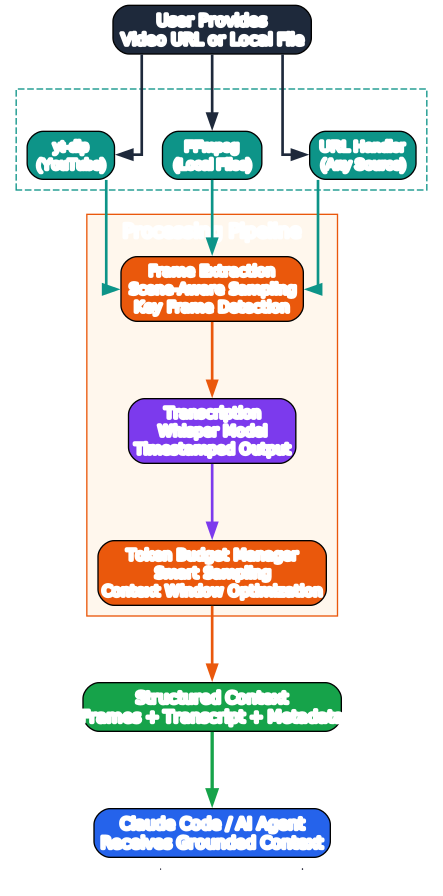
The key components:
SKILL.md— the skill contract. This is the source of truth across every host (Claude Code, Codex, Cursor, etc.). It tells the agent when to invoke the skill, how to resolve its own script directory, and the exact step-by-step procedure.watch.py— the entry point and orchestrator. It parses arguments, calls the download/frames/transcribe stages, and prints a markdown report to stdout that Claude then consumes.download.py— a thinyt-dlpwrapper that handles URLs and local paths, and fetches native captions.frames.py— theffmpegframe extraction engine, including the auto-fps budgeting logic, scene-change detection, keyframe mode, uniform-sampling fallback, and the frame-delta dedup pass.transcribe.py— VTT caption parsing, deduplication, and Whisper orchestration.whisper.py— pure-stdlib Groq and OpenAI Whisper clients.config.py— shared config from~/.config/watch/.env.setup.py— preflight check and idempotent installer.
The design philosophy is “prepare evidence, let the model reason.” The scripts never try to summarize or interpret — they surface frames and transcript, and Claude does the rest. This keeps the skill portable, testable, and cheap to maintain.
5. The /watch Workflow
The /watch workflow is the user-facing experience. It is designed to feel like a single command, even though it orchestrates a multi-stage pipeline.
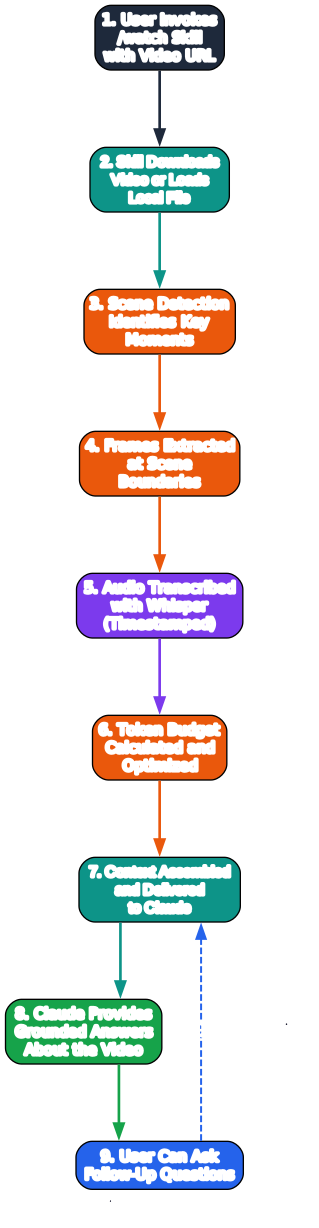
Step by step:
- Input. The user pastes a URL (anything
yt-dlpsupports — YouTube, Loom, TikTok, X, Instagram, Vimeo, and hundreds more) or a local path (.mp4,.mov,.mkv,.webm), plus an optional question. - Preflight.
setup.py --checkverifies the environment in under 100ms. On the first run in a session, a structured--jsonmode lets the agent detect first-time setup and walk the user through installingffmpeg/yt-dlpand optionally adding a Whisper key. - Captions decision. The skill checks for native captions first. If they exist and the user only needs a transcript, the video is never downloaded — a single
yt-dlpcall returns the captions in seconds. - Download (if needed). When frames are required or captions are missing,
yt-dlpdownloads only what the run needs. - Frame extraction.
ffmpegextracts JPEGs at the chosen detail level — keyframes (efficient), scene-change (balanced/token-burner), or uniform sampling as a fallback. A dedup pass drops near-identical frames. - Transcription. Native captions are parsed and deduped; if absent, audio is extracted and sent to Whisper (Groq preferred, OpenAI fallback).
- Context assembly. Frame paths with
t=MM:SSmarkers and the timestamped transcript are printed as a markdown report. - Claude Reads and answers. Claude
Reads every frame in a single parallel message, combines them with the transcript, and answers the user’s question — citing timestamps.
The workflow is intentionally asymmetric: the heavy lifting (download, extract, transcribe) happens in Python; the understanding happens in the model. This separation is what makes the skill portable across 50+ agent hosts with no changes.
6. Key Features
Claude Video packs six core capabilities into a single skill, each tuned for the realities of token budgets and agent context windows.
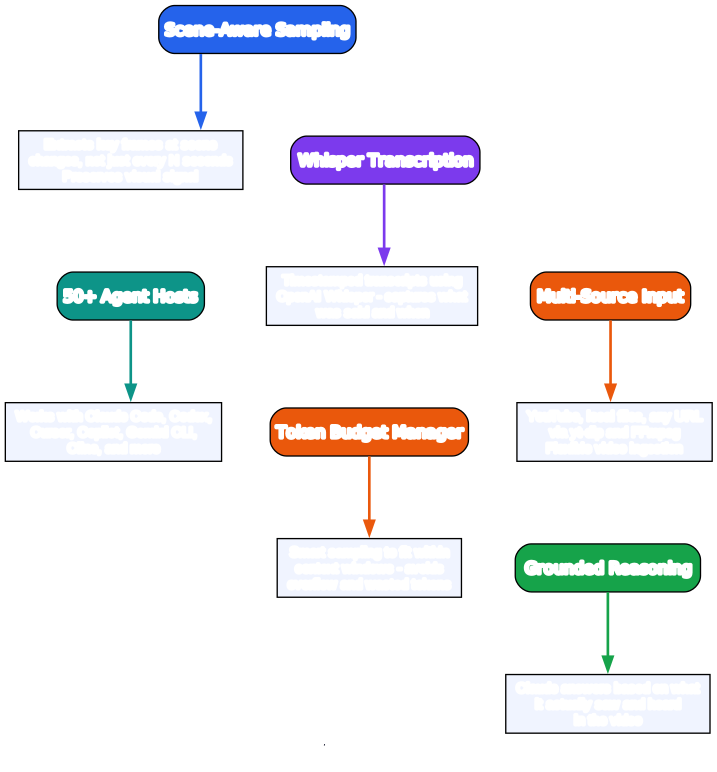
Video Download. Powered by yt-dlp, the skill supports YouTube, Vimeo, TikTok, X, Loom, Twitch, Instagram, and hundreds of other sites, plus local files in MP4, MOV, MKV, and WebM. Critically, it downloads only what the run needs — in transcript mode with captions available, it skips the video entirely.
Frame Extraction. ffmpeg extracts JPEGs at 512px wide (clamped to 1998px tall for Claude Read compatibility) using one of three engines: fast keyframes, scene-change detection, or uniform sampling. A universal 2 fps cap prevents token blowup, and the auto-fps logic budgets frames by duration so short videos are dense and long videos are capped.
Audio Transcription. Native captions are pulled free via yt-dlp first. When they are missing, the skill extracts mono 16kHz 64kbps audio (~480 kB/min) and sends it to Whisper — Groq’s whisper-large-v3 (preferred, cheaper and faster) or OpenAI’s whisper-1. Long audio is automatically chunked to stay under the 25 MB upload cap.
Claude Integration. Frames and transcript are handed to Claude, which Reads each JPEG as an image in parallel. The model answers grounded in what is on screen and in the audio — not “based on the title.” This works across Claude Code, Codex, Cursor, Copilot, Gemini CLI, and 50+ other Agent Skills hosts.
Multi-format Support. Anything yt-dlp supports, plus local containers. The --detail dial scales from transcript (no frames, cheapest) to token-burner (uncapped scene frames, maximum fidelity), so the same skill handles a 30-second TikTok and a 49-minute lecture.
Timestamp Referencing. Every frame carries a t=MM:SS marker aligned to the transcript. --start/--end focuses on a section with denser frame budgets, and --timestamps T1,T2 grabs frames at exact moments the presenter flags (“look here”, “as you can see”) — so deictic cues are never missed.
7. Processing Pipeline
The processing pipeline is where the engineering lives. It is designed to minimize download size, token cost, and wall-clock time, while maximizing the visual and auditory evidence Claude receives.
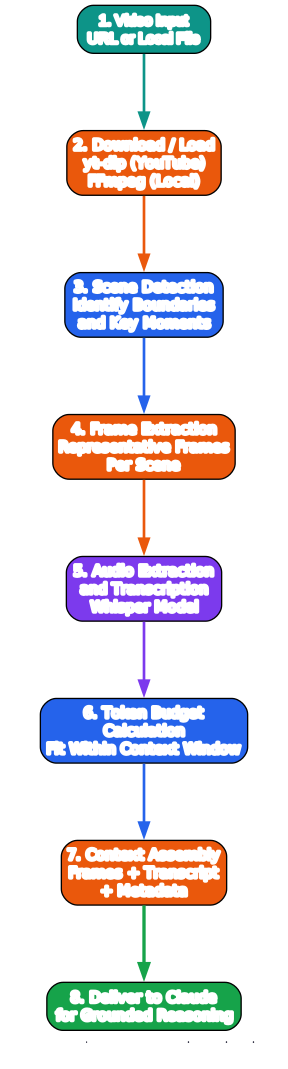
The pipeline runs in roughly this order, with parallelism where possible:
- Input — URL or local path plus an optional question.
- yt-dlp download — captions-first check. If captions exist and the detail mode is
transcript, return immediately. Otherwise, download the video (or just audio, if only Whisper is needed). - Parallel extraction —
ffmpegruns frame extraction and audio extraction concurrently. Frame extraction uses scene-change detection (-vf select), keyframe selection (-skip_frame nokey), or uniform sampling, depending on the detail mode. Audio extraction produces a mono 16kHz mp3. - Whisper transcription — if captions were missing, the audio is chunked and sent to Groq or OpenAI. Failed chunks are noted; the transcript is partial only if every chunk fails.
- Context assembly — frames (with timestamps) and transcript are combined into a markdown report.
- Claude analysis — Claude
Reads all frames in a single parallel message and reasons over frames + transcript together. - Output — a summary or answer with timestamp citations.
- Cleanup — the working directory is removed if no follow-ups are expected.
The parallelism matters: frame extraction and audio extraction are independent, so they run concurrently. And Claude’s Read calls are batched into one message, so the model sees all frames together rather than sequentially. This keeps latency low and context coherent.
8. Video Download — yt-dlp Integration
The download stage is a thin wrapper around yt-dlp, but the wrapper embodies an important principle: download as little as possible.
# Simplified from download.py
from download import download, fetch_captions, is_url

if is_url(source):
    captions = fetch_captions(source)  # try native captions first
    if detail == "transcript" and captions:
        return captions  # no video download at all
    video_path = download(source)  # download only what's needed
else:
    video_path = source  # local file, no download
The captions-first strategy is what makes transcript mode so cheap: a single yt-dlp call returns the VTT captions in seconds, with no video bytes transferred. For a 49-minute YouTube video, this is the difference between a 4.5-second run and a 37-second download plus 20 seconds of frame extraction.
yt-dlp supports an enormous range of sites — YouTube, Vimeo, TikTok, X, Instagram, Twitch, Loom, and hundreds more. For local files, no download happens at all; the path is passed straight to ffmpeg. The wrapper also handles format selection, so it picks the best available video stream for frame extraction and the best audio stream for Whisper, without over-downloading.
9. Frame Extraction — ffmpeg Integration
Frame extraction is the heart of the token economics. Every frame is an image, and image tokens add up fast. The skill’s frame logic is built around three ideas: budget by duration, select by scene, dedup by delta.
# From frames.py — the auto-fps budget
MAX_FPS = 2.0  # universal cap, never sample faster than 2 fps

def auto_fps(duration_seconds, max_frames):
    # target a frame budget by duration, not a fixed rate
    if duration_seconds <= 30:
        target = 30
    elif duration_seconds <= 60:
        target = 40
    elif duration_seconds <= 180:
        target = 60
    elif duration_seconds <= 600:
        target = 80
    else:
        target = 100  # capped modes
    fps = min(target / duration_seconds, MAX_FPS)
    return fps
The three extraction engines:
efficient—ffmpeg -skip_frame nokeyreconstructs only keyframes. Near-instant (~0.5s for a 49-minute video), cap of 50. Best for speed.balanced(default) — scene-change detection viaffmpeg’sselectfilter, cap of 100. Falls back to uniform sampling when the video is effectively static (fewer than 8 scene cuts).token-burner— scene-change, uncapped. Keeps every scene-cut frame. A soft warning prints past 250 frames.
After extraction, a dedup pass collapses near-identical frames. It scales each JPEG to a 16×16 grayscale thumbnail and computes the mean absolute difference against the last kept frame. If the difference is at or below 2.0 (on a 0–255 scale), the frame is dropped. This catches held slides, static screen recordings, and paused video — so the frame budget goes to distinct content. The Frames report line shows what was collapsed, e.g. 6 selected from 14 candidates (… 8 near-duplicates dropped …).
10. Audio Transcription — Whisper Integration
Transcription has a clear priority order: native captions first, Whisper fallback second.
# From transcribe.py — caption-first strategy
captions = fetch_captions(source)  # yt-dlp pulls VTT
if captions:
    transcript = parse_vtt(captions)  # free, instant, accurate-ish
elif not no_whisper and has_api_key():
    audio = extract_audio(video_path)  # ffmpeg: mono 16kHz 64kbps
    transcript = transcribe_video(audio)  # Groq or OpenAI
else:
    transcript = None  # frames-only
Native captions cover the majority of public videos for free. The Whisper fallback only kicks in for local files, TikToks, some Vimeos, and the occasional caption-less YouTube upload. When it does:
- Groq
whisper-large-v3is the preferred backend — cheaper and faster. - OpenAI
whisper-1is the fallback. - Audio is extracted as mono 16kHz 64kbps mp3 (~480 kB/min), keeping uploads small.
- Audio over the 25 MB API cap is automatically split into chunks and transcribed in sequence. If some chunks fail, the transcript is partial and the dropped chunks are noted on stderr; only if every chunk fails does the report say “none available.”
The transcript is timestamped and deduped (VTT often repeats lines), so Claude gets a clean, time-aligned text stream alongside the frames. Both keys live in ~/.config/watch/.env (mode 0600), and the skill prefers Groq when both are set. --no-whisper disables the fallback entirely for a fully free, frames-only experience.
11. Installation and Setup
Claude Video is designed to be zero-config to start. yt-dlp and ffmpeg install on first run via brew on macOS (Linux/Windows print the exact commands), and captions cover most public videos for free.
Claude Code (recommended — auto-updates via marketplace):
/plugin marketplace add bradautomates/claude-video
/plugin install watch@claude-video
Codex, Cursor, Copilot, Gemini CLI, or any of 50+ Agent Skills hosts:
npx skills add bradautomates/claude-video -g
The -g flag installs globally for your user (~/.codex/skills, ~/.cursor/skills, etc.); drop it to scope per-project.
claude.ai (web):
- Download
watch.skillfrom the latest release. - Go to Settings → Capabilities → Skills.
- Click
+and drop the file in. - Enable “Code execution and file creation” — the skill shells out to
ffmpegandyt-dlp.
Manual (developer):
git clone https://github.com/bradautomates/claude-video.git
ln -s "$(pwd)/claude-video/skills/watch" ~/.claude/skills/watch
On the first /watch call, the skill runs setup.py --check. If ffmpeg/yt-dlp are missing or no Whisper key is set, it walks you through fixing it:
# macOS — auto-installs
brew install ffmpeg yt-dlp

# Linux — prints exact commands
sudo apt install ffmpeg yt-dlp

# Windows — prints winget/pip commands
winget install ffmpeg yt-dlp
The installer also scaffolds ~/.config/watch/.env (mode 0600) with commented placeholders for GROQ_API_KEY and OPENAI_API_KEY:
# ~/.config/watch/.env
GROQ_API_KEY=your-groq-key-here
OPENAI_API_KEY=your-openai-key-here
WATCH_DETAIL=balanced
SETUP_COMPLETE=true
After setup, preflight is silent and /watch just works.
12. Usage Examples
The basic invocation is a video source plus an optional question:
/watch https://youtu.be/dQw4w9WgXcQ what happens at the 30 second mark?
/watch https://www.tiktok.com/@user/video/123 summarize this
/watch ~/Movies/screen-recording.mp4 when does the UI break?
/watch https://vimeo.com/123 what tools does she mention?
Focused on a specific section — denser frame budget, lower token cost:
/watch https://youtu.be/abc --start 2:15 --end 2:45
/watch video.mp4 --start 50 --end 60
/watch "$URL" --start 1:12:00            # from 1h12m to end
Choosing a detail mode:
/watch "$URL" --detail transcript        # no frames, captions only (cheapest)
/watch "$URL" --detail efficient          # fast keyframes, cap 50
/watch "$URL" --detail balanced           # scene-aware, cap 100 (default)
/watch "$URL" --detail token-burner       # scene-aware, uncapped (max fidelity)
Grabbing frames at specific timestamps — for moments the presenter flags:
/watch "$URL" --detail transcript --timestamps 4:32,7:10,9:55
Other useful flags:
/watch "$URL" --max-frames 40            # tighter token budget
/watch "$URL" --resolution 1024           # read on-screen text (slides, terminals)
/watch "$URL" --fps 2                     # override auto-fps (capped at 2)
/watch "$URL" --whisper openai            # force OpenAI Whisper backend
/watch "$URL" --no-whisper                # disable transcription, frames only
/watch "$URL" --no-dedup                  # keep near-duplicate frames
/watch "$URL" --out-dir /tmp/mywatch      # keep working files somewhere specific
Real-world patterns people use it for:
/watch https://youtu.be/<viral-video> what hook did they open with?— analyze someone else’s content./watch bug-repro.mov what's going wrong?— diagnose a bug from a screen recording./watch https://youtu.be/<long-thing> summarize this— faster than watching at 2x./watch https://youtu.be/<launch-video> what's actually new — skip the hype— cut the hype from an update video./watch https://youtu.be/<video> summarize this to a note— turn a playlist into notes.
13. Claude Code Integration
Claude Video is, at its core, a Claude Code skill — a self-contained folder with a SKILL.md contract and a scripts/ runtime. The SKILL.md is the source of truth: it tells the agent when to invoke the skill, how to resolve its own script directory, and the exact step-by-step procedure.
The skill resolves its own directory relative to wherever it was installed, so it works identically across every host:
Read ~/.claude/plugins/cache/claude-video/watch/<ver>/skills/watch/SKILL.md → SKILL_DIR=…/skills/watch
Read ~/.codex/skills/watch/SKILL.md                                          → SKILL_DIR=~/.codex/skills/watch
Read ~/.agents/skills/watch/SKILL.md                                         → SKILL_DIR=~/.agents/skills/watch
The agent then runs the orchestrator:
python3 "${SKILL_DIR}/scripts/watch.py" "<source>"
The script prints a markdown report to stdout listing frame paths (with t=MM:SS markers) and the transcript. Claude then Reads every frame path in a single parallel message — JPEGs render directly as images in its context — and combines them with the transcript to answer.
The SKILL.md defines the full procedure: Step 0 (setup preflight), Step 1 (parse input), Step 2 (run the script), Step 3 (Read every frame), Step 4 (answer the user), Step 5 (clean up). It also defines failure modes — no transcript, long-video warning, download failure, Whisper failure — and how the agent should handle each.
This contract-based design is why the same skill works on Claude Code, Codex, Cursor, Copilot, Gemini CLI, and 50+ other hosts with no code changes. The SKILL.md is portable; the scripts are portable; the agent harness is the only variable.
14. Use Cases
Claude Video’s flexibility makes it useful across a wide range of scenarios:
Video Summarization. Paste a long YouTube video and ask for a summary. The skill pulls the structure, key moments, what was said and shown — faster than watching at 2x. Run it across a playlist and file a per-video summary, so a channel or course becomes a searchable set of notes.
Content Analysis. /watch https://youtu.be/<viral-video> what hook did they open with? Claude looks at the first frames, reads the opening transcript, and breaks down the structure. Same for ad creative, competitor launches, podcast intros — anything where the how matters as much as the what.
Bug Diagnosis from Screen Recordings. Someone sends you a screen recording of something broken. /watch bug-repro.mov what's going wrong? Claude watches the recording, finds the frame where the issue appears, describes what is on screen, and often catches the cause without you ever opening the file.
Tutorial and Lecture Analysis. /watch https://youtu.be/<lecture> summarize the key concepts — extract the core ideas from an educational video, with timestamps so you can jump to the relevant moment. The --timestamps flag lets you grab frames at moments the lecturer flags (“look at this equation”, “notice this pattern”).
Meeting Notes. For recorded meetings, /watch meeting.mp4 what were the action items? — Claude reads the transcript and any on-screen slides or shared screens to produce structured notes with decisions and action items.
Cutting Through Hype. /watch https://youtu.be/<launch-video> what's actually new — skip the hype — strip a “game-changer” feature drop down to the few things that matter, so you get the substance without ten minutes of intro and overselling.
Multi-language Content. Whisper’s transcription supports dozens of languages, so you can analyze a video in a language you do not speak and get a summary in your own.
15. Conclusion
Claude Video represents a quiet but important shift in how AI agents interact with the world. For years, the assumption has been that agents work in text and code — the modalities they were born into. Video was a human format, too heavy and too unstructured for a model to consume directly. Claude Video challenges that assumption by treating video not as a monolith but as two streams — frames and transcript — that a multimodal model can reason over just like it reasons over a codebase.
The engineering is in service of that idea. The captions-first strategy, the duration-aware frame budgets, the scene-aware extraction, the delta dedup, the Whisper fallback — every piece exists to minimize the cost of getting visual and auditory evidence into Claude’s context. The skill does not try to understand the video; it prepares the evidence and lets the model do the understanding. That separation is what makes it portable across 50+ agent hosts, testable with a standard pytest suite, and cheap to maintain.
As multimodal models become more capable and agent hosts more ubiquitous, the ability to feed them real-world media — video, audio, images — will increasingly define what “agentic” means. Claude Video is an early, well-executed example of that future: a single /watch command that turns any video into something Claude can see, hear, and reason about. For developers, content creators, educators, and anyone who has ever scrubbed through a 30-minute video to find one moment, that is a capability worth having.
The project is MIT-licensed, built on yt-dlp, ffmpeg, and Claude’s multimodal Read tool, with Whisper transcription via Groq or OpenAI. It is built by Brad Bonanno, who makes content about building with AI on YouTube and builds AI operating systems for businesses at Solaris Automation. If /watch saves you from scrubbing through a video, it has done its job.
Links:
- GitHub: bradautomates/claude-video
- Author: @bradbonanno
- License: MIT

Enjoyed this post? Never miss out on future posts by following us


