1. Introduction
The AI revolution has created an insatiable appetite for vector similarity search. Every retrieval-augmented generation (RAG) pipeline, every recommendation engine, every semantic search system, and every deduplication tool relies on the ability to find the “nearest neighbors” among millions or billions of high-dimensional vectors. Traditionally, this has meant standing up a dedicated vector database server — a Milvus cluster, a Qdrant instance, or a Pinecone subscription — adding operational complexity, network latency, and infrastructure cost to what should be a simple lookup.
Enter ZVec, Alibaba’s open-source, in-process vector database. ZVec is lightweight, lightning-fast, and designed to embed directly into your application the same way SQLite embeds into countless apps without requiring a separate server process. Battle-tested inside Alibaba Group at production scale, ZVec delivers low-latency, durable, and scalable similarity search with minimal setup. With over 14,000 GitHub stars and growing at more than 4,000 per month, ZVec has rapidly become one of the most watched infrastructure projects in the AI ecosystem.
In this deep dive, we’ll explore what makes ZVec special: its embedded C++ core, its SIMD-accelerated distance kernels, its multiple index types (HNSW, IVF, Flat, DiskANN, Vamana), its native hybrid search combining dense vectors, sparse vectors, full-text search, and scalar filters, and its write-ahead logging for crash-safe durability. Whether you’re building a RAG pipeline, an edge AI application, or a high-throughput search service, ZVec offers a compelling alternative to the server-based vector database model.
2. The Vector Database Landscape
The vector database market has exploded since the rise of large language models. Broadly, solutions fall into two camps: server-based and in-process (embedded).
Server-based vector databases — Milvus, Qdrant, Weaviate, Pinecone, Vespa — run as standalone services. Your application connects to them over a network (gRPC, REST, or a custom protocol). This model shines for large-scale, distributed, multi-tenant deployments where you need horizontal scaling, high availability, and centralized management. The trade-off is operational overhead: you must deploy, monitor, scale, and secure a separate service. Every query pays a network round-trip cost. For small teams or latency-sensitive workloads, this can be overkill.
In-process vector libraries — FAISS, Annoy, ScaNN, HNSWLIB — are embedded directly into your application. There’s no server, no network hop, and no deployment complexity. FAISS, developed by Meta, is the most famous example: a C++ library with Python bindings that delivers blistering-fast similarity search. However, FAISS is primarily an indexing library, not a database. It lacks built-in durability (no write-ahead log), has no SQL-like query engine, no hybrid search, and no concurrent access guarantees. You get speed, but you build the database features yourself.
ZVec occupies a unique middle ground: it is an in-process vector database — not just a library. It combines the zero-infrastructure deployment of FAISS with the database features of Milvus: durable storage via WAL, a SQL query engine with a planner and optimizer, hybrid retrieval, concurrent multi-process reads, and multiple index types that span memory and disk. Think of it as SQLite for vectors: embed it, and you get a full database without the server.
3. How ZVec Works
ZVec’s core is written in C++ and compiled to native shared libraries (.so, .dylib, .dll). These libraries are wrapped by official SDKs for Python, Node.js, Go, Rust, and Dart/Flutter. When you pip install zvec or npm install @zvec/zvec, you get the precompiled native core plus a thin language binding that translates calls into the C++ engine.
The key architectural decision is that everything runs in your process. When you create a collection and insert vectors, ZVec writes directly to local files on disk using a write-ahead log (WAL) for durability. When you query, ZVec reads from memory-mapped index files and computes distances using SIMD-optimized kernels (AVX2, AVX-512, NEON, SSE) that are auto-dispatched based on your CPU’s capabilities. There is no inter-process communication, no network serialization, no connection pooling — just direct function calls into native code.
This design has profound implications for latency. A similarity search that might take 2–5 milliseconds over a network to a remote vector database can complete in under 0.5 milliseconds with ZVec, because the entire operation happens within your application’s memory space. For RAG pipelines where every query triggers a vector lookup, this can cut end-to-end latency dramatically.
Concurrency is handled pragmatically: multiple processes can read the same collection simultaneously (multi-reader), while writes are single-process exclusive. This matches the access pattern of most AI applications — frequent reads, occasional batch inserts — and avoids the complexity of distributed consensus protocols.
4. Architecture Overview
ZVec’s architecture is layered, with each component designed for performance and modularity.
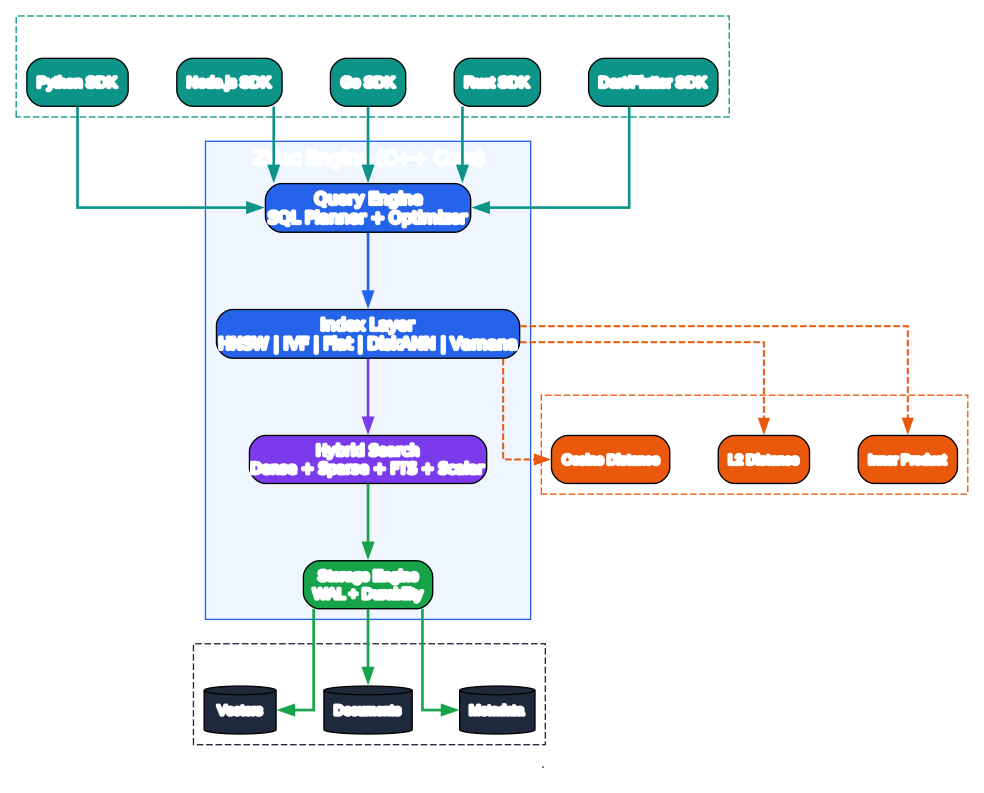
At the top is the Application Layer — your Python script, Node.js service, C++ binary, Go microservice, edge device, or Jupyter notebook. The application links against ZVec’s native library through a language-specific SDK.
Below sits the ZVec Embedded Engine, the C++ core that does all the heavy lifting. It contains several subsystems:
-
SQL / Query Engine: A full query engine with a planner, optimizer, and execution operators. It supports
MultiQuery— combining dense vector search, sparse vector search, full-text search, and scalar filters in a single query. The planner generates an execution plan (segment nodes, recall nodes, filter ops) and the optimizer reorders operations for efficiency. -
Vector Index Engine: Manages multiple index types — HNSW (graph-based, memory-resident), IVF (cluster-based), Flat (brute-force, exact), DiskANN (on-disk for billion-scale), and Vamana (graph-based, disk-optimized). Each index has a builder, searcher, and streamer component, all behind a unified
IndexProviderinterface. -
SIMD Distance Kernels: Hand-optimized distance computation routines for cosine, inner product, and Euclidean (L2) distances. These are implemented for FP32, FP16, INT8, INT4, and binary quantized vectors, with architecture-specific variants (AVX2, AVX-512, AVX-512-FP16, NEON, SSE, scalar fallback). A dispatch layer selects the fastest available implementation at runtime.
-
Quantizer: Converts vectors between precision levels (FP32 → FP16, INT8, INT4, binary) to reduce memory and accelerate search. Includes a rotator (FHT-based and matrix-based) for MIPS (maximum inner product search) transformation.
-
WAL & Buffer Pool: Write-ahead logging guarantees that inserted data survives process crashes and power failures. The buffer pool manages memory-mapped pages for efficient disk access.
-
Reranker / Reducer: Fuses results from multiple recall streams (e.g., dense + sparse + FTS) and produces the final ranked Top-K output.
At the bottom is the Local Storage Layer — WAL segment files, vector index files, and a forward store (using Arrow IPC and Parquet formats) for scalar field data. No server, no network, just files on your local disk.
5. Vector Operations Workflow
ZVec supports four primary operations: insert, query, update, and delete. Each follows a carefully optimized path through the engine.
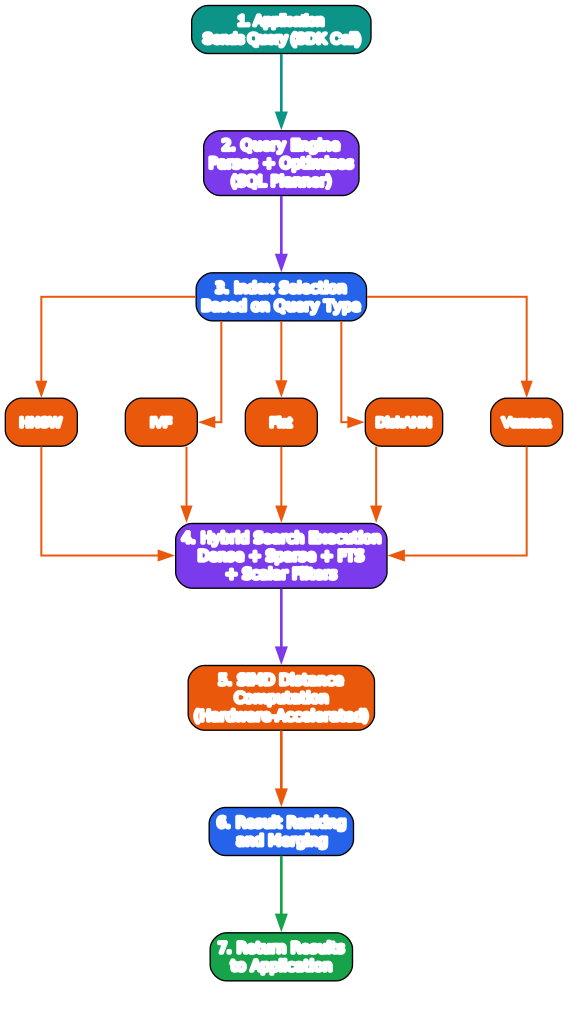
Insert / Update Flow: When you call collection.insert(docs), each document first passes through schema validation (checking field types, vector dimensions, and data types). Validated documents are appended to the write-ahead log (WAL) for durability — if the process crashes mid-insert, the WAL is replayed on recovery. The vectors are then added to the in-memory index (HNSW graph, IVF cluster, or flat array). Updates are handled as upserts: the old version is tombstoned and the new version is inserted.
Query / Search Flow: A query starts with a query vector and optional scalar filters. The query engine’s planner examines the query and decides which index to use. For HNSW, it performs a graph traversal starting from an entry point, greedily moving toward the query vector. For IVF, it probes the nearest cluster centroids and searches within those clusters. For Flat, it performs an exact brute-force scan. For DiskANN, it reads graph nodes from disk on demand. The candidate vectors are then scored using SIMD distance kernels, and the reranker fuses and ranks the final Top-K results.
Delete Flow: Deletions are handled via tombstone marking — the document is marked as deleted in the index without immediately removing it from the graph structure. A background compaction process later physically removes tombstoned entries and rebuilds index segments, keeping the index efficient over time.
Hybrid MultiQuery (v0.5.0+): ZVec’s standout feature is hybrid retrieval. A single MultiQuery can combine a dense vector search, a sparse vector search, a full-text search query, and scalar filters. The query engine runs each recall path in parallel, then the reranker merges the streams using configurable fusion strategies (e.g., reciprocal rank fusion, weighted score combination) to produce a unified ranked result set.
6. Key Features
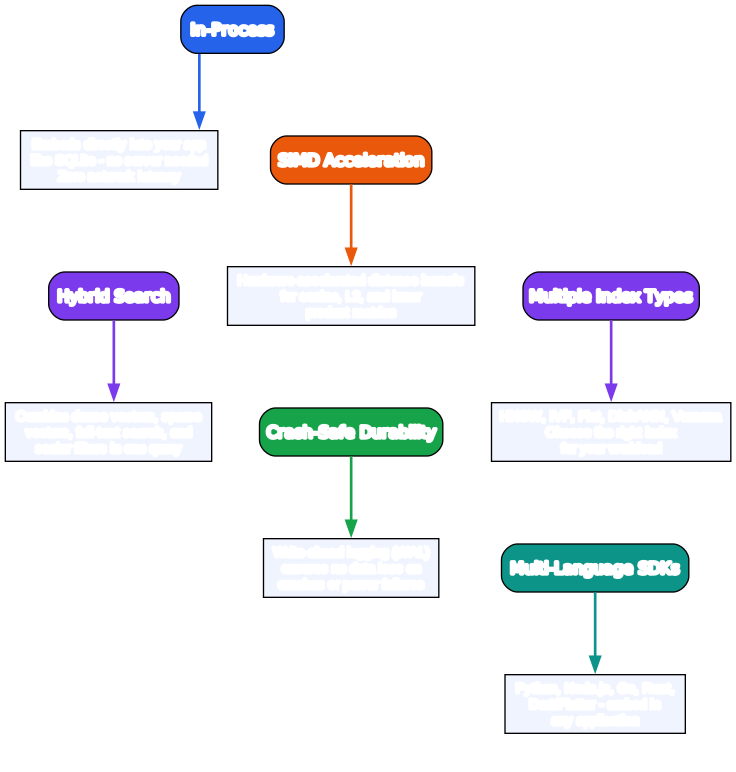
ZVec packs a comprehensive feature set into its lightweight footprint.
-
Blazing Fast: Searches billions of vectors in milliseconds, thanks to SIMD-accelerated distance computation and optimized index traversal algorithms.
-
Simple, Just Works: Install with a single command and start searching in seconds. Pure local, no servers, no configuration files, no Docker containers.
-
Dense + Sparse Vectors: Supports both dense embeddings (FP32, FP16, INT8, INT4, binary) and sparse vectors (FP32, FP16), with multi-vector queries and a rich selection of index types that scale from memory to disk.
-
Full-Text Search (FTS): Native keyword-based full-text search — attach an FTS index to any string field and query it with natural-language or structured expressions, no external search engine required.
-
Hybrid Search: Fuse vector similarity, full-text search, and structured filters in a single query for precise, multi-modal retrieval.
-
Durable Storage: Write-ahead logging (WAL) guarantees persistence — data is never lost, even on process crash or power failure. This is a critical differentiator from pure in-memory libraries like FAISS.
-
Concurrent Access: Multiple processes can read the same collection simultaneously; writes are single-process exclusive. This enables read-heavy production workloads without lock contention.
-
Runs Anywhere: As an in-process library, ZVec runs wherever your code runs — Jupyter notebooks, production servers, CLI tools, edge devices, and even RISC-V platforms (added in v0.5.0).
7. Indexing Algorithms
ZVec supports five primary index types, each suited to different scale and accuracy requirements:
HNSW (Hierarchical Navigable Small World): The default choice for most workloads. HNSW builds a multi-layer proximity graph that enables logarithmic-time approximate nearest neighbor search. It excels for datasets up to tens of millions of vectors in memory, offering excellent recall (95%+) with sub-millisecond query times. ZVec also supports HNSW with RaBitQ quantization (hnsw_rabitq_index) for memory-efficient graph search.
IVF (Inverted File Index): Partitions vectors into clusters using k-means. At query time, only the nearest clusters are probed, reducing the search space. IVF is faster to build than HNSW and works well for very large datasets where you can trade some recall for speed. ZVec’s IVF supports stratified clustering and optimized k-means for better centroid quality.
Flat (Brute-Force): Performs exact nearest neighbor search by computing distances against every vector. Guarantees 100% recall but is O(n) per query. Ideal for small datasets (under ~100K vectors) or when exact results are mandatory. ZVec’s Flat index uses SIMD distance matrices for maximum throughput.
DiskANN: An on-disk graph-based index introduced in v0.5.0. DiskANN keeps the bulk of the index on disk, loading only the necessary graph nodes into memory during search. This drastically cuts memory usage for billion-scale datasets — you can search a billion vectors with only a few gigabytes of RAM. DiskANN uses product quantization (PQ) to compress stored vectors and a Vamana-style graph for navigation.
Vamana: A graph-based index optimized for disk residency, serving as the foundation for DiskANN. It builds a navigable graph with controlled degree and diameter, balancing search efficiency and disk I/O.
Choosing the right index: For <1M vectors with low-latency needs, use HNSW. For 1M–100M vectors in memory, use IVF or HNSW with quantization. For >100M vectors or memory-constrained environments, use DiskANN. For exact results on small datasets, use Flat. For sparse vectors, ZVec offers dedicated flat_sparse and hnsw_sparse index types.
8. Performance and Benchmarks
ZVec is engineered for production-grade performance. Alibaba reports that ZVec can search billions of vectors in milliseconds, with the engine delivering exceptional QPS (queries per second) on standard hardware.
The performance advantage comes from several layers of optimization:
-
SIMD distance kernels: Hand-written assembly-level routines for AVX-512, AVX2, NEON, and SSE. The engine computes distance matrices (query vector vs. a batch of database vectors) in a single vectorized pass, exploiting CPU cache locality and instruction-level parallelism. For INT8 quantized vectors, ZVec uses AVX-512 VNNI instructions for maximum throughput.
-
Quantization: By converting FP32 vectors to FP16, INT8, INT4, or binary representations, ZVec reduces memory bandwidth requirements by 2–32x, which directly translates to faster distance computation (memory bandwidth, not compute, is often the bottleneck for vector search).
-
Index efficiency: HNSW graph traversal is optimized with prefetching and cache-aware memory layouts. DiskANN minimizes disk I/O through PQ-compressed vectors and a graph structure that maximizes locality.
-
Zero network overhead: Because ZVec runs in-process, there’s no serialization, deserialization, or network round-trip. A query that takes 3ms over gRPC to a remote database takes <0.5ms with ZVec.
On a 10-million vector benchmark (768-dimensional, FP32), ZVec demonstrates competitive QPS against FAISS while providing durability, hybrid search, and a query engine that FAISS lacks. For detailed benchmark methodology and results, see the official benchmarks documentation.
9. Installation and Setup
ZVec offers official SDKs across five languages, all backed by the same C++ core.
Python (3.10–3.14):
pip install zvec
Node.js:
npm install @zvec/zvec
Go:
go get github.com/zvec-ai/zvec-go
Rust:
cargo add zvec
Dart/Flutter:
flutter pub add zvec
Supported platforms: Linux (x86_64, ARM64), macOS (ARM64), Windows (x86_64), and RISC-V (v0.5.0+). Pre-built wheels and binaries are available for all major platforms, so you don’t need a C++ toolchain to get started.
Building from source: If you need a custom build (e.g., for a non-standard architecture or to enable experimental features), ZVec uses CMake:
git clone https://github.com/alibaba/zvec.git
cd zvec
mkdir build && cd build
cmake .. -DCMAKE_BUILD_TYPE=Release
make -j$(nproc)
The build system auto-detects CPU features and compiles the appropriate SIMD kernels. See the building from source guide for advanced options.
10. Usage Examples
Python — Create, Insert, and Search:
import zvec

# Define collection schema
schema = zvec.CollectionSchema(
    name="example",
    vectors=zvec.VectorSchema("embedding", zvec.DataType.VECTOR_FP32, 4),
)

# Create collection
collection = zvec.create_and_open(path="./zvec_example", schema=schema)

# Insert documents
collection.insert([
    zvec.Doc(id="doc_1", vectors={"embedding": [0.1, 0.2, 0.3, 0.4]}),
    zvec.Doc(id="doc_2", vectors={"embedding": [0.2, 0.3, 0.4, 0.1]}),
])

# Search by vector similarity
results = collection.query(
    zvec.Query(field_name="embedding", vector=[0.4, 0.3, 0.3, 0.1]),
    topk=10
)

# Results: list of {'id': str, 'score': float, ...}, sorted by relevance
print(results)
C++ — Full Schema with Multiple Fields and Index Types:
#include <zvec/db/collection.h>
#include <zvec/db/doc.h>
#include <zvec/db/schema.h>

using namespace zvec;

// Create schema with dense + sparse vectors and scalar fields
auto schema = std::make_shared<CollectionSchema>("demo");
schema->set_max_doc_count_per_segment(1000);

schema->add_field(std::make_shared<FieldSchema>(
    "id", DataType::INT64, false,
    std::make_shared<InvertIndexParams>(true)));
schema->add_field(std::make_shared<FieldSchema>(
    "name", DataType::STRING, false,
    std::make_shared<InvertIndexParams>(false)));
schema->add_field(std::make_shared<FieldSchema>(
    "weight", DataType::FLOAT, true));

// Dense vector with HNSW index (inner product metric)
schema->add_field(std::make_shared<FieldSchema>(
    "dense", DataType::VECTOR_FP32, 128, false,
    std::make_shared<HnswIndexParams>(MetricType::IP)));
// Sparse vector with HNSW index
schema->add_field(std::make_shared<FieldSchema>(
    "sparse", DataType::SPARSE_VECTOR_FP32, 0, false,
    std::make_shared<HnswIndexParams>(MetricType::IP)));

// Open collection
CollectionOptions options{false, true};
auto coll = Collection::CreateAndOpen("./demo", *schema, options).value();

// Insert documents
std::vector<Doc> docs = {/* ... build docs ... */};
coll->Insert(docs);

// Optimize (build indexes)
coll->Optimize();

// Query
SearchQuery query;
query.topk_ = 10;
query.target_.field_name_ = "dense";
query.include_vector_ = true;
std::vector<float> query_vec(128, 0.1f);
query.target_.set_vector(std::string(
    reinterpret_cast<char*>(query_vec.data()),
    query_vec.size() * sizeof(float)));

auto results = coll->Query(query).value();
Batch Insert for Performance:
import zvec
import numpy as np

collection = zvec.create_and_open(
    path="./batch_demo",
    schema=zvec.CollectionSchema(
        name="batch",
        vectors=zvec.VectorSchema("vec", zvec.DataType.VECTOR_FP32, 768),
    ),
)

# Generate 100K random embeddings
vectors = np.random.randn(100_000, 768).astype(np.float32)
docs = [
    zvec.Doc(id=f"doc_{i}", vectors={"vec": vectors[i].tolist()})
    for i in range(len(vectors))
]

# Batch insert (much faster than individual inserts)
collection.insert(docs)
collection.optimize()  # Build the HNSW index

# Query
query_vec = np.random.randn(768).astype(np.float32).tolist()
results = collection.query(
    zvec.Query(field_name="vec", vector=query_vec),
    topk=20
)
print(f"Found {len(results)} results, top score: {results[0]['score']:.4f}")
11. Comparison with Alternatives
ZVec enters a crowded vector database market. Here’s how it stacks up against the most popular alternatives.
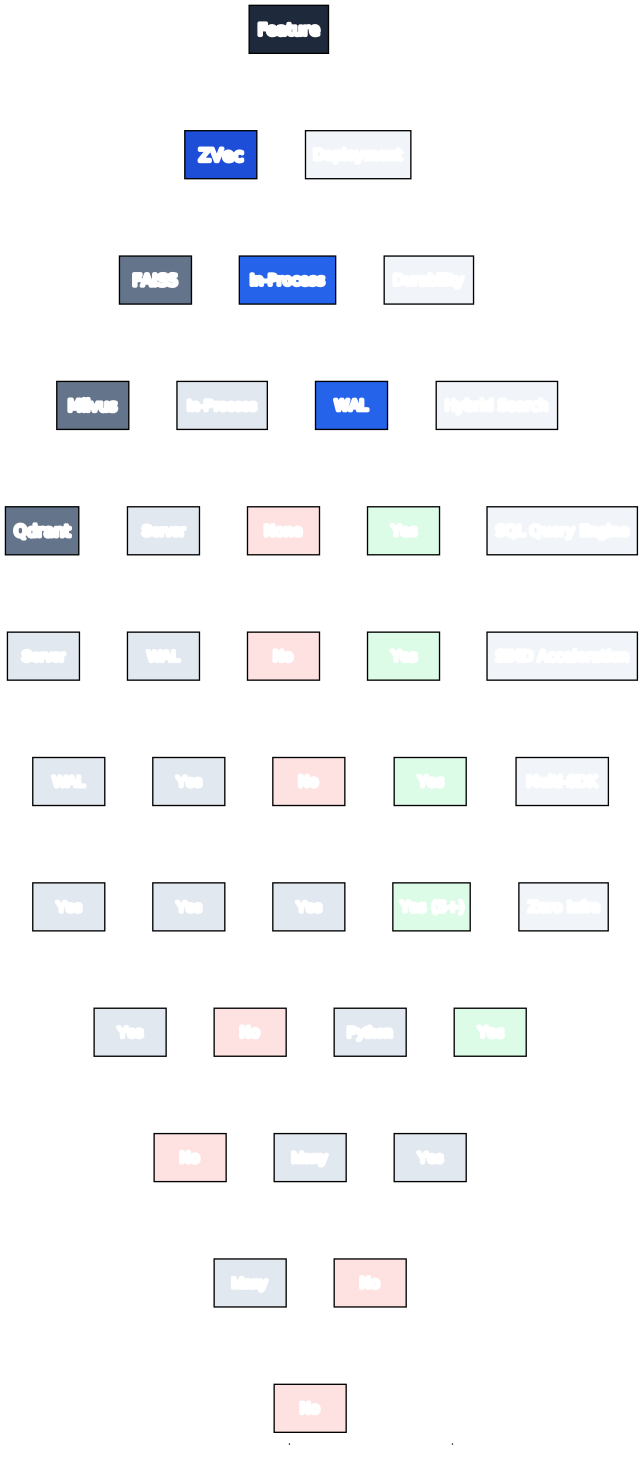
ZVec vs FAISS: Both are C++-based and in-process. FAISS is a pure indexing library — fast but stateless. It has no WAL, no query engine, no hybrid search, no concurrent access guarantees. ZVec provides all of these while matching FAISS-level speed through its SIMD kernels. Choose FAISS for research and batch similarity computation; choose ZVec when you need a durable, queryable database.
ZVec vs Milvus: Milvus is a full distributed vector database with a client-server architecture. It supports horizontal scaling, high availability, and multi-tenant deployments. However, it requires running a separate service (and often etcd, MinIO, and Pulsar as dependencies). ZVec is embedded — no server, no dependencies, no ops. Choose Milvus for large-scale distributed clusters; choose ZVec for in-process, low-latency production search.
ZVec vs Qdrant: Qdrant is a Rust-based vector database with a client-server model. It offers excellent filtered search and a rich API. Like Milvus, it requires a separate server process. ZVec’s in-process model eliminates the network hop. Choose Qdrant for cloud-native microservice architectures; choose ZVec for embedded applications.
ZVec vs Chroma: Chroma is a Python-first vector database popular for LLM application development and prototyping. It can run in-process (using DuckDB as a backend) or client-server. Chroma is great for getting started quickly but lacks the C++ performance and production-grade durability of ZVec. Choose Chroma for rapid prototyping in notebooks; choose ZVec for production workloads.
ZVec vs LanceDB: LanceDB is another in-process vector database (Rust-based, using the Lance columnar format). It targets serverless and embedded analytics use cases. ZVec and LanceDB share the embedded philosophy but differ in core technology (C++ vs Rust) and feature emphasis (ZVec’s hybrid search and Alibaba battle-testing vs LanceDB’s multimodal analytics focus).
ZVec’s sweet spot: When you need FAISS-level speed with durability, hybrid search, and zero-infrastructure deployment — embedded directly in your application like SQLite, but for vectors.
12. Use Cases
ZVec’s in-process, high-performance design makes it ideal for a wide range of AI applications:
RAG (Retrieval-Augmented Generation) Pipelines: The most common use case. Store document embeddings in ZVec, query at inference time to retrieve relevant context, and feed it to your LLM. ZVec’s sub-millisecond latency means the retrieval step adds negligible overhead to the LLM’s generation time. The hybrid search feature lets you combine semantic vector search with keyword matching for more accurate retrieval.
Recommendation Systems: Store user and item embeddings, then perform real-time similarity search to generate recommendations. ZVec’s high QPS makes it suitable for online serving where thousands of recommendation requests per second are needed.
Semantic Search: Power search bars that understand meaning, not just keywords. ZVec’s hybrid search combines dense vector similarity (semantic) with full-text search (keyword) for the best of both worlds — relevant results even when the query doesn’t exactly match the document text.
Deduplication and Near-Duplicate Detection: Store embeddings of images, documents, or audio clips, then query to find near-duplicates. ZVec’s exact Flat index guarantees no false negatives when deduplication must be precise.
AI Agent Memory: Store episodic and semantic memories as embeddings for AI agents. ZVec’s in-process model means the agent’s memory lives in the same process as the agent — no external dependency, no latency, no failure mode from a separate service.
Edge AI: Deploy vector search on edge devices (IoT gateways, mobile phones, on-premise servers) where running a separate database server is impractical. ZVec’s lightweight footprint and RISC-V support make it ideal for resource-constrained environments.
13. Integration with AI Frameworks
ZVec integrates smoothly with popular AI frameworks and embedding pipelines.
With LangChain: ZVec can serve as a custom vector store in LangChain’s retrieval chain. The pattern is straightforward: generate embeddings using your model of choice (OpenAI, Cohere, Hugging Face, Ollama), store them in ZVec, and query during retrieval.
from langchain_core.embeddings import Embeddings
import zvec

class ZVecStore:
    def __init__(self, path, dim, embedder: Embeddings):
        self.embedder = embedder
        self.collection = zvec.create_and_open(
            path=path,
            schema=zvec.CollectionSchema(
                name="langchain",
                vectors=zvec.VectorSchema(
                    "embedding", zvec.DataType.VECTOR_FP32, dim
                ),
            ),
        )

    def add_texts(self, texts):
        embeddings = self.embedder.embed_documents(texts)
        docs = [
            zvec.Doc(id=f"doc_{i}", vectors={"embedding": emb})
            for i, emb in enumerate(embeddings)
        ]
        self.collection.insert(docs)
        self.collection.optimize()

    def similarity_search(self, query, k=4):
        query_emb = self.embedder.embed_query(query)
        results = self.collection.query(
            zvec.Query(field_name="embedding", vector=query_emb),
            topk=k
        )
        return results
With LlamaIndex: Similar integration — use ZVec as the vector store backend for LlamaIndex’s VectorStoreIndex. The in-process model means your indexing and querying pipeline runs without external service dependencies.
With Embedding Models: ZVec is model-agnostic. It stores whatever vectors you give it. Common embedding models that pair well with ZVec include OpenAI’s text-embedding-3-small/large, Cohere’s embed-english-v3, BGE models, and local models via Hugging Face sentence-transformers or Ollama. The choice of dimension and data type (VECTOR_FP32, VECTOR_FP16, VECTOR_INT8) depends on your model and memory budget.
With Sparse Embedding Models: For hybrid search, ZVec supports sparse vectors (e.g., from SPLADE, BGE-M3, or BM25-style encoders). You can store both dense and sparse embeddings in the same collection and query them together via MultiQuery.
14. Deployment Patterns
ZVec’s in-process nature enables deployment patterns that are difficult or impossible with server-based vector databases.
Embedded in Application: The simplest and most common pattern. ZVec runs inside your Python/Node/Go/Rust application, reading and writing to a local directory. This is ideal for single-instance services, CLI tools, and scripts. No Docker, no Kubernetes, no service mesh — just a directory on disk.
Edge Deployment: Deploy ZVec on edge devices — IoT gateways, on-premise servers, factory floor machines — where network connectivity to a central vector database is unreliable or too slow. The vector index lives on the device’s local storage, enabling offline semantic search and RAG.
Mobile (via Dart/Flutter): ZVec’s Flutter SDK (flutter pub add zvec) enables on-device vector search in mobile applications. This supports privacy-preserving AI features (search runs on-device, no data leaves the phone) and offline functionality.
Serverless Functions: In serverless environments (AWS Lambda, Cloudflare Workers, Vercel Edge Functions), running a separate database server is often impractical. ZVec can be bundled with your function and read from attached storage (e.g., EFS, Lambda layers), providing vector search without a persistent server.
Read-Scale-Out: Since ZVec supports concurrent multi-process reads, you can scale read throughput by running multiple application processes that all read the same collection directory. A single writer process builds the index; multiple reader processes serve queries. This is simpler than sharding a distributed database and works well for read-heavy workloads.
CI/CD and Testing: ZVec’s zero-config nature makes it perfect for test environments. No need to spin up a database container in CI — just create a temporary ZVec collection in a temp directory, run your tests, and clean up. This speeds up test suites and eliminates flaky database dependencies.
15. Conclusion
ZVec represents a compelling evolution in the vector database space. By combining the in-process simplicity of a library with the features of a full database — durability, hybrid search, a query engine, multiple index types, and concurrent access — Alibaba has created a tool that fills a genuine gap between FAISS and Milvus.
The project’s rapid growth (14,000+ stars, +4,000/month) signals that the developer community recognizes this gap. As AI applications move from prototypes to production, the demand for lightweight, fast, and reliable vector storage that doesn’t require a DevOps team to operate is only increasing. ZVec answers that demand with a battle-tested, Apache-2.0-licensed solution that runs wherever your code runs.
The v0.5.0 release — with full-text search, hybrid retrieval, DiskANN, Go/Rust SDKs, Zvec Studio, and RISC-V support — shows a project investing in the right areas: performance at scale, developer ergonomics, and ecosystem breadth. The roadmap promises continued innovation.
The future of in-process vector databases is bright. As embedding models become cheaper and more ubiquitous, as RAG becomes the default architecture for knowledge-grounded AI, and as edge AI deployment grows, the need for embedded vector search will only expand. ZVec is well-positioned to be the SQLite of the vector world — the default choice when you need vector search without the infrastructure overhead.
If you’re building an AI application and weighing vector database options, give ZVec a try. The installation takes seconds, the API is clean, and the performance speaks for itself. Visit the GitHub repository, read the quickstart guide, and join the Discord community to get involved. Enjoyed this post? Never miss out on future posts by following us 


