Introduction
OpenCut is a free and open source video editor that runs on the web, on the desktop, and on mobile devices from a single codebase. It is positioned as an open source alternative to CapCut, the short-form video editor that dominates mobile content creation but ships as closed source and increasingly as a paid product. Where CapCut locks its features behind a single vendor, OpenCut ships under the MIT license and invites inspection, extension, and self-hosting.
The project is in the middle of a ground-up rewrite. The previous version, still live at opencut.app and preserved as a public archive at opencut-app/opencut-classic, proved that a browser-based editor could handle real editing work: timelines, masks, keyframe curves, audio waveforms, and MP4 export. The rewrite takes those lessons and rebuilds the engine on a Rust core, adds a plugin-first architecture so third parties can extend the editor without forking it, exposes an MCP server so AI agents can drive the editor programmatically, and introduces a headless mode so the same engine can render projects in batch and on CI.
This post walks through what OpenCut is, why it exists, how its architecture fits together, how the plugin system and MCP server work, and how to install and develop against it. The source for everything described here lives in the OpenCut-app/OpenCut repository.
Why OpenCut
The short-form video market is enormous, and almost all of it runs through a small number of closed, proprietary editors. Creators who want to script repetitive edits, render on a server farm, or simply own their toolchain are out of luck. OpenCut addresses three concrete problems that no single closed product solves well.
The first is lock-in. A project file in a closed editor is only useful for as long as the vendor keeps the product alive and the terms affordable. OpenCut’s project format, timeline model, and rendering pipeline are all open and documented in the source, so a project saved today remains renderable by anyone who can compile the code.
The second is reach. A creator might start a cut on a phone, refine it on a laptop, and finish it in a browser on a borrowed machine. OpenCut compiles its core to native code for desktop and mobile and to WebAssembly for the web, so the same timeline, effects, and renderer behave identically across all three surfaces. There is no separate “mobile cut-down” with a reduced feature set.
The third is automation. Modern content workflows are increasingly agentic: a script or an AI assistant trims silence, generates captions, applies a brand template, and exports. Closed editors expose at most a narrow plugin API. OpenCut treats automation as a first-class citizen through its Editor API, an MCP server for AI agents, and a headless mode that can render without a window. The same operations a human performs in the UI are available to a program, with no second implementation to drift out of sync.
Under the hood the rewrite is built on a Rust core, with TypeScript for the web UI and proto and moon for build tooling and toolchain pinning. The result is a single codebase that produces native desktop binaries, a web app, and an automation server, all backed by one rendering engine.
How It Works
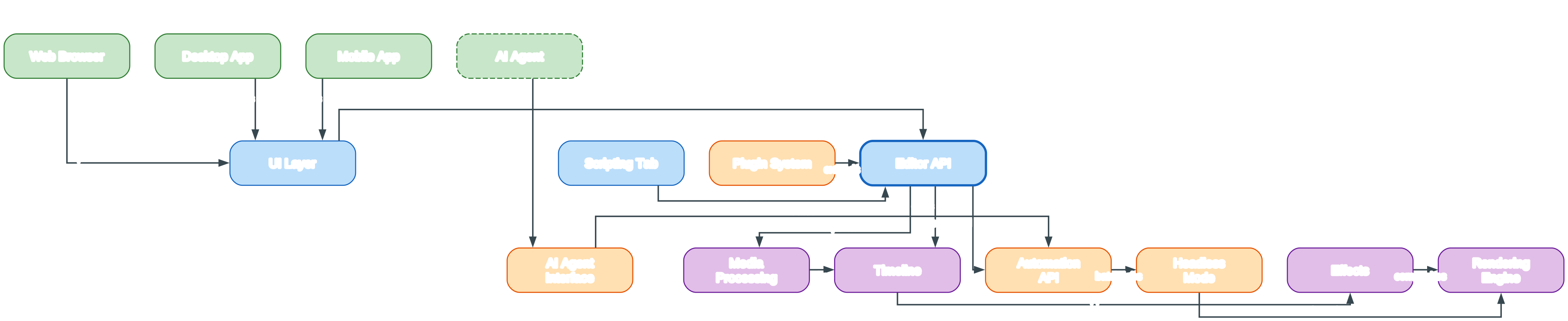
The architecture diagram above maps the complete data path through OpenCut, from the moment media is imported to the moment final pixels are composited for preview or export. Reading the graph from top to bottom reveals four colour-coded tiers, each representing a distinct responsibility in the system, and the arrows trace how a command travels from an input down to the rendering engine and back out as frames.
Green nodes mark the inputs that drive the editor. The Web Browser, Desktop App, and Mobile App are the three human-facing surfaces, and all three are built from a single codebase that shares one Rust core. The fourth green node, the AI Agent, is drawn with a dashed border to signal that it is a non-human, automated input. It never opens the UI; instead it issues commands through the MCP server on the right of the diagram.
The blue nodes form the in-process layers of the OpenCut editor itself. The UI Layer is where human input lands, rendering the timeline, the preview canvas, the properties panels, and the scripting tab. The Scripting Tab lets advanced users write short programs that manipulate a project, and every script ultimately resolves to calls against the Editor API.
The Plugin System is coloured orange because it is a tooling surface rather than a process. Third-party plugins register against the public Editor API instead of reaching into private internals, which is exactly what makes the architecture plugin-first. The Editor API is the thick blue node at the centre of the tier, and every other editor component converges on it: the UI drives it, scripts call it, and plugins extend it.
The lower-left of the diagram holds the Rust core, shown in purple to mark it as the computational backend. It is organised as a short pipeline that media flows through. The Media Processing node decodes video, audio, and image files into a common internal representation that the rest of the engine can consume.
The Timeline node owns the edit decision list: track ordering, clip placement, and frame-accurate timing. Time inside OpenCut is represented as an integer tick count at a high tick rate rather than floating-point seconds, which eliminates the rounding errors that accumulate when snapping to frame boundaries on fractional frame rates such as 23.976 or 29.97.
The Effects node is where masks, filters, transforms, and keyframed animations are evaluated against the timeline’s clips. Effects feed the Rendering Engine, the compositor that produces final frames. Because this pipeline is implemented in Rust and exposed to the web through WebAssembly, the browser gets GPU-accelerated compositing without relying on a hand-written JavaScript fallback.
The lower-right of the diagram holds the MCP server, drawn in orange to mark it as a tooling surface for automation rather than a human UI. An AI Agent issues MCP calls into the AI Agent Interface, which routes those calls to the Automation API. The Automation API is the same surface the Editor API exposes, so anything a human can do in the UI, a script or agent can do programmatically.
The Automation API dispatches long-running work to Headless Mode, which can render projects without any window open at all. This is what makes batch rendering and CI-driven export possible, because a render farm or a build server can drive the same engine a creator uses interactively.
Because Headless Mode speaks the same Automation API as the interactive editor, an agent does not need a separate rendering SDK. It submits the same operations a user would, against the same project model, and the headless runtime simply skips the window creation step. This removes an entire class of bugs where an export pipeline subtly disagrees with the editor.
The Scripting Tab sits inside the editor tier for the same reason. It is not a parallel automation path with its own semantics; it is a direct way for a human to write the same calls an agent would make through MCP. A script developed in the tab can later be wrapped as a plugin or handed to an agent with no translation, because all three share the Editor API as their contract.
The final edge, from Headless Mode back into the Rendering Engine, closes the loop. Headless rendering reuses the exact same Rust compositor as the interactive editor, which guarantees that an automated export is pixel-identical to what a user sees on screen. No separate export code path exists, so there is no risk of the rendered output drifting from the preview.
The end-to-end data flow, following the arrows in the diagram, resolves to the following steps:
- A user opens the editor on the web, desktop, or mobile, sending input to the UI Layer.
- The UI Layer, the Scripting Tab, and plugins all funnel their intent through the Editor API.
- The Editor API imports media into Media Processing and edits the Timeline.
- Media Processing decodes assets and feeds clips onto the Timeline.
- The Timeline applies Effects, which are then composited by the Rendering Engine.
- Separately, the Editor API exposes an Automation API consumed by the MCP server.
- An AI Agent calls the AI Agent Interface, which routes commands to the Automation API.
- The Automation API submits batch jobs to Headless Mode.
- Headless Mode renders through the same Rendering Engine, producing output identical to the interactive preview.
The colour scheme is deliberate and carries meaning throughout the diagram. Green is reserved for inputs, both human and automated. Blue marks the in-process editor layers that a human interacts with directly. Orange marks tooling surfaces that expose capabilities externally, namely the plugin system and the MCP server. Purple marks the Rust-backed backend where the real computation happens. Together the four tiers make a single guarantee: every path, whether started by a click or by an agent, ends at the same Rust compositor, so OpenCut behaves the same no matter who or what is driving it.
Plugin Architecture
OpenCut is described as plugin-first, and that phrase has a specific architectural meaning. In many editors, plugins are an afterthought: the core is built for the built-in UI, and an extension API is bolted on later by exposing whatever internal functions happen to be reachable. The result is a fragile surface that breaks every release and cannot reach the full power of the editor.
OpenCut inverts that relationship. The Editor API is the single choke point through which the editor’s own UI, its scripting tab, and third-party plugins all operate. Because the built-in UI is itself just another consumer of the Editor API, the API is guaranteed to be complete: if a feature exists in the UI, the calls that implement it are part of the public surface, and a plugin can make them too.
This has three practical consequences. First, a plugin can automate any editing task a human can perform, including tasks that involve the timeline, effects, masks, keyframes, media imports, and exports. Second, plugins do not depend on private internals, so they survive upgrades to the core far more reliably than plugins that reach into implementation details. Third, the scripting tab and the plugin system share the same API, so a script that works interactively can be packaged as a plugin with no rewrite.
The plugin system is one of the headline features of the ongoing rewrite, alongside the Editor API itself. Together they turn OpenCut from a single application into a platform: third parties can ship effects, transitions, caption generators, brand templates, and workflow automation without forking the project. The same surface also feeds the MCP server, so a plugin’s capabilities become reachable by an AI agent without any additional integration work.
MCP Server for AI Agents
The Model Context Protocol, or MCP, is a standardised way for AI agents to call external tools. OpenCut exposes an MCP server that turns the editor into a tool an agent can drive. Where a human clicks to split a clip, an agent issues an MCP call that performs the same split against the same timeline.
This matters because video editing is full of repetitive, well-specified work that is painful to do by hand but trivial to describe: trim the silence out of an interview, generate captions from the transcript, apply a lower-third template, cut to a beat, and export at a target resolution. An agent with access to the OpenCut MCP server can perform each of these as a sequence of tool calls, and a creator can review the result rather than perform every step.
The MCP server in the architecture diagram sits on the lower right, coloured orange to mark it as a tooling surface. An AI Agent enters through the AI Agent Interface, which validates and routes incoming calls. Those calls reach the Automation API, which is the same API the Editor API exposes internally. From there, long-running operations such as rendering are dispatched to Headless Mode, which can run without a window and therefore on a server.
Headless Mode is the piece that makes agent-driven workflows practical at scale. Because rendering can happen without a GUI, an agent can submit a render job and poll for completion, or a CI pipeline can export a project as part of a build. The render goes through the same Rust Rendering Engine as the interactive editor, so the output matches what a human would see. There is no second, divergent export pipeline to maintain.
The combination of the Editor API, the plugin system, and the MCP server means OpenCut has one consistent automation surface. A script in the scripting tab, a packaged plugin, and an AI agent all speak the same vocabulary of operations, and they all bottom out at the same Rust core. That consistency is what allows OpenCut to serve both a creator editing by hand and a pipeline editing by code.
Installation
OpenCut uses proto to pin its toolchain, so every developer and CI machine gets the exact same versions of the language tools automatically. Start by cloning the repository and installing the pinned tools.
git clone https://github.com/OpenCut-app/OpenCut.git
cd OpenCut
proto use
The proto use command reads the .prototools file at the repo root and installs the pinned versions of moon, bun, and rust. If you do not yet have proto installed, it can be installed on Linux, macOS, and WSL with the official installer.
bash <(curl -fsSL https://moonrepo.dev/install/proto.sh)
On Windows, use PowerShell to install proto.
irm https://moonrepo.dev/install/proto.ps1 | iex
If shims fail to run on Windows, allow local scripts for the current user.
Set-ExecutionPolicy -Scope CurrentUser RemoteSigned
Once proto use has installed the pinned tools, the web and API development servers can be started with moon.
moon run web:dev       # web editor on localhost:5173
moon run api:dev       # api server on localhost:8787
The web app is built with Vite and TanStack Router and runs in any modern browser. The API app runs on Cloudflare Workers via the Elysia adapter. The project is MIT licensed, so it can be self-hosted, audited, and modified without restriction.
Development
OpenCut is a monorepo managed by moon, with projects discovered under apps/* and crates/*. The web editor lives in apps/web, the API server in apps/api, and the native desktop app in apps/desktop. The desktop app is built with the GPUI Rust toolkit and is still early in development.
moon run web:dev       # vite dev server for the web editor
moon run api:dev       # elysia api dev server
moon run desktop:dev   # cargo run for the desktop app
The desktop target has its own check and build tasks, mirroring the standard cargo workflow.
moon run desktop:check   # cargo check
moon run desktop:build   # cargo build --release
The first desktop build compiles GPUI from source and takes a while, which is expected. Platform requirements differ: macOS needs the Xcode command line tools for the Metal renderer, Windows needs no extra dependencies, and Linux renders through Vulkan and needs Wayland or X11 development packages plus a C toolchain and cmake.
The project is honest about its status. The rewrite is actively in progress, and the maintainers are not yet accepting outside contributions while the architecture is being designed. Anyone who wants to follow along, ask questions, or report issues can open an issue on the main repository. The classic version, which is the one currently running at opencut.app, remains available at opencut-app/opencut-classic for anyone who needs a working editor today.
Conclusion
OpenCut is an ambitious attempt to rebuild a category of software that has been almost entirely closed. By putting a Rust core at the centre and compiling it to native code and WebAssembly, it delivers one editor across web, desktop, and mobile without compromising on the renderer. By making the Editor API the single surface that the UI, the scripting tab, and plugins all share, it guarantees that the extension model is as powerful as the built-in experience. By adding an MCP server and a headless mode, it turns the editor into a tool that AI agents and CI pipelines can drive directly.
The result is a video editor that is open, cross-platform, and automatable, and whose interactive and automated code paths converge on the same Rust compositor. Whether you are a creator looking for an honest alternative to CapCut, a developer who wants to script a rendering pipeline, or an agent builder who needs a real video tool to call, OpenCut is worth watching as the rewrite matures. The source is on GitHub under the MIT license, the classic version is live today, and the rewrite is under active development. Enjoyed this post? Never miss out on future posts by following us 


