Build Your Own JEV Locally: Run a 100% Private AI Agent on Your Machine
If you have been anywhere near AI Twitter in the last two weeks, you have seen Jev. Released in early access on September 15, 2026 by TypeSafe AI, it does something deceptively simple: it never writes text at all. You hand it a state - an email, a support ticket, a JSON blob - plus a list of typed questions, and it hands back typed answers with calibrated probabilities, in a single pass. No prose to parse, no JSON wrapped in apologetic sentences, and by the company’s design, nothing that can hallucinate. TypeSafe calls it a System One model: the fast, automatic judgment Kahneman described, as opposed to the slow, expensive generation that every chat model performs. The pitch lands because every agent you have built wastes a frontier model’s time asking it yes/no questions and then parsing the string back. Jev prices that judgment at $0.042 per million input tokens with output free, and answers end-to-end in 70 to 500 milliseconds.
There is exactly one problem, and it is the one stamped on the tin: Jev is a hosted API. Every “should this stay private?” check - the single most valuable gate a privacy-conscious agent can have - means shipping your raw state to someone else’s server for judgment. The privacy gate leaks by construction. This post builds the same capability with the gates pointing the other way: a Jev-style decision engine running entirely on your hardware, wired to a local chat model, with not a single byte of your state leaving the machine. The open-source anchor is Laya, an Apache-2.0 decision engine released on September 19, 2026 by ConvAI Innovations that landed 16,000 GitHub stars in its first week. By the end you will have a local agent that guards, routes, scores, and gates with typed probabilities - a build-your-own-JEV, 100 percent private.

What a System One Model Actually Does
A generative LLM answers every question the same way: token by token, each token conditioned on the last, until it has written you an answer. That is enormously flexible and enormously wasteful when the question is “which department handles this ticket?” - a small, closed-set judgment that a human would answer instantly. The System One insight is to cut generation entirely. Architecturally, a decision model like Laya is a bidirectional encoder (a ModernBERT-large backbone, 421 million parameters) with a trained decision head instead of a language head. Each question option is rendered into the input as a marker, and one forward pass reads the answer directly off each marker’s hidden state. Because nothing is generated, three things fall out for free:
- Typed answers. Every answer is one of three primitives:
choice(pick one of your named options, with a probability on each),score(a value on an ordered scale you define, like “not urgent / soon / critical”), andnoul(the probability that a yes/no question holds). A choice can never come back as a sentence. - Calibrated confidence. Every answer carries probabilities and a confidence value, trained with reinforcement learning against proper scoring rules - TypeSafe calls their variant RLCD. Low confidence is a signal your code can branch on, not a vibe.
- Speed at small scale. No autoregressive decoding means latency is set by input length, not output length. Laya measures 33 milliseconds per question on a T4 GPU, or 7.2 milliseconds per question in batches, and the whole model fits in well under a gigabyte of memory.
The three-primitive vocabulary sounds limiting until you notice how much of an agent’s control flow it covers. Triage, intent detection, urgency scoring, PII detection, moderation labels, tool permission gates, model routing, loop control (“keep gathering context, retry, or stop”) - all of it is choice/score/noul questions wearing different names. The generative model keeps the one job that genuinely needs writing: talking to the human.
The Privacy Hole in a Hosted Classifier
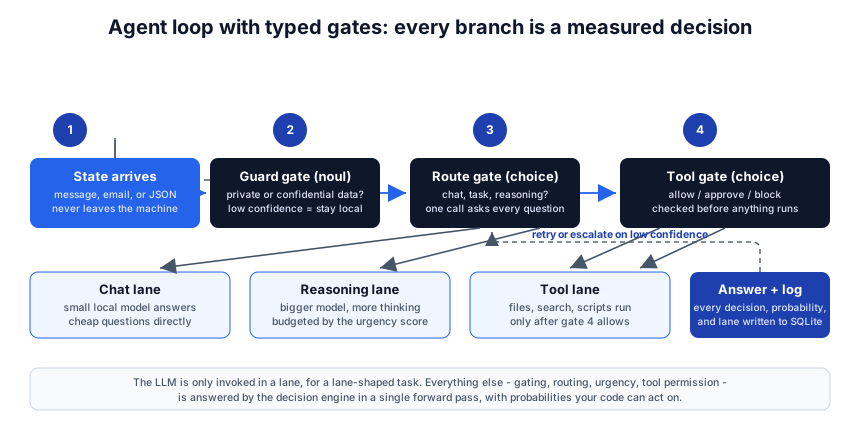
The fastest way to see why “hosted” breaks the story is to write down the agent loop you actually want. A request arrives. Before anything else, your code asks: does this contain private data - API keys, passwords, financial or medical details? If yes, it stays on local models, full stop. Then: what kind of request is it, how hard is it, how urgent? Based on those answers, it picks a lane - small local model, big model, or a tool call - and before any tool with side effects runs, it asks: allow, approve, or block?
With hosted Jev, that first guard question sends the raw state - the very payload you are checking for secrets - to a third party. As the MindStudio router walkthrough puts it, sending a prompt to a hosted classifier for a privacy check has an inherent leak problem, which is exactly why self-hosted clones matter if you want the whole flow to stay on your machine. The irony is structural: the more faithfully you use the confidence-gated pattern, the more sensitive data you stream to the classifier. A decision model is the right tool for exactly the data you least want to upload. Hence this build: same architecture, same typed gates, zero egress.
Meet Laya: the Open Jev
Laya is what the community consolidated around within days of Jev’s launch. It is built by ConvAI Innovations under Nandakishor Mukkunnoth, who published earlier non-autoregressive decision models in a March 2025 paper - a year before Jev shipped - and his release notes do not hide the frustration of watching a funded lab ship the same shape as a closed API. Set the drama aside, because the artifact is excellent: Apache-2.0 weights, a Python package, and a benchmark where its specialized checkpoint scores 76.6 percent against Jev’s published 72.7 percent on the 2,000-decision typed-decisions test, with a measured 32.8 milliseconds per single question against third-party Jev latencies of roughly 150 to 276 milliseconds.
Three checkpoints ship, with a built-in Router that detects the language and dispatches per request:
| Checkpoint | Encoder | Params | Context | Use it for |
|---|---|---|---|---|
| laya | ModernBERT-large | 421M | 512 | English states |
| laya-multilingual | mmBERT-base | 322M | 1024 | 100+ languages, 2x faster |
| laya-typed-decisions | ModernBERT-large | 421M | 1024 | the typed-decisions workflows |
The surrounding tooling is unusually complete for a week-old project: a self-hosted Jev-compatible HTTP server (so existing Jev API clients just work against your machine), an optional MCP server, LangChain and LangGraph integrations, batch scoring, a TypeScript port for Node and the browser, Rust inference crates, and a Docker Compose quickstart. For Apple Silicon owners there is a separate community runtime, Laya-MLX, which reimplements the architecture natively in Apple’s MLX framework - more on that in Step 3.
What You Are Building
Here is the target architecture. Everything inside the dashed box runs on your hardware; the only network calls ever made are one-time checkpoint downloads.
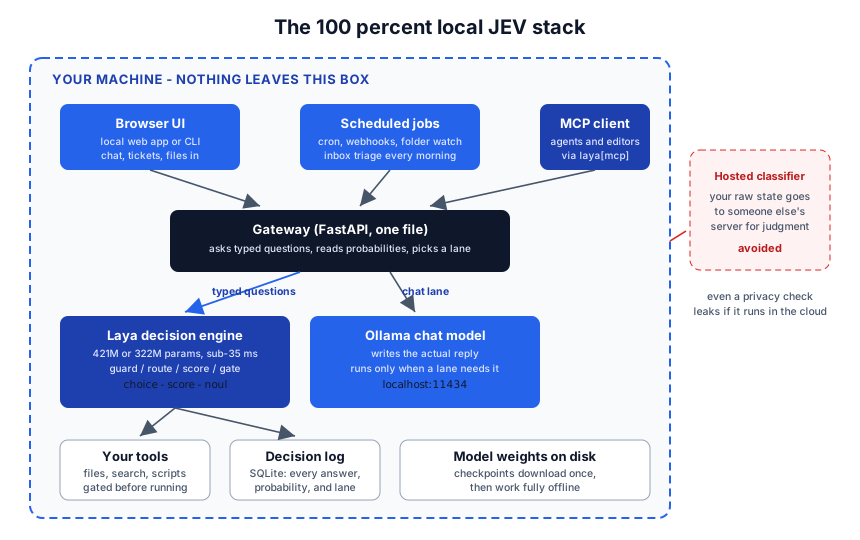
The pieces:
- Laya - the decision engine. Answers guard, route, urgency, and permission questions in tens of milliseconds.
- Ollama - the chat model that writes actual replies, invoked only when a lane needs prose.
- A one-file FastAPI gateway - the only code you write. It asks Laya typed questions, reads the probabilities, picks a lane, and logs every decision.
- SQLite - a decision log. Every answer with its probabilities and the lane it triggered, which turns your agent from a black box into an auditable system.
Step 1: The Chat Model
Install Ollama for your platform, then pull a tool-calling model that fits your memory:
ollama pull llama3.1:8b
That is the entire setup for the writing half. The current model catalogs move quickly - browse Ollama’s library for newer tool-calling models in the 7 to 14 billion parameter range if your VRAM or unified memory allows. Keep the server default port (11434) in mind; the gateway calls it later.
Step 2: The Decision Engine
Laya needs Python 3.10 or newer and lives on PyPI. Create a virtual environment so the torch dependency stays contained:
# macOS / Linux
python3 -m venv .venv
.venv/bin/python -m pip install laya
# Windows PowerShell
py -3.11 -m venv .venv
.\.venv\Scripts\python.exe -m pip install laya
Smoke-test it from the command line first - the package installs a laya command, and a plain routing check needs no download at all:
laya "Refactor this service" --predict
The first --predict downloads the routed checkpoint from Hugging Face (a few hundred megabytes, once). Then try the Python API - this is the entire decision layer of your agent:
from laya import Router

router = Router(preload=True)   # keeps checkpoints resident for sub-35ms answers

questions = {
    "intent": {
        "type": "choice",
        "instructions": "What does the user want?",
        "criteria": {
            "chat": "small talk or a simple factual question",
            "task": "needs a tool, file access, or an action",
            "reasoning": "analysis, math, or multi-step thinking"
        }
    },
    "urgency": {
        "type": "score",
        "instructions": "How urgent is this request?",
        "criteria": ["can wait", "soon", "blocking right now"]
    },
    "private_data": {
        "type": "noul",
        "instructions": "Does this message contain private or confidential data such as keys, passwords, or medical details?"
    }
}

result = router.predict("We were billed twice for March, please refund it today.", questions)
print(result["answers"]["intent"])     # choice value, per-option probabilities, confidence
print(result["routing"]["model"])      # which checkpoint handled it
Change a criterion at any time - there is no training step, no fine-tune, no redeploy. The criteria descriptions travel with every request, which is what makes the labels instant to iterate on. Laya also ships preset question sets for triage, guardrails, moderation, and email handling, so you rarely start from a blank page.
If you want a ready-made UI while you develop, the package includes one:
pip install "laya[serve]"
python examples/server.py    # opens a builder UI plus a JSON API on 127.0.0.1:8000
And the headline feature for this build: laya-serve (installed by the same laya[serve] extra) runs a self-hosted, Jev-compatible HTTP server. Any code you later write against the hosted API shape can be pointed at your own machine instead - the API contract stays, the egress disappears.
Step 3: Apple Silicon Owners - the 700 MB Shortcut
On a Mac you can drop PyTorch entirely. Laya-MLX reimplements the full architecture natively on Apple’s MLX framework (requires Python 3.11+ and macOS 14+):
pip install laya-mlx
import laya_mlx as laya

agent = laya.load("aac6fef/laya-mlx")   # checkpoint downloads on first run
The numbers justify the detour. The 421M English checkpoint peaks at 943.6 MiB of memory and the 322M multilingual one at 687.6 MiB - the whole decision brain fits in under a gigabyte. On an M3 Max, the project measures 13.42 ms P50 for a short decision on the 421M model and 7.39 ms on the multilingual one, with throughput reaching 395 questions per second on a 50-question batch. The port was validated against the original runtime at 378 out of 378 comparisons across all three checkpoints in both FP32 and FP16 - same answers, smaller stack, no cloud. The author’s snake demo runs the model at 60 decisions per second, every step a real inference call.
Step 4: Wire the Agent Loop
Now connect the halves. The gateway below is a sketch, not a shrine - but it is the complete control flow of the agent, and it fits in one file:
import json, sqlite3, time, requests
from fastapi import FastAPI
from pydantic import BaseModel
from laya import Router

OLLAMA = "http://127.0.0.1:11434/api/chat"
MODEL  = "llama3.1:8b"

router = Router(preload=True)
app = FastAPI()
db = sqlite3.connect("decisions.db", check_same_thread=False)
db.execute("CREATE TABLE IF NOT EXISTS decisions (ts REAL, lane TEXT, intent TEXT, confidence REAL, state TEXT)")

class Ask(BaseModel):
    message: str

# ... define the `questions` dict from Step 2 here ...

@app.post("/ask")
def ask(body: Ask):
    t0 = time.time()
    answers = router.predict(body.message, questions)["answers"]
    intent  = answers["intent"]["choice"]
    # each answer also carries per-option probabilities and a confidence -
    # print one answer dict once to see the exact keys, then branch on them

    if intent == "chat":
        lane = "small"       # cheap questions, small model, no tools
    elif intent == "reasoning":
        lane = "big"         # more thinking tokens for hard analysis
    else:
        lane = "tools"       # task lane: gate the tool, then act

    reply = ollama_chat(body.message, lane)
    db.execute("INSERT INTO decisions VALUES (?,?,?,?,?)",
               (time.time(), lane, intent, answers["intent"].get("confidence"), body.message))
    db.commit()
    return {"lane": lane, "elapsed_ms": (time.time() - t0) * 1000, "reply": reply}

def ollama_chat(message, lane):
    system = {"small": "Answer briefly.",
              "big":   "Think step by step.",
              "tools": "You may call tools to complete the task."}[lane]
    r = requests.post(OLLAMA, json={
        "model": MODEL, "stream": False,
        "messages": [{"role": "system", "content": system},
                     {"role": "user", "content": message}]})
    return r.json()["message"]["content"]
Three design rules make this loop trustworthy, and all three are decision-model questions rather than prompt tricks:
- Guard before route. Ask the private-data question first and let its probability, not the route answer, force the local-only lane. With everything on your machine the “safe” answer is trivially true, but keep the gate: the day you add one cloud model for the reasoning lane, the gate is already there, already measured.
- Gate tools with a choice, not a hope. Before any irreversible action, ask the decision engine for
allow / approve / blockgiven the action and the state. This is the agent-guardrail pattern from the community builds: a hallucinated tool call is annoying, but a tool call that ran when it should not have is a security incident. - Treat low confidence as a branch, not a footnote. When confidence drops below your threshold, escalate - ask the user, retry with more context, or fall back to the bigger model. That is what calibration is for: the model tells you when it is guessing, and your loop acts on it.
Step 5: Logs, Hooks, and the Privacy Checklist
The SQLite log is doing more work than it looks like. Because every decision is stored with its probabilities, you can replay any day’s traffic, find the threshold where your routing went wrong, and tighten criteria - with no vendor dashboard in between. For heavier-duty needs, Laya’s prediction hooks run around every decision on the Router and Agent objects to audit, redact, cache, or gate results, and there is a LangChain/LangGraph integration (pip install "laya[langchain]") if your stack already lives there.
Run down the checklist before you call the build 100 percent private:
- The gateway binds to loopback. Nothing listens on your LAN unless you decide it should.
- Checkpoint downloads are the only egress, and they happen once. After that, pull the network cable - the agent keeps working.
- The decision log never leaves the disk; there is no telemetry to turn off because there is none.
- Any cloud model you later add sits behind the private-data gate, which itself runs locally.
What It Costs and How Fast It Goes
The decision layer is free and nearly instant: tens of milliseconds per question on any GPU, 7 to 14 milliseconds on Apple Silicon via Laya-MLX, and about a second on a plain CPU build - still faster than a frontier model warming up. Memory is the real story: the decision engine fits in under a gigabyte, so it coexists comfortably with a 7 to 14 billion parameter chat model on an 8 to 12 GB GPU or a base-tier Apple Silicon Mac. Your hardware choice matters more here than for cloud work - we compared the current local-AI machines in the DGX Spark versus Ryzen AI Halo breakdown, and this stack is exactly the kind of workload those boxes are for. The pattern itself - lean local inference instead of a hosted service - is the same one behind colibri running hundred-billion-parameter MoE models in pure C, and it is becoming the default architecture for privacy-sensitive AI.
Conclusion
Jev deserves the attention it is getting: it draws a clean line between the part of an agent that decides and the part that writes, prices judgment near zero, and makes confidence a first-class output. But a decision layer is a privacy instrument, and an instrument that phones home with the evidence is not one. The stack in this post - Laya as the local System One brain, Ollama as the voice, one file of gateway code, SQLite as the memory of every judgment - gives you the same typed, calibrated, hallucination-proof decisions with the boundary drawn around your own machine. Total egress after setup: zero. Total monthly bill: zero. Total control over every gate, criterion, and threshold: complete. That is what build-your-own-JEV means, and once the gates point inward, you will never route private data through someone else’s classifier again. Enjoyed this post? Never miss out on future posts by following us 


