Claude Commerce Agents: Anthropic’s Open-Source Blueprint for Shopping and Merchant AI Agents
Anthropic has open-sourced a complete blueprint for building commerce agents on Claude. The repository, anthropics/commerce-agents, provides two fully runnable agents, a shared common library, four industry verticals, and a Claude Code plugin for scaffolding your own. Released on September 2, 2026 under the Apache 2.0 license, it is a reference implementation, not a maintained product, but it is packed with engineering decisions worth studying.
The two agents are a shopping agent that a business embeds in its app for customers, and a merchant agent that staff use to run the back office. Each agent is defined once, with a prompt, skills, tool contracts, and gates, and runs on three paths: the Messages API, the Claude Agent SDK, and Managed Agents. Four runnable verticals (retail, travel, telecom, entertainment) demonstrate both agents over the same libraries.
A core design principle is skills, not subagents. Instead of splitting the conversation across multiple small AIs (one for search, one for returns, one for checkout), a single model owns the conversation end to end and loads skills on demand. This preserves context when a shopper asks about a return mid-browse, or when a merchant switches from pricing to inventory.
How the Architecture Works
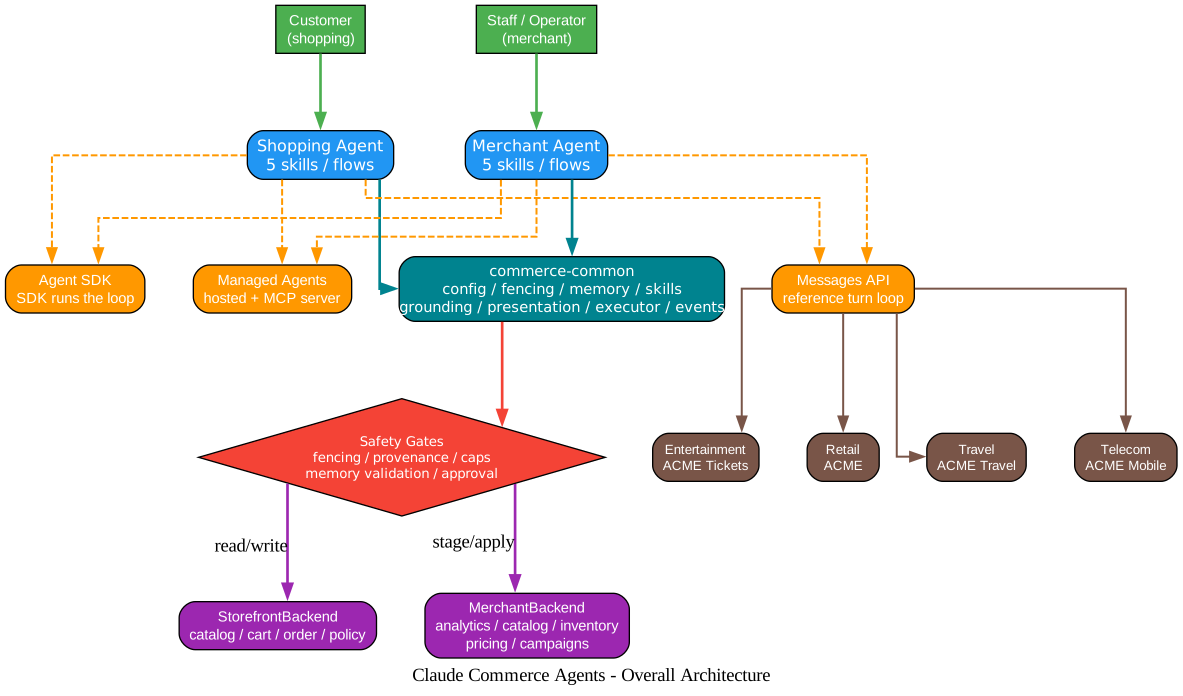
Understanding the Architecture
The architecture diagram above illustrates the full stack of Claude Commerce Agents, from users through agents, the shared core, backend interfaces, runtime paths, and vertical examples. Let us break down each layer.
User Layer
At the top, two user roles interact with the system. The customer talks to the shopping agent in natural language: “I need a two-person tent under $250 with a sleeping bag.” The staff member or operator talks to the merchant agent: “Which products should we discount to clear last season’s inventory?”
Agent Layer
Each agent carries five skills (flows). The shopping agent’s skills cover catalog search, multi-product planning, deep research, personalization, and customer care. The merchant agent’s skills cover sales analysis, catalog and inventory management, pricing, and marketing campaigns. Both agents use the same conversation model: one model, one conversation, skills loaded on demand.
commerce-common: The Shared Core
Everything both roles share lives in commerce-common. This package contains the config system, fencing (data boundary enforcement), memory (preference and history extraction), the skill loader, grounding (ensuring the model references real catalog data), presentation (UI tool calls), the executor frame (the turn loop skeleton), and the event system (text_delta, tool_call, ui, cart_update, change_update, turn_complete).
This design means a bug fix or a new safety rule lands once in commerce-common and applies to both agents on all three runtime paths. The repository enforces this with scripts/check.py, which compares the derived system.md against the source prompt text, tool descriptions, and skill files.
Backend Interfaces
Each agent has a backend interface that an adopter implements over their own systems. The StorefrontBackend maps to catalog, cart, order, and policy systems. The MerchantBackend maps to analytics, catalog, inventory, pricing, and campaign systems. The model never sees credentials or tokens; every backend method calls your service server-side with the credential the host holds for the session, and the model reads only the result.
Three Runtime Paths
The same prompt, skills, and tools run on three paths. The Messages API path is the reference loop: the host application calls stream_turn() and handles events. The Agent SDK path lets the SDK run the loop, with the host prefetching grounding reads. The Managed Agents path deploys a hosted agent over the same skills and contracts, calling your MCP server. All three paths share the same safety mechanisms.
Four Verticals
The examples directory ships four industry-specific verticals: ACME Retail (search, comparison, plans, cart, checkout, memory), ACME Travel (date-bound inventory, itinerary presentation), ACME Mobile (account context, plan matrix, fee disclosures), and ACME Tickets (timed holds, waitlists, transfers, venue maps). Each vertical runs both a storefront (customer-facing) and a portal (merchant-facing), for eight runnable web applications total.
Safety Gates
The diamond in the diagram represents the safety layer that sits between the agents and the backend interfaces. Fencing prevents the model from seeing raw credentials. Provenance gates cap third-party content and verify the source of every write. Memory validation checks extracted preferences. The merchant approval gate ensures every write is staged until a person approves it. These gates run inside the tool call and hold on all three runtime paths.
The Shopping Agent Flow
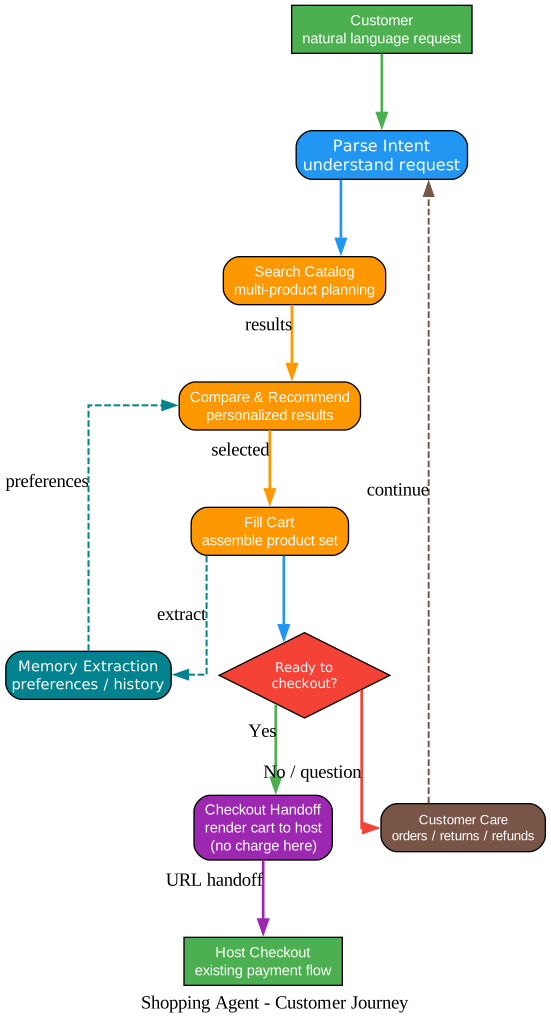
Understanding the Shopping Agent Journey
The shopping agent flow diagram traces a customer’s journey from a natural language request through search, comparison, cart assembly, and checkout handoff, with a branch for customer care questions.
Step 1: Parse Intent
The customer’s request enters the agent. The shopping agent parses the intent: is this a search, a comparison, a cart action, a policy question, or a customer care request? A single model owns this decision, so context is never lost between sub-agents.
Step 2: Search Catalog
The agent calls the StorefrontBackend.search_listings() method, which queries the business’s real catalog server-side. Multi-product planning is built in: if a customer says “I need a tent, a sleeping bag, and a stove for a weekend with two kids,” the agent assembles a product set, not a single item.
Step 3: Compare and Recommend
Results come back and the agent presents them in the conversation. Here is where personalization matters: the agent reads stored preferences (shoe size, allergies, brand history) from the memory layer and tailors recommendations. The memory extraction step runs after each cart interaction, pulling out any new preferences the customer mentioned.
Step 4: Fill Cart
The agent assembles the selected products into a cart. The cart is not a text list; it is a structured ui event that the host application renders as a visual cart. This is a key design choice: UI is presentation tool calls, validated and filled in on the server, streamed as ui events. The model outputs structured parameters, the server validates them, and the host renders the result.
Step 5: Checkout Handoff
This is where the blueprint is deliberately safe. The checkout tool does not charge anything. It renders the cart for the host to complete. The backend returns a checkout URL (the business’s own checkout route or a hosted checkout URL), and the host renders it. The model never sees the URL. The note in the README is explicit: “Nothing places an order, charges a card, or changes a live listing.”
Customer Care Branch
If the customer asks “Where is my order?” or “How do I return this?” instead of checking out, the agent handles it in the same conversation. The customer care skill covers order tracking, return policies, refund flows, and exchanges. The agent loops back to parsing the next intent, maintaining full context throughout.
The Merchant Agent Flow
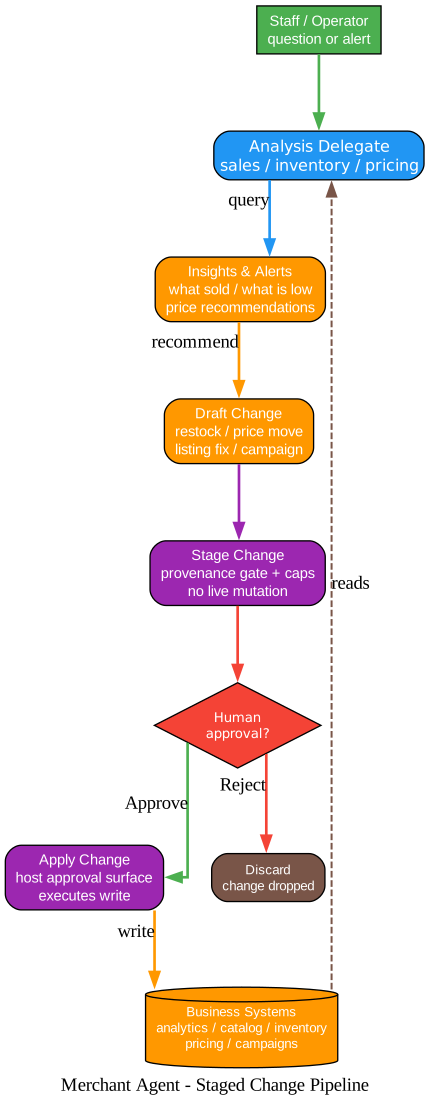
Understanding the Staged Change Pipeline
The merchant agent flow diagram shows the staged change pipeline that governs every write operation. This is the most safety-conscious part of the blueprint.
Analysis Delegate
The staff member asks a question or receives an alert. The merchant agent’s analysis delegate queries the business systems through the MerchantBackend interface: get_business_snapshot() for headline numbers, query_metrics() for a metric over time, get_campaign_performance() for marketing results. These are all read methods, free to call without staging.
Insights and Alerts
The agent synthesizes the analysis into insights: which products are selling well, which are underperforming, which are about to stock out before a promotion starts. It proactively flags inventory issues and recommends pricing moves based on the store’s own sales history.
Draft Change
When the agent proposes a change, a restock, a price move, a listing fix, or a campaign draft, it creates a StagedChange object. This is where the provenance gate kicks in: the change is capped, its source is verified, and it is recorded without touching live state.
Stage Change
The staged change sits in a staging area. The merchant agent’s changes.py module enforces guardrails: max_items_per_change limits, variant vs. family rules (a price update names a variant, not a family), and ordered flow enforcement for multi-step processes.
Human Approval Gate
This is the critical decision point. Every write, every price change, every restock, every campaign launch, must be approved by a human before it takes effect. The agent generates the proposal; the operator says yes or no. The agent never directly mutates live state.
Apply or Discard
If approved, apply_change() performs the platform write through the backend interface. If rejected, the change is dropped. The operator has the final say. The README makes this clear: “AI only generates a draft; a person or an approval flow must confirm before anything takes effect.”
The Deployment Matrix
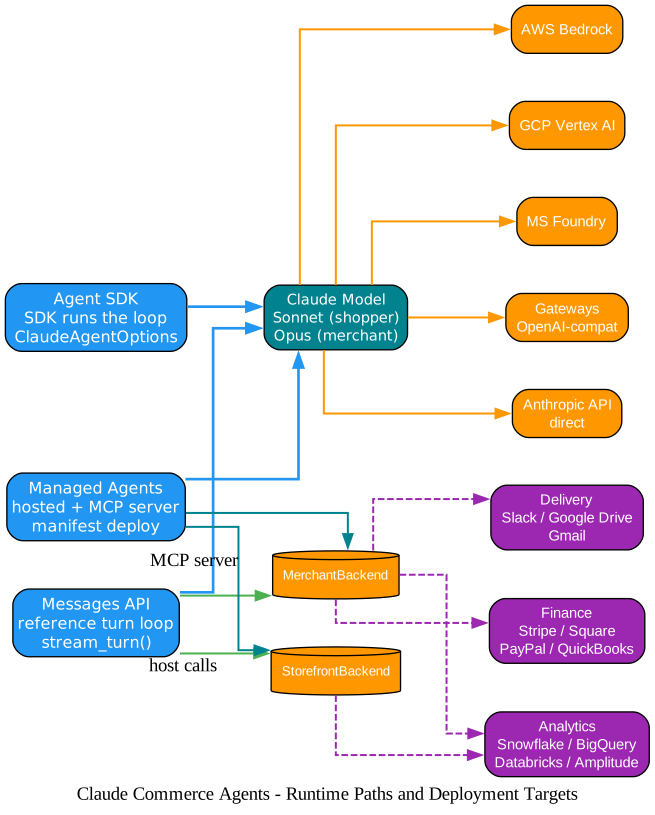
Understanding Runtime Paths and Deployment Targets
The deployment matrix diagram maps the three runtime paths, the Claude model layer, deployment platforms, and MCP connectors for external systems.
Three Runtime Paths
On the left, the three runtime paths represent the ways an agent can run. The Messages API path is the reference implementation: the host application imports ShoppingAgent or MerchantAgent, calls stream_turn(), and handles events like text_delta, tool_call, ui, cart_update, and turn_complete. The Agent SDK path uses ClaudeAgentOptions and lets the SDK manage the loop. The Managed Agents path deploys a manifest and an MCP server, with Anthropic hosting the agent.
Model Selection
The blueprint recommends different models for different roles. The merchant agent, with its heavier analysis tasks, benefits from the more capable Opus model. The shopping agent, where latency matters more, runs on the faster Sonnet model. This is a deliberate trade-off: intelligence for the back office, speed for the storefront.
Deployment Platforms
The same code runs on five deployment targets. The Anthropic API is the direct path. AWS Bedrock, GCP Vertex AI, and Microsoft Foundry are cloud platform integrations. Gateways support any OpenAI-compatible endpoint. The docs/deployment.md file covers the configuration for each.
MCP Connectors
No MCP connectors ship with the repository. Instead, both agents reach your systems through the backend interfaces. When an official connector is the source of record, it becomes the integration target. The diagram shows three connector categories: analytics warehouses (Snowflake, BigQuery, Databricks, Amplitude), finance systems (Stripe, Square, PayPal, QuickBooks), and delivery channels (Slack, Google Drive, Gmail). On Managed Agents, the manifest mounts a commerce platform’s MCP server beside the role’s server, with provenance gates staying in front of every write.
Installation and Quick Start
The repository requires Python 3.11+ and Node 22. Here is how to run the demos.
Clone and install:
git clone https://github.com/anthropics/commerce-agents.git && cd commerce-agents
python3 -m venv .venv && source .venv/bin/activate
pip install -r requirements.txt       # seven packages and pinned dependencies
cp .env.example .env                  # add ANTHROPIC_API_KEY
(cd examples && npm ci)               # eight web apps share one workspace
python scripts/run_demo.py retail      # API :8000 + storefront :3000
The --merchant flag starts the portal instead of the storefront, and --all starts both. The four verticals are retail (ports 3000, 3100), travel (3001, 3101), telecom (3002, 3102), and entertainment (3003, 3103).
Build your own with the Claude Code plugin:
claude plugin marketplace add anthropics/commerce-agents
claude plugin install commerce-builder@claude-commerce-agents
claude
/scaffold-commerce-agent a shopping assistant for our store
The command asks about your stack, plays the plan back, and builds the project. Additional commands include /add-commerce-flow to add a new flow, /author-commerce-evals to create evaluation tests, and /review-commerce-agent to review an existing agent.
Using the Messages API Directly
For host applications that want full control over the turn loop, the Messages API path is the reference implementation.
from pathlib import Path
from shopping_agent import ShoppingAgentConfig
from shopping_agent_runtime import ShoppingAgent

agent = ShoppingAgent(
    backend=your_backend,
    skills_dir=Path("shopping-agent/skills"),
    config=ShoppingAgentConfig(brand_name="Your Store")
)

async for event in agent.stream_turn(messages, session, state):
    # Handle: text_delta, tool_call, ui, cart_update, turn_complete
    ...

await agent.update_memory(messages, session)  # memory extraction; this path only
The example hosts take the session id in an X-Session-Id header. The stream_turn() method yields events that the host application processes. Memory extraction runs only on this path; the Agent SDK and Managed Agents paths handle memory differently.
Repository Layout
| Directory | Contents | Package |
|---|---|---|
commerce-common/ | Shared: config, fencing, memory, skills, grounding, presentation, executor, events | commerce-common |
shopping-agent/core/ | Shopping types, StorefrontBackend, prompt, tools, gates, executor | shopping-agent-core |
shopping-agent/runtime-messages-api/ | ShoppingAgent, turn loop on Messages API | shopping-agent-runtime |
shopping-agent/runtime-agent-sdk/ | Shopping agent on Agent SDK, console | shopping-agent-sdk |
shopping-agent/managed-agents/ | Manifest and MCP server for Managed Agents | - |
merchant-agent/core/ | Merchant types, MerchantBackend, tools, change guardrails, gates | merchant-agent-core |
merchant-agent/runtime-messages-api/ | MerchantAgent and analysis delegate | merchant-agent-runtime |
merchant-agent/runtime-agent-sdk/ | Merchant agent on Agent SDK, approving console | merchant-agent-sdk |
merchant-agent/managed-agents/ | Manifest, MCP server, scheduled digest | - |
examples/ | Four verticals, shared host code, shared web code | - |
plugins/commerce-builder/ | The Claude Code plugin (six skills, four commands) | - |
docs/ | safety.md, backends.md, deployment.md | - |
tests/ | Cross-package suites; each package has its own | - |
scripts/ | install, run_demo, smoke_chat, check, deploy, verify | - |
Safety Design
Safety is not an afterthought in this blueprint. It is baked into the tool call layer and holds on all three runtime paths.
- Fencing: Third-party content is delivered as fenced data. The model sees results, never tokens or credentials.
- Provenance gates: Every write is provenance-gated and capped in code. The source of a change is verified before it is staged.
- Checkout charges nothing: The
checkouttool renders the cart for the host to complete. Payment happens in the business’s own checkout flow. - Merchant writes require approval: Every merchant write is a staged change. Only
apply_change()mutates anything, and only for a change that is currently staged and approved. - Memory validation: Extracted preferences are validated before storage.
- Grounding: The model references real catalog data through backend methods, not hallucinated product information.
enable_*switches: A system the business lacks (no cart on a referral surface, no order tracking) is toggled off, which removes its tools, prompt lines, and grounding rule on every path.
The docs/safety.md file lists each rule with its module and paths, and what a deployment should add first.
Verticals in Detail
| Example | Storefront Features | Portal Features |
|---|---|---|
| ACME Retail | Search, comparison, plans, cart, checkout, memory | Digest, staged restocks, listing fixes, analysis delegate over SQL |
| ACME Travel | Date-bound inventory, present_itinerary extension | Occupancy calendar, date-window rate moves |
| ACME Mobile | Account context, plan matrix, server-authored fee disclosures | Plan mix, price moves with affected lines, protected regulated fees |
| ACME Tickets | Timed holds, waitlists, transfers, venue map, all-in fees | Event pacing, hold releases adding real capacity, fee-preserving price moves |
Each example’s README has a Try section with the turns that scripts/smoke_chat.py runs, plus single prompts with what a good answer does.
Verification
ruff check . && ruff format --check . && pytest && python scripts/check.py
python scripts/verify_all.py                        # above plus deploy dry runs and web builds
python scripts/smoke_chat.py --vertical travel       # one live conversation; needs a key
The verify_all.py script runs the linter, formatter check, test suite, system prompt check, deploy dry runs, and web builds. CI installs from requirements-dev.txt on two Python versions, builds the eight web apps, and checks that the package names stay unregistered on the public index (the pin files install them from their directories, never from the index).
To confirm prompt caching is working, read cache_read_input_tokens from the turn_complete event. Zero on a second turn means the prefix changed, which means caching is broken.
Making It Your Own
The blueprint is designed for adaptation, not just demonstration.
Backend methods: Each method calls your service server-side with the credential the host holds for the session. The model reads only the result. A flow whose steps have a fixed order enforces that order in the backend.
Start small: A shopping pilot implements search and product details and stubs the rest. A stubbed method returns an unavailable result and changes no prompt bytes. A merchant pilot implements the eight read methods and has the writes refuse; digests and metrics then run with no write path.
Switch off what you do not have: A system the business lacks entirely is an enable_* switch turned off. This removes its tools, prompt lines, and grounding rule on every path. Park the flows that need it under skills/_staged/.
Add your own: A flow is a directory with a SKILL.md under either skills/ directory. Domain UI is a PresentationExtension (the verticals ship seven). brand_name, assistant_name, and brand_voice on either config set the identity.
Checkout hands off: The checkout card links to your own checkout route or to the platform’s hosted checkout URL (one per seller on a marketplace). The backend returns the URL and the host renders it; the model never sees it.
Conclusion
Claude Commerce Agents is a rare thing: a production-grade reference implementation from the company that builds the model. The engineering decisions, the safety patterns, the staged write pipeline, and the skills-not-subagents principle are all directly applicable to any agent project, not just commerce. The Apache 2.0 license means you can fork it, adapt it, and ship it.
The repository is a reference implementation and does not accept contributions, but it is a goldmine of patterns for anyone building agents that touch real money, real inventory, and real customers.
Links
- GitHub: anthropics/commerce-agents
- Engineering blog post: The Anatomy of Effective Commerce Agents
- Commerce solutions page: claude.com/solutions/commerce
Related Posts
- Claude Code Skills Guide
- Claude Code Complete Guide
- Claude Code MCP Guide
- LangChain Agent Engineering Platform

Enjoyed this post? Never miss out on future posts by following us


