Introduction
The rise of AI-powered coding assistants has transformed how developers write, review, and maintain software. From Claude Code to Cursor, from Codex to Gemini CLI, these tools have become indispensable companions in the modern development workflow. However, each assistant comes with its own configuration, its own set of capabilities, and its own learning curve. What if there was a single, comprehensive collection of skills, agents, and commands that worked across all of them?
That is exactly what Claude Skills delivers. Created by Alireza Rezvani and hosted at https://github.com/alirezarezvani/claude-skills, this open-source project provides over 345 skills, 30 agents, and 70 custom commands designed to supercharge AI coding assistants. With 21,693 stars and 2,903 forks on GitHub, it has rapidly become one of the most popular resources for developers looking to get more out of their AI tools.
Whether you are a solo developer looking to automate code reviews, a team lead wanting consistent coding standards, or an enterprise seeking compliance-ready AI workflows, Claude Skills offers a modular, extensible framework that adapts to your needs. In this post, we will explore its architecture, key features, skill categories, and development workflow in detail.
Architecture Overview
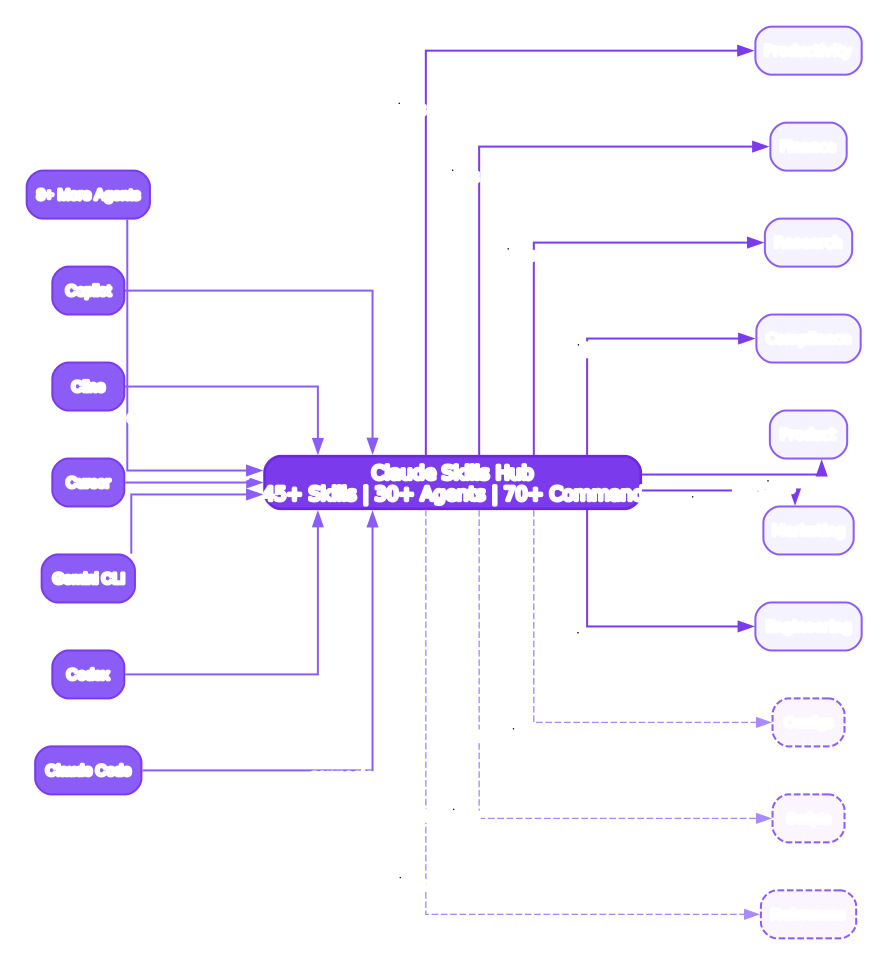
The architecture of Claude Skills is built around a modular, layered design that prioritizes extensibility and cross-platform compatibility. At the core of the system is the Skills Registry, which serves as the central repository for all 345+ skills, 30+ agents, and 70+ custom commands. This registry is organized into nine distinct categories – Engineering, Marketing, Product, Compliance, C-level Advisory, Research, Business Operations, Commercial and Finance, and Daily Productivity – ensuring that users can quickly locate and deploy the skills most relevant to their workflow.
Above the Skills Registry sits the Agent Layer, which contains the 30+ pre-configured agents. Each agent is designed to handle a specific domain or task type, such as code review, security auditing, or documentation generation. These agents can be invoked individually or composed together to form multi-step workflows. The Agent Layer communicates with the Skills Registry to pull in the appropriate skills for each task, creating a dynamic and flexible execution model.
The Compatibility Layer sits between the Agent Layer and the external AI coding assistants. This layer provides adapters for Claude Code, Codex, Gemini CLI, Cursor, and 8+ additional platforms. Each adapter translates the skill definitions and agent configurations into the native format expected by the target platform. This means that a single skill definition can be used across multiple AI assistants without modification, dramatically reducing the effort required to maintain cross-platform compatibility.
At the top of the architecture is the User Interface Layer, which provides command-line tools, configuration files, and interactive prompts that allow developers to browse, install, and manage skills. The entire system is designed to be self-contained, requiring no external dependencies beyond the AI coding assistant itself. Configuration is handled through simple YAML and Markdown files, making it easy to customize skills for specific project requirements or organizational policies.
Key Features
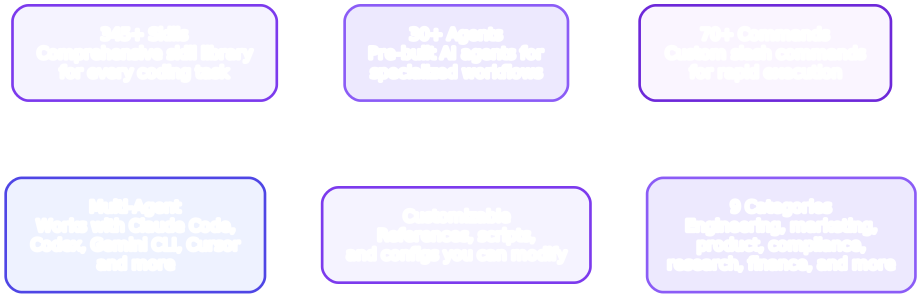
Claude Skills offers a rich set of features that distinguish it from other AI skill collections. The most notable feature is its sheer breadth: with 345+ skills covering nine categories, it provides the most comprehensive library of AI coding assistant enhancements available today. Each skill is self-contained, consisting of a Markdown file with instructions, optional reference documents, and configuration parameters. This self-contained design means skills can be mixed, matched, and composed without conflicts.
The 30+ agents represent another major feature. Unlike skills, which are passive instruction sets that guide an AI assistant’s behavior, agents are active participants in the development workflow. They can initiate tasks, make decisions based on context, and coordinate multiple skills to achieve complex objectives. For example, a Security Audit Agent might invoke code-review skills, vulnerability-scanning skills, and compliance-checking skills in sequence to produce a comprehensive security report.
Cross-platform compatibility is a cornerstone feature. Claude Skills works with Claude Code, Codex, Gemini CLI, Cursor, Windsurf, Aider, Continue, and 8+ additional AI coding assistants. The project achieves this through a standardized skill definition format that each platform adapter can interpret. When a skill is installed, the appropriate adapter automatically converts it to the native format, whether that is a Claude Code skill directory, a Codex configuration entry, or a Cursor rule file.
Custom commands extend the feature set further. With 70+ pre-built commands, developers can trigger complex workflows with a single instruction. These commands range from simple operations like formatting code or generating documentation to sophisticated multi-step processes like deploying a release or conducting a full security audit. Commands can be customized and extended through configuration files, allowing teams to define their own workflows on top of the existing command library.
The project also emphasizes community-driven growth. With 21,693 stars and 2,903 forks, the repository has a vibrant community of contributors who continuously add new skills, agents, and commands. The modular design makes it straightforward to contribute: simply create a new skill directory with the required files, submit a pull request, and the community reviews and integrates it. This organic growth model ensures that the skill library stays current with emerging technologies and best practices.
Installation and Setup
Getting started with Claude Skills is straightforward. The project is hosted on GitHub and can be cloned directly to your local machine.
# Clone the repository
git clone https://github.com/alirezarezvani/claude-skills.git
cd claude-skills
Once cloned, you will find the skills organized into category directories. Each skill is a self-contained folder with a Markdown instruction file and optional reference documents. To use a skill with your preferred AI coding assistant, simply copy it to the appropriate configuration directory.
Using Skills with Claude Code
# Copy a skill to your Claude Code skills directory
cp -r skills/engineering/code-review ~/.claude/skills/
Claude Code automatically detects skills in the ~/.claude/skills/ directory and makes them available during coding sessions. You can also place skills in a project-specific .claude/skills/ directory for team-wide configuration.
Using Skills with Codex
# Add skill to your Codex configuration
codex skill add skills/engineering/code-review
Codex reads skill configurations from its own directory structure. The codex skill add command handles the conversion and placement automatically.
Using Skills with Gemini CLI
# Link skill to Gemini CLI configuration
gemini skill install skills/engineering/code-review
Gemini CLI supports skill installation through its built-in package manager, which resolves dependencies and configures the skill for immediate use.
Using Skills with Cursor
For Cursor, skills are integrated as rule files. Copy the skill’s instruction file to your Cursor rules directory:
# Copy skill instructions to Cursor rules
cp skills/engineering/code-review/instructions.md ~/.cursor/rules/code-review.md
Verifying Installation
After installing a skill, verify that it is recognized by your AI assistant:
# For Claude Code
claude skills list

# For Codex
codex skill list
You should see the newly installed skill listed in the output, confirming that it is ready for use.
Skill Categories
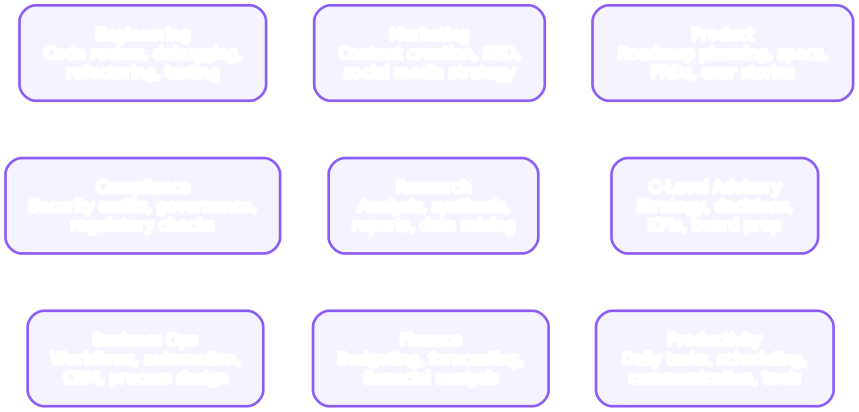
Claude Skills organizes its 345+ skills into nine carefully curated categories, each targeting a distinct domain of professional and technical work. This categorization ensures that developers, managers, and business professionals can quickly find the skills most relevant to their daily tasks without sifting through an unstructured list.
The Engineering category is the largest, containing skills for code review, debugging, refactoring, testing, deployment, and infrastructure management. These skills are designed to integrate directly into the software development lifecycle, providing AI assistants with the context and instructions needed to perform engineering tasks at a high level. Popular skills in this category include automated code review with style enforcement, intelligent debugging with root-cause analysis, and deployment pipeline generation.
The Marketing category provides skills for content creation, SEO optimization, social media management, and campaign analytics. These skills enable marketing teams to leverage AI assistants for generating copy, analyzing campaign performance, and optimizing content for search engines. The skills include templates for different content formats and style guides that ensure brand consistency.
The Product category covers product management tasks such as requirement gathering, user story writing, roadmap planning, and feature prioritization. Product managers can use these skills to generate PRDs, create sprint plans, and analyze user feedback at scale. The skills are designed to work with popular product management frameworks like OKRs and Jobs-to-Be-Done.
The Compliance category addresses regulatory and governance requirements, offering skills for GDPR compliance checking, security policy enforcement, audit trail generation, and risk assessment. These skills are particularly valuable for organizations operating in regulated industries such as finance, healthcare, and government.
The C-level Advisory category provides executive-level skills for strategic planning, financial modeling, competitive analysis, and board presentation preparation. These skills transform AI assistants into advisory tools that can synthesize large volumes of data into actionable insights for senior leadership.
The Research category includes skills for literature review, data analysis, hypothesis testing, and research paper drafting. Researchers and analysts can use these skills to accelerate the research process, from initial literature surveys through experimental design to final publication.
The Business Operations category covers operational tasks such as process optimization, supply chain management, vendor evaluation, and workflow automation. These skills help operations teams identify bottlenecks, streamline processes, and make data-driven decisions.
The Commercial and Finance category provides skills for financial modeling, investment analysis, budgeting, and revenue forecasting. Finance professionals can leverage these skills to build complex financial models, analyze market trends, and generate compliance-ready reports.
The Daily Productivity category rounds out the collection with skills for email management, meeting preparation, task prioritization, and time tracking. These skills are designed for individual contributors who want to optimize their daily workflows and reduce time spent on routine administrative tasks.
Development Workflow
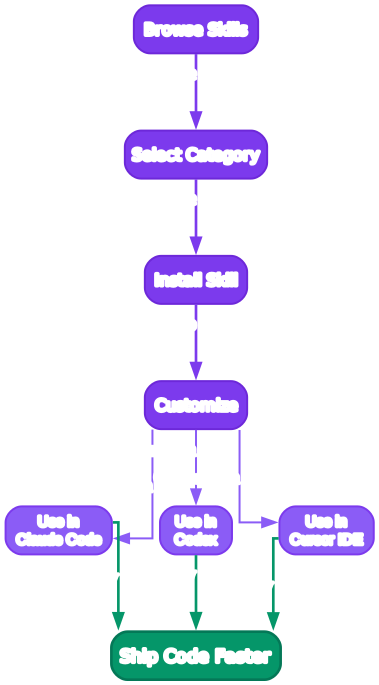
The development workflow for Claude Skills follows a structured, iterative process that begins with identifying a need and ends with a community-reviewed contribution. Understanding this workflow is essential for both users who want to create custom skills and contributors who want to share their work with the community.
The first step is Need Identification. This involves analyzing your daily workflow to identify repetitive tasks, common patterns, or areas where an AI assistant could provide more targeted guidance. For example, if you find yourself repeatedly asking your AI assistant to follow a specific code review checklist, that is a strong candidate for a skill. The key is to identify tasks that are both repetitive and well-defined, as these make the best skills.
The second step is Skill Design. Once you have identified a need, you design the skill by defining its scope, inputs, outputs, and constraints. A well-designed skill has a clear purpose, a defined set of instructions, and optional reference documents that provide additional context. The design phase also involves deciding which category the skill belongs to and whether it should be a standalone skill or part of a multi-skill workflow.
The third step is Skill Implementation. This involves creating the skill directory structure, writing the instruction Markdown file, and adding any reference documents. The instruction file follows a standardized format that includes a description, trigger conditions, step-by-step instructions, and example outputs. Reference documents can include style guides, checklists, templates, or any other material that helps the AI assistant perform the task more effectively.
The fourth step is Testing and Validation. Before deploying a skill, it should be tested across multiple AI coding assistants to ensure compatibility. This involves installing the skill on each platform, running it through a series of test scenarios, and verifying that the output meets expectations. The project provides a testing framework that automates much of this validation, checking for common issues like missing fields, formatting errors, and cross-platform compatibility problems.
The fifth step is Deployment. Once validated, the skill can be deployed locally for personal use or submitted as a pull request to the main repository for community review. Local deployment is as simple as copying the skill directory to the appropriate configuration folder. Community deployment involves creating a pull request with a clear description, usage examples, and test results.
The sixth and final step is Community Review and Integration. The maintainers and community members review submitted skills for quality, consistency, and compatibility. Feedback is provided, revisions are made, and once the skill meets the project’s standards, it is merged into the main repository and becomes available to all users. This review process ensures that the skill library maintains a high level of quality even as it grows.
Multi-Agent Support
One of the most powerful aspects of Claude Skills is its multi-agent architecture. Unlike simple prompt templates, agents in Claude Skills are designed to operate semi-autonomously, coordinating multiple skills to accomplish complex tasks.
How Agents Work
Each agent is defined by a configuration file that specifies:
- Trigger conditions: When the agent should activate
- Skill dependencies: Which skills the agent uses
- Execution order: The sequence in which skills are invoked
- Decision points: Where the agent evaluates intermediate results and chooses next steps
- Output format: How the agent presents its findings
Composing Agents
Agents can be composed to create sophisticated workflows. For example, a Release Management Agent might invoke:
- A code-review agent to validate changes
- A testing agent to run the test suite
- A security-audit agent to check for vulnerabilities
- A deployment agent to push the release
# List available agents
claude agents list

# Invoke a specific agent
claude agent run security-audit --target ./src

# Compose agents in a workflow
claude agent run release-management --from v1.0.0 --to v1.1.0
Creating Custom Agents
You can create custom agents by defining a configuration file:
# custom-agent.yaml
name: my-custom-agent
description: "A custom agent for my team's workflow"
trigger:
  - condition: "file_changed_in(src/)"
    action: "run_code_review"
skills:
  - engineering/code-review
  - engineering/test-runner
  - compliance/security-check
execution:
  - skill: engineering/code-review
    args:
      style_guide: "team-style.md"
  - skill: engineering/test-runner
    args:
      coverage_threshold: 80
  - skill: compliance/security-check
    args:
      severity: high
output:
  format: markdown
  destination: ./reports/
This composability makes Claude Skills a powerful platform for building AI-assisted development workflows that go far beyond simple prompt engineering.
Features Table
| Feature | Details |
|---|---|
| Total Skills | 345+ |
| Total Agents | 30+ |
| Custom Commands | 70+ |
| Categories | 9 (Engineering, Marketing, Product, Compliance, C-level Advisory, Research, Business Operations, Commercial and Finance, Daily Productivity) |
| Supported Platforms | Claude Code, Codex, Gemini CLI, Cursor, Windsurf, Aider, Continue, and 8+ more |
| Language | Python |
| GitHub Stars | 21,693 |
| GitHub Forks | 2,903 |
| License | Open Source |
| Skill Format | Markdown instructions + YAML configuration |
| Agent Format | YAML configuration with skill composition |
| Cross-Platform | Yes - single skill definition works across all supported platforms |
| Community Contributions | Active - pull requests welcome |
| Self-Contained Skills | Yes - no external dependencies required |
| Customizable | Yes - all skills and agents can be modified per project |
Troubleshooting
Skill Not Detected by AI Assistant
If a skill is not being recognized after installation, verify the following:
-
Check the installation path: Ensure the skill is placed in the correct directory for your AI assistant. For Claude Code, this is
~/.claude/skills/. For Cursor, it is~/.cursor/rules/. -
Verify the file structure: Each skill must contain at least an
instructions.mdfile. Check that the file exists and is properly formatted.
# Verify skill structure
ls -la ~/.claude/skills/code-review/
# Expected output: instructions.md  (and optionally reference files)
- Restart your AI assistant: Some assistants cache their configuration at startup. Restart the assistant to pick up newly installed skills.
Cross-Platform Compatibility Issues
If a skill works on one platform but not another:
-
Check platform-specific syntax: Some AI assistants use slightly different instruction formats. Review the skill’s instructions for platform-specific directives.
-
Use the adapter layer: The project includes adapters that handle format conversion. Make sure you are using the correct adapter for your target platform.
# Convert a skill for a specific platform
python scripts/convert_skill.py --skill engineering/code-review --platform cursor
Agent Execution Errors
If an agent fails during execution:
- Check skill dependencies: Ensure all skills referenced by the agent are installed.
# Verify agent dependencies
claude agent validate my-custom-agent
-
Review the agent configuration: Verify that the YAML configuration is valid and all required fields are present.
-
Check execution logs: Most AI assistants provide detailed logs that can help identify the point of failure.
Performance Issues
If skills are causing slow responses:
-
Reduce skill complexity: Long instruction files can increase processing time. Consider breaking complex skills into smaller, focused skills.
-
Limit active skills: Only install the skills you actively use. Having too many skills loaded can impact performance.
-
Use skill-specific triggers: Configure skills to activate only when relevant, rather than loading all skills for every interaction.
Conclusion
Claude Skills represents a significant step forward in the AI coding assistant ecosystem. By providing a comprehensive, modular, and cross-platform library of 345+ skills, 30+ agents, and 70+ custom commands, it addresses one of the most pressing challenges in AI-assisted development: how to make AI assistants consistently useful across different tools, workflows, and domains.
The project’s strength lies in its thoughtful organization across nine categories, its commitment to cross-platform compatibility, and its vibrant community of contributors. Whether you are an individual developer looking to streamline your workflow or an enterprise team seeking consistent AI-assisted practices, Claude Skills provides the building blocks you need.
The modular architecture ensures that skills can be mixed, matched, and composed without conflicts, while the agent framework enables sophisticated multi-step workflows that go far beyond simple prompt engineering. And with support for 10+ AI coding assistants, you can invest in skill development once and deploy across all your preferred tools.
To get started, clone the repository at https://github.com/alirezarezvani/claude-skills and explore the skills in the categories most relevant to your work. The project’s documentation provides detailed guides for installation, customization, and contribution.
Links:
- GitHub Repository: https://github.com/alirezarezvani/claude-skills

Enjoyed this post? Never miss out on future posts by following us


