What is Marketing Skills
Marketing Skills is a collection of 48 AI agent skills focused on marketing tasks. Built for technical marketers and founders who want AI coding agents to help with conversion optimization, copywriting, SEO, analytics, and growth engineering, it works with Claude Code, OpenAI Codex, Cursor, Windsurf, and any agent that supports the Agent Skills spec. The code is on GitHub at coreyhaines31/marketingskills, MIT-licensed, and built by Corey Haines.
What Are Skills
Skills are markdown files that give AI agents specialized knowledge and workflows for specific tasks. When you add these to your project, your agent can recognize when you’re working on a marketing task and apply the right frameworks and best practices. Each skill is a self-contained markdown file with a description that tells the agent when to use it, the frameworks and best practices to apply, and references to related skills.
How Skills Work Together
Skills reference each other and build on shared context. The product-marketing skill is the foundation - every other skill checks it first to understand your product, audience, and positioning before doing anything.

Skills cross-reference each other: copywriting references CRO and A/B testing; revops references sales-enablement and cold-email; seo-audit references schema and ai-seo; customer-research feeds into copywriting, CRO, and competitors.
How Skills Work with AI Agents
When a user asks an AI agent to help with a marketing task, the agent reads the installed skills, matches the request to the right skill, loads the product-marketing context first, and then executes the skill’s frameworks and best practices.

The workflow is:
- User Request - a marketing task like “Help me optimize this landing page for conversions”
- AI Agent - Claude Code, Codex, Cursor, or Windsurf reads from
.agents/skills/or.claude/skills/ - Skill Match - the agent recognizes the marketing task and loads the CRO skill
- Product Marketing Context - the skill reads
.agents/product-marketing.mdfirst to understand your product, audience, and positioning - Skill Execution - the agent applies CRO frameworks and best practices
- Tools - the agent may use tools from the Tools Registry (neutral options plus verified partners)
- Output - an optimized landing page with copy, layout, CTA, and form improvements
48 Skills Across 7 Categories
The collection has 48 skills organized into 7 categories.

Conversion Optimization (5 skills)
cro- pages and formssignup- registration flowsonboarding- post-signup activationpopups- modals and overlayspaywalls- in-app upgrade moments
Content and Copy (7 skills)
copywriting- marketing page copycopy-editing- edit and polish existing copycold-email- B2B cold outreach emails and sequencesemails- automated email flowssocial- social media contentvideo- AI video contentimage- AI image generation, design tools, and optimization
SEO and Discovery (7 skills)
seo-audit- technical and on-page SEOai-seo- AI search optimization (AEO, GEO, LLMO)programmatic-seo- scaled page generationsite-architecture- page hierarchy, navigation, URL structurecontent-strategy- content planning and topic selectionschema- structured dataaso- App Store and Google Play optimization
Paid and Measurement (5 skills)
ads- Google, Meta, LinkedIn ad campaignsad-creative- bulk ad creative generation and iterationab-testing- experiment designanalytics- event tracking setupattribution- conversion attribution
Growth and Retention (9 skills)
referrals- referral and affiliate programsfree-tools- marketing tools and calculatorschurn-prevention- cancel flows, save offers, dunningcommunity-marketing- community buildingco-marketing- partner identification and joint campaignslead-magnets- lead magnet creationdirectory-submissions- startup/SaaS/AI directory submissionsinfluencer-marketing- influencer partnershipsevents- webinars, conferences, sponsorships
Sales and GTM (5 skills)
revops- lead lifecycle, scoring, routing, pipeline managementsales-enablement- sales decks, one-pagers, objection docs, demo scriptscompetitors- comparison and alternative pagescompetitor-profiling- competitor research and profilingprospecting- prospect list building
Strategy and Monetization (10 skills)
marketing-ideas- 140 SaaS marketing ideasmarketing-psychology- mental models and behavioral sciencelaunch- product launches and announcementspricing- pricing, packaging, and monetizationoffers- offer design and value framingmarketing-plan- comprehensive marketing plansmarketing-council- simulated board of advisorsmarketing-loops- recurring self-running marketing workflowscustomer-research- customer research synthesispublic-relations- PR and earned media
Installation
Marketing Skills supports 6 installation options.
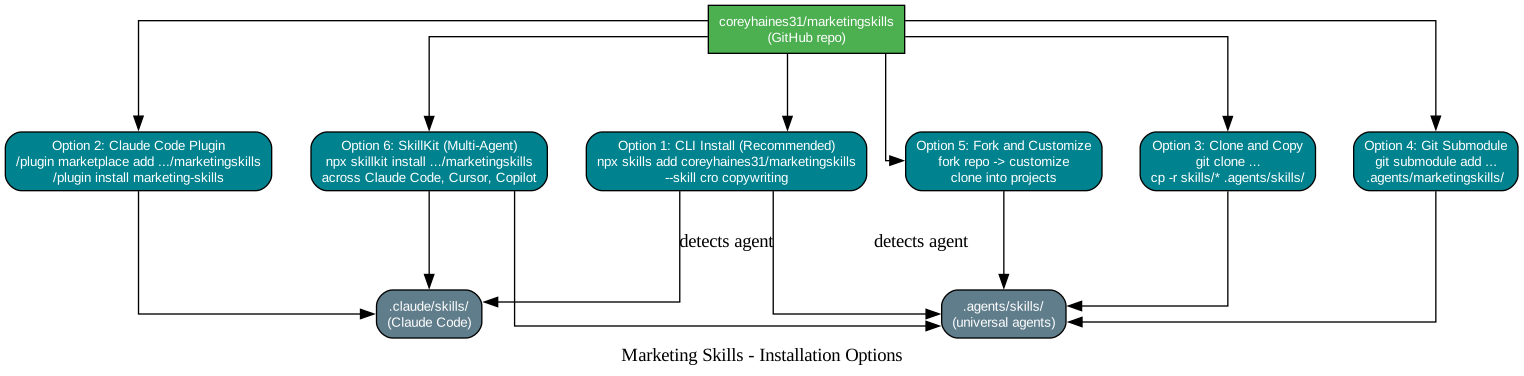
Option 1: CLI Install (Recommended)
Use npx skills to install skills directly:
# Install all skills
npx skills add coreyhaines31/marketingskills

# Install specific skills
npx skills add coreyhaines31/marketingskills --skill cro copywriting

# List available skills
npx skills add coreyhaines31/marketingskills --list
The CLI detects which agents you have installed and asks where to install. For Claude Code it installs into .claude/skills/; universal agents share .agents/skills/.
Option 2: Claude Code Plugin
# Add the marketplace
/plugin marketplace add coreyhaines31/marketingskills

# Install all marketing skills
/plugin install marketing-skills
Option 3: Clone and Copy
git clone https://github.com/coreyhaines31/marketingskills.git
cp -r marketingskills/skills/* .agents/skills/
Option 4: Git Submodule
git submodule add https://github.com/coreyhaines31/marketingskills.git .agents/marketingskills
Option 5: Fork and Customize
Fork the repository, customize skills for your specific needs, and clone your fork into your projects.
Option 6: SkillKit (Multi-Agent)
Use SkillKit to install skills across multiple AI agents (Claude Code, Cursor, Copilot, etc.):
npx skillkit install coreyhaines31/marketingskills
Usage
Once installed, just ask your agent to help with marketing tasks:
"Help me optimize this landing page for conversions"
 Uses cro skill

"Write homepage copy for my SaaS"
 Uses copywriting skill

"Set up GA4 tracking for signups"
 Uses analytics skill

"Create a 5-email welcome sequence"
 Uses emails skill
You can also invoke skills directly:
/cro
/emails
/seo-audit
Verified Partners
The library is free and MIT-licensed. Verified Partners fund the work - vetted, disclosed tool integrations, listed alongside neutral options and never influencing what the core skills recommend. Partners include Converly (conversion tracking and attribution) and Ploy (AI website and growth platform). The full rules and boundaries are in the tools/PARTNERS.md file.
v2.0 Upgrade
v2.0 renames 17 skills and consolidates page-cro and form-cro into a single cro skill. The context file moved from .claude/product-marketing-context.md to .agents/product-marketing.md. Skills still check .claude/ and the legacy filename as fallbacks, so nothing breaks if you don’t migrate.
Conclusion
Marketing Skills is a pragmatic answer to the gap between AI coding agents and marketing expertise. By packaging 48 marketing skills as markdown files that any agent supporting the Agent Skills spec can read, it lets a technical marketer or founder ask Claude Code, Codex, Cursor, or Windsurf to help with conversion optimization, copywriting, SEO, analytics, and growth engineering without leaving their coding workflow. The product-marketing foundation skill ensures every other skill understands your product, audience, and positioning before applying frameworks, and the cross-references between skills let the agent chain them naturally. The source is on GitHub at coreyhaines31/marketingskills, MIT-licensed. Enjoyed this post? Never miss out on future posts by following us 


