What is OpenClaude
OpenClaude is an open-source coding-agent command line interface that lets a developer use one terminal workflow across cloud APIs and local model backends. Instead of swapping between vendor CLIs, the user configures providers through a guided /provider flow, saves profiles, and then runs prompts, tools, agents, tasks, MCP servers, slash commands, and streaming output from a single shell. A bundled VS Code extension integrates launch and theme support so the CLI and the editor share one surface.
The project is written in TypeScript, requires Node.js >=22.0.0 for npm installs and runtime, and is published as the @gitlawb/openclaude package. Bun is only needed for source builds and local development. The same code is mirrored to GitLawb, and the project partners with Atlas Cloud, Novita AI, AI/ML API, ApiSmart, Concentrate, Exa, Bankr.bot, Atomic Chat, and Xiaomi MiMo for provider reach and compute options.
Layered Architecture
OpenClaude is organized into layers that move from user entry points down to provider backends. The CLI shell and VS Code extension sit at the top, followed by a command layer that parses prompts and slash commands. Below that, the agent loop coordinates tools, tasks, MCP, and streaming, and a provider router selects the correct backend for each request. At the bottom, cloud APIs and local runtimes handle the actual inference.
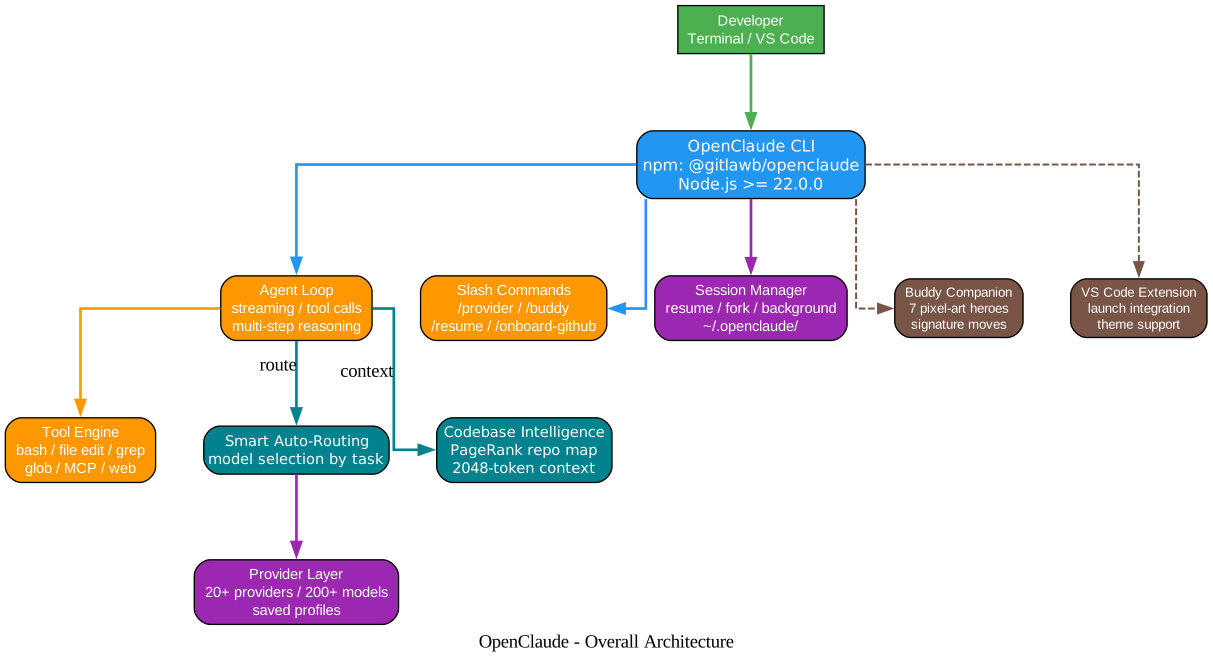
The architecture is intentionally thin. The CLI shell and the VS Code extension both feed into the same command layer, so editor users and terminal users get the same behavior. The agent loop is the only place that decides whether a request needs tools, sub-agents, MCP calls, or a direct model turn, which keeps provider-specific logic isolated in the router.
Supported Providers
OpenClaude supports a broad set of providers through a single routing layer. The table below summarizes the categories and the providers that fall into each.
| Category | Providers |
|---|---|
| OpenAI-compatible | OpenAI, DeepSeek, Qwen, Yi, Moonshot, Zhipu, MiniMax, Baichuan, 01.AI |
| Anthropic-compatible | Claude via direct API, Anthropic-compatible gateways |
| Gemini direct API, Vertex AI | |
| GitHub | GitHub Models, Codex OAuth, Codex |
| Local | Ollama, LM Studio, llama.cpp, any OpenAI-compatible local server |
| Partners | Atomic Chat, Atlas Cloud, Novita AI, AI/ML API, ApiSmart, Xiaomi MiMo |
| Other | Mistral, Cohere, Groq, Together AI, Fireworks AI, Anyscale |
The provider matrix below shows how cloud APIs, partner gateways, and local runtimes map onto the shared OpenAI-compatible contract that OpenClaude uses internally.

The router normalizes each provider onto the OpenAI-compatible contract so the agent loop does not need to know which backend is in use. A developer can swap providers with /provider and keep the same prompts, tools, and slash commands.
The Agent Loop
OpenClaude’s agent loop is the core of the CLI. When a user submits a prompt, the loop reads the input, checks for slash commands, decides whether tools or sub-agents are needed, calls the provider router, streams the response back, and then either stops or continues based on whether there are pending tool calls.
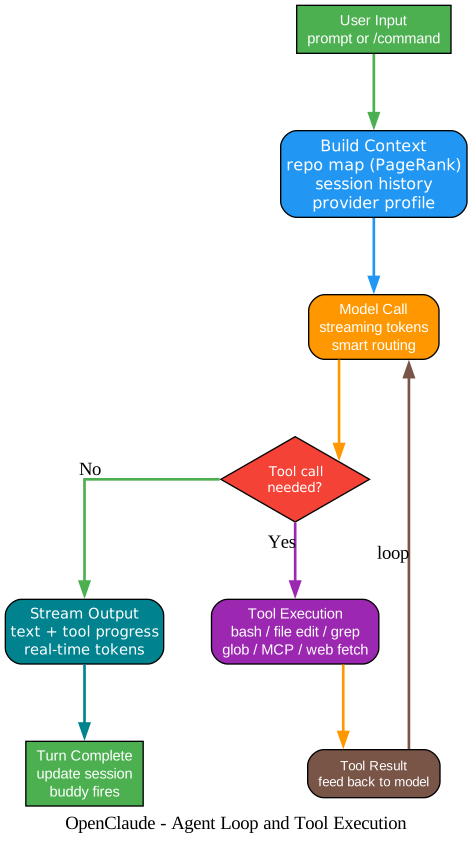
The loop is intentionally explicit. Each step is a discrete stage, so a developer can trace where a request is at any moment. Tool calls are executed inside the loop, not delegated to the provider, which means a local Ollama model gets the same tool surface as a cloud API. The streaming stage writes tokens to the terminal as they arrive, and the continue-or-stop decision is made only after all tool results are in.
Session Management
OpenClaude keeps session state so a developer can resume a conversation, branch it, or export it. The session manager stores messages, tool calls, provider profile, and working directory, and it exposes resume, branch, and export commands.
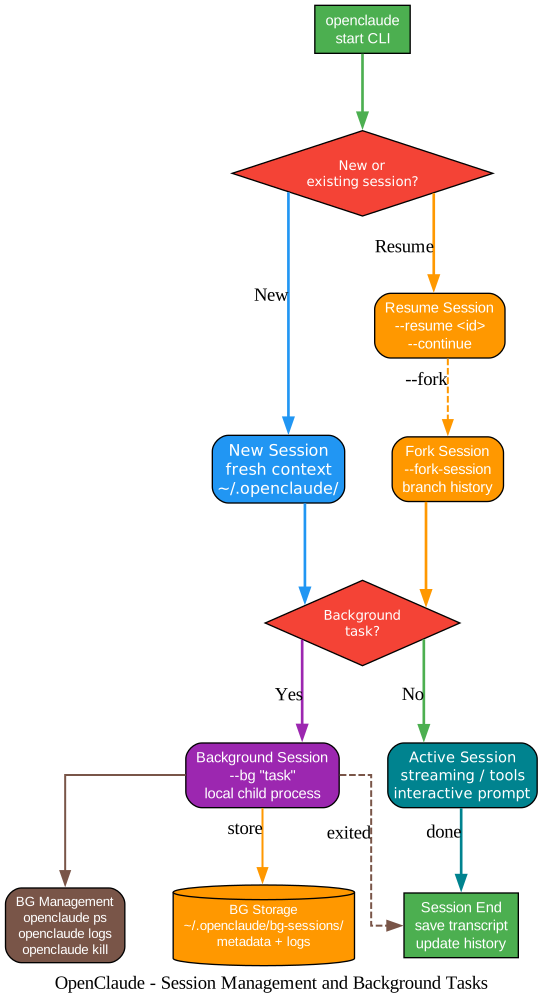
Sessions are stored as JSON files under the working directory, which makes them portable and version-controllable. Branching creates a copy at a chosen point, so a developer can explore two approaches without losing the original thread. Export writes the session as Markdown for sharing or archiving.
Installation
OpenClaude requires Node.js >=22.0.0. Bun is only needed for source builds.
npm install -g @gitlawb/openclaude
After install, run openclaude to start the guided provider setup, or use /provider inside the CLI to add or switch profiles later.
For source builds:
git clone https://github.com/Gitlawb/openclaude.git
cd openclaude
bun install
bun run build
The VS Code extension is bundled with the package and activates automatically when the CLI is installed globally.
Provider Setup
The /provider command walks through adding a backend. For cloud APIs, it asks for the base URL, the API key, and a model name. For Ollama and other local servers, it asks for the base URL and the model identifier. Each profile is saved under a name, so a developer can switch between, for example, a cloud Claude profile and a local Ollama profile with a single command.
Tools, Agents, MCP, and Slash Commands
OpenClaude ships with a tool set that covers the common coding-agent surface: bash execution, file read and write, grep, glob, sub-agents, tasks, MCP client, and web tools. Tools are available to every provider because they run inside the agent loop, not inside the provider. Slash commands are shortcuts that map to prompts or tool chains, and MCP servers extend the tool set with external integrations.
Safety Design
OpenClaude’s safety model is based on explicit user control. The CLI never auto-approves destructive tool calls; a developer reviews bash commands, file writes, and MCP actions before they run. Sessions are stored locally and are never uploaded unless the developer exports them. Provider keys are stored in a local config file and are only sent to the configured provider base URL. The CLI does not telemetry by default; partner integrations are opt-in.
When to use OpenClaude
OpenClaude fits a developer who wants one terminal workflow across many providers. It is useful when:
- A team uses both cloud APIs and local models and wants the same prompts and tools on both.
- A developer wants to switch providers without learning a new CLI each time.
- A team wants session portability so conversations can be resumed, branched, or archived.
- A developer wants a bundled VS Code extension that shares the CLI’s surface.
It is less suited for users who want a GUI-first experience or who only ever use one provider and are happy with that provider’s official CLI.
Conclusion
OpenClaude is a pragmatic answer to the fragmentation of LLM CLIs. By normalizing providers onto a shared OpenAI-compatible contract and putting the agent loop, tools, MCP, and slash commands above that contract, it lets a developer stay in one terminal across cloud and local backends. The bundled VS Code extension, session management, and partner ecosystem round out the surface. The source is on GitHub at Gitlawb/openclaude and the package is on npm. Enjoyed this post? Never miss out on future posts by following us 


