1. Introduction
The AI coding assistant landscape has evolved at a breakneck pace. In just a few years, we have moved from simple autocomplete suggestions to fully autonomous agents that can read entire codebases, reason about architecture, and produce multi-file changes. Two of the most powerful tools in this space are Claude Code — Anthropic’s terminal-native coding assistant — and OpenAI Codex — OpenAI’s agentic coding CLI powered by the GPT-5 family of models. Each has distinct strengths, and until now, developers who wanted to use both had to context-switch between separate tools, separate sessions, and separate mental models.
The Codex Plugin for Claude Code (repository: openai/codex-plugin-cc) changes that equation. It is an official OpenAI plugin that lets you invoke Codex directly from inside a Claude Code session. With a simple slash command like /codex:review or /codex:rescue, you can delegate work to Codex without ever leaving your Claude Code workflow. The plugin wraps the Codex App Server, communicates over JSON-RPC, and manages background jobs, session transfers, and model selection — all from the comfort of your existing Claude Code environment.
With over 26,000 GitHub stars and growing at roughly 4,300 stars per week, this plugin has clearly struck a chord with the developer community. In this post, we will take a deep dive into what the plugin does, how it works under the hood, and why bridging two AI coding giants represents a fundamental shift in how we think about composable developer tooling.
2. The AI Coding Tool Landscape
To understand why this plugin matters, we need to look at the two tools it connects.
Claude Code is Anthropic’s command-line coding assistant. It runs in your terminal, reads your project files, and can execute commands, edit code, and reason about your codebase using Claude’s language models. Claude Code excels at conversational coding — you describe what you want, and it iteratively works through the problem, asking clarifying questions and showing its reasoning along the way. Its plugin system allows third-party extensions to add slash commands, hooks, subagents, and skills.
OpenAI Codex is OpenAI’s agentic coding tool, available as a CLI (@openai/codex on npm) and as a cloud-based application. Codex is powered by the GPT-5 model family, including GPT-5.4, GPT-5.4-mini, and the specialized gpt-5.3-codex-spark model. Codex is particularly strong at autonomous code review, multi-file refactoring, and long-running tasks that require sustained reasoning over complex codebases. It has its own App Server protocol, configuration system (config.toml), and authentication flow that supports both ChatGPT subscriptions and OpenAI API keys.
The key insight is that these tools are not competitors — they are complements. Claude Code’s conversational interface and plugin ecosystem make it an excellent primary coding companion. Codex’s deep reasoning capabilities and specialized review modes make it an excellent second opinion. The Codex Plugin for Claude Code lets you use both without the friction of switching contexts, re-explaining your codebase, or managing separate authentication states.
3. How the Plugin Works
At its core, the plugin is a bridge. It sits inside Claude Code’s plugin system and exposes a set of slash commands that, when invoked, communicate with the Codex App Server running on your local machine.
The plugin does not ship its own copy of Codex. Instead, it uses the globally installed codex binary — the same one you would use if you ran Codex directly from the terminal. This means the plugin shares your existing Codex authentication, configuration, and repository checkout. There is no separate account to manage, no separate API key to configure, and no separate config file to maintain.
When you run a command like /codex:review, the plugin’s command router parses the flags and arguments, connects to the Codex App Server (either by spawning a new process or by reusing a shared broker process), starts or resumes a thread, submits the review or turn request, and then captures the streaming notifications that Codex sends back. These notifications include agent messages, file changes, command executions, reasoning summaries, and review output. The plugin assembles all of this into a structured result that Claude Code can display inline or track as a background job.
The communication protocol is JSON-RPC over either stdio (for directly spawned processes) or Unix domain sockets (for the shared broker). This is the same protocol that the Codex App Server exposes natively, so the plugin is essentially a thin client that knows how to speak Codex’s language.
4. Architecture Overview
The plugin’s architecture is designed around a layered approach that separates concerns: command handling, transport, and the Codex App Server itself.
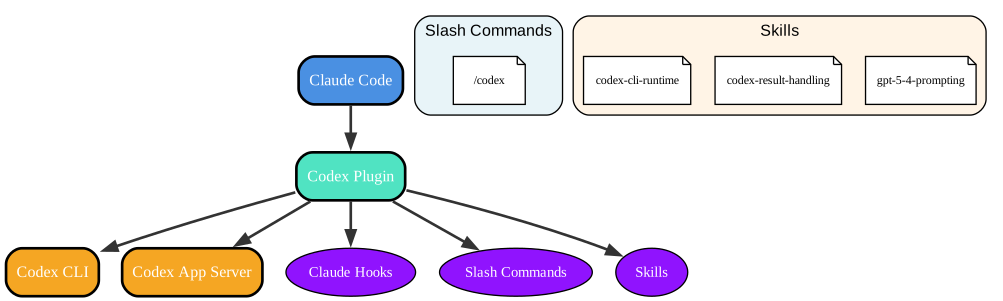
At the top layer, Claude Code provides the user interface. Slash commands like /codex:review, /codex:rescue, and /codex:transfer are defined as Markdown files in the plugin’s commands/ directory. When a user types one of these commands, Claude Code invokes the plugin’s command handler.
The Plugin Bridge layer is where the real work happens. The codex-companion.mjs script is the main entry point. It includes a command router that parses flags (--background, --base, --model, --effort, --resume, --fresh), a hooks system that responds to Claude Code lifecycle events (SessionStart, SessionEnd, Stop), and the logic for rendering results back into the Claude Code session.
The App Server Client layer handles transport. The CodexAppServerClient class in app-server.mjs supports two transport modes: a broker mode that connects to a long-running shared Codex process via Unix domain socket, and a direct mode that spawns a fresh codex app-server child process. The broker mode is preferred because it avoids the cold-start penalty of launching a new Codex process for every command. If the broker is busy or unavailable, the client automatically falls back to direct mode.
The Codex CLI layer is the actual Codex binary running on your machine. It handles model inference, tool execution (running commands, reading and writing files, web searches), and authentication. The plugin never bypasses Codex’s own security model — it simply drives Codex programmatically through the App Server protocol.
5. Request Workflow
Understanding the request flow is key to understanding how the plugin delivers a seamless experience. Let us trace a typical /codex:review command from start to finish.
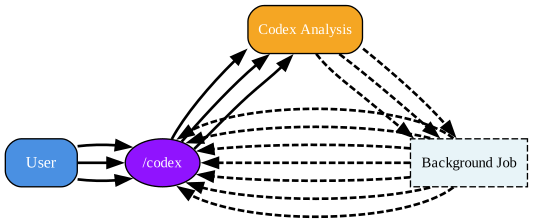
Step 1 — User Request: The user types /codex:review --background in their Claude Code session. Claude Code’s plugin system routes this to the plugin’s command handler.
Step 2 — Plugin Intercepts: The command router in codex-companion.mjs parses the flags. It identifies --background as a request to run the review asynchronously. It determines the review target — either uncommitted changes or a branch diff if --base was specified.
Step 3 — Connect App Server: The plugin calls CodexAppServerClient.connect(), which first checks for an existing broker session. If a broker is running and ready, it connects via Unix domain socket. If not, it spawns a new codex app-server process and communicates over stdio.
Step 4 — Start Thread: The plugin sends a thread/start JSON-RPC request to the App Server, specifying the working directory, model (if overridden), sandbox mode (read-only for reviews), and whether the thread should be ephemeral. The App Server returns a thread ID.
Step 5 — Submit Turn: For a review, the plugin sends a review/start request with the thread ID, delivery mode (inline or detached), and the review target. For a rescue task, it sends a turn/start request with the user’s prompt as input.
Step 6 — Codex Processes: Codex begins reasoning. It may read files, run commands, search the web, or spawn subagents. All of this happens inside the Codex App Server process.
Step 7 — Stream Notifications: As Codex works, it sends JSON-RPC notifications back to the plugin: item/started when a command begins, item/completed when it finishes, agentMessage when Codex produces text, fileChange when files are modified, and turn/completed when the turn is done. The plugin’s captureTurn() function listens for all of these and assembles a TurnCaptureState object.
Step 8 — Capture Turn State: The plugin collects the final agent message, reasoning summaries, file changes, command executions, and review text into a structured result.
Step 9 — Background or Inline: If --background was specified, the plugin stores the job in its tracked-jobs system and returns immediately. The user can later check progress with /codex:status and retrieve results with /codex:result. If not background, the plugin waits for the turn to complete and renders the result inline.
Step 10 — Output to Claude Code: The rendered result — whether a code review, a task summary, or a session transfer command — is displayed in the Claude Code session.
6. Key Features
The plugin exposes six major capability areas, each accessible through dedicated slash commands.

Code Review (/codex:review): This is the flagship feature. It runs a standard Codex review on your current work — either uncommitted changes or a branch diff against a base ref. The review is read-only: Codex will not modify any files. It produces the same quality of analysis you would get from running /review inside Codex directly. For large multi-file changes, the --background flag lets the review run asynchronously so you can continue working in Claude Code while Codex thinks.
Adversarial Review (/codex:adversarial-review): This is a steerable review that goes beyond surface-level code quality. It challenges design decisions, questions tradeoffs, and pressure-tests assumptions. You can provide custom focus text to direct the review toward specific risk areas: authentication, data loss, race conditions, rollback safety, or anything else you are worried about. This is the command you run before shipping a critical change.
Task Delegation (/codex:rescue): This command hands a task to Codex through the codex:codex-rescue subagent. You can ask Codex to investigate a bug, try a fix, continue a previous task, or take a faster pass with a smaller model. The --resume flag continues the latest rescue thread for your repo, while --fresh starts a new one. You can also specify --model and --effort to control which model Codex uses and how hard it reasons.
Session Transfer (/codex:transfer): This is a uniquely powerful feature. It takes the current Claude Code session transcript and imports it into Codex as a persistent thread. You get back a codex resume <session-id> command that you can run to continue the exact same conversation in Codex’s TUI or App. This means you can start a debugging session in Claude Code, build up context through conversation, and then hand the entire context over to Codex for autonomous execution.
Job Management (/codex:status, /codex:result, /codex:cancel): These commands manage background jobs. /codex:status shows running and recent Codex jobs for the current repository. /codex:result retrieves the final output of a completed job, including the Codex session ID for resumption. /codex:cancel stops an active background job.
Review Gate (/codex:setup --enable-review-gate): This optional feature uses a Stop hook to automatically run a Codex review based on Claude’s response. If the review finds issues, the stop is blocked so Claude can address them first. This creates a feedback loop between Claude and Codex, though the plugin documentation warns that this can drain usage limits quickly.
7. Installation and Setup
Getting started with the plugin is straightforward. You need Node.js 18.18 or later and either a ChatGPT subscription (including the free tier) or an OpenAI API key.
First, add the plugin marketplace in Claude Code:
/plugin marketplace add openai/codex-plugin-cc
Then install the plugin:
/plugin install codex@openai-codex
Reload plugins to activate it:
/reload-plugins
Run the setup command to check whether Codex is installed and authenticated:
/codex:setup
If Codex is not yet installed, /codex:setup can offer to install it for you. Alternatively, you can install it manually:
npm install -g @openai/codex
If Codex is installed but not logged in, authenticate with:
!codex login
The codex login command supports both ChatGPT account sign-in and API key sign-in. Once authenticated, you should see the slash commands and the codex:codex-rescue subagent in your /agents list.
A simple first run to verify everything works:
/codex:review --background
/codex:status
/codex:result
8. Usage Examples
Here are practical examples of how to use the plugin in real development scenarios.
Reviewing uncommitted changes before a commit:
/codex:review
This runs a standard Codex review on your current working directory changes. Codex will analyze the diff, check for bugs, style issues, and potential problems, and return a structured review.
Reviewing a branch against main:
/codex:review --base main
This compares your current branch against main and reviews the full diff. Useful for pre-merge quality checks.
Running an adversarial review focused on caching design:
/codex:adversarial-review --base main challenge whether this was the right caching and retry design
This tells Codex to specifically question the caching and retry approach in your branch diff, looking for hidden assumptions and failure modes.
Delegating a bug investigation to Codex:
/codex:rescue investigate why the tests started failing
Codex will autonomously investigate the test failures, potentially running commands, reading files, and trying fixes.
Using a smaller model for a quick investigation:
/codex:rescue --model gpt-5.4-mini --effort medium investigate the flaky integration test
This uses the smaller, faster GPT-5.4-mini model with medium reasoning effort — ideal for cost-sensitive tasks that do not require maximum reasoning depth.
Using the spark model for speed:
/codex:rescue --model spark fix the issue quickly
The plugin maps spark to gpt-5.3-codex-spark, a specialized fast model.
Transferring a Claude Code session to Codex:
/codex:transfer
This creates a persistent Codex thread from your current Claude Code session and prints a codex resume <session-id> command. You can then continue the same conversation in Codex’s TUI or App.
Running a long-running task in the background:
/codex:adversarial-review --background
/codex:rescue --background investigate the flaky test
Then check progress with:
/codex:status
/codex:result
9. Integration Ecosystem
The plugin does not exist in isolation. It is part of a broader ecosystem of developer tools, and understanding how it fits in helps you get the most value from it.

Claude Code is the primary interface. The plugin registers slash commands, subagents, hooks, and skills within Claude Code’s plugin system. When you type a /codex: command, Claude Code’s plugin runtime invokes the plugin’s scripts.
Codex CLI is the execution engine. The plugin communicates with the locally installed codex binary through its App Server protocol. Because it uses the same Codex install you would use directly, all your existing Codex configuration — including ~/.codex/config.toml for user-level settings and .codex/config.toml for project-level overrides — applies automatically.
Model Providers are configurable through Codex’s config system. While the default provider is OpenAI, Codex also supports Ollama and LM Studio for local model inference. You can even set a custom openai_base_url to point at a different endpoint. This means the plugin can effectively route requests to any compatible model provider.
Git Workspace is the source of truth. The plugin operates on your local repository checkout. Reviews analyze your actual uncommitted changes or branch diffs. Task delegation happens in the context of your real codebase. File changes that Codex makes are applied to your working directory.
IDEs and Editors benefit indirectly. Because the plugin runs in Claude Code (which itself runs in a terminal), it works alongside any editor — VS Code, Neovim, JetBrains IDEs, or a plain terminal. The session transfer feature means you can start a conversation in Claude Code and continue it in Codex’s TUI or App without losing context.
CI/CD and Automation can leverage the plugin’s review capabilities. The review gate feature, in particular, can be used to enforce a Codex review before code is merged. While the plugin is designed for interactive use within Claude Code, the underlying Codex App Server protocol is scriptable, opening possibilities for automated pre-merge adversarial reviews in GitHub Actions pipelines.
10. Multi-Model Support
One of the most powerful aspects of the plugin is its multi-model support. Codex supports a range of models, and the plugin lets you choose which one to use for each task.
The primary models available through the OpenAI provider include:
- GPT-5.4 — The flagship model with maximum reasoning depth. Best for complex reviews, architectural decisions, and tasks that require deep analysis.
- GPT-5.4-mini — A smaller, faster model that is significantly cheaper. Good for routine reviews and straightforward tasks.
- gpt-5.3-codex-spark — A specialized fast model that the plugin maps from the shorthand
spark. Ideal for quick fixes and investigations where speed matters more than depth.
You can specify the model per command using the --model flag:
/codex:rescue --model gpt-5.4-mini --effort medium investigate the flaky test
You can also set a default model and reasoning effort in your Codex config:
# .codex/config.toml
model = "gpt-5.4-mini"
model_reasoning_effort = "high"
This configuration is picked up automatically by the plugin. User-level config in ~/.codex/config.toml applies globally, while project-level config in .codex/config.toml overrides it for specific repositories (only when the project is trusted).
Beyond OpenAI models, Codex supports alternative providers like Ollama and LM Studio. This means you can use locally hosted models for privacy-sensitive work or to avoid API costs entirely. The plugin’s getCodexAuthStatus() function even detects when a non-OpenAI provider is configured and reports that OpenAI authentication is not required.
This multi-model flexibility is a significant advantage over tools that lock you into a single provider. You can use GPT-5.4 for critical reviews, GPT-5.4-mini for routine checks, and a local model for sensitive code — all from the same plugin interface.
11. Context Awareness
A key challenge in AI coding tools is context: how does the tool understand your codebase well enough to provide useful suggestions? The plugin addresses this through several mechanisms.
Repository-level context: When the plugin starts a Codex thread, it passes the current working directory (cwd) as a parameter. Codex uses this to ground its reasoning in your actual repository. It can read files, run commands, and explore the codebase autonomously — all within the sandbox constraints you configure.
Git diff awareness: For reviews, the plugin automatically determines the review target. Without any arguments, /codex:review analyzes your uncommitted changes (the working tree diff). With --base main, it compares your branch against main. Codex sees the actual diff and can reason about what changed and why.
Session continuity: The --resume flag for /codex:rescue continues the latest rescue thread for your repository. This means Codex retains the context from previous investigations — it remembers what it already tried, what it found, and what the next steps were. This is far more efficient than re-explaining the problem from scratch each time.
Session transfer: The /codex:transfer command is perhaps the most sophisticated context mechanism. It takes your entire Claude Code session transcript — every message, every code reference, every decision — and imports it into Codex as a persistent thread. Codex’s external-agent session importer converts the Claude transcript into visible turns that can be continued in the Codex App or TUI. This means the context you built up through conversation with Claude is not lost when you switch to Codex.
File change tracking: When Codex makes changes during a rescue task, the plugin captures the file changes in its TurnCaptureState. The result includes a list of touched files, so you can quickly see what Codex modified without diffing the entire repository.
Command execution tracking: Similarly, the plugin tracks all commands that Codex executes during a turn. This gives you visibility into what Codex actually did — which tests it ran, which linters it invoked, which build commands it tried.
12. Security and Privacy
Security is a critical concern when bridging two AI tools. The plugin’s design addresses several important security and privacy considerations.
Local authentication: The plugin uses your local Codex CLI authentication. It does not transmit your credentials to any third-party service. Whether you authenticate with a ChatGPT account or an API key, the authentication state lives on your machine and is managed by the codex binary itself. The plugin simply drives Codex; it does not handle tokens or keys directly.
Sandbox modes: Codex supports sandbox modes that restrict what it can do. For reviews, the plugin always uses read-only sandbox mode, meaning Codex cannot modify files or execute dangerous commands. For rescue tasks, you can control the sandbox mode through configuration. The approvalPolicy is set to never by default, meaning Codex will not prompt for approval — but this is configurable.
No separate runtime: The plugin does not create a separate Codex runtime or environment. It uses the same Codex install, the same local authentication state, and the same repository checkout that you would use directly. This means your existing security boundaries — file permissions, network policies, Codex’s own sandboxing — all apply unchanged.
Data flow: When you run a command, the plugin sends your prompt and review target to the Codex App Server, which runs locally. Codex then communicates with the model provider (OpenAI by default). Your code and prompts are sent to the model provider for inference, just as they would be if you used Codex directly. The plugin itself does not add any additional data transmission.
Project trust: Codex’s project-level configuration (.codex/config.toml) only loads when the project is trusted. This prevents malicious repositories from injecting configuration that could change Codex’s behavior without your knowledge.
Local model option: For maximum privacy, you can configure Codex to use a local model provider like Ollama or LM Studio. In this mode, no code or prompts leave your machine. The plugin works identically — it just routes requests to a local inference engine instead of the OpenAI API.
13. Performance and Latency
Performance is a practical concern, especially for code reviews of large changes. The plugin includes several optimizations to minimize latency.
Shared broker process: The most significant optimization is the broker. Instead of spawning a new codex app-server process for every command — which incurs a cold-start penalty of several seconds — the plugin maintains a long-running broker process. The first command starts the broker, and subsequent commands connect to it via Unix domain socket. The broker’s lifecycle is managed by broker-lifecycle.mjs, which handles creation, health checking, and teardown.
Automatic fallback: If the broker is busy (returns a BROKER_BUSY_RPC_CODE error) or unavailable (connection refused), the plugin automatically falls back to spawning a direct codex app-server process. This ensures that a stuck broker never blocks your work.
Background execution: For long-running tasks, the --background flag is essential. It starts the Codex job and returns immediately, letting you continue working in Claude Code. The job is tracked in the plugin’s state directory, and you can check on it with /codex:status and retrieve results with /codex:result when it finishes.
Streaming notifications: The plugin does not wait for Codex to finish before showing progress. As Codex works, it sends streaming notifications — item/started, item/completed, agentMessage — that the plugin forwards as progress updates. You can see what Codex is doing in real time, which makes long-running tasks feel more responsive.
Model selection for speed: Choosing the right model has a massive impact on latency. GPT-5.4-mini is significantly faster than GPT-5.4, and gpt-5.3-codex-spark is faster still. For routine tasks, using a smaller model can reduce response time from minutes to seconds. The --effort flag also controls reasoning depth: low effort is faster, high effort is more thorough.
Ephemeral threads: For reviews, the plugin uses ephemeral threads (ephemeral: true) that do not persist after the review completes. This avoids accumulating thread state that could slow down future operations.
Notification filtering: The plugin’s default capabilities include opting out of several high-frequency notification methods (item/agentMessage/delta, item/reasoning/summaryTextDelta, etc.). This reduces the volume of notifications the plugin needs to process, improving throughput.
14. Comparison: Plugin vs Direct API
When should you use the plugin versus calling the Codex API directly versus using Claude Code’s native capabilities?
Use the plugin when:
- You are already working in Claude Code and want a second opinion from Codex without switching tools.
- You want to run a background review while continuing to code in Claude Code.
- You want to transfer a Claude Code conversation to Codex for autonomous execution.
- You want to leverage Codex’s specialized review modes (standard and adversarial) from within your existing workflow.
- You want the convenience of slash commands without writing custom integration code.
Use Codex directly (CLI or App) when:
- You are not using Claude Code and want Codex as your primary coding assistant.
- You need maximum control over Codex’s execution environment and want to interact with it directly.
- You are building automation that needs to call Codex programmatically without the Claude Code plugin runtime.
- You want to use Codex’s TUI for an interactive session with full terminal control.
Use Claude Code native capabilities when:
- You want Claude’s conversational coding style — iterative, interactive, with clarifying questions.
- You need to work within Claude’s ecosystem of plugins, MCP servers, and skills.
- You want Claude’s particular strengths in certain languages or frameworks.
- The task is straightforward enough that a second opinion from Codex is unnecessary.
The key advantage of the plugin is composability. It lets you combine the strengths of both tools without the overhead of context switching. You get Claude’s conversational interface for exploration and planning, and Codex’s deep reasoning for review and autonomous execution — all in one session.
15. Conclusion
The Codex Plugin for Claude Code represents a significant step forward in the evolution of AI coding tools. For too long, AI assistants have been walled gardens — each tool excellent in its own way, but isolated from the others. Developers who wanted to use multiple tools had to accept the friction of context switching, re-explaining their codebase, and managing separate authentication and configuration states.
This plugin breaks down those walls. It demonstrates that AI coding tools can be composable — that you can build bridges between them without compromising the integrity of either. The plugin does not replace Claude Code or Codex; it makes both more valuable by connecting them. Claude Code gains access to Codex’s powerful review and autonomous execution capabilities. Codex gains access to Claude Code’s rich conversational context through session transfer.
The architecture is instructive. By wrapping the Codex App Server’s JSON-RPC protocol, the plugin achieves deep integration without duplicating Codex’s functionality. The shared broker process optimization shows attention to real-world performance. The automatic fallback from broker to direct spawn shows resilience engineering. The session transfer feature shows creative thinking about how context flows between tools.
Looking forward, this plugin points toward a future where AI coding tools are not monolithic platforms but composable components in a developer’s toolkit. Imagine a world where you can mix and match the best model for each task — Claude for conversation, GPT-5.4 for deep review, a local model for privacy-sensitive work — all orchestrated through a unified interface. The Codex Plugin for Claude Code is a concrete step toward that future, and its rapid adoption (26,000+ stars and growing) suggests that developers are ready for it.
As AI coding tools continue to evolve, the ability to bridge them will become increasingly important. The open-source nature of this plugin, combined with its clean architecture and thoughtful design, makes it a model for how future inter-tool integrations should be built. Whether you are a Claude Code user looking to add Codex’s capabilities to your workflow, or a Codex user looking for a more conversational interface, this plugin is worth exploring.
The future of AI-assisted development is not about choosing one tool — it is about composing the right tools for each job. The Codex Plugin for Claude Code shows us how. Enjoyed this post? Never miss out on future posts by following us 


