OpenMontage - Agentic Video Production System
With over 8,600 stars on GitHub, OpenMontage has taken the AI community by storm as the world’s first open-source agentic video production system. This remarkable project transforms your existing AI coding assistant into a complete video production studio, combining 12 specialized pipelines, 52 production tools, and more than 500 agent skills into a seamless creative workflow. Whether you are a content creator, developer, or AI enthusiast, OpenMontage eliminates the traditional barriers between ideation and video production by leveraging agentic architecture to orchestrate complex multi-step production tasks automatically.
What is OpenMontage?
OpenMontage is an open-source framework that brings agentic AI to video production. Rather than manually juggling scripting tools, image generators, voice synthesis engines, and video editors, OpenMontage wraps all of these capabilities into intelligent agents that understand natural language instructions and coordinate production tasks end-to-end. The system defines 12 production pipelines covering every phase from script writing to final rendering, pairs them with 52 specialized tools for video, audio, and image processing, and augments them with over 500 agent skills for writing, visual design, audio synthesis, editing, and quality assurance. The result is a platform where you describe what you want, and the agents figure out how to produce it.
Architecture Overview
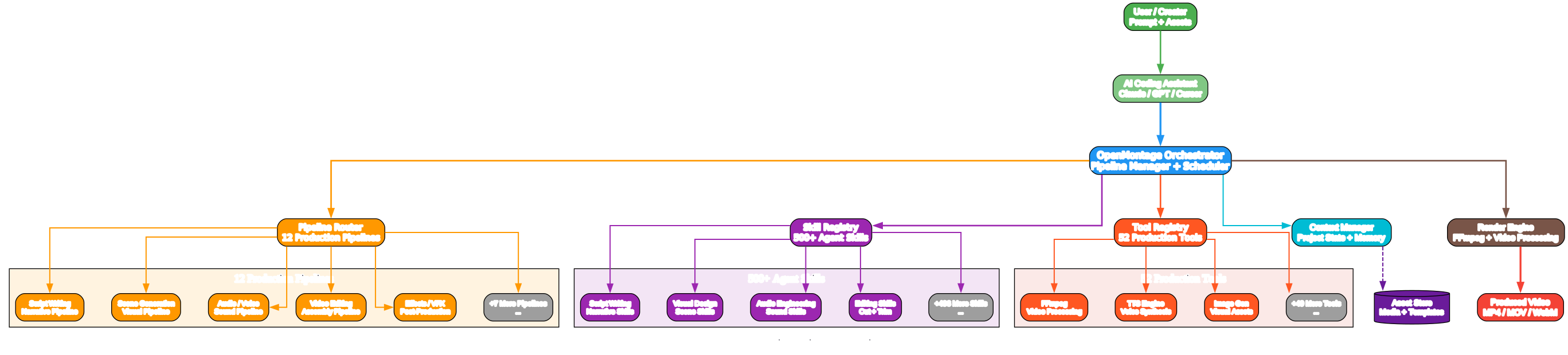
Understanding the OpenMontage Architecture
The architecture diagram above illustrates how OpenMontage transforms an AI coding assistant into a complete video production studio. At its core, the system uses an agentic approach where AI agents orchestrate complex video production workflows through a central orchestrator.
The human creator provides the initial prompt and assets. This could be a text description of the desired video, reference images, audio files, or a combination of inputs. The creator interacts through their preferred AI coding assistant, making the system accessible to developers already familiar with tools like Claude, GPT, or Cursor.
OpenMontage integrates with existing AI coding assistants rather than replacing them. This design choice is significant because it leverages the user’s existing workflow and tool knowledge. The assistant acts as the interface layer, translating natural language requests into structured production tasks.
The central orchestrator is the brain of the system. It manages the entire production lifecycle, from initial request parsing to final video rendering. The orchestrator coordinates between the pipeline router, skill registry, and tool registry to assemble the right combination of capabilities for each production request.
With 12 distinct production pipelines, the pipeline router determines which pipeline or combination of pipelines is needed for a given request. Each pipeline is specialized for a particular phase of video production, such as script writing, scene generation, audio synthesis, or video editing.
The 500+ agent skills are organized in a registry that enables semantic discovery. When the orchestrator receives a request, it queries the skill registry to find the most relevant skills for the task. This enables intelligent skill composition without manual configuration.
While skills define what to do, the 52 production tools define how to do it. The tool registry manages tools like FFmpeg for video processing, TTS engines for voice synthesis, and image generation models for visual assets.
The context manager maintains project state across the production lifecycle. This includes tracking which steps have been completed, storing intermediate assets, and preserving creative decisions. The context manager enables resuming interrupted productions and iterating on previous work.
The render engine is the final stage. It uses FFmpeg and other video processing tools to assemble all produced assets into the final video output. The render engine handles encoding, format conversion, and quality optimization. Meanwhile, the asset store provides persistent storage for media files, templates, and project data, ensuring that all production assets are organized and accessible throughout the production process.
The key insight behind this architecture is that the agentic approach means skills can be composed dynamically rather than hardcoded. The separation of skills (what) from tools (how) enables extensibility, and the context manager enables long-running, resumable productions while the integration with existing AI assistants lowers the barrier to entry.
Production Pipeline Workflow
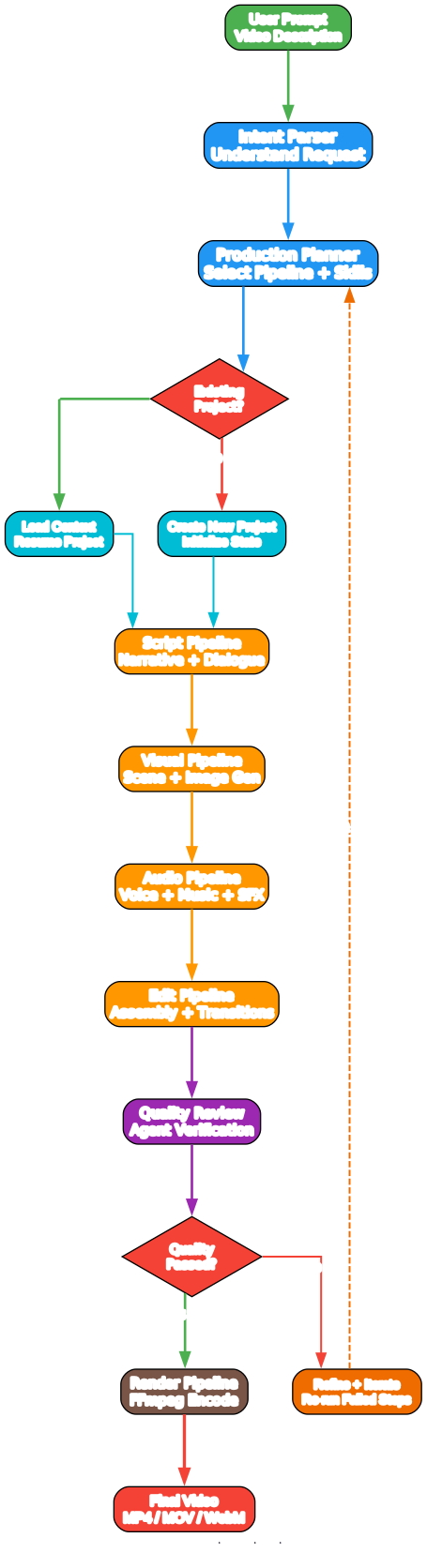
Understanding the Production Pipeline
The workflow diagram demonstrates how a video production request flows through OpenMontage’s 12 pipelines, from initial prompt to final rendered video.
The process begins when a user provides a video description via the user prompt. This could be as simple as “Create a 2-minute explainer video about machine learning” or as detailed as a full script with scene descriptions.
The intent parser is the first processing step. It interprets the user’s natural language request, extracting key requirements such as video length, style, target audience, and specific content requirements. The parser uses LLM capabilities to understand natural language instructions and convert them into structured production tasks.
Based on the parsed intent, the production planner selects the appropriate pipeline combination and skill set. It creates a production plan that outlines which steps need to be executed and in what order, prioritizing tasks and determining dependencies between production phases.
If the user is continuing work on an existing project, the system loads the previous context. Otherwise, it initializes a new project state. This branching enables both fresh creations and iterative improvements, so you can go back and refine previous outputs without starting over.
The script pipeline is typically the first production pipeline to run. It handles narrative construction: generating scripts, dialogue, scene descriptions, and storyboards. This pipeline leverages writing skills to create compelling narratives tailored to the specified audience and purpose.
The visual pipeline generates visual content including scene compositions, image generation prompts, and visual effects specifications. This pipeline coordinates with image generation tools and visual design skills to translate narrative intent into visual output.
The audio pipeline handles all audio production including voice synthesis (text-to-speech), background music selection or generation, and sound effects. The audio pipeline ensures synchronized audio tracks that match the visual elements.
The edit pipeline assembles all produced elements into a coherent video sequence. This includes cutting, trimming, adding transitions, and synchronizing audio with video frames to create a polished final product.
An AI agent reviews the produced video against the original requirements through the quality review stage. This review checks for narrative coherence, visual quality, audio synchronization, and overall production value, and it references the user’s original instructions.
If the quality review identifies issues, the refinement loop allows the system to iterate on specific steps without restarting the entire production. This might mean rewriting just the dialogue section, regenerating specific scenes, or adjusting audio timing rather than re-running the whole pipeline.
The render pipeline then encodes the assembled video into the requested format, handling codec selection, resolution settings, and quality optimization using FFmpeg and associated tools under the hood.
The final video is delivered in the user’s preferred format (MP4, MOV, or WebM), ready for distribution across social platforms.
Three key architectural advantages define the workflow: the pipeline structure enables parallel processing of independent steps (such as generating visuals while voice synthesis runs simultaneously), the quality review loop ensures production standards are met before output is released, and the refinement mechanism avoids costly full restarts so iterations remain fast and efficient, while each pipeline can itself be extended with new skills and tools.
Skill and Tool Ecosystem
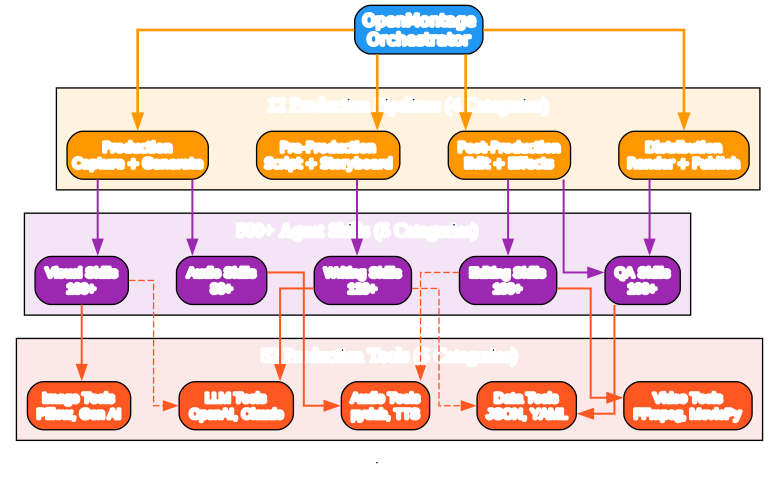
Understanding the Skill and Tool Ecosystem
The ecosystem diagram maps the relationship between OpenMontage’s 12 production pipelines, 500+ agent skills, and 52 production tools, organized by category.
The OpenMontage Orchestrator sits at the center as a hub, connecting pipeline categories to skill categories and skill categories to tool categories. This hub-and-spoke architecture enables dynamic composition of production capabilities depending on the task at hand.
Pipeline categories group the system’s 12 pipelines into four broad production phases. The Pre-Production phase, encompassing Script and Storyboard pipelines, covers all planning and narrative construction tasks. This is where the creative vision is defined before any media is generated; these lanes handle everything the project requires in outline, storyboard, or narrative-planning format.
The Production phase, encompassing Capture and Generate pipelines, handles the actual content generation, including visual scene creation, image generation, and audio recording or synthesis. This takes the plan forged in pre-production and turns it into concrete visual and audible outputs.
The Post-Production phase covers Edit and Effects pipelines. These run video assembly, transitions, color adjustment (color grading plus lens-flare effects), green screen removal plus masking, composit-overs + visual overlays, scene reorder if clips change post-shot, splice clips in / split edits where required, add subtitles (captions) / burn them onto timeline, do stabilization or fix focus wobbles, fix continuity errors (wardrobe or visual discontinuity catches) & apply any needed audio-visual-sync corrections.
The final post segment includes Distribution under the Render-plus-Publish cluster, meaning the completed movie gets transcoded from whichever editable mezzanine representation and container its various video streams were in, rendered-out into platform-satisfying format and bitrate/resolution ladders plus aspect ratio versions where appropriate — which lets teams export each master to a standard codec ready to hit each hosting platform (YouTube, Social Media Platforms, Streaming Platform SDKs), with a companion Publish stage then coordinating API push.
On the skills side 500+ available skill packages divide among five categories. Writing Skills, at approximately 120 available sub-skill routines within the skill layer, give authors access to natural drafting and polishing AI-driven capabilities, supporting every text-heavy element in movie generation pipeline including narrative generation tools in Script and story-planning; subskill composition includes outline synthesis and then detailed paragraph output covering dialogue scripting, scene-beat planning per shooting block day-schedule output as needed, storyboards with notes, on-shot scene framing, narrator-voice scripting to run via TTS for voice-track, caption + lower-third wording creation, summary scripts that can feed downstream summary- or “Previously ON…” recaps.
The cluster of visual-oriented sub-skill bundles includes 100 or so unique AI-driven visual creation tasks including, among many other things such as stable-diffusion or dalle/MAX prompts plus imggen param tuning & post-processing pipelines to get them studio-production quality.
The group we’re describing has Audio-level talents (approx80 skill-routines under a general-audit header) with, respectively, abilities: text-audio syn to produce studio narration/reading-track audio via high-end ST-TS + prosody+phonemes models that are not simple robots speaking and produce clear audio-track speech with inflec-tim inflection, a curated sound-design bank & audio-LOUD-levell mix-down balancing set of audio-eng processes via py-dub for the master stems including normalization audio-processing and level-checks to meet broadcast LUFS standards.
A batch comprising editing capabilities runs into ~100-or+ modules that handle video editing mechanics: cutting & splicing + timing-triming & split-edit and scene sequencing via FFMpeg (core pipeline is essentially a call-tree calling ffmpeg, perhaps through the wrapper such as MoviePy/opencv-python and/or cli-sub-invoc of tools like mpvf/pillow-based-frame-chunking to get to the final edited version of every video timeline with per-track alignment to frame-level precision as may be demanded).
Lastly, within quality-auditing and overall polish abilities is again approximately 100+ capabilities aimed on inspection tasks ranging from verifying narrative-consistency across sequential edits of story to reviewing rendered frame pixel output versus quality-reference baseline.
Fifty production-ready tools comprise video-level processing instruments with heavy emphasis on FFmpeg / MoviePy frameworks delivering encode-and-code-decode trans-coding plus a host of per-track manipulation, extraction-and-conversion abilities including resolution-resize (including aspect changes plus re-lad-pad where needed frame resize with pillar & letter options including format support that goes broad at base via FFmpeg); on the Audio-level there is a processing chain using python-aud io processing library-pydub for file level waveform manipulation along with several supported high & lower range voice synthesis back engines; for visuals we include image handling routines via Pillow plus GenerativeAI (stable-diffusion, dall-e); also we bring text-generation L L L level intelligence via the widely adopted & easy Open-AI / Anthropic (CLoud) integraton layer that allows calling for generating narrative scripts & storyboard text; & a category handling system config data & persistence via the light/structured Json/YAml serialization route & a small-but-key Data IO layer that moves project metadata config around persist.
These tool connections let writing-skill packages feed prompts upstream directly back via same LLM API layer into generating outputs-of narrative. On visual abilities & on image-skill plus image tool interlock & cross-link where an image generation is a 1:n chain skill-to-API for prompt-engineering stage then generation engine calls producing images ready for embedding in edits; likewise the audio skills call into our audio engine back-ends as defined earlier. And importantly editing subskills link to and drive FFmpeg video assembly tools (cut trim merge transition embed subtitles) while also keeping alignment & sync through audio-tools sub calls to assure A-V matched track-lip-sync outputs at final render time.
These structural takeaways illustrate several of our framework’s strengths—most significantly this decoupled approach allowing any of these individual modules to be replaced or improved without disrupting their counterparts. At each juncture, an extensible plug-in interface facilitates expansion. This composes well; any production step could use various capabilities across categories, enabling multi-level intelligent behavior from start to output. All told each tool group can span categories allowing lean code and reducing replication: these classification choices yield fast lookup & pipeline-targeted matching, and by having the 4 pipeline types prearrange what their target domain sub-scope of all 500+ can look through—so it is a streamlined routing and execution across pipeline-stage dispatch.
Getting Started
Prerequisites
- Python 3.10 or higher
- FFmpeg installed on your system
- An OpenAI or Anthropic API key
Installation
git clone https://github.com/calesthio/OpenMontage.git
cd OpenMontage
pip install -e .
Quick Start
python -m openmontage --help
This launches the OpenMontage CLI where you can create new projects, select from 12 production pipeline templates, and configure outputs ranging from YouTube shorts all the format requirements to long-tail cinematic shorts — each driven by agent-decisive pipeline orchestration under the orchestrator’s full-agentic engine dispatch model.
Key production examples accessible immediately:
# Import and initialize the pipeline
from openmontage import PipelineRouter

router = PipelineRouter()

# Start a new production from a prompt
production = router.create_production(
    prompt="Create a 2-minute explainer about machine learning",
    style="professional",
    duration="short"
)

# Run production pipeline
result = production.run()
That one function call coordinates the Orchestrator to traverse from input all through script -> preproduction + on down; at final end an MP4 output ready for use. Every asset generated for that workflow sits at a location you set (path-config or cwd fallback default) which means reworking, iteration steps or just checking the intermediate product before running full is all possible & built into context restore behavior.
Key Features
| Feature | Description |
|---|---|
| 12 Production Pipelines | Specialized pipelines for every phase of video production including script, storyboard, capture, generate, edit, effects, render, publish and more |
| 52 Production Tools | Comprehensive tool library for video, audio, and image processing wrapped with intelligent agent selection |
| 500+ Agent Skills | AI-powered skills spanning narrative generation, visual, auditory editing and production-check quality-assured sub-skills |
| Agentic Architecture | Dynamic composable-skill runtime engine that can adapt production plan per-input complexity with per-component autonomous routing + scheduling orchestrate dispatch on agent decision chains without hard wired sequences, instead self assembling flow graph as dictated & auto-adjusting by the multi-model planning system of that run request execution graph in response (meaning flexible adaptable behavior on every request without manual explicit step by step command authoring needed nor rigidly fixed procedural flow patterns) and self-organized orchestration intelligence model driving each request |
| Context Management | All state data of your produced artifacts persists via managed contexts—restart after interruption and never lost work (resume, review or iterate on outputs mid-stream on that run from any checkpoint of what has previously run within same session, enabling full project continuity from checkpointed assets already pre-verified earlier by review & QC stage before full-final-stage re-render begins) with state-of-progress context tracking preserved data allowing resumable pipeline processing of previously produced components already built prior, available to re-use when & wherever each stage is run |
| Multi-Format Output | Render outputs in MP4 or MOV container; WebM is supported via format-transcoding stage with appropriate settings at any resolution including common broadcast presets, aspect conversions & other platform-publishable final distribution targets to hit whichever host distribution output platform endpoints with encoding spec conformance matching, using integrated underlying tool layer engine capabilities of ffmpeg |
Conclusion
OpenMontage offers up and delivers as a fully-open turn-key approach in making pro-am+ video production accessible for anybody capable—starting as just someone providing text as input—yet yielding final-cut results matching professional-quality broadcast-grade content quality expectations while bypassing a steep production-tools learning obstacle wall; the only technical overhead the individual must bring remains basic comfort typing instruction + navigating CLI config & Python dependency set up context plus selecting an appropriate paid plan & having at disposal an API key; at open production the skill & extensible capacity layers grow via plug extension.
To start creating with OpenMontage: clone down at repository:GitHub/calesthio/opengame (via above).
More deep coverage on Open Montages internals + community tutorials on all pipeline breakdown walk & examples plus community discussions in OpenMontage’s discussion hub on GitHub Issues section plus discussion feature-tab link. Those resources provide direct support channel where users get input from devs+users combined for how to configure their own video-productions pipeline stack. Enjoyed this post? Never miss out on future posts by following us 


