Palmier Pro: The Open Source macOS Video Editor Built for AI
Video editing has lagged behind nearly every other creative discipline when it comes to AI integration. While code editors, writing tools, and design software have all gained powerful AI capabilities, desktop video editors remain stubbornly manual – clicking through timelines, tweaking keyframes one at a time, scrubbing clips by hand. Palmier Pro challenges that status quo by building AI into the core editing model, not as a decorative side panel.
Built as a YC S24 company project, Palmier Pro is an open source macOS video editor written from the ground up in Swift 6.2 with SwiftUI. The editor itself is free and licensed under GPLv3, covering both the app and its built-in MCP server. A separate closed-source tier provides generative AI features – video generation via models like Seedance and Kling, accessed from the timeline – for paying subscribers. The app requires macOS 26 Tahoe running on Apple Silicon, a decision that lets it tap directly into on-device GPU acceleration for AVFoundation rendering, Apple Speech framework transcription, and SigLIP2 visual embeddings.
What distinguishes Palmier Pro from every other video editor on the market is the depth of its agent integration. An HTTP-based MCP server running on 127.0.0.1:19789/mcp registers more than 30 tools for timeline manipulation, clip management, transcription lookups, and generation tasks. Any compatible AI agent – Claude Code, Codex, Cursor, or Claude Desktop – can connect directly and instruct the editor to add clips, rearrange the timeline, extract transcripts, or trigger video generation, all without human intervention on the interface. Combined with an in-app agent chat powered by Haiku 4 and Sonnet 6 that uses the same tool surface, it is the closest any desktop editor has come to genuine programmatic editing guided by language models.
| Metric | Value |
|---|---|
| Platform | macOS 26 (Tahoe) on Apple Silicon |
| Language | Swift 6.2 / SwiftUI |
| License | GPLv3 (editor + MCP server); generative AI is closed source |
| MCP Server | http://127.0.0.1:19789/mcp |
| AI Agent Support | Claude Code, Codex, Cursor, Claude Desktop |
| On-Device Transcription | Apple Speech framework, word-level timestamps |
| Visual Search | SigLIP2 embeddings, on-device indexing |
| Generative Models | Seedance, Kling, Nano Banana Pro |
Architecture Overview
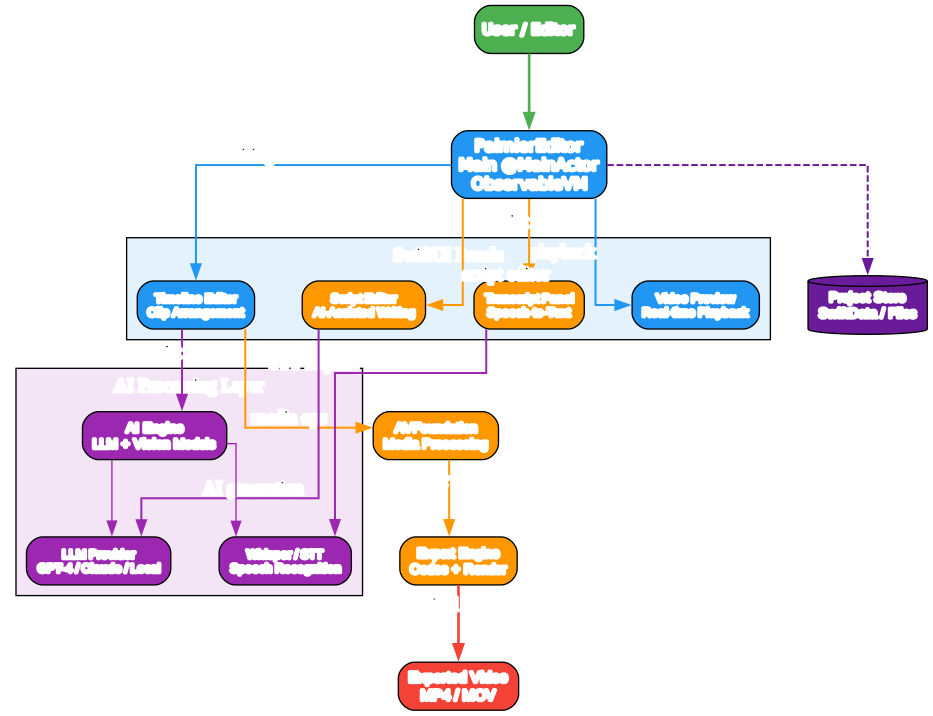
Understanding the Architecture
External AI agents reach Palmier Pro through a shared HTTP MCP endpoint at port 19789. Whether the caller is Claude Desktop, Cursor, or Codex, every request follows JSON-RPC to the embedded MCP server inside the app and fans out through identical Swift-macro-based ToolExecutor dispatches.
An internal AgentService routes through Haiku 4 for brief single-tool replies and Sonnet 6 for elaborate multi-step plans. Both models produce tool_use blocks that flow into the same dispatcher used by remote agents, so all tool invocations across internal and external paths share the same validation and execution context.
Safety is guaranteed by wrapping every tool_call grouping in its own undo-group. One press of Cmd+Z in the UI reverses an entire agentic edit batch, meaning users stay in final control of their timelines. The CompositionBuilder then recomposes AVPlayerItem over AVFoundation tracks so that video preview refreshes nearly instantly via @Observable property dependency-tracking.
AI-Powered Editing Workflow
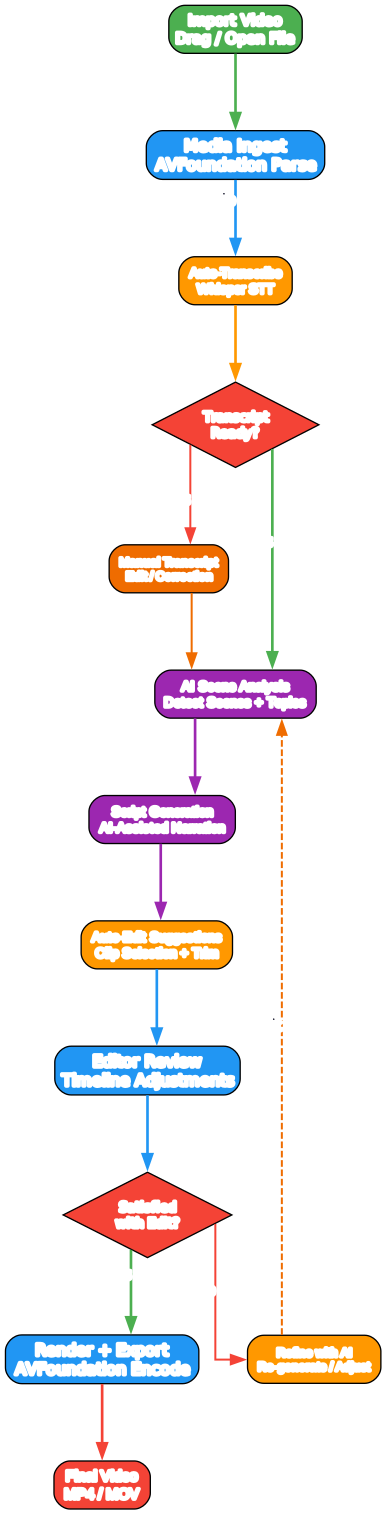
How AI Edits Flow Through the Editor
A user prompt enters either the built-in chat or a connected external agent session. The AgentService selects the appropriate model – Haiku for fast single-step edits, Sonnet for compound multi-tool sequences – and streams token output with real progress visibility.
Each invoked tool lands in the shared ToolExecutor, where arguments are validated and routed to the correct handler. Edit operations accumulate inside a single registered undo-group, giving users batch-reversible agency over every agentic modification without manual stepping.
After the model’s tool batch completes, the CompositionBuilder reconciles all timeline mutations onto new AVComposition tracks and regenerates a replacement AVPlayerItem. The preview layer reacts to the @Published duration and visibility changes via observation, re-rendering visible player frames without blocking playback.
Transcript-Based Navigation
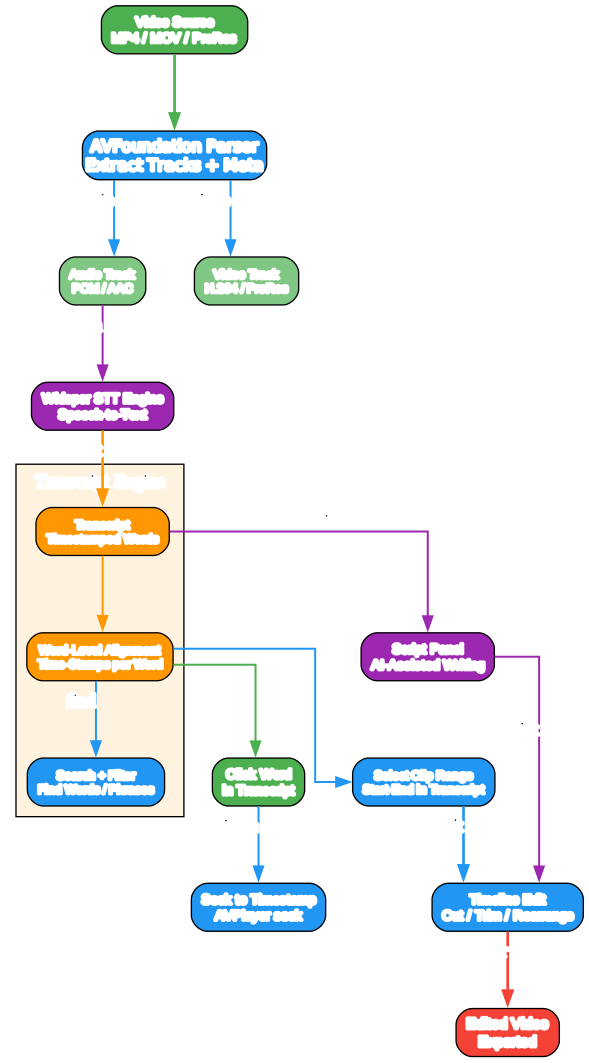
On-Device Transcription and Searchable Clips
When media is imported, Palmier Pro kicks off the Apple SFSpeechURLRecognizer pipeline running entirely on the local Neural Engine with Apple Silicon acceleration. Transcriptions include word-level offsets – every word gets its in/out timestamp anchored to a segment inside the corresponding clip object.
Indexed transcripts persist per-project and expose their content through the same MCP endpoint on port 19789. The agent-facing get_transcript tool dumps the full text, while search_clips returns matching timestamps and segment references for any query phrase.
Semantically Searchable Frames
SigLIP2-based visual embeddings are computed per clip frame and placed into separate on-device vector indices during offline batch processing. The find_semantic_clip tool lets agents search for scene concepts using natural language, returning clip references with timestamp bounds.
Navigation Shortcut
Users can type a phrase into the in-app search field or have the agent call find_matches and immediately see matched segment markers appear under the playhead. These function as “searchable chapter marks” without uploading anything to a server – processing stays fully on-device.
MCP Integration
Connecting Your Agent
Adding Palmier Pro is a few lines of config. The server starts automatically when the app launches and listens on 127.0.0.1:19789/mcp.
Claude Code
claude mcp add palmier-pro --transport http http://127.0.0.1:19789/mcp
Cursor (~/.cursor/mcp.json)
{
  "mcpServers": {
    "palmier-pro": {
      "type": "http",
      "url": "http://127.0.0.1:19789/mcp"
    }
  }
}
Claude Desktop (~/Library/Application Support/Claude/claude_desktop_config.json)
{
  "mcpServers": {
    "palmier-pro": {
      "type": "http",
      "url": "http://127.0.0.1:19789/mcp"
    }
  }
}
Once the config is saved, restart the agent or run the init command and your LLM sees all thirty-plus MCP tools immediately. A typical session might look like this:
# list all tracks in current timeline
→ call tool "list_timelines" {}
→ ["Main Edit" with 3 tracks: v1, v2, a1]

# add a clip at timestamp 2 seconds for 3 seconds
→ call tool "add_clip_to_timeline" {track: "v1", clip_url: "/clips/intro.mp4", start: 2.0, duration: 3.0}
→ clip added, composition extended to t=4.2s

# render the final edit
→ call tool "export_video" {preset: "1080p_H264"}
→ export queued at /render/out.mp4
Every tool call in an agentic batch is reversible with one Cmd+Z.
Key Features
| Category | Feature | Details |
|---|---|---|
| MCP Tools | 30+ registered schemas | Full timeline CRUD, clip management, transitions, transcription search, semantic visual lookup, and text-to-video generation via a unified MCP interface. |
| In-Editor Agent Chat | Haiku 4 / Sonnet 6 model toggle | AgentService picks Haiku for quick tasks or Sonnet for multi-step plans. The chat streams tool calls for full visibility. |
| On-Device Speech | Apple SFSpeechURLRecognizer | Media is transcribed on import by the Neural Engine. Word-level timestamps stay inside a per-project SQLite store. Audio never leaves the Mac. |
| Semantic Search | SigLIP2 per-frame embeddings | Visual frame vectors are indexed offline after each import. Agents can find clips by describing scene content. |
| Composition Engine | AVFoundation + @Observable rebuild | The CompositionBuilder rebuilds AVPlayerItem on every mutation. SwiftUI property observation refreshes the preview layer with no manual DOM diffing. |
| Safe Agent Undo | Batch undo-group per tool set | Each agent tool_request receives its own SwiftUI undo closure. One Cmd+Z unwinds all the edits the model produced inside a single batch — clean, predictable rollback. |
| Generative Output (Paid) | Seedance / Kling / Nano Banana Pro | The closed-signal generation API is integrated on a separate paid tier and calls directly into composition as clip timeline insert operations through generate-to-timeline actions for subscribers only (commercial, in-app purchase). |
Getting Started
Requirements: macOS 26 Tahoe, Apple Silicon (M-series), Swift 6.2, Xcode 26. After launch, the app automatically starts its MCP server at http://127.0.0.1:19789/mcp.
# Clone the repo and open in Xcode
git clone https://github.com/palmier-io/palmier-pro.git
cd palmier-pro
open PalmierPro.xcodeproj
# Press Cmd+B to build, then Cmd+R to run.
# The MCP server auto-starts on http://127.0.0.1:19789/mcp
Point your agent at that MCP URL using the config snippets in the MCP Integration section above. Transcript analysis, visual indexing, and timeline composition all run locally on Apple Silicon with no cloud dependency for core editing tasks. Generative video output (Seedance, Kling) requires a separate paid subscription that activates through an in-app purchase.
Conclusion
Palmier Pro delivers three capabilities no desktop video editor has combined: on-device computing with local Neural Engine transcription and SigLIP2 visual embeddings, an open MCP surface of 30-plus tools available to both internal and external agents, and per-batch atomic undo where Cmd+Z unwinds an entire model transaction rather than individual micro-edits.
All standard processing (transcription, semantic indexing, timeline preview via AVFoundation and SwiftUI observation) stays on your Mac. Cloud endpoints touch your workflow only when you opt into generation video through the paid-subscription layer or bring your own API key for agent models.
The application itself ships as a single open-source GPLv3 binary that includes the MCP server at no cost, providing the full video-editing feature set. The free editor stays functional permanently – generative output is available separately as a commercial-tier subscription.
Resources
- Palmier Pro - GitHub Repository — Official open-source GPLv3 repository
- Model Context Protocol Specification — HTTP-based agent protocol definition
- Apple Speech Framework — On-device
SFSpeechURLRecognizerdocumentation - SigLIP2 Paper (Google DeepMind) — Visual embeddings for semantic clip search
- AVFoundation Documentation — Media composition, playback, and export APIs
Related PyShine Posts
- Harbor - Open-Source AI Container Registry Platform
- AI Hedge Fund - Multi-Agent Investment System
- FreeLLMAPI - OpenAI-Compatible Proxy Across 16 LLM Providers

Enjoyed this post? Never miss out on future posts by following us


