TREK: A Self-Hosted, Real-Time Collaborative Travel Planner with MCP Built In
Most travel-planner apps fall into one of two camps: a slick SaaS that owns your data, or a single-player open-source project with no real collaboration. TREK is the rare third option — a self-hosted, real-time collaborative travel planner with maps, budgets, packing lists, a journal, and an AI integration layer baked in. The tagline says it plainly: “Your trips. Your plan. Your server.”
With 10,100 stars on GitHub, an AGPL-3.0 license, 81 releases, and the latest (v3.2.1) shipped on July 5, 2026, TREK is one of the more complete self-hosted productivity apps available. Let us look at how it is built.
Architecture: Real-Time First
TREK’s stack is a modern Node backend pushing changes to a React frontend over WebSocket, with SQLite as the durable store.
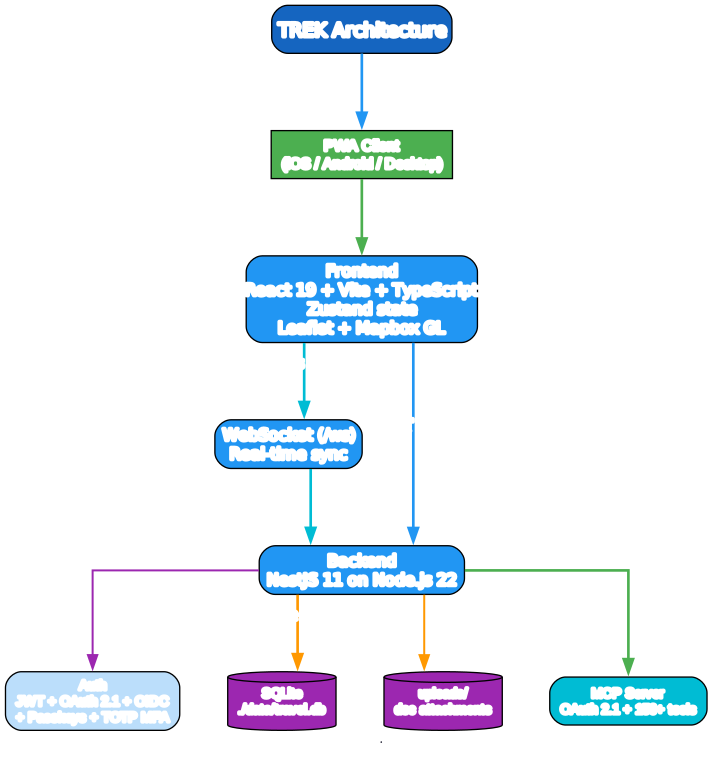
The pieces:
- Frontend — React 19, Vite, TypeScript (98.3% of the codebase), Tailwind CSS, and Zustand for state. Maps are Leaflet or Mapbox GL with 3D buildings, terrain, and clustering.
- Real-time — a WebSocket endpoint at
/wscarries every mutation so changes appear instantly across all connected users. This is what makes TREK a multi-user planner rather than a single-player one with sync bolted on. - Backend — NestJS 11 on Node.js 22. A single SQLite database at
./data/travel.dbholds trip, reservation, packing, budget, and journal state;./uploads/holds document attachments. - Auth — JWT sessions plus OAuth 2.1, OIDC SSO (Google, Apple, Authentik, Keycloak, or any OIDC provider), Passkeys via WebAuthn, and TOTP MFA with backup codes. Session duration is configurable (24h default, 30d with “remember me”).
- AI surface — a built-in MCP server with OAuth 2.1 authentication that exposes the entire app to AI assistants.
The deployment story is deliberately boring: Docker is primary, with a hardened compose example that uses a read_only filesystem, no-new-privileges, all capabilities dropped except CHOWN/SETUID/SETGID, and tmpfs for /tmp. Helm/Kubernetes is also supported via a published chart.
Features
TREK covers the full trip lifecycle, not just pin-dropping on a map.

Trip planning
- Drag & drop planner for organizing places into day plans, with reordering and cross-day moves
- Interactive maps with 3D buildings, terrain, photo markers, clustering, and route visualization
- Place search via Google Places (photos, ratings, hours) or OpenStreetMap (free, no API key)
- Place import from shared Google Maps/Naver Maps lists, GPX, KML/KMZ/GeoJSON files
- Route optimisation with auto-sorting and Google Maps export
- 16-day weather forecasts via Open-Meteo (no key required) plus a historical climate fallback
Travel management
- Reservations for flights, accommodations, and restaurants with status tracking, confirmation numbers, and file attachments — importable from booking confirmation emails and PDFs via KDE Itinerary
- Cost splitting Splitwise-style with per-person/per-day breakdowns, settle-up, and multi-currency
- Packing lists with categories, templates, user assignment, and progress tracking, plus bag tracking with optional weight and iOS-style distribution visualization
- Document manager for attaching docs, tickets, and PDFs (≤ 50 MB each) to trips, places, or reservations
- PDF export of full trip plans with cover page, images, and notes
Collaboration
- Real-time sync via WebSocket — changes appear instantly across all connected users
- Multi-user trips with role-based access control
- Invite links — one-time or reusable, with expiry
- SSO (OIDC) supporting Google, Apple, Authentik, Keycloak, or any OIDC provider
- 2FA via TOTP plus backup codes, and Passkeys for passwordless WebAuthn login
- Collab suite with group chat, shared notes, polls, and day check-ins
Mobile and PWA
- Installable on iOS and Android directly from the browser, no App Store required
- Offline support via a Service Worker that caches tiles, API responses, and uploads through Workbox
- Native feel with fullscreen standalone mode, themed status bar, and splash screen, plus touch-optimised layouts with safe-area handling
- 20 languages including English, German, Spanish, French, Italian, Dutch, Hungarian, Russian, Chinese (simplified and traditional), Polish, Czech, Arabic (RTL), Portuguese, Indonesian, Turkish, Japanese, Korean, Ukrainian, and Greek
The Addon System
Beyond the core features, TREK ships admin-toggleable addons that extend the app without forcing every install to carry every feature: Lists (packing + to-dos), Costs (expense tracker with splits and settle-up), Documents (file attachments), Collab (chat/notes/polls/check-ins), Vacay (personal vacation planner with 100+ country holidays), Atlas (world map of visited countries, bucket list, travel stats, streak tracking), Journey (magazine-style travel journal with Immich/Synology photo integration), AirTrail (sync flights from a self-hosted AirTrail instance), and MCP (expose TREK to AI assistants).
AI / MCP Integration
The most interesting piece, at least from an AI-tooling perspective, is the built-in MCP server. TREK does not just expose a REST API for AI assistants — it runs a full MCP server with OAuth 2.1, 150+ tools, 30 resources, and 27 OAuth scopes across 13 permission groups.
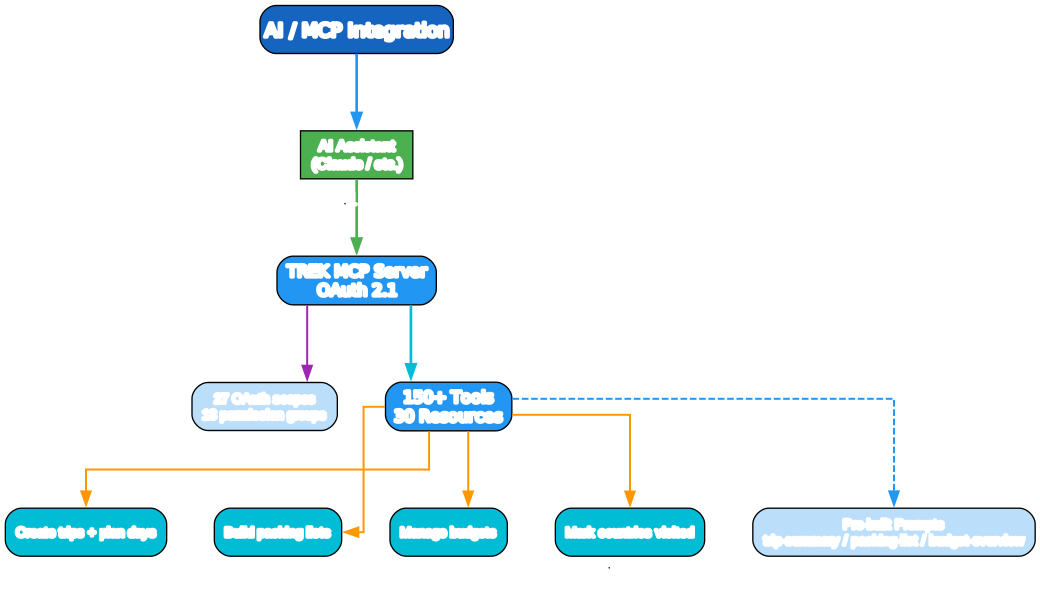
What that means in practice: an AI assistant can, with the right scoped token, create a trip, plan days, build a packing list, manage a budget, and mark countries visited — entirely through MCP tool calls. The MCP server is addon-aware, so enabling Atlas, Collab, or Vacay exposes their tools too. Three pre-built prompts ship out of the box: trip-summary, packing-list, and budget-overview. Rate limits are configurable (MCP_RATE_LIMIT defaults to 300 requests/user/minute; MCP_MAX_SESSION_PER_USER to 20 concurrent sessions).
This is the pattern to watch: self-hosted productivity apps exposing a scoped, OAuth-protected MCP surface so an AI assistant can act on your data with your permission, rather than scraping a UI or holding a god-token.
Self-Hosting
The quick-start path is a single Docker command:
ENCRYPTION_KEY=$(openssl rand -hex 32) docker run -d -p 3000:3000 \
  -e ENCRYPTION_KEY=$ENCRYPTION_KEY \
  -v ./data:/app/data -v ./uploads:/app/uploads mauriceboe/trek
Open http://localhost:3000. On first boot, TREK seeds an admin account — either from ADMIN_EMAIL/ADMIN_PASSWORD if set, or printed to the container log via docker logs trek.
Self-host deploy + collaborate
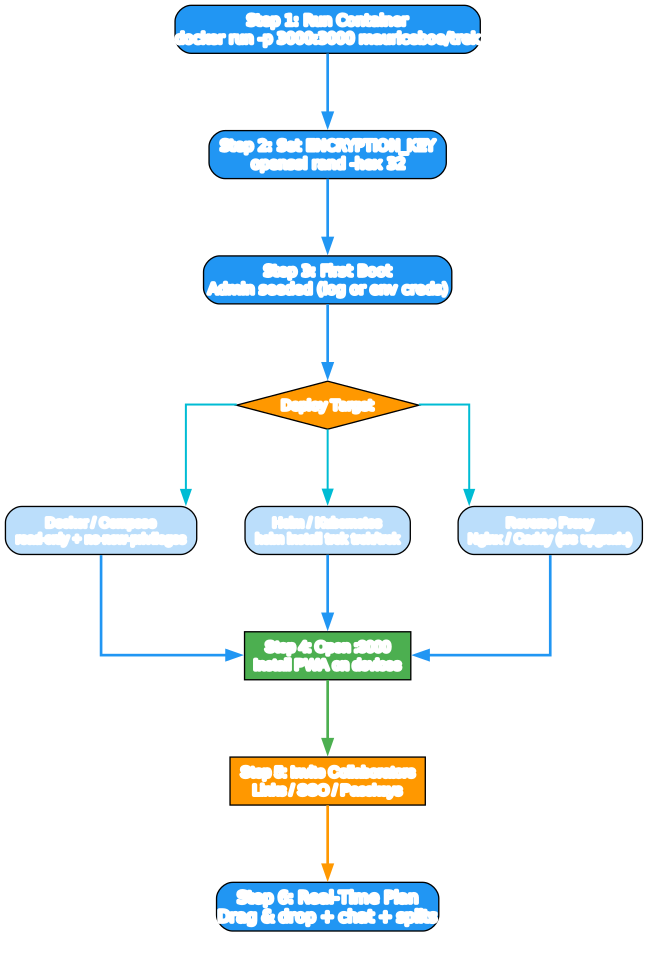
A few operational details worth flagging:
ENCRYPTION_KEYencrypts stored secrets (API keys, MFA, SMTP, OIDC) at rest. It auto-generates if unset, but you should set it explicitly and back it up — rotating it later runs a migration script (scripts/migrate-encryption.ts) that creates a timestamped DB backup before re-encrypting.- Mount only
./data:/app/dataand./uploads:/app/uploads. Never mount a volume at/app— doing so hides application code and causes startup failure. - Reverse proxy support for Nginx and Caddy. Nginx needs a WebSocket upgrade on
/wswith an 86400-second read timeout; Caddy handles TLS and WebSockets automatically. Allow up to 500 MB body size for backup-restore uploads. FORCE_HTTPSadds a 301 redirect, HSTS, CSP upgrade-insecure-requests, and the secure cookie flag.TRUST_PROXYcontrols how many reverse proxies are trusted (defaults to 1 in production).- Helm/Kubernetes install:
helm repo add trek https://mauriceboe.github.io/TREK && helm install trek trek/trek. - PWA install: open TREK over HTTPS, then iOS Share → Add to Home Screen, or Android Menu → Install app.
Why It Matters
TREK is worth paying attention to for three reasons.
First, real-time collaboration in a self-hosted app is hard, and TREK actually delivers it. WebSocket sync, role-based access, invite links with expiry, SSO, Passkeys, and 2FA — the full auth and collaboration surface you would expect from a SaaS product, but running on your own server under an AGPL-3.0 license.
Second, the MCP integration is a serious reference design. A self-hosted productivity app exposing 150+ scoped tools behind OAuth 2.1 — with addon-aware tool exposure and pre-built prompts — is exactly the shape “AI assistant acts on my data, with my permission” should take. It is more interesting than yet-another-chatbot-wrapper because the permission model is first-class.
Third, the deployment posture is production-grade. Hardened Docker defaults, Helm chart, reverse-proxy guidance, encryption-key rotation, and auto-backups with configurable retention. This is not a weekend project; it is a deployable piece of infrastructure.
The AGPL-3.0 license is the one caveat to read carefully: self-hosting is free for personal or internal company use, but if you modify TREK and offer it as a network service to third parties, your modifications must be open-sourced under the same license.
Links:
- GitHub: https://github.com/mauriceboe/TREK
- Helm chart: https://mauriceboe.github.io/TREK
- Docker image:
mauriceboe/trek - License: AGPL-3.0

Enjoyed this post? Never miss out on future posts by following us


