Stitch Skills: Google Labs’ Agent Skills Bridge for Design-to-Code with Stitch
Most design-to-code tooling is a one-way street: a design tool exports code, or a code generator produces a design, and the two never meet again. Stitch Skills is a collection of agent skills and plugins from Google Labs that closes the loop. It connects AI coding agents — Codex, Antigravity, Gemini CLI, Claude Code, and Cursor — to Google Stitch, the Google Labs design platform, so the same agent that writes your React can also generate, edit, and extract design systems from your Stitch project.
With 6,900 stars on GitHub and an Apache-2.0 license, the project implements the Agent Skills open standard (agentskills.io) and ships 14 skills across three plugins. Let us look at how it works.
How Stitch Skills Works
The architecture is a four-layer stack: your coding agent talks to the Stitch skills, the skills talk to the Stitch MCP server, and the MCP server talks to the Stitch design platform itself.
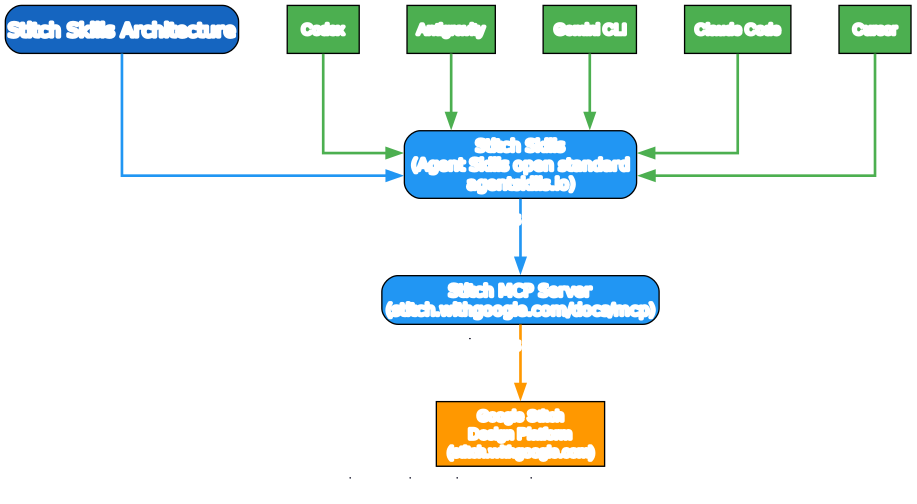
A few things are worth noting here:
- Agent-first, not GUI-first. There is no Stitch skills desktop app. The skills live in your coding agent’s environment and are invoked the way any agent skill is — by prompting the agent. Stitch itself is where the visual design happens.
- The Agent Skills open standard. The skills follow the open standard at agentskills.io, which is why the same skill bundle works across Codex, Antigravity, Gemini CLI, Claude Code, and Cursor without per-agent forks.
- Stitch MCP is the bridge. Every skill operation is an MCP call into the Stitch MCP server, which must be configured and running in your agent’s environment (setup docs live at stitch.withgoogle.com/docs/mcp/setup). The skills never talk to Stitch directly — they go through MCP, which keeps the agent’s tool surface clean and the design operations auditable.
Three Plugins, Fourteen Skills
The repository is organized into three plugin directories, each with a plugin.json and nested skills/ folders. The 14 skills split cleanly into design, build, and utility concerns.

stitch-design (6 skills) — design operations
stitch::code-to-design— converts frontend code (React, Vue, etc.) into Stitch designs via HTML extraction, design-system generation, and uploadstitch::generate-design— generates new screens from text or images, edits existing screens, and creates design variantsstitch::manage-design-system— uploadsDESIGN.mdfiles and applies themes to screensstitch::extract-design-md— extracts comprehensive design-system documentation directly from frontend source codestitch::extract-static-html— extracts self-contained static HTML from running web apps, inlining CSS and imagesstitch::upload-to-stitch— uploads local assets (images, mockups, HTML) to a Stitch project
stitch-build (4 skills) — code generation
stitch::react-components— converts Stitch screens into React component systems with validation and design-token consistencystitch::react-native— converts Stitch HTML designs into production-ready React Native components with StyleSheet and platform-specific coderemotion— generates walkthrough videos from Stitch projects using Remotion, with smooth transitions and zoomingshadcn-ui— expert guidance for integrating and building applications with shadcn/ui components
stitch-utilities (4 skills) — prompt and docs helpers
design-md— analyzes Stitch projects and generates comprehensiveDESIGN.mdfiles in semantic languageenhance-prompt— transforms vague UI ideas into polished, Stitch-optimized prompts with UI/UX keywordsstitch-loop— generates complete multi-page websites from a single prompt with automated validationtaste-design— generatesDESIGN.mdfiles enforcing premium, anti-generic UI standards
The bidirectional flow is the whole point. code-to-design and extract-design-md push existing code into Stitch; react-components and react-native pull Stitch designs back out as code. The same agent can do both in one session.
The Standardized Skill File Structure
Every skill follows the same file layout, which is what makes the bundle portable across agents.

skills/<skill-name>/
├── SKILL.md       — the "Mission Control" for the agent
├── scripts/       — executable enforcers (validation + networking)
├── resources/     — the knowledge base (checklists + style guides)
└── examples/      — "gold standard" syntactically valid references
The split is deliberate. SKILL.md is the instruction the agent reads; scripts/ are the executable validators and network calls the agent runs; resources/ are the reference materials it consults; and examples/ are the gold-standard outputs it matches against. Treating validation as executable code — rather than prose instructions the agent might ignore — is what the project calls “executable enforcers.”
One gotcha worth flagging: skills have inter-dependencies. Selective installation of a single skill must include all of its required dependencies, or the skill will fail at runtime.
Installation and the Design-to-Code Loop
Installation differs slightly per agent, but the plugin-install form is the recommended path.
Installation
For Codex via the plugin CLI:
codex plugin marketplace add google-labs-code/stitch-skills --ref main \
  --sparse .agents/plugins \
  --sparse plugins/stitch-design \
  --sparse plugins/stitch-build \
  --sparse plugins/stitch-utilities
For Claude Code:
npx plugins add google-labs-code/stitch-skills --scope project --target claude-code
For Cursor:
npx plugins add google-labs-code/stitch-skills --scope workspace --target cursor
Selective single-skill install is also supported via npx skills add google-labs-code/stitch-skills (remember the dependency caveat above).
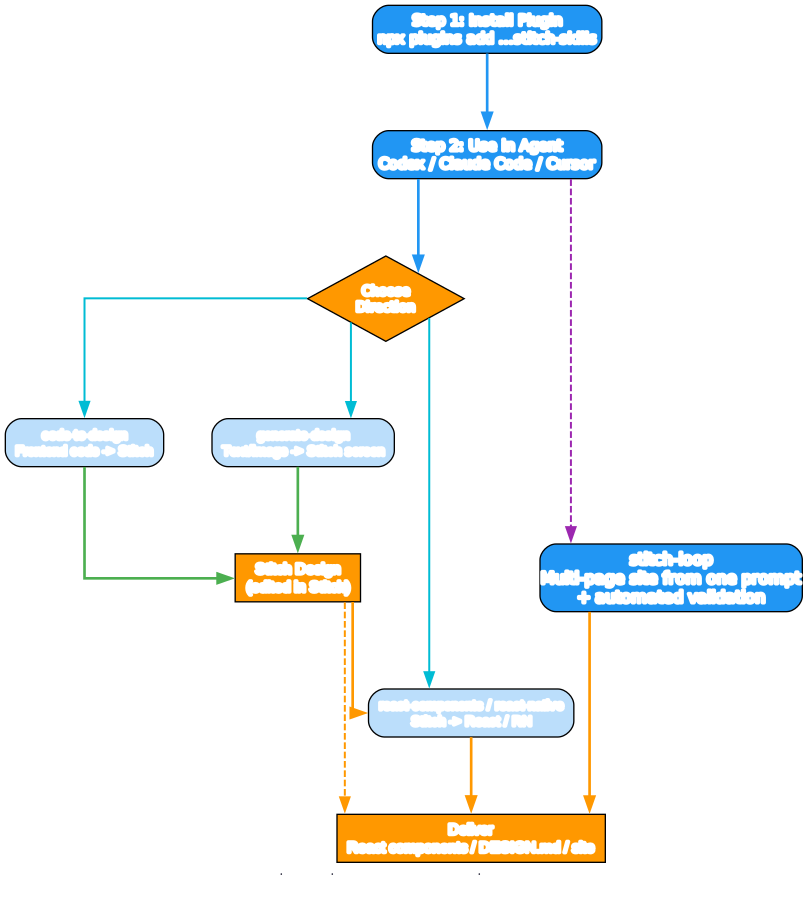
The loop in practice
- Install the plugin into your agent
- Use it in your agent — Codex, Claude Code, or Cursor
- Pick a direction: push code into Stitch (
code-to-design,extract-design-md), pull Stitch out as code (react-components,react-native), or generate fresh (generate-design) - Edit in Stitch — the visual design surface where screens, themes, and design systems live
- Deliver — React components, a
DESIGN.md, or a full multi-page site viastitch-loop
stitch-loop is the headline demo skill: it generates complete multi-page websites from a single prompt with automated validation, stitching the design-to-code loop end to end without leaving the agent.
Why It Matters
Stitch Skills is interesting for three reasons.
First, it treats design and code as a single bidirectional artifact, not two files that get exported once. The same agent session can extract a design system from a React codebase, upload it to Stitch, generate new screens, and pull those back as React Native components. That round-trip is the part that has historically been missing.
Second, it is a clean reference implementation of the Agent Skills open standard. Three plugins, fourteen skills, a standardized four-file structure, and the same bundle running unchanged across five different coding agents. If you are building your own agent skills, the directory layout and the “executable enforcer” pattern are worth copying.
Third, the MCP-as-bridge pattern is the right architectural call. By routing every design operation through the Stitch MCP server, the skills stay thin and the design platform stays the source of truth. The agent never has to know the Stitch REST surface; it only has to know how to call MCP tools.
One caveat: the repo is explicit that it is “not an officially supported Google product” and is ineligible for Google’s Open Source Software Vulnerability Rewards Program — so treat it as a Labs experiment, not a supported product. But as a Labs experiment with 6.9k stars and an active skill surface, it is one of the most complete design-to-code agent integrations available right now.
Links:
- GitHub: https://github.com/google-labs-code/stitch-skills
- Stitch platform: https://stitch.withgoogle.com
- MCP setup: https://stitch.withgoogle.com/docs/mcp/setup
- Agent Skills standard: https://agentskills.io
- License: Apache-2.0

Enjoyed this post? Never miss out on future posts by following us


