Learn Next.js App Router in a Single Post: Complete Tutorial From Server Components to Caching and Server Actions
Next.js App Router (the app/ directory, introduced in 13.4 and the default since 14) is a fundamental rethinking of how React apps work: pages render on the server by default, ship zero JavaScript for static content, and use a new file-based routing system that integrates layouts, loading states, and error boundaries. This is the modern Next.js — different enough from the Pages Router that it deserves its own tutorial. This single post covers it in five stages, with hand-drawn diagrams and runnable code.
Learning Roadmap
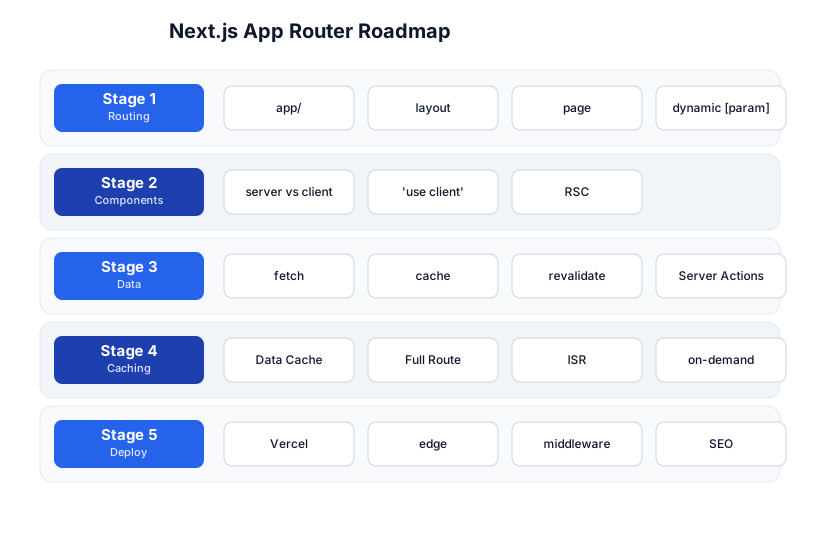
The roadmap moves from the routing system (Stage 1), through the server/client component model (Stage 2), data fetching (Stage 3), the caching layers (Stage 4), and deployment + optimization (Stage 5). The React tutorial is a prerequisite — this post goes deep on the App Router specifically.
Stage 1 — Routing: The app/ Directory
File-based routing
The App Router maps the file system to URLs. Each folder inside app/ is a route segment; each page.tsx is the content for that route.
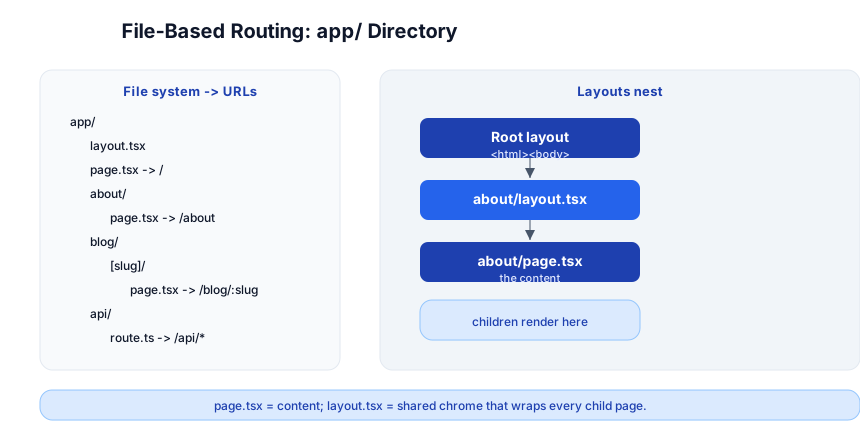
app/
  layout.tsx          → shared chrome (wraps every page)
  page.tsx            → /
  about/
    page.tsx          → /about
  blog/
    [slug]/
      page.tsx        → /blog/hello-world
  api/
    route.ts          → /api/* (Route Handlers)
Layouts nest
layout.tsx wraps every page in its subtree. Layouts nest — the root layout wraps the about layout, which wraps the about page:
// app/layout.tsx (root layout — required, wraps everything)
export default function RootLayout({ children }: { children: React.ReactNode }) {
  return (
    <html lang="en">
      <body><nav>...</nav>{children}</body>
    </html>
  );
}

// app/about/layout.tsx (nested — wraps only /about/*)
export default function AboutLayout({ children }) {
  return <div className="about-page">{children}</div>;
}
Layouts persist across navigations (they don’t re-render when you navigate within their subtree) — so a sidebar, navigation bar, or player widget in a layout stays mounted while the page content swaps underneath. This is the biggest UX improvement over the Pages Router.
Dynamic routes
app/blog/[slug]/page.tsx    → /blog/:slug
app/shop/[category]/[id]/page.tsx → /shop/electronics/42
// app/blog/[slug]/page.tsx
export default function Post({ params }: { params: { slug: string } }) {
  return <h1>Post: {params.slug}</h1>;
}
Special files
| File | Purpose |
|---|---|
page.tsx | route content (required for a route to be accessible) |
layout.tsx | shared chrome (wraps every child page) |
loading.tsx | Suspense fallback while the page loads |
error.tsx | error boundary if the page throws |
not-found.tsx | 404 for this subtree |
route.ts | API endpoint (Route Handler) |
middleware.ts | runs before routing (auth, redirects, i18n) |
Stage 2 — Server Components vs Client Components
The default: Server Components
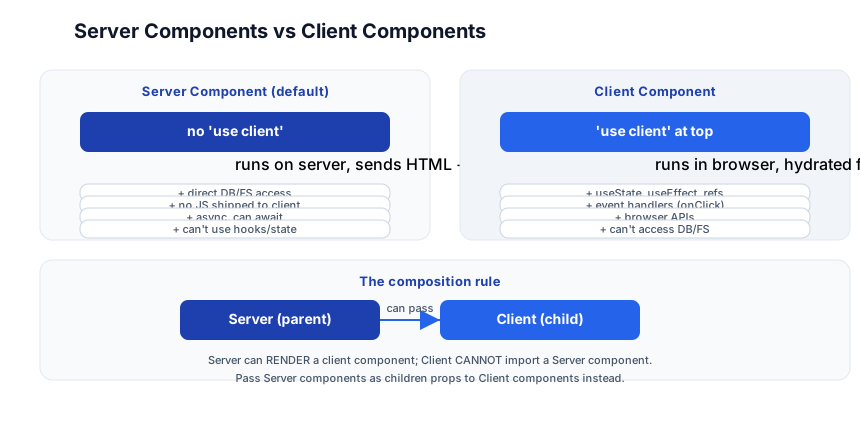
In the App Router, every component is a Server Component by default. It renders on the server, sends HTML to the browser, and ships zero JavaScript (no hydration). This means:
- It can access databases, the filesystem, environment variables directly.
- It can be
asyncandawaitdata fetching. - It cannot use
useState,useEffect, event handlers, or browser APIs.
The opt-in: Client Components
Add "use client" at the top of a file to make it a Client Component — the traditional React component that runs in the browser, can use hooks, handle events, and access the DOM:
// app/counter.tsx
"use client";                          // this runs in the browser

import { useState } from "react";

export default function Counter() {
  const [count, setCount] = useState(0);
  return <button onClick={() => setCount(count + 1)}>{count}</button>;
}
The composition rule
- ✅ Server Component can render a Client Component (pass it as children or import it).
- ❌ Client Component cannot import a Server Component (the Server Component can’t run in the browser).
If a Client Component needs Server Component output, pass it as children:
// app/page.tsx (Server Component)
import ClientWrapper from "./ClientWrapper";
import ServerData from "./ServerData";

export default function Page() {
  return (
    <ClientWrapper>
      <ServerData />    {/* rendered on server, passed as children to the client component */}
    </ClientWrapper>
  );
}
Pitfall: The most common App Router mistake is putting
"use client"at the top oflayout.tsxorpage.tsxout of habit. This makes the entire tree a Client Component — you lose the server-rendering benefits (no direct DB access, JS shipped to client, no streaming). Default to server; reach for"use client"only at the leaf where interactivity lives.
Stage 3 — Data Fetching + Server Actions
fetch() is cached by default
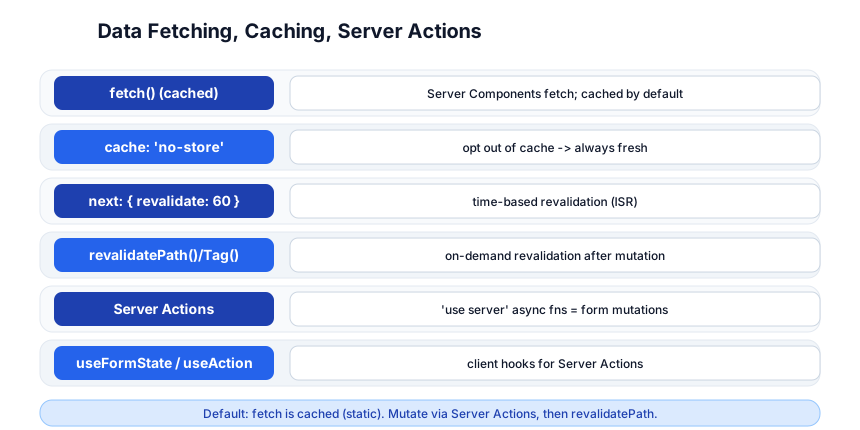
In a Server Component, fetch() is cached by default — the result is stored in the Data Cache and reused across requests. This makes pages fast (no repeated DB/API calls) but means you have to opt out when you need fresh data:
// app/products/page.tsx (Server Component)
export default async function Products() {
  // cached — same result for every request until revalidation
  const res = await fetch("https://api.example.com/products");
  const products = await res.json();
  return <ProductList products={products} />;
}
Controlling the cache
// opt out: always fetch fresh
fetch(url, { cache: "no-store" });

// time-based revalidation (ISR): revalidate every 60 seconds
fetch(url, { next: { revalidate: 60 } });

// tag-based: revalidate on demand
fetch(url, { next: { tags: ["products"] } });
// later, after a mutation:
revalidateTag("products");
Server Actions — mutations without API routes
A Server Action is an async function that runs on the server. Mark it with "use server" and call it from a form (or a button) — no need to write a separate API endpoint:
// app/posts/create.tsx
"use server";

import { revalidatePath } from "next/cache";

export async function createPost(formData: FormData) {
  const title = formData.get("title") as string;
  await db.post.create({ data: { title } });
  revalidatePath("/posts");   // tell Next.js to re-render the /posts page
}

// app/posts/page.tsx
import { createPost } from "./create";

export default function Posts() {
  return (
    <form action={createPost}>
      <input name="title" />
      <button type="submit">Create</button>
    </form>
  );
}
The form’s action={createPost} calls the Server Action directly — the form submission goes to the server, the action runs, and revalidatePath refreshes the cached data. No fetch, no API route, no client-side state management for the mutation.
Pitfall: After a Server Action mutates data, you must call
revalidatePath()orrevalidateTag()— otherwise the cached page still shows old data. The mutation succeeds, but the user sees stale content until the next build.
Stage 4 — Caching Layers
Next.js has four distinct caching layers, and understanding them is the difference between a fast site and a confusing one:
| Cache | What it stores | Duration | Controlled by |
|---|---|---|---|
| Request Memo | fetch() result within one request | per-request (deduped) | automatic |
| Data Cache | fetch() result across requests | until revalidation | fetch(url, { next: { revalidate } }) |
| Full Route Cache | rendered HTML + RSC payload of static routes | until revalidation | revalidatePath() / deploy |
| Router Cache | navigated RSC payloads in the browser | session (client-side) | router.refresh() |
Static vs Dynamic: A page is static if all its data is cached (rendered at build time, served from CDN). It’s dynamic if any fetch uses cache: "no-store" or reads from a dynamic API (cookies, headers, searchParams). Static pages are fast (CDN-cached HTML); dynamic pages render per-request but can still stream.
ISR (Incremental Static Regeneration): The middle ground — a static page that re-renders in the background on a schedule (revalidate: 60) or on demand (revalidatePath). The user gets the cached version instantly; the next request gets the fresh version. This is how you get static-site speed with dynamic data freshness.
Stage 5 — Deployment + Optimization
Vercel — the native host
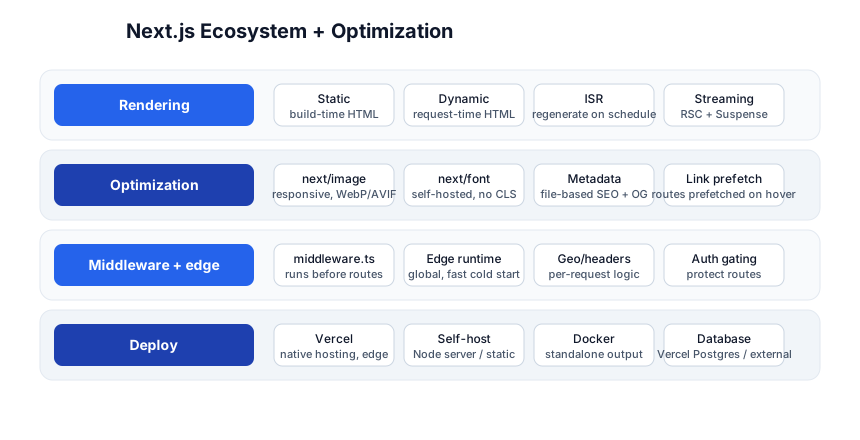
Vercel (the company behind Next.js) is the native deployment target: git push → Vercel builds → deploys to a global edge network. Static pages are served from CDN; dynamic pages run on Edge Functions (fast cold start) or Node.js serverless functions.
npx create-next-app@latest my-app
npm run dev          # http://localhost:3000
npm run build        # production build
# deploy: push to GitHub, connect on vercel.com, done
Self-hosting / Docker
# next.config.js: output: "standalone"
FROM node:20-alpine AS build
WORKDIR /app
COPY . .
RUN npm ci && npm run build

FROM node:20-alpine
COPY --from=build /app/.next/standalone ./
COPY --from=build /app/.next/static ./.next/static
COPY --from=build /app/public ./public
EXPOSE 3000
CMD ["node", "server.js"]
next/image — responsive, optimized images
import Image from "next/image";

<Image src="/hero.jpg" alt="Hero" width={1200} height={630} priority />
// Next.js generates responsive srcset, serves WebP/AVIF, lazy-loads, prevents CLS
next/image automatically generates multiple sizes, serves modern formats, lazy-loads below-the-fold images, and prevents layout shift — all from one component.
next/font — self-hosted fonts (no CLS)
import { Inter } from "next/font/google";
const inter = Inter({ subsets: ["latin"] });

// in layout.tsx:
<html className={inter.className}>
Fonts are self-hosted (no Google Fonts request), preloaded, and size-adjusted to prevent FOUT/CLS.
Metadata — file-based SEO
// app/layout.tsx
export const metadata: Metadata = {
  title: "PyShine — Learn Programming",
  description: "Complete programming tutorials...",
  openGraph: { images: ["/og.png"] },
};
Or per-page:
// app/blog/[slug]/page.tsx
export async function generateMetadata({ params }) {
  const post = await getPost(params.slug);
  return { title: post.title, description: post.excerpt };
}
Streaming with Suspense
export default function Page() {
  return (
    <>
      <h1>Dashboard</h1>
      <Suspense fallback={<Spinner />}>
        <SlowChart />     {/* streams in when ready */}
      </Suspense>
      <Suspense fallback={<Spinner />}>
        <SlowTable />
      </Suspense>
    </>
  );
}
Server Components wrapped in <Suspense> stream — the browser shows the shell immediately, and each Suspense boundary fills in as its data resolves. No loading spinner for the whole page; progressive rendering.
Middleware
// middleware.ts
import { NextResponse } from "next/server";
import type { NextRequest } from "next/server";

export function middleware(request: NextRequest) {
  const token = request.cookies.get("auth");
  if (!token && request.pathname.startsWith("/dashboard")) {
    return NextResponse.redirect(new URL("/login", request.url));
  }
  return NextResponse.next();
}

export const config = { matcher: ["/dashboard/:path*"] };
Middleware runs before routing — use it for auth gating, A/B testing, redirects, and locale detection. It runs on the Edge runtime (fast cold start, globally distributed).
Quick-Start Checklist
npx create-next-app@latest— choose TypeScript, App Router, Tailwind.- Understand the file system:
app/page.tsx=/,app/about/page.tsx=/about. - Default to Server Components — don’t add
"use client"unless you need hooks/events. - Fetch data in Server Components —
async function Page() { const data = await fetch(...) }. - Add a
loading.tsx— instant Suspense fallback while data loads. - Use
next/imagefor all images — responsive, optimized, zero CLS. - Set
metadatain layout.tsx for SEO + Open Graph. - Add a Server Action for form mutations —
"use server"+revalidatePath(). - Deploy on Vercel —
git pushand it’s live, globally edge-cached. - Check the cache: if data looks stale, add
revalidatePathafter mutations.
Common Pitfalls
"use client"on page/layout — makes the whole tree client-side; loses server rendering. Only add it at the leaf.- Client component importing server component — fails; pass as
childreninstead. - Forgetting
revalidatePathafter a Server Action mutation — user sees stale data. cache: "no-store"everywhere — defeats caching; pages become dynamic when they could be static.- No
loading.tsx— the page hangs with a blank screen while data fetches; add Suspense. - Heavy images without
next/image— huge payloads, layout shift; always usenext/image. - Dynamic function in a “static” page —
cookies(),headers(),searchParamsmake the page dynamic (opt out of Full Route Cache). Be deliberate. - Forgetting
generateMetadataon dynamic pages — the SEO title/description don’t match the content.
Further Reading
- Next.js Docs — the official App Router guide
- Next.js Learn — the official interactive course
- Vercel Docs — deployment + edge
- React Server Components — the RSC spec
- Lee Robinson’s YouTube — Next.js demos
Related guides
Next.js App Router builds on React fundamentals — these PyShine tutorials connect to it:
- Learn React + Next.js in One Post — the prerequisite; components, hooks, and the React mental model.
- Learn HTML + CSS in One Post — the styling layer;
next/image,next/font, and CSS modules build on HTML/CSS. - Learn Tailwind CSS in One Post — the default styling in
create-next-app. - Learn TypeScript in One Post — Next.js is TypeScript-first; the TS section covers generics, narrowing, and types.
- Learn PostgreSQL in One Post — Server Components can query the DB directly; this is the database.
- Learn Docker in One Post — the self-hosting Dockerfile above; containerize the standalone build.
Next.js App Router is a paradigm shift: the server is the default, the client is the opt-in. The five stages here — routing, server/client components, data fetching, caching, deployment — cover everything from a file-based route to a streamed, ISR-cached, Vercel-deployed app with Server Actions. The two habits that pay off: default to Server Components (the client is the exception, not the rule), and understand the four caching layers (Data Cache, Full Route Cache, Request Memo, Router Cache — knowing which one controls what fixes 90% of “why is my data stale?” bugs). Enjoyed this post? Never miss out on future posts by following us npx create-next-app, add a Server Component page that fetches data, and watch the HTML arrive with zero client JS — once you’ve felt that, the model clicks. 



