Grok Build: SpaceXAI’s Terminal-Based AI Coding Agent
xAI has open-sourced Grok Build (grok) — a terminal-based AI coding agent written in Rust. It runs as a full-screen TUI that understands your codebase, edits files, executes shell commands, searches the web, and manages long-running tasks. It operates in three modes: interactive TUI, headless for scripting/CI, and embedded in editors via the Agent Client Protocol (ACP). With 26,300+ stars and Apache 2.0 licensing, it is a serious entry in the coding agent space.
What Is Grok Build?
Grok Build is SpaceXAI’s answer to the terminal coding agent. It is not a thin wrapper around an LLM — it is a full agent runtime with a rich TUI, a comprehensive tool suite, a workspace abstraction for filesystem/VCS/checkpointing, and three execution modes for different use cases. The source is written in Rust, synced periodically from the SpaceXAI monorepo, with a SOURCE_REV file recording the monorepo commit SHA.
Key Capabilities
- Understands your codebase — reads, navigates, and reasons about project structure
- Edits files — directly modifies source with rollback support via checkpoints
- Executes shell commands — runs terminal commands with sandboxing and permission controls
- Searches the web — integrated web search for real-time information
- Manages long-running tasks — background execution with monitoring and
Ctrl+Bto demote - Plan mode — structured planning with plan-file edits and approval before coding
- Subagents — parallel child sessions with agent types, personas, and capability modes
- Memory — cross-session knowledge persistence with
/flush,/dream, and hybrid search - Sessions — save, load, resume, rewind, compact, and fork
Crate Architecture
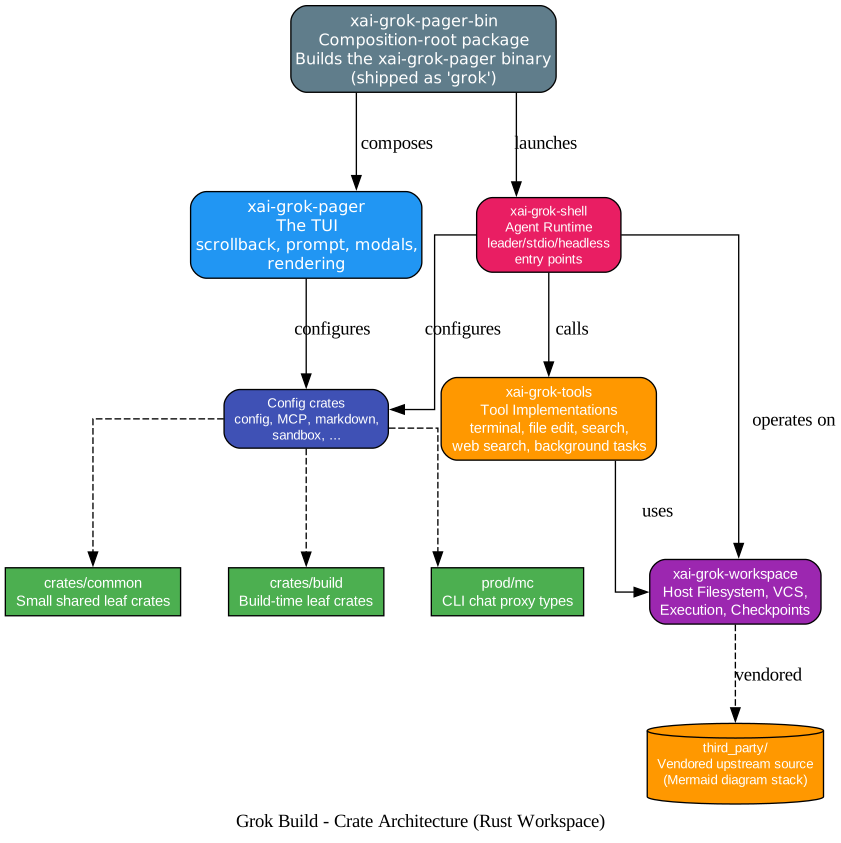
The repository is a Rust workspace with five main crates plus supporting leaf crates:
| Crate | Role |
|---|---|
xai-grok-pager-bin | Composition-root package; builds the xai-grok-pager binary (shipped as grok) |
xai-grok-pager | The TUI: scrollback, prompt, modals, rendering |
xai-grok-shell | Agent runtime + leader/stdio/headless entry points |
xai-grok-tools | Tool implementations (terminal, file edit, search, web search, background tasks) |
xai-grok-workspace | Host filesystem, VCS, execution, checkpoints |
Supporting crates include config, MCP, markdown, sandbox, and more under crates/codegen/, with shared leaf crates in crates/common/, crates/build/, and prod/mc/. The third_party/ directory contains vendored upstream source, notably the Mermaid diagram stack.
Important: The root Cargo.toml (workspace members, dependency versions, lints, profiles) is generated and should be treated as read-only. Prefer editing per-crate Cargo.toml files.
Three Execution Modes
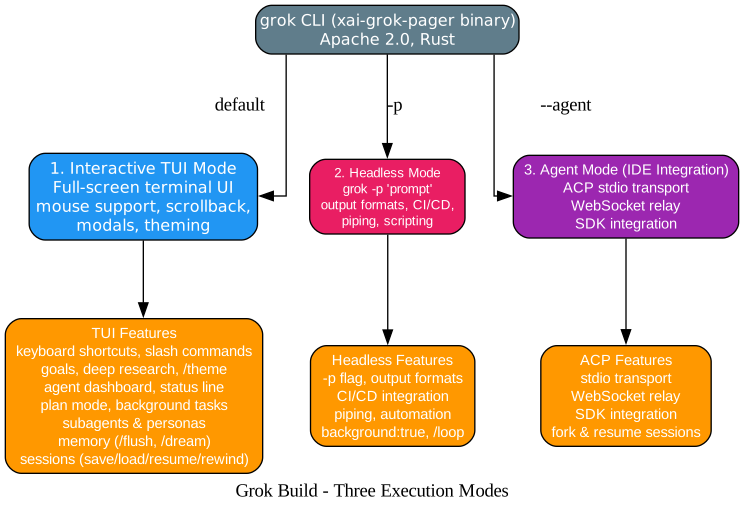
1. Interactive TUI Mode (Default)
The full-screen terminal UI with mouse support, scrollback, modals, theming, keyboard shortcuts, slash commands, agent dashboard, status line, plan mode, background tasks, subagents, memory, and session management.
2. Headless Mode (grok -p)
For scripting, CI/CD integration, and piping. Runs without the TUI, supports output formats, and can be embedded in automation pipelines. Background tasks use background:true and /loop.
3. Agent Mode (IDE Integration via ACP)
For embedding in editors and IDEs. Uses ACP stdio transport, WebSocket relay, and SDK integration. Supports fork and resume sessions for parallel work streams.
Extension & Integration Layer

Grok Build is highly extensible through multiple mechanisms:
| Mechanism | Description |
|---|---|
| MCP Servers | External tool integrations through the Model Context Protocol |
| Skills | Reusable prompt packages in the SKILL.md format |
| Plugins | Bundle and share skills, commands, agents, hooks, and MCP servers; install from marketplaces with organization governance controls |
| Hooks | Lifecycle scripts and HTTP callbacks for pre- and post-tool-use events |
| Custom Models | Bring-your-own-key, Ollama, and OpenAI-compatible endpoints |
| Project Rules | Per-directory AGENTS.md instructions with precedence hierarchy |
| Memory | Cross-session knowledge persistence with /flush, /dream, and hybrid search |
| Subagents | Parallel child sessions with agent types, personas, and capability modes |
| Sandbox | OS-level filesystem and network isolation profiles |
| Permissions | Modes: always-approve, auto, ask; rules, matching, hooks |
Agent Loop & Tool Pipeline
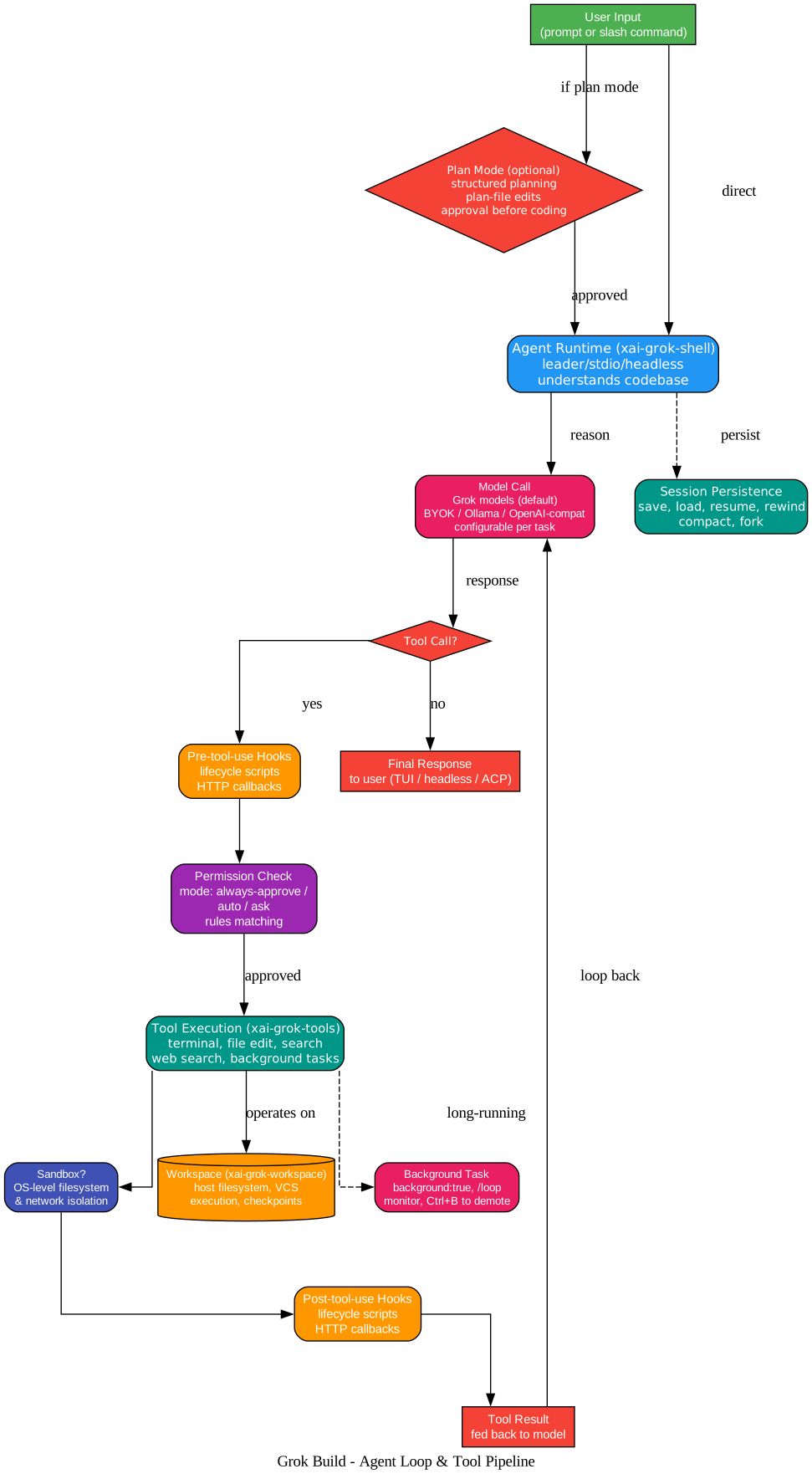
The agent loop follows a structured pipeline:
- User input — prompt or slash command, optionally entering plan mode
- Agent runtime (
xai-grok-shell) — understands the codebase and reasons about the task - Model call — Grok models by default, or BYOK/Ollama/OpenAI-compatible endpoints
- Tool decision — if the model requests a tool call:
- Pre-tool-use hooks — lifecycle scripts and HTTP callbacks fire
- Permission check — mode-based (always-approve/auto/ask) with rules matching
- Tool execution (
xai-grok-tools) — terminal, file edit, search, web search, background tasks - Sandbox check — OS-level filesystem and network isolation if configured
- Post-tool-use hooks — lifecycle scripts and HTTP callbacks fire
- Tool result — fed back to the model for the next reasoning step
- Final response — delivered to user via TUI, headless output, or ACP
Long-running tasks can be demoted to background execution with Ctrl+B, monitored, and managed with /loop.
Installation
Install the Released Binary
# macOS / Linux / Git Bash
curl -fsSL https://x.ai/cli/install.sh | bash

# Windows PowerShell
irm https://x.ai/cli/install.ps1 | iex

grok --version
See the changelog for the latest fixes, features, and improvements.
Build from Source
Requirements:
- Rust — toolchain pinned by
rust-toolchain.toml;rustupinstalls it automatically - DotSlash — required for hermetic tools under
bin/(notablybin/protoc) - protoc — resolves via DotSlash or a
protoconPATH/$PROTOC
cargo install dotslash

git clone https://github.com/xai-org/grok-build.git
cd grok-build
cargo run -p xai-grok-pager-bin    # build + launch the TUI
macOS and Linux are supported build hosts; Windows builds are best-effort and not currently tested from this tree. On first launch, Grok opens your browser to authenticate.
User Guide (27 Documents)
The user guide ships with the pager crate and covers everything from getting started to advanced automation:
Tier 1: Essential User Docs
- Getting Started — installation, first launch, authentication, key concepts
- Authentication — browser login, API keys, OIDC/SSO, external auth providers, device-code flow
- Keyboard Shortcuts — every key binding and mouse action
- Slash Commands — every
/command including goals, deep research, workflow run management - Configuration —
config.toml,pager.toml, environment variables, file locations
Tier 2: Core Feature Docs
- Theming and Appearance — themes,
/themecommand, color-support detection - MCP Servers — external tool integrations
- Skills — reusable prompt packages in SKILL.md format
- Plugins — bundle and share; marketplaces with org controls
- Hooks — lifecycle scripts and HTTP callbacks
- Custom Models — BYOK, Ollama, OpenAI-compatible endpoints
- Project Rules (AGENTS.md) — per-directory instructions and precedence
- Memory — cross-session persistence,
/flush,/dream, hybrid search
Tier 3: Advanced Usage Docs
- Headless Mode and Scripting —
grok -p, output formats, CI/CD, piping - Agent Mode and IDE Integration — ACP stdio, WebSocket relay, SDK
- Subagents and Personas — parallel child sessions, capability modes
- Session Management — save, load, resume, rewind, compact
- Sandbox Mode — OS-level filesystem and network isolation
- Plan Mode — structured planning, plan-file edits, approval
- Background Tasks —
background:true,/loop,monitor,Ctrl+B - Terminal Support — tmux, SSH, truecolor, clipboard, OSC 52
- Permissions and Safety — modes, rules, matching, hooks
- Agent Dashboard — central overview of local sessions and forks
- Monitoring Usage — external OpenTelemetry export
- Status Line — built-in segments, command scripts, stdin JSON contract
- Configuration Reference — field list for
config.toml,managed_config.toml,requirements.toml - grok clone — depth-1 Grove clone,
--full-history, safe deepen/switch
Subagents
Subagents run in parallel to research, build, and review at once. Grok Build delegates larger tasks to specialized subagents, each running in parallel with its own context window. Deep worktree support lets you launch subagents in their own Git worktrees, enabling true parallel development without workspace conflicts.
Plan Mode
The plan viewer makes it easy to architect complex projects. Start in plan mode for complex tasks — every edit is blocked until you approve. Approve the plan, comment on individual steps, or rewrite it entirely. Every approved change shows up as a clean diff.
Q&A Mode
Ambiguous tasks get a quick multiple-choice. Pick a design direction, a framework, or a schema. Answers flow straight into the plan.
Plugin Marketplaces
Marketplaces help you share capabilities across your team. Bundle skills, agents, hooks, and MCP servers behind one install. Install from marketplaces or self-host from any git repo. Connect to Linear, Sentry, Postgres, browsers — anything with MCP.
Key Design Decisions
Why Rust? Rust provides memory safety without garbage collection, high performance for the TUI rendering loop, and strong type guarantees for the agent runtime. The toolchain is pinned by rust-toolchain.toml for reproducibility.
Why a monorepo sync? The repository is synced periodically from the SpaceXAI monorepo, with a SOURCE_REV file recording the commit SHA. External contributions are not accepted — the open-source repository is a read-only mirror for community use.
Why three execution modes? Different workflows need different interfaces: interactive TUI for daily coding, headless for CI/CD and scripting, and ACP for IDE integration. The same agent runtime powers all three.
Why ACP over custom protocols? The Agent Client Protocol provides a standardized stdio transport and WebSocket relay for editor integration, enabling Grok Build to embed in any ACP-compatible IDE without custom integration work.
Why vendored third-party code? The third_party/ directory contains vendored upstream source (notably the Mermaid diagram stack) to ensure hermetic builds and avoid supply-chain issues. The THIRD-PARTY-NOTICES file documents all vendored dependencies, including in-tree source ports from openai/codex and sst/opencode.
Further Reading
- GitHub: xai-org/grok-build — Apache 2.0 license
- Grok Build landing page
- Documentation
- Changelog
- Getting Started Guide
- Authentication Guide
- MCP Servers Guide
- Skills Guide
- Plugins Guide
- Headless Mode Guide
- Agent Mode and IDE Integration
- DotSlash CLI
Summary
Grok Build is SpaceXAI’s terminal-based AI coding agent — a full-screen Rust TUI that understands codebases, edits files, executes shell commands, searches the web, and manages long-running tasks. With three execution modes (interactive TUI, headless for CI/CD, ACP for IDE integration), a comprehensive extension layer (MCP servers, skills, plugins, hooks, custom models, project rules, memory, subagents, sandbox, permissions), and a 27-document user guide, it is one of the most feature-complete open-source coding agents available. The Rust workspace architecture (pager-bin, pager, shell, tools, workspace) provides clean separation of concerns, while the monorepo sync model ensures the open-source community always has access to the latest SpaceXAI developments. Apache 2.0 licensed and available for macOS, Linux, and Windows. Enjoyed this post? Never miss out on future posts by following us 


