OpenMAIC: The Open-Source Multi-Agent Interactive Classroom
Education is the canonical use case for AI agents: a patient teacher that explains, a curious classmate that asks questions, and a rich set of interactive materials — slides, quizzes, simulations — all generated on demand. OpenMAIC (Open Multi-Agent Interactive Classroom) from Tsinghua University’s MAIC lab is the open-source platform that delivers exactly this. Describe a topic or upload a document, and OpenMAIC generates a full lesson in minutes — with AI teachers who lecture and draw on a whiteboard, AI classmates who discuss and ask questions, and interactive scenes that include 3D visualizations, games, and project-based learning.
What Is OpenMAIC?
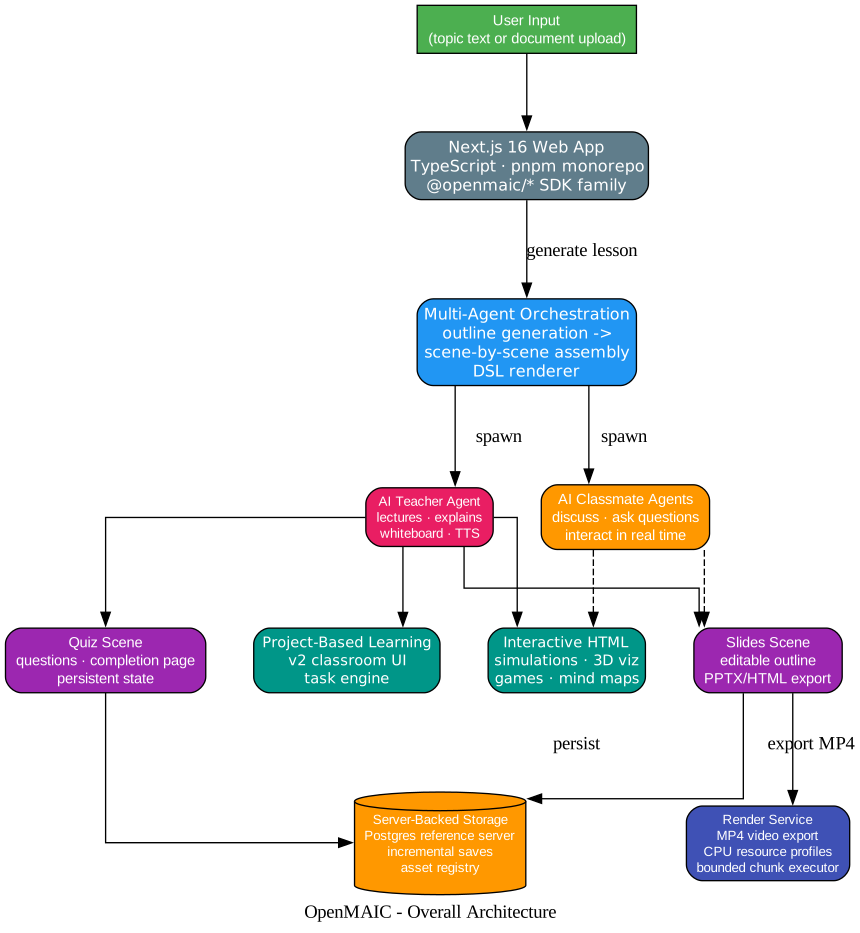
OpenMAIC is a Next.js 16 web application (TypeScript, pnpm monorepo) that turns any topic or document into a multi-agent classroom experience. The core idea: use multi-agent orchestration to generate a structured lesson — slides, quizzes, interactive simulations, and project-based learning activities — and then deliver it through AI agents who speak, draw, and discuss in real time.
Highlights
- One-click lesson generation — Describe a topic or attach your materials; the AI builds a full lesson in minutes
- Multi-agent classroom — AI teachers and peers lecture, discuss, and interact with you in real time
- Rich scene types — Slides, quizzes, interactive HTML simulations, and project-based learning (PBL)
- Whiteboard and TTS — Agents draw diagrams, write formulas, and explain out loud
- Export anywhere — Download editable
.pptxslides, interactive.htmlpages, or.mp4videos - OpenClaw integration — Generate classrooms from Feishu, Slack, Telegram, and 20+ messaging apps
Lesson Generation Pipeline
The pipeline from topic to classroom has five stages, each with LLM-driven generation and optional per-stage model routing.
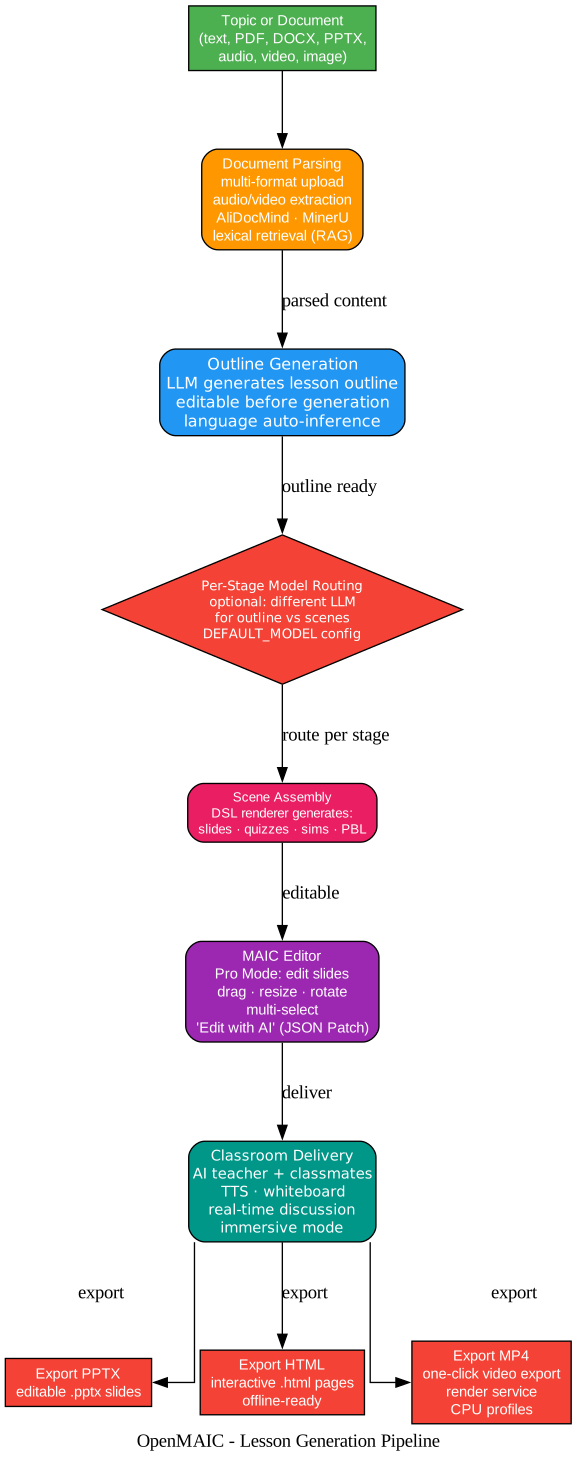
- Document Parsing — Multi-format upload (PDF, DOCX, PPTX, audio, video, image) with audio/video extraction, AliDocMind, MinerU, and a lexical retrieval foundation (RAG).
- Outline Generation — An LLM generates the lesson outline, which is editable before full generation. Language is auto-inferred from the input.
- Per-Stage Model Routing — Optionally use different LLMs for the outline vs. scene generation stages via
DEFAULT_MODELconfig. - Scene Assembly — The DSL renderer generates four scene types: slides, quizzes, interactive HTML simulations, and PBL activities.
- MAIC Editor — Pro Mode lets you edit slides directly (drag, resize, rotate, multi-select) or use “Edit with AI” with validated JSON Patch edits and multi-session history.
- Classroom Delivery — AI teacher and classmate agents deliver the lesson with TTS, whiteboard, real-time discussion, and immersive mode.
Export Options
| Format | Description |
|---|---|
.pptx | Editable PowerPoint slides |
.html | Interactive HTML pages (offline-ready) |
.mp4 | One-click video export via the render service (CPU resource profiles, bounded chunk executor) |
Multi-Agent Orchestration
The multi-agent design is what makes OpenMAIC feel like a real classroom rather than a slide generator:
- AI Teacher Agent — Lectures, explains concepts, draws on the whiteboard, and uses TTS to speak aloud
- AI Classmate Agents — Participate in discussions, ask questions, and interact with both the teacher and the user in real time
Agents operate across four scene types:
| Scene Type | Description |
|---|---|
| Slides | Editable outline with PPTX/HTML export |
| Quiz | Questions with a completion page and persistent quiz state |
| Interactive HTML | 3D visualizations, simulations, games, mind maps, online programming |
| Project-Based Learning (PBL) | v2 classroom UI with a vocational-learning task engine |
Provider Matrix: 15+ LLM Providers + Local AI
OpenMAIC supports an extensive provider matrix, covering both cloud and local AI.

Cloud LLM Providers
| Provider | Models |
|---|---|
| OpenAI | GPT-5.5, GPT-5.6 |
| Anthropic | Claude Opus 4.8, Claude Sonnet 5 |
| Amazon Bedrock | Claude (managed, AWS credentials) |
| Google Gemini | Gemini 3 Flash (recommended), Gemini 3.1 Pro |
| DeepSeek | DeepSeek-V4 |
| Qwen | Qwen3.7 Plus/Max |
| Kimi | K2.7 Code |
| MiniMax | M2.7, M3 |
| Grok (xAI) | Grok models |
| GLM (Zhipu) | GLM-5.1, GLM-5.2 |
| OpenRouter | 100+ models via single API |
| Tencent | Hunyuan/TokenHub |
| Xiaomi | MiMo (Token Plan) |
| Doubao | Doubao models |
Local AI Providers
| Provider | Capabilities |
|---|---|
| Ollama | Local LLM inference |
| Lemonade | Local LLM + image generation + TTS + ASR (OpenAI-compatible, no API key) |
| FunASR | Local speech recognition (SenseVoiceSmall, Paraformer, Fun-ASR-Nano with vLLM) |
| VoxCPM2 | Voice cloning with auto-generated voices |
| ComfyUI | Image generation |
Configuration
Configure providers via .env.local or server-providers.yml:
# OpenAI
OPENAI_API_KEY=sk-...
DEFAULT_MODEL=openai:gpt-5.5

# Anthropic
ANTHROPIC_API_KEY=sk-ant-...

# Google Gemini (recommended)
GOOGLE_API_KEY=...
DEFAULT_MODEL=google:gemini-3-flash-preview

# Amazon Bedrock
BEDROCK_REGION=us-east-1
BEDROCK_MODELS=us.anthropic.claude-sonnet-5,us.anthropic.claude-opus-4-8
DEFAULT_MODEL=bedrock:us.anthropic.claude-sonnet-5

# Local (Lemonade - no API key needed)
LEMONADE_BASE_URL=http://localhost:13305/v1
TTS_LEMONADE_BASE_URL=http://localhost:13305/v1
ASR_LEMONADE_BASE_URL=http://localhost:13305/v1
IMAGE_LEMONADE_BASE_URL=http://localhost:13305/v1
The recommended model is Gemini 3 Flash for the best balance of quality and speed. For highest quality (at slower speed), use Gemini 3.1 Pro.
OpenClaw Integration: Classrooms from Your Chat App
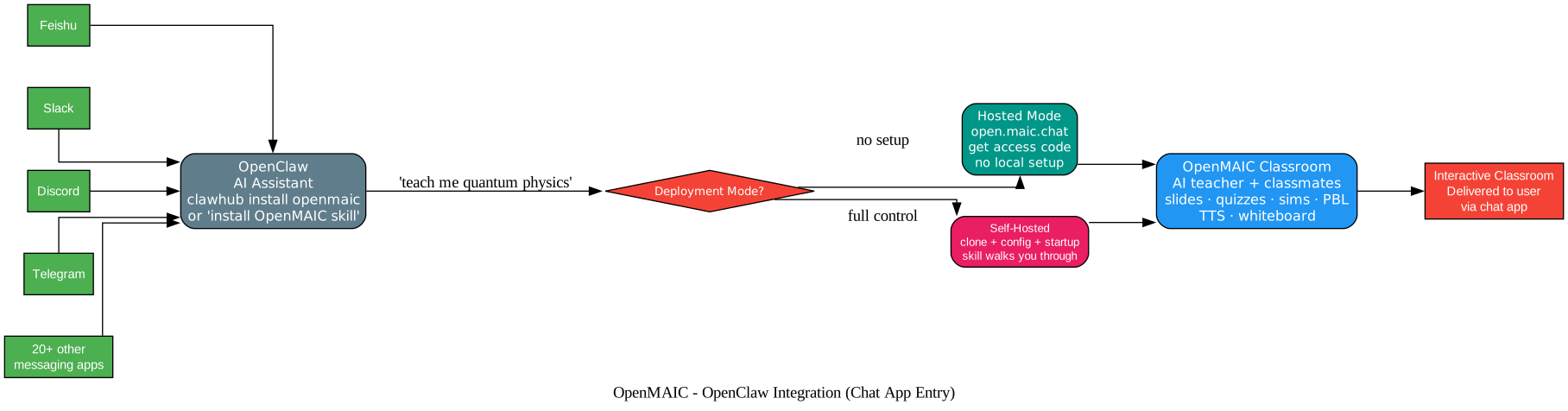
OpenMAIC integrates with OpenClaw, letting you generate classrooms directly from Feishu, Slack, Discord, Telegram, and 20+ other messaging apps — zero local setup required.
How It Works
- Install the skill:
clawhub install openmaicor ask your Claw to “install OpenMAIC skill” - Pick a mode:
- Hosted mode — Get an access code at open.maic.chat, no local setup needed
- Self-hosted — The skill walks you through clone, config, and startup step by step
- Tell your assistant “teach me quantum physics” — done!
Quick Start
Prerequisites
- Node.js >= 20
- pnpm >= 10
Installation
git clone https://github.com/THU-MAIC/OpenMAIC.git
cd OpenMAIC
pnpm install
Configuration
cp .env.example .env.local
Fill in at least one LLM provider key, then run:
pnpm dev
Docker Deployment
OpenMAIC ships with a Dockerfile and docker-compose.yml for containerized deployment, including a Postgres stack for server-backed persistence.
Version History
| Version | Date | Key Changes |
|---|---|---|
| v1.0 | Aug 27, 2026 | Brand-new Pro Workbench UI (three-pane chat + preview), course-level planning (consecutive lessons), full-component editing, high-fidelity PPTX import, audio/video-to-lesson, voice cloning (open-source), all-new Skill System (deep research, PPT style reuse, teaching-style transfer, diverse teaching styles, custom skills) |
| v0.3.2 | Aug 14, 2026 | Video export hardening, server-backed persistence, @openmaic/generation package, 4 new locales, Bedrock/Atlas Cloud/Claude search providers, FunASR ASR |
| v0.3.1 | Jul 21, 2026 | One-click MP4 video export, Postgres storage, direct slide manipulation, “Edit with AI” Pro-mode, expanded document parsing, Azure OpenAI/SearXNG/ComfyUI providers, GPT-5.6 |
| v0.3.0 | Jun 28, 2026 | PBL v2, “Edit with AI” editor agent, @openmaic/* SDK family on npm, per-stage model routing, GLM-5.2/Kimi K2.7/Qwen3.7, Korean locale, AGPL-3.0 to MIT relicense |
| v0.2.2 | Jun 2, 2026 | MAIC Editor v0, editable outline, offline classroom export, Brave/Baidu/Bocha/MiniMax search, Claude Opus 4.8/MiniMax M3/Gemini 3.5 Flash, zh-TW and pt-BR locales |
| v0.2.1 | Apr 26, 2026 | VoxCPM2 TTS with voice cloning, per-model thinking config, completion page, DeepSeek-V4/GPT-5.5/GPT-Image-2/Xiaomi MiMo |
| v0.2.0 | Apr 20, 2026 | Deep Interactive Mode — 3D visualization, simulations, games, mind maps, online programming |
| v0.1.1 | Apr 14, 2026 | Automatic language inference, ACCESS_CODE auth, classroom ZIP export/import, custom TTS/ASR, Ollama support |
| v0.1.0 | Mar 26, 2026 | Discussion TTS, immersive mode, keyboard shortcuts, whiteboard enhancements |
SDK Family
OpenMAIC publishes the @openmaic/* SDK family to npm:
@openmaic/generation— Lesson generation engine@openmaic/dsl— Domain-specific language for scene definitions@openmaic/renderer— Scene renderer@openmaic/importer— Document import and parsing
The SDKs enable secondary development (二开) — building custom classroom experiences on top of OpenMAIC’s orchestration layer.
Key Design Decisions
Why multi-agent instead of a single LLM? A classroom is inherently multi-agent: a teacher explains, a classmate asks questions, and the interaction between them creates the learning experience. A single LLM cannot replicate this dynamic.
Why a DSL renderer for scenes? The DSL separates scene definition from rendering, enabling the same lesson to be exported as PPTX, HTML, or MP4 without regeneration. It also enables the MAIC Editor to manipulate scenes structurally rather than as flat content.
Why per-stage model routing? Different stages have different quality/speed tradeoffs. Outline generation benefits from a strong reasoning model, while scene assembly may be faster with a lighter model. Per-stage routing lets you optimize cost without sacrificing quality where it matters.
Why MIT license? OpenMAIC started as AGPL-3.0 but relicensed to MIT in v0.3.0 to encourage adoption and secondary development, particularly in enterprise environments where AGPL is often a blocker.
Further Reading
- GitHub: THU-MAIC/OpenMAIC — MIT license
- Live Demo
- Changelog
- Contributing Guide
- ComfyUI Setup
- FunASR Deployment
- VoxCPM2 — Voice cloning TTS
Summary
OpenMAIC is the most comprehensive open-source AI classroom platform available: multi-agent orchestration with AI teachers and classmates, four scene types (slides, quizzes, simulations, PBL), 15+ LLM providers including local options (Ollama, Lemonade, FunASR), export to PPTX/HTML/MP4, an editable DSL with the MAIC Editor, an npm-published SDK family for secondary development, and OpenClaw integration for generating classrooms from any messaging app. Built on Next.js 16 with TypeScript and MIT-licensed, it is both a production-ready teaching tool and a platform for building custom interactive learning experiences. Enjoyed this post? Never miss out on future posts by following us 


