VoiceStudio: The Open-Source Local ElevenLabs Alternative
Cloud voice services like ElevenLabs are convenient, but they require an account, an API key, and a usage meter. VoiceStudio takes the opposite approach: clone voices, dub videos, dictate, and produce long-form audio entirely on your own hardware — no account, no API key, no subscription, no usage meter for the local workflow. With 16 TTS engines, 11 ASR engines, and a 646-language catalogue, it is the most comprehensive open-source local voice platform available today.
Architecture: Tauri Shell + FastAPI Backend + Engine Registry
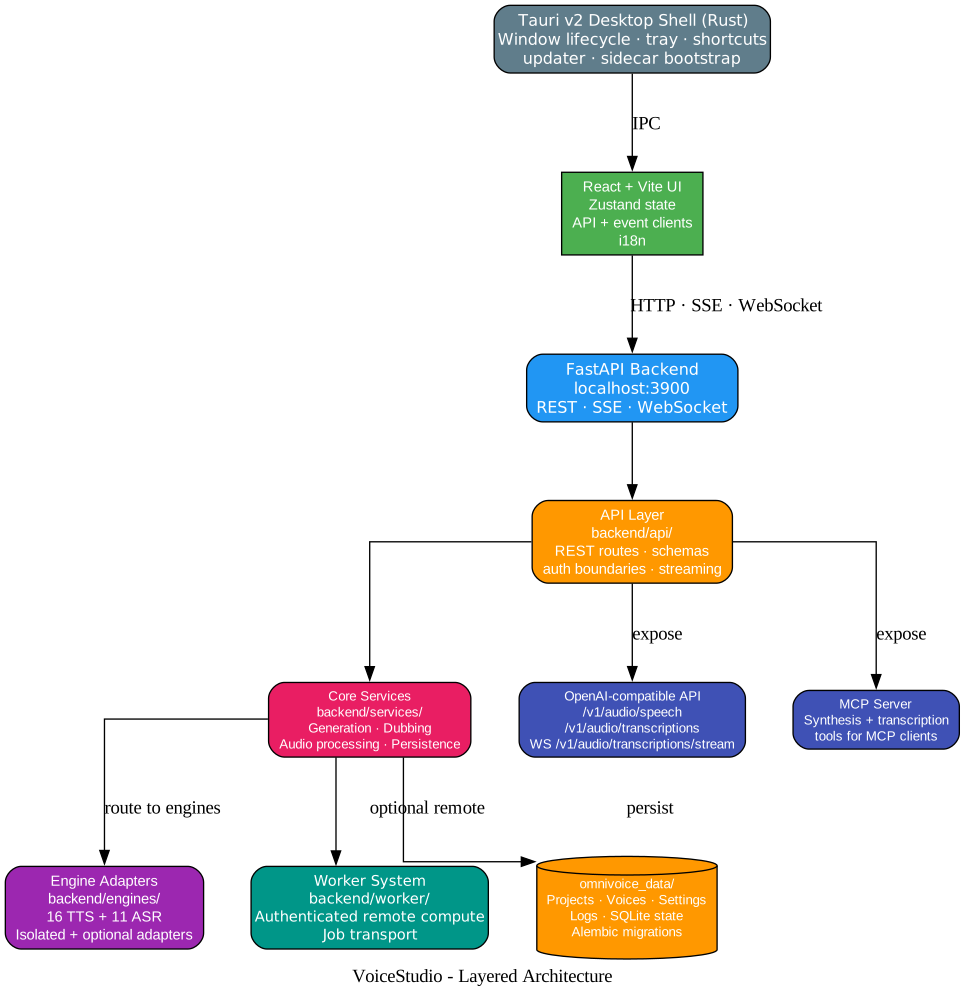
VoiceStudio is built as a Tauri v2 desktop application (Rust shell) wrapping a React + Vite frontend that talks to a FastAPI backend on localhost:3900. The backend exposes REST, SSE, and WebSocket interfaces, plus an OpenAI-compatible audio API and an MCP server for agent integration.
| Layer | Path | Responsibility |
|---|---|---|
| Desktop shell | frontend/src-tauri/ | Window lifecycle, tray, shortcuts, updater, sidecar bootstrap |
| Frontend | frontend/src/ | React UI, Zustand state, API and event clients, i18n |
| API | backend/api/ | REST routes, schemas, auth boundaries, streaming |
| Core services | backend/services/ | Generation, dubbing, audio processing, persistence |
| Engines | backend/engines/ | Isolated and optional engine adapters (16 TTS + 11 ASR) |
| Worker system | backend/worker/ | Authenticated remote compute and job transport |
| Data | omnivoice_data/ | Projects, voices, settings, logs, SQLite state |
The network boundary is strict: the desktop talks to a loopback-only backend. Loopback API calls need no server key. Remote access requires a share PIN or API key, and remote workers are opt-in. Analytics is off until consent and never sends text, audio, file names, or projects.
Six Core Workflows
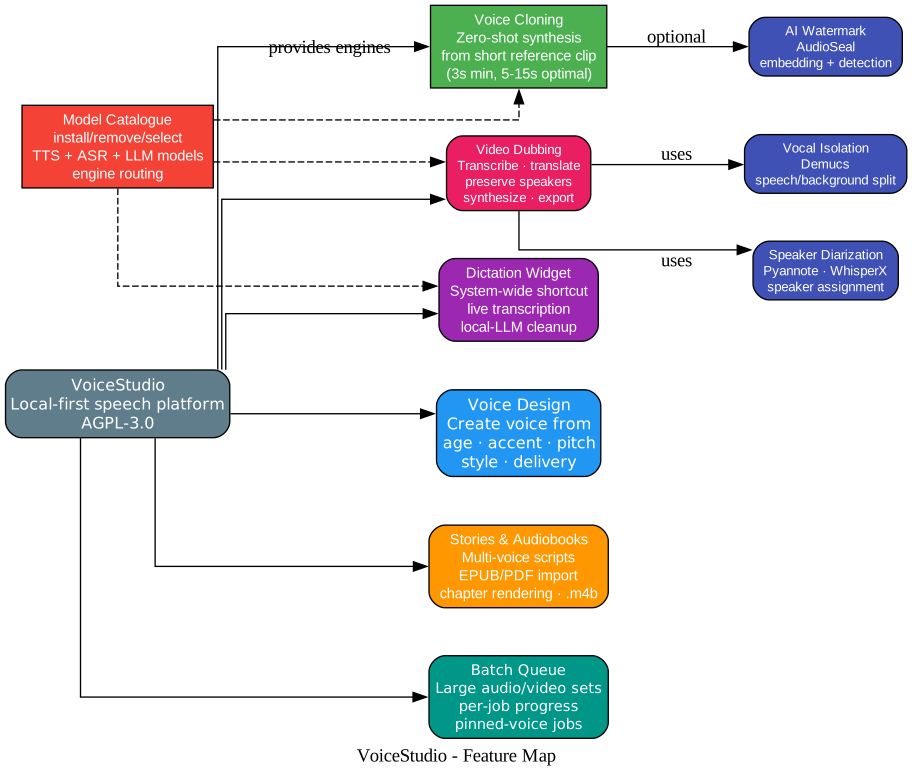
| Workflow | Description |
|---|---|
| Voice Cloning | Zero-shot synthesis from a short reference clip (3s minimum, 5-15s optimal) |
| Voice Design | Create a voice from age, accent, pitch, style, and delivery instructions |
| Video Dubbing | Transcribe, translate, preserve speakers, synthesize, and export video |
| Stories & Audiobooks | Multi-voice scripts, EPUB/PDF import, chapter rendering, .m4b export |
| Dictation Widget | System-wide shortcut, live transcription, optional local-LLM cleanup |
| Batch Queue | Queue large sets of audio and video jobs with per-job progress |
Additional capabilities include vocal isolation (Demucs speech/background separation), speaker diarization (Pyannote and WhisperX), AI watermarking (AudioSeal embedding and detection), and a Model Catalogue for installing, removing, selecting, and routing TTS/ASR/LLM models.
Video Dubbing Pipeline
The dubbing pipeline is VoiceStudio’s most complex workflow, combining ASR, diarization, translation, vocal isolation, and voice-cloned TTS into a single end-to-end process.
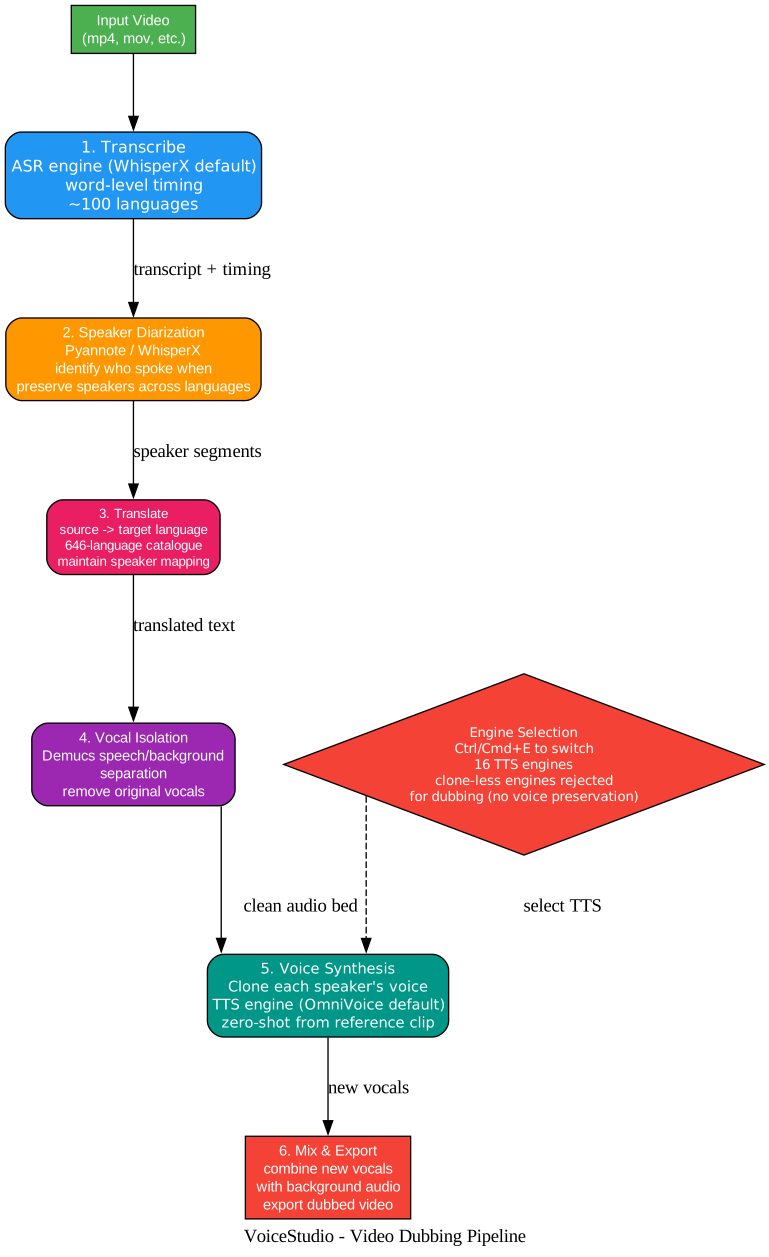
- Transcribe — ASR engine (WhisperX default) transcribes the video audio with word-level timing across ~100 languages.
- Speaker Diarization — Pyannote or WhisperX identifies who spoke when, preserving speaker mapping across the translation.
- Translate — Source text is translated to the target language from the 646-language catalogue.
- Vocal Isolation — Demucs separates speech from background audio, removing original vocals while preserving the audio bed.
- Voice Synthesis — Each speaker’s voice is cloned from their reference clip and used to synthesize the translated dialogue. Clone-less engines are rejected for dubbing — VoiceStudio refuses the job rather than silently changing voices.
- Mix & Export — New vocals are combined with the background audio and the dubbed video is exported.
The TTS engine can be switched at any time with Ctrl/Cmd+E or through the Model Catalogue.
16 TTS Engines
VoiceStudio’s engine registry includes 16 text-to-speech engines, each with different language coverage, cloning capability, and platform support:
| Engine | Languages | Clone | Platforms | License |
|---|---|---|---|---|
| VoiceStudio (default, k2-fsa/OmniVoice) | 600+ | Yes | CUDA/CPU, MPS | AGPL-3.0 app, Apache-2.0 code, CC-BY-NC weights |
| CosyVoice 3 | 9 + 18 dialects | Yes | CUDA/CPU, CPU | Apache-2.0 |
| GPT-SoVITS | 5 | Yes | CUDA/CPU | MIT |
| VoxCPM2 | 30 | Yes | CUDA/CPU, MPS | Apache-2.0 |
| MOSS-TTS-Nano | 20 | Yes | CUDA/CPU | Apache-2.0 |
| KittenTTS | English | No | CPU | MIT |
| MLX-Audio | Model-dependent | Varies | MLX | Varies |
| Sherpa-ONNX | 20+ | No | CUDA/CPU | Apache-2.0 |
| IndexTTS 2.5 | ZH, EN, JA, ES, AR | Yes | CUDA/CPU | Bilibili license |
| OmniVoice GGUF | 600+ | Yes | CUDA/CPU, MPS/CPU | AGPL-3.0 app |
| PocketTTS | EN, FR, DE, PT, IT, ES | Yes | CPU | CC-BY-4.0 |
| Supertonic 3 | 31 | No | CPU | OpenRAIL-M |
| MOSS-TTS-v1.5 | 31 | Yes | CUDA/CPU | Apache-2.0 |
| dots.tts | 24 | Yes | CUDA/CPU | Apache-2.0 |
| Confucius4-TTS | 14 | Yes | CUDA/CPU | Apache-2.0 |
Engines marked with lightning bolts are installed or registered on demand. Clone-less engines cannot preserve a reference speaker in dubbing or pinned-voice batch jobs — VoiceStudio rejects those jobs instead of silently changing engines.
11 ASR Engines
| Engine | ID | Languages | Best Fit |
|---|---|---|---|
| WhisperX (default) | whisperx | ~100 | Dubbing, subtitles, word-level timing |
| Faster-Whisper | faster-whisper | ~100 | General cross-platform transcription |
| Faster-Whisper (isolated) | faster-whisper-isolated | ~100 | Crash-isolated batch transcription |
| MLX Whisper | mlx-whisper | ~100 | Apple Silicon |
| PyTorch Whisper | pytorch-whisper | ~100 | CUDA, MPS, and CPU fallback |
| Parakeet TDT | nemo-parakeet | English + 25 EU | Fast CPU/CUDA transcription |
| Parakeet TDT v3 (MLX) | parakeet-mlx | 25 EU | Apple Silicon dictation |
| Moonshine | moonshine | English | Low-power, low-latency ONNX |
| FunASR | funasr | 50+ | VAD and inline diarization |
| sherpa-onnx (live) | sherpa-onnx-asr | Model-dependent | Streaming CPU dictation |
| OpenAI-compatible | openai-compat-asr | Server-dependent | Local or remote endpoint |
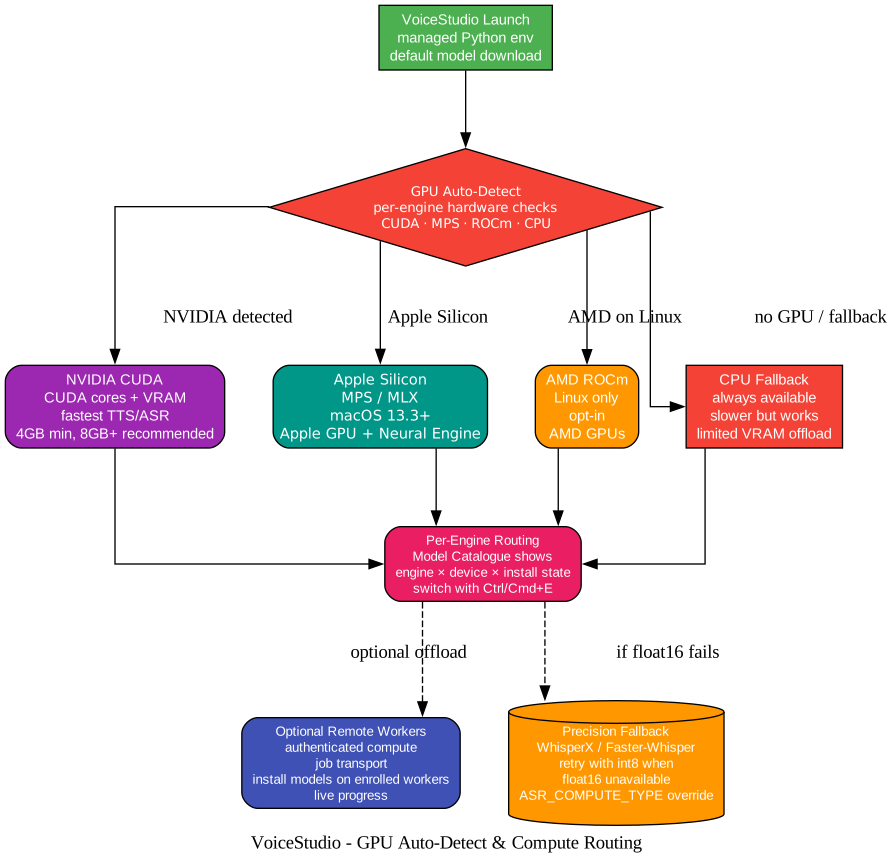
WhisperX and Faster-Whisper automatically retry with int8 precision when efficient float16 is unavailable. You can pin ASR_COMPUTE_TYPE=int8 or float32 if automatic selection fails.
Compute Routing: GPU Auto-Detect
VoiceStudio automatically detects available compute and routes work to the best backend per engine.
| Compute | Platforms | Notes |
|---|---|---|
| NVIDIA CUDA | Linux, Windows | Fastest TTS/ASR. 4GB VRAM min, 8GB+ recommended |
| Apple Silicon (MPS/MLX) | macOS 13.3+ | Apple GPU + Neural Engine. Intel Macs need remote backend |
| AMD ROCm | Linux only | Opt-in |
| CPU | All platforms | Always available fallback. Slower but works everywhere |
| Remote Workers | Network | Optional authenticated remote compute with live progress |
Systems with limited VRAM offload work to CPU when required. The Model Catalogue shows the engine, device, and install state for each model, and you can switch engines with Ctrl/Cmd+E.
OpenAI-Compatible API
VoiceStudio exposes an OpenAI-compatible audio API on the local backend:
# Point an OpenAI-compatible client at the local backend
client = OpenAI(
    base_url="http://localhost:3900/v1",
    api_key="not-needed-for-loopback"
)

# Text to speech
response = client.audio.speech.create(
    model="voicestudio",
    voice="cloned-voice-profile",
    input="Hello from VoiceStudio!",
    response_format="mp3"
)

# Speech to text
transcript = client.audio.transcriptions.create(
    model="whisperx",
    file=open("audio.mp3", "rb")
)
| Endpoint | Purpose |
|---|---|
POST /v1/audio/speech | TTS to mp3, opus, aac, flac, wav, or pcm |
POST /v1/audio/transcriptions | STT to json, text, verbose_json, srt, or vtt |
WS /v1/audio/transcriptions/stream | Live PCM/WebM transcription with partial, utterance, and session-final events |
GET /.well-known/voicestudio-speech | Discover HTTP, WebSocket, MCP, and OpenAI-compatible capabilities |
The MCP server exposes synthesis and transcription tools for MCP clients, enabling agent-driven voice workflows.
Installation
| Platform | Package | Guide |
|---|---|---|
| macOS 13.3+ (Apple Silicon) | DMG | Install on macOS |
| Windows 10/11 x64 | MSI (current-user build needs no admin) | Install on Windows |
| Linux x86_64 (glibc 2.39+) | AppImage | Install on Linux |
| Docker | CUDA, ROCm, CPU, worker-only GPU profiles | Run with Docker |
First launch creates a managed Python environment and downloads the default model. Later launches reuse both.
Run from Source
git clone https://github.com/debpalash/VoiceStudio.git
cd VoiceStudio
bun install
bun run desktop
Use bun run dev for the browser UI.
Requirements
| Minimum | Recommended | |
|---|---|---|
| OS | Windows 10 x64, macOS 13.3 Apple Silicon, Linux x86_64 glibc 2.39+ | Current supported OS release |
| RAM | 8 GB | 16 GB+ |
| Disk | 10 GB free | 20 GB+ SSD |
| GPU | Optional (CPU supported) | NVIDIA CUDA or Apple Silicon |
| VRAM | 4 GB (when using GPU) | 8 GB+ |
| Python (from source) | 3.11+ | 3.11 or 3.12 |
Local-First vs. Hosted Services
| VoiceStudio | Typical hosted service | |
|---|---|---|
| Best fit | Private, offline, self-hosted, high-volume | Fast setup without model management |
| Data path | Local by default; remote is opt-in | Audio processed by provider |
| Cost model | Free software; you supply hardware | Subscription, credits, or metered API |
| Setup | Install app + model weights | Create account, use web app or API |
| Offline use | Yes, after models installed | Usually requires network |
| Customization | Source, engines, models, API, routing open | Limited to provider options |
Further Reading
- GitHub: debpalash/VoiceStudio — AGPL-3.0 license
- Install guides
- Engine docs
- Benchmarks
- Performance tuning
- Dictation widget docs
- OmniVoice model (k2-fsa) — default TTS engine
Summary
VoiceStudio is the most comprehensive open-source local voice platform available: 16 TTS engines, 11 ASR engines, 646-language catalogue, voice cloning, video dubbing, audiobook production, dictation, and batch processing — all running on your own hardware with no account or API key required. The Tauri v2 desktop shell wraps a FastAPI backend that exposes both an OpenAI-compatible audio API and an MCP server, making it easy to integrate into existing AI workflows. With automatic GPU detection across CUDA, Apple Silicon, ROCm, and CPU, it adapts to whatever hardware you have available. Enjoyed this post? Never miss out on future posts by following us