Claude Code Cheat Sheet 2026
The definitive quick-reference guide for Claude Code v2.1.195+. Keep this bookmarked.
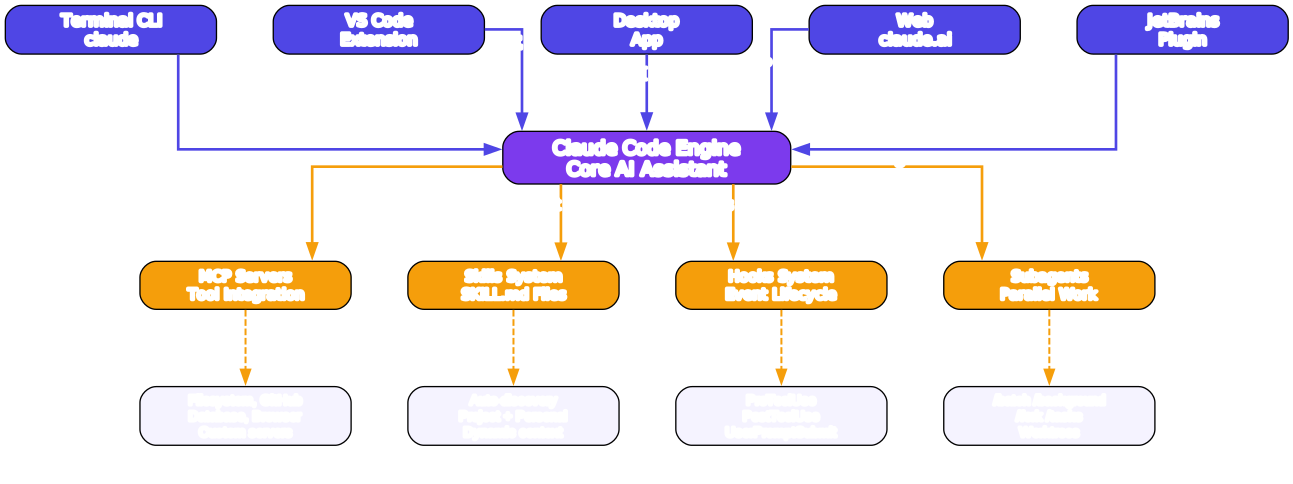
1. Installation & Setup
| Platform | Command |
|---|---|
| macOS / Linux | npm install -g @anthropic-ai/claude-code |
| Windows (native) | npm install -g @anthropic-ai/claude-code |
| WSL | npm install -g @anthropic-ai/claude-code |
| Homebrew (macOS) | brew install claude-code |
| WinGet (Windows) | winget install Anthropic.ClaudeCode |
# First run - authenticates and sets up
claude

# Initialize project configuration
claude /init

# Start with a specific model
claude --model claude-sonnet-4-20250514

# Non-interactive (pipe mode)
echo "Explain this code" | claude -p
2. CLI Commands Quick Reference
| Command | Description | Example |
|---|---|---|
claude | Start interactive REPL | claude |
claude -p "msg" | One-shot prompt (non-interactive) | claude -p "fix the bug" |
claude -c | Continue last conversation | claude -c |
claude -r "session" | Resume a specific session | claude -r "abc123" |
claude config | View/set configuration | claude config set theme dark |
claude mcp | Manage MCP servers | claude mcp add filesystem |
claude update | Update to latest version | claude update |
3. Slash Commands by Category

Setup
| Command | Description |
|---|---|
/init | Initialize project with CLAUDE.md, permissions, and MCP config |
/mcp | Manage MCP server connections |
/permissions | View and modify tool permissions |
/login | Authenticate with Anthropic |
During Task
| Command | Description |
|---|---|
/plan | Plan before coding - generates implementation plan |
/model | Switch AI model mid-conversation |
/effort | Adjust effort level (low/medium/high) |
/compact | Compress conversation context to save tokens |
/context | Manage context files and priorities |
/btw | Side conversation that doesn’t affect main context |
Parallel Work
| Command | Description |
|---|---|
/tasks | Manage running subagents |
/background | Run task in detached background session |
/batch | Apply changes across multiple files at scale |
/fork | Create a side task branch |
Before Ship
| Command | Description |
|---|---|
/diff | Review all changes made in this session |
/code-review | AI-powered code review |
/security-review | Security audit of changes |
Between Sessions
| Command | Description |
|---|---|
/clear | Reset conversation context |
/resume | Continue from a previous session |
/branch | Git branch management |
/teleport | Jump to a different directory |
/remote-control | Connect to remote sessions |
Debugging
| Command | Description |
|---|---|
/status | Show current session status |
/cost | Display token usage and cost |
/bug | Report a bug |
/help | Show available commands |
4. CLI Flags
| Flag | Description | Example |
|---|---|---|
-p, --prompt | Non-interactive prompt mode | claude -p "explain this" |
-c, --continue | Continue last conversation | claude -c |
-r, --resume | Resume specific session | claude -r "session-id" |
--model | Specify model | claude --model claude-sonnet-4-20250514 |
--effort | Set effort level | claude --effort high |
--permission-mode | Set permission mode | claude --permission-mode auto |
--allowedTools | Whitelist specific tools | claude --allowedTools "Read,Write" |
--add-dir | Add directory to context | claude --add-dir ../shared-lib |
--mcp-config | Path to MCP config | claude --mcp-config ./mcp.json |
--max-turns | Limit conversation turns | claude --max-turns 10 |
--verbose | Verbose output | claude --verbose |
--no-input | Skip all input prompts | claude -p "task" --no-input |
5. Skills System
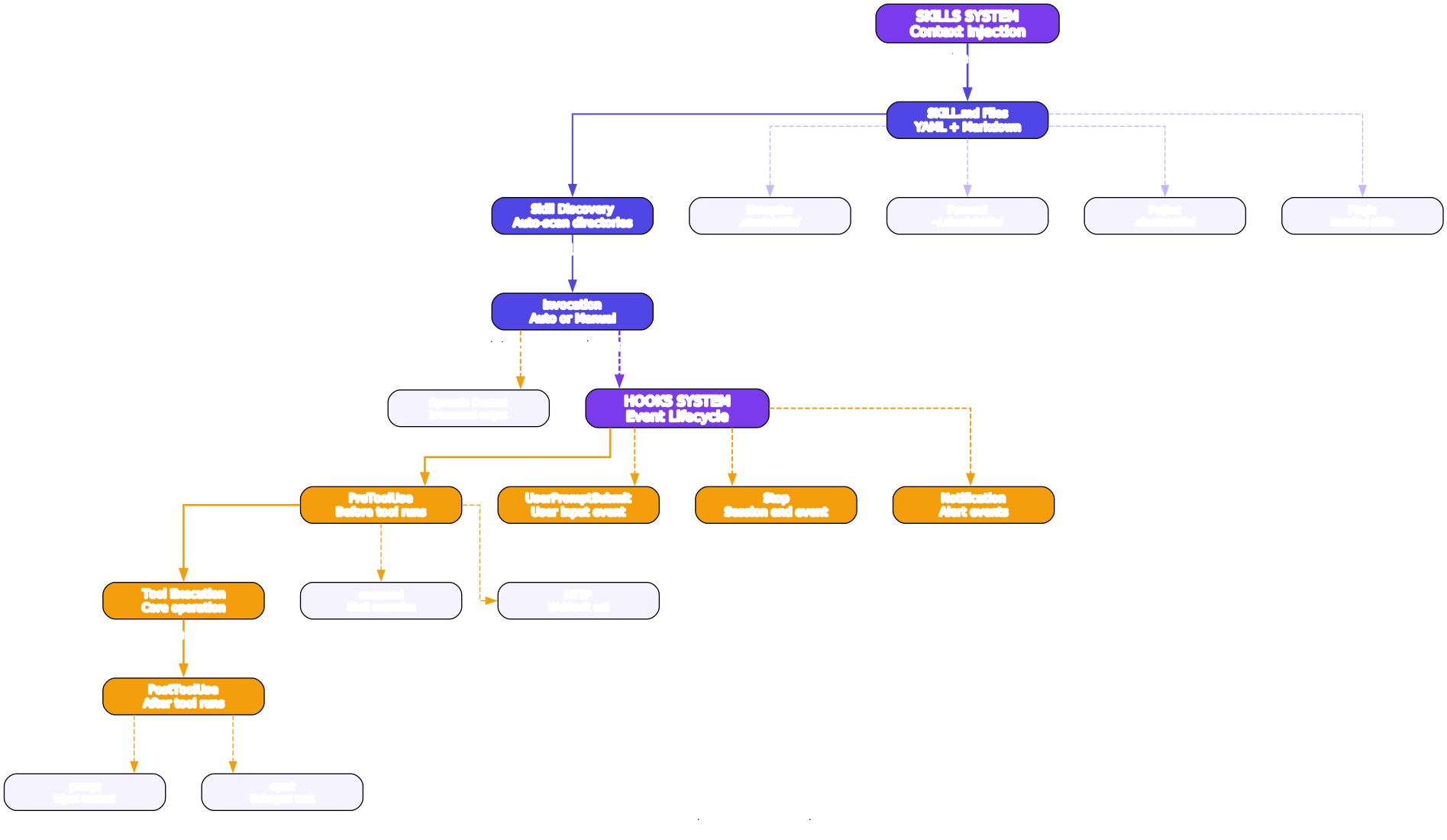
SKILL.md Format
---
name: my-skill
description: One-line summary of what this skill provides
triggers: keyword1, keyword2, when to use
---

# Skill Title

Instructions and reference content for the skill...
Skill Locations (Priority Order)
| Location | Scope | Path |
|---|---|---|
| Enterprise | Organization-wide | .claude/skills/ (enterprise config) |
| Personal | User-wide | ~/.claude/skills/ |
| Project | Project-specific | .claude/skills/ in project root |
| Plugin | Installed via packages | Auto-discovered |
Dynamic Context Injection
Use !command`` syntax to inject live command output into skill context:
Current git branch: !`git branch --show-current`
Recent commits: !`git log --oneline -5`
Bundled Skills
| Skill | Purpose |
|---|---|
create-mcp-server | Scaffold new MCP server projects |
create-mode | Create custom agent modes |
find-skills | Discover and install community skills |
6. Hooks System
Hook Events Lifecycle
UserPromptSubmit → PreToolUse → [Tool Execution] → PostToolUse → Stop
Key Events
| Event | Trigger | Use Case |
|---|---|---|
PreToolUse | Before any tool runs | Validate inputs, block dangerous ops |
PostToolUse | After any tool completes | Log actions, transform outputs |
UserPromptSubmit | User sends a message | Preprocess prompts, inject context |
Stop | Session ends | Cleanup, save state |
Notification | Alert triggered | Send alerts, integrate with CI |
Hook Types
| Type | Description | Example |
|---|---|---|
command | Run shell command | {"type": "command", "command": "eslint $FILE"} |
HTTP | Send webhook request | {"type": "http", "url": "https://hooks.example.com"} |
prompt | Inject context into conversation | {"type": "prompt", "prompt": "Always use TypeScript"} |
agent | Delegate to subagent | {"type": "agent", "prompt": "Review for security"} |
Configuration (.claude/settings.json)
{
  "hooks": {
    "PreToolUse": [
      {
        "type": "command",
        "command": "echo 'About to use: $TOOL_NAME'",
        "matcher": "Write"
      }
    ],
    "PostToolUse": [
      {
        "type": "http",
        "url": "https://ci.example.com/notify",
        "matcher": "Bash"
      }
    ],
    "UserPromptSubmit": [
      {
        "type": "prompt",
        "prompt": "Remember: follow the project coding standards in CLAUDE.md"
      }
    ]
  }
}
7. Subagents & Parallel Work
| Feature | Command | Description |
|---|---|---|
| Batch | /batch | Apply changes across many files simultaneously |
| Background | /background | Run a detached session that continues independently |
| Fork | /fork | Create a side task without leaving current session |
| Tasks | /tasks | View and manage all running subagents |
| Worktrees | Git worktrees | Each subagent works in its own worktree |
# Run a background task
/background Refactor all API endpoints to use the new auth middleware

# Batch changes across files
/batch Update all import statements from the old module path to the new one

# Fork a side investigation
/fork Investigate why the test suite is failing on CI
8. MCP Integration
Quick Setup
# Add a filesystem MCP server
claude mcp add filesystem -- npx @anthropic-ai/mcp-server-filesystem /path/to/dir

# Add a GitHub MCP server
claude mcp add github -- npx @anthropic-ai/mcp-server-github

# List configured servers
claude mcp list

# Remove a server
claude mcp remove filesystem
Key MCP Servers
| Server | Purpose | Package |
|---|---|---|
| Filesystem | Read/write local files | @anthropic-ai/mcp-server-filesystem |
| GitHub | PR, issues, repos | @anthropic-ai/mcp-server-github |
| Database | Query databases | @anthropic-ai/mcp-server-postgres |
| Browser | Web automation | @anthropic-ai/mcp-server-browser |
| Memory | Persistent memory | @anthropic-ai/mcp-server-memory |
| Sequential Thinking | Structured reasoning | @anthropic-ai/mcp-server-sequential-thinking |
9. Memory & Configuration
CLAUDE.md Hierarchy (Priority: highest to lowest)
| File | Scope | Purpose |
|---|---|---|
~/.claude/CLAUDE.md | Global | Personal preferences, coding style |
.claude/CLAUDE.md | Project | Project conventions, architecture notes |
CLAUDE.md (root) | Project | Quick project-level instructions |
Auto-Memory
Claude Code automatically saves important context across sessions:
- User preferences - Coding style, language preferences
- Project conventions - Discovered patterns, build commands
- Error solutions - Previously solved problems
- Architectural decisions - Key design choices
Key Settings
# View all settings
claude config list

# Set preferred model
claude config set model claude-sonnet-4-20250514

# Set default effort level
claude config set effort high

# Set permission mode
claude config set permissionMode auto

# Enable/disable auto-memory
claude config set autoMemory true
10. Permissions & Security
Permission Modes
| Mode | Behavior | Best For |
|---|---|---|
| default | Ask before dangerous operations | Everyday development |
| plan | Plan first, then ask before executing | Complex changes |
| auto | Auto-approve based on classifier | Trusted CI/CD pipelines |
Auto-Mode Classifier
Claude Code uses an internal classifier to determine which operations are safe to auto-approve:
- Auto-approved: Reading files, searching code, listing directories
- Requires approval: Writing files, running shell commands, network access
- Always blocked: Destructive operations (rm -rf, force push)
Permission Configuration
{
  "permissions": {
    "allow": ["Read", "Grep", "Glob", "LS"],
    "deny": ["Bash(rm -rf *)", "Bash(git push --force)"],
    "defaultMode": "default"
  }
}
11. Platforms & Integrations
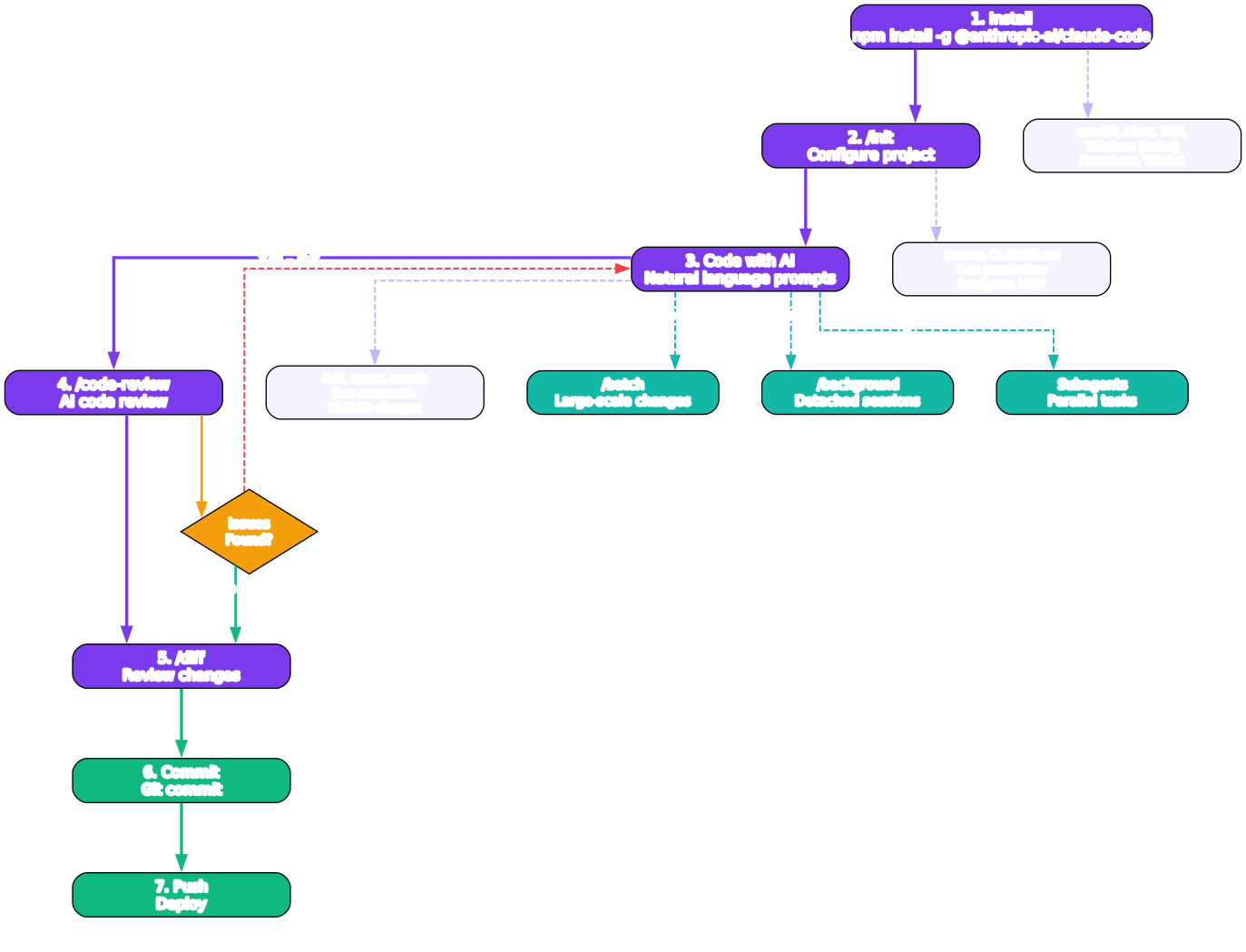
| I Want To… | Best Option |
|---|---|
| Code in terminal | claude CLI |
| Code in VS Code | Claude Code extension |
| Code in JetBrains | Claude Code plugin |
| Use desktop app | Claude Desktop |
| Use web interface | claude.ai |
| Run in CI/CD | claude -p --no-input |
| Run headless | claude -p with --allowedTools |
| Pair with git hooks | Hooks system (PreToolUse) |
| Automate workflows | /batch + --permission-mode auto |
12. Pro Tips
-
Use
/compactfrequently - Compresses context to save tokens and keep conversations focused. Do this before long sessions. -
Chain flags for power sessions -
claude --model claude-sonnet-4-20250514 --effort high --add-dir ../shared-libfor complex multi-repo work. -
Leverage
/planbefore coding - Generates a plan first, then executes. Prevents wasted effort on wrong approaches. -
Use
/btwfor side questions - Ask off-topic questions without polluting your main context window. -
Configure
.claude/CLAUDE.md- Project-specific instructions are loaded automatically. Include coding standards, architecture notes, and common commands. -
Use
/backgroundfor long tasks - Run tests, linting, or research in the background while you continue working. -
Set up MCP servers early - Filesystem and GitHub MCP servers dramatically expand what Claude Code can do.
-
Use
/diffbefore committing - Always review changes before shipping. Catches unintended modifications. -
Create custom skills - Package repetitive workflows into SKILL.md files for instant reuse across projects.
-
Use
--permission-mode autoin CI - For trusted pipelines, auto-mode skips approval prompts while still blocking dangerous operations.
Quick Reference Card
# Start
claude                          # Interactive REPL
claude -p "task"                # One-shot
claude -c                       # Continue last session

# Key Slash Commands
/init                           # Setup project
/plan                            # Plan before coding
/model                           # Switch model
/effort                          # Adjust effort
/compact                         # Compress context
/batch                           # Multi-file changes
/background                      # Detached session
/fork                            # Side task
/diff                            # Review changes
/code-review                     # AI code review
/security-review                 # Security audit
/clear                           # Reset context
/resume                          # Continue session

# Key Flags
--model MODEL                    # Choose model
--effort LEVEL                   # low/medium/high
--permission-mode MODE           # default/plan/auto
--allowedTools TOOLS             # Whitelist tools
--add-dir DIR                    # Add directory
--mcp-config FILE                # MCP config path
--max-turns N                    # Limit turns
--verbose                        # Verbose output
This cheat sheet covers Claude Code v2.1.195+. For the latest updates, check the official documentation. Enjoyed this post? Never miss out on future posts by following us 


