FluidVoice: On-Device Voice Dictation With AI Enhancement for macOS
Voice dictation has come a long way, but most solutions still rely on cloud processing - sending your voice data to remote servers for transcription. That means latency, privacy concerns, and a dependency on internet connectivity. FluidVoice changes the game entirely. It is the fastest and only macOS dictation app that performs speech-to-text entirely on your device, enhanced by a custom-trained AI model that cleans up transcripts in real time.
With nearly 7,000 stars on GitHub and active development across 800+ commits, FluidVoice has quickly become the go-to open source alternative to commercial tools like Wispr Flow. Let us explore what makes it special.
Architecture Overview
FluidVoice is built around a simple but powerful principle: keep everything local. The architecture reflects this philosophy with a clean pipeline that processes audio from your microphone through an on-device STT engine, then through a custom AI enhancement model, and finally outputs polished text to any application.
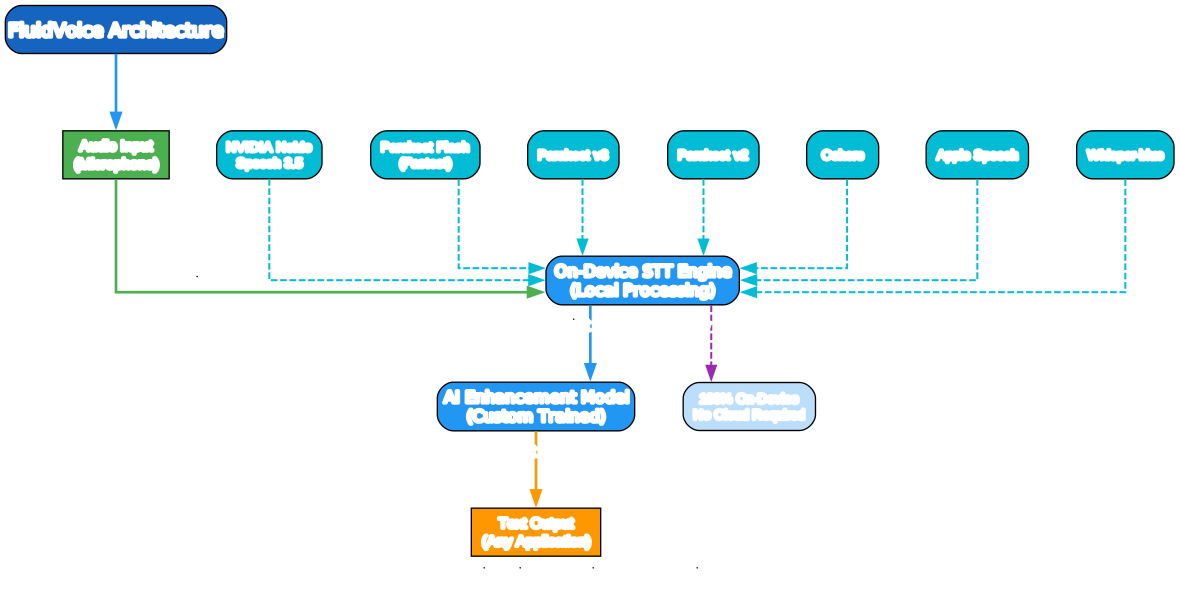
The key components in the architecture are:
- Audio Input: Captures voice from the macOS microphone in real time
- On-Device STT Engine: Converts speech to text locally without sending data to any cloud service
- AI Enhancement Model: A custom-trained model that refines raw transcripts by adding punctuation, correcting errors, and improving overall accuracy
- Text Output: Delivers the enhanced text directly to whatever application you are using
The STT engine supports seven different models, giving you flexibility to choose the right balance of speed and accuracy for your workflow. All processing happens on your Mac - no data ever leaves your device.
Key Features
FluidVoice stands out in the crowded voice dictation space because of four core pillars: privacy, speed, accuracy, and flexibility.

Privacy First
In an era where voice data is increasingly valuable, FluidVoice takes a firm stance on privacy. Every byte of audio is processed on your Mac. No recordings are uploaded, no transcripts are sent to remote servers, and no internet connection is required after the initial model download. This makes FluidVoice ideal for dictating sensitive documents, medical notes, legal briefs, or any content where confidentiality matters.
Zero Delay Speed
Version 1.6.0 of FluidVoice introduced what the developers call “insanely fast Parakeet” - a rebuilt engine that achieves near-zero delay between speaking and seeing words appear on screen. The experience feels natural, almost like typing but with your voice. This speed advantage comes from running everything locally, eliminating the round-trip latency that plagues cloud-based solutions.
AI-Enhanced Accuracy
Raw speech-to-text output is often messy - missing punctuation, homophone errors, and awkward phrasing. FluidVoice addresses this with a custom-trained AI enhancement model that sits between the STT engine and the final output. This model:
- Adds proper punctuation automatically
- Corrects common transcription errors using context
- Improves readability without requiring manual editing
The result is text that often needs little to no cleanup, saving you significant time compared to raw STT output.
Multi-Model Support
FluidVoice does not lock you into a single speech recognition model. With seven models available, you can switch between them based on your needs - whether you prioritize raw speed, accuracy, or compatibility with specific hardware.
Supported STT Models
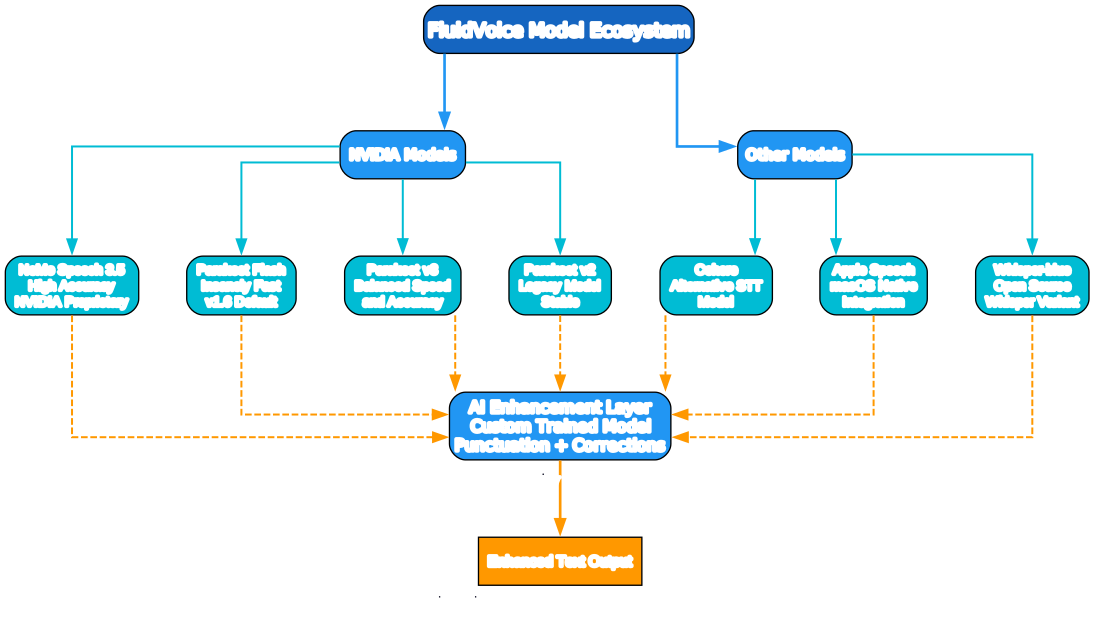
One of FluidVoice’s most compelling features is its support for multiple speech-to-text models. This gives users the freedom to choose the model that best fits their use case.
NVIDIA Models
The NVIDIA family provides four models with different characteristics:
- NVIDIA NeMo Speech 3.5: The high-accuracy option from NVIDIA’s NeMo toolkit. Best for users who need the most accurate transcription and are willing to trade some speed for precision.
- Parakeet Flash: The default model in v1.6.0, delivering “insanely fast” performance with near-zero latency. This is the recommended starting point for most users.
- Parakeet v3: A balanced option that offers good accuracy with reasonable speed, sitting between Flash and v2 in the performance spectrum.
- Parakeet v2: The legacy Parakeet model. Stable and reliable, but superseded by v3 and Flash for most use cases.
Other Models
Beyond NVIDIA’s offerings, FluidVoice supports three additional models:
- Cohere: An alternative STT model that provides different accuracy characteristics, useful for specific accents or speaking styles.
- Apple Speech: Leverages macOS’s native speech recognition framework for tight system integration and low resource usage.
- Whisper-blue: An open source Whisper variant that provides solid baseline performance without proprietary dependencies.
All seven models feed into the same AI Enhancement Layer, which applies consistent post-processing regardless of which model you choose. This means you get the benefit of AI-enhanced output no matter which STT engine you prefer.
Getting Started
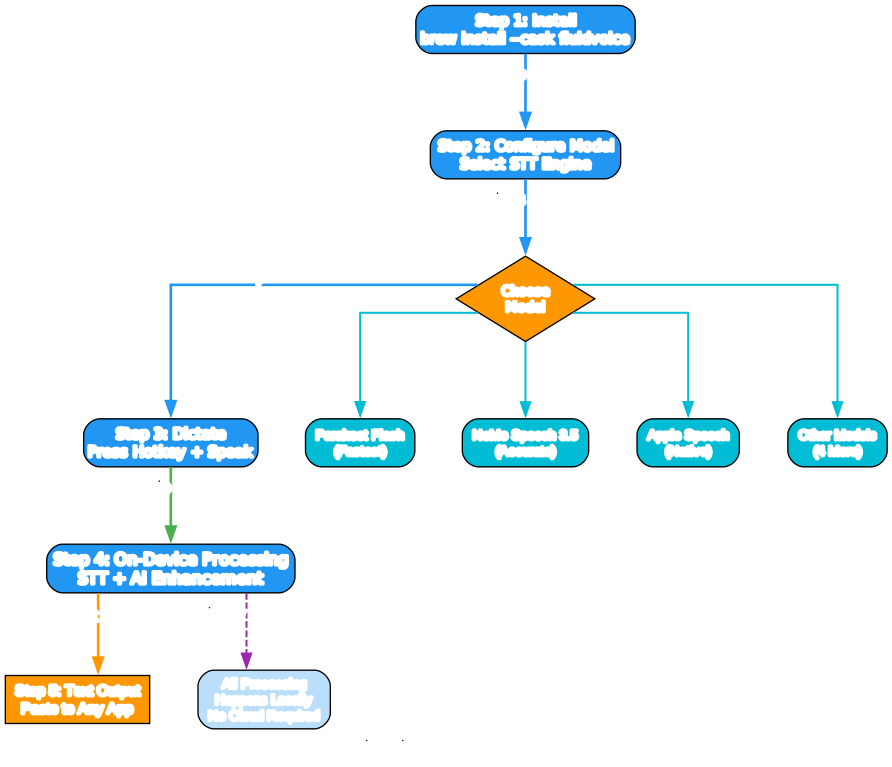
Getting FluidVoice up and running on your Mac is straightforward. The entire process takes just a few minutes.
Installation
The easiest way to install FluidVoice is via Homebrew:
brew install --cask fluidvoice
Alternatively, you can download the latest release directly from the GitHub repository.
Initial Setup
After launching FluidVoice for the first time:
- Grant microphone access when prompted by macOS
- Select your preferred STT model (Parakeet Flash is the default and recommended)
- Configure your hotkey for starting and stopping dictation
- The selected model will be downloaded to your device for local processing
Daily Usage
Once configured, using FluidVoice is simple:
- Press your configured hotkey to start dictation
- Speak naturally - words appear on screen with near-zero delay
- Press the hotkey again to stop
- The AI enhancement model automatically cleans up the transcript
- The enhanced text is pasted into your active application
Comparison With Alternatives
How does FluidVoice stack up against other dictation solutions?
| Feature | FluidVoice | Wispr Flow | Apple Dictation | Dragon Dictate |
|---|---|---|---|---|
| On-Device Processing | Yes | Partial | Yes | Partial |
| Open Source | Yes (GPLv3) | No | No | No |
| AI Enhancement | Yes | Yes | No | No |
| Multiple STT Models | 7 | 1 | 1 | 1 |
| Cost | Free | Subscription | Free | Paid |
| macOS Native | Yes | Yes | Yes | Yes |
| Internet Required | No | Yes | Partial | Yes |
| Custom Hotkey | Yes | Yes | Limited | Yes |
Wispr Flow is the most direct competitor, but it requires a subscription and relies on cloud processing. FluidVoice provides a local, free alternative with comparable or better accuracy thanks to its AI enhancement layer.
Apple Dictation is built into macOS and works offline, but lacks AI enhancement, supports only one model, and produces raw transcripts that often need manual cleanup.
Dragon Dictate is a long-standing commercial option, but it is expensive, requires internet for some features, and has not kept pace with modern AI-enhanced approaches.
The Open Source Advantage
FluidVoice is released under the GPLv3 license, which means:
- You can inspect the code to verify privacy claims
- The community can contribute improvements and new models
- The software remains free forever
- You can fork and customize it for your specific needs
With 806 commits and active development, the project is healthy and evolving. The maintainers are responsive to issues and regularly ship updates with new features and model support.
What Is Coming Next
The FluidVoice roadmap includes some exciting developments:
- iOS support: Bringing on-device dictation to iPhone and iPad
- Windows support: Expanding beyond macOS to reach more users
- Additional models: More STT engine options as the ecosystem grows
- Enhanced AI model: Continued improvements to the enhancement layer for even better accuracy
Conclusion
FluidVoice represents a significant step forward for voice dictation on macOS. By combining on-device processing with AI enhancement and multi-model support, it delivers an experience that is fast, private, and accurate. Whether you are writing emails, drafting documents, or taking notes, FluidVoice lets you dictate with confidence knowing your voice data never leaves your Mac.
The fact that it is open source under GPLv3 makes it even more compelling - you get enterprise-grade dictation capabilities without the enterprise price tag, and you can verify every claim about privacy by reading the source code yourself.
If you are a macOS user looking for a reliable, private, and free voice dictation solution, FluidVoice deserves a spot in your workflow.
Links:
- GitHub: https://github.com/altic-dev/FluidVoice
- Install:
brew install --cask fluidvoice - License: GPLv3

Enjoyed this post? Never miss out on future posts by following us


