HuggingFace Speech-to-Speech: Build Voice Agents With Open-Source Models
Voice agents are transforming how humans interact with technology. From customer service bots to robotic companions, the ability to speak and listen naturally opens doors to applications that text-only interfaces cannot reach. Yet building a production-grade voice agent has traditionally meant stitching together proprietary services for speech recognition, language understanding, and speech synthesis – each with its own API, latency profile, and vendor lock-in.
HuggingFace’s speech-to-speech project changes this equation. It provides a fully open-source, modular voice-agent pipeline that chains Voice Activity Detection (VAD), Speech-to-Text (STT), a Large Language Model (LLM), and Text-to-Speech (TTS) into a single low-latency system. Every component is swappable, the LLM slot speaks OpenAI-compatible protocols, and the entire stack can run locally using models like Parakeet TDT and Qwen3-TTS. With 5,7+ thousand stars on GitHub and an Apache 2.0 license, speech-to-speech is rapidly becoming the go-to framework for developers who want full control over their voice agents.
In this post, we walk through the architecture, key features, installation, and practical deployment of speech-to-speech – including how to run it entirely on local hardware with llama.cpp.
Architecture Overview
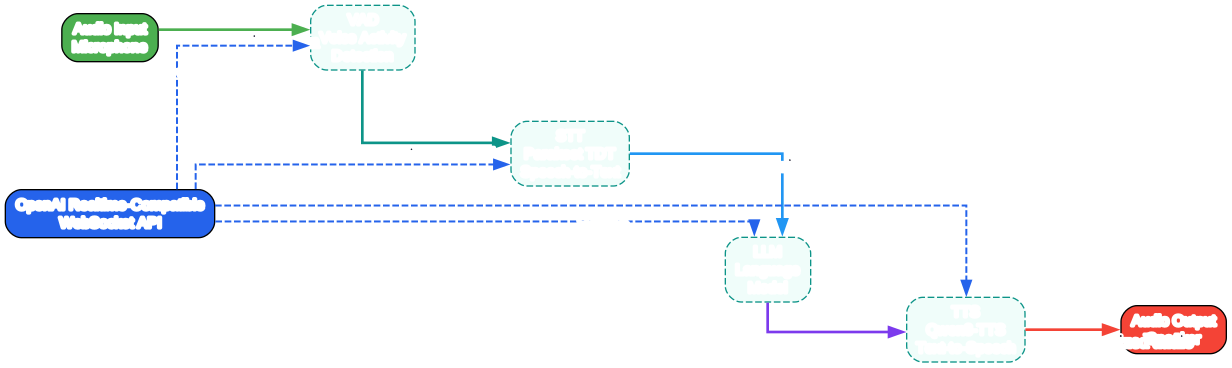
The architecture of HuggingFace’s speech-to-speech follows a modular pipeline design that separates concerns into four distinct processing stages. At the front of the pipeline sits the Voice Activity Detection (VAD) module, which continuously monitors the incoming audio stream to determine when a user is speaking versus when there is silence or background noise. This is critical for a real-time system because it prevents the downstream components from processing irrelevant audio, saving compute resources and reducing false triggers. The VAD module segments the audio into speech chunks that are then forwarded to the Speech-to-Text (STT) component.
The STT component, powered by NVIDIA’s Parakeet TDT model when running locally, converts the detected speech segments into text transcriptions. Parakeet TDT is a fast and accurate model optimized for real-time transcription, supporting multiple languages and handling accents robustly. The transcribed text is then passed to the LLM component, which is the reasoning engine of the pipeline. The LLM slot is designed to be protocol-compatible with OpenAI’s API, meaning you can use any OpenAI-compatible endpoint – whether that is a hosted provider like OpenAI itself, HuggingFace’s Inference Providers, or a local server running vLLM or llama.cpp.
After the LLM generates a response, the text output is sent to the Text-to-Speech (TTS) module, which converts it back into audio. When running locally, the default TTS engine is Qwen3-TTS, a high-quality neural speech synthesis model that produces natural-sounding speech. The synthesized audio is then streamed back to the client through the same WebSocket connection, completing the round-trip from user speech input to agent speech output. The entire pipeline is orchestrated through an OpenAI Realtime-compatible WebSocket API, which means any client that can speak the OpenAI Realtime protocol can connect to and interact with a speech-to-speech server without modification.
This modular architecture provides several key advantages. First, each component can be independently upgraded or replaced without affecting the others. Second, the pipeline can be configured for different latency and quality trade-offs by choosing different models for each slot. Third, the OpenAI-compatible API layer means that existing tools and SDKs built for OpenAI’s Realtime API can work with speech-to-speech out of the box, dramatically reducing integration effort.
Key Features
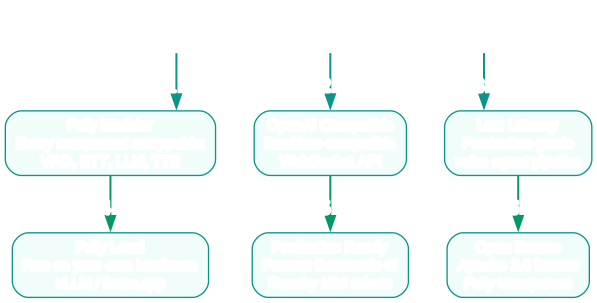
HuggingFace’s speech-to-speech distinguishes itself through a set of features that address the real pain points developers face when building voice agents. The most prominent feature is full modularity. Unlike monolithic voice services where every component is tightly coupled, speech-to-speech treats VAD, STT, LLM, and TTS as independent, pluggable slots. You can swap the default Parakeet TDT for Whisper, replace Qwen3-TTS with a different voice model, or point the LLM slot at any OpenAI-compatible endpoint. This modularity extends to configuration – each component has its own set of parameters that can be tuned independently.
The OpenAI Realtime-compatible WebSocket API is another standout feature. Rather than inventing a new protocol, speech-to-speech implements the same WebSocket interface that OpenAI uses for its Realtime API. This means that any client library, SDK, or application already built for OpenAI’s voice capabilities can connect to a speech-to-speech server with minimal changes. The protocol handles audio streaming, function calling, conversation management, and interruption handling, providing a rich interaction model that goes beyond simple request-response patterns.
Local deployment is a first-class concern, not an afterthought. The project includes pre-configured defaults for running every component on local hardware. Parakeet TDT handles STT locally, Qwen3-TTS handles TTS locally, and the LLM can be served through llama.cpp or vLLM for fully on-premises operation. This is essential for use cases where data privacy, latency, or network reliability make cloud-based services impractical. The fact that speech-to-speech runs in production for thousands of Reachy Mini robots demonstrates that the local deployment path is battle-tested and reliable.
The project also provides a hosted model option through HuggingFace’s Inference Providers. If you do not want to manage local GPU resources, you can point the STT and TTS components at HuggingFace’s hosted endpoints while keeping the LLM slot pointed at whatever provider you prefer. This hybrid approach lets you balance cost, latency, and data privacy according to your specific requirements. Additionally, the pip install speech-to-speech experience means you can go from zero to a running voice agent in minutes, and the Apache 2.0 license gives you full freedom to use, modify, and distribute the software in any context.
Installation and Setup
Getting started with speech-to-speech is straightforward. The project is distributed as a Python package on PyPI, and the entire pipeline can be launched with a single command after setting a few environment variables.
Prerequisites
- Python 3.10 or later
- An OpenAI API key (for the hosted LLM path) or a local LLM server (for the fully local path)
- A CUDA-capable GPU is recommended for local STT and TTS models, though CPU-only operation is possible with reduced performance
Quick Start with Hosted LLM
The fastest way to get a voice agent running is to use OpenAI’s hosted API for the LLM component while running STT and TTS locally:
pip install speech-to-speech
export OPENAI_API_KEY=sk-your-key-here
speech-to-speech
This single command downloads and configures the default local models for VAD, STT, and TTS, connects to OpenAI for the LLM, and starts a WebSocket server on ws://127.0.0.1:8765. The server is now ready to accept connections from any OpenAI Realtime-compatible client.
Fully Local Setup with llama.cpp
For a fully local deployment with no external API calls, you can serve the LLM through llama.cpp and point speech-to-speech at it:
# Terminal 1: Start the local LLM server
llama-server -hf ggml-org/gemma-4-E4B-it-GGUF -np 2 -c 65536 -fa on --swa-full
# Terminal 2: Start speech-to-speech pointing at the local LLM
speech-to-speech \
    --model_name "ggml-org/gemma-4-E4B-it-GGUF" \
    --responses_api_base_url "http://127.0.0.1:8080/v1" \
    --responses_api_api_key ""
This configuration runs every component on your local machine. The VAD, STT, and TTS models are downloaded and loaded automatically, while the LLM is served by llama.cpp on the same machine.
Testing the Connection
Once the server is running, you can test it using the included listen-and-play script:
python scripts/listen_and_play_realtime.py --host 127.0.0.1 --port 8765
This script captures audio from your microphone, streams it to the speech-to-speech server, and plays back the agent’s audio response in real time. It is the quickest way to verify that your pipeline is working end to end.
Voice Agent Pipeline
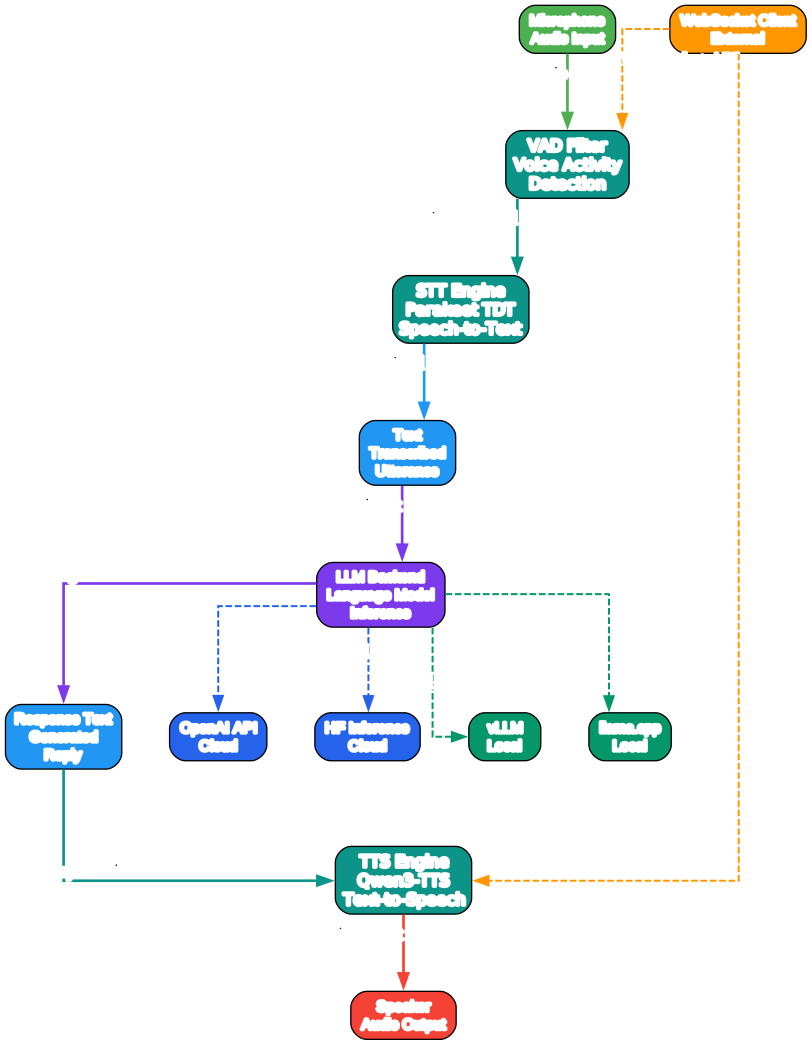
The voice agent pipeline in speech-to-speech is designed as a streaming architecture where audio flows through each stage in near-real-time. Understanding this pipeline is essential for configuring the system effectively and diagnosing performance issues. The pipeline begins when a client connects via the WebSocket endpoint and starts sending audio frames. These frames arrive as raw PCM audio data and are immediately fed into the VAD module.
The VAD module operates on short audio windows, typically 20-30 milliseconds, and classifies each window as speech or non-speech. When the VAD detects the start of a speech segment, it begins buffering the incoming audio. When it detects the end of the speech segment – a pause in speaking – it finalizes the audio chunk and passes it to the STT module. This segmentation is crucial because it allows the system to process speech in natural utterance units rather than arbitrary time slices, which improves transcription accuracy and reduces latency.
Once the STT module receives a speech chunk, it transcribes it into text. The transcription is then formatted as a message and sent to the LLM through the OpenAI-compatible API. The LLM processes the message, potentially calling tools or functions defined in the agent’s configuration, and generates a text response. This response is streamed token-by-token back to the TTS module, which begins synthesizing audio as soon as it receives the first tokens. This streaming approach to TTS is what enables the low end-to-end latency that makes speech-to-speech suitable for real-time conversation.
The synthesized audio is then streamed back to the client through the WebSocket connection. The client receives audio frames that it can play back immediately, creating the experience of a natural conversation. If the user begins speaking while the agent is still responding, the VAD detects the interruption and the pipeline can be configured to stop the current TTS output and begin processing the new speech input. This barge-in behavior is essential for natural conversational flow and is handled automatically by the pipeline’s orchestration layer.
Each stage of the pipeline exposes configuration parameters that let you fine-tune behavior. The VAD has sensitivity thresholds, the STT has language and model selection, the LLM has temperature, system prompts, and tool definitions, and the TTS has voice selection and speed controls. By adjusting these parameters, you can optimize the pipeline for different use cases – from fast-paced customer service interactions to more deliberate, thoughtful conversational agents.
Development Workflow
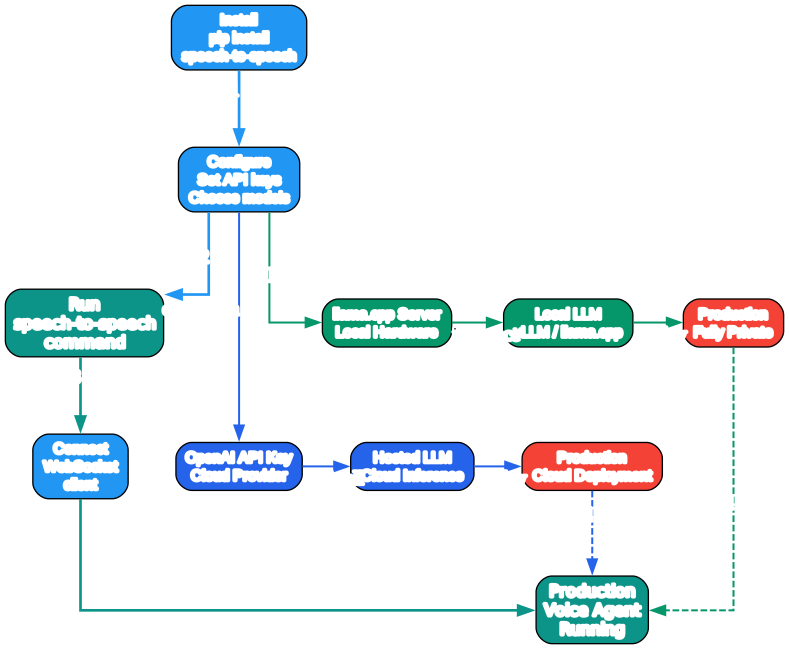
Developing a voice agent with speech-to-speech follows an iterative workflow that starts with a basic configuration and progressively adds complexity. The first step is to get the default pipeline running with the quick-start command. This validates that your environment is set up correctly and that the basic audio path works end to end. At this stage, you are using the default models and a generic system prompt, so the agent will respond conversationally but without any domain-specific knowledge.
The next step is to customize the LLM behavior by providing a system prompt and optionally defining tools. The system prompt shapes the agent’s personality, knowledge boundaries, and response style. Tools extend the agent’s capabilities by allowing it to call external APIs, query databases, or perform other actions during a conversation. Because the LLM slot speaks the OpenAI-compatible protocol, you can use the same tool and function-calling definitions that you would use with OpenAI’s API, making it straightforward to port existing agent configurations.
Once you have a working agent with custom behavior, the next phase is performance optimization. This involves measuring end-to-end latency, identifying bottlenecks, and adjusting the pipeline configuration. Common optimizations include switching to a faster STT model, reducing the LLM’s maximum token count to limit response length, or choosing a TTS voice that balances quality and synthesis speed. The modular architecture makes it easy to swap components and compare performance without changing the rest of the pipeline.
For production deployment, the workflow shifts to reliability and scalability concerns. You will want to containerize the speech-to-speech server using Docker, set up health checks and monitoring, and configure the pipeline for your deployment environment. If you are running on cloud infrastructure, you can use HuggingFace’s Inference Providers for STT and TTS to offload GPU workloads. If you are running on-premises, you will want to tune llama.cpp or vLLM parameters for your specific hardware. The project’s documentation covers these deployment scenarios in detail, and the fact that it runs in production for thousands of Reachy Mini robots provides a strong reference architecture for production deployments.
Throughout this workflow, the OpenAI Realtime-compatible API is a constant. Whether you are in development, testing, or production, the client-side code that connects to the speech-to-speech server remains the same. This consistency means you can develop and test locally, then deploy to production without changing a single line of client code. The WebSocket protocol also makes it easy to integrate with existing web and mobile applications, since WebSocket clients are available in every major programming language and framework.
Local Deployment with llama.cpp
Running speech-to-speech entirely on local hardware is one of its most compelling capabilities. This section provides a deeper look at the local deployment path using llama.cpp as the LLM backend.
Why Local Deployment Matters
Local deployment eliminates dependency on external API services, which provides three key benefits. First, data privacy – no audio or text data leaves your machine, which is essential for healthcare, finance, and other regulated industries. Second, latency predictability – without network round-trips to cloud APIs, response times are consistent and bounded by your local hardware capabilities. Third, operational resilience – your voice agent continues to work even when internet connectivity is unavailable or unreliable.
Configuring llama.cpp for Voice Agents
When running llama.cpp as the LLM backend for a voice agent, there are several parameters worth tuning:
llama-server \
    -hf ggml-org/gemma-4-E4B-it-GGUF \
    -np 2 \
    -c 65536 \
    -fa on \
    --swa-full \
    --host 0.0.0.0 \
    --port 8080
The -np 2 flag sets the number of parallel processing slots, which allows the server to handle multiple concurrent requests. The -c 65536 flag sets the context window to 64K tokens, giving the LLM enough context for extended conversations. The -fa on flag enables flash attention for faster inference, and --swa-full enables the full sliding window attention mechanism for better long-context handling.
Connecting speech-to-speech to the Local LLM
With llama.cpp running, configure speech-to-speech to use it as the LLM backend:
speech-to-speech \
    --model_name "ggml-org/gemma-4-E4B-it-GGUF" \
    --responses_api_base_url "http://127.0.0.1:8080/v1" \
    --responses_api_api_key ""
The empty API key tells speech-to-speech that no authentication is required for the local server. The responses_api_base_url points to the llama.cpp server’s OpenAI-compatible endpoint. The model_name parameter should match the model you loaded in llama.cpp.
Hardware Recommendations
For a smooth real-time experience, the following hardware is recommended:
| Component | Minimum | Recommended |
|---|---|---|
| GPU | NVIDIA RTX 3060 (12GB) | NVIDIA RTX 4090 (24GB) |
| RAM | 16 GB | 32 GB |
| CPU | 8 cores | 16 cores |
| Storage | 20 GB SSD | 50 GB NVMe SSD |
The STT and TTS models require approximately 4-6 GB of VRAM combined, while the LLM requirements depend on the model size. The Gemma 4E model quantized to 4-bit fits comfortably in 12 GB of VRAM, making the RTX 3060 a viable minimum configuration.
Features Table
The following table summarizes the key features and capabilities of HuggingFace’s speech-to-speech:
| Feature | Details |
|---|---|
| License | Apache 2.0 – fully open source, commercial use permitted |
| Pipeline | VAD -> STT -> LLM -> TTS, fully modular and swappable |
| API Protocol | OpenAI Realtime-compatible WebSocket API |
| Local STT | Parakeet TDT (NVIDIA) – fast, accurate, multilingual |
| Local TTS | Qwen3-TTS – natural-sounding neural speech synthesis |
| LLM Backend | OpenAI API, HF Inference Providers, vLLM, llama.cpp |
| Installation | pip install speech-to-speech |
| GitHub Stars | 5,701+ |
| Production Use | Thousands of Reachy Mini robots |
| Language | Python 3.10+ |
| Interruption Handling | Barge-in support via VAD-based detection |
| Streaming | Token-level streaming for LLM and chunk-level for TTS |
| Tool Calling | OpenAI-compatible function/tool calling |
| Containerization | Docker support for production deployment |
| Hybrid Deployment | Mix local and hosted components as needed |
Troubleshooting
Common Issues and Solutions
Issue: “No audio output from the agent”
Verify that your microphone is capturing audio and that the WebSocket connection is established. Check the server logs for errors in the VAD or STT modules. If you are running on a headless server, ensure that audio devices are properly configured. You can test the microphone separately using the listen_and_play_realtime.py script with verbose logging enabled.
Issue: “High latency between speaking and receiving a response”
Latency can originate from any stage in the pipeline. Start by measuring the latency of each component independently. If the LLM is the bottleneck, consider switching to a smaller model or using a quantized version. If STT is slow, ensure you are running on a GPU and that CUDA is properly configured. The streaming architecture of speech-to-speech means that TTS can begin synthesizing before the LLM finishes generating, so the LLM’s time-to-first-token is more important than its total generation time.
Issue: “CUDA out of memory errors”
Running all components locally requires sufficient GPU memory. The STT and TTS models together consume approximately 4-6 GB of VRAM. If you are also running the LLM on the same GPU, you need enough headroom for the model’s KV cache. Reduce the context window size in llama.cpp (-c flag) or switch to a smaller model. You can also offload the LLM to CPU using llama.cpp’s -ngl flag to limit GPU layers.
Issue: “Connection refused on WebSocket endpoint”
Ensure that the speech-to-speech server is running and listening on the expected port (default: 8765). Check firewall rules if you are connecting from a different machine. If you changed the host or port configuration, update your client connection string accordingly.
Issue: “STT producing empty or garbled transcriptions”
This typically indicates a mismatch between the audio format expected by the STT model and the audio being sent. Verify that your client is sending 16-bit PCM audio at the correct sample rate (usually 16 kHz). If you are using a custom audio source, ensure it matches the format specification in the speech-to-speech documentation.
Issue: “TTS output sounds robotic or distorted”
The quality of TTS output depends on the model and the voice configuration. If you are using the default Qwen3-TTS model, ensure it is fully downloaded and loaded correctly. Check the server logs for any warnings about model loading. You can also experiment with different TTS voices and speed parameters to find the best quality for your use case.
Conclusion
HuggingFace’s speech-to-speech project represents a significant step forward for open-source voice agents. By combining a modular pipeline architecture with OpenAI-compatible protocols and first-class local deployment support, it removes the traditional barriers to building production-grade voice agents. Whether you are prototyping a conversational AI on your laptop or deploying thousands of robotic voice interfaces, speech-to-speech provides the flexibility and performance you need.
The key takeaways are:
- Modularity – every component (VAD, STT, LLM, TTS) is swappable, letting you optimize for quality, speed, or cost
- Compatibility – the OpenAI Realtime-compatible API means you can use existing tools and SDKs without modification
- Local-first – the entire pipeline can run on local hardware with Parakeet TDT and Qwen3-TTS, ensuring data privacy and latency control
- Production-proven – deployed at scale in thousands of Reachy Mini robots
To get started, visit the resources below:
- GitHub Repository: https://github.com/huggingface/speech-to-speech
- PyPI Package: https://pypi.org/project/speech-to-speech/
- HuggingFace Models: https://huggingface.co/models
The future of voice agents is open, modular, and accessible. With speech-to-speech, HuggingFace has given developers the building blocks to create that future on their own terms. Enjoyed this post? Never miss out on future posts by following us 


