Every token sent to an LLM costs money – and most of it is wasted on redundant context. Tool outputs spew thousands of lines of logs. RAG chunks overlap with duplicate information. Source files contain boilerplate that adds nothing to the answer. The result: bloated API calls, overflowing context windows, and degraded response quality.
Headroom solves this problem at the source. It compresses tool outputs, logs, files, and RAG chunks before they reach the LLM, cutting token usage by 60-95% while preserving answer quality. With 18,835 GitHub stars and explosive weekly growth of 14,266 stars, it is one of the fastest-growing developer tools in the AI ecosystem.
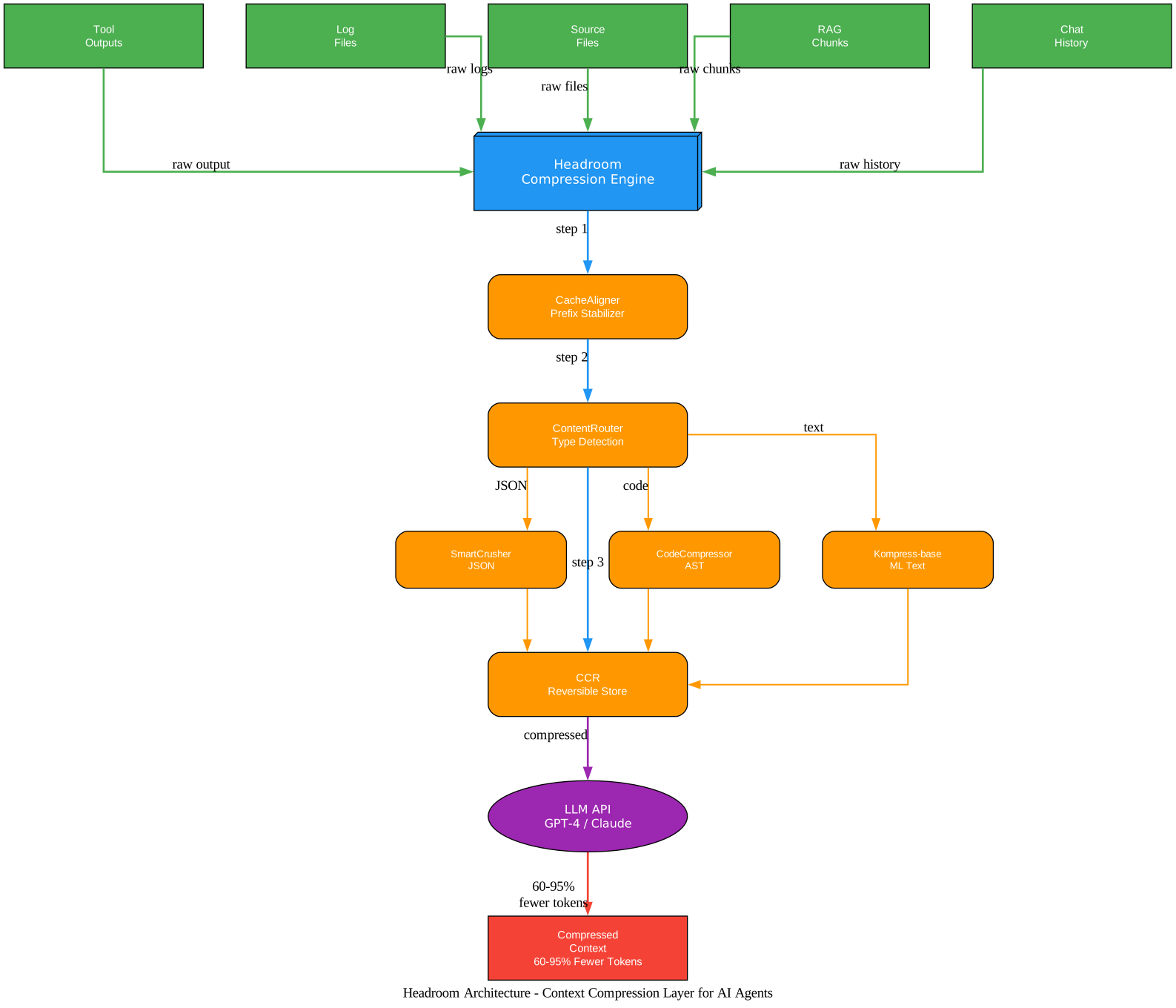
What is Headroom?
Headroom is a Python library (package name headroom-ai on PyPI) that sits between your data sources and the LLM, compressing context before it enters the prompt. It supports three integration modes – Library, Proxy, and MCP Server – so you can compress tokens regardless of how you interact with LLMs.
Key facts:
- 18,835 GitHub stars, 1,203 forks
- 60-95% token reduction across content types
- Apache 2.0 license
- Python 3.10+ required, Rust core for performance
- Available on PyPI (
headroom-ai) and npm (headroom-ai)
Headroom reduces LLM token usage by 60-95% across tool outputs, logs, files, and RAG chunks – while preserving answer quality. With 18,835 GitHub stars and explosive weekly growth of 14,266 stars, it is one of the fastest-growing developer tools in the AI ecosystem.
How Headroom Works
Headroom uses a multi-stage compression pipeline that analyzes content type, selects the best compression strategy, and verifies quality before outputting the compressed result.
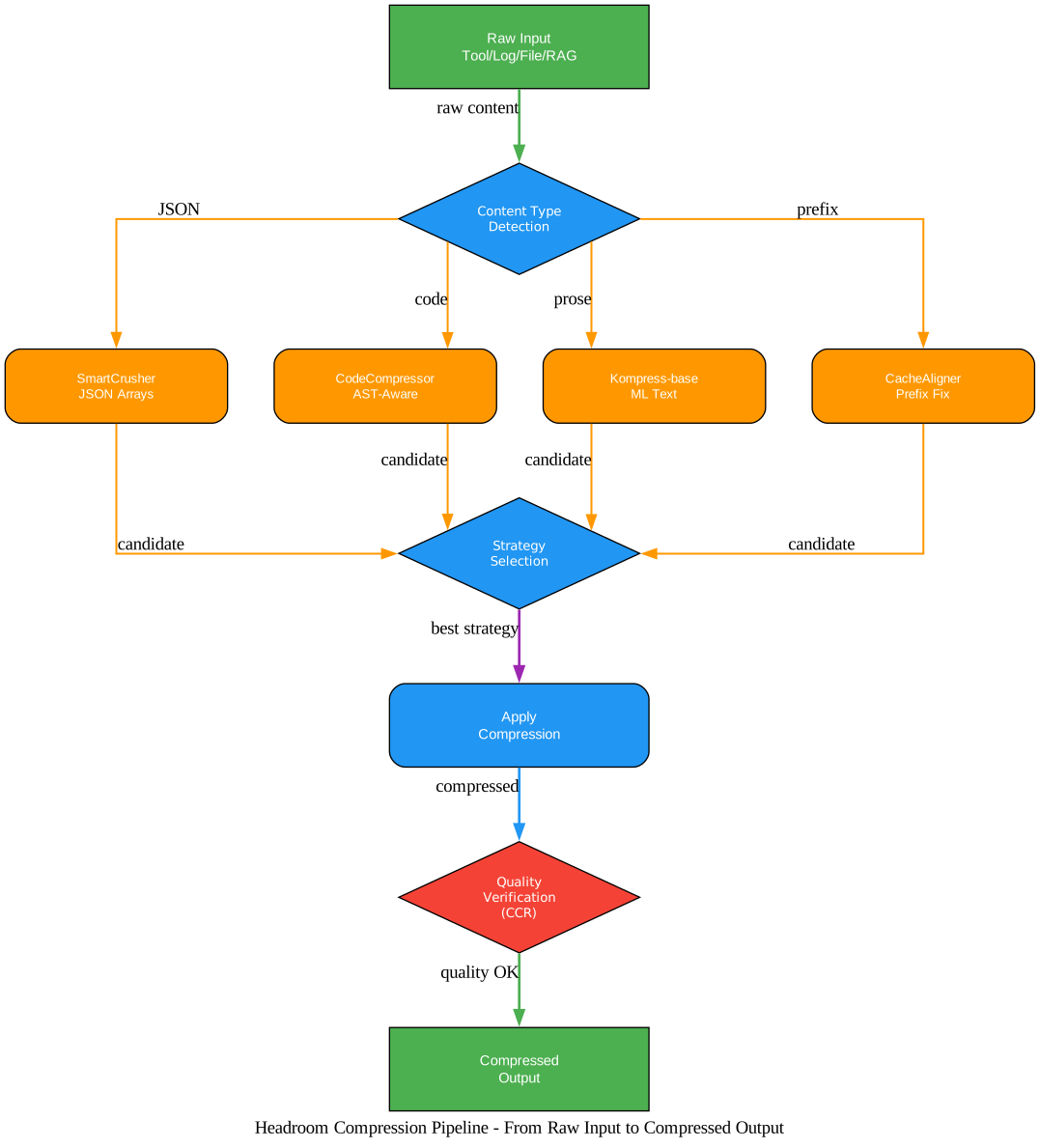
The pipeline works in stages:
-
Content Type Detection – Headroom automatically identifies whether the input is JSON (tool outputs), code (source files), prose (documentation), or structured data (logs, RAG chunks).
- Strategy Selection – Based on content type, Headroom selects the optimal compression strategy:
- SmartCrusher for JSON arrays – removes redundant keys, collapses nested structures, preserves semantic meaning
- CodeCompressor for source code – AST-aware compression that removes boilerplate while keeping logic intact
- Kompress-base for prose text – ML-based text compression using a HuggingFace model
- CacheAligner for prefix stabilization – stabilizes common prefixes for KV cache hits
-
Compression – The selected strategy is applied to reduce token count.
- Quality Verification (CCR) – Headroom’s CCR (reversible compression) stores originals locally so the LLM can retrieve them on demand. This means compression is lossy in the prompt but reversible when needed.
Three Integration Modes
Headroom offers three ways to integrate, depending on your workflow:
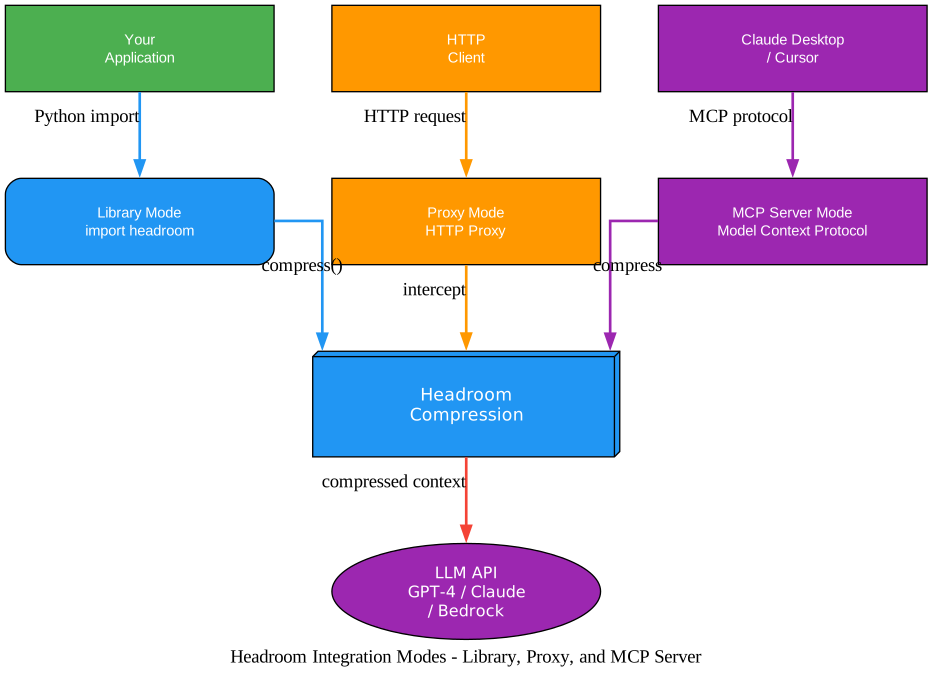
Headroom offers three integration modes – Library, Proxy, and MCP Server – so you can compress tokens regardless of how you interact with LLMs. Import it in Python, run it as a transparent proxy, or configure it as an MCP server for Claude Desktop and Cursor.
Library Mode
The simplest integration. Import Headroom in your Python code and call compress() directly:
from headroom import compress

messages = [
    {"role": "user", "content": "Analyze this log file..."}
]

result = compress(messages, model="claude-sonnet-4-5-20250929")

print(f"Tokens saved: {result.tokens_saved}")
print(f"Compression ratio: {result.compression_ratio:.1%}")
print(f"Transforms applied: {result.transforms_applied}")

# Use compressed messages in your LLM call
response = client.chat.completions.create(
    model="claude-sonnet-4-5-20250929",
    messages=result.messages
)
The compress() function returns a CompressResult object with:
messages– the compressed messages (same format as input)tokens_before– token count before compressiontokens_after– token count after compressiontokens_saved– number of tokens removedcompression_ratio– ratio of tokens saved (0.0 = no savings, 1.0 = 100% removed)transforms_applied– list of compression strategies that were applied
Proxy Mode
Run Headroom as an HTTP proxy that intercepts LLM API calls transparently. No code changes needed in your application:
# Install with proxy support
pip install "headroom-ai[proxy]"

# Start the proxy server
headroom proxy --port 8787

# Point your LLM client at the proxy
export OPENAI_API_BASE=http://localhost:8787/v1
The proxy intercepts requests, compresses the context, forwards to the LLM, and returns the response. Your application code does not change at all.
MCP Server Mode
For MCP-compatible tools like Claude Desktop, Cursor, and others:
# Install with MCP support
pip install "headroom-ai[mcp]"

# Install the MCP server
headroom mcp install
This configures Headroom as an MCP server that compresses context in tool calls before they reach the LLM. It works with Claude Code, Codex, Cursor, Aider, Copilot CLI, and OpenClaw.
Agent Wrap Mode
Headroom also provides a convenient wrap command that wraps any AI coding agent with compression:
# Wrap Claude Code with Headroom
headroom wrap claude

# Wrap other agents
headroom wrap codex
headroom wrap cursor
headroom wrap aider
headroom wrap copilot
Installation and Setup
Prerequisites
- Python 3.10 or higher
- pip package manager
Install Headroom
# Basic installation
pip install headroom-ai

# With all optional dependencies
pip install "headroom-ai[all]"

# With specific extras
pip install "headroom-ai[proxy]"    # Proxy server support
pip install "headroom-ai[mcp]"      # MCP server support
pip install "headroom-ai[ml]"       # ML-based compression (Kompress)
pip install "headroom-ai[code]"     # Code compression
pip install "headroom-ai[memory]"   # Cross-agent memory
For npm users:
npm install headroom-ai
Quick Start
from headroom import compress

# Simple one-function compression
messages = [
    {"role": "system", "content": "You are a helpful assistant."},
    {"role": "user", "content": "Analyze this error log..."}
]

result = compress(messages, model="gpt-4o")

# Access compressed messages
compressed_messages = result.messages

# Check compression metrics
print(f"Before: {result.tokens_before} tokens")
print(f"After: {result.tokens_after} tokens")
print(f"Saved: {result.tokens_saved} tokens ({result.compression_ratio:.1%})")
Advanced Configuration
from headroom import compress, CompressConfig

# Fine-tune compression behavior
config = CompressConfig(
    compress_user_messages=True,    # Also compress user messages
    target_ratio=0.5,               # Target 50% compression
    protect_recent=0,               # Don't protect recent messages
    kompress_model="default",       # ML compression model
)

result = compress(messages, model="claude-opus-4-20250514", config=config)
Performance Benchmarks
Headroom’s benchmarks demonstrate significant token reduction across real-world tasks:
| Task | Token Savings | Description |
|---|---|---|
| Code Search | 92% | Searching large codebases |
| SRE Debugging | 92% | Debugging production incidents |
| GitHub Triage | 73% | Triaging GitHub issues |
| Codebase Exploration | 47% | Exploring unfamiliar codebases |
Quality preservation benchmarks show Headroom maintains answer quality:
| Benchmark | Accuracy Impact | Compression |
|---|---|---|
| GSM8K | +/-0.000 | Full context |
| TruthfulQA | +0.030 | Full context |
| SQuAD v2 | 97% | 19% compression |
| BFCL | 97% | 32% compression |
In benchmarks, Headroom achieves 60-95% token reduction across content types: tool outputs, log files, source code files, and RAG chunks. The compression is lossy but quality-preserving – LLMs produce the same answers with a fraction of the tokens.
Comparison with Alternatives
| Feature | Headroom | RTK | lean-ctx | Compresr | OpenAI Compaction |
|---|---|---|---|---|---|
| Token Reduction | 60-95% | 40-60% | 30-50% | 20-40% | 50-70% |
| Quality Preservation | High | Medium | Medium | Low | Medium |
| Integration Modes | 3 (Library, Proxy, MCP) | 1 (Library) | 1 (Library) | 1 (Library) | 1 (API) |
| Agent Compatibility | 6+ agents | Limited | Limited | Limited | OpenAI only |
| Reversible Compression | Yes (CCR) | No | No | No | No |
| Open Source | Yes (Apache 2.0) | Yes | Yes | Yes | No |
Headroom stands out with three integration modes, reversible compression via CCR, and compatibility with six AI coding agents (Claude Code, Codex, Cursor, Aider, Copilot CLI, OpenClaw).
Conclusion
Headroom provides a practical solution to the token waste problem in LLM workflows. With 60-95% token reduction across three integration modes – Library, Proxy, and MCP Server – it fits into any workflow without requiring code changes in many cases.
The key innovations are:
- SmartCrusher for JSON compression that preserves semantic meaning
- CodeCompressor for AST-aware source code compression
- Kompress-base for ML-based text compression
- CacheAligner for prefix stabilization and KV cache optimization
- CCR for reversible compression that lets LLMs retrieve originals on demand
At scale, reducing tokens by 60-95% translates directly to cost savings on API calls. If you spend $1,000/month on LLM API costs, Headroom could reduce that to $50-400/month – a 60-95% reduction in spending.
Get started with Headroom:
pip install "headroom-ai[all]"
Links:
- GitHub: https://github.com/chopratejas/headroom
- PyPI: https://pypi.org/project/headroom-ai/
- npm: https://www.npmjs.com/package/headroom-ai

Enjoyed this post? Never miss out on future posts by following us


