Introduction
GPT-Image-2 API prompt engineering has rapidly become an essential skill for developers and creatives working with AI image generation. OpenAI’s GPT-Image-2 model represents a paradigm shift in what AI can produce: photorealistic images with accurate text rendering, consistent character identity across multiple generations, and multi-turn editing that maintains context from previous outputs. The awesome-gpt-image-2-API-and-Prompts repository curates 763+ production-ready prompt cases across seven specialized categories, making it the most comprehensive GPT-Image-2 prompt resource available today.
This guide covers everything you need to integrate the GPT-Image-2 API into your workflow: the API architecture and authentication flow, core capabilities from text-to-image generation to multi-turn editing, seven prompt engineering techniques with concrete examples, a deep dive into all seven prompt categories, step-by-step integration code in curl and Python, advanced prompt patterns for professional workflows, and how to contribute your own cases to this growing community resource.
Key Insight: GPT-Image-2’s breakthrough capabilities – high-fidelity text rendering, identity preservation across generations, and multi-turn conversational editing – make it the first AI image model suitable for production-grade commercial workflows, not just creative experimentation.
GPT-Image-2 API Overview
The GPT-Image-2 API is accessible through the Evolink platform, which provides a standardized endpoint compatible with OpenAI’s API format. The primary endpoint handles both text-to-image generation and image editing tasks through a single unified interface.
API Endpoint: POST https://api.evolink.ai/v1/images/generations
Authentication: All requests require a Bearer token in the Authorization header. You can obtain an API key from the Evolink dashboard.
Request Format: The API accepts JSON payloads with the model identifier, prompt text, and optional parameters for image count and dimensions.
curl -X POST https://api.evolink.ai/v1/images/generations \
  -H "Authorization: Bearer YOUR_API_KEY" \
  -H "Content-Type: application/json" \
  -d '{
    "model": "gpt-image-2",
    "prompt": "A cinematic product shot of a luxury watch on marble surface",
    "n": 1,
    "size": "1024x1024"
  }'
Callable Skill: For quick CLI-based generation without writing code, the Evolink platform provides a one-line callable skill:
npx evolink-gpt-image -y
This skill handles authentication, request formatting, and response parsing automatically. It is ideal for rapid prototyping and testing prompt variations before integrating into an application.
Response Format: The API returns a JSON object containing an array of generated images, each with a URL or base64-encoded data:
{
  "data": [
    {
      "url": "https://cdn.evolink.ai/generated/abc123.png"
    }
  ]
}
The Evolink API gateway handles authentication validation, request routing to the appropriate GPT-Image-2 engine, and response formatting. Compared to direct OpenAI API access, the Evolink platform provides simplified authentication, the callable skill for CLI workflows, and consolidated billing for image generation usage.
Core Capabilities
GPT-Image-2 delivers five core capabilities that distinguish it from previous image generation models.
Text-to-Image Generation
Generate images from natural language descriptions with unprecedented fidelity. The model understands complex scene descriptions, material properties, lighting conditions, and compositional instructions.
A hyper-realistic miniature diorama product advertisement featuring an oversized luxury skincare pump bottle, tiny figurine construction workers climbing scaffolding, tilt-shift miniature aesthetic, studio photography style, 8K resolution
Image Editing
Modify existing images through three editing modes: inpainting fills masked regions with new content, outpainting extends the image beyond its original borders, and style transfer applies artistic transformations to the entire image while preserving its structure.
Transform this product photo into a shattered stone sculpture style, dramatic lighting, dark background
Multi-Turn Conversations
Iteratively refine images through conversational prompts. Each generation maintains context from previous outputs, allowing progressive refinement of composition, style, and details without starting from scratch.
First: "A luxury watch on a marble surface, studio lighting"
Follow-up: "Add a subtle reflection on the marble and change the lighting to golden hour"
Follow-up: "Now add a dark velvet background instead of marble"
High Fidelity Text Rendering
GPT-Image-2’s most celebrated breakthrough: accurate text rendering within generated images. Brand names, headlines, labels, and signage appear with correct spelling and appropriate typographic styling – a capability that was unreliable in previous models.
A movie poster titled "MIDNIGHT HORIZON" in bold metallic letterpress typography, dark sci-fi atmosphere, starfield background
Consistent Character Generation
Maintain character identity across multiple generations using reference images. Upload a photo as a facial reference, and the model preserves recognizable features, skin tones, and proportions across different poses, outfits, and scenes.
Generate a portrait maintaining the facial features from the uploaded reference photo, cinematic lighting, 85mm lens
Amazing: GPT-Image-2 renders text with such precision that brand names, product labels, and movie titles appear with correct spelling and appropriate typography – a capability that was essentially unusable in previous image generation models.
Prompt Engineering Techniques
Mastering GPT-Image-2 requires understanding seven key prompt engineering techniques. Each technique provides a different lever for controlling the model’s output, and they can be combined for maximum precision.

The mind map above presents the seven core prompt engineering techniques that unlock GPT-Image-2’s full potential. Identity Preservation enables consistent character generation by locking facial features from uploaded reference photos. Style Transfer applies artistic transformations ranging from material effects like shattered stone to traditional art styles like watercolor and anime. Negative Prompts provide fine-grained control by specifying elements to exclude, acting as quality filters for the generation process. Multi-Panel Compositions generate complex layouts including storyboards with camera notes, contact sheets with multiple angles, and character sheets with turnaround views. Reference-Based Generation combines uploaded images with text prompts for guided output, supporting style references, composition references, and direct image editing. Aspect Ratio Control ensures outputs match their intended display context, from vertical 9:16 for mobile to wide 16:9 for presentations. Structured Templates bring reproducibility through JSON, section-based, and argument-based formats that make prompts shareable and versionable. Together, these seven techniques form a comprehensive toolkit for controlling every aspect of GPT-Image-2’s output.
Identity Preservation
Upload a photo as a facial reference and use identity lock headers to maintain consistency across generations. This technique is essential for character design, model portfolios, and any workflow requiring the same person across multiple images.
Generate a portrait maintaining the facial features from the uploaded reference photo, cinematic lighting, 85mm lens, shallow depth of field
The identity lock works by extracting facial features from the uploaded reference and using them as a constraint during generation. Consistency headers in the prompt reinforce the lock by explicitly stating which features to preserve.
Style Transfer
Specify artistic styles directly in the prompt to transform the output’s visual language. GPT-Image-2 supports material styles (shattered stone, brushed metal, glass), artistic styles (watercolor, anime, oil painting), and era-based styles (Art Deco, Victorian, 1980s retro).
Transform this product photo into a shattered stone sculpture style, dramatic lighting, dark background
Negative Prompts
Use exclusion rules to specify what the model should avoid. Negative prompts act as quality filters, preventing common artifacts and unwanted elements from appearing in the output.
Product photo of a perfume bottle, minimalist studio, --no text, no watermark, no reflections
Multi-Panel Compositions
Generate complex multi-panel layouts in a single image. This technique produces storyboards with camera notes, contact sheets showing multiple angles, and character sheets with turnaround views – all within one generation.
4-panel storyboard showing a character walking through a forest, each panel with different camera angle, continuity sheet layout
Reference-Based Generation
Combine an uploaded image with a text prompt for guided output. The reference image provides structural or stylistic guidance while the prompt specifies the desired transformation or addition.
[Upload: product photo] Create a lifestyle shot of this product in a modern kitchen setting, natural morning light, shallow depth of field
Aspect Ratio Control
Specify output dimensions using standard ratios. This ensures generated images match their intended display context without cropping or resizing.
| Ratio | Use Case | Example |
|---|---|---|
| 9:16 | Mobile stories, vertical ads | Instagram Stories, TikTok |
| 16:9 | Presentations, video thumbnails | YouTube, slide decks |
| 4:5 | Social media posts | Instagram feed, Facebook |
| 1:1 | Square posts, product grids | Instagram grid, catalog |
| 3:4 | Medium portrait | Pinterest, editorial |
Vertical product shot for Instagram, 9:16 aspect ratio, luxury cosmetics, soft pink lighting
Structured Templates
Use JSON-based, section-based, or argument-based prompt formats for reproducibility and sharing. Structured templates make prompts versionable, testable, and composable.
{
  "subject": "luxury watch",
  "setting": "marble surface",
  "lighting": "studio, soft diffused",
  "camera": "85mm macro, f/2.8",
  "style": "commercial product photography",
  "exclude": ["text", "watermark", "reflections"]
}
Takeaway: The most effective GPT-Image-2 prompts combine multiple techniques: identity preservation for character consistency, structured templates for reproducibility, and negative prompts for quality control. A single prompt can leverage three or four techniques simultaneously.
7 Prompt Categories Deep Dive
The 763+ curated prompt cases span seven specialized categories, each targeting distinct commercial and creative use cases.

The categories ecosystem diagram maps the full scope of the 763+ curated prompt library across seven specialized domains. Poster and Illustration leads with 353 cases, covering movie posters, travel art, anime, watercolor, and editorial illustration – reflecting the broad creative applications of GPT-Image-2. Ad Creative follows with 183 cases spanning campaign posters, billboard ads, social media content, and brand identity systems. E-commerce and Portrait and Photography each contribute 109 cases, serving product photography needs and artistic portrait generation respectively. UI and Social Media Mockup provides 67 cases for design prototyping, brand boards, and infographic generation. Comparison and Community offers 53 cases for creative experiments and style exploration. Character Design, while the smallest category at 13 cases, delivers high-value specialized outputs including reference cards, model sheets, and key visuals essential for game development and animation workflows. Together, these categories form a comprehensive prompt engineering resource covering virtually every commercial and creative image generation use case.
E-commerce (109 Cases)
The e-commerce category provides production-ready prompts for product photography, lifestyle shots, food photography, jewelry, cosmetics, furniture, and fashion. These cases are designed for online store imagery, catalog photos, and social commerce platforms.
Key subcategories include product shots with studio lighting setups, food photography with appetizing compositions, jewelry and cosmetics with material-accurate rendering, and fashion with editorial-quality styling.
A hyper-realistic miniature diorama product advertisement featuring an oversized luxury skincare pump bottle, tiny figurine construction workers climbing scaffolding, tilt-shift miniature aesthetic, studio photography style, 8K resolution
Product photo of a handcrafted leather wallet on a rustic wooden surface, warm ambient lighting, shallow depth of field, commercial e-commerce style
Ad Creative (183 Cases)
The ad creative category is the second-largest collection, covering campaign posters, billboard ads, social media ads, brand identity systems, and sports marketing materials. These prompts are built for marketing campaigns, brand launches, and social media content generation.
Key subcategories include campaign posters with bold typography, billboard ads with high-impact visuals, social media ads optimized for different platforms, and brand identity systems that maintain visual consistency across assets.
Billboard advertisement for a sports energy drink, dynamic splash photography, extreme angle, bold sans-serif typography reading "SURGE", urban night background with neon reflections
Social media ad for a luxury fragrance, minimalist composition, product centered, soft gradient background, brand logo watermark, 4:5 aspect ratio
Portrait and Photography (109 Cases)
The portrait and photography category covers cinematic photography, editorial and fashion photography, identity preservation portraits, and character portraits. These cases serve editorial spreads, model portfolios, and character art workflows.
Key subcategories include cinematic photography with lens specifications and lighting setups, editorial fashion photography with magazine cover aesthetics, identity preservation using reference photos, and character portraits with detailed facial rendering.
Cinematic portrait, 85mm lens, f/1.4, golden hour backlight, subject looking off-camera, shallow depth of field, film grain, Kodak Portra 400 emulation
Editorial fashion photography, Vogue magazine cover style, model in structured blazer, studio lighting with dramatic shadows, high contrast black and white with selective color
Poster and Illustration (353 Cases)
The poster and illustration category is the largest in the entire collection, covering movie posters, travel posters, anime illustrations, watercolor paintings, editorial illustrations, and sports cards. This breadth reflects the wide range of creative applications GPT-Image-2 supports.
Key subcategories include movie posters with genre-specific design language, travel posters with vintage and modern aesthetics, anime illustrations in multiple sub-styles, watercolor paintings with material-accurate brushwork, editorial illustrations for publications, and sports cards with collectible design layouts.
Movie poster for a sci-fi thriller titled "QUANTUM DRIFT", bold metallic typography, dark space background with nebula, lone astronaut silhouette, dramatic lens flare, 27x40 poster format
Vintage travel poster for Tokyo, Art Deco style, bold flat colors, pagoda silhouette with cherry blossoms, geometric sun rays, retro typography reading "TOKYO 2026"
Character Design (13 Cases)
The character design category is the smallest but delivers high-value specialized outputs: character reference cards, model sheets, key visuals, and stylized 3D characters. These cases are essential for game development, animation pre-production, and concept art workflows.
Character reference card, front and side view, fantasy ranger class, detailed costume breakdown, neutral pose, white background, turnaround sheet layout
3D character model sheet, stylized low-poly warrior, three-quarter view, expression sheet showing 4 emotions, color palette swatch, white background
UI and Social Media Mockup (67 Cases)
The UI and social media mockup category covers design systems, brand identity boards, storyboards, infographics, packaging design, and moodboards. These cases serve design prototyping, brand guidelines, and social media template generation.
UI design system mockup, component library showcase, cards, buttons, input fields, navigation bar, dark theme, Figma-style layout, clean grid presentation
Brand identity board for a coffee shop, logo variations, color palette with hex codes, typography specimens, packaging mockup, moodboard layout, A3 format
Comparison and Community (53 Cases)
The comparison and community category covers style transfer comparisons, worldbuilding kits, storyboards, character lineups, and creative experiments. These cases are designed for creative exploration, style comparison, and community challenges.
Style transfer comparison: same landscape rendered in watercolor, oil painting, anime, and photorealistic styles, 4-panel grid layout, labeled with style names
Worldbuilding kit: fantasy map elements including mountains, forests, rivers, castles, and villages, top-down cartography style, parchment texture background, hand-drawn aesthetic
Important: The Poster and Illustration category alone contains 353 cases – nearly half of the entire 763+ prompt library. This reflects the extraordinary breadth of creative applications GPT-Image-2 supports, from movie posters to watercolor paintings to sports card designs.
API Integration Guide
Integrating the GPT-Image-2 API into your application follows a straightforward pattern: authenticate, construct the request, send it, and process the response. This section provides complete working examples in curl and Python.
curl Integration
The curl example below demonstrates a complete request with authentication headers, JSON body, and the expected response structure:
curl -X POST https://api.evolink.ai/v1/images/generations \
  -H "Authorization: Bearer YOUR_API_KEY" \
  -H "Content-Type: application/json" \
  -d '{
    "model": "gpt-image-2",
    "prompt": "A cinematic product shot of a luxury watch on marble surface",
    "n": 1,
    "size": "1024x1024"
  }'
Expected response:
{
  "data": [
    {
      "url": "https://cdn.evolink.ai/generated/abc123.png"
    }
  ]
}
Python Integration
The Python example uses the requests library with proper error handling for production use:
import requests

url = "https://api.evolink.ai/v1/images/generations"
headers = {
    "Authorization": "Bearer YOUR_API_KEY",
    "Content-Type": "application/json"
}
payload = {
    "model": "gpt-image-2",
    "prompt": "A cinematic product shot of a luxury watch on marble surface",
    "n": 1,
    "size": "1024x1024"
}

try:
    response = requests.post(url, headers=headers, json=payload, timeout=60)
    response.raise_for_status()
    image_url = response.json()["data"][0]["url"]
    print(f"Generated image: {image_url}")
except requests.exceptions.HTTPError as e:
    print(f"HTTP error: {e.response.status_code} - {e.response.text}")
except requests.exceptions.Timeout:
    print("Request timed out after 60 seconds")
except KeyError:
    print("Unexpected response format")
Image Upload for Editing
For image editing tasks such as inpainting, outpainting, or style transfer, you send a reference image alongside the prompt. The image is typically sent as a base64-encoded string or as a URL that the API can fetch:
import base64
import requests

with open("reference_photo.jpg", "rb") as f:
    image_data = base64.b64encode(f.read()).decode("utf-8")

payload = {
    "model": "gpt-image-2",
    "prompt": "Change the background to a sunset beach scene",
    "image": image_data,
    "n": 1,
    "size": "1024x1024"
}

response = requests.post(
    "https://api.evolink.ai/v1/images/generations",
    headers=headers,
    json=payload,
    timeout=60
)
Multi-Turn Conversation Flow
Multi-turn conversations maintain context across generations. Each follow-up prompt builds on the previous output, enabling iterative refinement:
# Turn 1: Initial generation
payload1 = {
    "model": "gpt-image-2",
    "prompt": "A luxury watch on a marble surface, studio lighting"
}
response1 = requests.post(url, headers=headers, json=payload, timeout=60)
image1_url = response1.json()["data"][0]["url"]

# Turn 2: Refine with follow-up (same conversation context)
payload2 = {
    "model": "gpt-image-2",
    "prompt": "Add a subtle reflection on the marble and change the lighting to golden hour",
    "conversation_id": response1.json().get("conversation_id")
}
response2 = requests.post(url, headers=headers, json=payload2, timeout=60)
image2_url = response2.json()["data"][0]["url"]
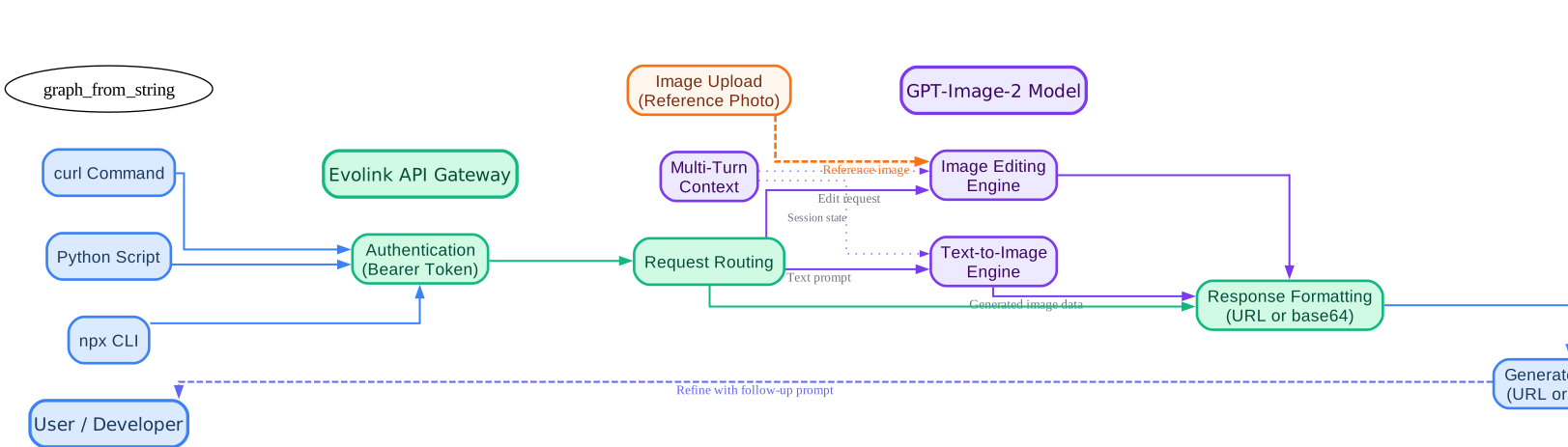
The API workflow diagram illustrates the three integration paths available for GPT-Image-2 generation. Developers can submit requests via curl for quick testing, Python for application integration, or the npx callable skill for CLI workflows. All requests pass through the Evolink API Gateway, which handles authentication via Bearer tokens and routes to the appropriate GPT-Image-2 engine. For text-to-image generation, the prompt flows directly to the generation engine. For image editing tasks such as inpainting, outpainting, or style transfer, a reference image is uploaded alongside the prompt and processed by the editing engine. The model returns generated images as URLs or base64-encoded data through the API Gateway. A multi-turn conversation loop enables iterative refinement, where developers can submit follow-up prompts that maintain context from previous generations. This architecture supports both single-shot generation and complex multi-step creative workflows, making it suitable for everything from quick prototyping to production-grade automated pipelines.
Advanced Prompt Patterns
Beyond the seven core techniques, professional workflows benefit from structured prompt patterns that combine multiple techniques into reusable templates.
Storyboard Generation
Storyboards combine multi-panel composition with cinematic photography techniques and continuity headers. Each panel includes camera notes, shot types, and narrative progression:
6-panel storyboard for a coffee brand commercial:
Panel 1: Wide establishing shot, coffee farm at dawn, golden light, 16mm lens
Panel 2: Medium shot, farmer's hands picking coffee cherries, shallow DOF
Panel 3: Close-up, roasted coffee beans falling in slow motion, macro lens
Panel 4: Medium shot, barista pouring latte art, steam rising, warm lighting
Panel 5: Close-up, finished latte with intricate art, overhead angle
Panel 6: Wide shot, customer enjoying coffee in modern cafe, lifestyle feel
Continuity: warm color temperature throughout, consistent brand cup design
Brand Identity Systems
Brand identity prompts generate complete visual systems including logo analysis, color extraction, typography matching, and brand board layouts:
Brand identity system for a sustainable fashion label called "VERDANT":
- Logo: minimalist leaf motif, single-line weight, emerald green
- Color palette: emerald #2D6A4F, cream #FEFAE0, charcoal #1B4332, gold #B68D40
- Typography: sans-serif headings (Montserrat Bold), serif body (Lora Regular)
- Layout: brand board with logo, color swatches, typography specimens, and 3 product mockups
- Style: clean, organic, premium sustainable aesthetic
Character Design Sheets
Character design sheets combine identity preservation with multi-panel composition to produce model sheets, turnaround views, expression sheets, and costume variations:
Character design sheet for a sci-fi pilot character:
- Front view: neutral pose, full body, detailed flight suit with patches
- Side view: profile, helmet visor detail
- Back view: jetpack and harness detail
- Expression sheet: 4 emotions (determined, surprised, focused, relieved)
- Costume detail: helmet off, casual undersuit
- Color callouts: flight suit #2C3E50, accent #E74C3C, visor #3498DB
- White background, model sheet grid layout
Cinematic Contact Sheets
Film-strip style contact sheets combine lens specifications, lighting setups, and camera angles into a single reference image:
Cinematic contact sheet, 9 frames, film strip layout:
Subject: woman in red dress walking through rain
Frame 1: Wide shot, 35mm, f/2.8, overhead street view, neon reflections
Frame 2: Medium shot, 50mm, f/1.8, three-quarter angle, rain on lens
Frame 3: Close-up, 85mm, f/1.4, face with rain drops, backlit
Frame 4: Over-shoulder, 35mm, f/4, looking down street, depth
Frame 5: Low angle, 24mm, f/2.8, puddle reflection, dramatic
Frame 6: Tracking shot, 50mm, f/2, motion blur background
Frame 7: Silhouette, 135mm, f/2.8, against neon sign, rim light
Frame 8: Detail shot, 100mm macro, f/2.8, hand catching rain
Frame 9: Final wide, 24mm, f/11, walking away into city, deep focus
Film grain, anamorphic lens flares, Blade Runner color palette
Packaging Design
Packaging design prompts generate product packaging with die-cut templates, material specifications, and print-ready layouts:
Product packaging design for artisan chocolate bar:
- Die-cut template: standard chocolate bar sleeve, unfolded view
- Front panel: brand name "CACAO ATELIER", gold foil accent, cocoa pod illustration
- Back panel: ingredients, barcode, origin story text
- Color palette: deep brown #3E2723, gold #D4A843, cream #FFF8E7
- Material: matte uncoated paper, embossed logo area
- Print specifications: CMYK + 1 spot gold, 350gsm card stock
- Layout: flat die-cut with fold lines marked, production-ready
Community and Contributing
The awesome-gpt-image-2-API-and-Prompts repository is a community-driven project with over 100 credited contributors from X/Twitter. The project maintains a structured contribution workflow that ensures quality and consistency across all 763+ prompt cases.
How to Contribute
Contributing a new prompt case follows a three-step process:
- Fork the repository to your GitHub account
- Add your prompt case following the established format in the appropriate category file under
cases/ - Submit a pull request with the case title, prompt text, output image, and contributor credit
The repository provides an issue template for structured prompt submissions. Each submission includes the prompt text, the output image, the category, and the contributor’s social handle for credit.
11 Language Translations
The repository is fully translated into 11 languages, making the 763+ prompt cases accessible to a global audience:
| Language | File | Cases File |
|---|---|---|
| English | README.md | cases/*.md |
| German | README_de.md | cases/*_de.md |
| Spanish | README_es.md | cases/*_es.md |
| French | README_fr.md | cases/*_fr.md |
| Japanese | README_ja.md | cases/*_ja.md |
| Korean | README_ko.md | cases/*_ko.md |
| Portuguese | README_pt.md | cases/*_pt.md |
| Russian | README_ru.md | cases/*_ru.md |
| Turkish | README_tr.md | cases/*_tr.md |
| Traditional Chinese | README_zh-TW.md | cases/*_zh-TW.md |
| Simplified Chinese | README_zh-CN.md | cases/*_zh-CN.md |
This translates to 77 case files total: 7 categories multiplied by 11 language versions. The community-driven growth model ensures the prompt library continues expanding with daily curation batches, review processes, and media validation.
Conclusion
The awesome-gpt-image-2-API-and-Prompts repository provides the most comprehensive GPT-Image-2 prompt engineering resource available today: 763+ curated cases across seven categories, complete API integration guides, and 11 language translations. The seven prompt engineering techniques – identity preservation, style transfer, negative prompts, multi-panel compositions, reference-based generation, aspect ratio control, and structured templates – give developers precise control over every aspect of image generation.
Getting started is straightforward: clone the repository, obtain an API key from the Evolink platform, and try the callable skill with npx evolink-gpt-image -y for instant generation. The repository’s structured contribution workflow makes it easy to submit your own prompt cases and join the 100+ contributors who have already shaped this resource.
The combination of production-ready prompts, working API integration code, and a growing community makes this repository an essential reference for anyone working with GPT-Image-2 – whether you are building e-commerce product photography pipelines, generating ad creative at scale, or exploring the frontiers of AI-assisted illustration. Enjoyed this post? Never miss out on future posts by following us