LLM Quantization: Running 70B Models on a Laptop with FP16, INT8, and INT4
A Llama-2 70B model in FP32 precision requires 280 GB of GPU memory – far more than any single consumer GPU can provide. Quantization compresses those weights into 35 GB (INT4) or 70 GB (INT8), making it possible to run the model on a single RTX 4090 (24 GB) with offloading, or on a Mac Studio with unified memory. The catch is a small quality drop, typically 1-3% on standard benchmarks. This post explains how quantization works, the tradeoffs between formats, and which method to choose for your hardware.
This is the sixth post in our LLM internals series, following our coverage of tokenization, attention, KV-cache, inference phases, and the training pipeline.
Why Quantization Matters
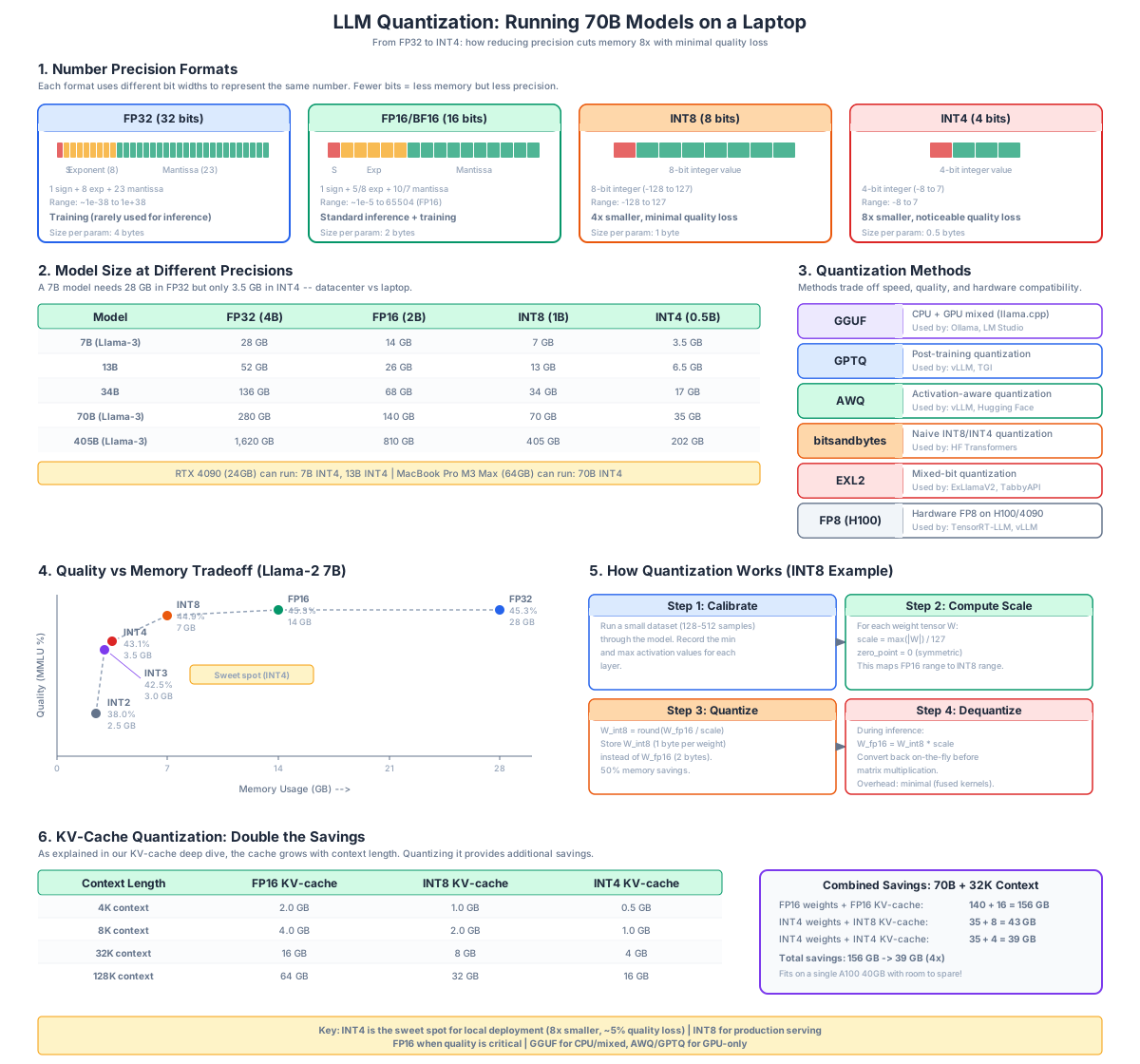
Understanding the Diagram
The diagram above breaks quantization into six panels: precision formats, model sizes across precisions, the major quantization methods, the quality-versus-memory tradeoff curve, the quantization workflow, and KV-cache savings. Let us walk through each panel.
Panel 1: Number Precision Formats
The top-left panel shows the bit layout for each precision. FP32 uses 32 bits per number (1 sign, 8 exponent, 23 mantissa) and is the default for scientific computing. FP16 and BF16 each use 16 bits but differ in how they allocate bits between exponent and mantissa: FP16 has more mantissa (better precision), while BF16 has more exponent (better dynamic range, which is why it is preferred for training). INT8 uses 8 bits with no exponent at all – it represents 256 discrete levels between a minimum and maximum value. INT4 uses only 4 bits (16 levels) and is the practical floor for LLM weights today.
Panel 2: Model Sizes Across Precisions
The top-middle panel shows the dramatic effect on memory. A 7B parameter model occupies 28 GB in FP32, 14 GB in FP16, 7 GB in INT8, and only 3.5 GB in INT4. A 70B model shrinks from 280 GB (FP32, requires 4x A100 80GB) down to 35 GB (INT4, fits on a single A100 or a Mac with 64 GB unified memory). This is what makes local LLM deployment practical: the same model that costs $5/hour on cloud GPUs can run on consumer hardware.
Panel 3: Quantization Methods
The top-right panel lists the major methods. GGUF (used by llama.cpp) is the most popular for CPU and mixed CPU/GPU inference. GPTQ is a post-training method that quantizes weights using a small calibration dataset. AWQ (Activation-aware Weight Quantization) preserves the most important weights in higher precision based on activation magnitudes. bitsandbytes provides naive INT8 and INT4 that require no calibration but lose more quality. EXL2 supports mixed-bit quantization for ExLlamaV2. FP8 is the new hardware-accelerated format on H100 and newer GPUs.
Panel 4: Quality vs Memory Tradeoff
The bottom-left panel plots benchmark quality (vertical axis) against memory usage (horizontal axis) for a 7B model. The curve is not linear: dropping from FP32 to FP16 loses essentially nothing, FP16 to INT8 loses about 0.4 points, and INT8 to INT4 loses about 1.8 points. Below INT4, quality drops sharply – INT3 loses another 4.5 points and INT2 becomes unusable for most tasks. The sweet spot for most users is INT4 to INT6.
Panel 5: Quantization Workflow
The bottom-middle panel shows the workflow. The model is loaded in FP16, a small calibration dataset (typically 128-1024 samples of representative text) is run through it, statistics about weight and activation distributions are collected, and the weights are converted to the target format. Calibration matters because the quantizer needs to know which weights are sensitive – compressing them naively destroys rare but important values.
Panel 6: KV-Cache Savings
The bottom-right panel shows that quantizing weights is only half the story. The KV-cache grows linearly with context length and batch size, and at long contexts it can exceed the model weights themselves. Quantizing the KV-cache from FP16 to INT8 (or FP8 on H100) halves its memory, doubling the maximum context length or batch size for free. llama.cpp supports KV-cache quantization with the --cache-type q8_0 flag, and vLLM supports it through the kv_cache_dtype option.
Number Precision Formats Explained
The fundamental idea of quantization is to represent the same number with fewer bits. Floating-point numbers (FP32, FP16, BF16) use an exponent and mantissa to cover a wide range of values. Integer formats (INT8, INT4) use a scale factor and zero-point to map a continuous range to discrete integer levels.
FP32 (32 bits)
The default for scientific computing. Each number uses 1 sign bit, 8 exponent bits, and 23 mantissa bits. Range: roughly 1e-38 to 1e38 with about 7 decimal digits of precision. Almost no modern LLM is trained or served in FP32 – it is too slow and too memory-hungry. FP32 is the baseline against which quality loss is measured.
FP16 and BF16 (16 bits)
Both use 16 bits but differ in layout:
- FP16 (1 sign, 5 exponent, 10 mantissa): better precision, smaller range (6e-5 to 65504). Used for inference on most GPUs.
- BF16 (1 sign, 8 exponent, 7 mantissa): same range as FP32 but only 3 decimal digits of precision. Preferred for training because it rarely overflows.
Almost all modern models ship in BF16 or FP16. This is the default for Hugging Face Transformers and vLLM. If you have enough VRAM, run in FP16/BF16 – there is no quality loss and no calibration required.
INT8 (8 bits)
Each number is stored as an 8-bit integer plus a scale factor. The continuous range [min, max] is mapped to 256 discrete levels. For a typical weight tensor with values in [-1, 1], each level is about 0.008 apart. INT8 cuts memory in half compared to FP16 with minimal quality loss (typically under 1% on perplexity benchmarks).
The challenge is choosing the scale factor: too small and values clip, too large and resolution is wasted. Modern methods like GPTQ and AWQ use calibration data to set optimal scales per channel or per group.
INT4 (4 bits)
Each number is stored as a 4-bit integer plus a scale factor (typically shared across groups of 32-128 weights). With only 16 levels, the resolution is coarse, but LLM weights turn out to be remarkably tolerant of this compression. INT4 cuts memory by 4x compared to FP16 with a quality loss of 2-5% on most benchmarks.
INT4 is the practical floor for general LLM deployment. Below INT4 (INT3, INT2), quality degrades sharply, especially for math, code, and reasoning tasks. INT2 is essentially unusable for anything beyond simple chat.
Quantization Methods Compared
GGUF (llama.cpp)
GGUF is the file format used by llama.cpp, the most popular CPU and mixed CPU/GPU inference engine. GGUF supports multiple quantization levels from Q8_0 (8-bit) down to Q2_K (2-bit), with the most popular being Q4_K_M (4-bit with mixed precision on important layers).
Strengths:
- Runs on CPU, GPU, or both (offloading)
- Single file contains the entire model
- Wide hardware support (x86, ARM, Apple Silicon, AMD, NVIDIA)
- Mac-optimized for Apple Silicon unified memory
Weaknesses:
- Slower than GPU-only methods on pure GPU inference
- Quality varies between quantization variants (Q4_K_M is better than Q4_0)
Use case: Local deployment on consumer hardware, especially Macs and laptops. This is the format to choose if you want to run a model on a machine without a high-end GPU.
GPTQ
GPTQ (Generalized Post-Training Quantization) is an algorithm that quantizes weights using a small calibration dataset to account for interactions between layers. It produces 4-bit quantized models that are popular for GPU inference with ExLlamaV2, AutoGPTQ, and vLLM.
Strengths:
- Better quality than naive INT4 (uses second-order information from calibration)
- Fast GPU inference with ExLlamaV2
- Widely supported in Hugging Face pipelines
Weaknesses:
- Requires calibration data and a quantization step (minutes to hours)
- GPTQ models are GPU-only – they cannot run on CPU
- Quality still slightly below AWQ at the same bit width
Use case: Pure GPU inference where speed matters. If you have an NVIDIA GPU with enough VRAM to hold the quantized model, GPTQ (via ExLlamaV2) is among the fastest options.
AWQ
AWQ (Activation-aware Weight Quantization) is a newer method that observes which weights are activated strongly during inference and keeps those weights in higher precision while quantizing the rest. This activation-aware approach produces better quality than GPTQ at the same bit width.
Strengths:
- Best quality among 4-bit methods
- Fast GPU inference with vLLM and Hugging Face
- Less sensitive to calibration data than GPTQ
Weaknesses:
- Requires calibration data
- GPU-only inference
- Slightly more complex quantization process
Use case: Production GPU inference where quality is the priority. AWQ is the recommended format for vLLM deployments.
bitsandbytes
bitsandbytes provides naive INT8 and INT4 quantization that requires no calibration. It is the simplest to use – just add load_in_8bit=True or load_in_4bit=True to from_pretrained – but it produces the lowest quality among the methods discussed here.
Strengths:
- Zero calibration required
- Trivial to use (one flag in Hugging Face Transformers)
- Works with any model that Hugging Face can load
Weaknesses:
- Lower quality than GPTQ, AWQ, or GGUF at the same bit width
- Slower inference than dedicated quantized formats
- INT4 NF4 (the default) is better than pure INT4 but still worse than AWQ
Use case: Quick experiments where you want to load a large model on a small GPU without pre-quantizing. Not recommended for production.
EXL2
EXL2 is the format used by ExLlamaV2, a fast GPU inference engine. It supports mixed-bit quantization, where different layers can use different bit widths (for example, 4-bit for most layers but 6-bit for sensitive ones). This produces better quality than uniform 4-bit at similar size.
Use case: High-performance GPU inference where you want to squeeze maximum quality into a fixed VRAM budget. ExLlamaV2 is among the fastest inference engines for quantized models on NVIDIA GPUs.
FP8 (H100 and newer)
FP8 is a hardware-accelerated 8-bit floating-point format supported on NVIDIA H100 and newer GPUs. Unlike INT8, FP8 retains the exponent-mantissa structure, which makes it more accurate for values with a wide dynamic range. FP8 is supported by vLLM, TensorRT-LLM, and Transformer Engine.
Use case: Production inference on H100 or H200 GPUs. FP8 is the future of 8-bit inference because it requires no calibration and matches INT8 quality with hardware acceleration.
KV-Cache Quantization
The KV-cache stores key and value tensors for every token in the context, so that attention can be computed without re-running earlier layers. As discussed in our KV-cache deep dive, the cache grows linearly with context length and can dominate memory usage at long contexts.
Quantizing the KV-cache is a separate optimization from quantizing weights. Most inference engines support it:
- llama.cpp:
--cache-type q8_0for INT8,--cache-type q4_0for INT4 KV-cache - vLLM:
kv_cache_dtype=fp8for FP8 on H100, orkv_cache_dtype=int8for INT8 - ExLlamaV2: supports 8-bit KV-cache via the
--cache_8bitflag
KV-cache quantization is generally safe: INT8 loses almost nothing on quality, and even INT4 is acceptable for most use cases. The memory savings can double or triple the maximum context length, which is often more valuable than a small quality drop on long-context tasks.
Choosing a Format
The right format depends on your hardware and use case:
| Hardware | Recommended Format | Engine |
|---|---|---|
| Mac (Apple Silicon) | GGUF Q4_K_M | llama.cpp / Ollama |
| Laptop with no GPU | GGUF Q4_K_M | llama.cpp / Ollama |
| Consumer NVIDIA GPU (8-24 GB) | GGUF Q4_K_M (with offload) or EXL2 4.0 bpw | llama.cpp or ExLlamaV2 |
| Single A100 (80 GB) | AWQ INT4 | vLLM |
| Single A100 (40 GB) | AWQ INT4 or GPTQ INT4 | vLLM or ExLlamaV2 |
| Multiple H100 | FP8 | vLLM or TensorRT-LLM |
| CPU server | GGUF Q4_K_M or Q8_0 | llama.cpp |
For a 7B model on a 16 GB GPU, FP16 fits directly (14 GB) and is the best choice. For a 70B model on the same GPU, you need INT4 quantization (35 GB) with CPU offloading via GGUF, or you need to use a smaller model.
Practical Example: Quantizing a Model with AutoGPTQ
The following example shows how to quantize a model with AutoGPTQ. The same general pattern applies to AWQ – the difference is the quantizer class and configuration.
from transformers import AutoModelForCausalLM, AutoTokenizer
from auto_gptq import AutoGPTQForCausalLM, BaseQuantizeConfig

model_id = "meta-llama/Meta-Llama-3-8B"
quant_path = "Llama-3-8B-GPTQ-4bit"

# Configure 4-bit quantization with group size 128
quant_config = BaseQuantizeConfig(
    bits=4,
    group_size=128,
    desc_act=False,
)

# Load calibration data (128 short samples is enough)
tokenizer = AutoTokenizer.from_pretrained(model_id)
calibration_texts = [
    "The quick brown fox jumps over the lazy dog.",
    "In machine learning, gradient descent is an iterative optimization algorithm.",
    # ... 126 more representative samples
]

# Quantize and save
model = AutoGPTQForCausalLM.from_pretrained(model_id, quant_config)
model.quantize(calibration_texts, batch_size=4)
model.save_quantized(quant_path, use_safetensors=True)
tokenizer.save_pretrained(quant_path)
The resulting model can be loaded with ExLlamaV2, vLLM, or the Hugging Face Transformers library for inference. The quantization step takes roughly 10-30 minutes on an A100 for a 7-8B model.
Practical Example: Running a GGUF Model with llama.cpp
The simplest way to get started is with a pre-quantized GGUF model from Hugging Face. The following commands download a Llama-3 8B model in Q4_K_M format and run it with llama.cpp:
# Download a pre-quantized GGUF model
huggingface-cli download \
    QuantFactory/Meta-Llama-3-8B-Instruct-GGUF \
    Meta-Llama-3-8B-Instruct.Q4_K_M.gguf \
    --local-dir ./models

# Build llama.cpp (one-time setup)
git clone https://github.com/ggml-org/llama.cpp
cd llama.cpp
cmake -B build -DGGML_CUDA=ON
cmake --build build --config Release

# Run inference
./build/bin/llama-cli \
    -m ../models/Meta-Llama-3-8B-Instruct.Q4_K_M.gguf \
    -p "Explain quantization in one sentence." \
    -n 128 \
    --gpu-layers 99
The --gpu-layers 99 flag offloads all layers to the GPU if there is room, otherwise llama.cpp falls back to CPU. This is what makes GGUF so flexible: the same model file runs on a Mac, a laptop, or a workstation with any combination of CPU and GPU.
Quality Benchmarks
The following table summarizes typical quality and memory tradeoffs for Llama-2 7B. Quality is measured as average accuracy on a suite of standard benchmarks (MMLU, HumanEval, GSM8K, etc.). Memory is the total VRAM required to load the model weights (excluding KV-cache and activations).
| Format | Bits | Memory (GB) | Quality (avg) | Quality Drop |
|---|---|---|---|---|
| FP32 | 32 | 28.0 | 45.3 | baseline |
| FP16 | 16 | 14.0 | 45.3 | 0.0% |
| BF16 | 16 | 14.0 | 45.3 | 0.0% |
| INT8 | 8 | 7.0 | 44.9 | 0.9% |
| INT4 (AWQ) | 4 | 3.5 | 43.1 | 4.9% |
| INT4 (GPTQ) | 4 | 3.5 | 42.8 | 5.5% |
| INT4 (GGUF Q4_K_M) | 4 | 4.1 | 43.0 | 5.1% |
| INT3 | 3 | 3.0 | 38.0 | 16.1% |
| INT2 | 2 | 2.5 | 25.0 | 44.8% |
The key takeaways from this table:
- FP16 is free. There is no measurable quality loss going from FP32 to FP16, and memory is halved. Always use FP16 or BF16 instead of FP32.
- INT8 is nearly free. The 0.9% quality drop is within the noise of most benchmarks. If you need to cut memory in half, INT8 is the safest choice.
- INT4 is the practical sweet spot. A 4.9% quality drop buys an 8x memory reduction. For most chat and coding tasks, this is imperceptible to users.
- Below INT4, quality collapses. INT3 loses 16% and INT2 loses 45%. These formats are only useful for research or extremely constrained environments.
Common Pitfalls
Pitfall 1: Quantizing the wrong layers. The embedding layer, output projection (lm_head), and normalization layers are sensitive to quantization. Most modern quantizers exclude these layers automatically, but if you are writing a custom quantizer, keep them in FP16.
Pitfall 2: Using unrepresentative calibration data. If you calibrate on English text and then run the model on code, quality will suffer. Use calibration data that matches your deployment distribution.
Pitfall 3: Ignoring KV-cache memory. A 70B model in INT4 weighs 35 GB, but at 32K context with batch size 8, the FP16 KV-cache can add another 40 GB. Always quantize the KV-cache when running long contexts.
Pitfall 4: Assuming lower bits is always better. INT4 GGUF (Q4_K_M) is often higher quality than INT4 GPTQ because it uses mixed precision on sensitive layers. Compare formats, not just bit widths.
Pitfall 5: Forgetting about activation memory. Even with quantized weights, activations are typically kept in FP16. At long contexts or large batch sizes, activation memory can become the bottleneck. Use FlashAttention or its variants to reduce this.
Related Posts
- LLM Tokenization: How Text Becomes Numbers
- LLM Attention Mechanism: The Heart of the Transformer
- LLM Decode: KV-Cache and GPU VRAM Deep Dive
- LLM Prompt vs Decode: Understanding the Two Phases of Inference
- LLM Training Pipeline: From Pretraining to RLHF and DPO
Further Reading
- AWQ: Activation-aware Weight Quantization (paper)
- GPTQ: Accurate Post-Training Quantization (paper)
- QLoRA: Efficient Finetuning of Quantized LLMs (paper)
- llama.cpp GitHub repository
- AutoGPTQ GitHub repository (note: AutoGPTQ is now archived; the maintained successor is GPTQModel)
- vLLM documentation
- ExLlamaV2 GitHub repository
Conclusion
Quantization is the single most impactful optimization for running large models on limited hardware. The progression from FP32 (280 GB for a 70B model) to INT4 (35 GB) is what makes local LLM deployment possible on consumer GPUs and Macs. The key decisions are: choose GGUF for CPU or mixed CPU/GPU, choose AWQ or GPTQ for pure GPU inference, choose FP8 on H100 hardware, and always consider KV-cache quantization for long-context workloads. With a 5% quality cost, INT4 quantization is the right choice for most practical deployments – and the format you should reach for first when VRAM is the bottleneck. Enjoyed this post? Never miss out on future posts by following us 


