Learn Cryptography in a Single Post: Complete Tutorial From Symmetric and Asymmetric Encryption to TLS and Applied Security
Cryptography is the math and engineering that lets two parties communicate securely over an insecure channel — where anyone can listen. It’s the foundation of every HTTPS page, every SSH login, every secure message, and every password you’ve ever stored. This single post teaches the whole field in five stages, with hand-drawn diagrams and runnable examples.
Learning Roadmap
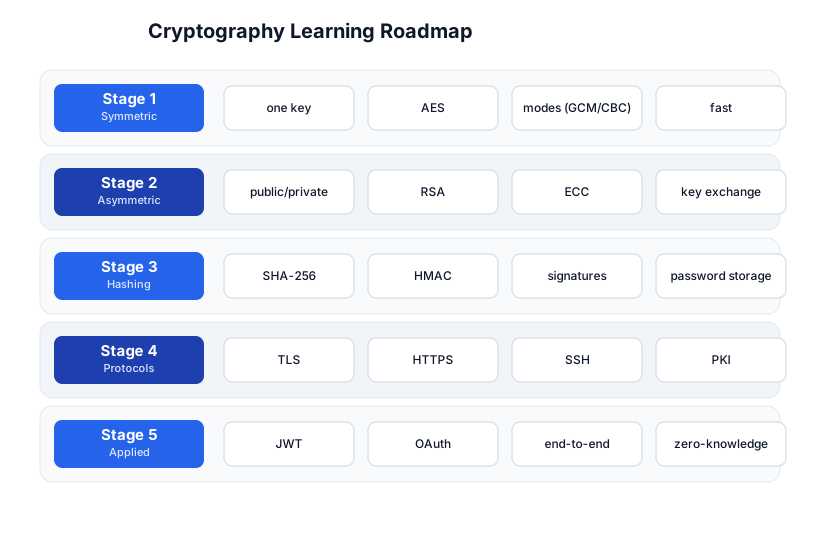
The roadmap moves from the fastest kind of encryption (Stage 1), through the key-exchange solution to its key-sharing problem (Stage 2), to the integrity/authentication layer (Stage 3), the protocols that combine them (Stage 4), and the applied layer you build with (Stage 5).
Stage 1 — Symmetric Encryption
One shared key
Symmetric encryption uses one key for both encryption and decryption. It’s fast (AES hardware-accelerated on every modern CPU) and the workhorse of all bulk data encryption.
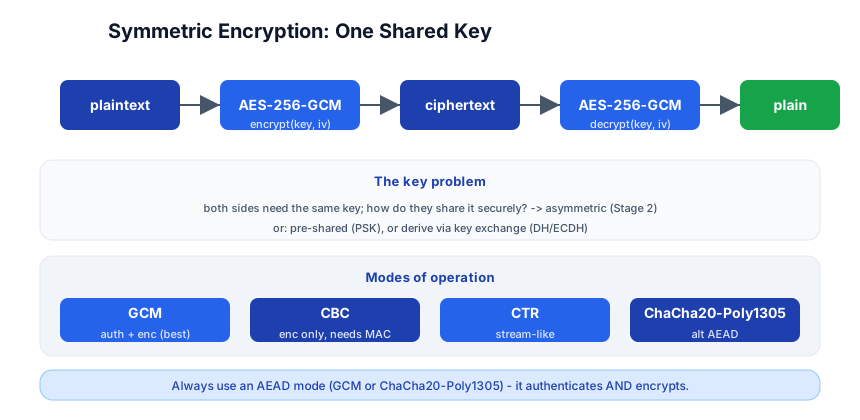
encrypt(key, plaintext)  ->  ciphertext
decrypt(key, ciphertext) ->  plaintext
from cryptography.hazmat.primitives.ciphers.aead import AESGCM
key = AESGCM.generate_key(bit_length=256)    # 32-byte key
aesgcm = AESGCM(key)
nonce = os.urandom(12)                        # 12-byte nonce, unique per encryption
ciphertext = aesgcm.encrypt(nonce, b"secret message", None)
plaintext  = aesgcm.decrypt(nonce, ciphertext, None)   # b"secret message"
AES and modes
AES (Advanced Encryption Standard) is the standard symmetric cipher, with 128/192/256-bit keys. But AES alone is a block cipher — it encrypts one 16-byte block. A mode of operation turns it into a general-purpose cipher:
| Mode | What it does |
|---|---|
| GCM (Galois/Counter Mode) | AEAD — encrypts + authenticates in one pass. The default choice. |
| ChaCha20-Poly1305 | an AEAD alternative to AES-GCM, fast in software (no AES-NI needed) |
| CBC | encrypts blocks chained together; needs a separate MAC for integrity |
| CTR | turns AES into a stream cipher; needs a MAC for integrity |
AEAD (Authenticated Encryption with Associated Data) is the key concept: it encrypts and authenticates in one operation. If someone tampers with the ciphertext, decryption fails — you don’t need a separate MAC. Always use an AEAD mode (GCM or ChaCha20-Poly1305); CBC/CTR alone don’t detect tampering.
Pitfall: The nonce (number used once) must be unique per key — never reuse a nonce with the same key in GCM/CTR. Reusing a nonce leaks the key’s keystream, breaking the encryption entirely. Generate a random nonce per message, or use a counter.
The key-sharing problem
Symmetric encryption has one weakness: both sides need the same key, but how do they share it over an insecure channel? That’s what asymmetric cryptography (Stage 2) solves.
Stage 2 — Asymmetric Encryption
Two keys: public and private
Asymmetric encryption uses a key pair: a public key (shared freely) and a private key (kept secret). What one encrypts, the other decrypts.
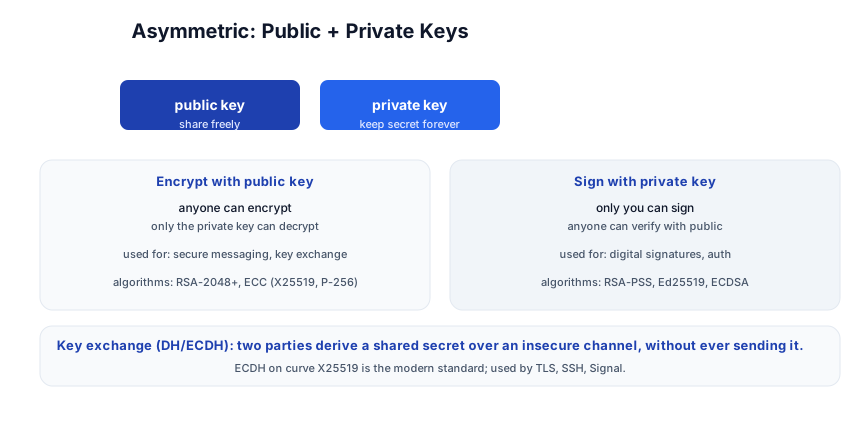
Two operations:
- Encrypt with public key → only the private key can decrypt. Anyone can send you a secret; only you can read it.
- Sign with private key → anyone can verify with the public key. Only you could have signed it; it proves authenticity.
Algorithms
| Algorithm | Use | Notes |
|---|---|---|
| RSA (2048+ bits) | encryption + signatures | the classic; large keys, slower |
| ECC (Elliptic Curve) | key exchange + signatures | X25519 for exchange, Ed25519 for signatures; smaller keys, faster |
| Diffie-Hellman (DH / ECDH) | key exchange | two parties derive a shared secret without ever sending it |
Key exchange — the solution to the key-sharing problem
Diffie-Hellman (and its elliptic-curve variant ECDH) lets two parties derive a shared secret over an insecure channel, without ever transmitting the secret itself. Each side generates a key pair, exchanges public keys, and computes the same shared secret from their own private key + the other’s public key:
Alice:  shared = ECDH(Alice_private, Bob_public)
Bob:    shared = ECDH(Bob_private, Alice_public)
# both compute the SAME shared secret, but no one listening can
That shared secret becomes the symmetric key for AES — so you get the speed of symmetric encryption with the key-sharing solution of asymmetric. This is how TLS, SSH, and Signal all establish their session keys.
Pitfall: DH/ECDH alone is vulnerable to a man-in-the-middle (Mallory intercepts both public keys and substitutes her own). You need authentication — a way to prove the public key is really theirs (certificates in TLS, host keys in SSH). Without authentication, key exchange is secure against eavesdroppers but not against active attackers.
Stage 3 — Hashing, HMAC, Signatures, Passwords
Cryptographic hashes
A hash function takes any input and produces a fixed-size digest (e.g. SHA-256 → 256 bits). Properties:
- One-way — you can’t reverse a hash to get the input.
- Deterministic — same input always produces the same hash.
- Avalanche — changing one bit changes ~half the output bits.
- Collision-resistant — hard to find two inputs with the same hash.
import hashlib
hashlib.sha256(b"hello").hexdigest()   # 2cf24dba5fb0a30e26e83b2ac5b9e29e1b161e5c1fa7425e73043362938b9824
hashlib.sha256(b"hello ").hexdigest()  # completely different (space added)
HMAC — keyed hashing
HMAC (Hash-based Message Authentication Code) is a hash with a key: HMAC-SHA256(key, message) → tag. The recipient verifies the tag with the same key. If it matches, the message is authentic and untampered. This is symmetric message authentication.
Digital signatures
A digital signature combines hashing + asymmetric: sign hash(message) with your private key; anyone verifies with your public key. It proves who sent it (authentication) and that it wasn’t modified (integrity), with non-repudiation (you can’t deny signing).
sign:  signature = RSA-PSS(private_key, SHA-256(message))
verify: RSA-PSS-verify(public_key, message, signature) -> true/false
Modern signature algorithms: Ed25519 (fast, small, recommended for new systems), ECDSA (used in TLS), RSA-PSS (classic).
Password storage
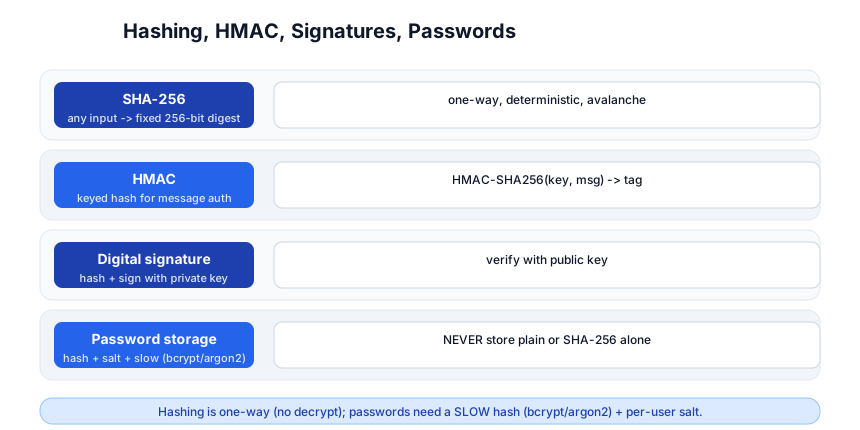
Passwords must never be stored in plaintext or even as a plain SHA-256 hash (rainbow tables + GPU brute-force crack SHA-256 fast). Use a slow, salted hash:
import bcrypt
hashed = bcrypt.hashpw(b"password123", bcrypt.gensalt())   # $2b$12$...
bcrypt.checkpw(b"password123", hashed)                      # True
- Salt — a random per-user value mixed in, so two users with the same password get different hashes. Prevents rainbow tables.
- Slow — bcrypt/scrypt/argon2 are deliberately slow (cost factor adjustable), so brute-force takes years, not seconds. SHA-256 is fast — wrong for passwords.
- argon2 — the current recommendation (memory-hard, resists GPU/ASIC attacks).
Pitfall: Never roll your own crypto, and never store passwords with
SHA-256(password). Usebcrypt,scrypt, orargon2with a per-user salt. The library handles the salt (it’s embedded in the hash output). And rate-limit login attempts — even a slow hash falls to unlimited online guessing.
Stage 4 — Protocols: TLS, HTTPS, SSH, PKI
TLS 1.3 — the protocol behind HTTPS
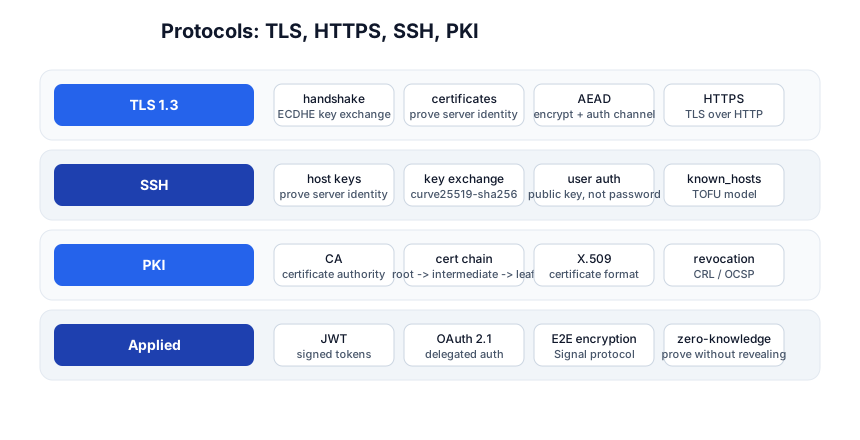
TLS (Transport Layer Security) is how HTTPS works. The handshake (simplified):
- Client Hello → client offers cipher suites + a random.
- Server Hello + Certificate → server picks a cipher, sends its certificate (public key + identity, signed by a CA).
- Key exchange → ECDHE: both derive a shared secret (the session key) — never sent over the wire.
- Finished → both switch to encrypted communication with AES-GCM, using the session key.
TLS 1.3 (the current standard) collapses this to one round-trip and supports zero-round-trip resumption. It combines everything from Stages 1-3: asymmetric for key exchange, symmetric for the bulk data, hashing/HMAC for integrity, certificates for authentication.
SSH
SSH uses a similar handshake: key exchange (curve25519), server authentication via host keys (a server’s public key, stored in ~/.ssh/known_hosts — trust on first use), and user authentication via public key (your ~/.ssh/id_ed25519.pub on the server, private key signs a challenge). Never use password auth over SSH; disable it in sshd_config.
PKI — Public Key Infrastructure
PKI is the system of certificate authorities (CAs) that vouch for public keys. A certificate binds a public key to an identity (a domain name) and is signed by a CA whose root your browser trusts. The chain: root CA → intermediate CA → leaf certificate (your site). If any link is broken, the cert is invalid.
- X.509 — the certificate format.
- Let’s Encrypt — free, automated CA for HTTPS (ACME protocol).
- Revocation — CRL (certificate revocation list) or OCSP (online status) to invalidate a compromised cert before expiry.
Pitfall: A self-signed certificate encrypts the channel but doesn’t prove identity — anyone can generate one. Without a CA-validated chain, you’re vulnerable to MITM. Use Let’s Encrypt (free) or a real CA; never self-sign in production.
Stage 5 — Applied Cryptography
JWT (JSON Web Tokens)
A JWT is a signed token: a header + payload + signature, base64-encoded. The server signs it (HMAC or RSA); the client sends it back on each request; the server verifies the signature. It’s stateless auth — the server doesn’t need to look up a session, just verify the signature. Never put secrets in a JWT — the payload is base64 (not encrypted); only the signature prevents tampering.
OAuth 2.1 / OIDC
OAuth 2.1 is the delegated-authorization standard: “let app X access my data on service Y, without giving app X my password.” It uses access tokens + refresh tokens + authorization codes. OIDC (OpenID Connect) adds identity (who the user is) on top. Use a library; the spec has many sharp edges (PKCE for public clients, exact redirect-URI matching, token lifetimes).
End-to-end encryption
E2EE (e.g. the Signal Protocol) means only the endpoints can decrypt — not the server, not the network provider. It combines key exchange (X3DH), ratcheting (double ratchet for forward secrecy), and AEAD. The result: even if the server is compromised, old messages stay unreadable.
Zero-knowledge proofs
A zero-knowledge proof lets you prove a statement is true without revealing why. “I know the password” without sending it; “I’m over 18” without revealing my age; “this transaction is valid” without revealing the amount. Used in Zcash (private blockchain), Tornado Cash, and increasingly in auth (WebAuthn / passkeys prove possession of a key without the server ever seeing the private key).
Quick-Start Checklist
- Use a library, never roll your own crypto —
cryptography(Python),ring/rustls(Rust), Go’scrypto/*. - Use AES-GCM or ChaCha20-Poly1305 for symmetric encryption (AEAD — encrypts + authenticates).
- Never reuse a nonce with the same key in GCM/CTR.
- Use ECDH (X25519) for key exchange; authenticate with certificates (TLS) or host keys (SSH).
- Use Ed25519 for signatures (fast, small, modern).
- Store passwords with bcrypt/argon2 + salt, never SHA-256 or plaintext.
- Use TLS (Let’s Encrypt) for all web traffic; never HTTP, never self-signed in prod.
- Use SSH key auth, not passwords; disable password auth.
- JWT: sign, don’t encrypt — the payload isn’t secret; never put secrets in it.
- Rate-limit auth endpoints — crypto doesn’t stop online brute-force; limits do.
Common Pitfalls
- Rolling your own crypto — the #1 rule: don’t. Use vetted libraries and standard protocols.
- Reusing a nonce in GCM/CTR — leaks the keystream, breaks everything.
- SHA-256 for passwords — too fast; use bcrypt/argon2 (slow, salted).
- No salt in password hashing — rainbow tables crack unsalted hashes.
- Self-signed certs in production — encrypts but doesn’t authenticate; MITM-vulnerable.
- CBC/CTR without a MAC — no integrity; attacker can tamper undetected. Use AEAD.
- Secrets in JWT payload — base64 isn’t encryption; anyone can read the payload.
- Storing the private key in Git —
id_ed25519is a secret; gitignore it. - Password SSH auth — brute-forceable; use keys, disable
PasswordAuthentication. - No rate limiting on login — even a slow hash falls to unlimited online guessing.
Further Reading
- Cryptography Engineering — the Cryptopals challenges (learn by breaking)
- Serious Cryptography by Jean-Philippe Aumasson — the modern practical book
- The Cryptopals Crypto Challenges — hands-on, “break real crypto”
- Let’s Encrypt — free TLS certificates
- OWASP Crypto Storage Cheat Sheet — what to use
Related guides
Cryptography underpins every secure system — these PyShine tutorials connect to it:
- Learn Computer Networking in One Post — TLS sits at layer 4-6 of the OSI model; networking is the substrate.
- Learn REST API in One Post — HTTPS/TLS is the transport; JWT/OAuth the auth.
- Learn Python in One Post — the
cryptography+bcryptlibraries are Python. - Learn Rust in One Post —
ring/rustlsare the Rust crypto stack; Rust’s safety makes it a popular crypto language. - Learn System Design in One Post — encryption-at-rest, mTLS, and secret management are system-design concerns.
Cryptography is the one field where “it works” is not enough — it must work against an adversary, and the failure mode is silent (you don’t know you’re broken until it’s too late). The five stages here — symmetric, asymmetric, hashing, protocols, applied — cover the whole map from a single AES key to a zero-knowledge proof. The two rules that pay off forever: never roll your own crypto (use vetted libraries and standard protocols), and use AEAD + slow password hashes + TLS + key-based auth — the defaults that are almost always right. Install the Enjoyed this post? Never miss out on future posts by following us cryptography library, encrypt a message with AES-GCM, hash a password with bcrypt, and set up a Let’s Encrypt cert — once you’ve done those three, you understand the foundation of every secure system. 


