Learn Swift in a Single Post: A Complete Swift Tutorial from Optionals and Protocols to Async Actors and SwiftUI
Swift is Apple’s modern language for iOS, macOS, watchOS, tvOS — and now server-side. It’s statically typed, compiled, and built around a simple idea: make value types cheap and safe, make null impossible by construction, and make protocols the central abstraction. The result is fast (LLVM-compiled, no GC pauses — reference counting), safe (optionals force nil handling), and increasingly expressive (async/await, actors, SwiftUI).
This post teaches the whole language in five stages with runnable snippets. By the end you’ll understand optionals, value vs reference semantics, protocols + generics, async/await and actors, and SwiftUI — the parts that make Swift Swift.
We target Swift 5.10+ (with notes on the 6.0 concurrency model). Everything here compiles on a current toolchain.
The Roadmap
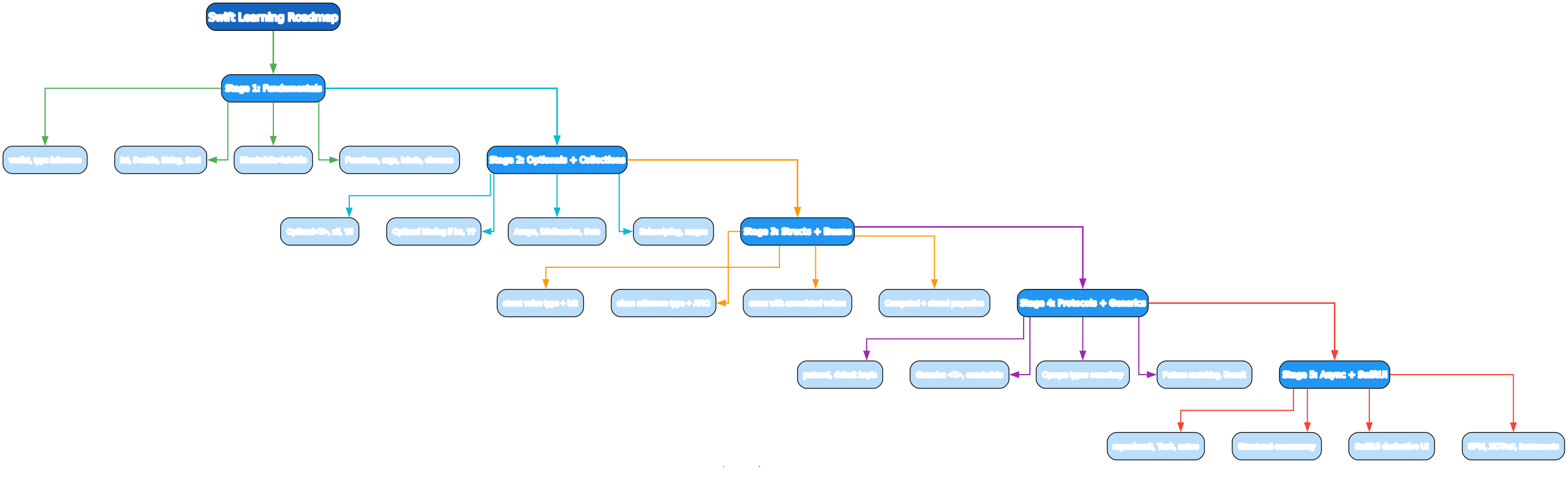
- Fundamentals —
let/var, type inference, control flow, functions, closures - Optionals + Collections —
Optional<T>,if let,??, Arrays, Dictionaries, Sets - Structs + Enums + Classes — value vs reference, associated values, properties
- Protocols + Generics — default impls, opaque
some/any, pattern matching,Result - Async + SwiftUI —
async/await,Task, actors, structured concurrency, SwiftUI, SPM
Stage 1 — Fundamentals
A program
print("Hello, Swift!")
Swift doesn’t need a main function — top-level code in main.swift runs directly. Run with swift main.swift (script mode) or compile via swiftc main.swift -o hello && ./hello. For real projects, use the Swift Package Manager (below).
let vs var and type inference
let n = 10          // let = constant (immutable) - default
var x = 5           // var = variable (mutable)
// n = 20          // error — let is immutable

let pi: Double = 3.14      // explicit type annotation
let name = "Ada"           // inferred as String
let items: [Int] = [1, 2]  // explicit array type

// Swift infers types at compile time — no runtime cost
Use let by default; reach for var only when you must mutate. This is the single most important habit in Swift — immutability by default catches bugs and reads better.
Basic types and strings
let n: Int = 10
let d: Double = 3.14
let b: Bool = true
let c: Character = "A"
let s: String = "Hello"

let greeting = "Hi, \(name)! \(1 + 2)"   // string interpolation \(expr)
let multi = """
    multi-line
    string
    """                                  // triple-quoted, preserves indentation

// Strings are value types (copied on assign), UTF-8, Unicode-correct
s.count; s.uppercased(); s.hasPrefix("H")
let parts = s.split(separator: ",")     // [Substring]
String is a value type — assignment copies (cheaply, via copy-on-write). It’s Unicode-correct (emoji, combining characters count as one grapheme cluster), unlike many older languages.
Control flow
if x > 0 { } else if x == 0 { } else { }     // no parens around condition

switch day {
case "MON", "TUE": print("weekday")
case "SAT", "SUN": print("weekend")
default: print("?")
}

// switch must be EXHAUSTIVE (no fallthrough without default unless all cases covered)
// switch with tuples and ranges
switch point {
case (0, 0): print("origin")
case (let x, 0): print("x-axis \(x)")   // value binding
case (0, _): print("y-axis")
case (let x, let y) where x == y: print("diagonal")
default: break
}

for i in 0..<5 { }       // exclusive range: 0,1,2,3,4
for i in 0...5 { }       // inclusive range: 0..5
for item in array { }    // for-in
while cond { }
repeat { } while cond    // do-while equivalent
Swift’s switch is powerful — it supports value binding, where guards, tuples, ranges — and must be exhaustive (the compiler errors if you miss a case). This is a major safety win over C/Obj-C.
Functions and argument labels
func add(_ a: Int, _ b: Int) -> Int { return a + b }   // _ = no label
add(1, 2)

func greet(name: String, with greeting: String = "Hi") -> String {
    return "\(greeting), \(name)!"
}
greet(name: "Ada")               // labels required by default
greet(name: "Ada", with: "Hey")  // external label 'with' for internal 'greeting'

// Multiple return values (tuples)
func minmax(_ nums: [Int]) -> (min: Int, max: Int) {
    return (nums.min()!, nums.max()!)
}
let r = minmax([3, 1, 2])
r.min; r.max

// Variadic
func sum(_ nums: Int...) -> Int { nums.reduce(0, +) }
sum(1, 2, 3)   // 6

// Inout (mutable param, like ref)
func incr(_ n: inout Int) { n += 1 }
var x = 5; incr(&x)   // x = 6
Swift uses argument labels for call-site readability — greet(name:with:) reads like a sentence. The _ omits the label (for operators and obvious params). inout is the only way to pass-by-reference; use sparingly.
Closures
let sq = { (x: Int) -> Int in x * x }   // full closure
sq(5)   // 25

// Type can be inferred
let add: (Int, Int) -> Int = { $0 + $1 }  // positional args
add(1, 2)

// Trailing closure syntax — Swift's signature feature
[1, 2, 3].map { $0 * 2 }              // [2, 4, 6] — trailing closure
[1, 2, 3].filter { $0 > 1 }           // [2, 3]
nums.sorted { $0 < $1 }                 // ascending

// Capture semantics
class Obj { var v = 0 }
let o = Obj()
let inc = { [o] in o.v += 1; return o.v }   // capture list — strong by default
let safe = { [weak o] in o?.v += 1 }        // weak to break cycles

// @escaping — closure stored/passed out (async, completion handlers)
func load(_ completion: @escaping (Int) -> Void) { /* ... */ }
Closures are first-class. Trailing closure syntax makes map/filter/sorted read like a pipeline. Capture lists ([weak self], [unowned o]) control how closures retain captured references — critical for breaking retain cycles (below).
Stage 2 — Optionals and Collections
Optionals — no null by construction
let n: Int = 5
// let bad: Int = nil     // error — Int cannot be nil
let maybe: Int? = nil      // Optional<Int> — either .some(5) or .none

maybe == nil                // true
let forced: Int = maybe!    // force-unwrap — CRASHES if nil

// Optional binding — the safe way
if let v = maybe { print(v) }     // v is Int (unwrapped) inside the block
guard let v = maybe else { return }  // early exit pattern — v available after
let s = maybe.map { $0 * 2 }     // map on optional
let result: Int = maybe ?? 0     // nil-coalescing — default if nil
Optionals are the signature Swift feature. A type that can be nil is a different type (Int?, not Int). The compiler forces you to unwrap before use, eliminating an entire class of null-pointer crashes. if let/guard let is the idiomatic unwrap; ! (force-unwrap) crashes if you’re wrong — use it only when you’ve proven the value is non-nil.
Optional chaining
let user: User? = getUser()
let city = user?.profile?.address?.city   // String??  — any nil propagates, no crash
let upper = user?.name.uppercased()       // String? — nil if user is nil

// Try? converts throwing to optional
let n = try? parseInt(s)   // Int? — nil if throws
let forced = try! parseInt(s)  // crashes on throw
? chains — any nil short-circuits the whole expression to nil, no crash. This is the Swift alternative to “null-safe navigation” in other languages, but built into the type system.
Collections
var nums = [1, 2, 3]                     // Array<Int> (value type!)
nums.append(4)                            // [1,2,3,4]
nums[0] = 0                               // subscript set
nums.count; nums.isEmpty
nums.map { $0 * 2 }                       // [0, 4, 6, 8]
nums.filter { $0 > 1 }                    // [2, 3, 4]
nums.reduce(0, +)                          // sum

let set: Set<Int> = [1, 2, 2, 3]          // {1, 2, 3} — unique
set.contains(2)

var dict: [String: Int] = ["a": 1, "b": 2]
dict["c"] = 3                            // insert
dict["a"]                                // Int? — nil if missing
for (k, v) in dict { print("\(k)=\(v)") }

// Ranges and slicing
let slice = nums[1..<3]                   // [2, 3] — ArraySlice
Arrays, Sets, and Dictionaries are all value types (backed by copy-on-write for performance). Mutating a copy doesn’t affect the original — no aliasing bugs.
Stage 3 — Structs, Enums, and Classes
Structs — value types
struct Point {
    var x: Double
    var y: Double

    // memberwise init generated automatically
    var distance: Double { sqrt(x * x + y * y) }   // computed property

    mutating func translateBy(dx: Double, dy: Double) {   // mutating = alters self
        x += dx; y += dy
    }
}

var p = Point(x: 3, y: 4)
p.translateBy(dx: 1, dy: 0)
print(p.distance)   // sqrt(16+16) ≈ 5.66

let fixed = Point(x: 1, y: 1)
// fixed.x = 9   // error — let struct is fully immutable
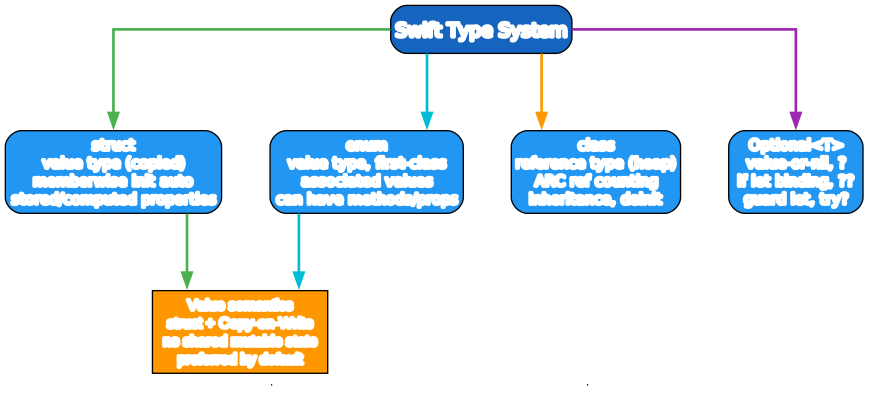
struct is the default choice for data. It’s a value type (copied on assign), gets a free memberwise initializer, and supports mutating methods (required because let structs are immutable). Prefer struct over class unless you need identity/reference semantics.
Enums — first-class with associated values
enum Result {
    case ok(Int)
    case error(String)
}

let r = Result.ok(42)

switch r {
case .ok(let v): print("got \(v)")
case .error(let msg): print("err: \(msg)")
}

// Enums with raw values (like C enums)
enum Direction: Int {
    case north = 0, south, east, west   // auto-increment raw values
}
let d = Direction.north
d.rawValue    // 0

// Enums can have methods and computed properties
enum TrafficLight {
    case red, yellow, green
    var next: TrafficLight {
        switch self { case .red: return .green; case .green: return .yellow; case .yellow: return .red }
    }
}
Swift enums are algebraic data types — they carry associated values, can have methods, computed properties, and conform to protocols. This makes them ideal for modeling state (enum LoadingState { case idle, loading, loaded(Data), failed(Error) }). Pattern matching (switch) is exhaustive and checked.
Classes — reference types with ARC
class Counter {
    var count: Int
    init(start: Int = 0) { count = start }   // custom init (no auto memberwise)
    deinit { print("Counter freed") }        // deinit runs on dealloc
    func inc() { count += 1 }
}

let c = Counter(start: 5)
c.inc()
let alias = c            // SHARED — alias and c point at the same object
alias.count = 100
c.count                   // 100 — reference semantics

// Inheritance
class LoggedCounter: Counter {
    override func inc() { print("inc"); super.inc() }
}
class is a reference type (heap-allocated, shared identity). It’s the exception, not the rule — use it when you need identity (===), inheritance, or deinit. Reference counting (ARC, below) manages memory — no GC pauses.
Stage 4 — Protocols, Generics, Pattern Matching

Protocols
protocol Describable {
    var description: String { get }
    func describe() -> String
}

protocol Greetable: Describable {     // protocol inheritance
    var name: String { get }
}

// Default implementations via extension
extension Describable {
    func describe() -> String { "I am \(description)" }   // default — overridable
}

struct User: Greetable {
    let name: String
    var description: String { "User(\(name))" }
}

let u = User(name: "Ada")
u.describe()   // "I am User(Ada)" — uses default impl

// Protocol as existential type
func show(_ d: any Describable) { print(d.describe()) }
Protocols are Swift’s interfaces — declare requirements, provide default impls via extensions. They enable protocol-oriented programming: design around protocols and value types, not class inheritance.
Generics
func first<T>(_ xs: [T]) -> T? { xs.first }   // works for any T

struct Box<T> { let value: T }                // generic type
let b = Box(value: 42)

// Constraints
func max<T: Comparable>(_ a: T, _ b: T) -> T { a > b ? a : b }
func sort<T>(_ xs: [T]) -> [T] where T: Comparable { xs.sorted() }

// Protocol constraints
func draw<T: Shape>(_ s: T) { s.draw() }
Generics are reified (unlike Java) — type info is available at runtime. Constraints (T: Comparable, where T: Hashable) express requirements.
Opaque types: some vs any
// some Shape — opaque type: caller doesn't know the concrete type,
// but it's ONE fixed type chosen by the implementation
func makeShape() -> some Shape { Circle() }

// any Shape — existential: any concrete type conforming to Shape (has overhead)
let shapes: [any Shape] = [Circle(), Square()]
some (opaque) hides the concrete type while preserving static dispatch — used heavily in SwiftUI (var body: some View). any (existential) is a type-erased box with dynamic dispatch and a small overhead — use when you genuinely need a heterogeneous collection.
Pattern matching
enum LoadState {
    case idle
    case loading
    case loaded(Data)
    case failed(Error)
}

func handle(_ s: LoadState) {
    switch s {
    case .idle: break
    case .loading: print("...")
    case .loaded(let data): use(data)
    case .failed(let err) where err is CancellationError: print("cancelled")
    case .failed(let err): print("err \(err)")
    }
}

// if case let — single-case matching
if case .loaded(let data) = state { use(data) }

// for case — iterate matching
for case .loaded(let data) in states { use(data) }
Pattern matching is the natural companion to enums — extract associated values, filter by case, add where guards. Combined with exhaustive switch, it makes state handling bulletproof.
Result and error handling
enum ParseError: Error { case badInput, overflow }

func parseInt(_ s: String) throws -> Int {
    guard let n = Int(s) else { throw ParseError.badInput }
    return n
}

do {
    let n = try parseInt("42")
} catch ParseError.badInput {
    print("bad input")
} catch {
    print("other error: \(error)")
}

// Result type — explicit error as a value
let r: Result<Int, ParseError> = .success(42)
switch r {
case .success(let n): print(n)
case .failure(let err): print(err)
}

// map and flatMap on Result
let doubled = r.map { $0 * 2 }
Swift errors are typed: throws/try/catch for the exception-like path, Result<Success, Failure> when you want errors as values (composable, storable). try? gives an optional; try! crashes on throw.
Stage 5 — Async, Concurrency, and SwiftUI
async/await
func fetch(_ url: URL) async throws -> Data {
    let (data, _) = try await URLSession.shared.data(from: url)
    return data
}

// Sequential awaits
async func loadData() async {
    let a = try await fetch(url1)   // suspends, doesn't block
    let b = try await fetch(url2)
    return [a, b]
}

// Parallel (structured concurrency)
async func loadAll() async throws -> [Data] {
    async let a = fetch(url1)
    async let b = fetch(url2)
    return try await [a, b]          // await both — concurrent
}

// Task — bridge sync into async
Task {
    let data = try await fetch(url)
    print(data)
}
async/await (5.5+) makes async code read like sync — await suspends the function and frees the thread (no blocking). Structured concurrency (async let, TaskGroup) runs child tasks in parallel and waits for all, with automatic cancellation propagation.
Actors — safe shared mutable state
actor Counter {
    private var count = 0
    func inc() { count += 1 }     // serialized — no data race by construction
    func get() -> Int { count }
}

let c = Counter()
Task {
    await c.inc()                  // await — even reads serialize
    let n = await c.get()
}
An actor is like a class with built-in serialization — only one task accesses its state at a time, enforced by the type system. This eliminates data races without locks. Access actor methods from outside is async (you await your turn).
AsyncSequence and streams
// Iterate an async stream
for try await event in urlSession.events(from: url) {
    handle(event)
}

// Build a stream
let stream = AsyncStream<Int> { continuation in
    for i in 0..<10 { continuation.yield(i) }
    continuation.finish()
}
SwiftUI — declarative UI
import SwiftUI

struct ContentView: View {
    @State private var count = 0

    var body: some View {
        VStack(spacing: 20) {
            Text("Count: \(count)")
                .font(.title)
            Button("Increment") { count += 1 }
                .buttonStyle(.borderedProminent)
        }
        .padding()
    }
}

#Preview {
    ContentView()
}
SwiftUI is declarative — you describe the UI as a function of state (@State, @Binding, @EnvironmentObject), and the framework diffs and renders. body: some View uses the opaque some type. Re-renders happen automatically when state changes. It’s the modern way to build Apple-platform UIs.
Memory: ARC, value vs reference, COW
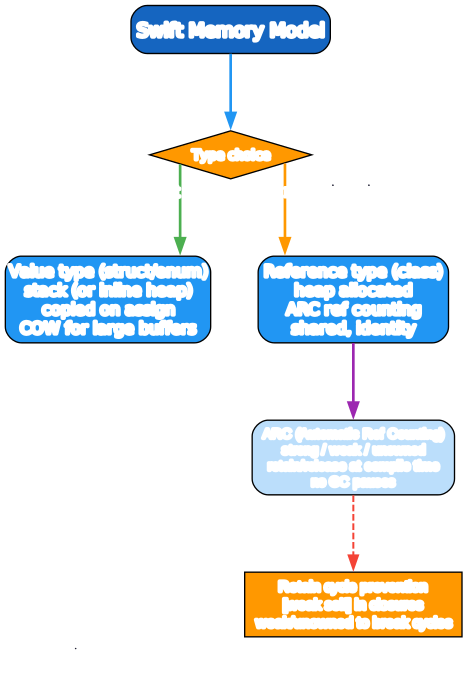
Swift uses Automatic Reference Counting (ARC), not garbage collection:
- Strong (default) — keeps the object alive.
weak— weak reference; becomesnilwhen the object deallocates (must be optional).unowned— non-owning reference; assumed to always have a value (crashes if accessed after dealloc).
class Parent { var child: Child? }
class Child { weak var parent: Parent? }   // weak breaks the retain cycle
Retain cycles (A ↔ B strong) leak memory. Break them with weak/unowned. In closures capturing self in a class, use [weak self] capture lists. Value types (struct/enum) don’t have this problem — no references, no cycles — another reason to prefer them.
For large value-type buffers (Array, String, Dict), Swift uses copy-on-write: copies share storage until one mutates, then it clones. You get value semantics without paying for copies until needed.
The Toolchain
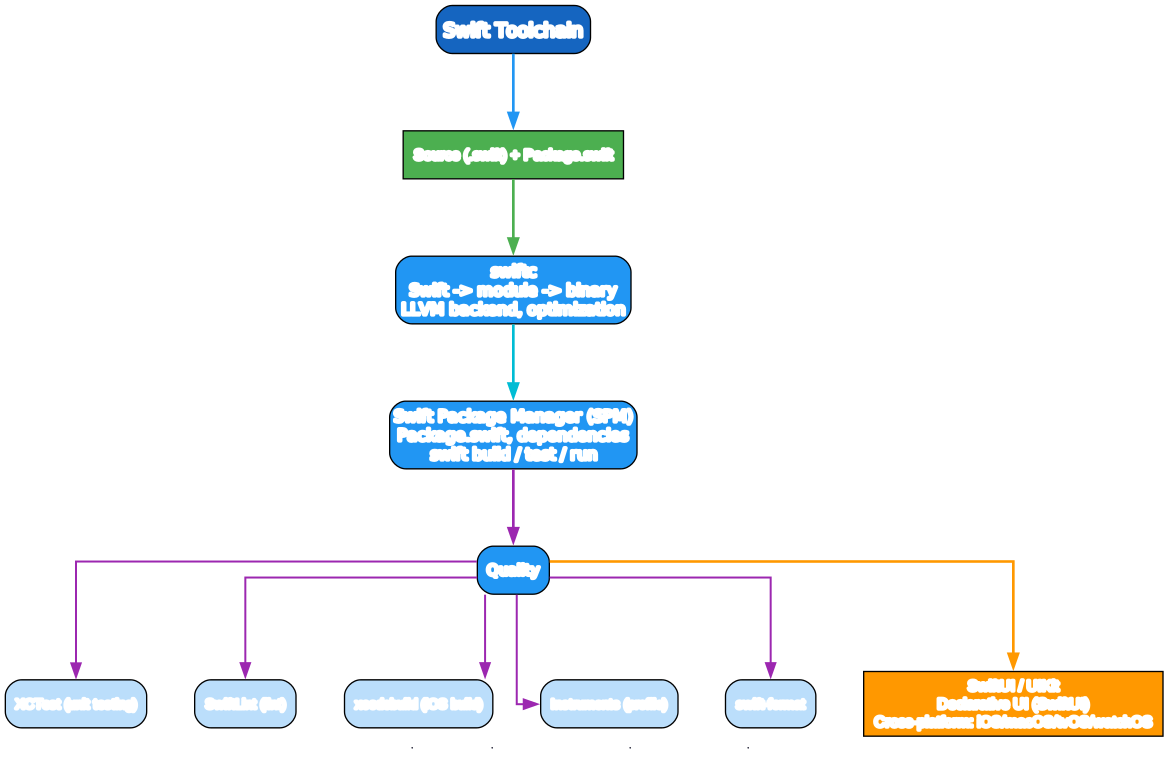
Swift Package Manager (SPM)
swift package init --type executable   # scaffold
swift build                              # build
swift test                               # run XCTest
swift run                                # run the executable
swift package update                     # update deps
A Package.swift:
// swift-tools-version: 5.10
import PackageDescription

let package = Package(
    name: "MyApp",
    platforms: [.macOS(.v14)],
    dependencies: [
        .package(url: "https://github.com/apple/swift-nio.git", from: "2.0.0"),
    ],
    targets: [
        .executableTarget(name: "MyApp", dependencies: ["NIO"]),
        .testTarget(name: "MyAppTests", dependencies: ["MyApp"]),
    ]
)
Apple platforms and XCTest
xcodebuild -scheme MyApp -destination 'platform=iOS Simulator,name=iPhone 15' build
xcodebuild test                              # iOS tests
open -a Instruments                          # profiling (allocation, time)
xcrun simctl list                            # simulators
Testing with XCTest
import XCTest
@testable import MyApp

final class CounterTests: XCTestCase {
    func testIncrement() {
        let c = Counter()
        c.inc()
        XCTAssertEqual(c.count, 1)
    }
}
Tooling
swift/swiftc— compiler + REPL (swiftwith no args opens a REPL).- SPM — package manager, test runner, build.
- Xcode — IDE for Apple platforms; Swift Playground for exploration.
swift-format/ SwiftLint — formatting and linting.- Instruments — profiling (memory, time, leaks).
- Vapor / Hummingbird — server-side Swift frameworks.
- XCTest / Swift Testing — testing (
Testingis the newer macro-based framework, 6.0+).
A Quick-Start Checklist
letby default,varonly when mutating.- Prefer
structoverclass; useclassonly for identity/inheritance. - Handle every optional —
if let/guard let/??; avoid!unless you’ve proven non-nil. - Use enums with associated values for state; match exhaustively.
- Design around protocols (protocol-oriented programming), not class hierarchies.
async/awaitfor async;actorfor shared mutable state.[weak self]in escaping closures that capture class instances — break retain cycles.- SPM for package management;
swift test+ XCTest/Swift Testing. - SwiftUI for new Apple-platform UIs; describe state, let it diff.
- Run Instruments for performance and leak checks before shipping.
Common Pitfalls
- Force-unwrap
!on nil — crashes. Only!when you’ve proven non-nil; preferguard let. letstruct is fully immutable — you can’t even mutate a property. Usevarif you need to.- Forgetting
mutating— astructmethod that mutates must be markedmutating. - Retain cycles — two classes strongly referencing each other leak. Break with
weak/unowned. [weak self]missing in escaping closures — common iOS leak; the closure holdsselfforever.- Existential overhead —
any Protocolhas indirection;some Protocolis faster. Usesomewhere you can. - Value-type surprise in arrays of classes —
[Class]holds references; mutating one element affects the shared object. - Switch not exhaustive — the compiler errors; don’t silence with
default: breakon enums — handle all cases. - String indexing —
s[i]is O(n) (Unicode-correct), not O(1). Uses.startIndex,s.index(after:), orfor (i, c) in s.enumerated(). try?loses error detail — it returnsnilon throw; use when you don’t care why it failed.
What to Learn Next
- The Swift Programming Language — docs.swift.org/swift-book the official, free, comprehensive guide.
- Swift by Sundell — swiftbysundell.com articles and the “Swift by Sundell” podcast.
- Hacking with Swift — hackingwithswift.com practical tutorials by Paul Hudson.
- Point-Free — point-free.co video series on Swift design and functional programming.
- 100 Days of Swift — hackingwithswift.com/100 a structured curriculum.
- Swift Evolution — github.com/swiftlang/swift-evolution proposals — the source of new features.
- WWDC videos — developer.apple.com/videos Apple’s annual deep dives.
- Swift Testing docs — developer.apple.com/documentation/testing the modern test framework.
Swift’s value-type-first design, exhaustive pattern matching, and the optionals system make it one of the safest compiled languages. The recent async/actor concurrency model and SwiftUI have made it modern as well as safe. Learn the value-vs-reference distinction and optionals first — everything else builds on them.
Good luck — and default to let.
Resources:
- Official: https://docs.swift.org/
- SPM: https://www.swift.org/package-manager/
- SwiftUI: https://developer.apple.com/xcode/swiftui/
- Vapor: https://vapor.codes/
- Forums: https://forums.swift.org/

Enjoyed this post? Never miss out on future posts by following us