no-mistakes: A Local Git Proxy That Runs an AI Validation Gate Before Your Push Lands
AI coding agents are fast, and fast means sloppy sometimes — a half-finished test, a docstring that drifted from the code, a lint failure the agent did not run. no-mistakes is a local git proxy that sits between your working branch and the real remote and refuses to forward anything that has not passed an AI validation pipeline. The tagline is blunt: “Kill all the slop. Raise clean PR.”
With 5,900 stars on GitHub, written in Go (99.8%), MIT licensed, and at v1.34.0 across 82 releases, no-mistakes is one of the more thoughtfully designed entries in the “AI coding gatekeeper” space. Let us look at how it works.
The Validation Pipeline
The core idea is simple: instead of pushing to origin, you push to no-mistakes. The proxy intercepts the push, creates a disposable worktree, runs a multi-stage validation pipeline, and only forwards the branch to the real push target if every check passes — then opens a clean PR.
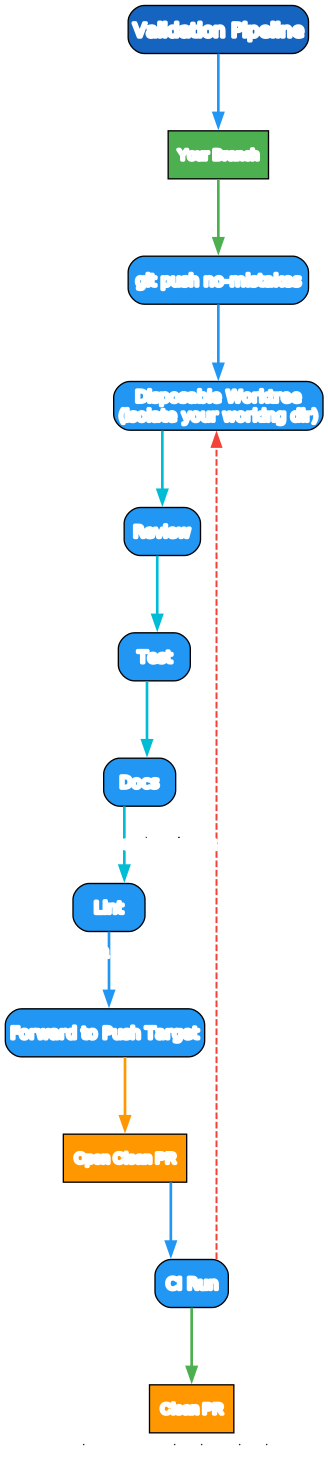
The pipeline runs:
your branch → git push no-mistakes → disposable worktree → review → test → docs → lint → push → PR → CI → clean PR
Two design decisions make this work well in practice:
- The worktree is disposable. Validation happens in an isolated copy of your repo, so your working directory is never touched while the pipeline runs. You keep editing; the gate runs in parallel. This is what makes the proxy non-blocking rather than a
git pushthat freezes your terminal. - Every step either passes or stops with a finding. Nothing reaches the push target until all checks are green. A finding is not a generic failure — it is a specific, actionable item routed to either auto-fix or a human.
The CI step after PR creation is part of the same flow: if CI fails, no-mistakes can auto-fix the failures and re-run, so the “clean PR” state is reached without you babysitting it.
Three Trigger Entry Points
no-mistakes is deliberately not a single interface. It exposes three ways in, for different workflows.
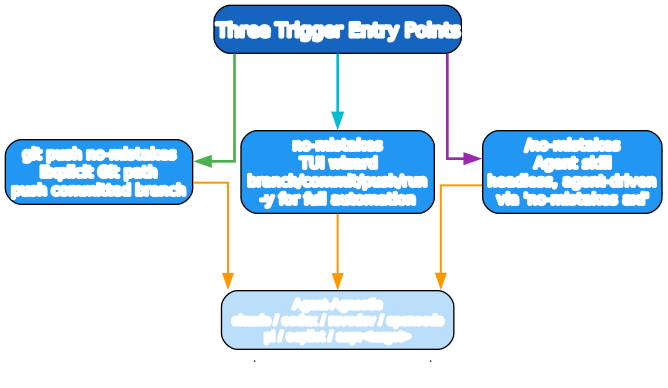
git push no-mistakes— the explicit Git path. You push a committed branch to the gate remote the way you would push to any remote. This is the lowest-friction entry for people who already live ingit.no-mistakes— a TUI wizard that walks through branch creation, committing, pushing, and run monitoring. The-yflag makes it fully automatic end to end./no-mistakes— an agent skill for headless, agent-driven workflows. It usesno-mistakes axi, a non-interactive interface, so an AI coding agent can both perform a task and gate it, or gate already-committed work, without a human at the terminal.
All three converge on the same agent-agnostic backend, which supports claude, codex, rovodev, opencode, pi, copilot, or acp:<target> (via acpx), with ordered fallbacks. You are not locked to one AI provider — and if one agent fails a check, another can take a turn.
Human-in-Charge Routing
The most important design choice in no-mistakes is how it treats findings. It does not blindly auto-fix everything, and it does not blindly escalate everything. It routes by whether a fix touches developer intent.
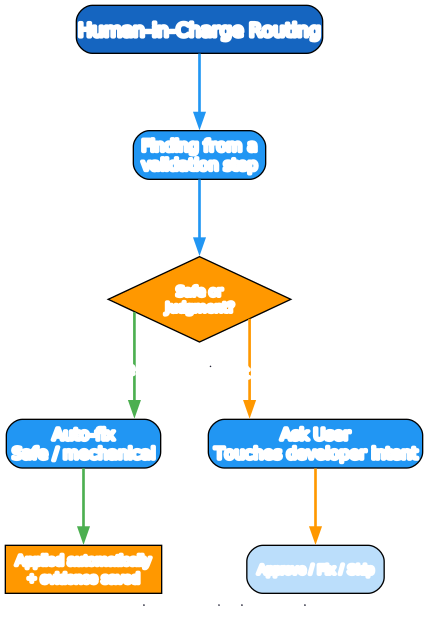
When a validation step produces a finding, a router decides:
- Safe / mechanical → auto-fix. Things like a missing newline at EOF, an import sort, a formatting nit, an obvious typo in a docstring. The fix is applied automatically and the evidence is saved under
.no-mistakes/evidence. - Touches developer intent → ask user. Anything that changes behavior, names, structure, or semantics is escalated. You get three options: approve the agent’s fix, fix it yourself, or skip.
This split is the difference between a useful gate and an annoying one. A gate that auto-applies a refactor you did not ask for is a gate you turn off. A gate that asks you about every trailing-whitespace fix is a gate you ignore. no-mistakes draws the line at intent, which is the right line.
Installation and Daily Use
no-mistakes installs as a single binary and configures itself with one init command.
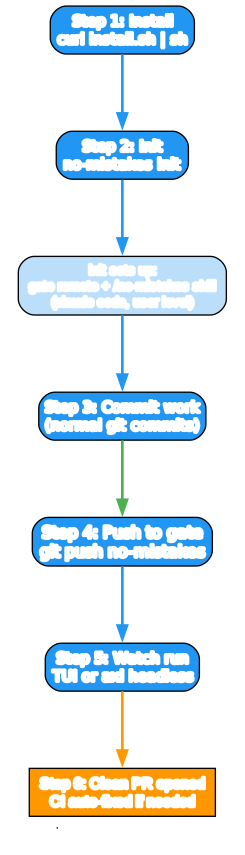
The daily loop:
- Install via the install script:
curl -fsSL https://raw.githubusercontent.com/kunchenguid/no-mistakes/main/docs/install.sh | sh(Windows,go install, and build-from-source paths are also documented) - Init with
no-mistakes init— this sets up the gate remote, configures the push target, and installs the/no-mistakesskill for Claude Code and other agents at the user level - Commit work with normal git commits
- Push to the gate with
git push no-mistakes - Watch the run via the TUI or, for headless use,
no-mistakes axi - Get a clean PR — the branch is forwarded only when all checks pass, and CI failures are auto-fixed within the flow
A few operational details
- Fork support:
no-mistakes init --fork-url <your-fork-url>configures the gate for a fork contribution while keepingoriginpointed at the parent repo. This is the right detail for open-source contributors who push to their own fork but want the gate. - Per-project config: a
.no-mistakes.yamlat the repo root controls project-specific behavior. - Evidence directory:
.no-mistakes/evidencestores validation artifacts, so you can audit what the gate checked and what it changed. - Generated-file guards: the repo includes a
workflow_guard_generated_files_test.goand skill-drift detection inmake lint— the tool eats its own dogfood and refuses to let generated files or drifted skill definitions slip in. - Platforms: macOS, Linux, and Windows.
Why It Matters
no-mistakes is interesting for three reasons.
First, it treats the push as the gate, not the PR. Most AI-coding quality tools run at PR time on the remote, after the slop is already in a branch someone has to review. By running locally at the push — in a disposable worktree so it does not block you — no-mistakes catches problems before they become someone else’s review burden. The proxy model is the right layer.
Second, agent-agnosticism with ordered fallbacks is a genuine architectural choice. Locking a quality gate to one AI provider is a fragile bet; letting multiple agents take turns, with fallbacks, makes the gate robust to any single agent having a bad day. This is rare and valuable.
Third, the intent-based auto-fix / ask-user split is the correct line to draw. It is the difference between a tool developers keep on and a tool they silently disable. Combined with disposable-worktree isolation and an evidence trail, it makes “AI gates my push” something a careful engineer would actually adopt rather than a demo to retweet.
If you use an AI coding agent — especially in a team where PRs from agents need to be trustworthy — no-mistakes is worth a serious look. The proxy model, the human-in-charge routing, and the agent-agnostic backend together make it one of the better-designed entries in this category.
Links:
- GitHub: https://github.com/kunchenguid/no-mistakes
- Install:
curl -fsSL https://raw.githubusercontent.com/kunchenguid/no-mistakes/main/docs/install.sh | sh - Init:
no-mistakes init - License: MIT

Enjoyed this post? Never miss out on future posts by following us


