Introduction
Penpot is an open-source design and prototyping platform that has been gaining significant traction in the developer and design communities. Hosted at penpot/penpot on GitHub, the repository has accumulated approximately 52,224 stars and 3,339 forks, with an impressive growth rate of 1,135 stars in a single day. This momentum reflects a growing demand for design tools that are not locked behind proprietary ecosystems and subscription paywalls.
Developed by Kaleidos, a Spanish technology company, Penpot is licensed under the Mozilla Public License (MPL-2.0) and has been recognized as a Verified Digital Public Good by the Digital Public Goods registry. Unlike many design tools that store artwork in opaque binary formats, Penpot embraces open web standards such as SVG, CSS, HTML, and JSON as its native representation. This means that what designers create in Penpot is already code, and developers can work with it directly without translation layers.
This article provides an independent technical analysis of the Penpot codebase, its architecture, technology stack, and the features that make it a compelling alternative to proprietary design platforms. It is not an endorsed publication of the Penpot project; rather, it is an exploration of the engineering decisions behind a tool that is reshaping how design and code collaborate.
What is Penpot?
Penpot is a web-based design and prototyping platform that runs entirely in the browser. It provides a full-featured visual editor for creating user interfaces, interactive prototypes, and design systems. What sets Penpot apart from other design tools is its foundational philosophy: design should be expressed as code using open standards.
The platform supports vector editing, prototyping, components and variants, CSS Grid and Flex layouts, and native design tokens. It offers real-time collaboration so that multiple designers and developers can work on the same file simultaneously, with changes propagating instantly through WebSocket connections and Redis PubSub messaging.
Penpot can be used as a hosted SaaS application at design.penpot.app or self-hosted on your own infrastructure using Docker, Kubernetes, Elestio, or TrueNAS. This deployment flexibility makes it suitable for individuals, small teams, and large enterprises with strict data governance requirements. The official website at penpot.app provides comprehensive documentation, a learning center, and community resources.
System Architecture
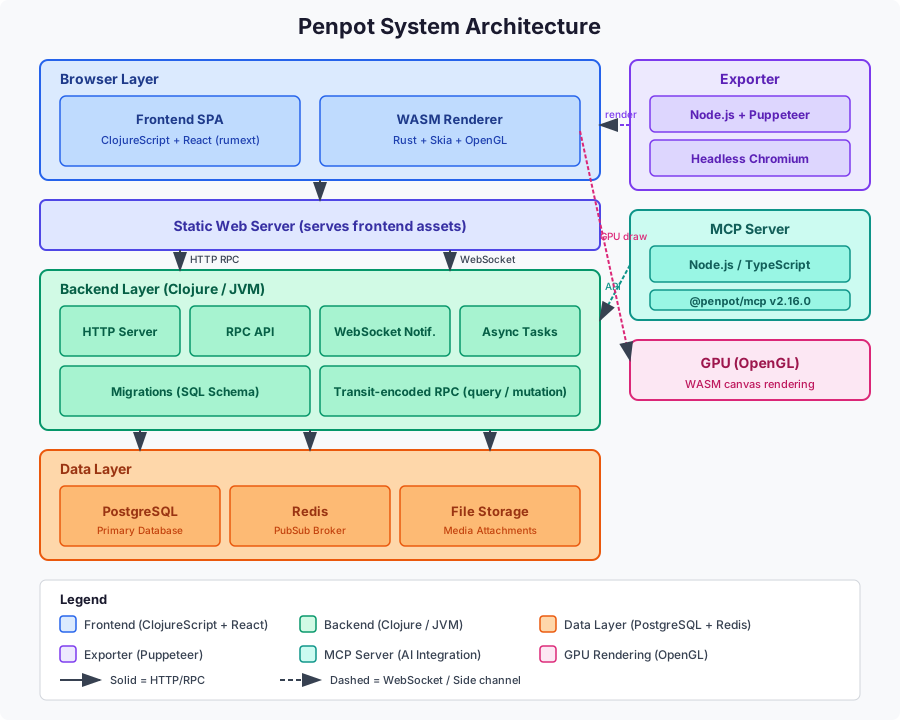 The Penpot system architecture follows the structure of a modern single-page application with several specialized layers that handle rendering, export, and AI integration. At the top of the stack sits the browser layer, which contains the frontend SPA built with ClojureScript and React, alongside the WASM renderer compiled from Rust. The browser loads the frontend assets from a static web server and then communicates with the backend over HTTP for RPC calls and over WebSocket for real-time updates.
The backend layer runs on the Java Virtual Machine as a Clojure application. It exposes an HTTP server that handles RPC API requests, manages WebSocket notifications for file subscriptions, runs async task workers for scheduled jobs, and applies SQL schema migrations. All RPC parameters are encoded using Cognitect transit, a format that is more expressive than JSON and allows the frontend and backend to share data structures seamlessly.
The data layer consists of PostgreSQL as the primary database for all persistent data, Redis as a PubSub broker for real-time collaboration, and external file storage for media attachments. Two side components extend the platform: the exporter, which uses Node.js and Puppeteer to drive a headless Chromium instance for rendering shapes to bitmap, SVG, or PDF outputs, and the MCP server, which provides a Model Context Protocol bridge for AI tools to read and modify designs programmatically.
The WASM renderer communicates with the GPU via OpenGL to deliver hardware- accelerated canvas drawing directly in the browser, ensuring smooth performance even with complex designs. The interaction flow proceeds as follows: a user opens Penpot in the browser, the frontend SPA loads from the static web server, RPC calls are made to the backend over HTTP with transit-encoded parameters, and when a file is opened a persistent WebSocket is established. The backend subscribes to a Redis PubSub topic keyed by file ID, and edits propagate through the chain of backend RPC to Redis PubSub to all subscribers via their WebSocket connections, resulting in real-time UI updates across all connected clients.
Technology Stack
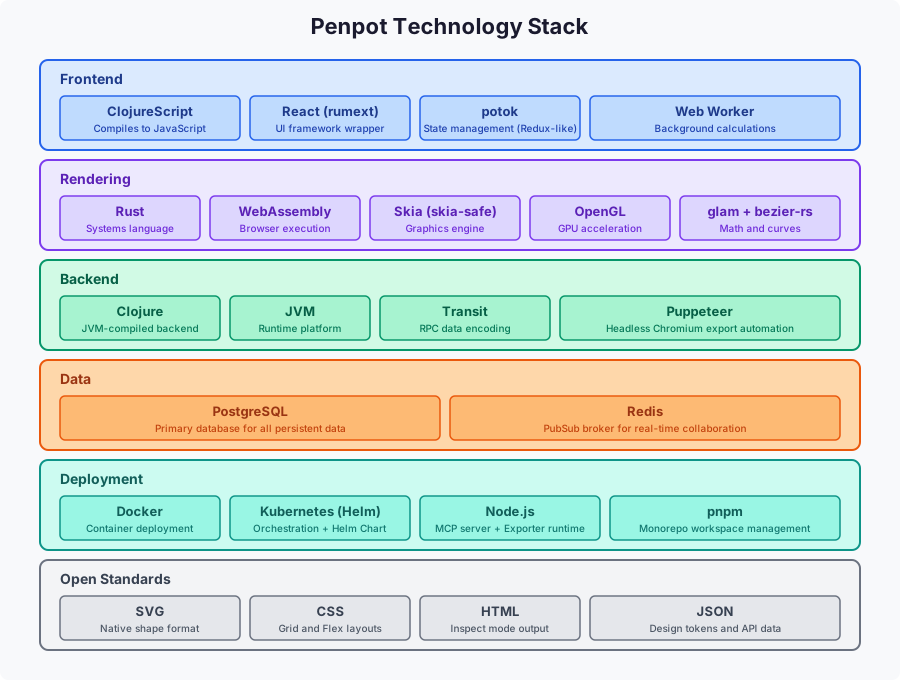 The Penpot technology stack is notable for its use of functional programming languages and high-performance systems languages working together. The frontend is written in ClojureScript, a dialect of Clojure that compiles to JavaScript. It uses React through the rumext wrapper library and manages application state with potok, an event-loop paradigm similar to Redux. A web worker handles background calculations to keep the main thread responsive during intensive design operations.
The rendering layer is implemented in Rust and compiled to WebAssembly. It relies on skia-safe, the Rust binding for the Skia graphics engine, along with glam for linear algebra math, OpenGL for GPU access, and bezier-rs for curve calculations. This combination delivers GPU-accelerated canvas rendering that runs at native speed inside the browser, a significant advantage over JavaScript-based renderers for complex scenes. The build configuration uses a release profile with optimization level 3, fat LTO, and a single codegen unit for maximum performance.
The backend is a Clojure application running on the JVM. It uses transit for RPC data encoding, which preserves Clojure data types across the wire. The exporter runs as a Node.js application using Puppeteer to control headless Chromium for export automation. PostgreSQL serves as the primary database for all persistent data including users, teams, projects, files, shapes, and media metadata. Redis acts as the PubSub broker for real-time collaboration, using file ID-based topics to broadcast change notifications to all WebSocket subscribers.
Deployment is handled through Docker containers and Kubernetes with an official Helm Chart. The monorepo is managed with pnpm workspaces for JavaScript and TypeScript packages, and deps.edn for Clojure dependencies. Open standards including SVG, CSS, HTML, and JSON form the foundation of the design representation, ensuring that Penpot output is always interoperable with web technologies and never locked into a proprietary format.
Design and Code Collaboration
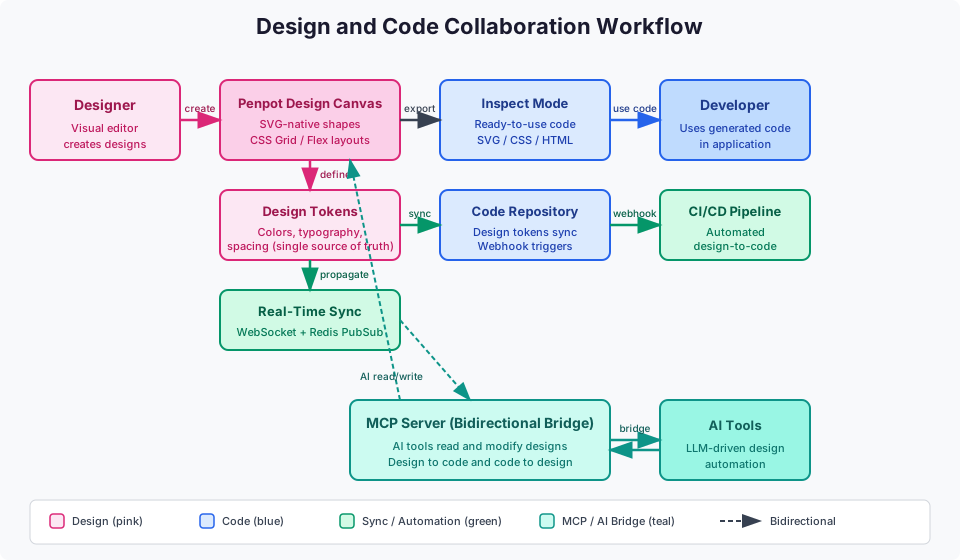 The design and code collaboration workflow is the core differentiator that separates Penpot from traditional design tools. The flow begins with a designer creating interfaces in the visual editor. All shapes are stored natively as SVG, meaning there is no proprietary format to decode. CSS Grid and Flex layouts in Penpot behave identically to real CSS, so what a designer creates matches what a developer implements in production code.
Design tokens provide a single source of truth for colors, typography, spacing, and other design variables. These tokens can sync between design files and code repositories, ensuring that a change to a brand color in Penpot propagates to the codebase automatically. This eliminates the common problem of design specifications drifting from implementation over time. More details on design tokens are available at penpot.app/collaboration/design- tokens.
Real-time collaboration is powered by WebSocket connections and Redis PubSub. When a user opens a file, a persistent WebSocket is established with the backend, which subscribes to a Redis PubSub topic keyed by file ID. Any edit made by one user is sent to the backend via RPC, published to the Redis topic, and broadcast to all subscribers, resulting in instant updates across all connected clients. Live presence events and cursor tracking let team members see who is working on what in real time.
The MCP server acts as a bidirectional bridge between Penpot and AI tools. Large language models and other AI agents can read design data, modify shapes, and generate code from designs through the Model Context Protocol. This enables AI- driven design automation workflows that were not previously possible with closed design tools. Webhooks and the open API allow teams to trigger CI/CD pipelines on design changes, automating the design-to-code pipeline end to end. Developers can use Inspect Mode to access ready-to-use SVG, CSS, and HTML code directly from the design canvas, eliminating manual translation work.
Key Features and Capabilities
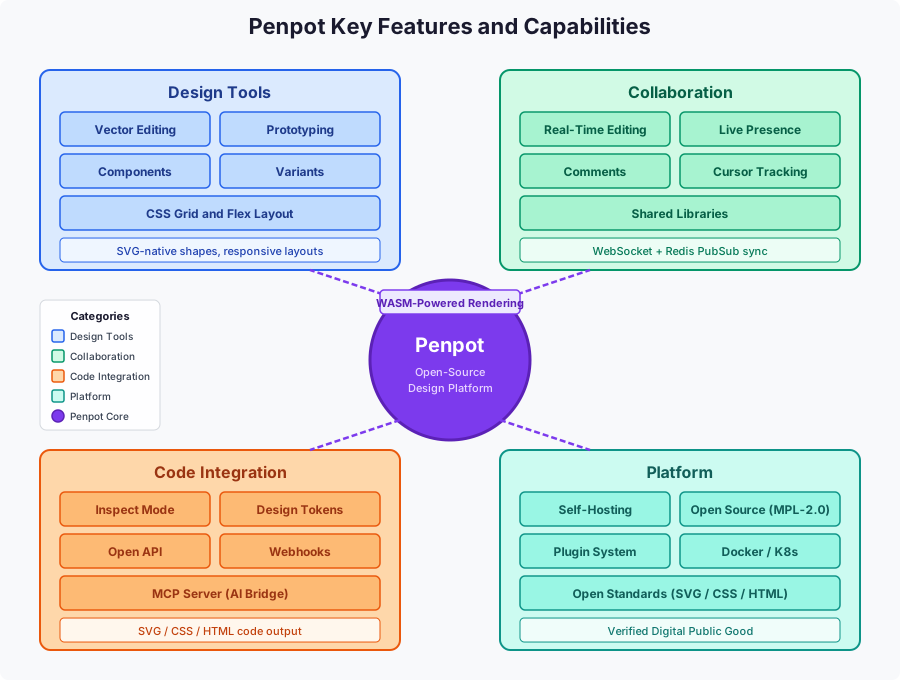 Penpot organizes its capabilities into four major categories, each addressing a distinct aspect of the design workflow. The design tools quadrant covers the core creative functionality: vector editing for precise shape manipulation, prototyping for interactive transitions, reusable components with variants for scalable design systems, and CSS Grid and Flex layouts that produce responsive interfaces matching real CSS behavior. These tools give designers the full expressive power needed for modern UI design.
The collaboration quadrant encompasses everything that enables team work. Real- time editing allows multiple users to modify the same file simultaneously. Live presence shows who is online and active. Comments facilitate asynchronous feedback directly on the canvas. Cursor tracking provides spatial awareness of where teammates are working. Shared libraries allow teams to maintain consistent design assets across projects. All of this is underpinned by the WebSocket and Redis PubSub synchronization engine.
The code integration quadrant bridges the gap to development. Inspect Mode generates ready-to-use SVG, CSS, and HTML code from any design element. Design tokens sync between design and code repositories. The open API and webhooks enable automated pipelines that trigger on design changes. The MCP server provides a standardized protocol for AI tools to interact with designs programmatically, opening the door to AI-assisted design and code generation workflows.
The platform quadrant covers the infrastructure and ecosystem. Self-hosting via Docker, Kubernetes, Elestio, or TrueNAS gives teams full control over their data. The MPL-2.0 open-source license guarantees that the software remains free and auditable. The plugin system allows extending Penpot with custom integrations. Open standards including SVG, CSS, and HTML ensure long-term interoperability. The WASM-powered rendering engine delivers GPU-accelerated performance. Penpot is also recognized as a Verified Digital Public Good, affirming its value as a public-benefit open-source project.
Repository Structure
The Penpot repository is a monorepo containing all components of the platform. The backend/ directory holds the Clojure backend application with code under backend/src/app/, including subdirectories for HTTP handling, RPC API, database migrations, setup, CLI, and async tasks. The frontend/ directory contains the ClojureScript frontend with main/, worker/, and util/ subdirectories under frontend/src/app/.
The common/ directory holds shared Clojure and ClojureScript code used by both frontend and backend, enabling code and data structure sharing without conversion. The exporter/ directory contains the ClojureScript Node.js exporter application that uses Puppeteer and headless Chromium. The render-wasm/ directory houses the Rust-based WASM canvas renderer with its skia-safe, glam, and OpenGL dependencies. The mcp/ directory contains the MCP server package published as @penpot/mcp.
Additional directories include plugins/ for the plugin system, docker/ for deployment configurations, docs/ for documentation rendered at help.penpot.app, library/ for shared library components, scripts/ for build utilities, tools/ for development tools, and experiments/ for experimental features. Key root files include deps.edn for Clojure dependency configuration, package.json and pnpm-workspace.yaml for the Node.js monorepo, and manage.sh for management operations.
Installation and Deployment
Penpot offers multiple deployment paths to suit different needs. The simplest option is the hosted SaaS at design.penpot.app, which requires no installation and lets users register and start designing immediately. For teams that need control over their data, self-hosting is fully supported through several methods.
The development environment can be set up using Gitpod for a ready-to-code experience at gitpod.io. The developer environment guide at help.penpot.app provides detailed instructions for local development. Contributors can follow the contributing guide at help.penpot.app/contributing-guide/ to get started with the codebase.
Docker Deployment
Docker Compose is the most common self-hosting method. The official Docker images are published shortly after each SaaS update, ensuring that self-hosted instances stay current. The Docker installation guide at help.penpot.app provides the complete configuration. A typical Docker Compose setup includes the backend, frontend, exporter, PostgreSQL, and Redis containers. Configuration is handled through environment variables that specify the public URI, database connection string, and Redis connection string. The official documentation covers all available settings at help.penpot.app/technical-guide/configuration/. Docker images are tagged by version, allowing teams to pin specific releases for stability while still having the option to track the latest updates.
Self-Hosting Options
Beyond Docker Compose, Penpot supports several other self-hosting options. Kubernetes deployment is available through an official Helm Chart, with additional support for OpenShift and Rancher, documented at help.penpot.app. Elestio provides a managed deployment option for teams that want self-hosting without the operational overhead, available at help.penpot.app/technical-guide/getting-started/elestio/.
TrueNAS users can install Penpot from the TrueNAS app catalog at apps.truenas.com. Additional community and unofficial self-hosting options are documented at help.penpot.app. A detailed self-hosting blog post is also available at penpot.app/blog/how-to-self-host-penpot/.
MCP Server Integration
The Penpot MCP server, published as the @penpot/mcp package at version 2.16.0, implements the Model Context Protocol to enable multi-directional workflows between design and code. This allows AI tools and large language models to read Penpot designs, modify shapes, and generate code from design files programmatically.
The MCP server runs as a Node.js application and communicates with the Penpot backend API. It exposes design data in a structured format that AI agents can consume, and it accepts modification commands that can create or update design elements. This bidirectional capability means that AI can both analyze existing designs and contribute to them, opening possibilities for AI-assisted design iteration and automated design-to-code pipelines.
Quick start instructions for the MCP server are available at help.penpot.app/mcp/, and additional information is at penpot.app/penpot-mcp-server. The MCP integration represents a forward-looking approach to design tooling, positioning Penpot as a platform that can participate in AI-driven development workflows alongside coding assistants and other AI tools.
Plugin System
Penpot features a plugin system that allows developers to extend the platform with custom integrations and solutions. The plugin system makes the workspace programmable, enabling teams to connect Penpot to their existing toolchains and build specialized workflows. Information about the plugin system is available at penpot.app/penpothub/plugins.
The open API and webhooks complement the plugin system by providing integration points for automation. Access tokens allow authenticated API access for programmatic operations, and webhooks can notify external systems when design changes occur. This enables CI/CD pipelines that trigger on design updates, automated design token synchronization to code repositories, and custom reporting workflows. The integrations and API documentation is at penpot.app/integrations-api.
Community and Ecosystem
Penpot has built a vibrant community around its open-source mission. The community forum at community.penpot.app hosts discussions, support requests, and feature discussions. The ambassador program at penpot.app/ambassador-program recognizes community members who advocate for the platform. A YouTube channel at youtube.com/@Penpot publishes tutorials and updates, and a dedicated tutorials playlist is available for structured learning.
Contributors can get involved through the contributing guide, bug reporting process, and translation efforts. The contributing video by Alejandro Alonso provides an overview of how to contribute to the project. Libraries and templates are available at penpot.app/penpothub/libraries-templates to help users get started quickly. The project management happens on Taiga at tree.taiga.io, providing transparency into the development roadmap.
Penpot vs Proprietary Alternatives
Penpot distinguishes itself from proprietary design tools through several key advantages. The open-source MPL-2.0 license means there is no vendor lock-in and no subscription fees. Self-hosting gives teams complete control over their design data, which is critical for organizations with compliance and governance requirements. The use of open web standards means designs are stored as SVG, CSS, and HTML, not proprietary binary formats that could become inaccessible.
The design-as-code philosophy means that what designers create is already in a format developers can use directly. CSS Grid and Flex layouts behave like real CSS, eliminating the gap between design and implementation. Design tokens provide a single source of truth that syncs between design and code. The MCP server enables AI integration that proprietary tools cannot match through their closed APIs. These factors combine to make Penpot a compelling choice for teams that value openness, interoperability, and long-term sustainability.
Getting Started
Getting started with Penpot is straightforward. For immediate use without installation, visit design.penpot.app and register for an account. The learning center at penpot.app/learning-center provides tutorials and courses, including a UI Design Course at penpot.app/courses/. The user guide at help.penpot.app/user-guide/ covers all features in detail.
For self-hosting, follow the Docker or Kubernetes guides referenced earlier. For development, use Gitpod or set up a local environment following the developer guide. The architecture documentation at help.penpot.app/technical-guide/developer/architecture/ provides deep technical context for contributors. Whether you are a designer looking for an open alternative or a developer interested in the codebase, Penpot offers accessible entry points for every level of engagement.
Conclusion
Penpot represents a significant shift in how design tools can be built and operated. By choosing open web standards as its native format, functional programming languages for its core, and a self-hostable deployment model, Penpot addresses many of the pain points that teams experience with proprietary design platforms. The 52,224 stars and 1,135 daily star growth on GitHub demonstrate that this approach resonates with a large and growing community.
The architecture combining Clojure, ClojureScript, Rust, and WebAssembly is technically sophisticated yet pragmatic, leveraging the strengths of each language where they fit best. The MCP server integration positions Penpot at the intersection of design and AI, a frontier that will only grow more important. For teams evaluating design tools, Penpot offers a compelling combination of openness, performance, and developer-friendly design representation that is worth serious consideration.
Related Posts
- DESIGN-md-AI-Powered-Design-Systems - Explores AI-powered design systems, a topic that aligns closely with Penpot’s design tokens and MCP server capabilities.
- Awesome-Design-Systems-Curated-Collection - A curated collection of design system resources, directly relevant since Penpot is a tool for building design systems at scale.
- Claude-Code-Complete-Guide - A guide to AI-assisted coding, relevant because Penpot’s MCP server integrates with AI coding tools for design-to-code workflows.
- Harbor-Cloud-Native-Registry - Covers an open-source infrastructure tool with Docker and Kubernetes deployment, similar to Penpot’s self-hosting model.
- MarkItDown-Microsoft-Document-Conversion - Discusses format conversion, thematically related to Penpot’s design-to-code conversion using open standards.

Enjoyed this post? Never miss out on future posts by following us


