Introduction
Staying informed about global events has never been harder. Journalists, analysts, and researchers juggle dozens of news feeds, satellite imagery services, flight trackers, financial dashboards, and geopolitical monitors, with almost no correlation between the signals each tool surfaces. WorldMonitor, an open-source project by Elie Habib (GitHub user koala73), tackles this fragmentation head-on by unifying news aggregation, geopolitical monitoring, and infrastructure tracking into a single situational awareness interface.
At the time of writing, the repository at https://github.com/koala73/worldmonitor has accumulated 60,714 stars and 9,465 forks, growing at roughly 2,845 stars per week. It is written in TypeScript, distributed under the AGPL-3.0-only license, and powers a live site at https://worldmonitor.app. What makes WorldMonitor particularly notable is its privacy-first design: the entire intelligence pipeline can run locally using Ollama, with no API keys required, while still offering cloud inference through Groq and OpenRouter for users who want higher throughput.
From a single codebase, WorldMonitor produces 6 themed site variants (world, tech, finance, commodity, happy, and energy), ships a native desktop application built with Tauri 2, and renders data on dual map engines powered by globe.gl and deck.gl. This article walks through the key features, the layered architecture, the data ingestion pipeline, the variant system, the desktop app, the data sources, and a quick-start guide for self-hosting.
Key Features

The diagram above shows the WorldMonitor feature ecosystem organized into five groups radiating from the central dashboard. Each group represents a distinct capability domain, and together they form a comprehensive situational awareness platform.
Intelligence group (light green) – the core analytical functions:
- AI News Aggregation ingests more than 500 curated news feeds across 15 categories
- Cross-Stream Correlation detects related events across military, economic, disaster, and escalation signal streams
- Country Instability Index (CII v8) produces server-authoritative stress scores for 31 Tier-1 countries
Visualization group (light orange) – the dual map engine:
- A 3D globe rendered with globe.gl on top of Three.js
- A WebGL flat map rendered with deck.gl on top of MapLibre GL
- 56 map layer types that can be composed to visualize different data dimensions
Finance group (light purple) – financial market monitoring:
- Finance Radar tracking 29 stock exchanges worldwide
- A 7-signal market composite indicator fusing technical and sentiment signals into a single health score
- Commodities and crypto monitoring for a complete financial picture
AI group (light yellow) – the inference layer:
- Local AI through Ollama for fully private processing with no data leaving the machine
- Transformers.js for browser-side machine learning that runs models directly without a server round-trip
- Cloud inference through Groq and OpenRouter for faster generation or larger models
Platform group (light pink) – deployment and accessibility:
- 6 site variants (world, tech, finance, commodity, happy, energy) from a single codebase
- A Tauri 2 desktop application for macOS, Windows, and Linux
- 24 languages with native-language feeds and right-to-left (RTL) support
- PWA support for installable web apps with offline caching
The hub-and-spoke layout is deliberate: every feature connects back to the central WorldMonitor node, emphasizing that these are not isolated tools but integrated capabilities that share the same data backbone. A journalist tracking a breaking geopolitical event can see the news brief, the affected country’s CII score, the financial market reaction, and the flight activity over the region, all on the same dashboard without switching applications. This integration is what distinguishes WorldMonitor from a simple RSS reader or a standalone map viewer.
Architecture Overview

The architecture diagram above shows the layered design of WorldMonitor, with each layer serving a distinct responsibility.
Frontend Layer (light blue) – the user-facing rendering engine:
- Built with vanilla TypeScript bundled by Vite, deliberately avoiding heavy UI frameworks in favor of direct DOM manipulation for performance-critical map rendering
- The 3D globe uses globe.gl, which wraps Three.js for WebGL-based spherical visualization
- The 2D flat map uses deck.gl on top of MapLibre GL for tile-based rendering
- Together these engines expose 56 map layer types for visualizing flight paths, financial heatmaps, and more
Edge Functions Layer (light green) – serverless data aggregation on Vercel:
- More than 60 serverless edge functions deployed close to the user for low latency
- Data aggregation from external providers, normalization, deduplication, and AI synthesis of raw feeds into concise briefs
- Protocol Buffers serialization for efficient binary transport and CII v8 scoring for the Country Instability Index
AI/ML Layer (light orange) – inference for synthesis and analysis:
- Ollama for local processing with no data leaving the machine
- Groq and OpenRouter for cloud inference with higher throughput
- Transformers.js for browser-side models that run entirely in the user’s browser
Railway Relay (light yellow) – persistent background processing:
- Long-running tasks such as continuous feed polling and historical data archiving
- Freshness monitoring across 35 source groups
- Survives beyond the ephemeral request lifecycle of a single edge function invocation
Data Sources Layer (light purple) – the ingestion foundation:
- More than 65 external providers and APIs across 8 domains
- More than 500 curated news feeds across 15 categories
- Wingbits ADS-B flight data for real-time aviation tracking, with 35 source groups monitored for staleness and freshness
Caching Layer (light gray) – a 3-tier cache strategy:
- Edge cache at the Vercel function level for request-level deduplication
- Redis cache backed by Upstash for sub-millisecond reads
- CDN for static asset delivery
- A service worker provides offline caching for the PWA
Desktop Layer (light pink) – native deployment via Tauri 2:
- Wraps the same frontend in a Rust shell with a Node.js sidecar
- Produces native binaries for macOS, Windows, and Linux
- Uses the same Protocol Buffers API as the web frontend
The edges in the diagram show how these layers interact: the frontend calls edge functions via Protocol Buffers, edge functions aggregate from data sources and cache results in Redis, the Railway relay feeds background data into the edge functions, and the desktop app uses the same API as the web frontend. Protocol Buffers define the contract between the edge functions and all frontends. The repository contains 276 protos across 34 services, which gives type safety across the TypeScript frontend and the Rust desktop shell, efficient binary serialization over the network, and a schema evolution path that does not break existing clients when new fields are added. This is a significant architectural choice: rather than ad-hoc JSON, WorldMonitor treats its API as a versioned schema, which is essential for a system that must remain stable while ingesting data from 65+ providers and serving six site variants.
Data Flow and Aggregation Pipeline
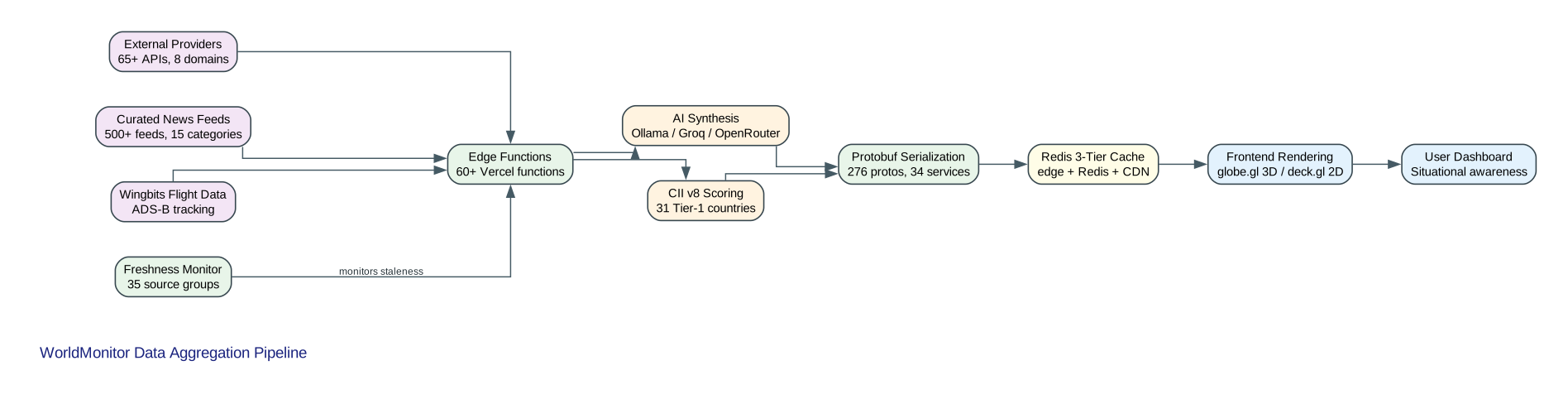
The data pipeline diagram above traces how raw information flows from external sources to the user’s dashboard, reading from left to right.
Stage 1 – Input Sources (left side of the diagram):
- External Providers: more than 65 APIs spanning 8 domains (geopolitics, finance, energy, climate, aviation, cyber security, infrastructure, and news intelligence)
- Curated News Feeds: more than 500 feeds across 15 categories, human-curated for source quality and diversity
- Wingbits Flight Data: ADS-B flight tracking for real-time aviation awareness
Stage 2 – Edge Functions (aggregation node):
- More than 60 Vercel edge functions perform initial aggregation, normalization, and deduplication
- All three input streams converge here before branching into parallel processing paths
Stage 3 – Parallel Processing Paths:
- AI Synthesis path: Ollama, Groq, or OpenRouter models transform raw feed items into concise briefs that preserve the signal while reducing the reading burden
- CII v8 Scoring path: the server-authoritative Country Instability Index computes stress scores for 31 Tier-1 countries based on aggregated geopolitical signals
- Keeping CII scoring server-authoritative is a deliberate security decision that prevents client-side manipulation of index values
Stage 4 – Protobuf Serialization:
- The 276 protos and 34 services encode results into compact binary messages
- Provides type safety across the TypeScript frontend and the Rust desktop shell
Stage 5 – Freshness Monitor:
- Sits above the edge functions and continuously checks 35 source groups for staleness
- Flags feeds that have stopped updating so operators can investigate potential outages or censorship events
Stage 6 – Redis 3-Tier Cache:
- Edge-level cache at the Vercel function level
- Upstash Redis cache for sub-millisecond reads
- CDN delivery for static assets
- Minimizes latency and reduces load on upstream providers
Stage 7 – Frontend Rendering and User Dashboard:
- globe.gl renders the 3D globe and deck.gl renders the 2D flat map
- The rendered visualizations arrive at the User Dashboard, the situational awareness interface the analyst interacts with
The entire pipeline is designed for low latency: edge functions run close to the user, Redis provides sub-millisecond cache reads, and Protocol Buffers keep payload sizes small. The result is a dashboard that can surface a breaking event within seconds of it appearing in a source feed, synthesize it into a brief, correlate it with related signals, and display it on a 3D globe, all without the user leaving the page.
The 6 Site Variants
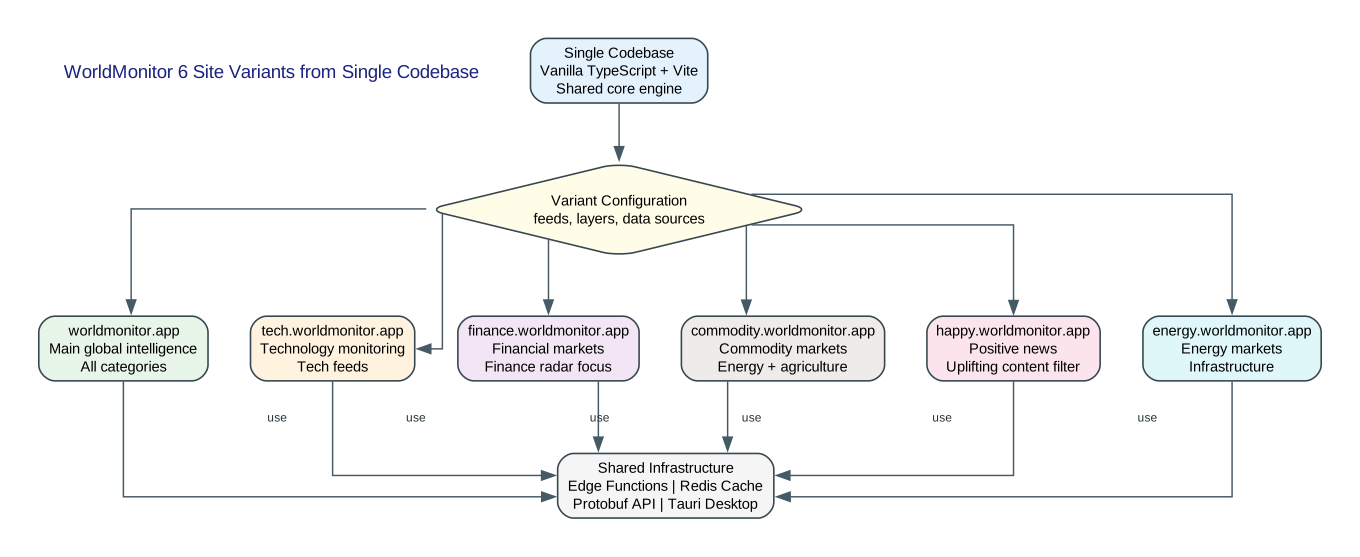
The diagram above illustrates how WorldMonitor derives six themed dashboards from a single shared codebase. At the top, the Single Codebase node represents the vanilla TypeScript and Vite project with its shared core engine. This codebase flows into the Variant Configuration node (the diamond in the center), which applies per-variant settings for feed categories, map layers, and data sources.
The six site variants, each with a distinct focus:
- worldmonitor.app – the main global intelligence dashboard that includes all categories and serves as the flagship site
- tech.worldmonitor.app – focused on technology monitoring with tech-industry feeds and relevant map layers
- finance.worldmonitor.app – oriented toward financial markets with the Finance Radar front and center
- commodity.worldmonitor.app – tracking commodity markets including energy and agriculture
- happy.worldmonitor.app – filters for positive news and uplifting content, offering situational awareness without the doom-scrolling that typically accompanies news consumption
- energy.worldmonitor.app – dedicated to energy markets and infrastructure monitoring
The Variant Configuration node applies three types of per-variant settings:
- Feed categories: which of the 15 news categories are enabled for each variant
- Map layers: which of the 56 map layer types are shown by default
- Data sources: which of the 65+ providers are prioritized for each variant’s domain
Shared Infrastructure (bottom of diagram):
- Edge functions for data aggregation and AI synthesis across all variants
- Redis cache backed by Upstash for sub-millisecond reads
- Protocol Buffers API with 276 protos across 34 services for type-safe transport
- Tauri 2 desktop build for macOS, Windows, and Linux
- PWA support with service worker for offline caching
- 24 languages with native-language feeds and RTL support
All six variants connect down to this shared infrastructure, which is the key to the variant strategy: because the core engine, the data pipeline, and the API contracts are identical across variants, a bug fix or a new feature in the shared codebase propagates to all six sites automatically. There is no forking, no separate maintenance burden, and no drift between variants. The only differences are configuration: which feed categories are enabled, which map layers are shown by default, and which data sources are prioritized.
This approach is a model for multi-tenant open-source projects. Instead of maintaining six separate repositories that inevitably diverge, WorldMonitor maintains one repository and six configuration files. The happy variant deserves special mention as a thoughtful design decision: it acknowledges that continuous exposure to negative news has a documented effect on mental health, and it offers users who want to stay informed a way to do so with a positive-content filter. This is not a gimmick but a genuine accessibility consideration for a tool that people may use for hours each day.
Desktop App (Tauri 2)
WorldMonitor ships as a native desktop application built with Tauri 2, the Rust-based application framework that produces small, secure, cross-platform binaries. The desktop app wraps the same web frontend in a native window and adds a Node.js sidecar process that runs background data processing outside the webview. This sidecar architecture is important: it allows long-running tasks such as continuous feed polling and local AI inference to persist even when the webview is idle, without blocking the user interface.
The desktop build targets three platforms: macOS (with separate builds for Apple Silicon and Intel), Windows (as a .exe installer), and Linux (as an AppImage). Tauri was chosen over Electron for several reasons. The bundle size is dramatically smaller because Tauri uses the operating system’s native webview rather than bundling a full Chromium runtime. The Rust security model provides memory safety and a smaller attack surface. And native performance is better because the backend logic runs in compiled Rust rather than a JavaScript runtime.
For users who prefer not to install a native application, WorldMonitor also works as a Progressive Web App (PWA). The service worker provides offline caching, so previously loaded data remains available without a network connection. This makes WorldMonitor usable in environments where installing native software is restricted, such as corporate workstations or shared computers. The PWA and the desktop app share the same frontend code, so there is no feature gap between them; the choice is purely about deployment preference.
Data Sources
WorldMonitor aggregates from more than 65 external providers and APIs across 8 domains. The geopolitics and military domain includes conflict monitors, sanctions databases, and military movement trackers. The finance and markets domain provides stock exchange data from 29 exchanges, commodity prices, and cryptocurrency rates. The energy domain covers grid status, fuel prices, and production data. The climate domain includes weather alerts and environmental sensors. The aviation domain uses Wingbits ADS-B flight data for real-time aircraft tracking. The cyber security domain monitors threat feeds and breach notifications. The infrastructure domain tracks outages and service disruptions. The news intelligence domain ingests the 500+ curated feeds.
The feed curation process is human-driven: sources are selected for reliability, diversity of perspective, and coverage of the 15 content categories. This curation is critical for reducing bias, because an automated system that simply ingests everything would amplify high-volume but low-quality sources. The freshness monitor covers 35 source groups and detects when a source has stopped publishing, which can indicate a technical outage at the source or, in some cases, a censorship event. Source diversity is treated as a first-class concern: the system deliberately includes sources from different regions, languages, and political perspectives so that the AI-synthesized briefs reflect a balanced view rather than a single editorial line.
Quick Start / Self-Hosting
WorldMonitor is designed to run with zero configuration. The only prerequisites are Node.js and npm. Clone the repository, install dependencies, and start the development server:
git clone https://github.com/koala73/worldmonitor.git
cd worldmonitor
npm install
npm run dev
After the development server starts, open http://localhost:3000 in your browser. No environment variables are required for the basic experience; the dashboard will function with the default configuration. The project runs entirely on the frontend with the edge functions handling data aggregation, so there is no database to provision and no backend to configure.
For users who want local AI synthesis, install Ollama from https://ollama.com and configure the connection in the WorldMonitor settings. This enables fully private AI processing with no data leaving your machine. For higher-throughput cloud inference, set the GROQ_API_KEY or OPENROUTER_API_KEY environment variable to use Groq or OpenRouter respectively. These are optional; the dashboard works without them.
To build for production:
npm run build
This produces an optimized bundle in the dist directory that can be deployed to any static host, with the edge functions deployed to Vercel. For the Tauri desktop build, follow the Tauri 2 setup instructions at https://tauri.app and use the Tauri CLI commands provided in the repository.
Use Cases
WorldMonitor serves several professional audiences. Journalists use it to track breaking news across 500+ feeds simultaneously, correlate events across data streams, and generate concise briefs for editorial workflows. The cross-stream correlation is particularly valuable for investigative reporting, where a military movement, a financial market shift, and a flight pattern change may all relate to a single unfolding story.
Analysts use WorldMonitor for geopolitical monitoring and threat assessment. The CII v8 scoring provides a quantitative baseline for country instability, and the ability to overlay multiple data layers on the 3D globe helps analysts identify patterns that would be invisible in a text-only feed. Researchers benefit from access to 65+ data providers in a unified interface, with historical data available through the caching layer for longitudinal studies.
Finance professionals use the Finance Radar with its 29 stock exchanges, commodities and crypto monitoring, and the 7-signal market composite to correlate financial signals with geopolitical events. The energy sector uses the energy variant for market and infrastructure monitoring. Open-source intelligence (OSINT) practitioners use WorldMonitor as a unified situational awareness dashboard that brings together signals that would otherwise require a dozen separate tools.
Community and Contributing
WorldMonitor is licensed under AGPL-3.0-only, which means derivative works must also be open-source. This protects the project from being absorbed into closed-source commercial products while still allowing broad use and modification. The community gathers on Discord at https://discord.gg/re63kWKxaz, and documentation is available at https://www.worldmonitor.app/docs/documentation.
The project supports 24 languages with native-language feeds and right-to-left (RTL) layout support, making it accessible to a global audience. Contributors can help in several ways: curating new news feeds, adding map layers, translating the interface into additional languages, reporting bugs, and proposing new site variants. The six-variant architecture makes it straightforward to propose a new themed dashboard: define the feed categories, map layers, and data sources, and the shared infrastructure handles the rest. The project’s rapid growth, at 2,845 stars per week, reflects a community that is actively engaged with the tool and invested in its development.
Conclusion
WorldMonitor represents a thoughtful approach to the problem of global intelligence overload. By unifying news aggregation, geopolitical monitoring, infrastructure tracking, and financial analysis into a single TypeScript dashboard with dual map engines, server-authoritative instability scoring, and local AI through Ollama, it gives journalists, analysts, and researchers a tool that reduces fragmentation without sacrificing depth. The six-variant architecture, the Tauri 2 desktop app, the Protocol Buffers API contract, and the 3-tier caching strategy all reflect engineering decisions that prioritize performance, privacy, and maintainability. For anyone who needs to understand what is happening in the world as it happens, WorldMonitor is worth exploring.
Related Posts
- AI Hedge Fund: AI-Powered Investment Analysis - financial intelligence with AI-driven analysis
- TimesFM: Google’s Time Series Foundation Model - data analysis for time series forecasting
- Top AI Coding Assistant Frameworks - TypeScript frameworks for building tools
- Claudian: Claude Code as AI Collaborator - AI integration patterns
- Harbor: Open Source Container Registry - infrastructure tooling for self-hosting

Enjoyed this post? Never miss out on future posts by following us


