Every macOS user eventually hits the same wall. Spotlight is great for launching apps and hopeless for everything else, so you end up paying for Raycast or Alfred, accepting Electron-based launchers that eat RAM, or stitching together ten single-purpose utilities. Tinycast takes a different route: a fully native launcher written in SwiftUI and AppKit, zero third-party dependencies, no telemetry, under 100 MB of RAM, and - the kicker - it runs the Raycast extensions you may already have, rendered as real SwiftUI views. In its first weeks on GitHub it has already climbed past 6,200 stars, and it is free under AGPL-3.0.
Understanding the Architecture
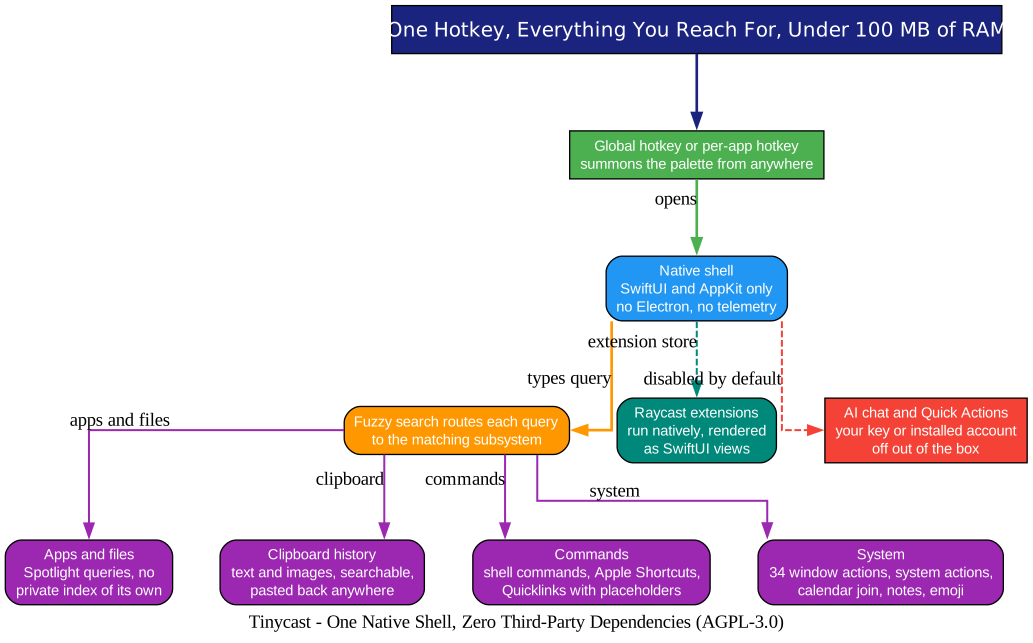
The architecture diagram above is the whole story in one picture: one hotkey, one native shell, and a fuzzy search that routes each query to exactly the subsystem that handles it. Let’s walk through it.
One shell, no layers. Tinycast is SwiftUI and AppKit from top to bottom. There is no Electron process, no web view pretending to be native, and no third-party dependency anywhere in the binary. That constraint shows up in the numbers: the whole app idles well under 100 MB of RAM, and the repository documents a memory budget that every pull request is measured against.
One hotkey, two kinds. A global hotkey summons the palette from anywhere, and per-app hotkeys bind a key to a specific application - press it to focus that app, press again to hide. The palette floats over whatever you were doing, and Esc dismisses it. While idle, the app stays out of your way and your memory.
Search without an index. File and folder search delegates to Spotlight rather than building a private index, which means results are always current and the launcher never doubles the size of your disk metadata. The Dictionary command reads from the Mac’s own dictionaries, the calculator does units, live currency and crypto conversions inline, and the clipboard history keeps searchable text and images that paste back into whatever app you were using.
Commands everywhere. Quicklinks turn URLs, searches, files, or deeplinks into commands with placeholders for typed input, the clipboard, or the date. Apple Shortcuts from the Shortcuts app appear with aliases and their own global hotkeys. Custom shell commands are first-class citizens, fuzzy-searchable or bound to a key. Window management ships 34 Rectangle-style actions: halves, quarters, thirds, nudging, display moves, fullscreen, Spaces.
The AI features are off by default. AI chat and Quick Actions (fix grammar, rewrite, translate, summarize selected text) exist, but they use your own API key or an installed AI account, and they ship disabled. Nothing phones home to a built-in service.
The Raycast Trick
Understanding Raycast Extension Compatibility
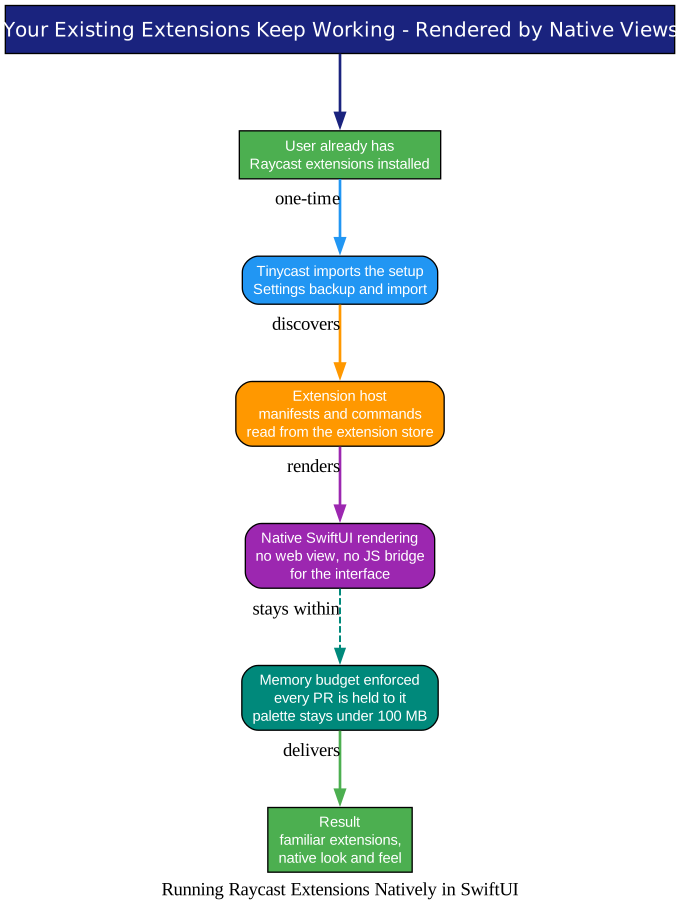
The Raycast diagram above covers the feature that earned Tinycast its audience. Raycast’s extension ecosystem is enormous, and switching launchers usually means abandoning it. Tinycast instead imports the setup you already have: the backup-and-import command reads your Raycast configuration, discovers the extensions you use, and runs them inside Tinycast - rendered natively as SwiftUI rather than web content.
That detail matters more than it sounds. A native renderer means extensions inherit the palette’s responsiveness, its keyboard handling, and its memory ceiling. You keep the ecosystem you invested in and lose the running cost that made you look for alternatives. And if you are setting up a new Mac, the same import path works in reverse: export Tinycast settings to a file and carry them over.
Privacy and Permissions
Understanding the Privacy Model
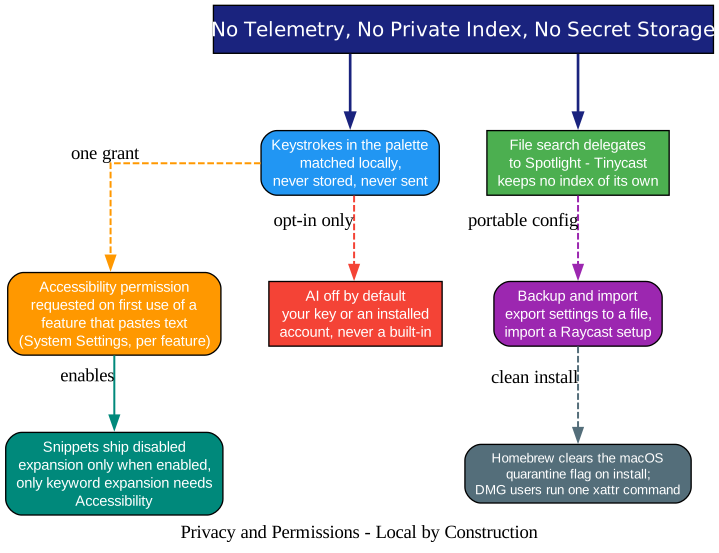
The privacy diagram above shows a design that treats permissions as a cost to minimize, not a checkbox to maximize. Three details stand out.
Keystrokes stay local. Snippet expansion matches typed keywords on your machine. The README is blunt: keystrokes are matched locally, never stored, and never sent anywhere.
Accessibility is requested late. Tinycast needs the macOS Accessibility permission only when a feature pastes or expands text into another app, and it prompts you the first time you actually use such a feature - not on first launch. Snippets themselves ship disabled until you enable them.
No secret index, no silent grants. File search leans on Spotlight, so Tinycast never builds its own index of your disk. AI features are opt-in. Settings export to a plain file. And installation stays clean: Homebrew clears the macOS quarantine flag automatically, while DMG users run one xattr command because the app is self-signed rather notarized-with-telemetry.
A Day With Tinycast
Understanding the Daily Flow
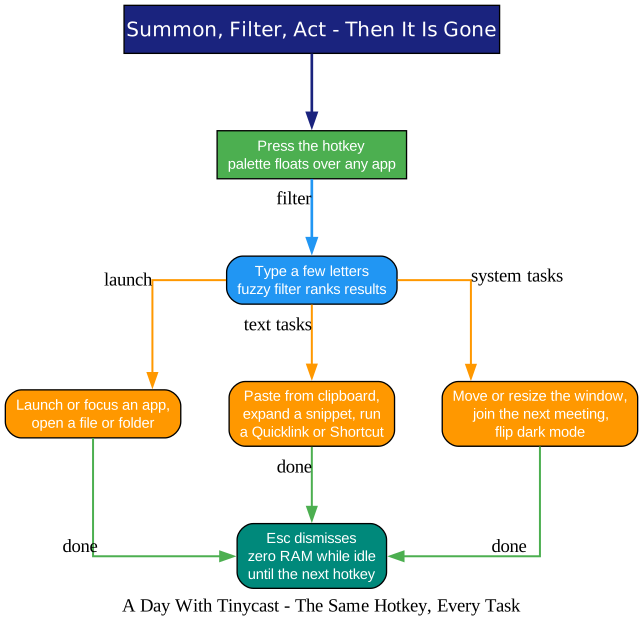
The workflow diagram above is the honest pitch. Press the hotkey, type a few letters, and act: launch an app, paste from history, expand a snippet, resize the window, join the next meeting from the calendar entry that is waiting on the empty palette, flip dark mode, look up a word. The calendar feature even joins the meeting for you if you let it.
Getting started is two Homebrew lines for Apple Silicon (or the tinycast-universal cask for Intel Macs, both requiring macOS 26 or newer):
brew tap abue-ammar/tinycast
brew install --cask tinycast
Then open Settings, record your global shortcut, and press it anywhere. A beta cask exists if you want early builds alongside the stable app, each with its own settings and permissions.
A Project That Says No
One more reason to watch this repository: the contribution policy. Every PR must start with an approved issue, docs fixes being the only exception. The feature set is deliberately closed - “another launcher has it” is explicitly not a reason to add something. Visual changes require before-and-after videos, and every patch is held to the same memory budget that keeps the app under 100 MB.
In a decade of writing about open source, we have covered tools that grew until they collapsed under their own settings pages. Tinycast is betting the opposite way: fewer features, native code, hard resource limits, and the discipline to keep it that way. We saw the same instincts in OpenDisplay, which turns an unused iPhone into a native second monitor, and in LocalSend, which rebuilt AirDrop as an open, cross-platform protocol. The pattern is consistent: the best new utilities are not the ones that do the most - they are the ones that do one thing natively, quickly, and then get out of your way. Tinycast may be the purest expression of that idea yet, and at under 100 MB of RAM, even the claim is literal.
Links
Related Posts
- OpenDisplay: Turn Your iPhone Into a Free Second Monitor for Your Mac
- LocalSend: The Open-Source AirDrop Alternative for Every Device

Enjoyed this post? Never miss out on future posts by following us


