WeKnora: Tencent’s Open-Source Knowledge Framework with RAG, ReAct Agents and Auto-Wiki
Introduction
Most enterprise “knowledge management” tools are really just keyword search boxes bolted onto a document store. You upload a PDF, type a query, and hope the exact phrase you used appears somewhere in the text. When it does not, you are back to scrolling. WeKnora, open-sourced by Tencent under the MIT license, takes a fundamentally different stance: it treats every document as raw material that can be parsed, vectorized, retrieved, reasoned over, and ultimately distilled into a self-maintaining, interlinked wiki.
WeKnora is an LLM-powered knowledge framework organized around three core capabilities. RAG-based Quick Q&A handles everyday lookups by combining BM25 sparse retrieval with dense vector search and reranking, returning answers with inline citations pointing back to the exact source chunk. The ReAct Agent autonomously orchestrates knowledge retrieval, MCP tools, a tenant skill catalog, session-persistent Docker / E2B / Cube sandboxes, and web search to resolve complex multi-step tasks that no single retrieval pass could answer. The Wiki Mode, introduced in v0.5 and now production-hardened, has agents read raw documents and auto-generate structured, interlinked Markdown wiki pages with an interactive knowledge graph, complete with manual editing, revision history, and one-click rollback.
What makes WeKnora stand out in a crowded RAG landscape is the breadth of its integration surface and the depth of its operational tooling. It supports 20+ LLM providers (OpenAI, Anthropic Claude, DeepSeek, Qwen, Gemini, MiniMax, NVIDIA, LiteLLM, Ollama, and more), 8 vector databases (pgvector, Elasticsearch, OpenSearch, Milvus, Weaviate, Qdrant, Apache Doris, Tencent VectorDB), 7 object storage backends, 10 IM channels (WeCom, Feishu, Slack, Telegram, DingTalk, WeChat, and others), and 11 web search providers. Cross-session long-term memory remembers who you are and what you keep asking about. A tree-structured folder view preserves the directory layout of uploads, and chunk editing with revision history lets retrieval chunks be edited, diffed, and reverted like documents. Multi-source ingestion auto-syncs knowledge from Feishu, GitLab, Tencent IMA, Notion, Yuque, and RSS. The whole stack is fully self-hostable with Docker Compose or Kubernetes Helm, ensuring complete data sovereignty.
Understanding the Architecture
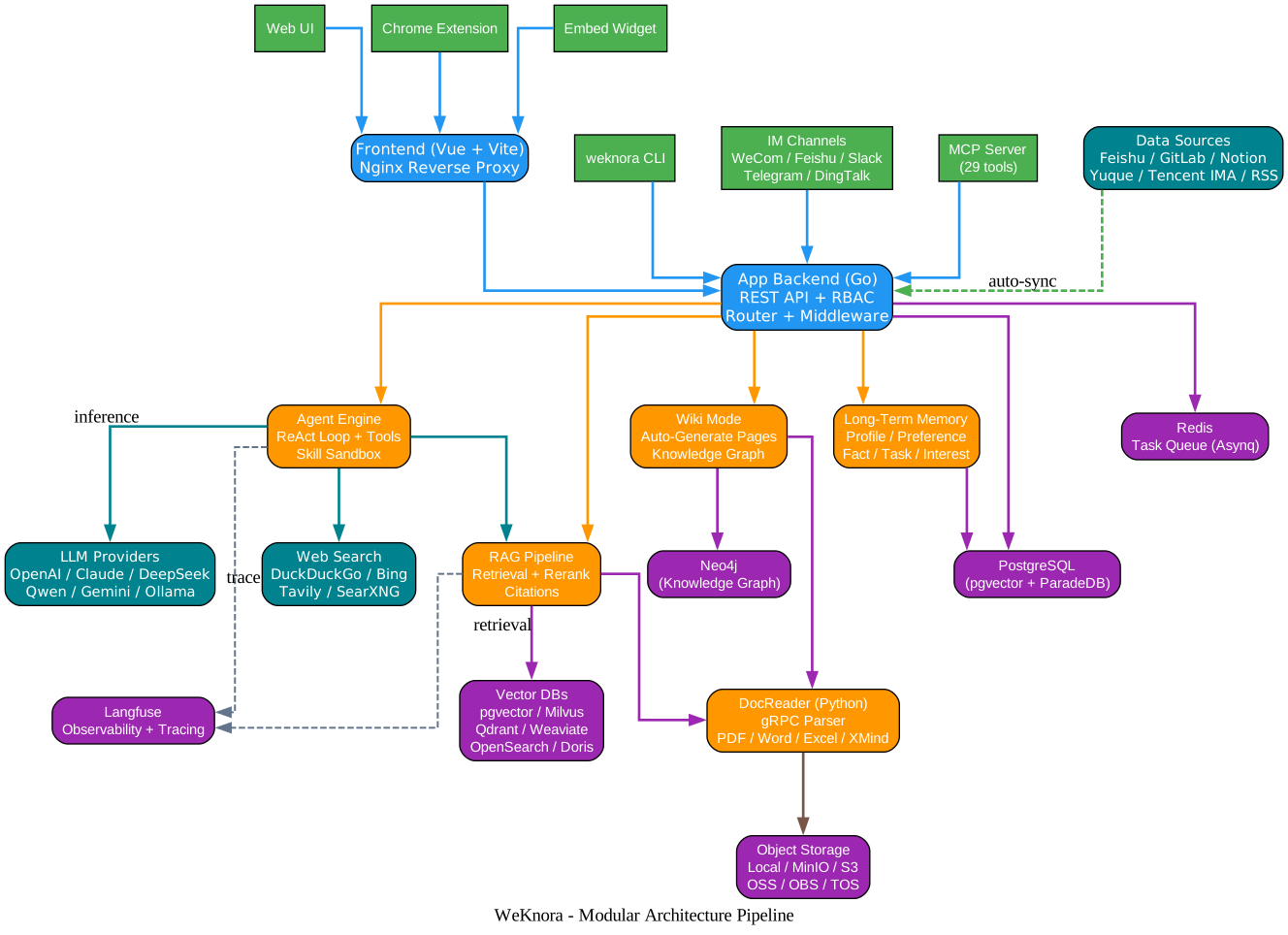
The architecture diagram above illustrates WeKnora’s fully modular pipeline, where every component is swappable and extensible. Let’s break down each layer:
Client and Channel Layer (Green)
The top layer shows the diverse ways users and external systems interact with WeKnora. The Web UI is a Vue 3 + Vite single-page application served by an Nginx reverse proxy that handles routing, static asset delivery, and API proxying to the backend. The weknora CLI is an agent-first command-line tool that emits a stable JSON envelope by default (with typed error codes mapped to exit codes) and renders human-readable output with --format text; it also serves a curated MCP tool surface via weknora mcp serve and ships bundled Agent Skills. The Chrome Extension lets you capture web content - selected text, images, or entire pages - directly into a knowledge base with one click, eliminating copy-paste or manual file uploads. The Embed Widget publishes agents to external sites with domain allowlists, rate limits, and secure-mode token exchange. IM Channels (WeCom, Feishu, Slack, Telegram, DingTalk, WeChat, and more) bring Q&A directly into the chat apps where users already live. The MCP Server exposes 29 tools over stdio, SSE, and HTTP transports for programmatic integration with any MCP-compatible client.
Frontend and API Layer (Blue)
The Frontend container bundles the Vue application and serves it through Nginx, which reverse-proxies API calls to the App Backend. The App Backend is written in Go and exposes a REST API with a comprehensive router and middleware stack including authentication, RBAC enforcement, access logging, and rate limiting. The backend orchestrates all business logic: session management, knowledge base CRUD, document processing pipeline coordination, agent execution, and tenant/workspace governance.
Core Subsystem Layer (Orange)
Four primary subsystems sit at the heart of WeKnora. The Agent Engine implements the ReAct (Reason + Act) loop, autonomously deciding which tools to call and in what order. It can invoke knowledge search, web search, MCP tools (including OAuth2 remote services with mid-conversation OAuth), skill sandboxes, wiki generation, and memory recall. The RAG Pipeline handles retrieval (BM25 sparse + dense + GraphRAG), reranking, and citation assembly. Wiki Mode drives the auto-generation of structured, interlinked Markdown wiki pages from raw documents, backed by a visual knowledge graph. Long-Term Memory stores cross-session user profile, preferences, facts, tasks, and interests, with auto-extraction that prompts users for confirmation before persisting.
Document Processing Layer (Orange)
The DocReader is a Python microservice communicating with the App Backend over gRPC. It handles parsing of 10+ document formats including PDF, Word, Excel, PowerPoint, Markdown, HTML, EPUB, MHTML, images, CSV, JSON, and XMind. It supports adaptive 3-tier chunking with live preview, parent-child chunking for hierarchical context, VLM-based image description for multimodal understanding, and ASR for audio. The OpenDataLoader hybrid backend can be optionally enabled for advanced OCR scenarios.
Backend and Storage Layer (Purple)
PostgreSQL (using the ParadeDB image with pgvector) is the primary relational store, holding knowledge bases, chunks with revision history, metadata, tags, RBAC definitions, audit logs, and API keys encrypted with AES-256-GCM. Redis serves as the task queue backend (Asynnq) with per-stage worker-pool governance - separate pools for core, post-process, enrichment, maintenance, and wiki tasks, plus an elastic shared pool and per-model concurrency governors. The Vector DB layer is pluggable: pgvector (with HNSW index for 1024-dim embeddings), Elasticsearch, OpenSearch, Milvus, Weaviate, Qdrant, Apache Doris, and Tencent VectorDB can all be used, and multiple stores can be queried in parallel with a configurable timeout. Object Storage is equally pluggable: local filesystem, MinIO, AWS S3 (with IAM Role / IRSA default credential chain support), Alibaba Cloud OSS, Volcengine TOS, Kingsoft Cloud KS3, and Huawei Cloud OBS, with multiple storage instances per workspace and per-KB binding. Neo4j is optional and powers the knowledge graph visualization in Wiki Mode. Langfuse provides observability and tracing for the entire agent and RAG pipeline.
External Services Layer (Teal)
LLM Providers are configured per-knowledge-base, allowing different KBs to use different model combinations. Web Search providers (DuckDuckGo, Bing, Google, Tavily, Baidu, SearXNG, Keenable, Zhipu AI, Exa, Metaso) augment retrieval with real-time information. Data Sources (Feishu wiki, Feishu Drive, GitLab, Tencent IMA, Notion, Yuque, RSS) auto-sync knowledge into WeKnora with incremental and full sync modes.
Key Architectural Insights
The modular design means you can start with the default Docker Compose stack (frontend, app, docreader, postgres, redis) and progressively enable optional profiles: --profile neo4j for knowledge graphs, --profile minio for S3-compatible object storage, --profile langfuse for a full self-hosted observability stack, or --profile full for everything. The SSRF-safe HTTP client protects all outbound requests (data sources, URL import, redirect chains), and the skill sandbox isolation (Docker opt-in, E2B, or Cube) with per-config network policy ensures untrusted skill code cannot escape its container.
How the ReAct Agent Works
Understanding the ReAct Agent Loop
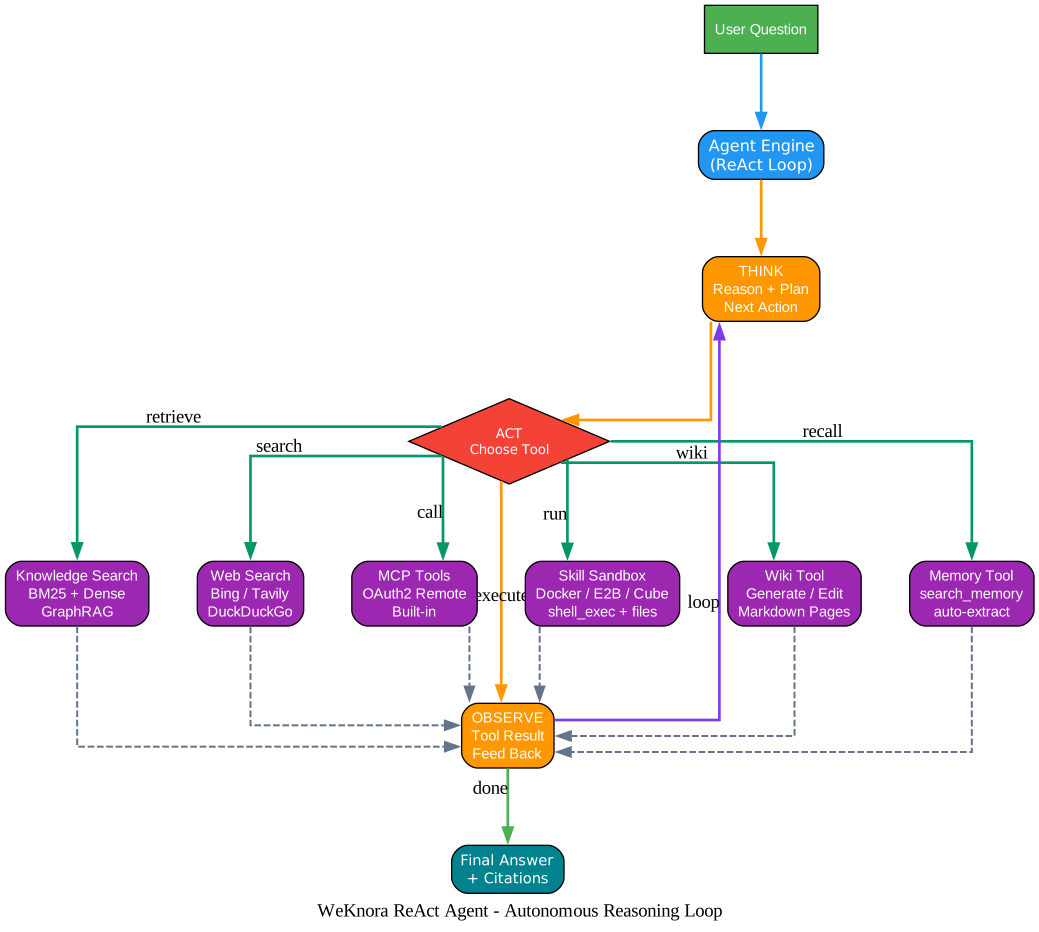
The ReAct Agent diagram above shows how WeKnora handles questions that no single retrieval pass can answer. Let’s trace the loop:
The ReAct (Reason + Act) Paradigm
ReAct is a reasoning paradigm that interleaves thinking and acting. Instead of retrieving context once and generating an answer, the agent iterates: it reasons about what to do next (THINK), takes an action (ACT), observes the result (OBSERVE), and loops back to think again until it has enough information to produce a final answer. This is particularly powerful for multi-step questions like “compare our Q3 sales with the industry average from the latest market report” - a question that requires retrieving internal documents, searching the web for external data, and synthesizing both.
THINK: Reason and Plan
The THINK step is where the agent reasons about the user’s question and decides the next action. It considers what it already knows, what tools are available, and what information is still missing. The agent engine in internal/agent/engine.go implements this loop with progressive multi-step reasoning. The prompts are configurable per-agent, and a thinking mode can be enabled in model configuration to make the reasoning chain visible in the UI timeline.
ACT: Choose and Execute a Tool
The ACT step is a decision diamond where the agent picks from its toolset. The tools available are:
- Knowledge Search - BM25 sparse + dense retrieval + GraphRAG across one or more knowledge bases, with hybrid scoring and optional reranking
- Web Search - Bing, Tavily, DuckDuckGo, SearXNG, or any configured provider, with results distinguished from KB sources in the references drawer
- MCP Tools - OAuth2 remote services with mid-conversation OAuth flow, plus built-in MCP services;
@Skilland@MCPmentions can scope the agent runtime per turn - Skill Sandbox - session-persistent Docker, E2B, or Cube sandboxes with
shell_exec, file tools, and artifact generation; per-tenant network policy isolates untrusted code - Wiki Tool - generate or edit structured Markdown wiki pages with the knowledge graph backend
- Memory Tool -
search_memoryfor cross-session recall of profile, preferences, facts, tasks, and interests
OBSERVE: Feed Results Back
After each tool execution, the result is observed and fed back into the reasoning loop. The agent evaluates whether the result is sufficient or whether another action is needed. Langfuse tracing captures each iteration, providing a span tree visualization of the entire reasoning process. The observe step also handles tool approval workflows - MCP tool calls can require human-in-the-loop approval with a configurable timeout and fail-open or fail-close behavior.
Final Answer with Citations
When the agent determines it has gathered enough information, it produces a final answer with inline citations. Each citation points back to the exact source chunk in the knowledge base or the web search result that supported the claim. This grounding in verifiable sources is what distinguishes WeKnora’s answers from free-form LLM hallucination - every factual claim can be traced back to its origin.
Key Design Decisions
The ReAct loop is bounded by a per-agent LLM timeout (WEKNORA_AGENT_LLM_TIMEOUT) and a tool approval timeout (WEKNORA_AGENT_TOOL_APPROVAL_TIMEOUT). The agent engine handles context compaction to stay within model token limits, and provider prompt-cache markers are respected to optimize cost and latency. The final_answer tool provides an explicit termination signal, and parallel tool calling is supported for independent operations.
Document to Knowledge Pipeline
Understanding the Knowledge Pipeline
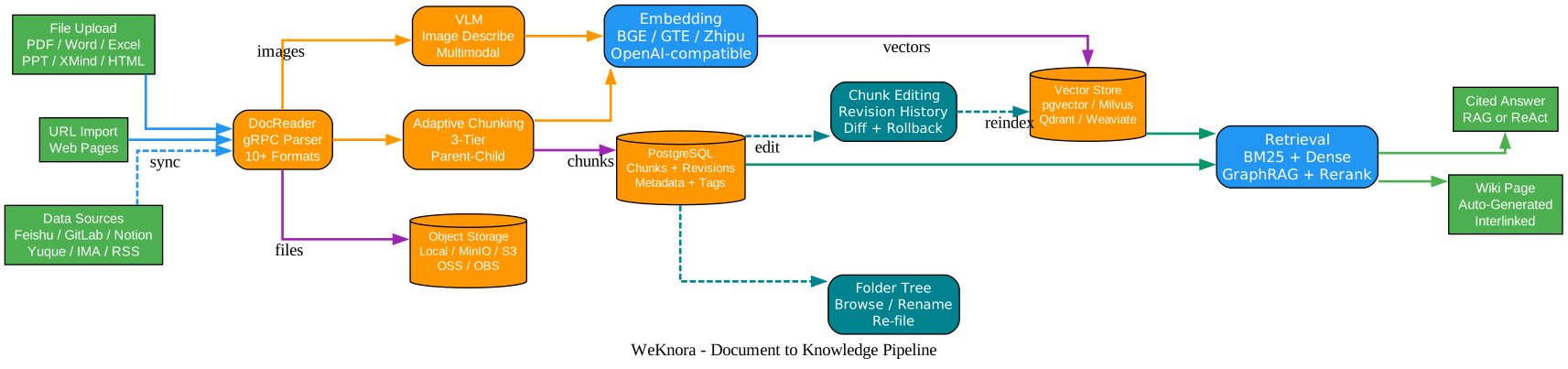
The knowledge pipeline diagram shows how raw documents become queryable, retrievable knowledge. This is the ingestion side of WeKnora - the process that happens before any question can be answered.
Ingestion Sources
Three primary ingestion paths feed documents into the pipeline. File Upload accepts PDF, Word, Excel, PowerPoint, Markdown, HTML, EPUB, MHTML, images, CSV, JSON, and XMind - over 10 formats total. Folder uploads preserve their original directory structure, which becomes a first-class tree view in the UI for browsing, renaming, and re-filing documents like a file manager. URL Import fetches web pages and parses them inline. Data Sources auto-sync from Feishu wiki, Feishu Drive, GitLab, Tencent IMA, Notion, Yuque, and RSS feeds, with both incremental and full sync modes; the sync is resilient, with retry and resume for large spaces.
Parsing and Chunking
The DocReader microservice (Python, gRPC) handles parsing. It uses the anydoc library for in-process Office file parsing, pdfium for PDF rendering, and can optionally integrate OpenDataLoader hybrid for advanced OCR. After parsing, Adaptive 3-Tier Chunking splits documents into retrieval chunks with a live preview, and Parent-Child Chunking maintains hierarchical context so a retrieved child chunk can pull in its parent for broader context. A VLM (Vision Language Model) describes images in documents, making multimodal content accessible to text-only LLMs.
Embedding and Vectorization
Chunked text is embedded using configurable embedding models: BGE, GTE, Zhipu, or any OpenAI-compatible API. The embedding dimension is configurable per model, and HNSW-accelerated pgvector supports 1024-dim vectors for high-recall retrieval. Batch embedding size is tunable for throughput optimization.
Storage Layer
Vectors go to the configured Vector Store (pgvector, Milvus, Qdrant, Weaviate, Elasticsearch, OpenSearch, Apache Doris, or Tencent VectorDB). Multiple stores can be queried in parallel with a configurable timeout (MULTI_STORE_RETRIEVE_TIMEOUT_SEC). Original files go to Object Storage (local, MinIO, S3, OSS, OBS, TOS, or KS3), with multiple storage instances per workspace and per-KB binding. Chunk text, metadata, tags, and revision history go to PostgreSQL, where chunks can be edited directly in the UI with per-version snapshots, diff, and one-click rollback; after an edit, the vector index is automatically rebuilt.
Retrieval and Output
At query time, the Retrieval layer combines BM25 sparse retrieval, dense vector search, and optional GraphRAG (when Neo4j is enabled), then applies reranking (Volcengine, Zhipu, or custom rerank servers) to produce the most relevant passages. These passages feed either the RAG pipeline (for Quick Q&A) or the ReAct Agent (for complex tasks), and the output is a cited answer or a wiki page. Chunk editing and folder tree operations are human-in-the-loop tools that let knowledge curators refine retrieval quality after the fact - editing a chunk to clarify ambiguity, fixing OCR errors, or reorganizing the folder structure all improve answer quality without re-uploading documents.
Pluggable Integration Matrix

Understanding the Integration Matrix
The integration matrix diagram shows the breadth of WeKnora’s pluggable backends. Every category is independently swappable, and the modular design means you can mix and match to fit your infrastructure and compliance requirements.
LLM Providers (Teal)
WeKnora integrates with 20+ LLM providers. OpenAI and Azure OpenAI are first-class, with deployment name preservation and configurable dimensions. Anthropic Claude is supported with thinking mode. DeepSeek, Qwen (Alibaba Cloud), Zhipu, Hunyuan, Doubao (Volcengine), Gemini, MiniMax, NVIDIA, Novita AI, SiliconFlow, OpenRouter, and Requesty are all supported. LiteLLM acts as a gateway for any provider it supports. Ollama enables fully local, offline inference with no data leaving your network. Models are configured declaratively via YAML for built-in models, and per-knowledge-base model selection allows different KBs to use different model combinations - for example, a customer-facing KB might use a faster model while an internal research KB uses a more capable one. Per-model thinking-mode and embedding-dimension overrides, an interactive model test debugger, and multi-workspace built-in model sharing round out the model management surface.
Vector Databases (Purple)
Eight vector databases are supported. PostgreSQL with pgvector is the default, using HNSW indexing for 1024-dim embeddings. Elasticsearch and OpenSearch provide full-text search with vector capabilities. Milvus is designed for large-scale vector search. Weaviate offers a schema-rich graph-vector hybrid. Qdrant provides high-performance filtering with payload indexing. Apache Doris (3.0+) adds HNSW ANN and cosine distance approximate functions. Tencent VectorDB is Tencent Cloud’s managed vector service. Multiple stores can be queried in parallel, and the RETRIEVE_DRIVER environment variable accepts a comma-separated list for fan-out retrieval.
Object Storage (Orange)
Seven object storage backends are supported. Local filesystem is the default for zero-dependency deployments. MinIO provides S3-compatible storage self-hosted. AWS S3 supports the IAM Role / IRSA default credential chain, so you can run on EKS without static credentials. Alibaba Cloud OSS, Volcengine TOS, Kingsoft Cloud KS3, and Huawei Cloud OBS cover the major Chinese cloud providers. Multiple storage instances can be configured per workspace, with per-KB binding and a designated default instance - useful when different KBs have different residency or compliance requirements.
IM Channels (Green)
Ten IM channels bring WeKnora’s Q&A directly into the chat apps where users already work. WeCom (WeChat Work), Feishu and Lark (Feishu International), QQBot, Slack, Telegram, DingTalk, Mattermost, WeChat, and Yunzhijia are all supported. IM adapters handle WebSocket or webhook connections, streaming markdown replies, image message ingestion, and slash commands (/help, /info, /search, /stop, /clear). A per-user rate limit and Redis-based distributed coordination prevent a single user from overwhelming the system. Session source filtering groups sessions by origin (Web, IM, Embed, API) in the sidebar.
Key Takeaway
The pluggable design is not just about choice - it is about data sovereignty. You can run WeKnora entirely on your own infrastructure with Ollama for inference, pgvector for vectors, local filesystem for storage, and never send a byte to an external API. Or you can use the best-in-class commercial providers for each layer. The architecture adapts to your constraints, not the other way around.
Installation
Prerequisites
- Docker and Docker Compose
- Git
Quick Start with Docker Compose
# Clone the repository
git clone https://github.com/Tencent/WeKnora.git
cd WeKnora

# Copy and edit the environment file
cp .env.example .env
# Edit .env as needed - see comments in the file for each variable

# Pull the latest images
docker compose pull

# Start core services
docker compose up -d
Once started, visit http://localhost for the Web UI and http://localhost:8080 for the backend API. The default stack includes the frontend, app backend, DocReader, PostgreSQL (ParadeDB with pgvector), and Redis.
Optional Services (Docker Compose Profiles)
Additional components can be enabled with --profile flags. Multiple profiles can be combined:
# Knowledge Graph (Neo4j) - for Wiki Mode knowledge graph visualization
docker compose --profile neo4j pull && docker compose --profile neo4j up -d

# Object Storage (MinIO) - for S3-compatible file storage
docker compose --profile minio pull && docker compose --profile minio up -d

# Tracing (Langfuse) - full observability stack with ClickHouse and dedicated MinIO
docker compose --profile langfuse pull && docker compose --profile langfuse up -d

# All features at once
docker compose --profile full pull && docker compose --profile full up -d
Service URLs
| Service | URL |
|---|---|
| Web UI | http://localhost |
| Backend API | http://localhost:8080 |
| Langfuse Tracing | http://localhost:3000 |
Using a Local Ollama Model
To use a local Ollama model for inference, start Ollama before launching WeKnora:
ollama serve > /dev/null 2>&1 &
The app container reaches Ollama at http://host.docker.internal:11434 by default. Ollama is optional - if unavailable, WeKnora will warn but not block startup.
Usage
The weknora CLI
The weknora CLI is an agent-first command-line tool for driving the API from a terminal or an AI agent. Every command emits a stable JSON envelope by default, with typed error codes mapped to exit codes. Use --format text for human-readable output.
# Add a profile pointing to your WeKnora deployment
weknora profile add prod --host https://kb.example.com --use

# Authenticate
weknora auth login

# List knowledge bases
weknora kb list

# Bind the current directory to a knowledge base
weknora link --kb my-knowledge-base

# Upload a document
weknora doc upload notes.md

# Ask a question
weknora chat "summarise the design doc"
For headless or CI use, set WEKNORA_API_KEY and WEKNORA_HOST environment variables to skip auth login entirely - no credentials are written to disk.
MCP Server Integration
WeKnora ships an official MCP (Model Context Protocol) server published as the tencent-weknora-mcp PyPI package. It exposes 29 tools over stdio, SSE, and HTTP transports, enabling any MCP-compatible client (including Claude Desktop, Cursor, and other AI coding tools) to search, read, and manage knowledge bases programmatically.
DeepSeek Harness Plugin
The official @wxg-prc-cpg/dsh-weknora npm package is a DeepSeek Harness plugin that gives a coding agent your documents. Install it with:
dsh plugin --profile web add @wxg-prc-cpg/dsh-weknora
Point it at your WeKnora deployment, and four read-only tools appear in the agent’s toolset: weknora_search (hybrid retrieval returning source passages with reusable knowledge_id), weknora_read_document (one document’s passages reassembled in order with paging), weknora_ask (WeKnora’s own composed answer with citations, over RAG or ReAct pipeline), and weknora_list_knowledge_bases (knowledge base names and IDs for scoping searches).
Key Features
| Feature | Description |
|---|---|
| ReAct Agent | Progressive multi-step reasoning that autonomously orchestrates knowledge retrieval, MCP tools, skill sandboxes, and web search |
| RAG Quick Q&A | Hybrid BM25 + dense retrieval with reranking and inline citations for fast, accurate answers |
| Wiki Mode | Agent-driven auto-generation of structured, interlinked Markdown wiki pages with a visual knowledge graph |
| Skill Catalog & Sandbox | Workspace skill catalog (ClawHub / SkillHub / git / zip) installed onto session-persistent Docker / E2B / Cube sandboxes |
| Long-Term Memory | Cross-session memory (profile / preference / fact / task / interest) with auto-extract and search_memory |
| Chunk Editing & Revisions | Edit retrieval chunks in the UI with per-version snapshots, diff, and one-click rollback; automatic reindexing |
| Folder Tree | Upload paths stored as first-class data; browse, rename, and re-file documents like a file manager |
| Multi-Source Sync | Auto-sync from Feishu, GitLab, Tencent IMA, Notion, Yuque, and RSS with incremental and full sync |
| Workspace RBAC | 4-tier role matrix (Owner / Admin / Contributor / Viewer) with per-KB ownership and per-workspace audit log |
| Scoped API Keys | Capability-level grants with per-KB restriction and throttled last-used tracking |
| Langfuse Observability | Tracing for ReAct loops, token tracking, tool calls, and pipeline spans with W3C traceparent propagation |
| Task Queue Dashboard | Runtime queue depth, per-model concurrency, failed-task inspection and manual retry |
Troubleshooting
Container fails to start: Check that .env exists and has the required variables (DB_USER, DB_PASSWORD, DB_NAME, REDIS_PASSWORD, JWT_SECRET). The scripts/start_all.sh script creates a default .env if missing, but production deployments must customize it.
DocReader health check fails: The DocReader container uses grpc_health_probe on localhost:50051. Give it more startup time by increasing start_period in the healthcheck. If parsing large PDFs, increase DOCREADER_PDF_RENDER_MAX_EDGE (default 2000px) and WEKNORA_DOCREADER_CALL_TIMEOUT (default 30m).
Vector store connection errors: Each vector store has its own connection variables (QDRANT_HOST, MILVUS_ADDRESS, WEAVIATE_HOST, etc.). Verify the service is running and the network alias is correct. The RETRIEVE_DRIVER variable controls which store is active.
Ollama not reachable from app container: Use http://host.docker.internal:11434 (not localhost) since the app runs inside a container. The extra_hosts directive maps host.docker.internal to the host gateway.
Skill sandbox not working: Docker sandbox is opt-in. Set WEKNORA_SANDBOX_DOCKER_ENABLED=true and mount the Docker socket (uncomment the volume line in docker-compose.yml). Note that mounting the Docker socket is equivalent to host root access - use E2B or Cube for multi-tenant or production scenarios.
Conclusion
WeKnora represents a mature, production-hardened approach to enterprise knowledge management that goes far beyond simple document search. By unifying RAG, ReAct agents, and auto-wiki generation into a single framework with cross-session memory, comprehensive RBAC, and a pluggable backend for every layer, Tencent has open-sourced a system that can serve a solo developer running Ollama on a laptop or an enterprise with multi-workspace teams, audit requirements, and diverse LLM and storage providers. The MIT license, the breadth of integrations, and the depth of operational tooling (task queue dashboard, Langfuse tracing, skill sandbox isolation, SSRF-safe HTTP transport) make it a compelling choice for anyone who needs to turn scattered documents into a queryable, reasoning-capable, continuously evolving knowledge asset.
Links
- GitHub Repository
- Official Website
- WeChat Dialog Open Platform
- Chrome Extension
- ClawHub Skill
- DeepSeek Harness Plugin on npm
- DeepSeek Harness on GitHub
Related Posts
- Buzz: Block’s Self-Hosted Workspace Where Humans and AI Agents Build Together
- CowAgent: Open-Source Super AI Assistant and Agent Harness
- Grok Build: SpaceX AI Terminal Coding Agent in Rust

Enjoyed this post? Never miss out on future posts by following us